30 秒でわかる
Matthew Berman examines General Agents’ Ace computer-use launch, including demonstrations across macOS, Chrome, Premiere and HubSpot. He highlights the reported speed and behavior-based training, while distinguishing company demonstrations and benchmarks from his own future testing.
- 1Cross-app workflowsExamples include sharing an image and compressing, uploading and sharing files.
- 2Flight and contact tasksThe agent navigates a flight search and enters contacts in a demonstration labeled 2× speed.
- 3Reported benchmarksThe company compares click accuracy and action latency, not end-to-end reliability across every task.
- 4Behavior-based trainingThe company describes learning from recordings and input logs of people performing tasks.
ポイント
- Ace demonstrations show desktop and browser workflows including file sharing, editing and flight search.
- The contact-entry demonstration is labeled 2× speed, while other examples are labeled 1×.
- The company reports click accuracy and action-prediction latency under its chosen benchmark conditions.
- General Agents says it trains on recorded behavior such as screen, mouse and keyboard activity.
- Berman had not independently tested Ace at the time of the video.
チャプターごとに整えた全文を読む
Fast computer-use demonstrations
Berman introduces Ace and reviews browser and desktop tasks. He notes that he has not tested the product himself.
General Agents has shown Ace, a computer-use agent that operates a browser and desktop applications. The launch demonstrations look exceptionally fast to me, especially compared with the slow, error-prone computer-use agents I have tried. I have not yet tested Ace myself, so my assessment is based on the company’s examples and reported benchmarks.
In one demonstration, Ace finds a dog image in Chrome and shares it through iMessage. Another compresses files on macOS, uploads the archive to Google Drive and shares the link. The company labels these examples as running at normal speed.
The demonstrations extend beyond the browser. In Premiere, Ace slows a clip, splits it and starts an MP4 export. The attraction is that a person can describe a multistep task and let the agent operate the relevant interface, rather than manually performing each click.
Tasks and reported benchmarks
The examples include flight research and contact entry. Charts report click accuracy and action-prediction latency.
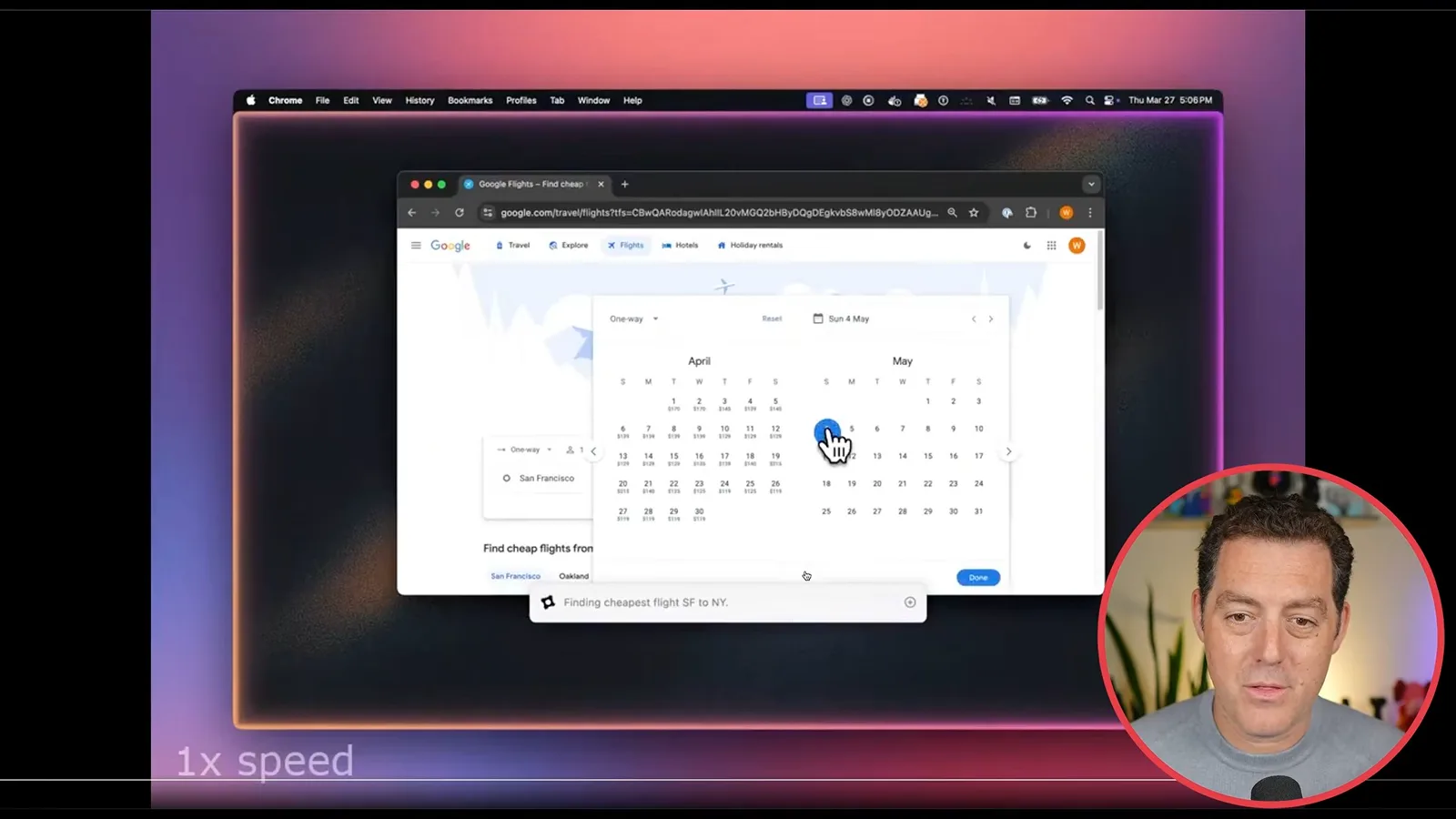
A flight-search example navigates Google Flights to find a trip from San Francisco to New York. Another adds spreadsheet contacts to HubSpot one by one; that demonstration is labeled 2× speed. These examples show a range of tasks, but they do not establish performance across all real-world situations.
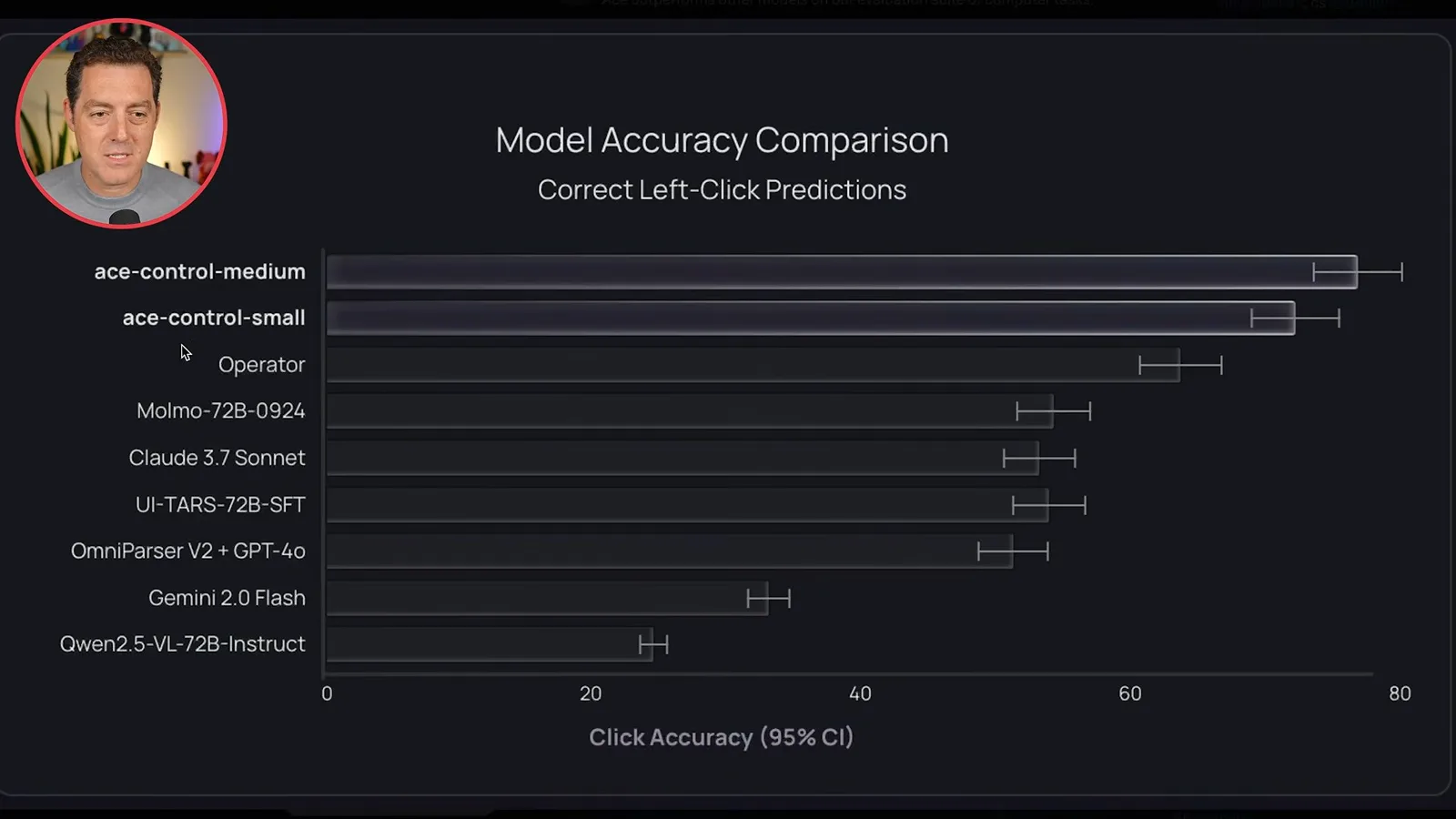
The company’s chart compares correct click predictions, with Ace Control Medium near 80% in the displayed test. Its latency chart reports roughly 324 milliseconds for Ace Control Small and 533 milliseconds for Medium, versus about 6.4 seconds for Operator. These are reported benchmark results for particular conditions, not a complete measure of end-to-end task reliability.
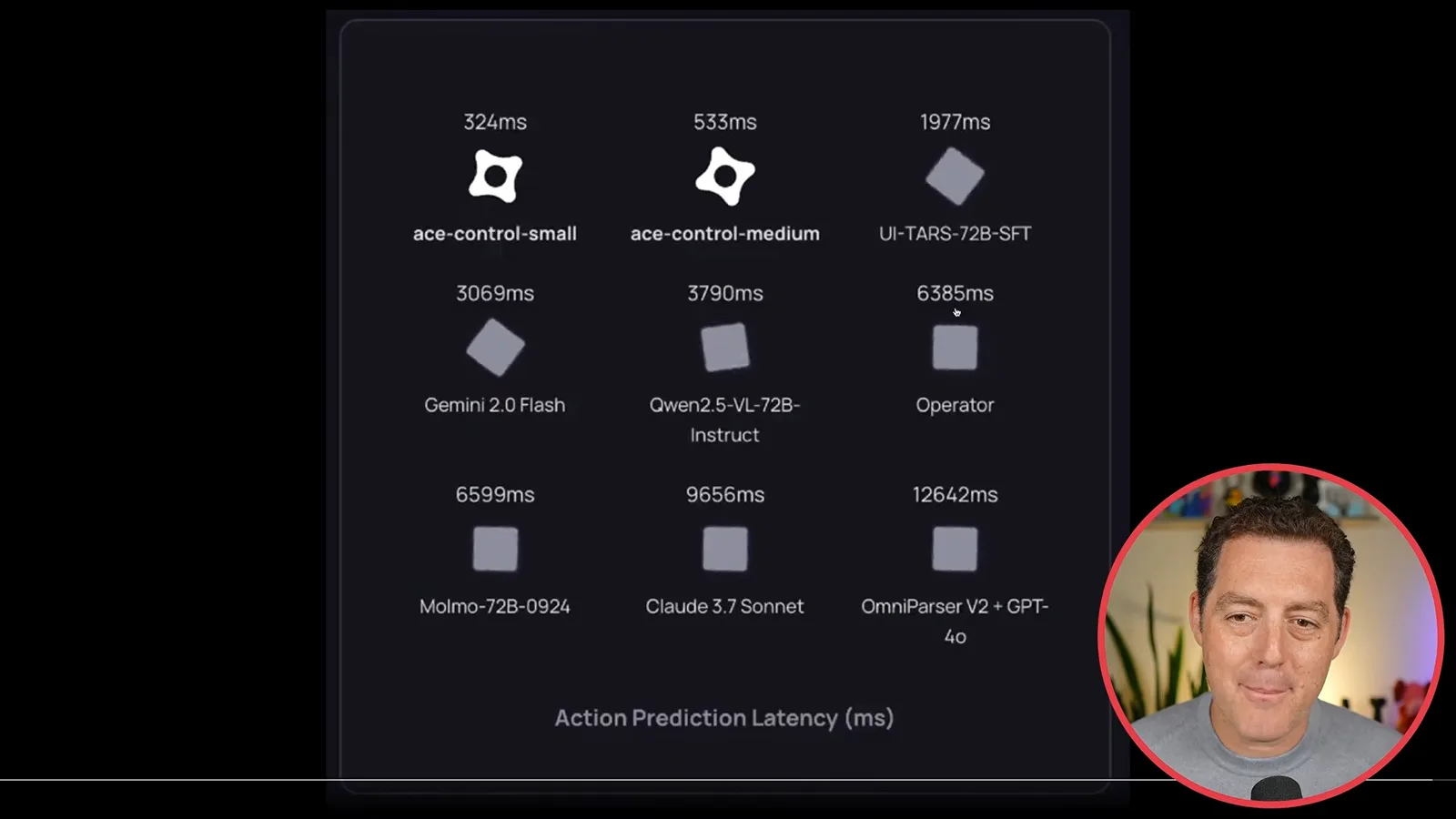
Training and more examples
General Agents describes behavior-based training. Further demonstrations cover booking, issue creation and system settings.
General Agents describes training Ace on behavior rather than only text and images. According to the company, screen recordings and mouse and keyboard logs can provide examples of how people use familiar tools. I find the idea promising, but I want to see how it performs outside the demonstrations.
Further examples show Ace navigating an Airbnb booking flow and turning an error traceback into a GitHub issue. Another changes macOS appearance to dark mode and enables Game Center. The company is offering a research preview; at the time of this video I have requested access and plan to test it independently.
同じチャンネルの記事
 25:50EN
 32:20EN
 45:08EN
 12:14EN
 10:36EN
 17:37EN