30초 요약
In June 2023, Matthew Berman walks through an early GPT-Engineer checkout and uses it to generate a Python Snake game. He describes a successful earlier run, then shows the setup, clarification process and resulting files. The commands and directory layout in the video are historical: the project’s later documentation uses a package installation and a different CLI. A successful small demo does not guarantee generated projects will work without review.
- 1A first-pass Snake gameBerman reports that an earlier generated game worked without edits; this is one anecdotal run, not evidence of reliability across applications.
- 2The historical setupHe clones the repository, creates a Conda environment with Python 3.11.3 and installs its then-current requirements.
- 3A prompt and clarificationsThe example specifies a Python Snake game; GPT-Engineer asks questions about rules, components and keyboard control.
- 4Generated filesThe early version writes code under the example workspace. Later project documentation describes a different package and CLI workflow.
핵심 정리
- The early GPT-Engineer workflow generated project files from a natural-language prompt and follow-up answers.
- Berman used a Conda environment, installed dependencies and supplied an OpenAI API key for his 2023 setup.
- The example requested a Python Snake game with model-view-controller components and keyboard controls.
- Later project documentation uses `python -m pip install gpt-engineer` and `gpte <project_dir>`; the video’s source-checkout commands may no longer apply.
- Generated code requires review and testing even when an example works on the first run.
챕터별로 다듬은 전문 읽기
A generated Snake game
Berman introduces GPT-Engineer and describes an earlier successful Snake game. He contrasts the project with Smol Developer.
I have been trying GPT-Engineer, an early AI coding project, and an earlier run generated a working Snake game on the first attempt without edits or bug fixes. That is an encouraging example, not a guarantee for every project. I want to show the installation and a second generation workflow.
Like Smol Developer, GPT-Engineer takes a description of a software project and generates code. I think it addresses some shortcomings of the earlier approach. This walkthrough reflects the repository and commands I used in June 2023; the project has changed since then.
Set up the historical version
He clones the repository, creates and activates a Conda environment, and installs dependencies. The procedure reflects the 2023 checkout.
I use Conda to isolate the Python environment and reduce dependency conflicts. First, clone the repository and enter its directory. In my setup I create an environment named `gpt-eng` with Python 3.11.3, then activate it; Conda is my chosen setup method, not a universal requirement for every version.
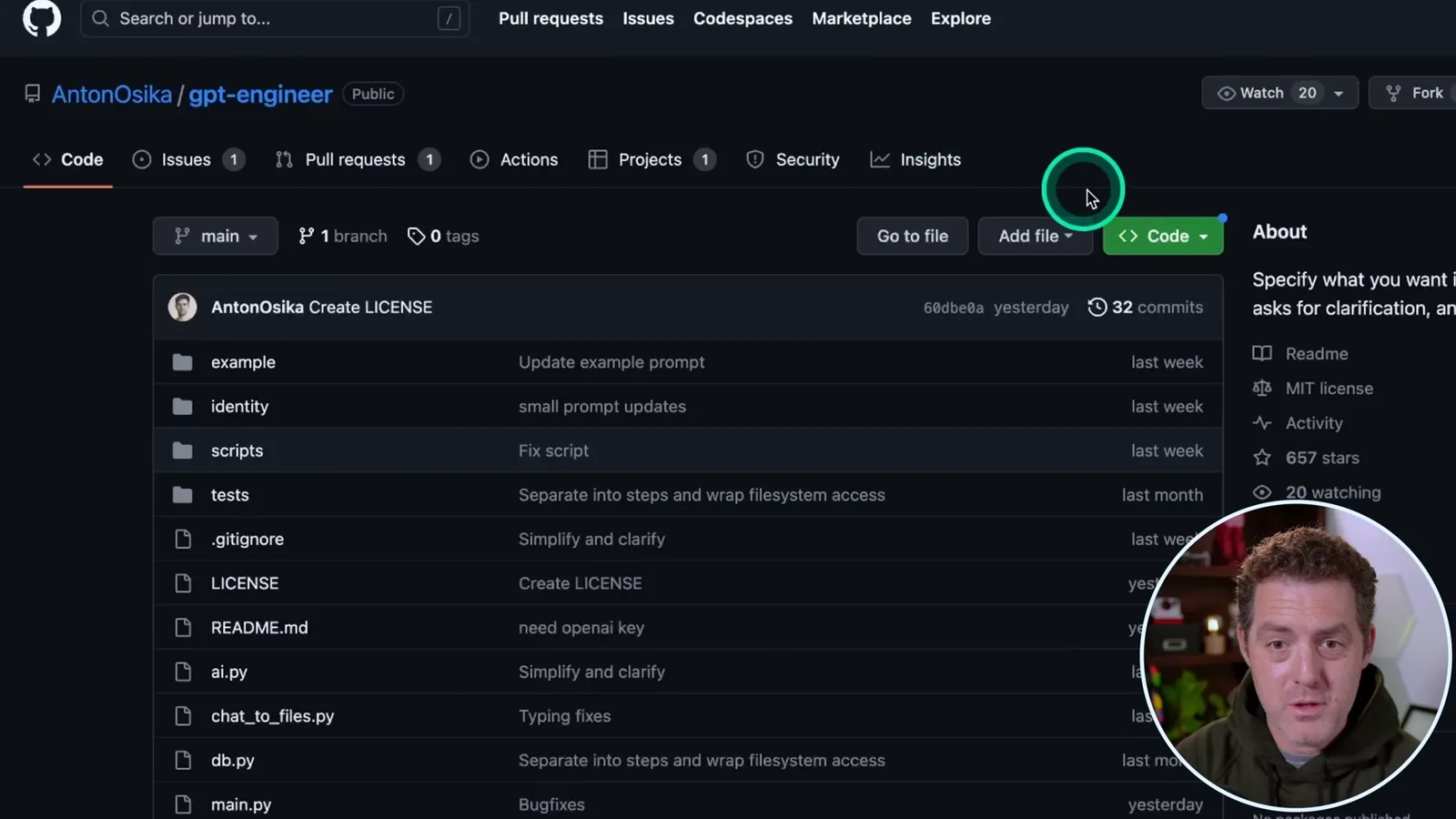
After activation, I run `python -m pip install -r requirements.txt` in the historical checkout. Calling pip through Python helps select the interpreter associated with the active environment. That requirements-file procedure belongs to the version shown, not necessarily the current repository.
Prompt, clarify and inspect output
Berman defines the game, supplies API access and responds to clarification questions. He shows the generated project files and discusses a then-current limitation.
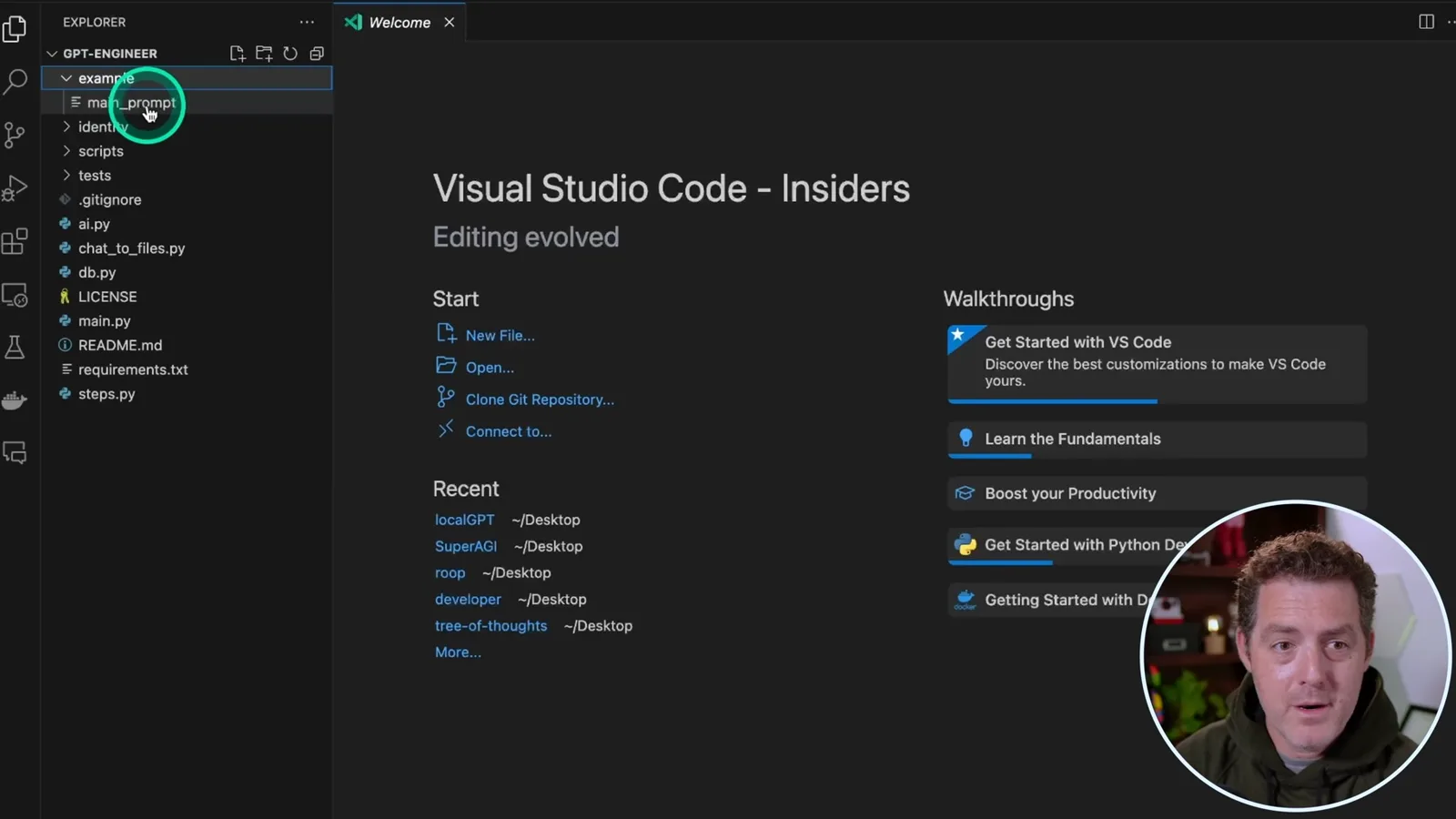
In VS Code, I open the example folder and its `main_prompt` file. The example asks for Snake in Python, with model-view-controller components in separate files and keyboard controls. You can give much more detail, but I leave this prompt brief to demonstrate how the tool asks follow-up questions.
The program needs an OpenAI API key for this setup. I set `OPENAI_API_KEY` in the environment and say I will rotate the key shown in the video. Treat keys as secrets: use your own credential and avoid publishing it in a recording, source file or shell history. API usage may incur charges.
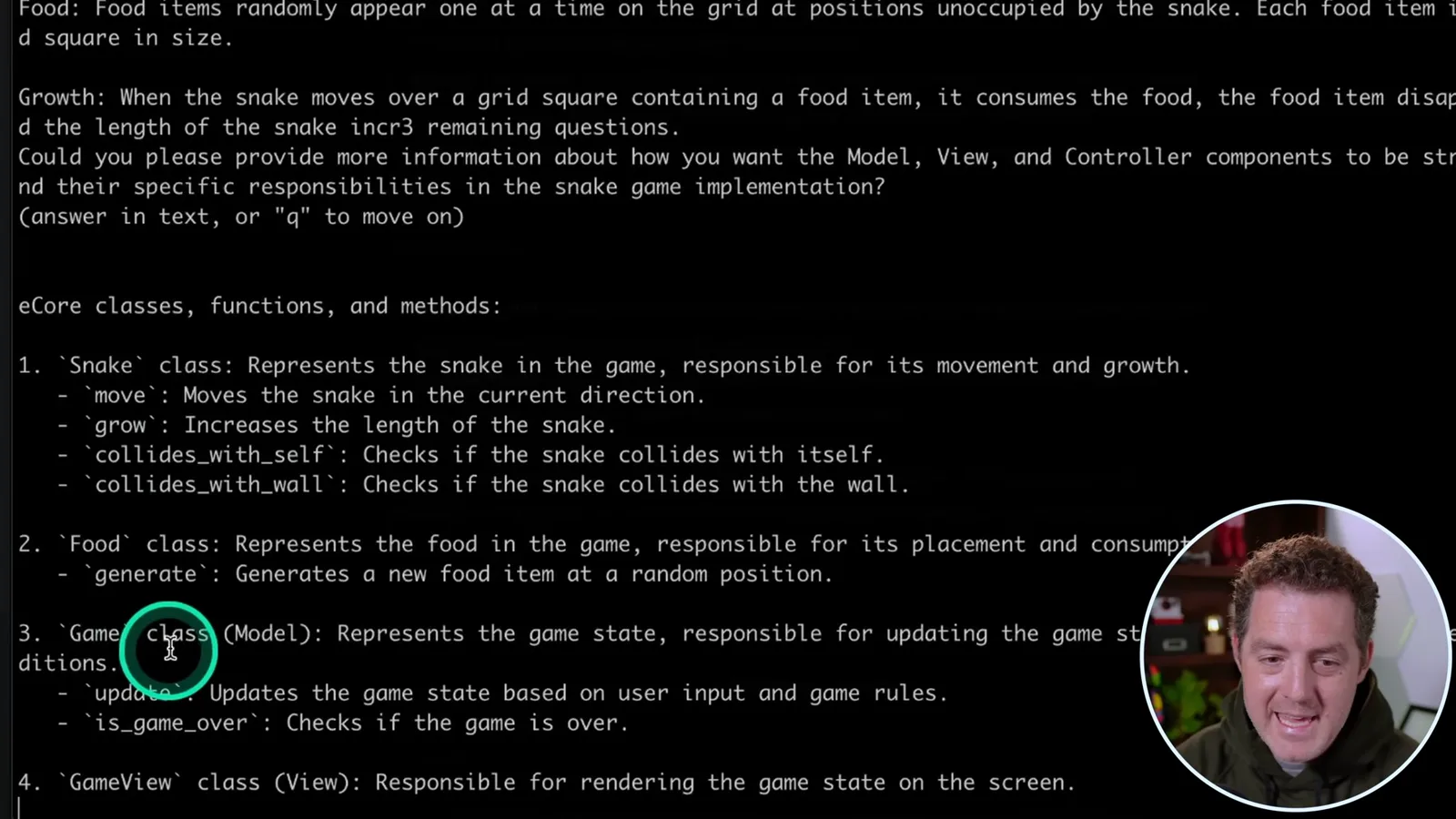
I run the historical command `python main.py example`, where `example` is the folder containing the prompt. GPT-Engineer asks for clarification about game rules, model-view-controller responsibilities, keyboard handling and file organization. The folder argument would change if the project folder had another name.
Instead of typing every rule myself, I ask ChatGPT to describe Snake rules for an engineer, then paste that description into the clarification step. GPT-Engineer outlines classes for the snake, food, game and view, and proceeds to generate project files. This still involves human direction and another model-generated description, rather than a wholly specified one-line task.
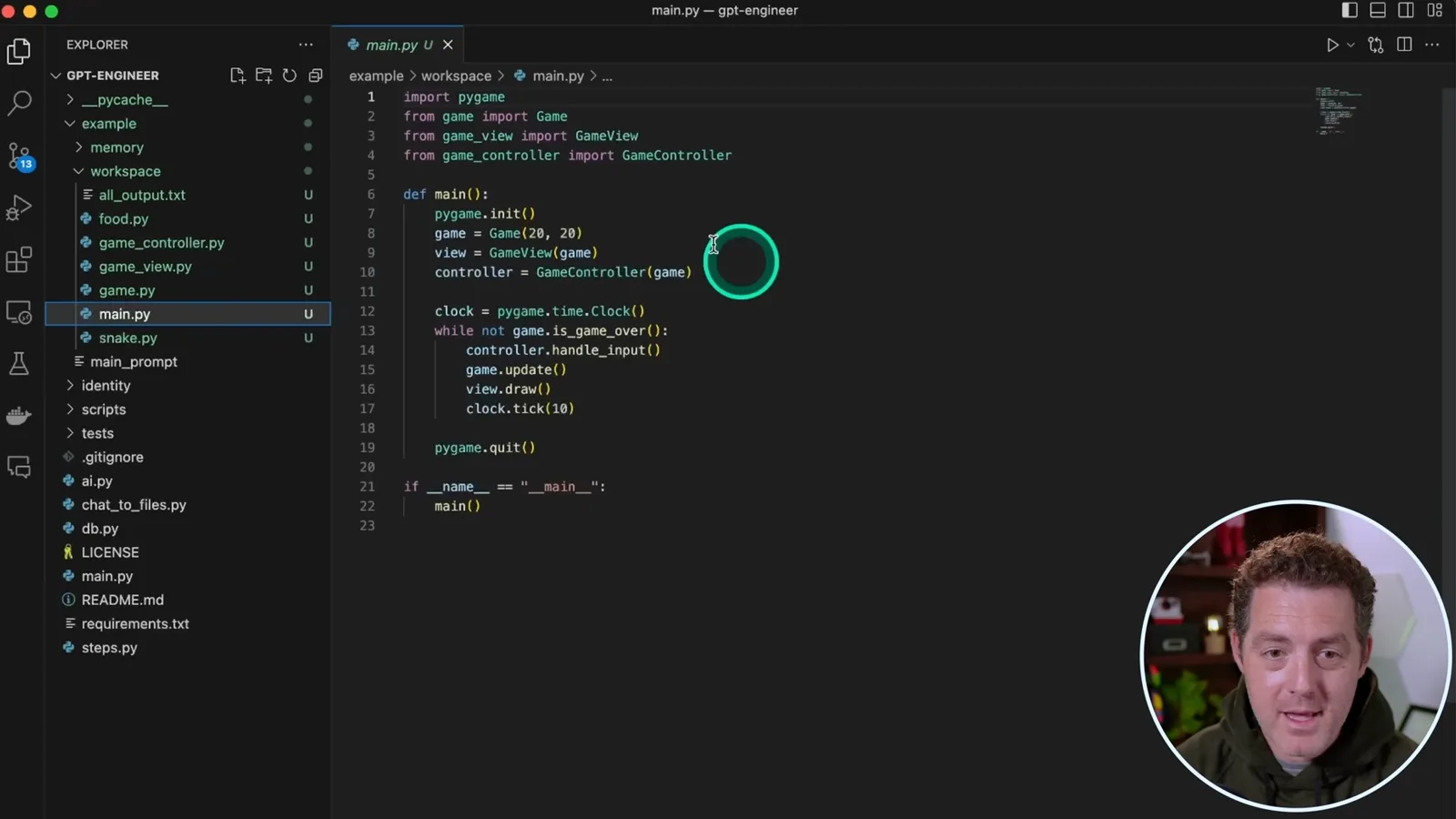
Back in VS Code, I inspect the generated files under the early `example/workspace` directory, including a `main.py` that connects the game, view and controller. I found a previous run worked first time, but code generation is not proof of correctness: inspect the output and test the behavior before relying on it.
At the time I did not see a way to read and iterate on an existing codebase, though I expected the project might add it. Later, the video description noted `pip install gpt-engineer` and a `projects/my-new-project/workspace` layout. The project’s [later quickstart](https://gpt-engineer.readthedocs.io/en/latest/quickstart.html) documents `python -m pip install gpt-engineer`, `gpte <project_dir>` and an existing-code improvement option; consult the project documentation for the version you use.
같은 채널의 다른 글
 34:21EN
 Matthew Berman· 2026년 10월 27일Matthew Berman Examines Anthropic’s IPO Filing, AI Growth and GovernanceMatthew Berman, Sam Altman · Forward FutureThe presenter reviews the S-1’s financial metrics, compute strategy and voting structure while questioning the tension between rapid AI development and safety.
 0:26ENMatthew Berman· 2026년 10월 25일Sam Altman on Human Values and Problem-Solving in an AI WorldSam Altman · OpenAIIn a short interview excerpt, Altman considers the enjoyment of solving hard problems and the human role in interpreting results.
 0:36ENMatthew Berman· 2026년 10월 25일Kimi K3.1 and a Rubik’s Cube Solver DemonstrationMatthew Berman · Forward FutureMatthew Berman shows a scrambled virtual cube being solved and gives the Kimi K3.1 test a favorable assessment.
 0:21ENMatthew Berman· 2026년 10월 24일An AI-Generated Kimi Benchmark Chart Used Invented ScoresMatthew Berman · Forward FutureMatthew Berman asks for a graph of Kimi K3.1 Pro benchmarks, then discovers that the displayed figures are illustrative placeholders.
 25:50ENMatthew Berman· 2026년 10월 24일Kimi K3.1 Pro Tested: Strong 3D Demos, Uneven Results and Competitive PricingMatthew Berman · Forward FutureMatthew Berman tests the open-weight model on coding, 3D rendering and visual explanations, then compares benchmark results and prices.
 32:20ENMatthew Berman· 2026년 10월 23일Who Is Local AI For? The Costs, Trade-offs and a Hybrid FutureMatthew Berman · Forward FutureMatthew Berman weighs data control and independence against hardware cost, setup complexity and inference speed.