30초 요약
In May 2023, Matthew Berman walks through deploying a Runpod GPU with a community template and using Text Generation Web UI to download and run a GPTQ-quantized Guanaco 65B model. He demonstrates model settings, generation controls and terminating the pod. The video description labels the Runpod link as an affiliate link; prices and interface details are historical.
- 1Renting a GPUBerman explains hourly GPU rental and chooses an RTX 6000 Ada instance. His displayed 2023 prices are examples, not current quotations.
- 2A community templateHe selects TheBloke’s preconfigured Text Generation Web UI template after encountering trouble with the default.
- 3Download Guanaco 65BThe interface downloads the GPTQ-quantized Hugging Face model; the displayed procedure depends on the specific release and loader.
- 4Adjust the loaderHe follows the then-current model instructions to select four-bit weights, no group size and the LLaMA model type.
- 5Stop spending and preserve dataBerman terminates the pod without a configured volume. Persistent storage and its billing are separate considerations.
핵심 정리
- A cloud GPU can provide temporary compute without purchasing a local accelerator, but cost and availability vary by instance and time.
- The demonstrated Guanaco 65B GPTQ model uses a particular quantization and requires enough GPU memory; the workflow does not guarantee every model fits every GPU.
- The 2023 example configures four-bit weights, no group size and LLaMA model type for the model version shown.
- Guanaco is based on LLaMA and carries license restrictions; check the model card and underlying terms before use.
- A pod with no persistent volume can lose its data on termination, and separate storage may continue to incur charges.
- Treat the 2023 template and UI as historical instructions and secure any remotely reachable interface.
챕터별로 다듬은 전문 읽기
Rent a cloud GPU
Berman explains why he rents GPU time, deposits funds and selects hardware. He chooses a community template for the web interface.
I want to show how to run a large language model on a rented cloud GPU using Runpod and Text Generation Web UI. The example is Guanaco 65B in a quantized GPTQ format. This tutorial was recorded in May 2023: templates, model loaders and the provider’s prices may have changed, and no single GPU can necessarily run every model.
Cloud GPUs let me rent compute by the hour instead of buying an expensive accelerator. I create a Runpod account, add funds and compare the available GPUs. The video shows prices from roughly $0.69 to $2.30 per hour and an initial $25 deposit; these are examples from the recording, not current pricing or a promise of a particular cost.
I select an RTX 6000 Ada and choose a template. Capacity planning depends on the model’s architecture, quantization, runtime overhead and available GPU memory; a 24 GB card does not automatically fit a 65-billion-parameter model. I had trouble with the default template, so I use a community template from TheBloke for Text Generation Web UI.
TheBloke published quantized model files and a preconfigured template. I choose it, accept the warning that no volume is configured, and deploy. Without persistent storage, files in the pod can be lost when the pod is terminated; follow the provider’s current storage instructions before relying on data surviving ([Runpod storage documentation](https://docs.runpod.io/pods/storage/types)).
Connect and download a model
He inspects the pod, opens its web interface and downloads a GPTQ version of Guanaco 65B. The pod has no persistent volume in this example.
The pod dashboard exposes logs, configuration, environment variables and a web terminal. I then open the application through its HTTP connection on port 7860. A remotely accessible interface needs appropriate access controls, and credentials should not be exposed in screenshots, prompts or logs.
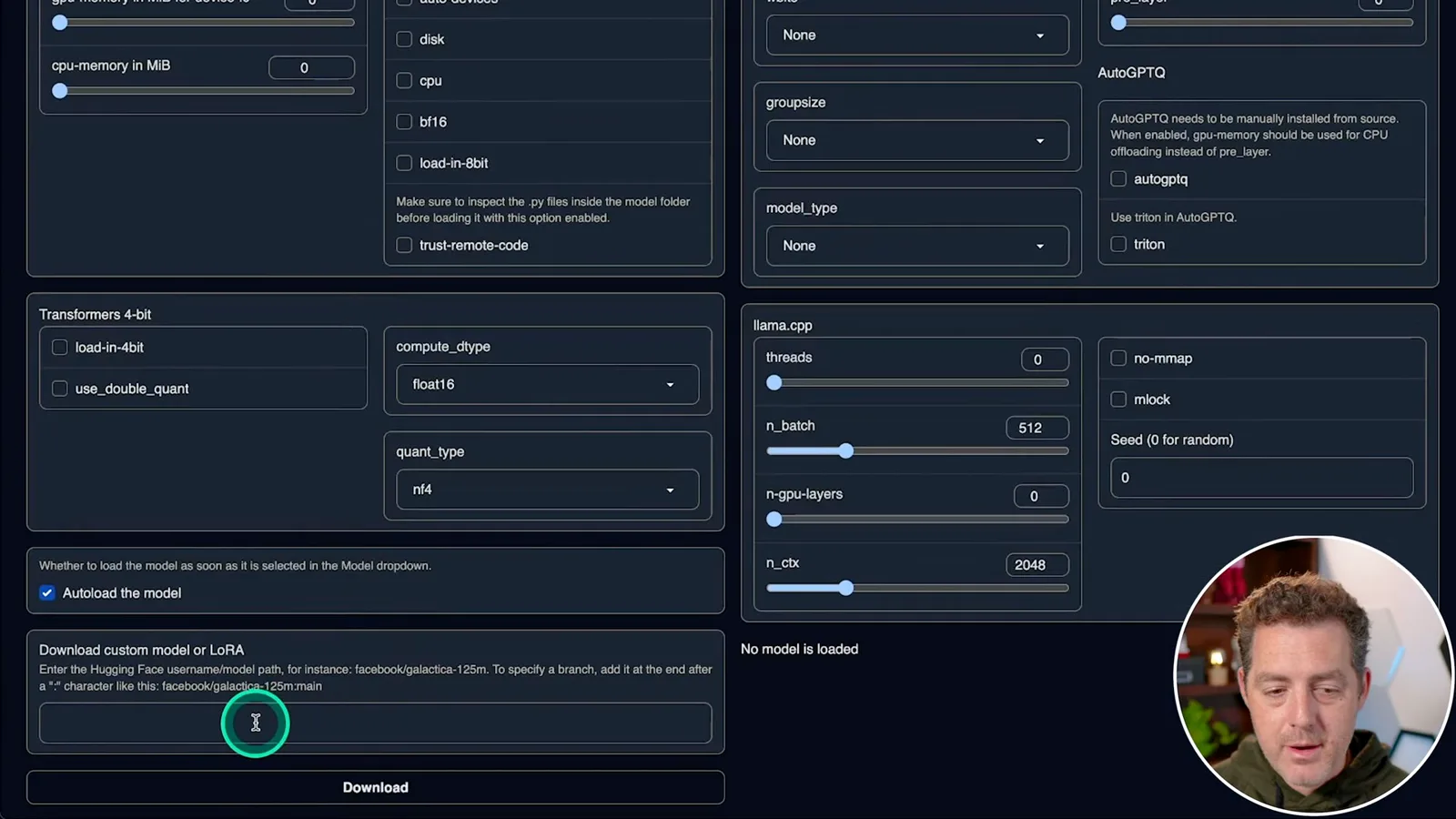
In the Model tab I paste the Hugging Face identifier TheBloke/guanaco-65B-GPTQ into the custom-model download field and start the download. It takes time because the model is large; after it finishes I refresh the list and select it. The [model card](https://huggingface.co/TheBloke/guanaco-65B-GPTQ) provides available files and compatibility details, which can differ from the version shown in 2023.
Configure and generate
Berman applies the demonstrated loader settings, runs a prompt and reviews generation controls. He points to the training guide without performing training.
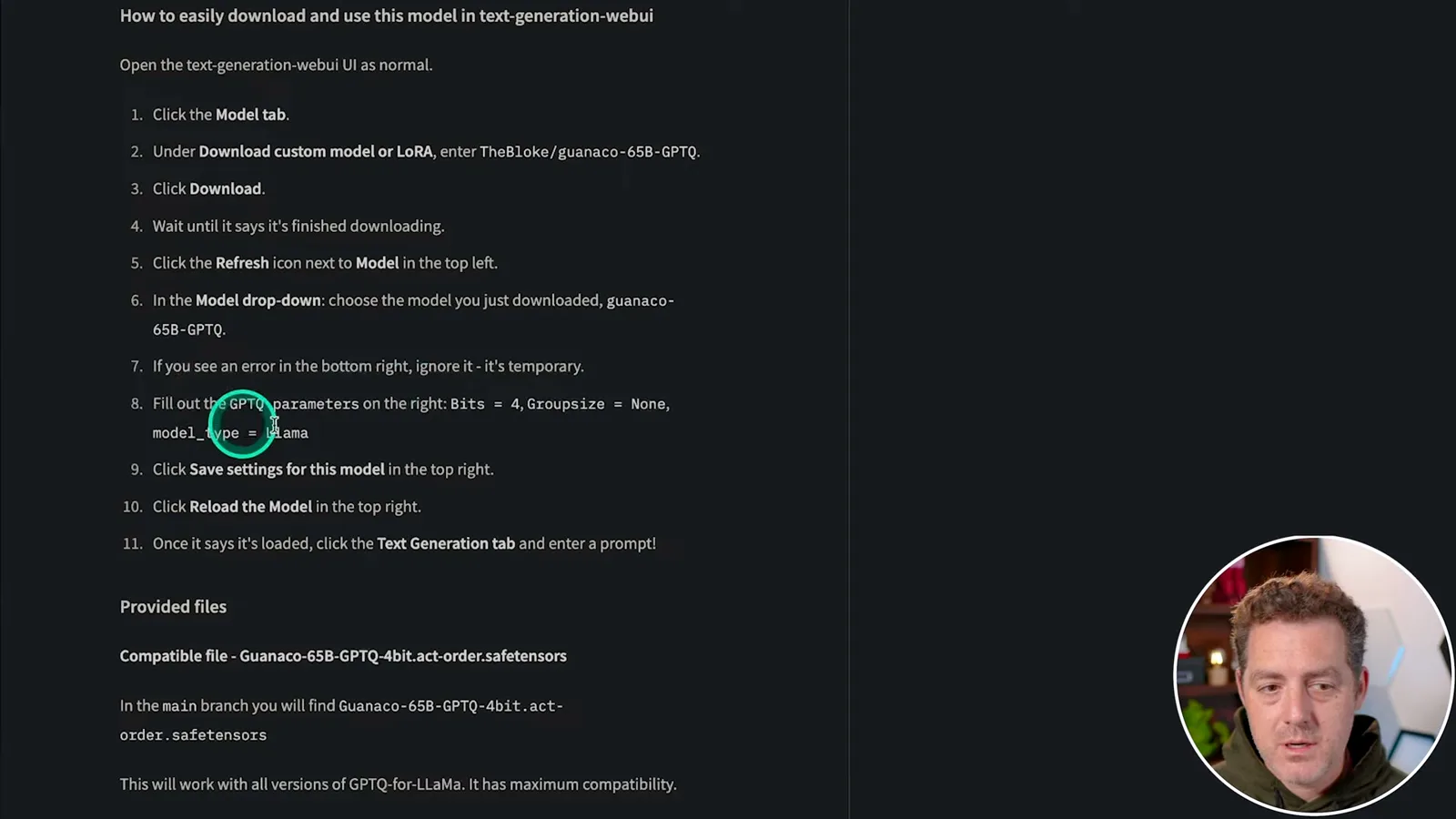
The first loading attempt produces errors. Following the instructions for the particular version shown, I set GPTQ weights to four bits, group size to none and model type to LLaMA, save the model settings and reload. Those values are not universal: other GPTQ files, quantization groups and newer loaders may require different options.
Once the model loads, I switch to text generation, select the Guanaco instruction template and ask for a joke. The interface generates a short response; a successful joke is a basic connectivity check, not evidence of accuracy or suitability for every task.
The interface also offers stop and continue controls, prompt saving, token counting and parameters such as temperature, top-p and top-k. I suggest experimenting with them. A separate training tab links to a guide, but I do not actually train a model in this video.
Review usage and terminate
Berman checks disk and GPU use and terminates the pod. Its unpersisted data is deleted.
Back in Runpod I review disk and GPU usage, then terminate the pod. Because my example has no configured persistent volume, its data is lost; terminating ends the pod’s compute charges, while separately retained storage can have its own charges. Check the actual resource and billing status after finishing.
This is a useful way to experiment with a model without owning the hardware, subject to the model’s memory needs and license. Guanaco is derived from LLaMA, and its model card points users to the underlying LLaMA terms; verify the applicable restrictions before commercial use. The video description identifies the Runpod link as an affiliate link.
같은 채널의 다른 글
 34:21EN
 Matthew Berman· 2026년 10월 27일Matthew Berman Examines Anthropic’s IPO Filing, AI Growth and GovernanceMatthew Berman, Sam Altman · Forward FutureThe presenter reviews the S-1’s financial metrics, compute strategy and voting structure while questioning the tension between rapid AI development and safety.
 0:26ENMatthew Berman· 2026년 10월 25일Sam Altman on Human Values and Problem-Solving in an AI WorldSam Altman · OpenAIIn a short interview excerpt, Altman considers the enjoyment of solving hard problems and the human role in interpreting results.
 0:36ENMatthew Berman· 2026년 10월 25일Kimi K3.1 and a Rubik’s Cube Solver DemonstrationMatthew Berman · Forward FutureMatthew Berman shows a scrambled virtual cube being solved and gives the Kimi K3.1 test a favorable assessment.
 0:21ENMatthew Berman· 2026년 10월 24일An AI-Generated Kimi Benchmark Chart Used Invented ScoresMatthew Berman · Forward FutureMatthew Berman asks for a graph of Kimi K3.1 Pro benchmarks, then discovers that the displayed figures are illustrative placeholders.
 25:50ENMatthew Berman· 2026년 10월 24일Kimi K3.1 Pro Tested: Strong 3D Demos, Uneven Results and Competitive PricingMatthew Berman · Forward FutureMatthew Berman tests the open-weight model on coding, 3D rendering and visual explanations, then compares benchmark results and prices.
 32:20ENMatthew Berman· 2026년 10월 23일Who Is Local AI For? The Costs, Trade-offs and a Hybrid FutureMatthew Berman · Forward FutureMatthew Berman weighs data control and independence against hardware cost, setup complexity and inference speed.