30초 요약
Matthew Berman explains how he runs OpenClaw through messaging threads and delegates work to different models and agents. He also describes scheduled maintenance, prompt-injection defenses, permissions, logging, backups, tests and batched notifications. His model choices and subscription claims reflect his own setup at the time; security filters are not foolproof and provider terms can change.
- 1One thread per topicBerman organizes Telegram group topics into distinct conversations so unrelated work does not crowd a single session.
- 2Route by taskHis setup uses different models for planning, coding, research and local tasks; his choices reflect his own use and change over time.
- 3Delegate longer workBerman uses sub-agents for coding and multi-step work so the main conversation can continue.
- 4Schedule recurring workHe runs routine jobs overnight to spread compute and manage his rolling usage quota.
- 5Layered securityHe describes input screening, outbound redaction, limited permissions, approvals and spending caps. None guarantees complete protection.
- 6Maintain and recoverLogs, documentation, version control, independent backups and tests support troubleshooting and recovery.
핵심 정리
- Topic-specific messaging threads keep conversations and their working context easier to navigate.
- Match models and delegated agents to tasks, balancing capability, cost, latency and the need to verify results.
- Scheduled jobs can maintain a system and perform recurring work, but need monitoring and resource limits.
- Layered screening, least-privilege permissions and approval for destructive actions reduce exposure to prompt injection without eliminating it.
- Logs, documentation, backups and meaningful tests help diagnose and recover from failures.
- Subscription eligibility, third-party integration rules and costs depend on provider terms and usage.
챕터별로 다듬은 전문 읽기
Threads, voice and publishing
Berman organizes conversations by topic and demonstrates voice messages. He also describes the video’s sponsor, here.now, for publishing agent-created artifacts.
NVIDIA CEO Jensen Huang opens by arguing that enterprises and software companies need an agent strategy. After spending extensive time on my OpenClaw setup, I want to share the practices I use to make the assistant easier to work with and maintain. These are my configuration choices, not guarantees that every setup will behave the same way.
One of the simplest improvements is to split conversations into topic threads. A single long chat mixes unrelated subjects and makes it awkward to return to a previous task; it also puts a lot of unrelated context into the conversation. I use a Telegram group containing my bot and me, with separate topics for general work, customer relationships, my knowledge base and scheduled updates.
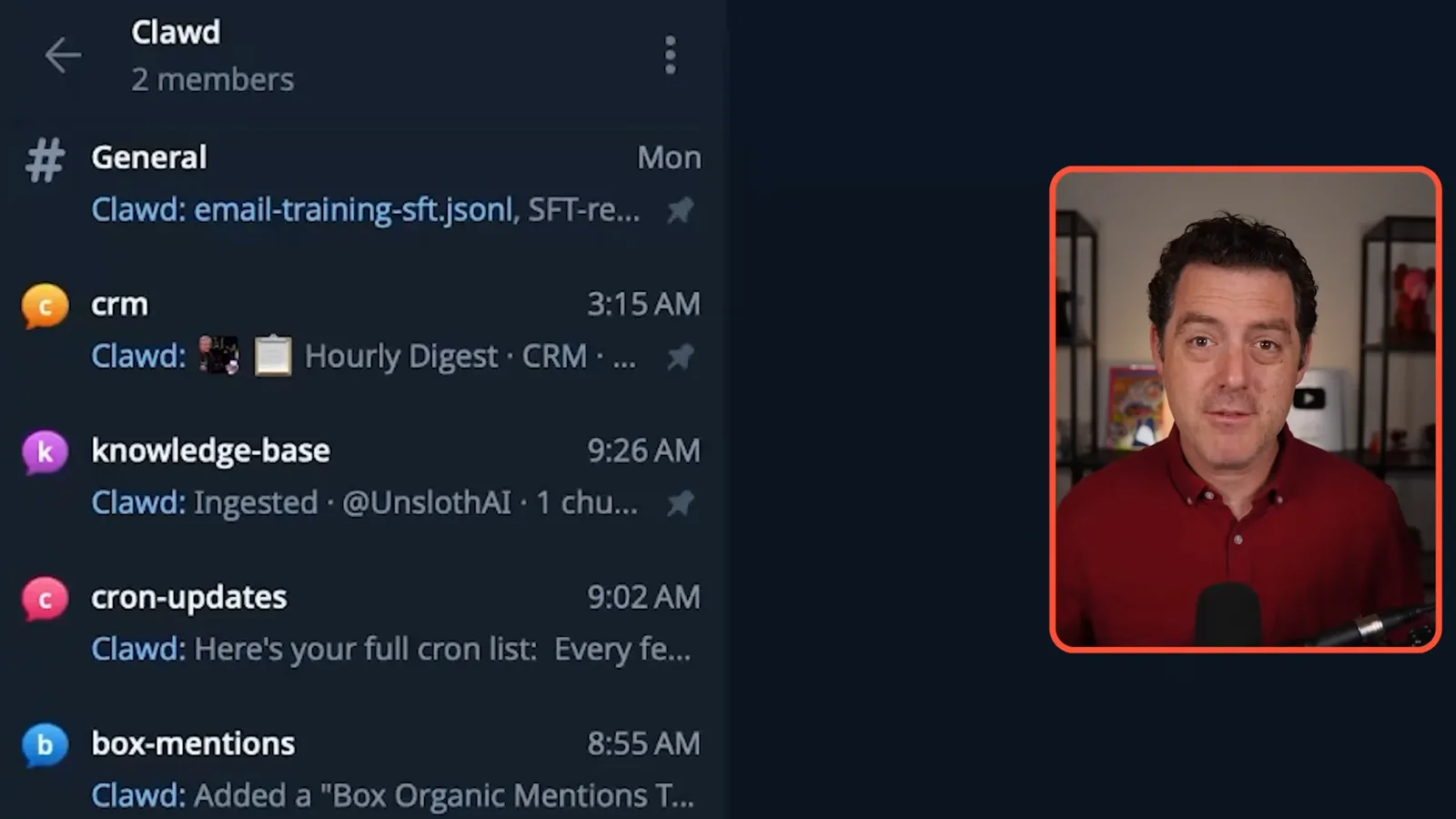
Each topic in my setup has its own session and focused context, making it easier to resume one conversation while another is underway. I find this helps the agent stay on topic and helps me navigate my work. The same principle can apply to other messaging platforms that support suitable threading.
Voice messages are another useful mobile interface. I hold the microphone button in Telegram, speak a question or task, and receive a response without typing a long prompt. I use it for questions, tasks and coding requests. The capabilities available depend on the messaging integration and how the assistant is configured.
The sponsor of this video is here.now, a service for publishing agent-created artifacts such as static pages, images and PDFs. I ask my agent to publish an Eiffel Tower explanation, then revise the page to text only. Berman says an unclaimed page expires after 24 hours and an account can claim it for longer use; service terms and pricing can change.
Model routing and delegation
He matches models to tasks and explains how his main agent delegates longer work. He describes maintaining model-specific prompts.
I do not use one model for every task. At the time of this video, I use Anthropic models for much of my main chat and coding, GPT-5.4 as a fallback, Grok for search, Gemini for video and research, Nomic for embeddings, and Qwen for local work. These are my personal choices and I change them as models, availability and quotas change.
The main model plans and delegates, so I generally favor a capable model there. Simpler work may be faster and cheaper with a smaller model. OpenClaw has configuration for models and fallbacks, and I can check the main session with `/status`; assignment is not perfectly deterministic, so I still check what actually ran.
In my setup I can also assign a model to a specific thread: a simple question-and-answer thread may not need the same model as difficult coding. Choosing based on the work can help manage token use, latency and cost. Whether a smaller model is sufficient should be measured against the actual task.
I am exploring replacing suitable frontier-model tasks with fine-tuned local models. For email labeling I collected labeled examples and trained a 9-billion-parameter Qwen model; in my own use, I say it performs as well as Opus 4.6 on that specific task. This is my experience, not a general comparison or a published benchmark; local hardware and training still have costs.
I delegate longer tasks so the main agent is not blocked while I continue the conversation. My rule is to delegate work expected to take over ten seconds, including coding, searches, multi-step processing, file operations and calendar or email work. Simple replies, clarifications and quick reads stay with the main agent. Delegation can still fail or choose the wrong route.
The main agent can assign different models to sub-agents and can also invoke coding harnesses such as Cursor Agent or Claude Code. A harness can execute a task and return a summary through the sub-agent to the main agent. I prefer to delegate early, selecting a cheaper model for simple jobs and a stronger one where the task warrants it.
Different models may respond differently to prompt structure, so I maintain separate versions of my instruction files for different model families. I use each provider’s prompting guidance as a starting point and tell OpenClaw which files to use. My examples about capitals or negative instructions are heuristics, not universal rules; test prompts against the task and model.
I keep a primary set of instructions and a separate fallback set, then run a nightly job to compare them. The job checks that the instructions remain consistent in substance while reflecting each model’s prompting guidance. Documenting that arrangement helps the agent select the intended version.
Scheduled jobs and security
Berman schedules recurring work and describes multiple defenses against prompt injection and unwanted actions. He also limits spending and runaway loops.
Scheduled jobs, or crons, perform recurring work without my having to ask each time. I spread many daily maintenance tasks through the night, when I am less likely to be using the system, to reduce contention and manage my rolling usage allowance. Examples include checking job health, prompt and configuration consistency, and backups.
Other jobs run every few hours, including HubSpot and Asana synchronization and a review for personal information or secrets. Scheduling makes recurring work convenient, but jobs still need monitoring: an authentication failure or other error can affect multiple dependent tasks.
Security matters because an agent can read untrusted external content and use powerful tools. Prompt injection is an attempt to put instructions in a webpage, email or other material that diverts the agent from its authorized task. I treat incoming material as potentially untrusted and use several defenses; no scanner alone can guarantee it will catch every attack.
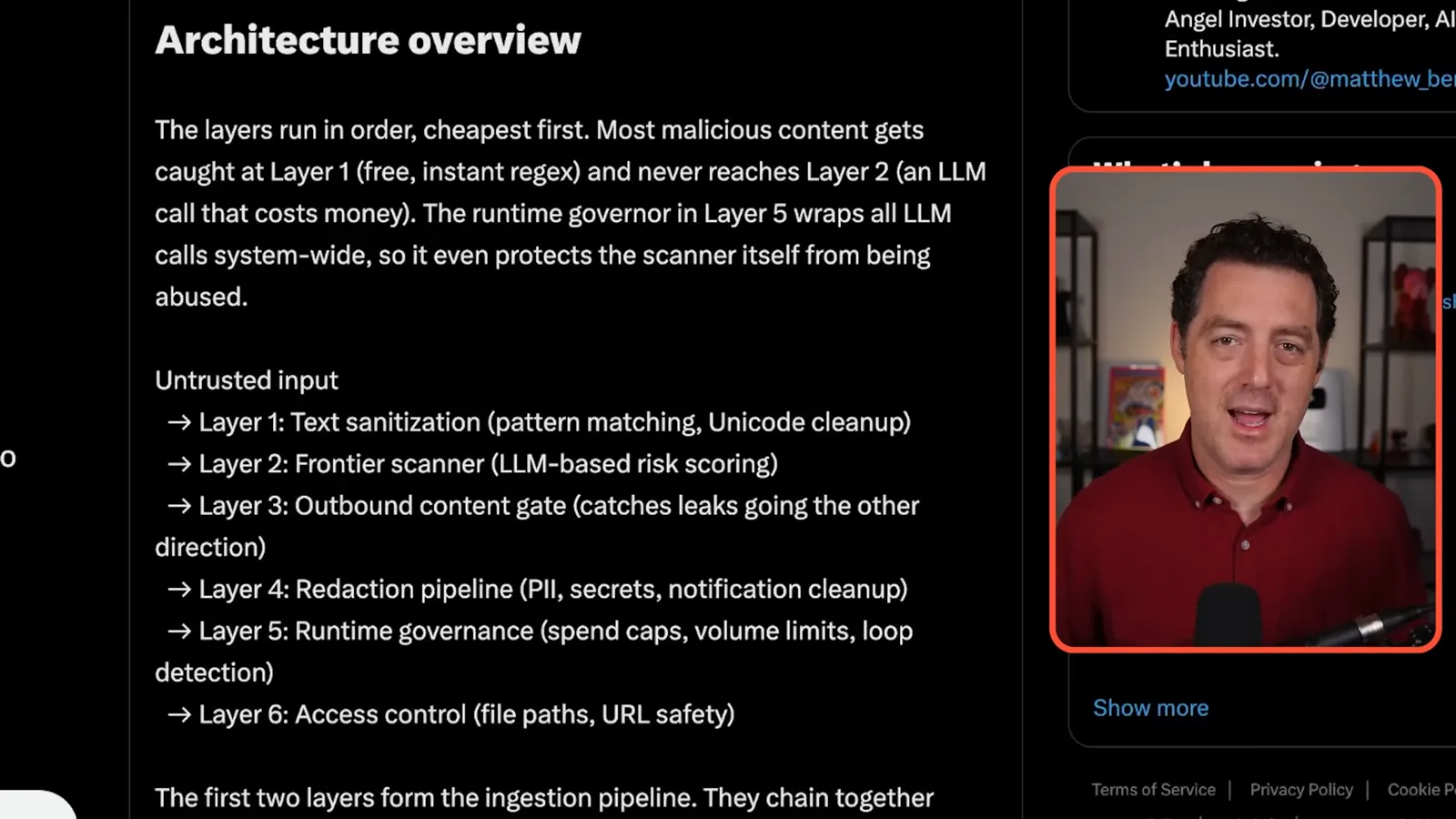
My first layer uses conventional code to scan incoming text for suspicious patterns and unusual characters. A second, model-based scanner reviews material that passes the first layer, assigns a risk score and can quarantine it. Both pattern matching and model review can miss attacks or flag harmless content, so I do not treat them as a complete security boundary.
I also inspect outbound content for secrets and personally identifying information and redact aggressively. Sometimes that means I must explicitly authorize information that is safe to share. Redaction is another safeguard rather than proof that every sensitive value will be detected.
I scope permissions narrowly: my assistant can read my email but cannot send it, and can read Box files but cannot delete them. Destructive actions require my approval. These restrictions limit what an injected instruction or mistaken agent can do even if earlier screening fails.
Another concern is wallet draining: an attacker could send enough material to consume the model budget used by a security scanner. A runaway loop can create a similar cost. My runtime governance uses spending caps, volume limits and loop detection to constrain both cases.
Operations, backups and notifications
He uses logs, updates, documentation, version control, backups and tests to maintain his setup. He closes with notification batching and a separate coding interface.
I keep logs so I can investigate failures instead of guessing. Each morning I ask the system to review overnight errors and propose fixes. In the example shown, a Google authentication problem affected an inbox refresh and calendar-dependent daily brief, alongside a smaller code bug. Logs can contain sensitive information, so their access and retention need care.
I check for OpenClaw updates regularly using a scheduled job that summarizes the changelog and updates the installation. Security fixes matter, but automatic updates and restarts can also disrupt a setup; testing and a recovery path are useful. The appropriate update cadence depends on the deployment.
I recommend evaluating subscription access against API pricing for your workload. I describe ways I use provider subscriptions in my setup, but permitted integrations, usage limits and pricing vary. Check the current provider terms and documentation for the specific application rather than assuming all OAuth or SDK uses are allowed; [OpenAI describes supported plan use in participating apps](https://help.openai.com/en/articles/20001542-using-your-chatgpt-plan-in-other-apps-and-sites).
Documentation makes the system easier to operate. I maintain a product requirements document, workflow descriptions, workspace organization, prompting guides and security notes, as well as a learnings file for mistakes. A daily job compares documentation with code and commits to identify gaps, although generated updates still need review.
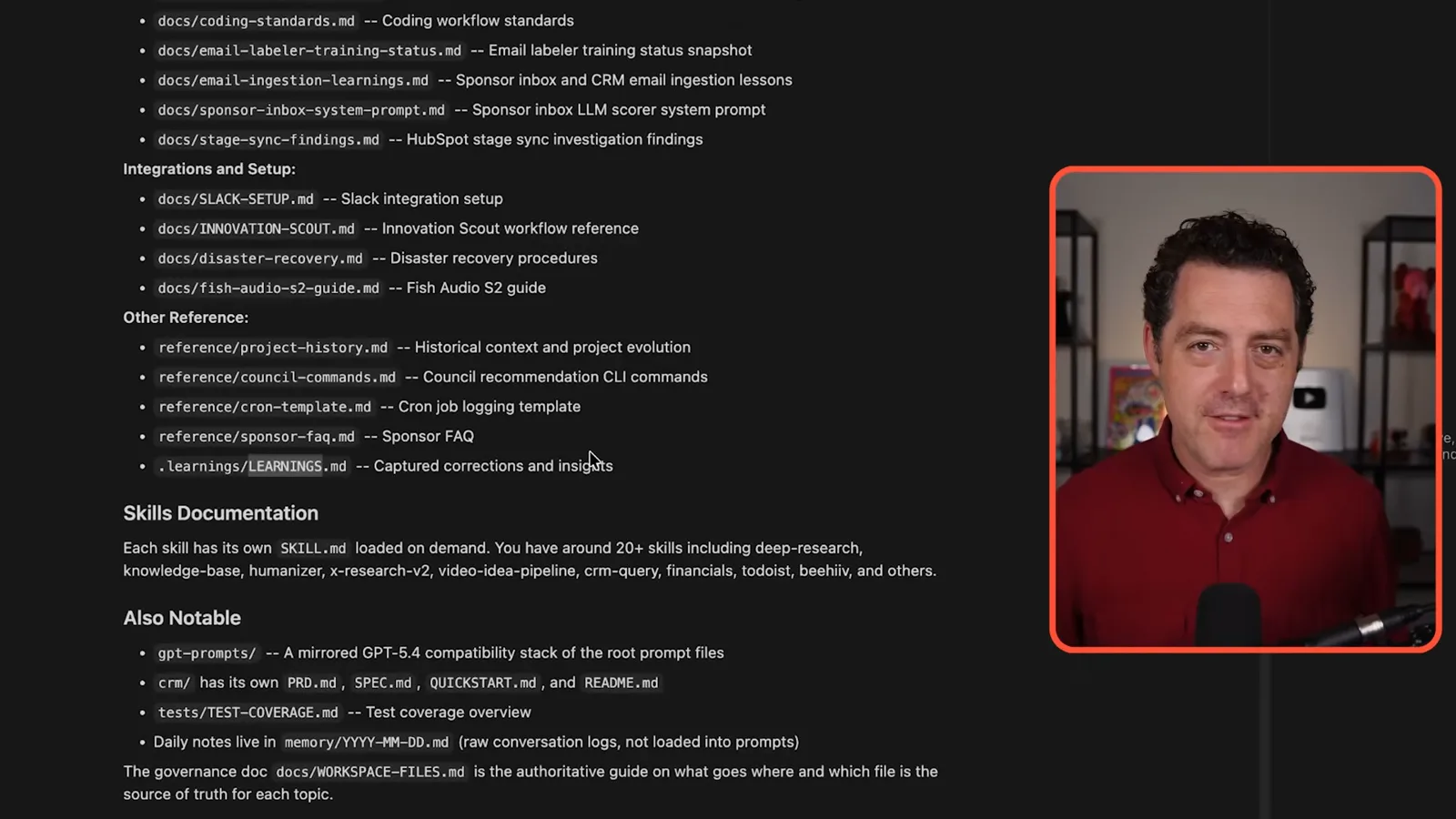
Git records versions of the code, making it possible to inspect recent changes or restore an earlier state. I also push snapshots to GitHub as an off-device copy. Databases, images and PDFs need separate backups when they are not in Git; I use Box for those files. A backup is useful only if it can be restored.
Tests check whether code behaves as intended. My simple example is verifying that two plus two equals four; for real systems, tests should exercise meaningful behavior and failure cases. Logging, documentation, version control, separate backups and testing all help keep an evolving agent setup manageable.
To reduce interruptions from scheduled work, I batch low-priority notifications into a three-hour digest and higher-priority items into an hourly digest. Critical incidents, such as the assistant being unavailable, bypass the batch and alert me immediately. I can ask for more detail when a digest identifies something worth investigating.
Finally, I prefer building and modifying the OpenClaw system in a separate coding environment, such as Cursor, while using Telegram for everyday interaction. Codex, Claude Code or a text editor can also be used. A dedicated development interface makes code easier for me to inspect and iterate on than a chat window.
같은 채널의 다른 글
 34:21EN
 Matthew Berman· 2026년 10월 27일Matthew Berman Examines Anthropic’s IPO Filing, AI Growth and GovernanceMatthew Berman, Sam Altman · Forward FutureThe presenter reviews the S-1’s financial metrics, compute strategy and voting structure while questioning the tension between rapid AI development and safety.
 0:36ENMatthew Berman· 2026년 10월 25일Kimi K3.1 and a Rubik’s Cube Solver DemonstrationMatthew Berman · Forward FutureMatthew Berman shows a scrambled virtual cube being solved and gives the Kimi K3.1 test a favorable assessment.
 25:50ENMatthew Berman· 2026년 10월 24일Kimi K3.1 Pro Tested: Strong 3D Demos, Uneven Results and Competitive PricingMatthew Berman · Forward FutureMatthew Berman tests the open-weight model on coding, 3D rendering and visual explanations, then compares benchmark results and prices.
 32:20ENMatthew Berman· 2026년 10월 23일Who Is Local AI For? The Costs, Trade-offs and a Hybrid FutureMatthew Berman · Forward FutureMatthew Berman weighs data control and independence against hardware cost, setup complexity and inference speed.
 1:03:37ENMatthew Berman· 2026년 10월 23일Matthew Berman’s Team Tests Kimi K3.1 on Animation, Games, and ChartsMatthew Berman, Alex, Brian · Forward FutureA live team AMA turns into an informal test of Kimi K3.1, from personal-agent workflows to motion graphics, a browser game, and a benchmark chart.
 0:53ENMatthew Berman· 2026년 10월 22일Sam Altman on AI and the Discovery of New KnowledgeSam Altman · OpenAIAltman expects progress in mathematical discovery to extend to biology, materials and energy.