30초 요약
Matthew Berman walks through STORM, an open-source Stanford project that researches a topic and produces a structured, Wikipedia-like article with references. He installs its 2024 version, configures OpenAI and You.com credentials, and runs a Streamlit demonstration. The resulting dog article has sections and linked sources, but the demonstration does not independently verify its claims. Berman also discusses local model options without demonstrating a successful fully local setup.
- 1A cited research draftBerman shows a generated AI overview organized by subject and accompanied by references. The result is a Wikipedia-like draft, not an article published to Wikipedia.
- 2Local interface, external servicesHis installation runs on his computer, but the demonstration uses OpenAI for model calls and You.com for search.
- 3Install the projectHe clones the STORM repository, creates a Python 3.11 conda environment, and installs the requirements shown in the 2024 tutorial.
- 4Research dogsThe demo identifies research perspectives, browses pages, and produces an article with sections and links. Readers should check the sources and their support for each claim.
- 5Local model option remains untestedBerman points to an example using vLLM and Mistral, but says he has not set it up and did not get Ollama working.
핵심 정리
- STORM uses research and source retrieval to draft structured, cited articles on a chosen topic.
- The demonstrated interface runs locally, but its OpenAI and You.com requests use external services.
- A linked citation is a starting point for checking a claim, not proof that the claim is correct.
- The setup and service terms shown in the July 2024 video may have changed.
- Berman mentions a vLLM and Mistral example but does not demonstrate it working locally.
챕터별로 다듬은 전문 읽기
STORM and its research output
Berman introduces the Stanford project and shows a referenced overview of artificial intelligence. He explains that the interface can run locally while his demonstration uses OpenAI.
A Stanford project called STORM can take a topic, research it, and produce a Wikipedia-like article. In the example I generated about artificial intelligence, it organized material into areas such as business, healthcare, education, and security, with references alongside the text. The result is a research draft, not a page published on Wikipedia.
The project is open source, and I am running the interface on my computer. This demonstration still calls the OpenAI API; the web search also uses an external service. Before installing anything, you can try the hosted STORM demo and look at articles it has already generated. At the time of the recording, the site also showed a forthcoming human–AI collaboration mode.
Try the demo and install STORM
He visits the hosted demo and then clones the repository. He creates a conda environment and installs the Python dependencies.
STORM stands for Synthesis of Topic Outlines through Retrieval and Multi-perspective Question Asking. Its research process considers different perspectives before organizing and writing an article. I previously encountered a bug that required a code change, although the installation in this demonstration works without that fix.
To install the version shown in this July 2024 tutorial, open a terminal in your chosen directory, clone the [STORM repository](https://github.com/stanford-oval/storm), and change into its folder. I use conda to create an environment named `storm` with Python 3.11, activate it, and then run `pip install -r requirements.txt`. Project files and setup steps may have changed since this recording.
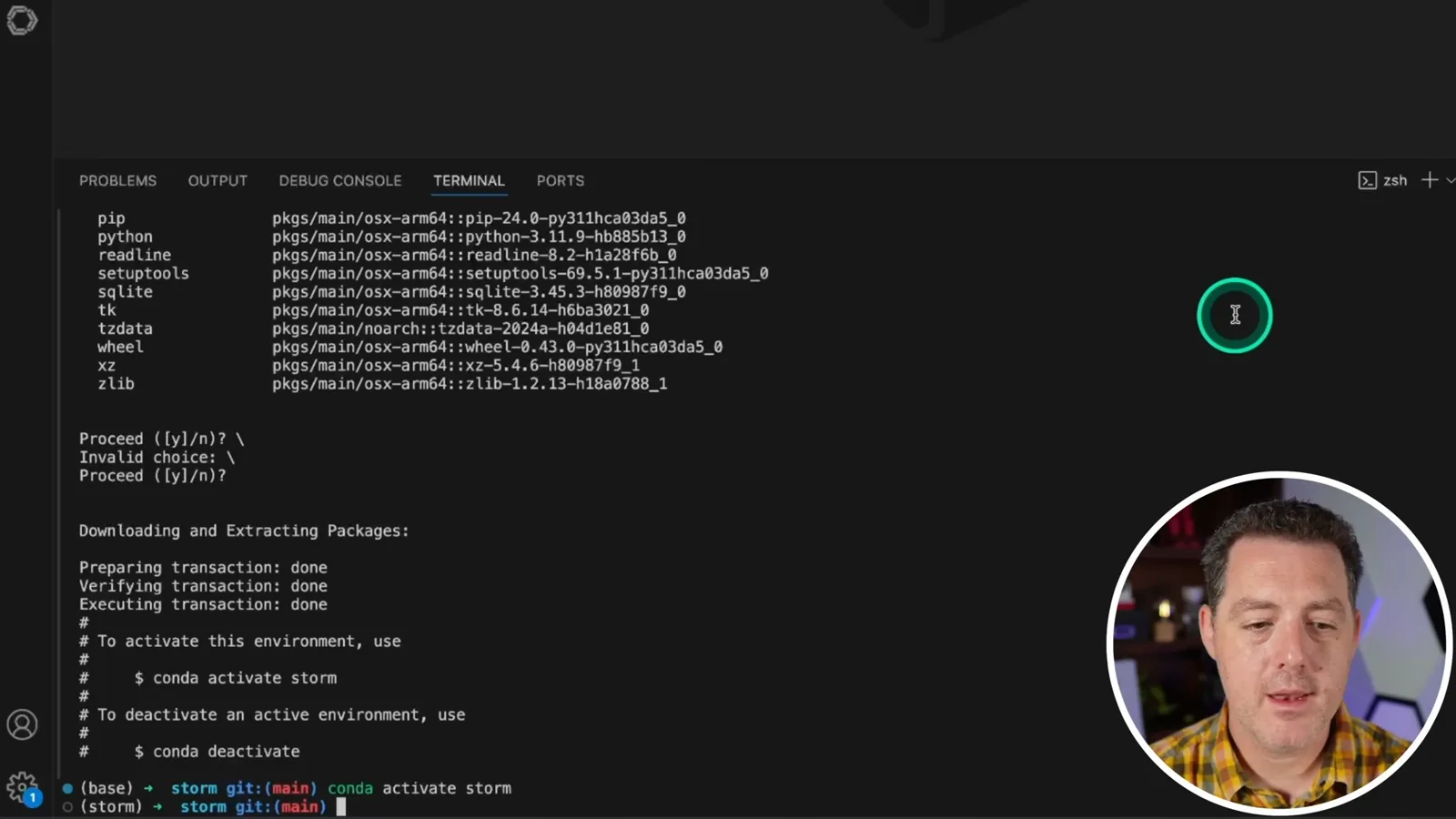
Configure API keys and launch the interface
He creates the secrets file and configures OpenAI and You.com access. He copies the configuration for Streamlit and launches the demo.
Open the project folder in the editor, reactivate the environment if the terminal resets, and create a `secrets.toml` file using the repository’s getting-started template. For this walkthrough I configure OpenAI rather than Azure, then add an OpenAI API key. Keep credentials private and consult the current repository instructions for the supported configuration.
I also create a You.com web search API key and add it to the configuration. At the time, Berman says the service offered a trial but otherwise cost money; pricing and availability can change. The project also supports command-line use, but I prefer the simple web interface for this demonstration.
For the 2024 Streamlit interface, I copy the secrets file into the `.streamlit` folder under the frontend, change into the `demo_light` directory, and run `streamlit run storm.py`. The local server starts and opens the research interface. These are the steps shown in the video, so check the current documentation before reproducing them.
Run a research task
The tool researches dogs and produces a structured article with references. Berman then discusses local model alternatives that he has not successfully demonstrated.
I start a research task on dogs. The logs show the system brainstorming perspectives and making requests to the OpenAI endpoint, followed by browsing activity. The run finishes with a structured article covering subjects such as taxonomy, evolution, physical characteristics, and behavior.
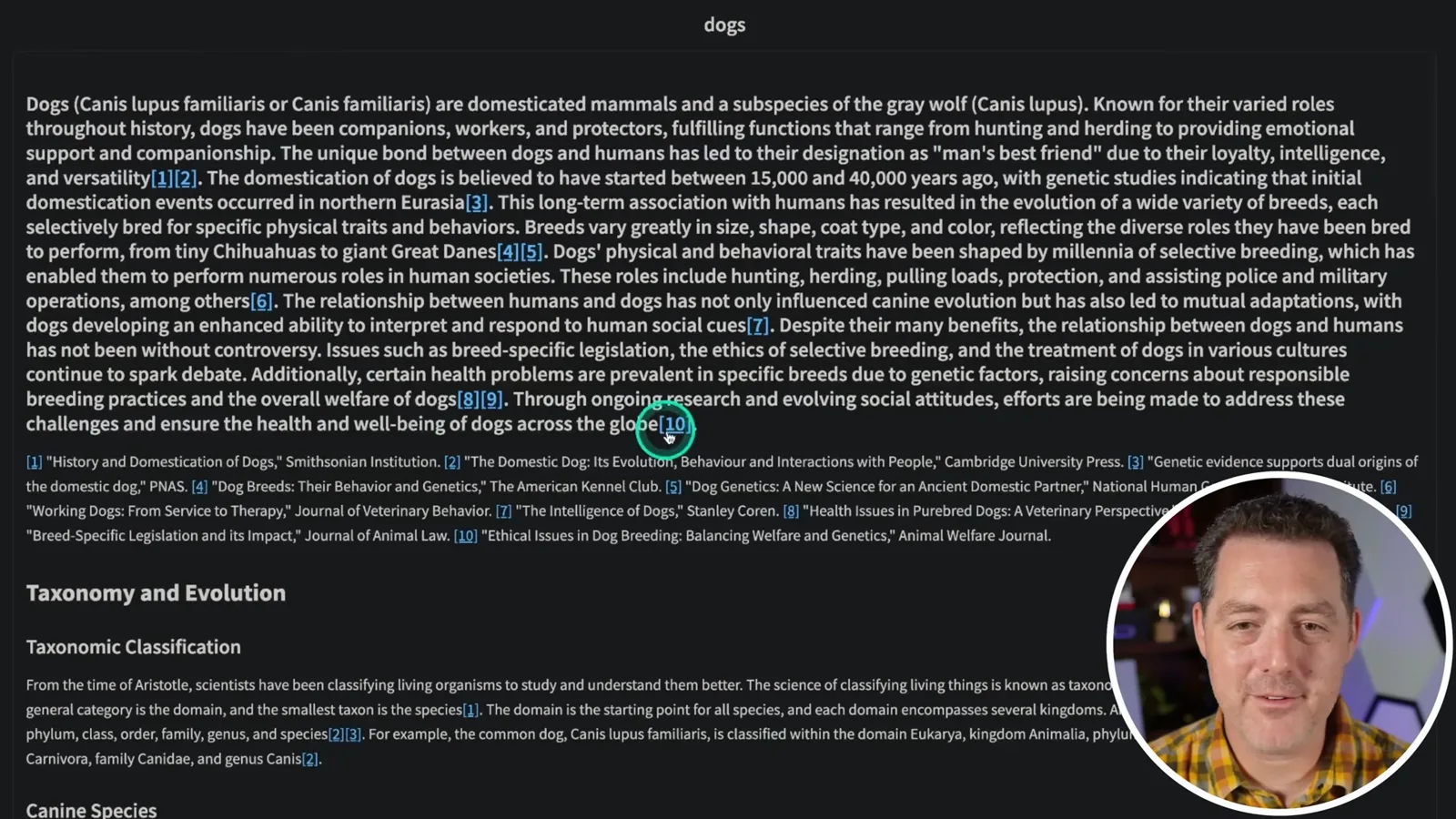
The article has numbered references that can be selected to open the underlying sources and see highlights. That makes it easier to inspect the research, but a citation alone does not establish that a source is accurate or actually supports the nearby claim; readers should verify both before relying on the draft.
If you do not want to use OpenAI’s API, I point to an example using vLLM with Mistral for the model side, although I have not set it up myself. Web search would still need a source of external information unless you built a replacement. I also saw discussion of Ollama, but did not get it working and did not spend much time trying.
같은 채널의 다른 글
 34:21EN
 Matthew Berman· 2026년 10월 27일Matthew Berman Examines Anthropic’s IPO Filing, AI Growth and GovernanceMatthew Berman, Sam Altman · Forward FutureThe presenter reviews the S-1’s financial metrics, compute strategy and voting structure while questioning the tension between rapid AI development and safety.
 0:26ENMatthew Berman· 2026년 10월 25일Sam Altman on Human Values and Problem-Solving in an AI WorldSam Altman · OpenAIIn a short interview excerpt, Altman considers the enjoyment of solving hard problems and the human role in interpreting results.
 0:36ENMatthew Berman· 2026년 10월 25일Kimi K3.1 and a Rubik’s Cube Solver DemonstrationMatthew Berman · Forward FutureMatthew Berman shows a scrambled virtual cube being solved and gives the Kimi K3.1 test a favorable assessment.
 0:21ENMatthew Berman· 2026년 10월 24일An AI-Generated Kimi Benchmark Chart Used Invented ScoresMatthew Berman · Forward FutureMatthew Berman asks for a graph of Kimi K3.1 Pro benchmarks, then discovers that the displayed figures are illustrative placeholders.
 25:50ENMatthew Berman· 2026년 10월 24일Kimi K3.1 Pro Tested: Strong 3D Demos, Uneven Results and Competitive PricingMatthew Berman · Forward FutureMatthew Berman tests the open-weight model on coding, 3D rendering and visual explanations, then compares benchmark results and prices.
 32:20ENMatthew Berman· 2026년 10월 23일Who Is Local AI For? The Costs, Trade-offs and a Hybrid FutureMatthew Berman · Forward FutureMatthew Berman weighs data control and independence against hardware cost, setup complexity and inference speed.