30 秒でわかる
Matthew Berman shows an OpenClaw setup on a freshly wiped MacBook Air and lists uses ranging from a food journal to a personal CRM. He describes a daily analytics pipeline that stores snapshots locally and feeds charts and insights to an AI business-analysis workflow. These are his descriptions of his own setup, not independently verified performance results.
- 1A dedicated machineBerman says he wiped a MacBook Air and installed OpenClaw on it.
- 2Sessions for many jobsHis sessions include a knowledge base, food journal, scheduled updates, video research and business analysis.
- 3Daily analytics snapshotsHe says a workflow pulls YouTube statistics through an API, stores snapshots locally, and produces PNG charts.
- 4An AI business councilBerman describes combining business data and a council of AI experts to prepare a daily improvement report.
ポイント
- Berman separates personal and business tasks into sessions for notes, research, journaling and analysis.
- He says his YouTube workflow retrieves channel and video statistics daily and stores local snapshots.
- The analytics feed a broader workflow that produces recommendations about videos, titles and thumbnails.
- An AI council and daily business report are part of his described setup, not evidence that its recommendations are independently validated.
チャプターごとに整えた全文を読む
An OpenClaw setup for personal and business work
Berman introduces a wiped MacBook Air running OpenClaw and lists his sessions. They cover personal information, research and business analysis.
This is a fresh MacBook Air: I wiped it clean and installed OpenClaw. I consider myself one of its most advanced users, and I want to show what I have learned.
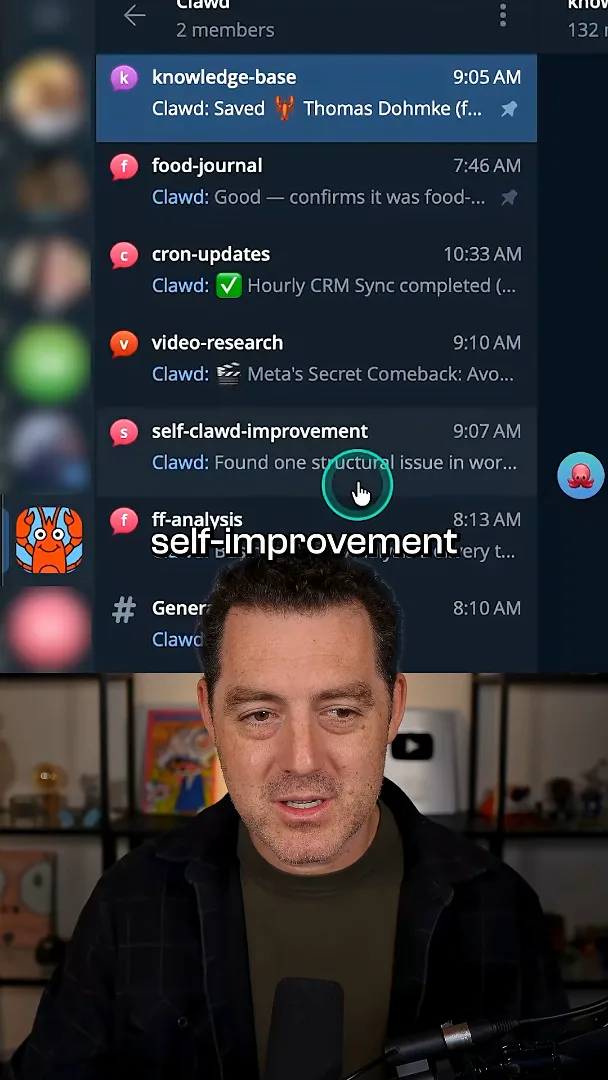
I have separate sessions for my knowledge base, food journal, cron updates, video research, self-improvement and business analysis. I use the system as a personal CRM and a knowledge base, as well as a pipeline for video ideas, X/Twitter research and business meta-analysis.
YouTube analytics and business recommendations
He describes daily collection and local snapshots of channel data. Those insights feed a broader AI-assisted business report.
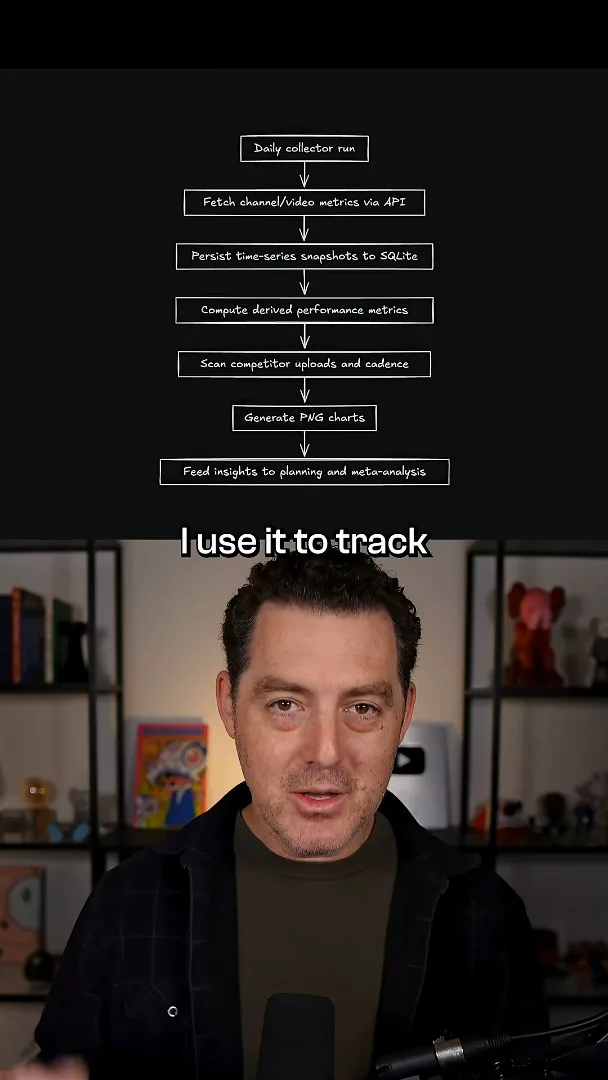
I also use it to track YouTube analytics. Each day, the workflow calls the API to pull statistics for my videos and channel growth, saves a snapshot in a local database, and produces PNG charts. The diagram shown in the video also depicts derived metrics and competitor upload tracking before the insights feed planning and meta-analysis.
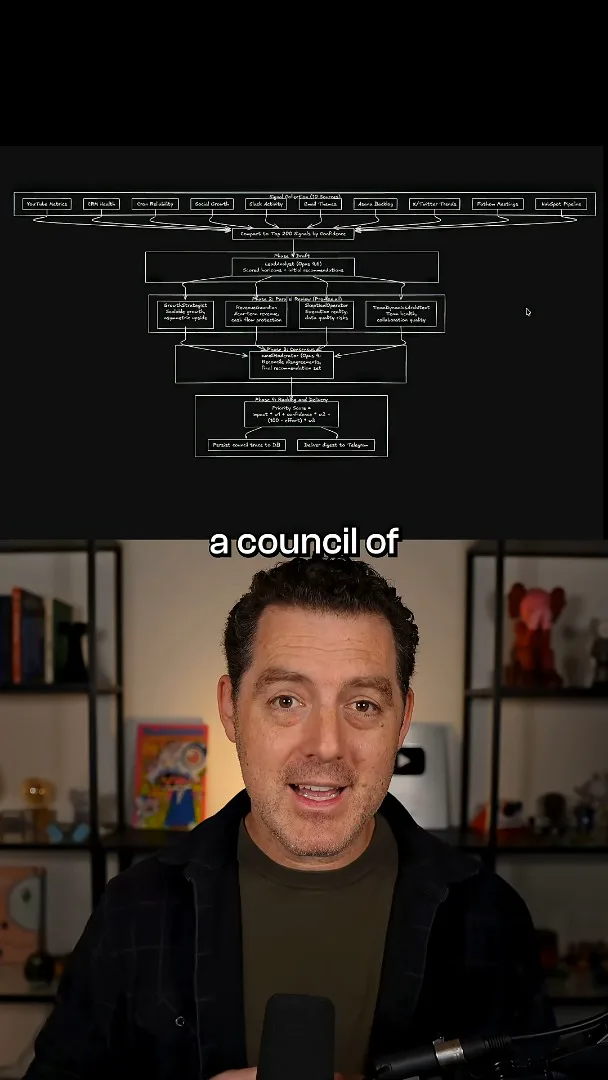
Those insights help me look at which types of videos viewers like and which titles and thumbnails work or do not work; the system gives me recommendations. I bring together business data and a council of AI experts to create a daily report with ways to improve the business. This is my description of my own workflow, not a controlled evaluation of its recommendations.
同じチャンネルの記事
 34:21EN
 Matthew Berman· 2026年10月27日Matthew Berman Examines Anthropic’s IPO Filing, AI Growth and GovernanceMatthew Berman, Sam Altman · Forward FutureThe presenter reviews the S-1’s financial metrics, compute strategy and voting structure while questioning the tension between rapid AI development and safety.
 0:26ENMatthew Berman· 2026年10月25日Sam Altman on Human Values and Problem-Solving in an AI WorldSam Altman · OpenAIIn a short interview excerpt, Altman considers the enjoyment of solving hard problems and the human role in interpreting results.
 0:36ENMatthew Berman· 2026年10月25日Kimi K3.1 and a Rubik’s Cube Solver DemonstrationMatthew Berman · Forward FutureMatthew Berman shows a scrambled virtual cube being solved and gives the Kimi K3.1 test a favorable assessment.
 0:21ENMatthew Berman· 2026年10月24日An AI-Generated Kimi Benchmark Chart Used Invented ScoresMatthew Berman · Forward FutureMatthew Berman asks for a graph of Kimi K3.1 Pro benchmarks, then discovers that the displayed figures are illustrative placeholders.
 25:50ENMatthew Berman· 2026年10月24日Kimi K3.1 Pro Tested: Strong 3D Demos, Uneven Results and Competitive PricingMatthew Berman · Forward FutureMatthew Berman tests the open-weight model on coding, 3D rendering and visual explanations, then compares benchmark results and prices.
 32:20ENMatthew Berman· 2026年10月23日Who Is Local AI For? The Costs, Trade-offs and a Hybrid FutureMatthew Berman · Forward FutureMatthew Berman weighs data control and independence against hardware cost, setup complexity and inference speed.