30 秒でわかる
Matthew Berman demonstrates his OpenClaw setup, then commonly called Clawdbot, on a sponsored Hostinger VPS. He explains memory, skills, model routing, Telegram topics, scheduled jobs and his own research workflows, while discussing security limitations. The video reflects the software and model options available when recorded.
- 1Instructions, skills and memoryMarkdown files define behavior and memory; skills describe repeatable workflows and tools implement actions.
- 2Model routingBerman demonstrates a primary model, fallbacks and switching based on the cost and complexity of a task.
- 3Separate work by topicTelegram group topics keep parallel conversations organized; scheduled jobs automate reminders and reviews.
- 4Security requires layersHe discusses credential handling, audit commands, untrusted external content and human review. A VPS or AI scan alone is not a guarantee.
- 5Practical workflowsHis examples cover video research, channel analytics and meeting preparation using connected services.
ポイント
- Separate instruction files, skills and tools shape the assistant’s behavior and capabilities.
- Model routing balances speed, cost and task complexity; fallbacks help when a provider is unavailable or rate-limited.
- Telegram topics and scheduled jobs organize parallel work and recurring reminders.
- A server boundary, model scanning and audit tools do not eliminate prompt injection or credential risks.
- Berman uses the assistant for video research, YouTube analytics and daily meeting preparation.
チャプターごとに整えた全文を読む
VPS setup and sponsorship
Berman introduces his assistant and demonstrates a Hostinger-hosted installation. Hosting is sponsored and carries server and model costs.
I began using the assistant then called Clawdbot as an experiment, and it quickly became a major part of my workflow. It connects services such as Gmail, Telegram, Asana and Slack so I can ask it to work through a chat interface. This video shows my setup at the time; the project and its interfaces may have changed.
You can run the assistant locally, on separate hardware, or on a virtual private server. I demonstrate a Hostinger VPS, and Hostinger sponsors this video. A VPS can keep the service running separately from a personal computer, but isolation alone does not secure connected accounts or the server.
In the sponsored setup I choose a server plan, configure a model provider API key, deploy, and complete onboarding before chatting through Telegram. Costs depend on the server and model usage. Credentials and account permissions need careful handling regardless of hosting provider.
Files, skills and model selection
He explains configuration, memory and reusable workflows, then shows his model choices and fallbacks.
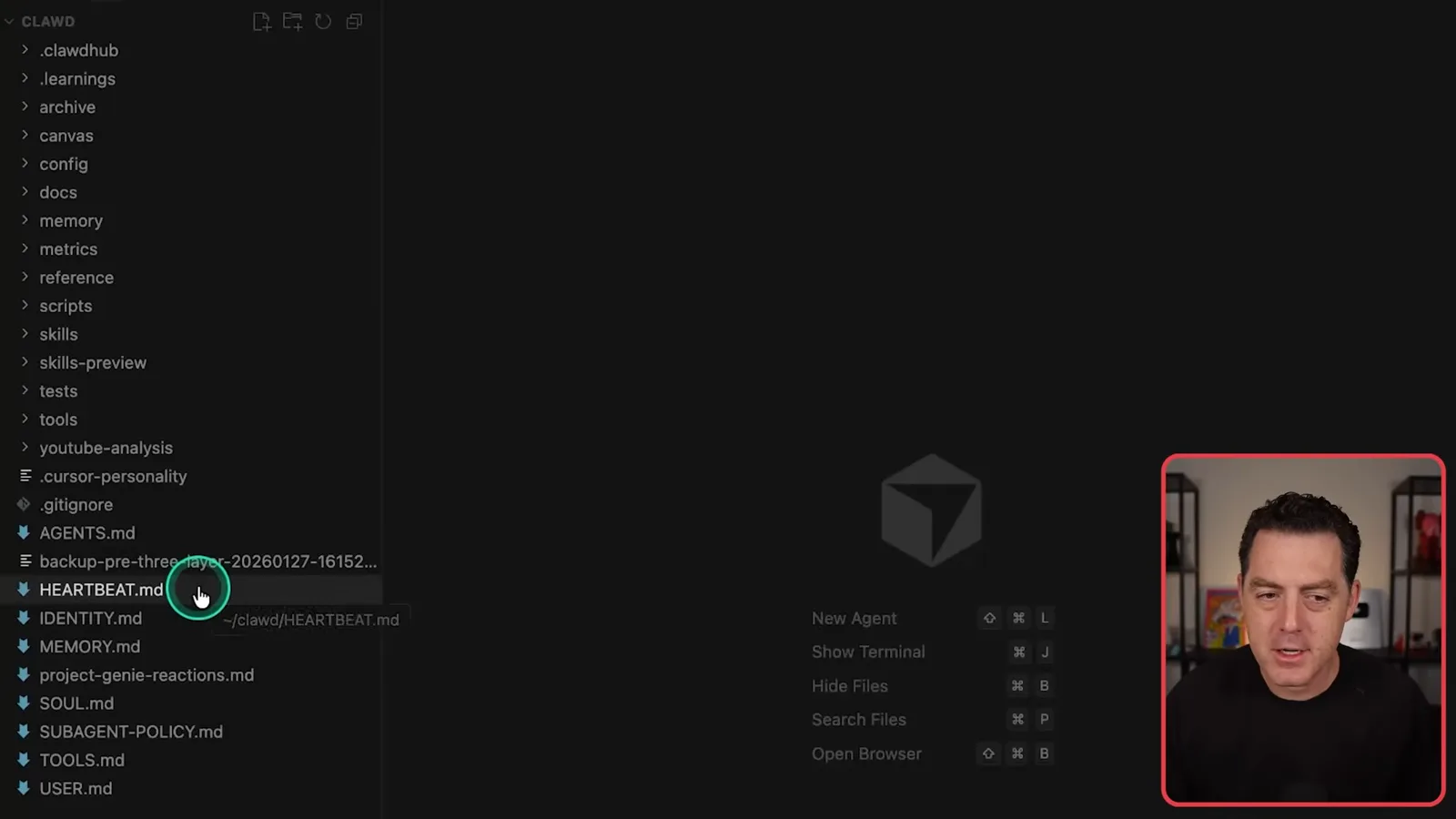
Several Markdown files shape the assistant. SOUL.md describes personality, IDENTITY.md describes its identity and tone, and other files cover tools, the user and recurring behavior. You can inspect and edit these instructions as your needs change.
Skills describe repeatable workflows, while tools contain code that carries out operations such as fetching information from Asana. I often describe a new task in natural language and ask the assistant to build a workflow. Generated code still needs review before it receives access or runs.
Memory stores information the assistant learns, and I can prune it when it becomes outdated or unnecessary. Retaining personal information creates privacy and security exposure, so decide deliberately what to keep and who or what can access it. A heartbeat can trigger periodic checks; scheduled jobs serve a related purpose.
Model selection is another important decision. In this setup Claude Sonnet 4.5 is my primary model, with fallbacks including Gemini 3 Flash and Claude Opus 4.5. My choice reflects the cost, speed and capability tradeoffs I saw at the time, not a permanent ranking.
I can request a different model in conversation or use the /model command to inspect or change it, for example after a rate limit. I may use a stronger model for difficult coding and a cheaper one for simpler interactions. Local models can also be useful where the available hardware and task permit.
Changing models can change the assistant’s tone even when its stored identity and memory are supplied to each model. I experiment with routing and choose based on what the task requires, as well as whether I value a consistent conversational style.
Integrations, schedules and Telegram
The assistant connects services and runs scheduled work. Telegram topics help Berman organize multiple conversations.
I connect the assistant to services I use, including email, calendar, Drive, Slack and Asana. It may find or generate a skill for a new integration, although an API key or other configuration can still be necessary. Start with low-risk tools and grant only the access needed.
I also delegate difficult coding work to Cursor Agent running on the VPS and receive updates in Telegram. The delegated agent may respond differently from my main assistant. The same idea can work with other tools, but access and actions should be reviewed.
ClawHub offers community skills for inspiration. Those skills are third-party code and may be malicious. I ask my assistant to scan them, but an AI scan is not proof of safety; inspect code and permissions independently and avoid installing anything you cannot trust.
Scheduled jobs can handle one-off reminders or repeated tasks. For example, I gave the assistant my alternating recycling schedule and asked it to message me each Sunday with the correct bins. The useful part is translating a real schedule into a repeatable reminder and checking that it works.
I organize parallel work with Telegram group topics rather than one endless direct-message history. Separate topics for video research, social research, an ebook and other work make conversations easier to follow and reduce irrelevant context. I remove topics when I no longer need them.
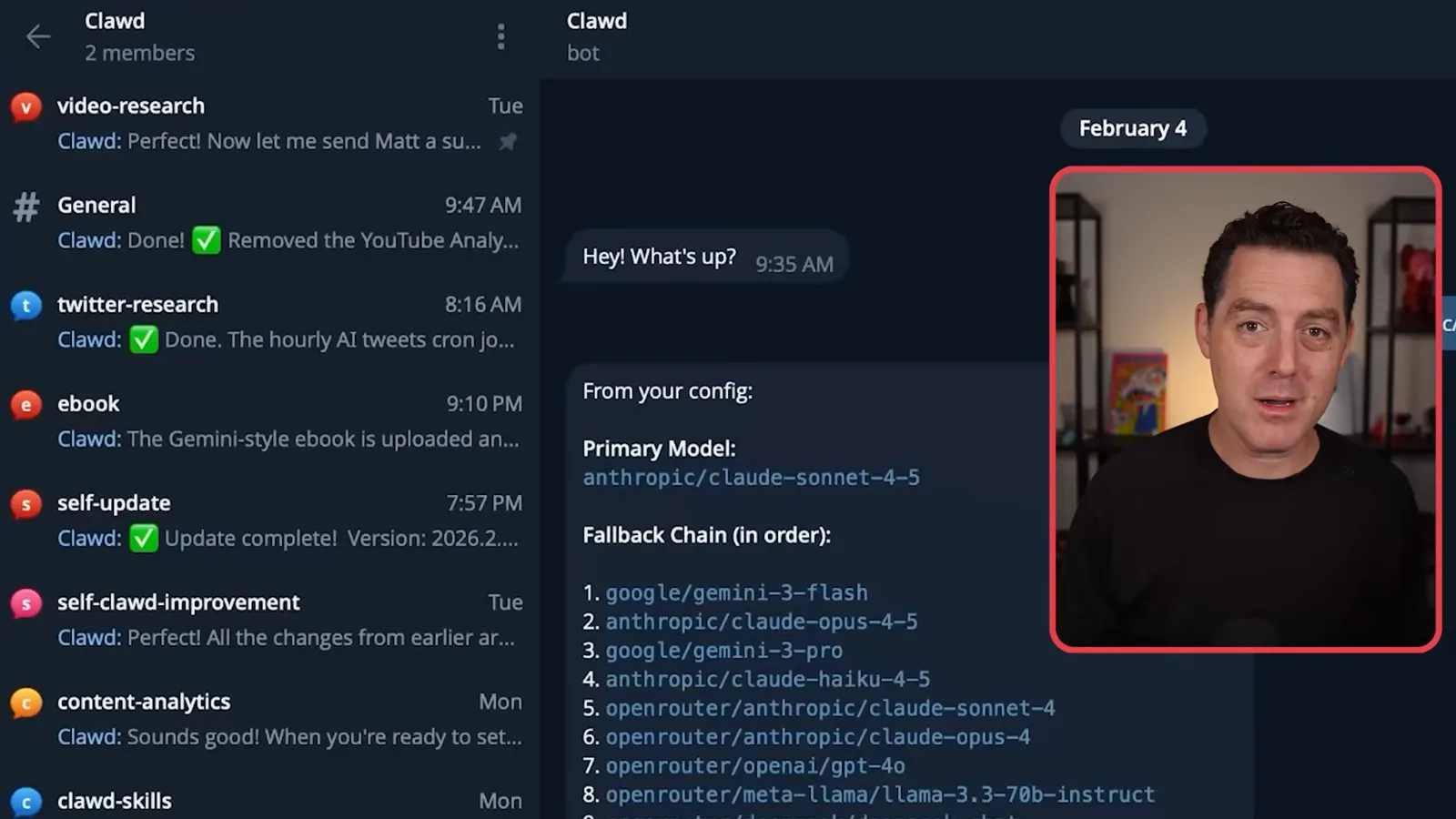
In my setup I create a group, add the bot, and configure it to respond to messages rather than only explicit mentions. The exact permissions and steps depend on the version and chat configuration. Restrict group membership and bot permissions to the people and actions required.
Maintenance and security
A daily review proposes configuration changes. Berman discusses secrets, untrusted content, skills, permissions and human review.
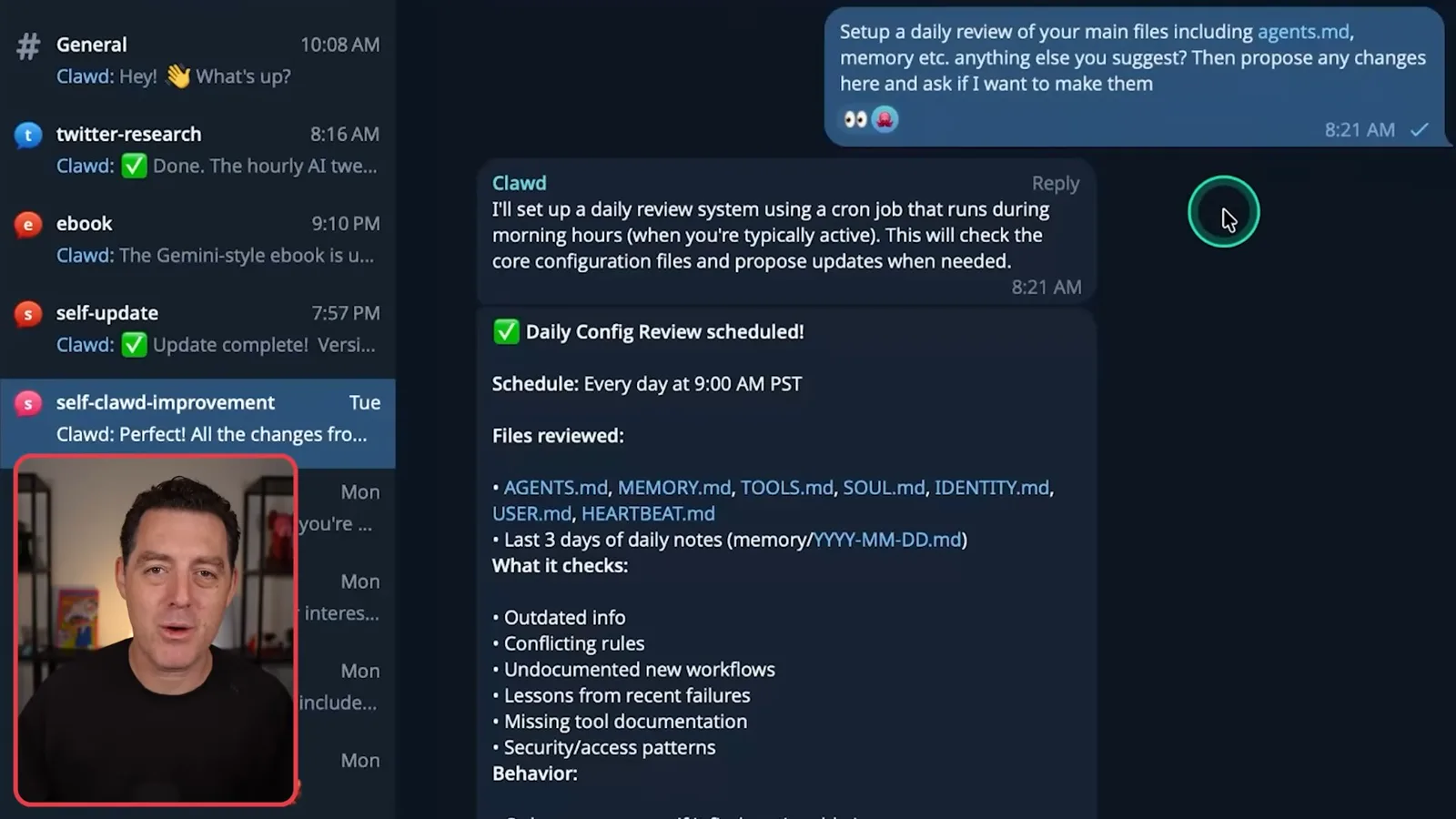
I ask for a daily review of the assistant’s main files and memory. It looks for outdated information, conflicting rules, undocumented workflows and lessons from failures, then proposes changes for me to approve. This helps prevent accumulated instructions from becoming clutter.
The assistant can also use connected media tools to generate images or speech and interpret images sent through chat. I show a lobster image generated with Nano Banana and mention ElevenLabs for voice. Each additional service has its own permissions, cost and data handling.
Security deserves special attention. I am not a security expert. I recommend keeping credentials out of Git, limiting their access, and using the OpenClaw security audit shown in the video. A local environment file is one option, but it also needs protection; simply telling an agent to be careful is not sufficient.
A VPS separates the runtime from my personal computer, but connected services and credentials can still be exposed. Keep the server patched, limit network and account permissions, review audit findings, and understand what the agent can access or modify.
External content is untrusted. An email or web page can contain instructions designed to redirect the assistant and leak information. Treat that content as data, limit the tools and secrets available to the agent, and require human review for consequential actions.
I discuss using stronger models and built-in detection to reduce prompt-injection risk, while acknowledging that detection is imperfect. Neither model choice nor a scan guarantees protection. Community skills and even generated code need scrutiny, and connecting fewer sensitive services reduces exposure.
For complex tasks, particularly changes to files or integrations, I ask the assistant to propose a plan before acting. I review that proposal and decide whether to proceed. This provides an opportunity to catch errors and scope permissions before a consequential change.
Three real workflows
He shows video research, channel analytics and meeting preparation. Each depends on integrations and access choices.
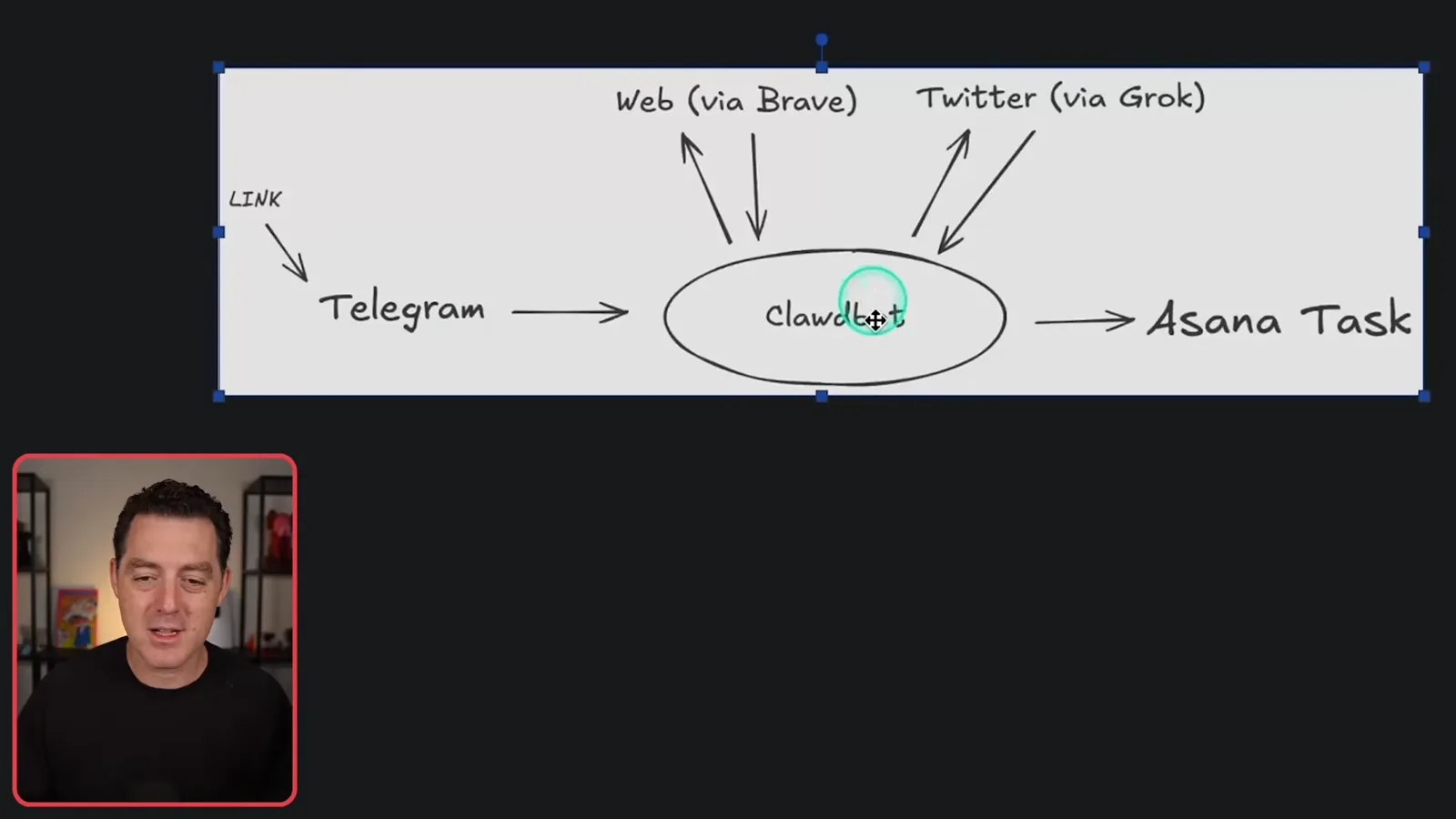
One practical workflow starts when I drop a video idea or link into Telegram. The assistant researches the topic with the Brave API, checks social discussion using Grok, and creates an Asana task for the team. One message initiates a research pipeline that I can review later.
For YouTube analytics, I connect the YouTube Data and Analytics APIs, then ask for the performance of recent videos in a dedicated topic. The assistant fetches the numbers and can report them in Telegram or Slack. Access to analytics and team channels should be scoped appropriately.
A daily meeting-preparation job checks my calendar for external meetings, researches the people and returns a morning summary. I limit the email it reads to known contacts to reduce exposure, although familiar senders do not eliminate the possibility of malicious or compromised content.
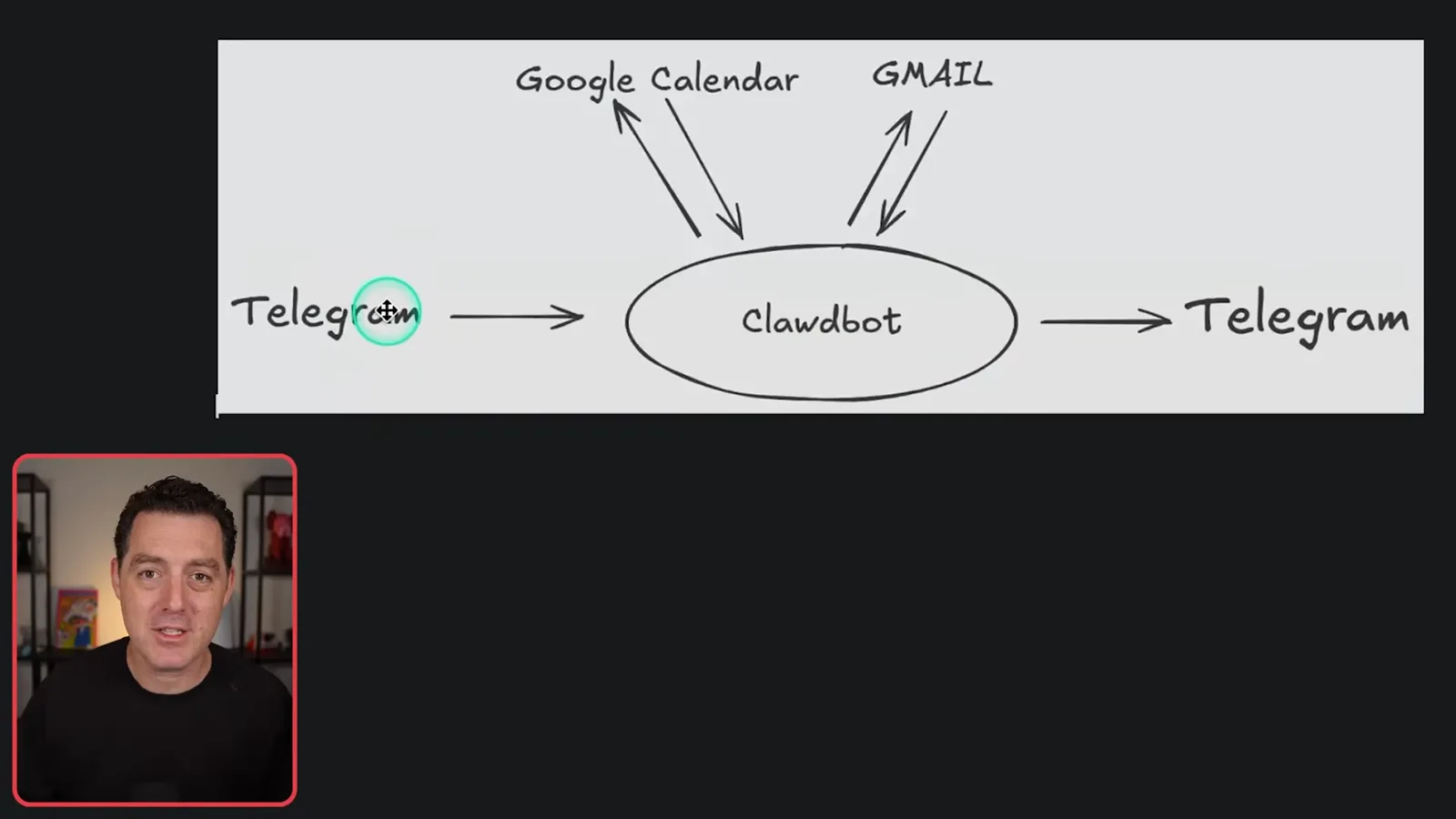
These automations are why the assistant has become valuable to me: it turns recurring research, reporting and preparation into tasks I can request from chat. The video closes with another mention of its Hostinger sponsorship and the VPS setup.
同じチャンネルの記事
 25:50EN
 32:20EN
 0:22EN
 45:08EN
 0:32EN
 1:02EN