En 30 segundos
In this January 2024 Aiven-sponsored tutorial, Matthew Berman uses a pretrained OpenCV detector and image embeddings to find a face crop similar to a separate photo. He stores the vectors in a hosted PostgreSQL database with pgvector and illustrates a successful match. The demonstration combines existing components and does not establish biometric identification accuracy. A nearest result may be wrong, a detector may miss faces, and the video’s historical cloud-credit offer may have changed.
- 1A composed pipelinePretrained face detection and image embeddings feed a PostgreSQL vector search; the tutorial does not train a model from scratch.
- 2Detect and cropOpenCV locates candidate rectangles and the notebook saves detected face crops.
- 3Hosted vector storageBerman provisions the sponsor’s PostgreSQL service and enables pgvector; the offer is historical.
- 4Search by distanceA query vector is compared with stored vectors. The closest candidate is not automatically a verified identity.
Conclusiones
- The pipeline separates face detection, image embedding, vector storage and nearest-neighbor search.
- The word-indicator example illustrates vector comparison; the actual image vectors come from a pretrained model.
- OpenCV detection parameters change which candidate rectangles are retained and can affect missed or false detections.
- A nearest neighbor is not proof of identity, and a ranking alone does not indicate whether any match is valid.
- Database credentials and face-derived data require appropriate access controls; cloud services also receive stored vectors.
- Aiven sponsored the video and the trial-credit figures refer to the 2024 demonstration.
Lee el texto editado por capítulos
Faces, vectors and similarity
Berman introduces the workflow and uses a simple word-vector example to explain similarity. The actual demo uses pretrained image components.
Matthew Berman demonstrates a small image-matching pipeline in Python: detect faces in a group photo, turn the crops into vectors, store them in PostgreSQL and search using a different photo. The January 2024 video is sponsored by Aiven and follows its [published tutorial](https://aiven.io/developer/find-faces-with-pgvector). The accompanying [Colab notebook](https://colab.research.google.com/drive/19ulJqMQqk4PfcTx1v3C3cxjvzokrKgZS?usp=sharing) contains the demonstration.
The example assembles existing pretrained components, rather than training a face-recognition model from scratch. OpenCV detects candidate faces; an image embedding model encodes the crops; pgvector orders stored vectors by distance from a query image. The result is a similarity ranking, not a verified identity.
To introduce vectors, Berman compares the sentences “I love parks” and “I love croissants” using binary indicators for whether each word occurs. Both share two words and differ on the third. This is a simple bag-of-words illustration of numerical comparison, not how modern learned image embeddings are necessarily constructed.
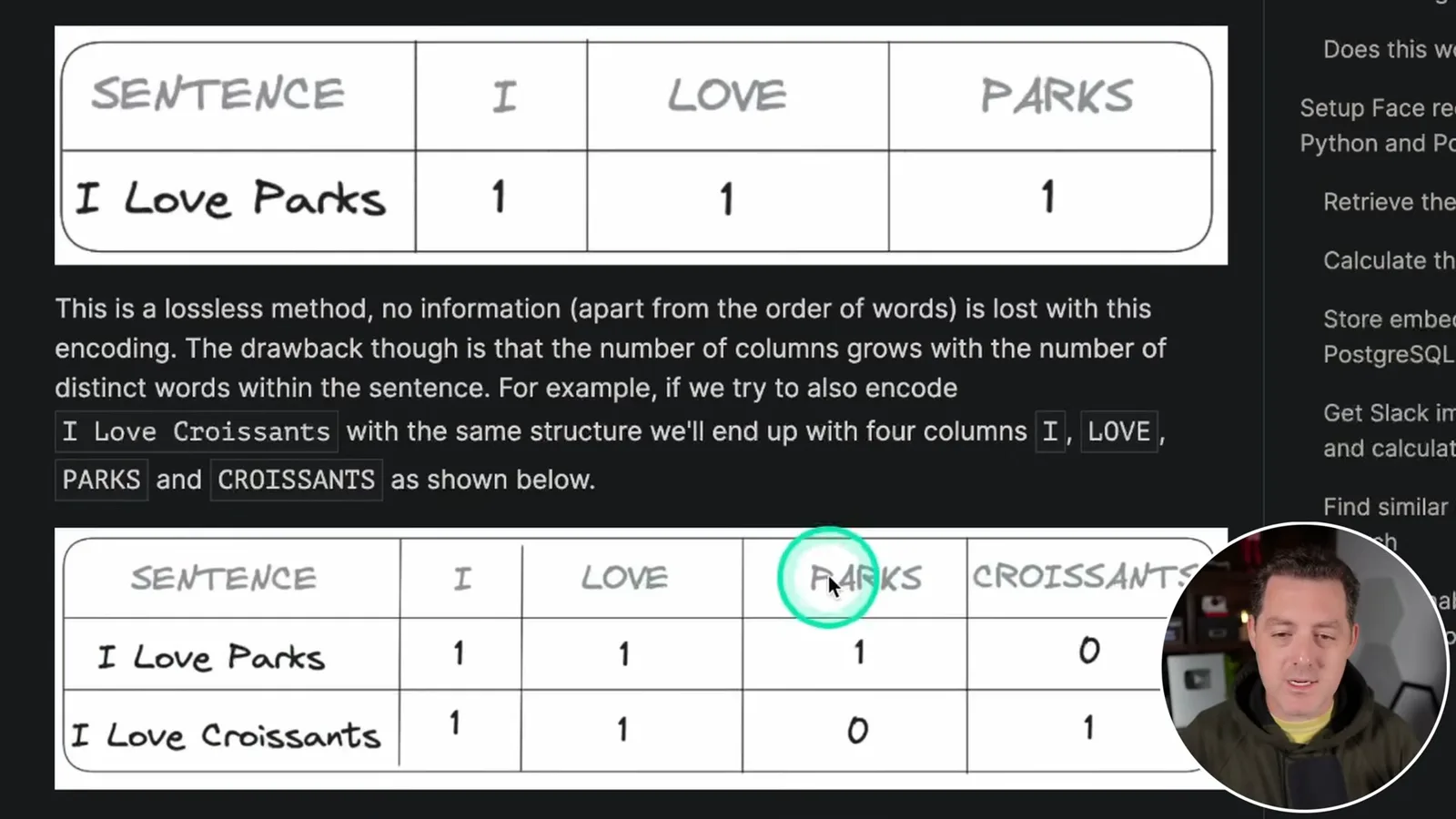
Distances between vectors give a way to order items by similarity. The actual image pipeline uses a learned representation of visual content, rather than those four word-presence flags. Similarity depends on the model, preprocessing and distance measure; a short vector explanation is only an intuition for the technique.
Detecting faces in a group photo
The Colab notebook loads a Haar cascade and crops detected faces. Detection parameters influence the resulting images.
In Colab, Berman installs the libraries and loads a pretrained OpenCV Haar cascade for frontal-face detection. He downloads the `haarcascade_frontalface_default.xml` classifier, uploads it into the notebook environment and supplies its file path. He then uploads a group photo of the cast of *It’s Always Sunny in Philadelphia* as the source image.
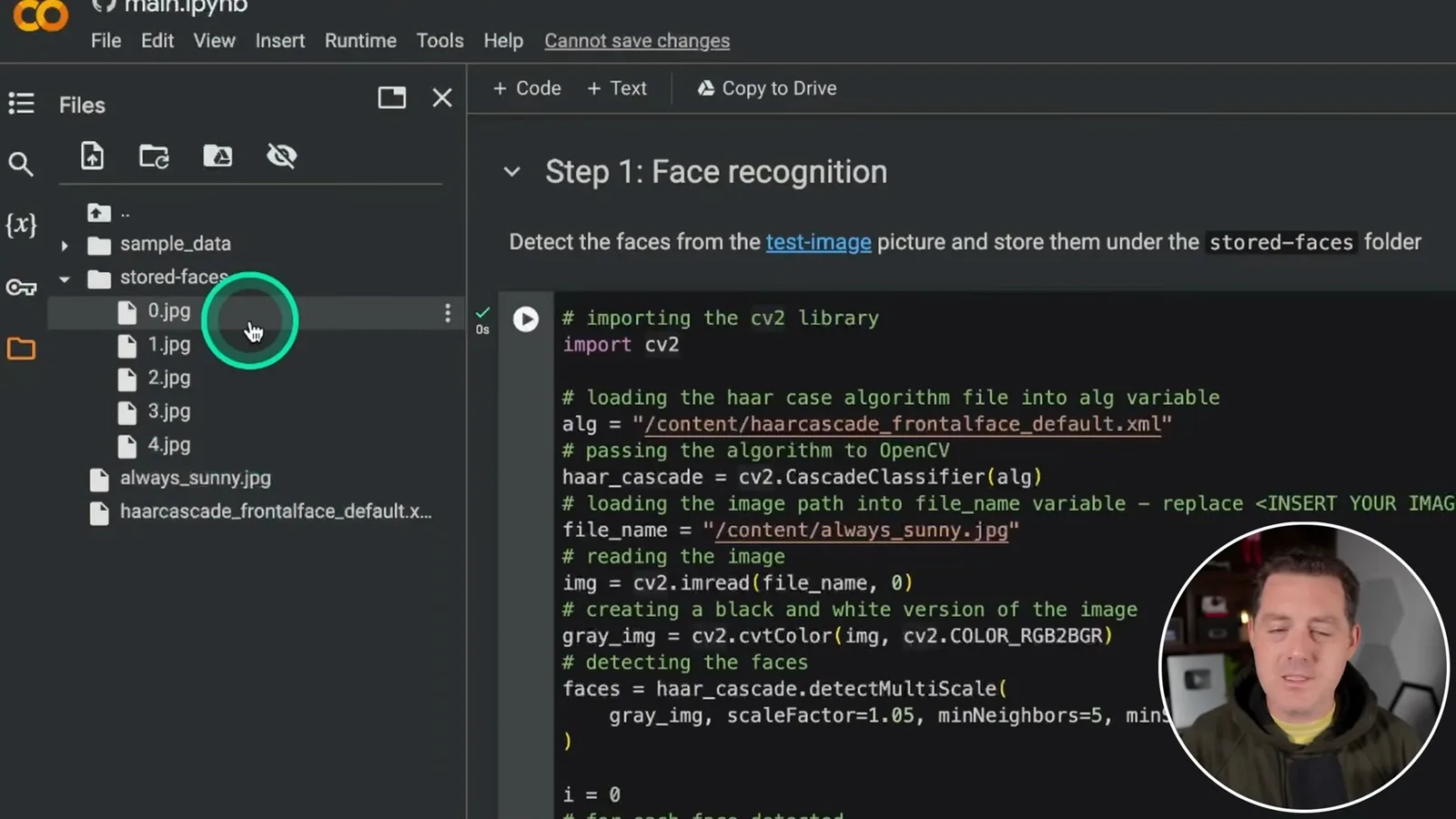
The notebook reads the image, prepares a grayscale version and calls `detectMultiScale` to find face rectangles. In the demonstration, Berman changes `minNeighbors` to 5 and uses a minimum size of 100 by 100 pixels. OpenCV defines `minNeighbors` as the number of neighboring candidate rectangles required to retain a detection, not a count of nearby people.
For each detected rectangle, the code crops the image and saves a JPEG in a `stored-faces` folder. Berman first creates that folder, reruns the cell and finds five crops. He notes that detection is imperfect and that changing parameters can affect results; missed faces cannot be returned by later searches.
PostgreSQL and embeddings
Berman provisions a sponsored Aiven service, enables pgvector and stores image embeddings. Credentials and sensitive data need protection.
The next stage is a PostgreSQL database with the pgvector extension. Aiven, the sponsor, provides the hosted service in the demonstration. Berman creates a project and a PostgreSQL service using the trial credits available at the time; trial offers and pricing can change, so the video’s 2024 figures should not be assumed current.
Once the service is running, Berman connects with `psql`, enables the extension using `CREATE EXTENSION vector;`, and creates a `pictures` table with a filename and a 768-dimensional vector column. The dimension matches the embedding output in the example. A service URI contains credentials and should be kept out of shared notebooks, logs and screenshots.
Back in Colab, the code loads each cropped face, uses `imgbeddings` to produce an image vector, and inserts the filename and vector into PostgreSQL. The Aiven tutorial identifies the embedding approach as OpenAI CLIP-based image recognition. A general image embedding is not by itself a validated biometric identification system.
Searching with a second photo
He embeds a separate photo and ranks the stored crops by distance. The example works once, without establishing general recognition accuracy.
Berman uploads a separate image of actor Charlie Day as the query, loads it and calculates its embedding with the same tool. Using compatible embeddings for both the stored crops and the query is necessary for the distance comparison to be meaningful.
The query orders the stored records by vector distance and returns the closest candidates. In this demonstration, the result corresponds to the same actor in the original group image. The source tutorial uses Euclidean distance via pgvector; nearest-neighbor ordering still returns a closest item even when no correct match is present unless an appropriate rejection rule is added.
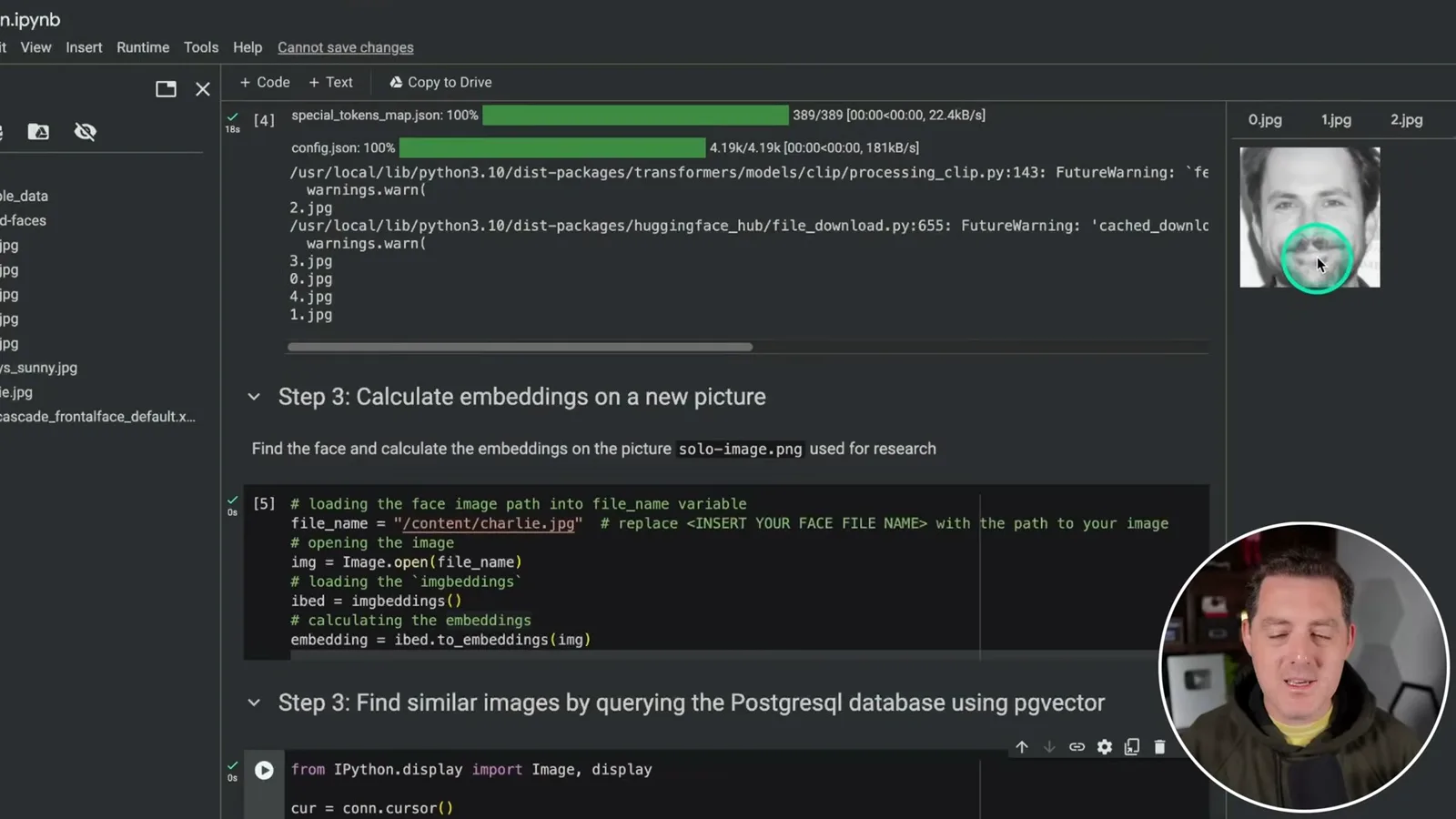
A successful match in one small example does not establish a reliable accuracy rate, identity verification, or performance across lighting, pose and different people. Face detection can miss or falsely locate faces, and image similarity can produce false matches. Human review and a representative evaluation are needed before relying on the output.
Berman encourages viewers to extend the example and thanks Aiven for sponsoring the video. He mentions a referral offer and credits available in 2024; check current terms before provisioning a service. Images and face-derived vectors can be sensitive, so use images with appropriate permission, protect access and delete stored material when no longer needed.
Más de este canal
 34:21EN
 Matthew Berman· 27 oct 2026Matthew Berman Examines Anthropic’s IPO Filing, AI Growth and GovernanceMatthew Berman, Sam Altman · Forward FutureThe presenter reviews the S-1’s financial metrics, compute strategy and voting structure while questioning the tension between rapid AI development and safety.
 0:26ENMatthew Berman· 25 oct 2026Sam Altman on Human Values and Problem-Solving in an AI WorldSam Altman · OpenAIIn a short interview excerpt, Altman considers the enjoyment of solving hard problems and the human role in interpreting results.
 0:36ENMatthew Berman· 25 oct 2026Kimi K3.1 and a Rubik’s Cube Solver DemonstrationMatthew Berman · Forward FutureMatthew Berman shows a scrambled virtual cube being solved and gives the Kimi K3.1 test a favorable assessment.
 0:21ENMatthew Berman· 24 oct 2026An AI-Generated Kimi Benchmark Chart Used Invented ScoresMatthew Berman · Forward FutureMatthew Berman asks for a graph of Kimi K3.1 Pro benchmarks, then discovers that the displayed figures are illustrative placeholders.
 25:50ENMatthew Berman· 24 oct 2026Kimi K3.1 Pro Tested: Strong 3D Demos, Uneven Results and Competitive PricingMatthew Berman · Forward FutureMatthew Berman tests the open-weight model on coding, 3D rendering and visual explanations, then compares benchmark results and prices.
 32:20ENMatthew Berman· 23 oct 2026Who Is Local AI For? The Costs, Trade-offs and a Hybrid FutureMatthew Berman · Forward FutureMatthew Berman weighs data control and independence against hardware cost, setup complexity and inference speed.