En 30 segundos
Matthew Berman sets up Nous Research’s Hermes Agent using Hostinger and an OpenAI API key, then demonstrates skills, a scheduled job, memory, profiles, provider routing and plugins. A skill with a missing script triggers an attempted temporary workaround, which he describes as self-healing. He connects a Telegram bot and shows a Manim animation generated by the assistant. Hostinger sponsored the video; setup time, available integrations and access depend on the selected environment and configuration.
- 1Managed setupBerman provisions the sponsored hosting environment and provides an OpenAI API key before opening Hermes.
- 2Adding a skillHe copies a skill instruction file into the interface, then encounters a missing script when invoking it.
- 3Scheduled tasksA daily briefing job is configured for every 24 hours; a working calendar connection would be needed for real meetings.
- 4Model routingThe settings show model choices for tasks such as vision, compression and session search.
- 5Telegram gatewayBerman sets up a bot, restricts access with a user ID and tests a greeting.
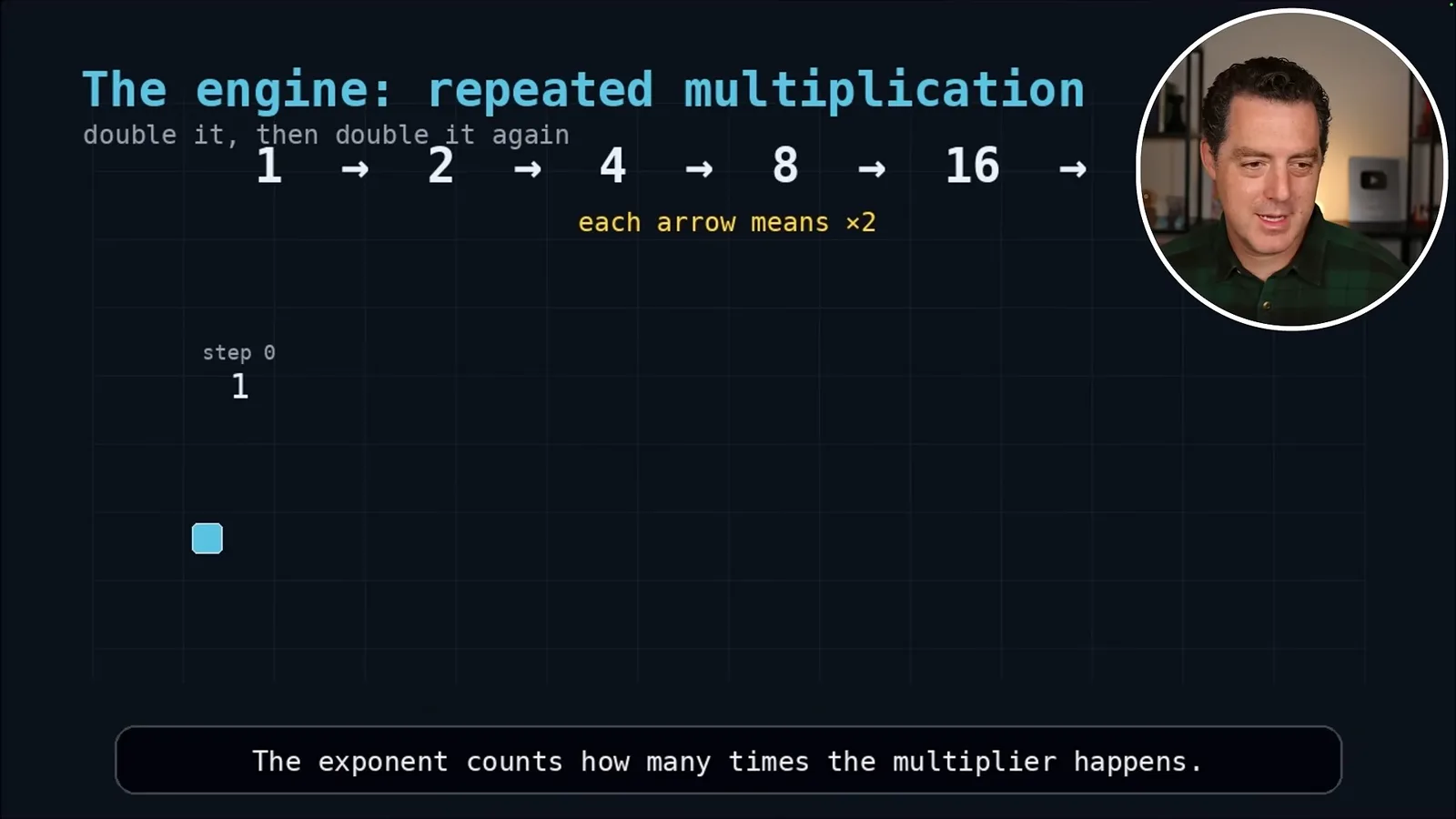
- 6Manim animationA video skill produces a short animation explaining exponentials.
Conclusiones
- The video demonstrates a sponsored managed installation using separate hosting and model-provider configuration.
- Hermes supports reusable skills; the demonstrated research skill also required a script that was initially missing.
- A scheduled task can be configured with a prompt and delivery destination, while real data access requires the corresponding integration.
- Memory, profiles and model-routing settings allow the user to shape how the assistant operates.
- The Telegram example uses a bot token and allowed user ID to connect messaging.
- The hosted server’s actual access depends on the credentials, services and permissions granted to it.
Lee el texto editado por capítulos
Hosted setup and first connection
Berman demonstrates a sponsored Hostinger installation with a model-provider key. He opens Hermes and checks basic connectivity.
In a June 2026 tutorial sponsored by Hostinger, Matthew Berman introduces Hermes Agent, a Nous Research assistant, and demonstrates a hosted setup, skills, scheduled tasks, memory and messaging. He contrasts it with OpenClaw, focusing on features available in the configuration he shows rather than presenting a controlled comparison.
Berman selects a Hostinger hosting plan and supplies an OpenAI API key during setup. He reports that the initial installation takes under two minutes, then walks through the remaining configuration and opens the interface. Hosting and model-provider usage are separate parts of the setup, and the advertised timing is his demonstration, not a guarantee for every installation.
He leaves the provider configuration already populated, chooses a workspace and opens Hermes. In his demonstration he changes the selected model and sends a greeting to verify that the assistant responds. A successful greeting confirms basic connectivity, not that other integrations are configured.
Skills and recovery
The interface exposes bundled skills, and Berman adds a research skill. A missing script leads the agent to attempt a temporary workaround.
The skills panel lists many enabled instruction sets, including coding and diagramming examples. Berman shows that skills can be toggled and inspected as Markdown. The bundled selection reflects the hosted environment shown; installed skills and available tools can vary by setup.
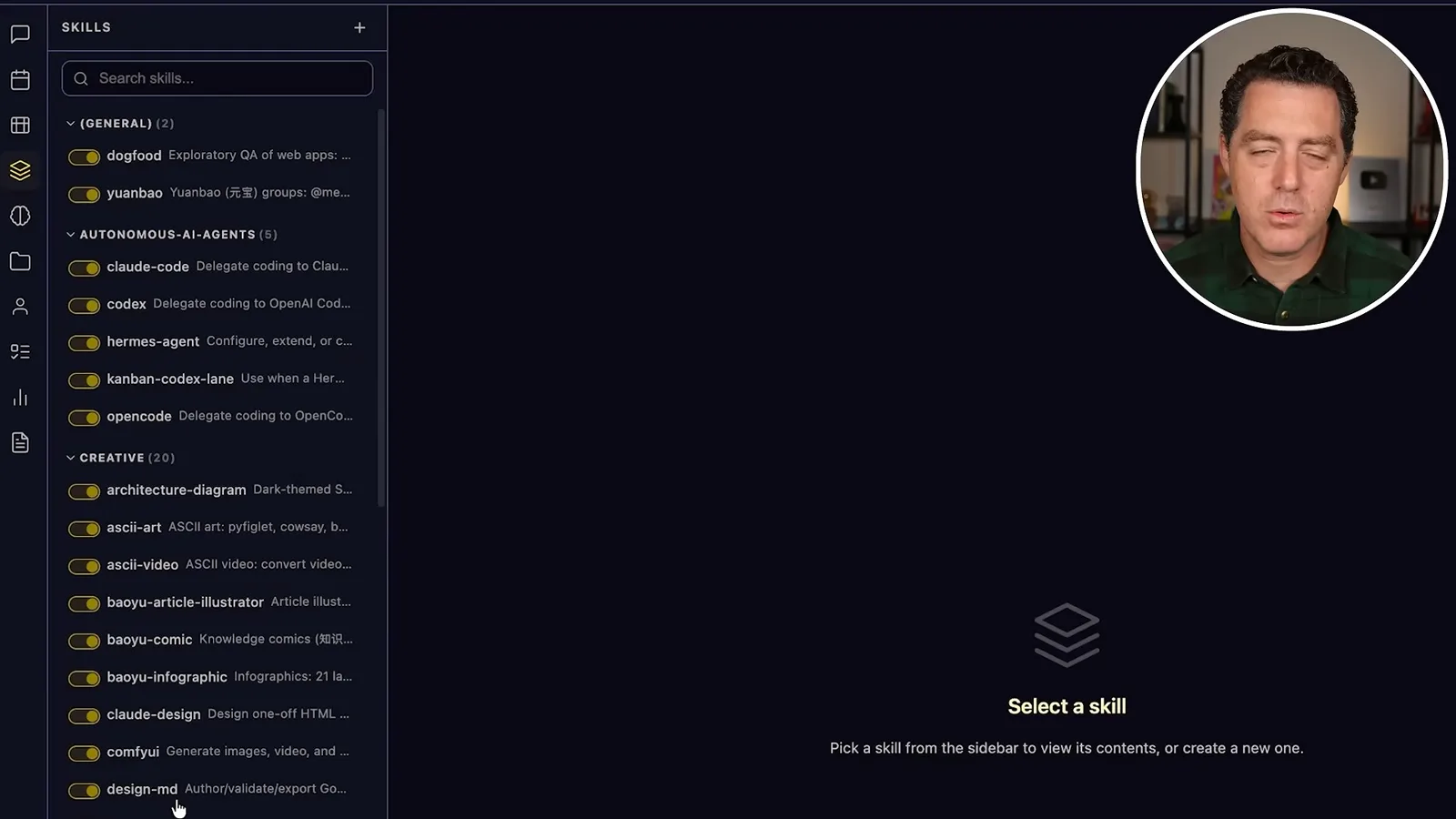
To add a skill, he copies the raw SKILL.md content from a repository into a new skill entry, assigns a name and category, and invokes it from chat using a slash command. His example asks a “last 30 days” research skill about Hermes.
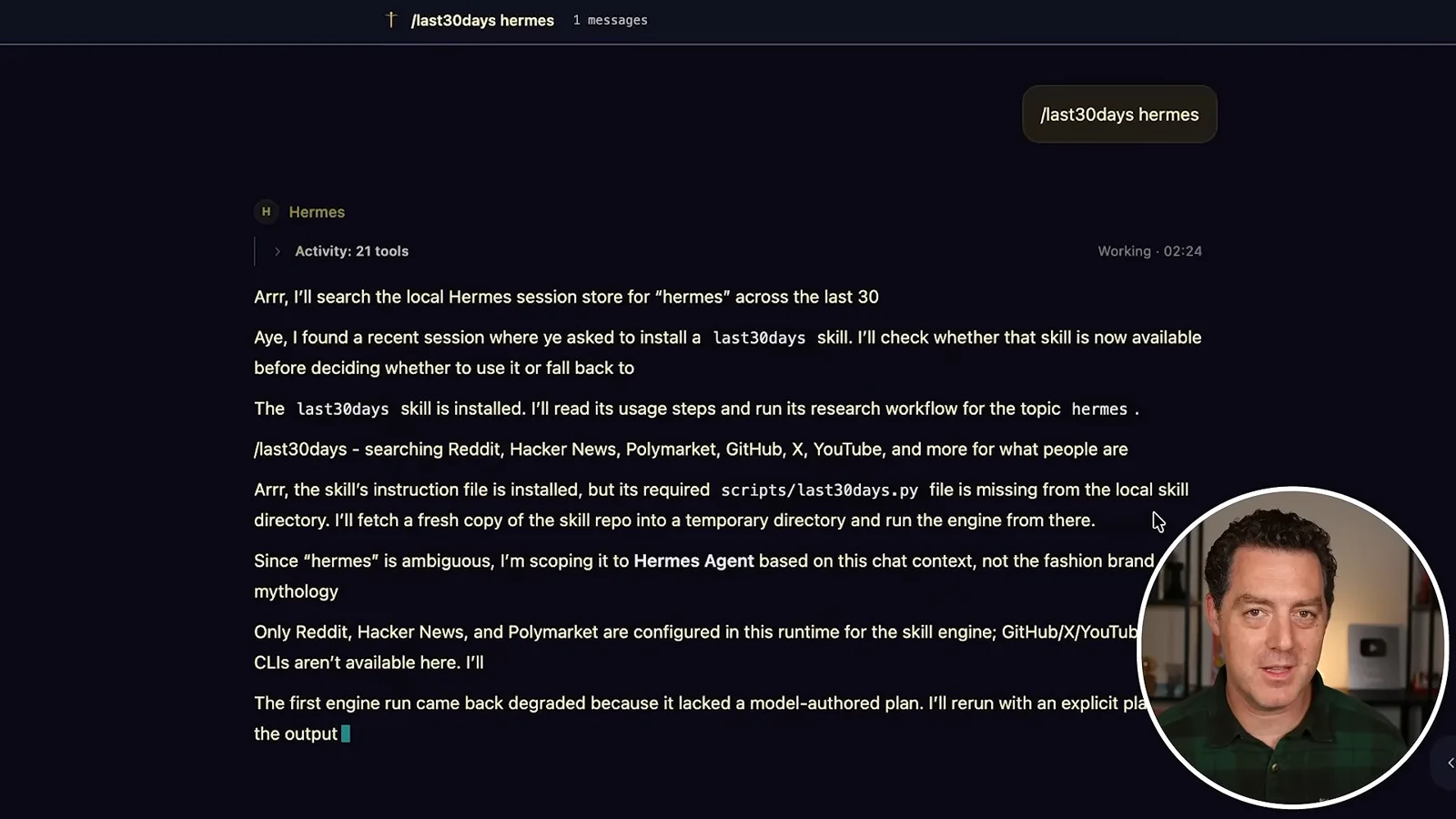
The agent reports that the instructions were installed but a required Python script was missing. It says it will fetch the repository into a temporary directory and run the script there; Berman calls this self-healing. The shown workaround illustrates one recovery attempt, not proof that every failure is fixed or that the missing file was permanently installed.
Tasks, memory and configuration
Berman creates a scheduled briefing and shows memory, profiles, usage, providers, routing and plugins. Integrations require their own configuration.
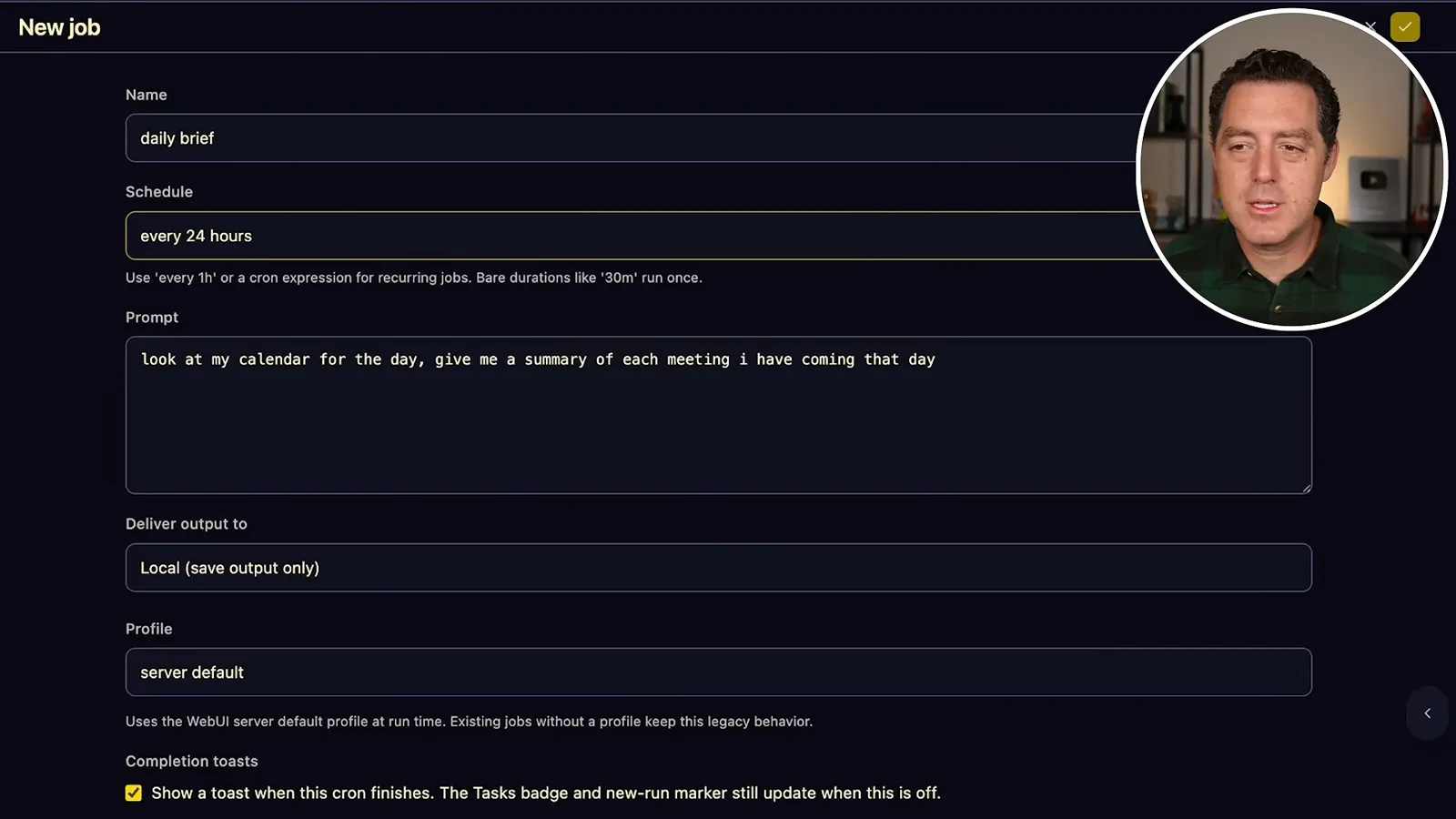
Under Tasks, Berman creates a daily briefing job with a 24-hour schedule and a prompt to summarize that day’s meetings. He chooses local output and saves the job. The example demonstrates job configuration; obtaining real meeting information also requires an appropriately connected calendar.
The memory view lets him edit persistent instructions and add personal facts. He demonstrates a pirate-speaking style and stores basic information about himself. These are user-controlled examples in his setup, not evidence that every memory entry will always be applied correctly.
Profiles allow different agent configurations, such as separate marketing and development setups. Berman also shows an insights view for tokens, messages and sessions, making usage visible in the interface.
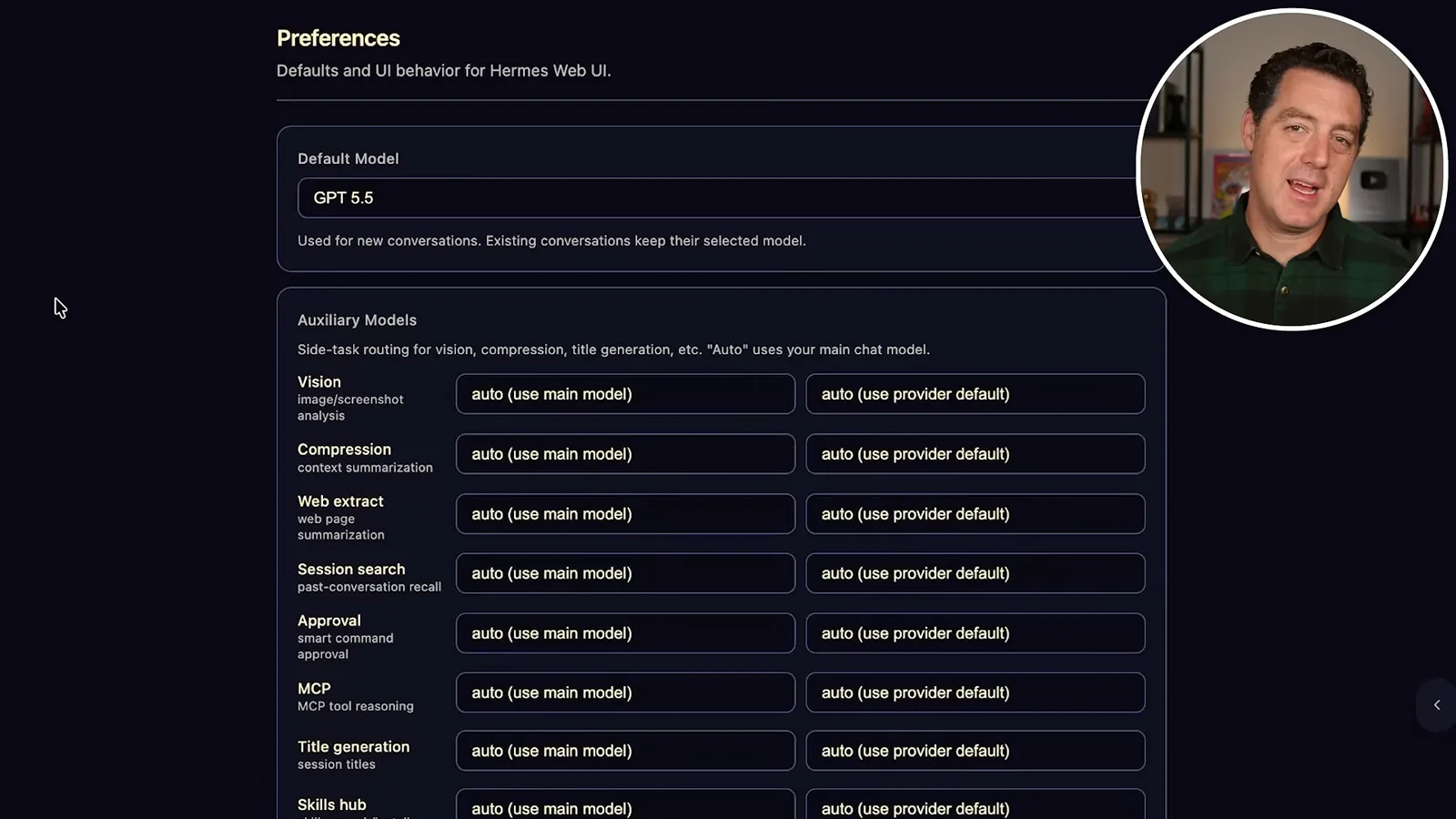
The settings screen lists multiple model providers, including hosted APIs and local options such as LM Studio. Berman points out routing controls for tasks such as vision, compression, web extraction and session search, and leaves the settings on automatic selection for his demonstration.
He describes plugins as broader feature integrations and shows examples for browser use and web extraction. The available plugins and their operation depend on installation, configuration and any required service credentials.
Telegram and a generated animation
He connects a Telegram bot and demonstrates a Manim-generated explanation of exponentials. He closes with the hosting sponsorship.
Berman connects Hermes to Telegram through the hosted command line by running `hermes gateway setup` and selecting Telegram. He creates a bot through Telegram’s BotFather, supplies its token, restricts access using an allowed user ID, and restarts the gateway. He then sends a greeting and receives a reply in the configured style.
For a practical demo, Berman invokes a built-in Manim video skill and asks for an explanation of exponentials. The assistant returns a 58-second animation illustrating repeated multiplication. Manim is a Python animation library, and the example shows one generated video rather than a general guarantee of accuracy.
Berman summarizes the appeal as skills, recovery behavior, plugins, configuration and managed hosting. He says the hosted instance is on a separate server and has access to what he grants it; its actual access depends on the connected credentials, services and permissions. He discloses that Hostinger sponsored the video.
Más de este canal
 34:21EN
 Matthew Berman· 27 oct 2026Matthew Berman Examines Anthropic’s IPO Filing, AI Growth and GovernanceMatthew Berman, Sam Altman · Forward FutureThe presenter reviews the S-1’s financial metrics, compute strategy and voting structure while questioning the tension between rapid AI development and safety.
 0:36ENMatthew Berman· 25 oct 2026Kimi K3.1 and a Rubik’s Cube Solver DemonstrationMatthew Berman · Forward FutureMatthew Berman shows a scrambled virtual cube being solved and gives the Kimi K3.1 test a favorable assessment.
 25:50ENMatthew Berman· 24 oct 2026Kimi K3.1 Pro Tested: Strong 3D Demos, Uneven Results and Competitive PricingMatthew Berman · Forward FutureMatthew Berman tests the open-weight model on coding, 3D rendering and visual explanations, then compares benchmark results and prices.
 32:20ENMatthew Berman· 23 oct 2026Who Is Local AI For? The Costs, Trade-offs and a Hybrid FutureMatthew Berman · Forward FutureMatthew Berman weighs data control and independence against hardware cost, setup complexity and inference speed.
 1:03:37ENMatthew Berman· 23 oct 2026Matthew Berman’s Team Tests Kimi K3.1 on Animation, Games, and ChartsMatthew Berman, Alex, Brian · Forward FutureA live team AMA turns into an informal test of Kimi K3.1, from personal-agent workflows to motion graphics, a browser game, and a benchmark chart.
 0:53ENMatthew Berman· 22 oct 2026Sam Altman on AI and the Discovery of New KnowledgeSam Altman · OpenAIAltman expects progress in mathematical discovery to extend to biology, materials and energy.