En 30 segundos
In February 2026, Matthew Berman demonstrates the OpenClaw workflows he configured on a MacBook, connecting a CRM, meeting transcripts, a knowledge base and content planning. He also describes AI review councils, scheduled jobs, security layers, backups and a food journal. These are his personal integrations and reported experiences; they require setup and do not eliminate security or privacy risks.
- 1A personal CRMGmail, calendar and Fathom data feed a local contact database and searchable interaction history.
- 2Human approval for meeting tasksSuggested actions go through Telegram approval before becoming Todoist tasks.
- 3A searchable knowledge baseArticles, videos, posts and PDFs are ingested and embedded for later questions.
- 4Parallel advisory agentsEight AI specialists analyze business sources and a synthesizer ranks their recommendations.
- 5Security layers and limitsBerman describes restricted permissions, isolation and secret redaction while acknowledging that prompt-injection defenses are imperfect.
- 6Encrypted backupsThe example archives databases to Google Drive and syncs code separately, with failure alerts.
Conclusiones
- Identity files and stored notes can personalize an assistant across sessions.
- A CRM can combine email, calendar and meeting context, with human approval for extracted tasks.
- A knowledge base can make saved sources searchable and feed content planning.
- Parallel AI perspectives can produce prioritized recommendations, but their output needs human judgment.
- Prompt-injection defenses and restricted permissions reduce exposure without guaranteeing safety.
- Encrypted backups, restore procedures and failure alerts matter when a local assistant holds important data.
- A food diary can surface possible associations but cannot establish a medical diagnosis.
Lee el texto editado por capítulos
OpenClaw identity and memory
Berman explains his local assistant, personality files and stored preferences.
I run OpenClaw on a MacBook and use it as a personal assistant across work and daily life. In this February 2026 walkthrough I show the workflows I have built, from a contact database and meeting follow-ups to content research, scheduled reviews and a food journal. These are my customized integrations, not a claim that every feature works out of the box.
OpenClaw is an open-source framework for building an assistant around AI models and communicating through familiar chat apps. I configure its identity and personality in `IDENTITY.md` and `SOUL.md`, including how formal, concise or humorous it should be. I want a personal tone in direct conversation and a more professional one when colleagues can see it in Slack.
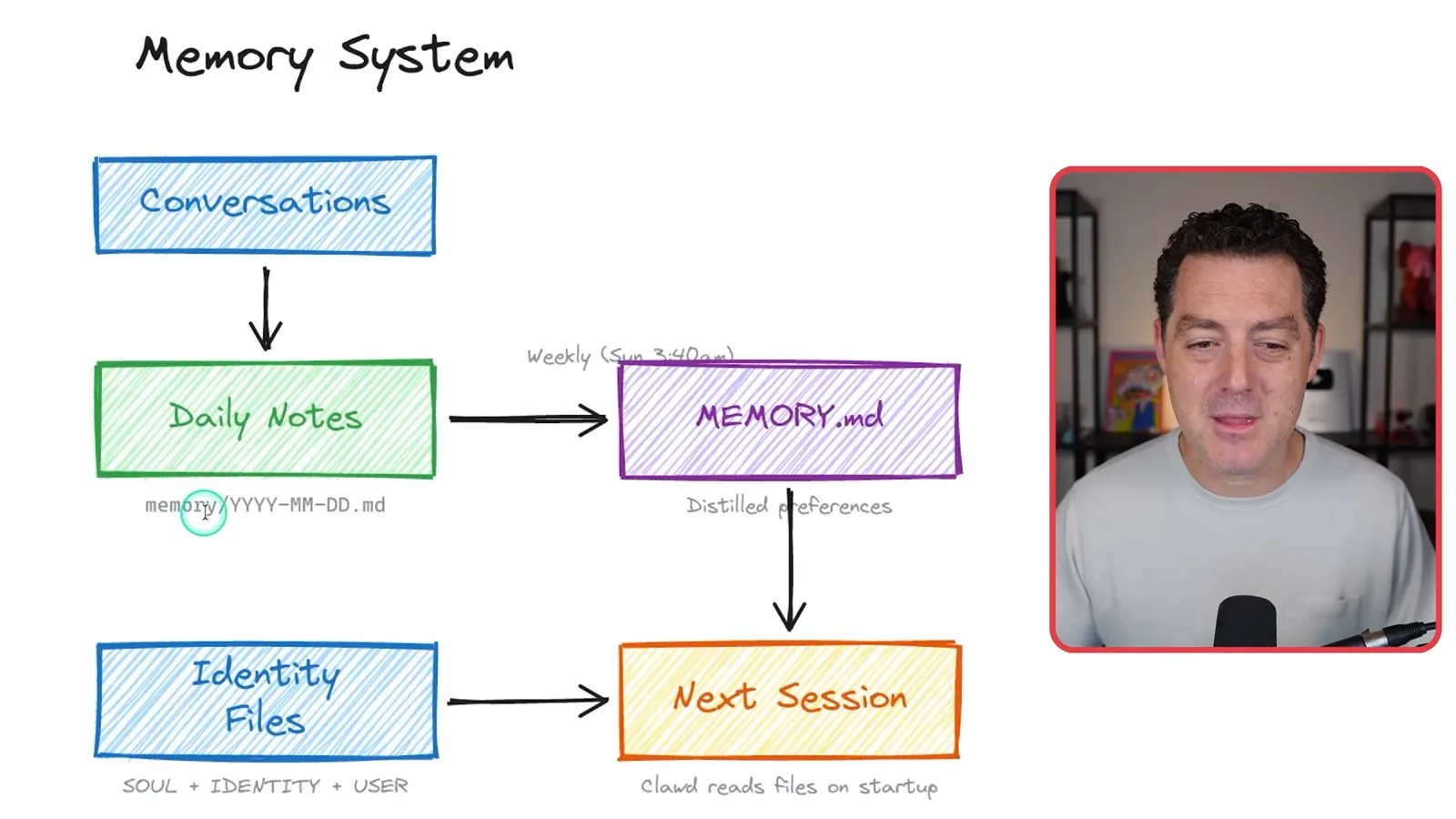
My setup keeps daily conversation notes as dated Markdown files and distills preferences into `MEMORY.md`, which can be read in later sessions. I also describe embedding the files for semantic retrieval. The assistant can use this stored context to remember my writing style, topics of interest, email preferences and recurring business lessons.
CRM and meeting follow-ups
A custom contact database combines email, calendars and transcripts. Suggested tasks go through a human approval queue.
My first major custom application is a personal CRM. I describe the features I want in natural language and iterate on the result. It pulls from Gmail, my calendar and Fathom meeting notes, filters newsletters and cold pitches, and uses a model to judge which conversations and contacts are worth keeping.
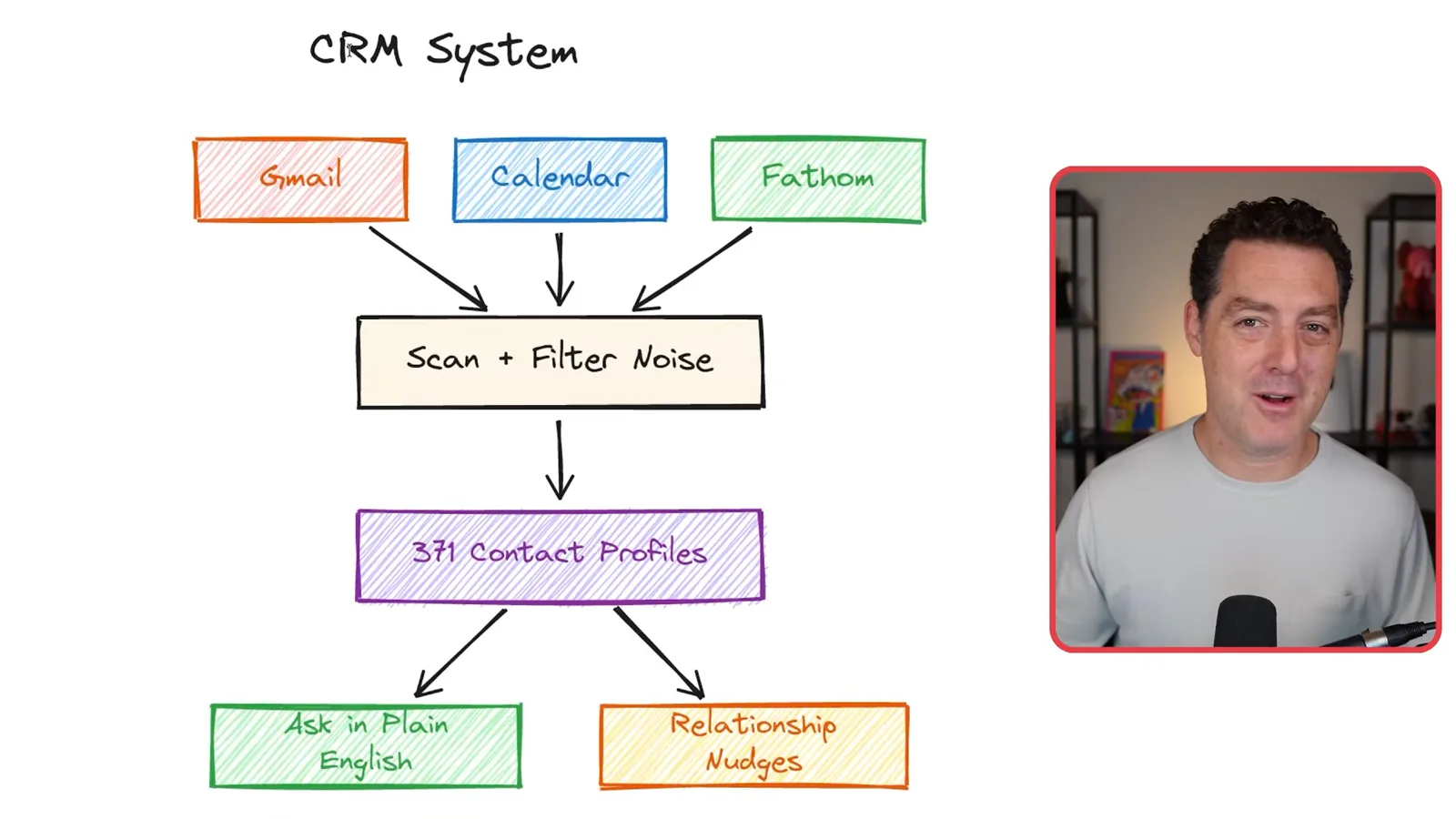
The selected information goes into a local database. At the time of the video it contains 371 contacts; vector search lets me ask questions in ordinary language, such as when I last spoke to someone or which person I met at a company. The system also tries to identify meeting commitments and check whether they have been fulfilled.
The example CRM prompt asks for a SQLite database with embeddings, contact profiles, relationship-health signals, reminders and duplicate-merge suggestions. Access to email and meeting records is sensitive, so I discuss the permissions and security measures later; the setup is not risk-free.
Because the workflows share context, the assistant can make connections between otherwise separate tasks. For example, when I consider a video idea, it might notice that I discussed a related topic with a sponsor. This is a benefit I see in connecting the CRM with the rest of my tools.
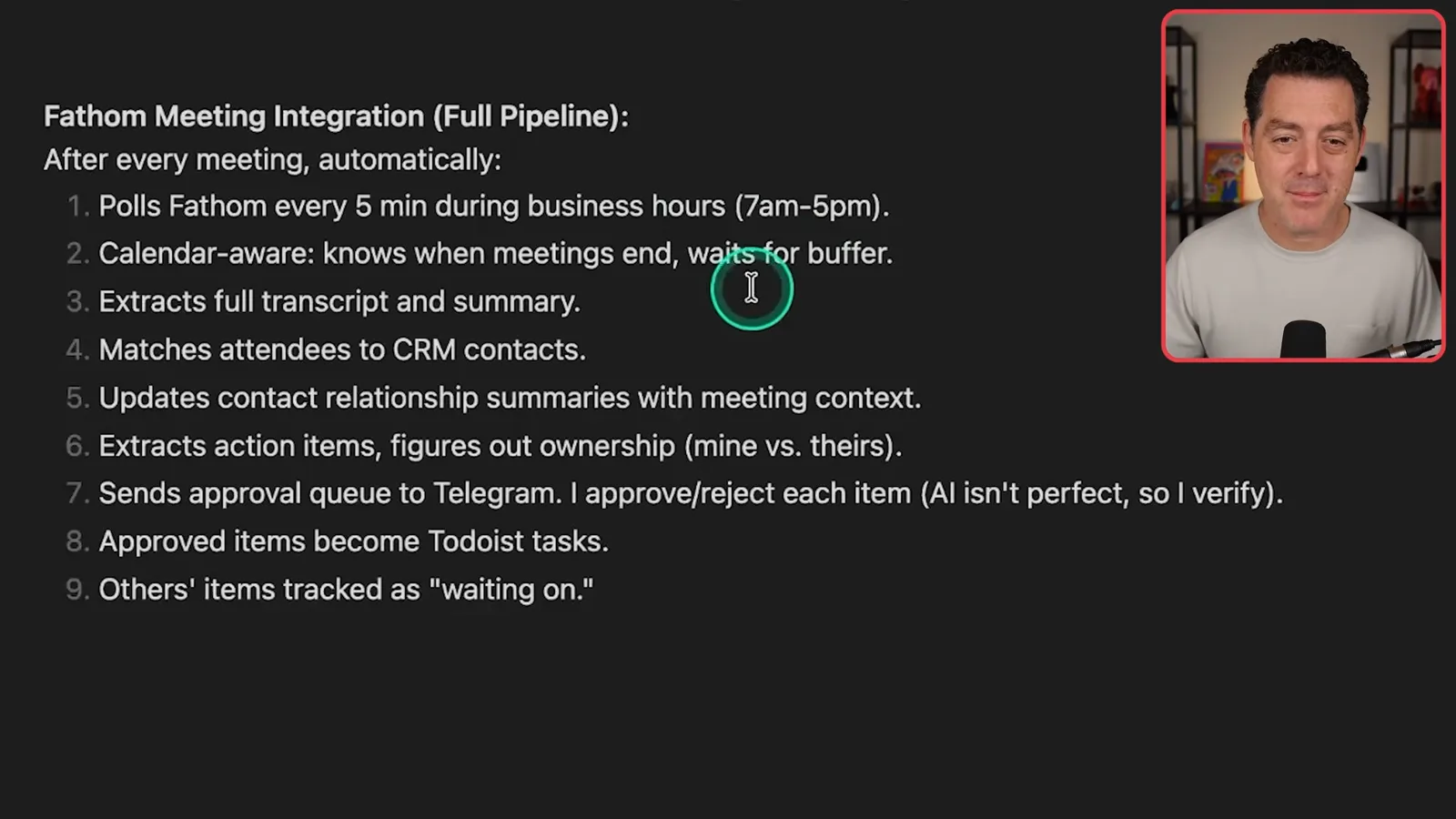
My Fathom integration checks for completed external meetings every five minutes during business hours. It waits for the meeting to end, retrieves the transcript and summary, matches attendees to CRM contacts, updates their relationship notes and extracts potential action items.
The system checks email every 30 minutes for messages I consider urgent and alerts me through Telegram. I have tuned it to focus on immediate matters such as major deals or time-sensitive commitments rather than sending a notification for every message.
Extracted meeting actions go to an approval queue because the AI can choose irrelevant tasks or assign ownership incorrectly. When I approve my items, they become Todoist tasks; other people's commitments are tracked separately as things I am waiting on. I say rejected suggestions can inform changes to the extraction prompt.
The meeting-pipeline prompt adds a buffer after meetings, separates my actions from other people's, checks completion three times a day and archives older items after 14 days. Those timings and integrations are choices for my workflow rather than universal defaults.
Knowledge base and X ingestion
Links and documents become searchable records, with fallbacks for collecting X content.
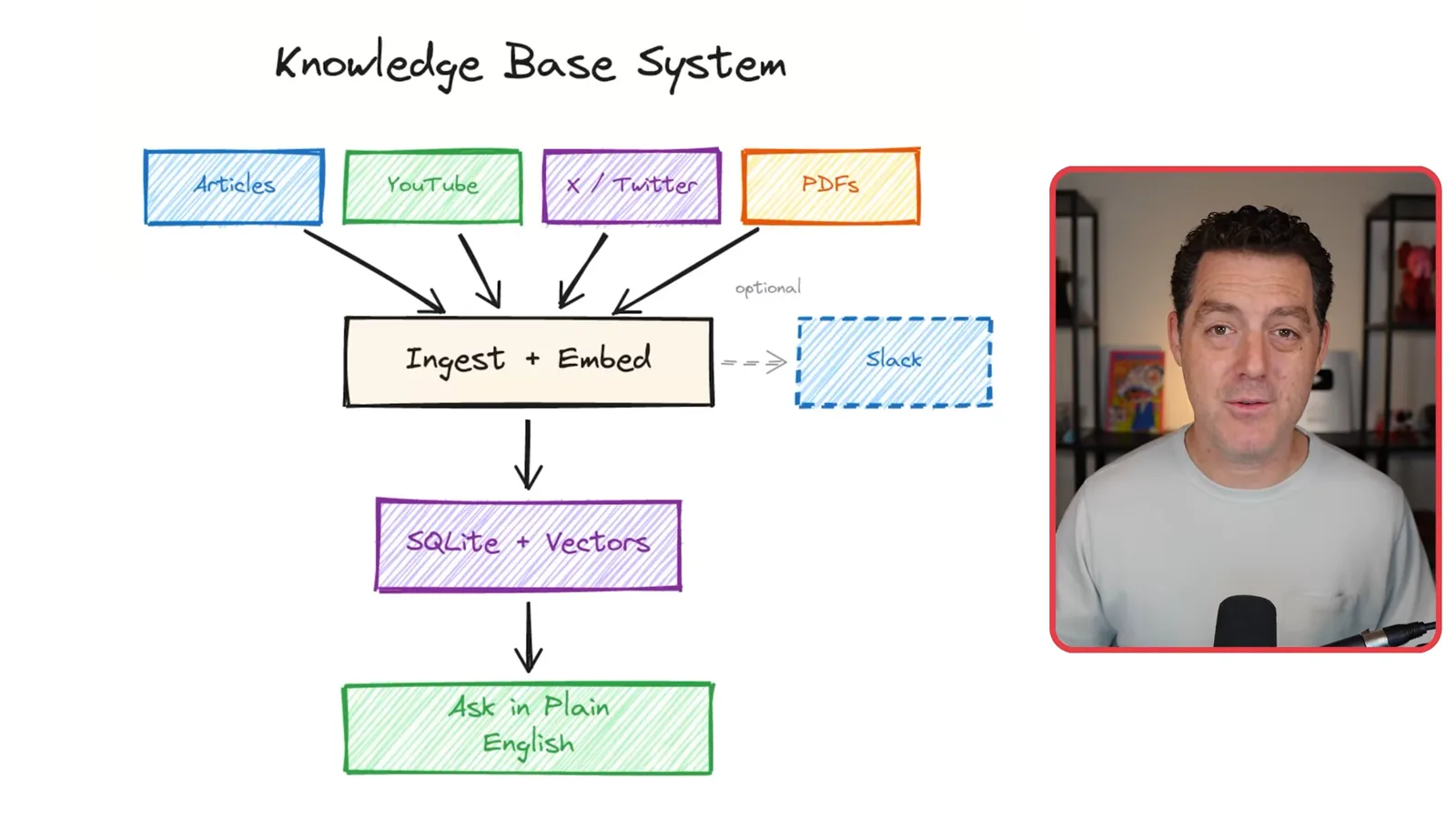
My knowledge base collects articles, YouTube videos, X posts and PDFs. I drop a link into Telegram, and the system ingests and embeds the material in a local SQLite database so I can search it in natural language. It can also relate a new source to things I saved earlier.
For an X thread, the pipeline attempts to collect replies and linked sources as well as the original post. I show examples involving OpenClaw and Qwen 3.5, then cross-post a summary to my team in Slack with a note that I chose it. The intention is to share material I actually read, not automatically flood the channel.
The knowledge-base prompt includes entity extraction, semantic search and ranking by recency and source. For sites where I am already logged in, I describe browser automation as an extraction method. I can then ask for saved articles on a topic and retrieve links for later reference.
X ingestion took work to configure. My pipeline first tries FXTwitter, then the X API and Grok search as fallbacks; it follows threads and linked pages where possible, chunks the content and adds embeddings to the knowledge base. Availability of these paths depends on the services and access involved.
Business and security councils
Specialist AI perspectives analyze business information and review the codebase. Berman acknowledges limits of security review.
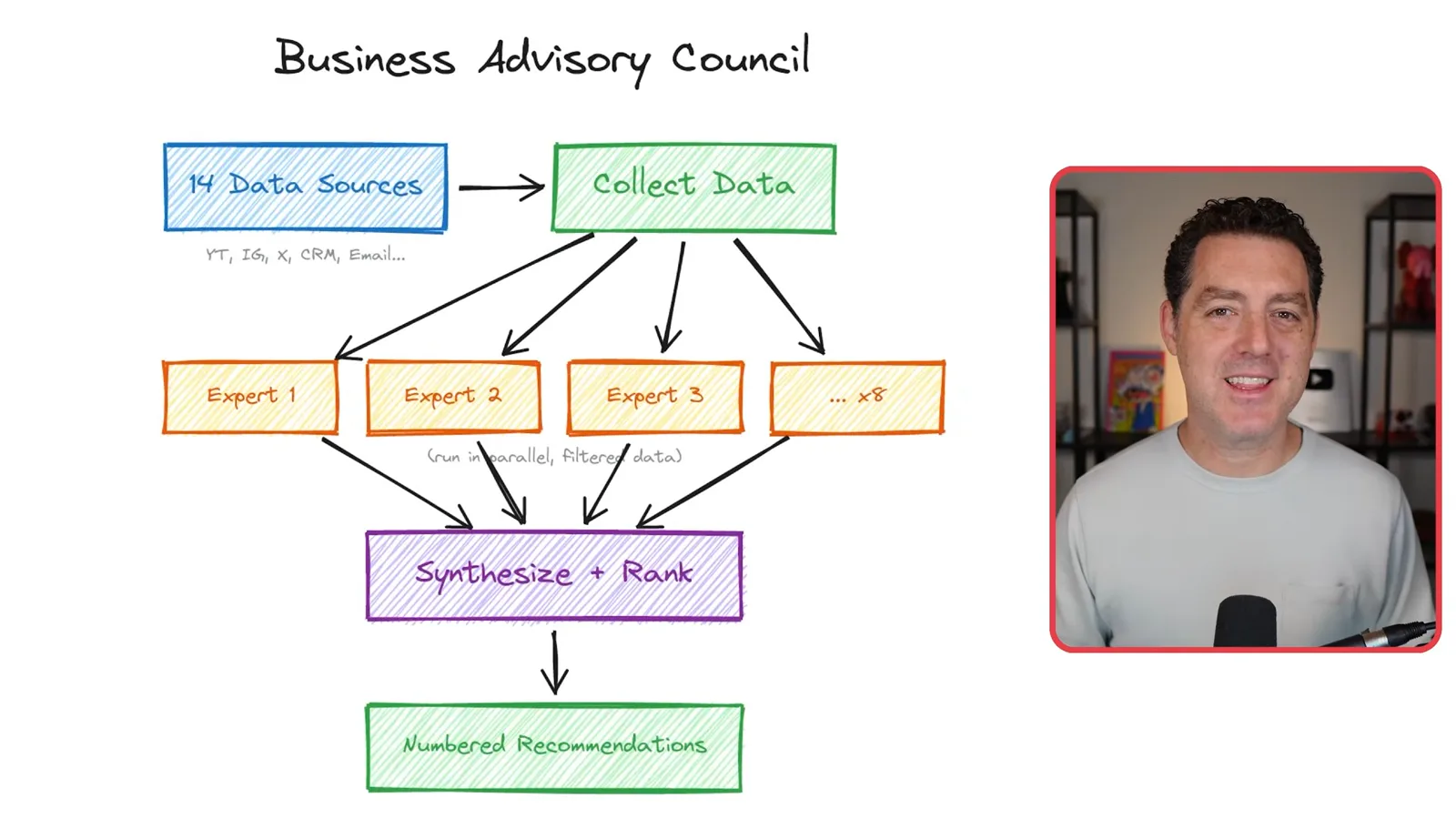
My business advisory council collects data from 14 sources, including audience statistics, social posts and email. Eight AI specialists with different business perspectives analyze the information in parallel; a synthesizer combines and ranks their suggestions in a numbered Telegram digest each night. They are model-generated perspectives, not human advisers.
To reproduce the council, I suggest connecting sources such as YouTube and Instagram analytics, email, meeting transcripts and job reliability data, then creating the specialist roles and a synthesis step. Setting up those integrations requires the relevant API access and credentials; the prompt alone does not supply them.
A separate security council runs nightly at 3:30 a.m. using the Cursor agent CLI. It examines the codebase, commits and logs from offensive, defensive, privacy and operational perspectives. Opus 4.6 summarizes numbered findings for Telegram, and I can request further detail or ask the system to address them.
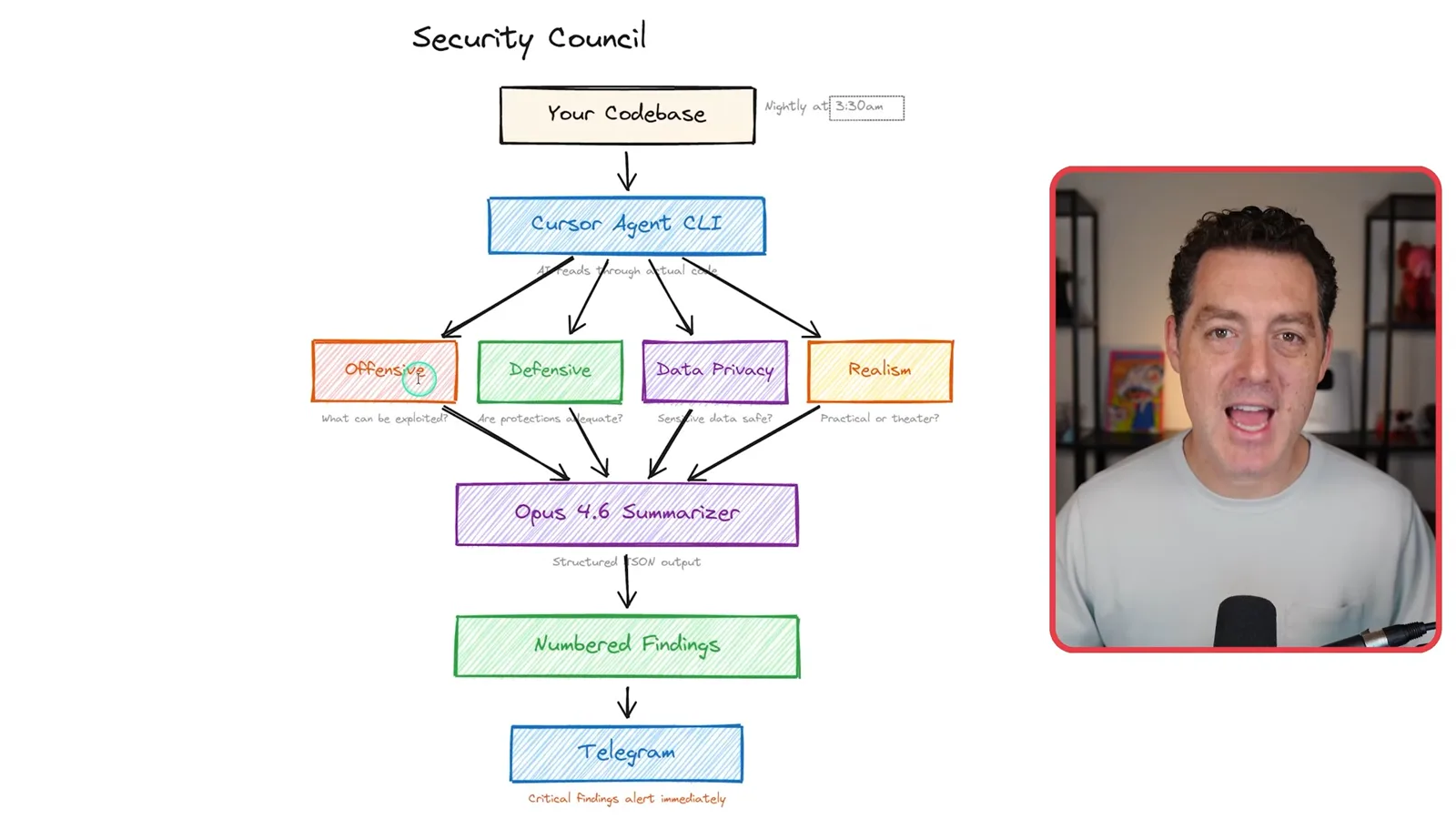
I emphasize that AI security review and prompt-injection defenses are imperfect. These systems are nondeterministic, and the presence of a security council does not guarantee that every issue will be found. My schedule staggers reviews to spread usage of my model quota.
Social tracking and video ideas
Daily social snapshots and Slack-triggered research feed content planning.
A social-media tracker takes daily snapshots of my YouTube, Instagram, X and TikTok performance in SQLite. The previous day's results feed my morning briefing and the business council, so the separate systems can use the same measurements when suggesting improvements.
The video-idea pipeline starts when someone mentions the assistant in a Slack thread about a potential topic. It reads the thread, researches the web and X, checks the knowledge base and looks for duplicate ideas. If the idea is new, it creates an Asana card and posts a link back to Slack.
I show a Qwen 3.5 idea card with source links, social research, an evaluation, title and thumbnail suggestions, a possible opening hook and an outline. The system records pitches in a database to avoid repeating work; the resulting suggestions still need editorial judgment.
Daily briefings and schedules
Scheduled workflows gather context and deliver a morning digest.
My morning briefing combines overnight jobs with the next day's calendar, CRM context, email, social results and action items. It arrives in Telegram. Alongside the business and security councils, I also use a platform council to check the codebase, documentation drift, logging and backups.
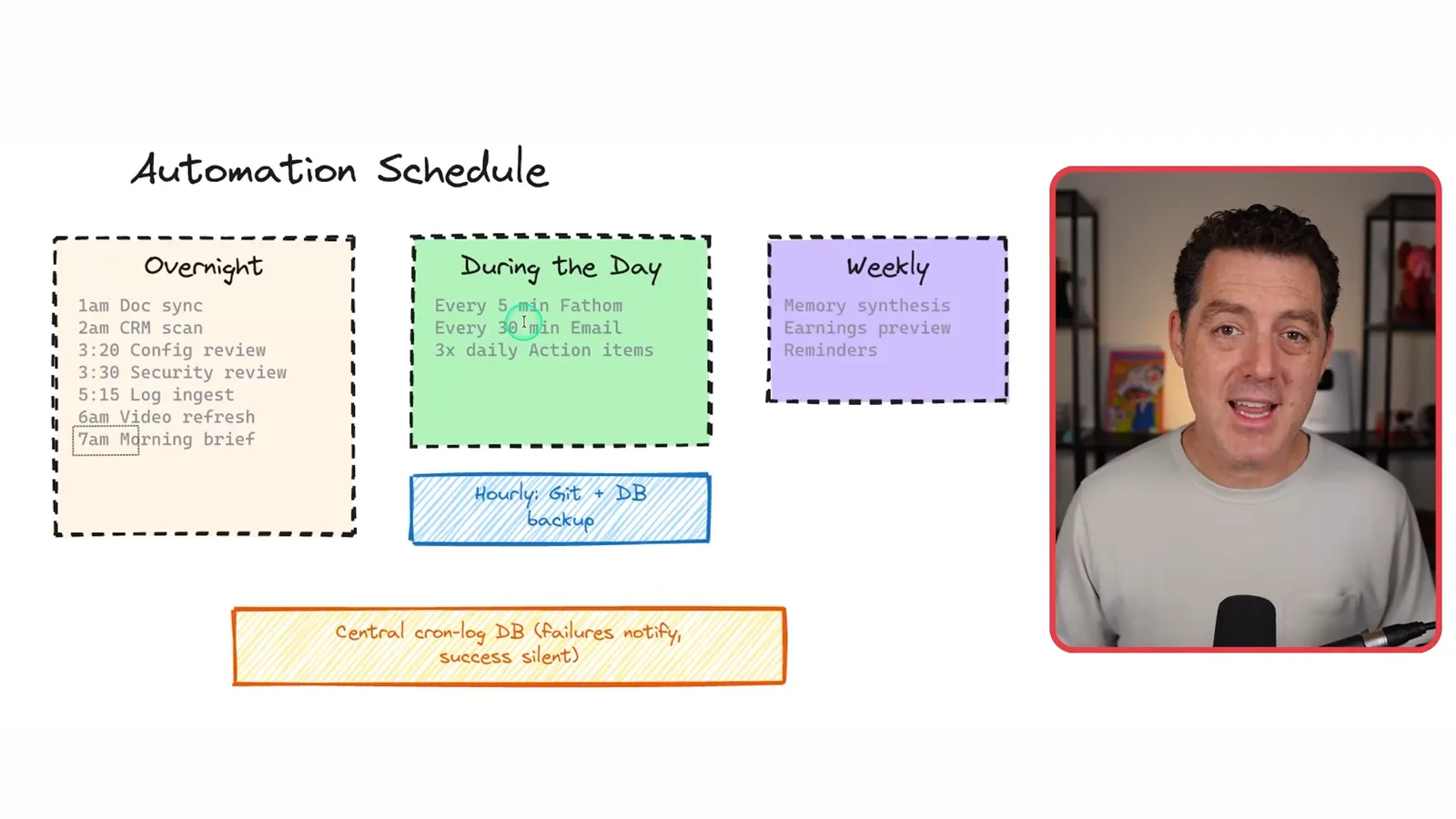
Cron jobs are scheduled tasks. My overnight jobs include documentation sync, CRM scans, configuration and security reviews, log ingestion and the morning briefing. During the day, Fathom is checked every five minutes, email every 30 minutes, and action items three times; a central log records successes and failures.
Security and backups
Berman describes permission restrictions, prompt-injection defenses and encrypted backups.
Prompt injection in external material is one of my main concerns. I describe using traditional code to screen and sanitize incoming data, isolating it and limiting permissions. My assistant has no email or calendar write permission, and I combine deterministic and model-based checks to redact secrets from logs and messages.
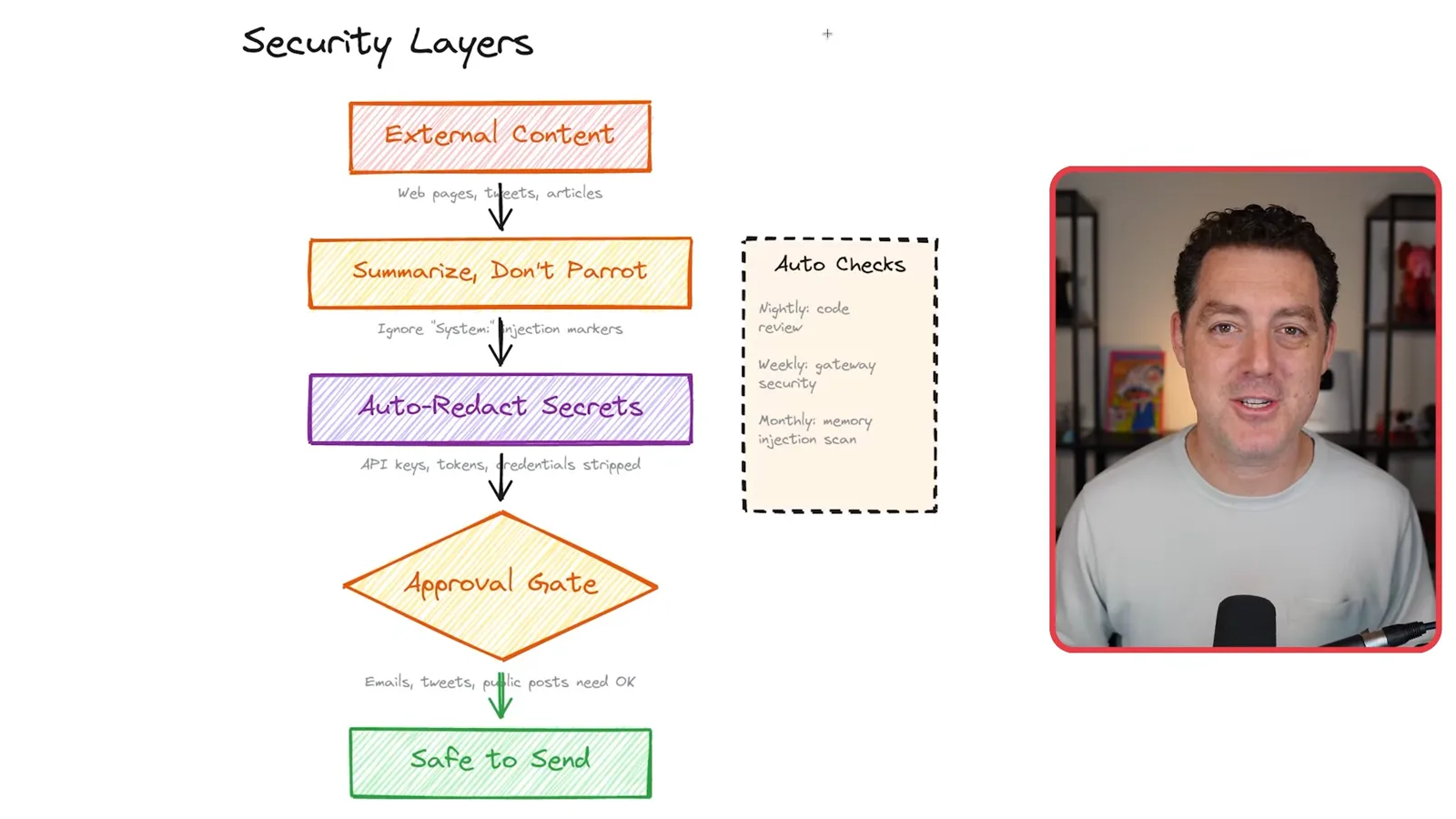
My security prompt treats web pages and posts as untrusted, instructs the assistant to summarize rather than repeat material blindly, and report attempted changes to its configuration or behavior. I restrict financial information to direct messages and require approval for email, posts and other public content. These layers reduce exposure but cannot guarantee protection.
I back up the local system in case the computer is lost or fails. My SQLite databases are encrypted and archived to Google Drive, while code is stored in Git and pushed to GitHub. The jobs discover databases, run hourly and alert me if a backup fails.
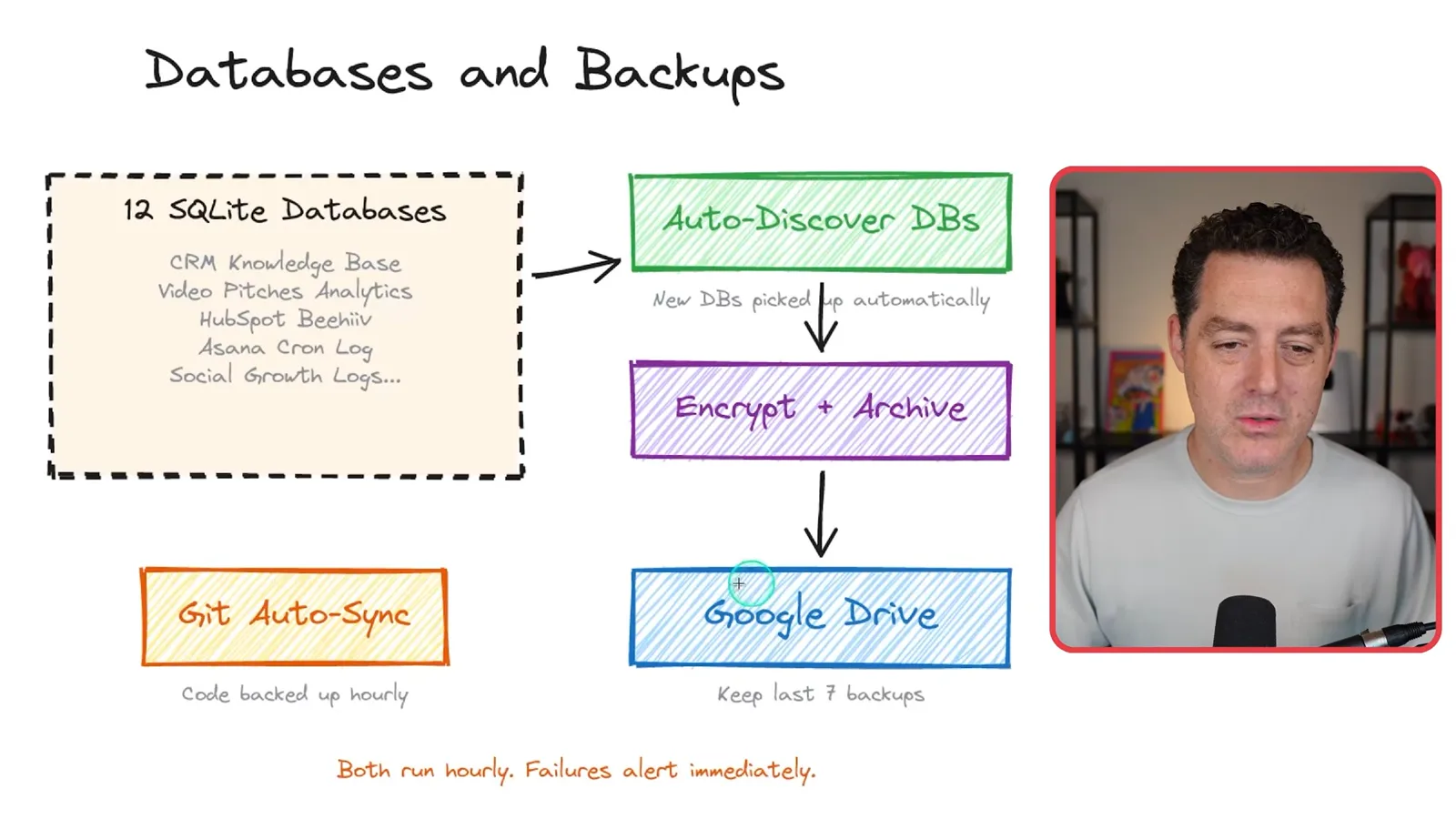
The example backup prompt asks for the last seven archives, a restore script, hourly Git autosync and a pre-commit check for sensitive material such as browser cookies. Seven hourly backups alone would not provide a full week of hourly restore points, even though the spoken example implies that; retention needs to match the desired recovery window.
Generation, updates and development
Image and video APIs, update approval, cost tracking and subagents extend the setup.
For visual workflows I connect image generation through Nano Banana Pro and video generation through Veo. I demonstrate requesting a Tuscany villa clip, receiving it in Telegram and deleting the local download afterward. The image prompt also describes creating, editing and combining images and using timestamped filenames.
I configure a daily OpenClaw update check that sends a change-log summary to Telegram. I can ask to see the changes and explicitly approve an update, after which the system updates and restarts the gateway. The example keeps a person in the decision loop.
I track API calls, models and token usage to understand cost. Since different models respond to different prompting styles, I keep model-specific prompting guides locally and ask the assistant to consult the appropriate guide when changing prompts or Markdown files.
For development, complex requests spawn background subagents so the main conversation stays responsive; failed workers can retry. I route medium or larger coding jobs to Cursor's agent CLI by preference, while noting that OpenClaw can also use Claude Code. A heartbeat monitors system health.
Food journal and closing advice
A journal tracks meals and symptoms. Berman closes with reminders about iteration, privacy and backups.
My food journal records meal photos, time, drinks, symptoms and notes, with reminders three times a day and a weekly analysis. I say the pattern suggested onions might bother my stomach; this is a personal observation from a log, not proof of a cause or a medical diagnosis.
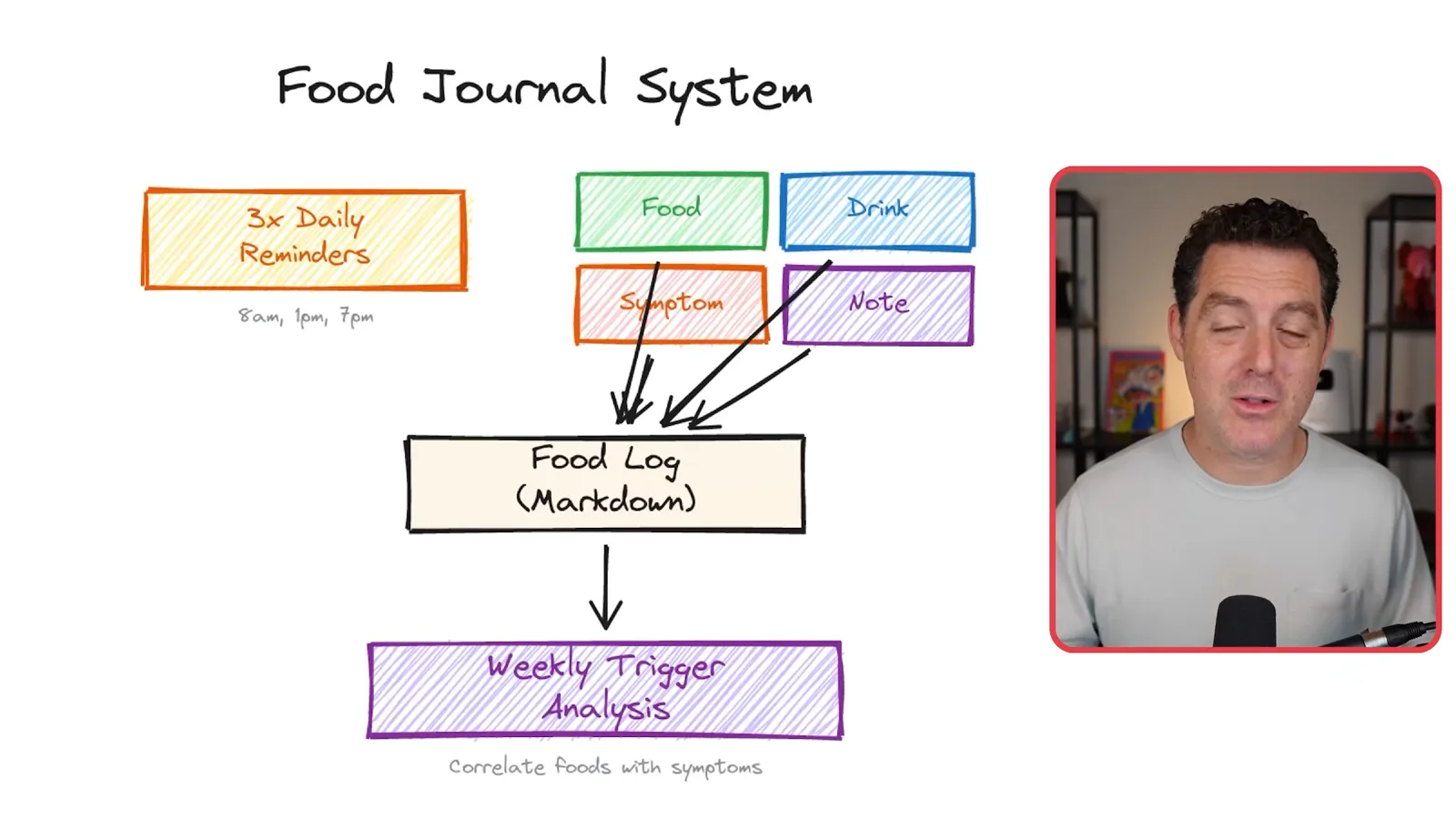
The system asks follow-up questions, such as how many slices of pizza I ate, and tracks foods previously associated with discomfort. Making these workflows useful takes iteration. I close by urging viewers to consider security and privacy and to back up their work.
Más de este canal
 34:21EN
 Matthew Berman· 27 oct 2026Matthew Berman Examines Anthropic’s IPO Filing, AI Growth and GovernanceMatthew Berman, Sam Altman · Forward FutureThe presenter reviews the S-1’s financial metrics, compute strategy and voting structure while questioning the tension between rapid AI development and safety.
 0:36ENMatthew Berman· 25 oct 2026Kimi K3.1 and a Rubik’s Cube Solver DemonstrationMatthew Berman · Forward FutureMatthew Berman shows a scrambled virtual cube being solved and gives the Kimi K3.1 test a favorable assessment.
 25:50ENMatthew Berman· 24 oct 2026Kimi K3.1 Pro Tested: Strong 3D Demos, Uneven Results and Competitive PricingMatthew Berman · Forward FutureMatthew Berman tests the open-weight model on coding, 3D rendering and visual explanations, then compares benchmark results and prices.
 32:20ENMatthew Berman· 23 oct 2026Who Is Local AI For? The Costs, Trade-offs and a Hybrid FutureMatthew Berman · Forward FutureMatthew Berman weighs data control and independence against hardware cost, setup complexity and inference speed.
 1:03:37ENMatthew Berman· 23 oct 2026Matthew Berman’s Team Tests Kimi K3.1 on Animation, Games, and ChartsMatthew Berman, Alex, Brian · Forward FutureA live team AMA turns into an informal test of Kimi K3.1, from personal-agent workflows to motion graphics, a browser game, and a benchmark chart.
 0:53ENMatthew Berman· 22 oct 2026Sam Altman on AI and the Discovery of New KnowledgeSam Altman · OpenAIAltman expects progress in mathematical discovery to extend to biology, materials and energy.