In 30 seconds
In this February 2026 short video, Matthew Berman describes his own OpenClaw-based personal CRM, which he says checks email and calendar data hourly, stores relevant contacts locally and prepares meeting context. He also refers to a Fathom note taker and shares a detailed prompt for filtering and organizing contacts. The workflow is his personal configuration and a proposed prompt, not an independent evaluation or a guarantee that the same prompt will produce a working system. The described integrations require access to sensitive communications and meeting information; local CRM storage does not mean every upstream service or model processes data locally.
- 1Hourly contact syncBerman says his bot scans email and calendar information and saves relevant contacts in a local CRM.
- 2Meeting preparationHe describes a morning channel that surfaces past conversations and notes for people on the day’s calendar.
- 3Meeting transcriptsHe says a Fathom note taker joins his meetings and its notes are ingested into the workflow.
- 4Filter contact noiseHis shared prompt requests exclusion of newsletters, bots and cold outreach, alongside contact ranking and retrieval features.
Takeaways
- Berman says his personal CRM scans email and calendar data hourly and stores relevant business contacts on his computer.
- He describes a morning meeting-preparation channel that retrieves context from previous interactions, including ingested Fathom notes.
- The shared prompt proposes filtering out newsletters, automated senders and low-engagement outreach before adding contacts.
- The written prompt specifies a daily ingestion schedule, while Berman describes his own running setup as hourly.
- The suggested system involves email, calendar and meeting data; local storage alone does not ensure that connected services or AI classification remain local.
Read the edited text by chapter
A personal CRM and meeting briefing
Berman describes an hourly sync, local contact storage and a daily meeting-preparation channel. He says the workflow also ingests Fathom meeting transcripts.
My favorite OpenClaw use case is a personal CRM. I say my bot runs a sync every hour, downloads and scans my email and calendar information, and saves relevant business contacts in a CRM running locally on my computer. This describes my own configuration; the short video does not independently verify its completeness, filtering accuracy or reliability.
Each morning, a meeting-preparation channel looks at the people on my calendar and retrieves context from previous interactions: whether we have met before, what we discussed, the takeaways and what we may discuss next. I also say a Fathom note taker joins my meetings, transcribes them and supplies material that I ingest into the CRM.
The shared filtering prompt
He introduces a prompt for building a CRM that excludes noisy contacts. The written description adds proposed filtering, scoring, storage and retrieval details.
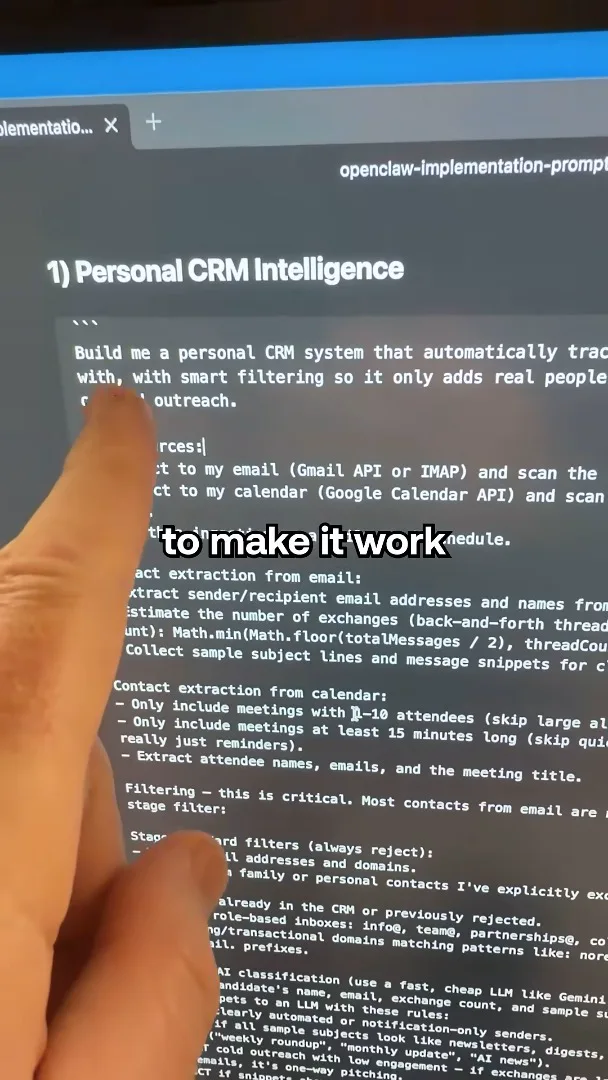
I share a prompt asking for a personal CRM that tracks meaningful relationships while filtering newsletters, bots and cold outreach. The longer prompt in the video description proposes scanning 60 days of email and calendar events, applying hard rules and AI classification, scoring and deduplicating contacts, storing them in SQLite, and supporting natural-language retrieval. It specifies daily ingestion even though I describe my running sync as hourly; these are respectively the proposed prompt and my reported configuration.
The proposed workflow requires access to email and calendar contents, and my described setup also uses meeting transcripts. The prompt suggests sending candidate contact details and message snippets to a language model for classification. Keeping the CRM database on a local computer does not by itself mean that email, Fathom, embeddings or model processing stay local; those details depend on the integrations and configuration.
More from this channel
 34:21EN
 Matthew Berman· Oct 27, 2026Matthew Berman Examines Anthropic’s IPO Filing, AI Growth and GovernanceMatthew Berman, Sam Altman · Forward FutureThe presenter reviews the S-1’s financial metrics, compute strategy and voting structure while questioning the tension between rapid AI development and safety.
 0:26ENMatthew Berman· Oct 25, 2026Sam Altman on Human Values and Problem-Solving in an AI WorldSam Altman · OpenAIIn a short interview excerpt, Altman considers the enjoyment of solving hard problems and the human role in interpreting results.
 0:36ENMatthew Berman· Oct 25, 2026Kimi K3.1 and a Rubik’s Cube Solver DemonstrationMatthew Berman · Forward FutureMatthew Berman shows a scrambled virtual cube being solved and gives the Kimi K3.1 test a favorable assessment.
 0:21ENMatthew Berman· Oct 24, 2026An AI-Generated Kimi Benchmark Chart Used Invented ScoresMatthew Berman · Forward FutureMatthew Berman asks for a graph of Kimi K3.1 Pro benchmarks, then discovers that the displayed figures are illustrative placeholders.
 25:50ENMatthew Berman· Oct 24, 2026Kimi K3.1 Pro Tested: Strong 3D Demos, Uneven Results and Competitive PricingMatthew Berman · Forward FutureMatthew Berman tests the open-weight model on coding, 3D rendering and visual explanations, then compares benchmark results and prices.
 32:20ENMatthew Berman· Oct 23, 2026Who Is Local AI For? The Costs, Trade-offs and a Hybrid FutureMatthew Berman · Forward FutureMatthew Berman weighs data control and independence against hardware cost, setup complexity and inference speed.