In 30 seconds
In April 2023, Matthew Berman tries ChatGPT - Genie AI while waiting for access to GitHub Copilot X. He demonstrates explanations, optimization, problem finding and test generation on Rails code, and notes that he cannot confirm whether the extension sees the whole repository.
- 1Six code actionsGenie presents actions for tests, potential problems, optimization, explanation, comments and completion.
- 2Explain a state machineThe extension describes the AASM states and events in a Rails webhook model.
- 3Shorter association helperThe proposed rewrite reduces the example from 45 lines to 21, although length does not prove equivalence.
- 4Generate a testOne suggested test compares the associated company public ID with the value exposed through the customer.
- 5Context remains uncertainBerman can select code for prompts but does not verify full-repository context.
Takeaways
- The extension offers shortcuts for explaining, optimizing, testing and completing selected code.
- A state-machine explanation and an association-helper refactor demonstrate its workflow on Rails code.
- Generated refactors, tests and security recommendations need human review and execution.
- The demonstration does not establish that Genie has access to an entire codebase.
- The model support and availability discussed reflect April 2023.
Read the edited text by chapter
Installing Genie AI
Berman introduces the extension as an option while he waits for Copilot X. He describes its API key and model support as observed in 2023.
I have used GitHub Copilot for a long time and found it saves me time. In this April 2023 tutorial, I explore a VS Code extension while waiting for access to the newly announced GitHub Copilot X. The extension I chose, ChatGPT - Genie AI, worked immediately with my Ruby on Rails project, whereas another extension I tried did not.
At the time, Genie required an OpenAI API key and appeared to support GPT-3.5; I expected GPT-4 support to follow, but that was a prediction, not a feature I demonstrated. After installing it, open the Genie icon in the VS Code sidebar. Its interface offers a prompt box, temperature choices, saved shortcuts, and six actions for selected code.
Explaining a Rails state machine
The sidebar offers actions for selected code. Genie explains an AASM webhook model.
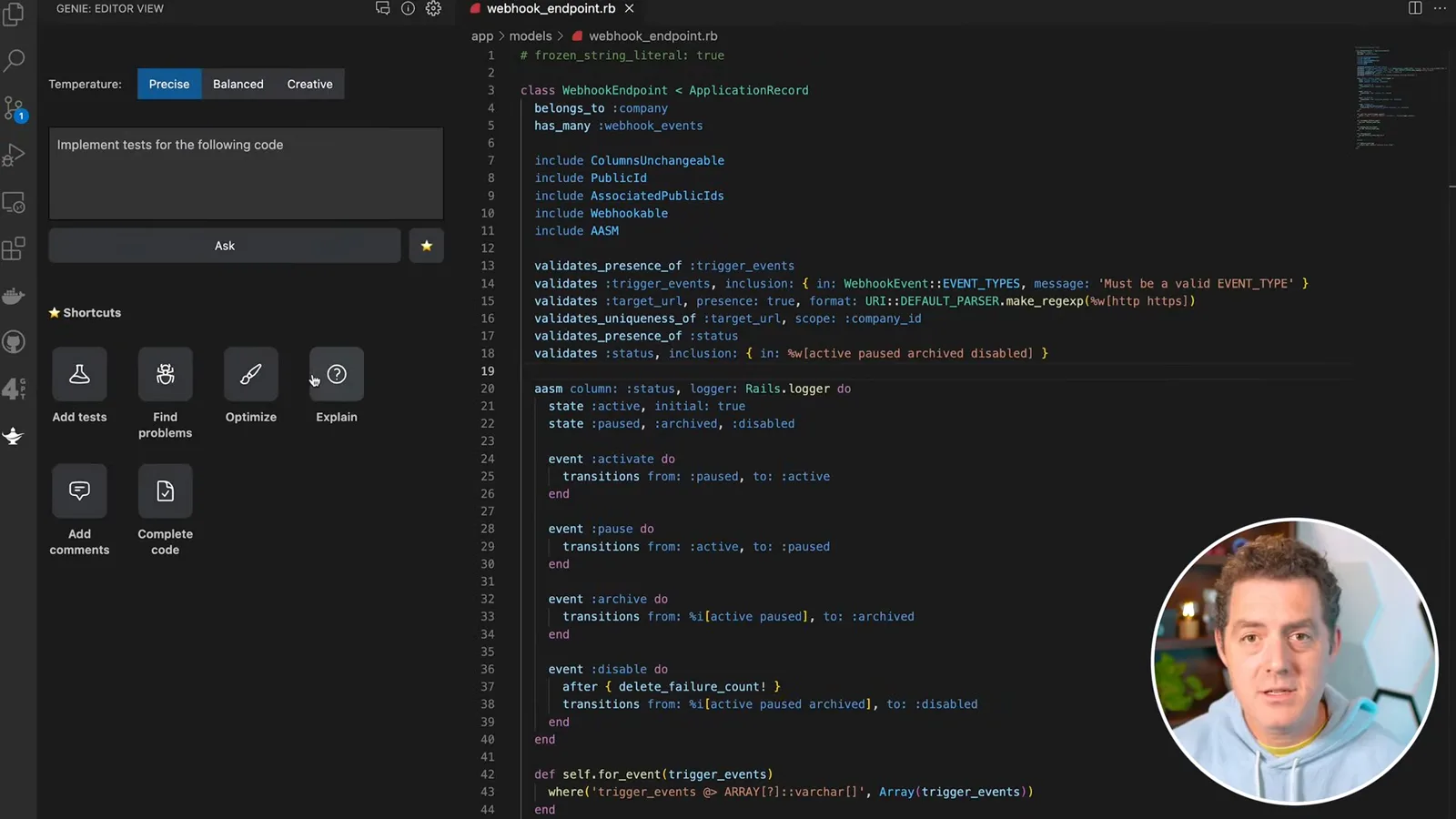
The buttons add tests, find potential problems, optimize, explain, add comments and complete code. I have found test generation particularly useful. For optimization, I have previously given it code I knew was unnecessarily complex and received a shorter, clearer version that passed my tests; that experience does not guarantee every generated change preserves behavior.
Explain can help when entering an unfamiliar codebase: select a method or file and ask for an explanation. I have not extensively tested the comment generator, and I wonder how much the ability to ask for explanations changes the need for comments. Code completion resembles a function GitHub Copilot already offered.
First I select a Rails webhook endpoint model. It uses the AASM gem to manage states such as active, paused, archived and disabled. Genie explains the state machine and its events, and I find the description accurate. The example suggests a way to navigate unfamiliar Ruby code, including code that uses metaprogramming.
Refactoring and finding issues
Berman examines an association helper, asks Genie to shorten it, and reviews its suggestions. The proposed changes still require verification.
Next I examine an AssociatedPublicIds file, which creates public IDs for associated models so the API does not expose sequential database IDs. I select the code and ask Genie to explain it. Its response identifies methods returning public IDs from associated records, which matches my intent.
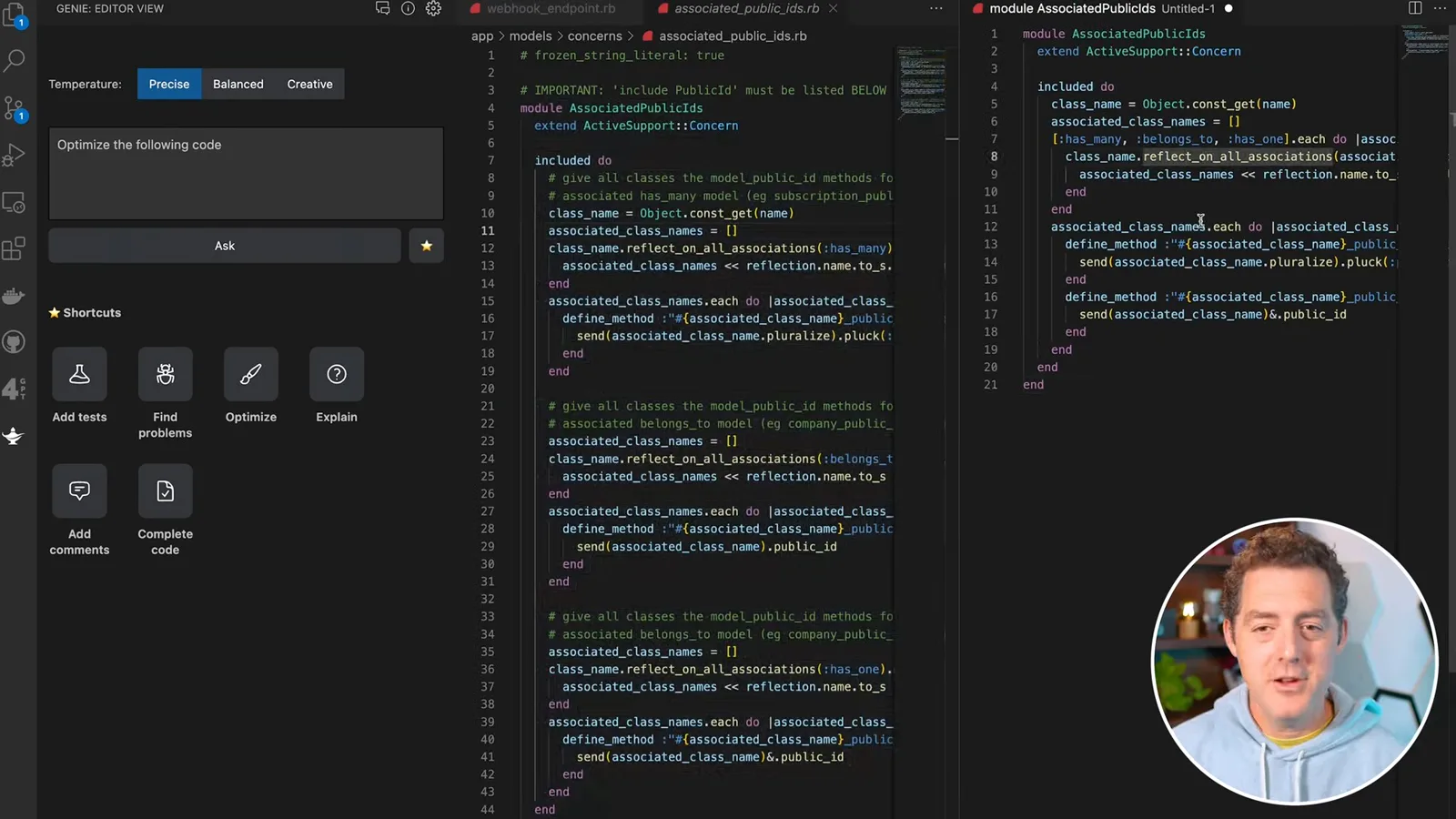
I ask Genie to optimize the file. The resulting version consolidates similar has-many, belongs-to and has-one logic, reducing the displayed code from 45 lines to 21. It looks cleaner to me, but shorter code alone does not establish equivalence: generated changes still need review and tests.
The Find Problems action flags possible issues: dynamic constant lookup could be risky if a class name comes from user input; dynamically defined methods can make maintenance harder; and the safe-navigation operator requires Ruby 2.3 or later. I agree that the metaprogramming may be too fancy, and I learned about the version constraint. Genie suggested Module.const_get as a safer alternative, but changing the receiver alone does not validate untrusted input; its suggestions need scrutiny.
Tests, settings and context
A generated test checks an associated public ID. Berman explores temperature presets and saved prompts, then explains his uncertainty about repository-wide context.
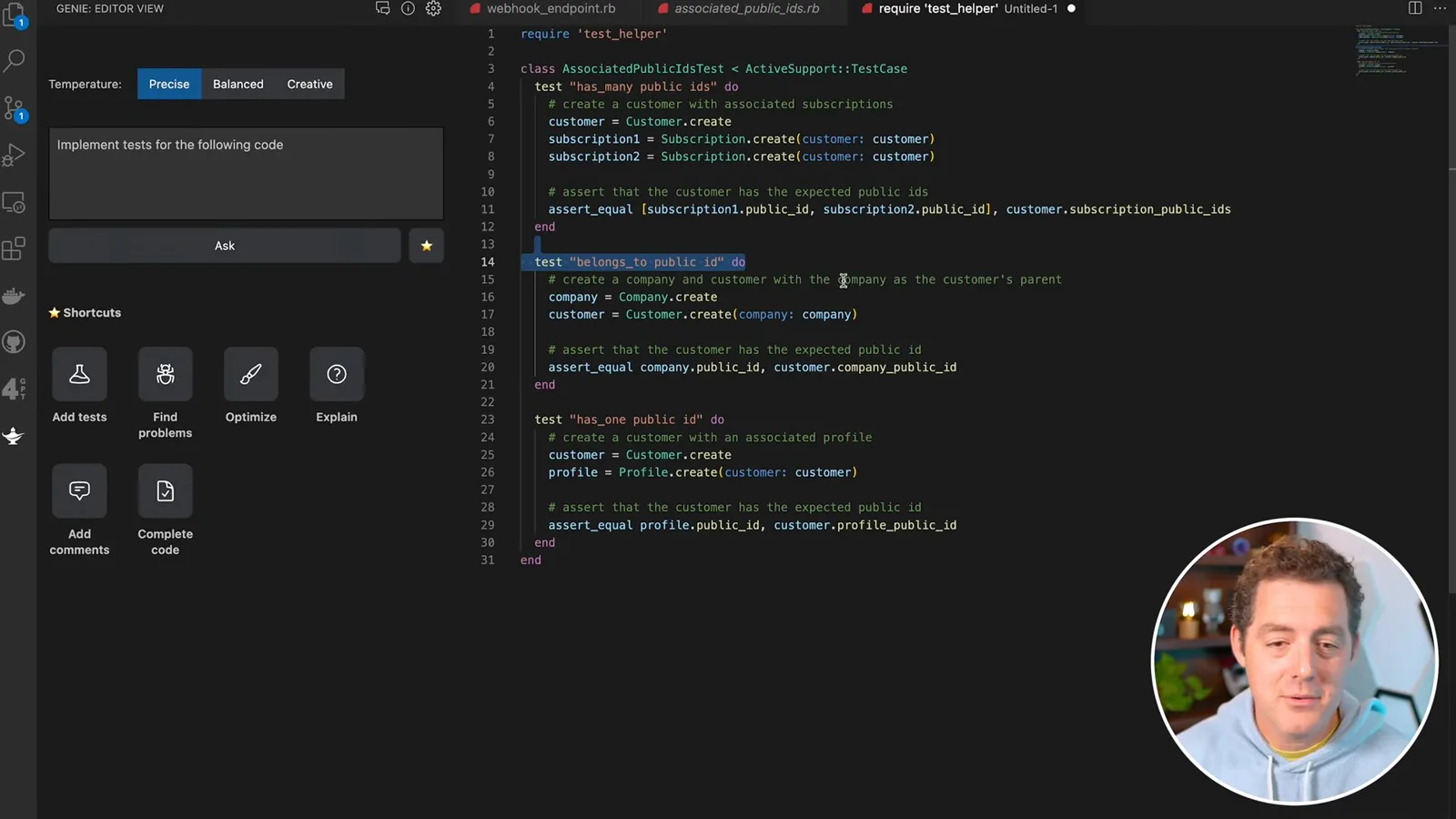
I then select the code and ask Genie to add tests. One generated example asserts that a customer’s company public ID equals the associated company’s public ID, which is the relationship I expect. The generated test is a useful starting point; the demonstration shows the code rather than a full test run.
The interface provides Precise, Balanced and Creative temperature options. Temperature affects the variability of responses; I guess that the presets correspond to values such as zero and 0.5, but I do not verify their exact settings. The star button lets you save custom prompts as shortcuts, such as an instruction to implement tests.
My major concern is context. In the interface I can select the code passed to a prompt, but I have not figured out how to ask questions with the whole codebase as context. I speculate that Genie might have more project context, while acknowledging I could be wrong; the video does not demonstrate that it sees the full repository.
I would like a tool that can answer questions across the entire project rather than only the open file and highlighted code. Even with that limitation, I find this extension useful, and I hope the forthcoming Copilot X will address some of these rough edges.
More from this channel
 34:21EN
 Matthew Berman· Oct 27, 2026Matthew Berman Examines Anthropic’s IPO Filing, AI Growth and GovernanceMatthew Berman, Sam Altman · Forward FutureThe presenter reviews the S-1’s financial metrics, compute strategy and voting structure while questioning the tension between rapid AI development and safety.
 0:26ENMatthew Berman· Oct 25, 2026Sam Altman on Human Values and Problem-Solving in an AI WorldSam Altman · OpenAIIn a short interview excerpt, Altman considers the enjoyment of solving hard problems and the human role in interpreting results.
 0:36ENMatthew Berman· Oct 25, 2026Kimi K3.1 and a Rubik’s Cube Solver DemonstrationMatthew Berman · Forward FutureMatthew Berman shows a scrambled virtual cube being solved and gives the Kimi K3.1 test a favorable assessment.
 0:21ENMatthew Berman· Oct 24, 2026An AI-Generated Kimi Benchmark Chart Used Invented ScoresMatthew Berman · Forward FutureMatthew Berman asks for a graph of Kimi K3.1 Pro benchmarks, then discovers that the displayed figures are illustrative placeholders.
 25:50ENMatthew Berman· Oct 24, 2026Kimi K3.1 Pro Tested: Strong 3D Demos, Uneven Results and Competitive PricingMatthew Berman · Forward FutureMatthew Berman tests the open-weight model on coding, 3D rendering and visual explanations, then compares benchmark results and prices.
 32:20ENMatthew Berman· Oct 23, 2026Who Is Local AI For? The Costs, Trade-offs and a Hybrid FutureMatthew Berman · Forward FutureMatthew Berman weighs data control and independence against hardware cost, setup complexity and inference speed.