In 30 seconds
Matthew Berman describes how Gemini Personal Intelligence can draw on connected Google apps and walks through the settings shown in his account. His example combines finding an old email with creating a calendar event; the short does not show that full workflow being executed.
- 1Personalized contextBerman argues that connecting Google services could make Gemini more useful, while his prediction that it could become the leading AI is an opinion.
- 2Find an old emailHis example asks Gemini to locate a message about tennis and then create a calendar event; it is described rather than demonstrated end to end.
- 3Choose connected appsHe shows the Personal Intelligence settings and says he connected YouTube but did not connect Google Photos or YouTube Music.
Takeaways
- Personal Intelligence lets eligible users opt in to connecting selected Google apps for more personalized Gemini responses.
- Berman’s desired workflow is to find an email about a tennis plan and create a calendar event from its details.
- The video shows where to choose connected apps, while availability and interfaces can change.
Read the edited text by chapter
Gemini and connected apps
Berman introduces the January 2026 Personal Intelligence beta and his example of using an inbox as context.
In January 2026, I am excited about Gemini’s Personal Intelligence feature because it can draw on information from connected Google services to make responses more relevant. Google announced it as an opt-in US beta initially rolling out to eligible Google AI Pro and Ultra subscribers. My view that it could put Gemini ahead of competitors is a prediction, not a measured ranking.
The use case I most want is asking questions about my inbox. For example, I could ask Gemini to find an email from Jake about playing tennis, tell me when we planned to play and then create a calendar event. This is the workflow I describe; the video does not show it being completed, and calendar actions depend on the relevant connected app and permissions.
Personal Intelligence settings
He shows the settings path and describes which apps he chose to connect.
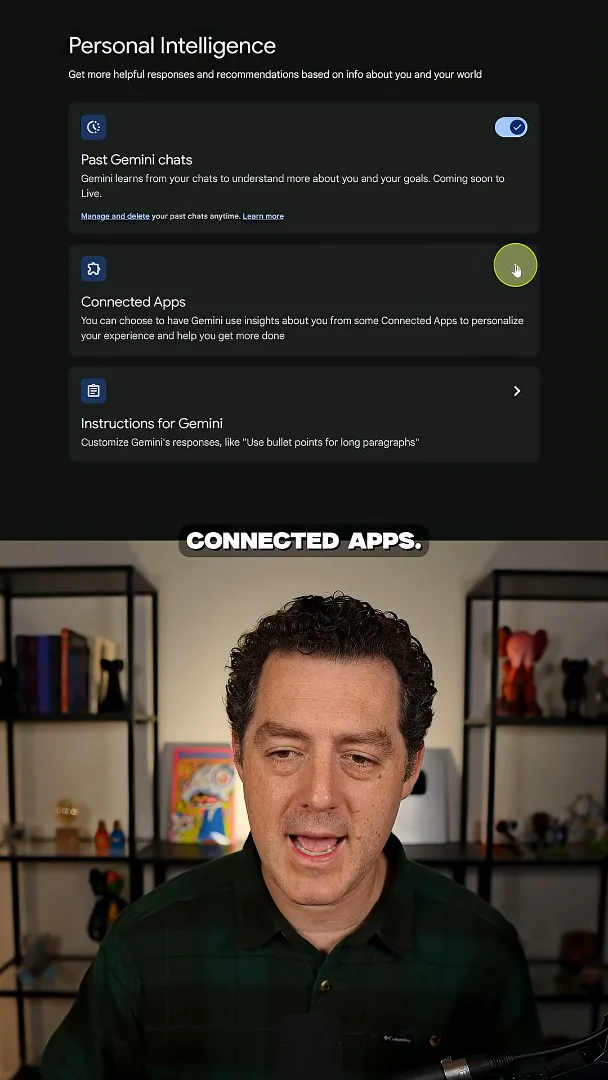
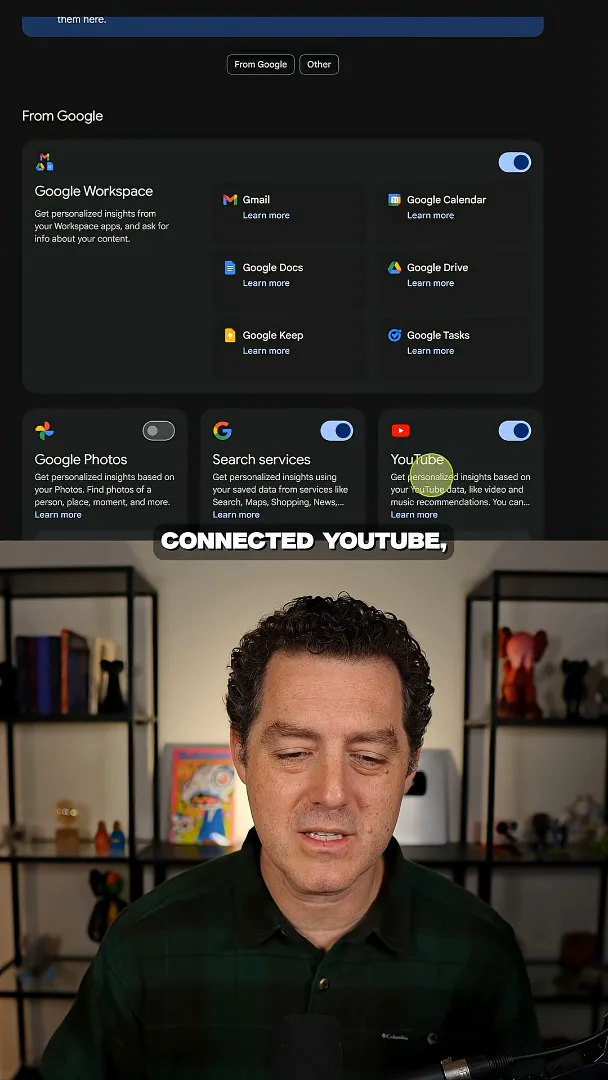
In the interface shown, I open Gemini settings, select Personal Intelligence and then Connected Apps. I choose which services to link: I connect YouTube, leave Google Photos disconnected and skip YouTube Music because I do not use it. The exact settings and availability may change over time.
More from this channel
 34:21EN
 Matthew Berman· Oct 27, 2026Matthew Berman Examines Anthropic’s IPO Filing, AI Growth and GovernanceMatthew Berman, Sam Altman · Forward FutureThe presenter reviews the S-1’s financial metrics, compute strategy and voting structure while questioning the tension between rapid AI development and safety.
 0:36ENMatthew Berman· Oct 25, 2026Kimi K3.1 and a Rubik’s Cube Solver DemonstrationMatthew Berman · Forward FutureMatthew Berman shows a scrambled virtual cube being solved and gives the Kimi K3.1 test a favorable assessment.
 25:50ENMatthew Berman· Oct 24, 2026Kimi K3.1 Pro Tested: Strong 3D Demos, Uneven Results and Competitive PricingMatthew Berman · Forward FutureMatthew Berman tests the open-weight model on coding, 3D rendering and visual explanations, then compares benchmark results and prices.
 32:20ENMatthew Berman· Oct 23, 2026Who Is Local AI For? The Costs, Trade-offs and a Hybrid FutureMatthew Berman · Forward FutureMatthew Berman weighs data control and independence against hardware cost, setup complexity and inference speed.
 1:03:37ENMatthew Berman· Oct 23, 2026Matthew Berman’s Team Tests Kimi K3.1 on Animation, Games, and ChartsMatthew Berman, Alex, Brian · Forward FutureA live team AMA turns into an informal test of Kimi K3.1, from personal-agent workflows to motion graphics, a browser game, and a benchmark chart.
 0:53ENMatthew Berman· Oct 22, 2026Sam Altman on AI and the Discovery of New KnowledgeSam Altman · OpenAIAltman expects progress in mathematical discovery to extend to biology, materials and energy.