30초 요약
After a Google alert about access to his email and reports of security incidents in October 2026, Peter Yang reviewed his accounts and assembled a six-part checklist. He suggests reviewing connected apps, using unique passwords, enabling two-factor authentication, examining API keys, checking software updates and treating urgent breach messages cautiously. He demonstrates a prompt that asks an AI agent to report findings before making changes and says he enters new passwords himself.
- 1An access alert prompted Yang to review his own connectionsHe says several agents use Linux machines, so the alert alone did not tell him which one accessed email. He spent time reviewing his accounts.
- 2The review prompt requests a report before changesYang’s prompt asks the agent not to change or install anything without approval and not to review passwords. It covers six categories and asks for explicit gaps.
- 3A password manager can identify reused and weak passwordsYang shows a password-manager audit and describes navigating to change screens with help while entering the new password himself.
- 4Unused API keys can remain active after a project is abandonedYang found two unused keys in his account and recommends auditing active and unused keys.
- 5Urgent breach notices can themselves be phishingYang suggests checking sender and link details instead of reacting immediately to an alarming email.
핵심 정리
- Review which connected applications can access important accounts and remove access you no longer need.
- Use unique passwords and enable two-factor authentication on important accounts.
- Review unused API keys and software updates before making changes.
- Verify urgent breach notices through trusted channels instead of immediately following links.
- When using an agent for a review, Yang asks it to report first and leave passwords and changes to him.
챕터별로 다듬은 전문 읽기
Why Yang reviewed his accounts
Yang describes October 2026 security reports and an alert about email access. He introduces six areas for a personal review.
In October 2026, I saw reports of security incidents, including warnings about PHP vulnerabilities and a report that banks were finding unvetted AI agents in customer accounts. I understood the situation as a race between attackers and defenders finding existing software vulnerabilities.
I had also connected several AI agents to my Google account. After an alert about email access from a Linux machine, I could not tell from that description alone which agent was responsible. I spent two hours reviewing my accounts and decided to make a checklist.
My six areas are connected applications, unique passwords, two-factor authentication, API keys, software updates and suspicious messages. I suggest reviewing each rather than assuming that an urgent email or an unfamiliar access alert explains the whole situation.
An AI-assisted review with approval before changes
His prompt asks for findings and gaps without exposing passwords or making changes automatically.
I wrote a prompt for an AI assistant to review the accounts and devices it can access and produce a report. The prompt says not to delete, change or install anything without approval, not to review passwords, and to state what it could not check. My example report groups findings and suggested next steps.
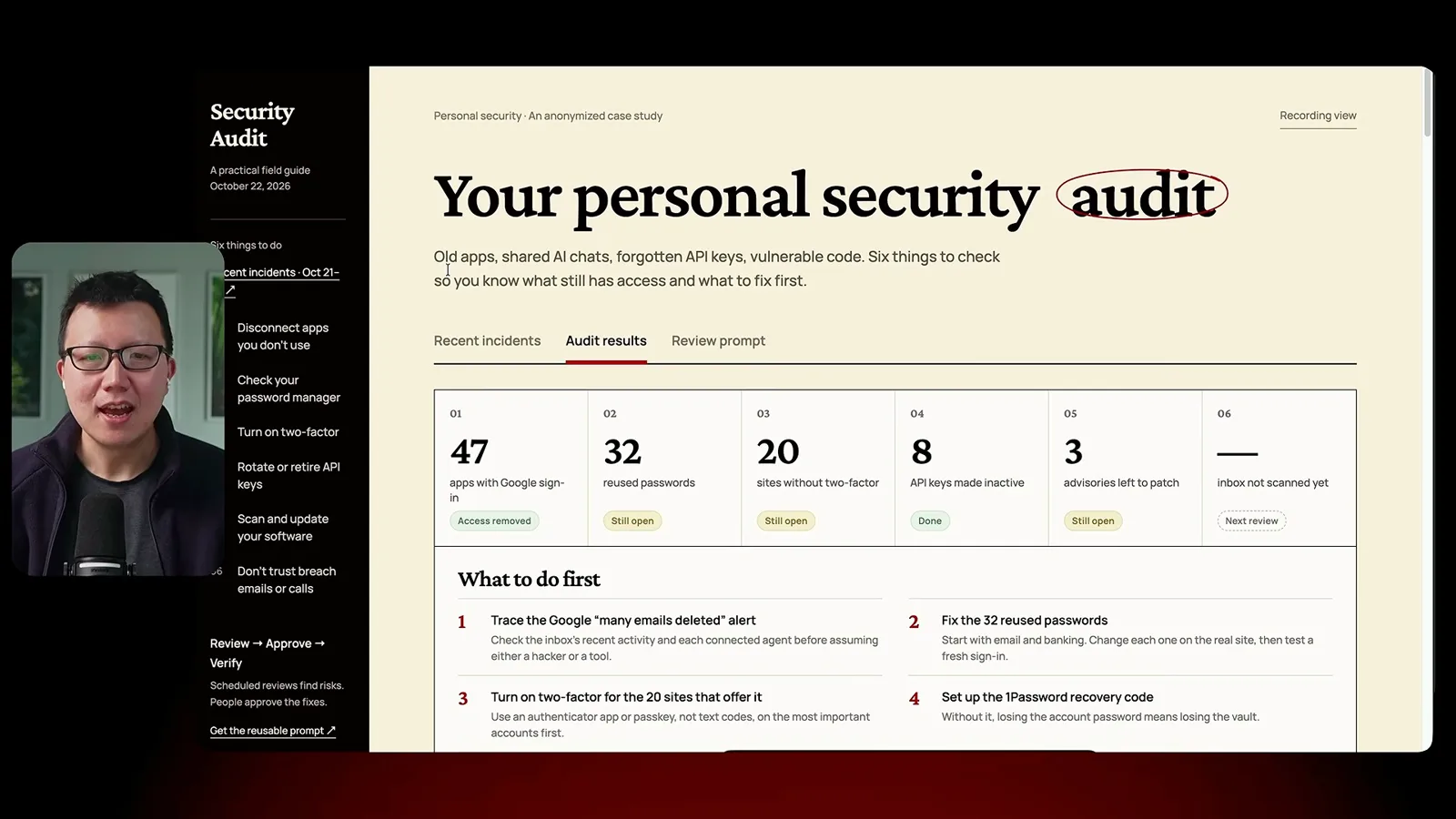
Connected apps, passwords and two-factor authentication
Yang reviews app access, reused passwords and sign-in protection. He uses an authenticator app for codes.
First, I review applications connected to my Google account and decide which still need access. I demonstrate asking an agent to list candidates, then choosing what to keep or disconnect. The example shows 47 connected applications.
Second, I use a password manager to find reused or weak passwords and replace them with unique ones. My example audit shows reused credentials and sites where stronger sign-in protection is available. I say the product is not sponsoring this video.
Changing passwords still requires visiting each site. I describe letting an assistant navigate to a password-change page while I sign in and enter the new password myself. I also discuss a password-manager feature for agents, while presenting my description of its operation as my understanding rather than a verified specification.
Third, I recommend enabling two-factor authentication for important accounts. I prefer an authenticator app to text-message codes because text messages can be intercepted. The app displays a code that I enter when signing in.
API keys, updates and suspicious messages
Yang discusses reviewing keys and software, then checking urgent breach messages carefully.
Fourth, I review API keys. I suggest identifying exposed or unused keys, rotating active keys and retiring those no longer needed. I found two unused but active keys in one account after abandoning projects.
Fifth, I ask for a list of software updates and a dependency audit without installing anything automatically. After reviewing the findings, I can decide which updates or removals to approve. I suggest checking again as fixes become available.
Sixth, I treat urgent breach emails and calls cautiously. I demonstrate inspecting the sender and the destination of a link rather than immediately following a message that claims an account has been hacked. The goal is to distinguish a genuine notice from a phishing attempt.
The review prompt brings the six areas together in a report. I suggest using the findings to decide what to address, while checking what the assistant could and could not inspect and retaining control over changes.
같은 채널의 다른 글
 46:40EN
 Peter Yang· 2026년 11월 8일팟캐스트 · 2명Ashley Alexander: How AI Helps Me Care for My Parents With Cancer게스트 Ashley Alexander · 진행자 Peter YangA caregiver uses AI to prepare for appointments, organize records and ask better questions—while keeping doctors at the center of treatment.
 17:50ENPeter Yang· 2026년 11월 4일팟캐스트Peter Yang’s Five Steps for Using AI to Help Care for His MotherYang uses a shared care brief and organized records to navigate appointments, while making time for family.
 15:03ENPeter Yang· 2026년 11월 3일팟캐스트How Peter Yang Used an AI Phone Agent to Negotiate His Internet BillAn AI call negotiated a lower price and faster service, but Yang still had to approve the change himself.
 33:09ENPeter Yang· 2026년 11월 1일팟캐스트 · 2명Jaclyn Konzelmann: When AI Can Build More, Choose What Deserves to Exist게스트 Jaclyn Konzelmann · 진행자 Peter YangGoogle Labs pairs short strategy documents with prototypes, user co-creation and lessons from experiments that end.
 13:05ENPeter Yang· 2026년 10월 28일팟캐스트Peter Yang Tests Genie 4: Convincing Worlds, Unfinished GameplayFive live demonstrations show scenes that respond to prompts and sound, alongside inconsistent actions and limited game mechanics.
 1:06ENPeter Yang· 2026년 10월 26일팟캐스트Peter Yang on Setting Up Payroll for a One-Person BusinessIn a paid partnership, Yang describes the paperwork he encountered and a payroll product integrated with a business account.