30 秒でわかる
After examining roughly 20,000 calls in his own agent sessions, Ayush Bhardwaj found repeated pipelines that revealed missing CLI features. His fixes included selecting relevant messages, compact search results and batch inspection. He also shows how a pipeline can hide a failed test, why stale skill instructions persist, and why smaller output must be evaluated against correct answers and fewer turns.
- 1Repeated filtering can expose missing tool featuresIn his own sample, Bhardwaj found agents frequently piped CLI output through filters.
- 2A successful final pipe command can mask a failed testThe real error or exit status may be lost unless the tool and shell preserve it.
- 3Agents kept using a no-op flag while instructions still named itAll 95 observed searches used the old flag; revised instructions changed the behavior in two sessions.
- 4Replay real commands as test casesUse the next agent action as a rough clue and reserve examples for evaluation.
- 5Fewer output tokens alone do not prove a better workflowMeasure correct answers and turns as well as output size.
ポイント
- Inspect repeated pipes and retries in real agent sessions.
- Make errors visible and preserve the real failure status.
- Offer selection, compact output and batch operations where usage warrants them.
- Update skills and help text when the interface changes.
- Replay held-out traces and measure useful outcomes, not only output size.
チャプターごとに整えた全文を読む
Read workarounds as product feedback
Bhardwaj audits agent calls and shows how filtering can also hide failures.
I built a command-line tool that lets coding agents retrieve context from previous sessions. Watching agents use it taught me that their workarounds are feedback: they can silently write a program around a tool rather than report a bug.
I extracted about 20,000 calls involving 14 command-line tools from my transcripts. Around a quarter piped output into filters such as head, tail, grep or Python; the proportion was higher for read-heavy commands. These are observations from my own sessions.
Pipelines can also hide failures. Without pipefail, a shell pipeline normally reports the final command’s exit status, so a successful head or tail can mask a failed test. Trimming output can remove the actual error too; I recommend a concise failure summary and a path to the full log.
Turn repeated filters into CLI features
His session-search tool adds selection, compact results and batch inspection based on observed usage.
My chat-history CLI searches past sessions from several coding tools. In a smaller audit of my own usage, agents often opened a session and immediately filtered it again. That repeated cut suggested the interface should offer better selection rather than making the agent rebuild it each time.
One full session was around 1.2 million characters, while the messages around a match were about 3,000. A generic size cap limits volume but does not identify the relevant section, so I added ranges, matching messages and recent-message options.
Repeated Python processing of JSON suggested a compact search format with fewer fields; repeated loops over sessions suggested a batch inspection command. The commands agents wrote around my command became a product roadmap.
Teach changes and test with real traces
Stale instructions kept a no-op flag in use. Recorded commands can become replay tests.
Help text and skill files are part of the interface. I made a flag do nothing but left it in the skill instructions; all 95 observed searches still used it. After two sessions loaded revised instructions, neither used the obsolete flag and both tried new options.
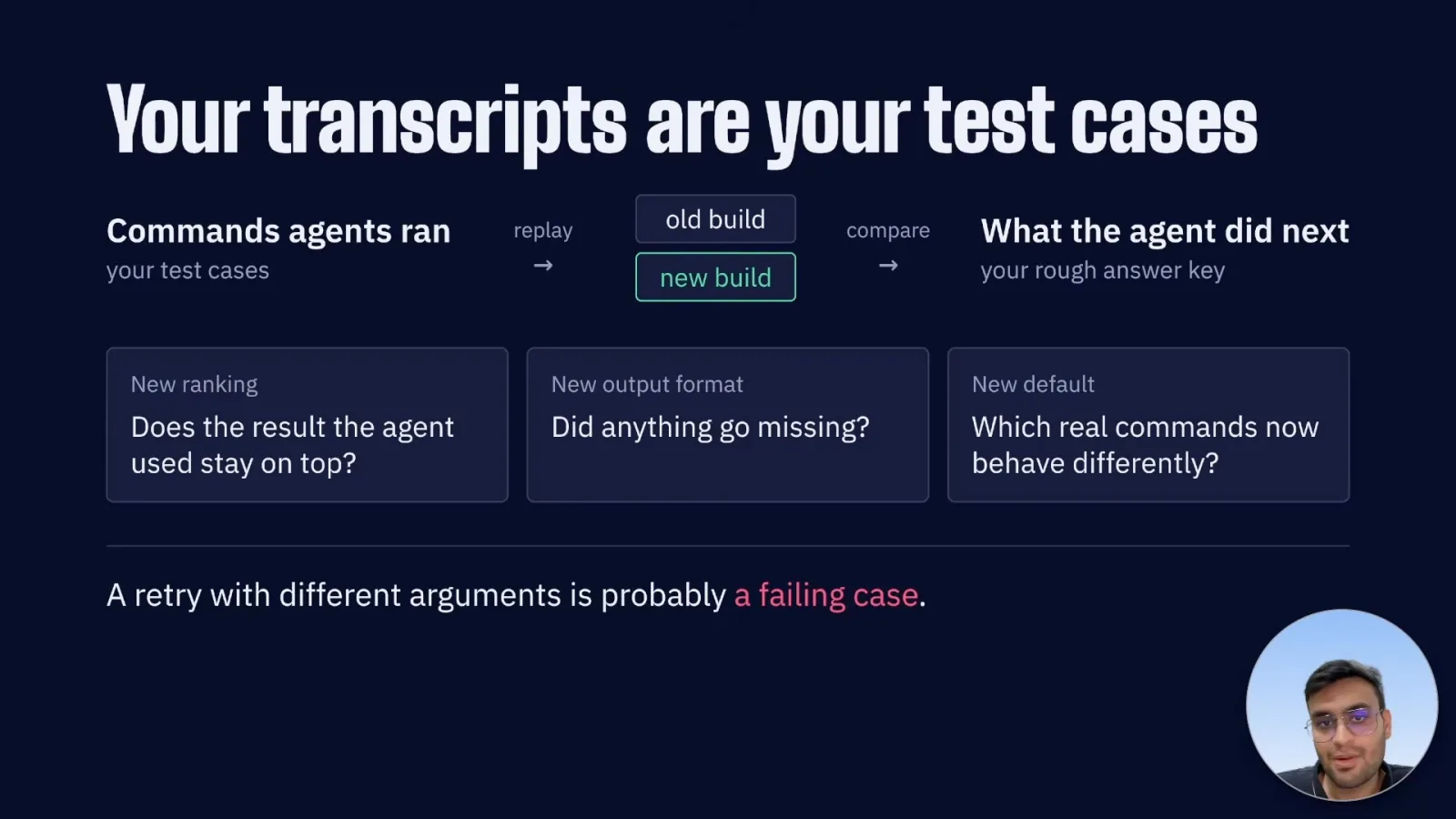
Transcripts can provide replay tests: run the same commands against old and new versions, then inspect whether a result the agent used remains available. What the agent did next is only a rough clue about its intention, so hold back cases for evaluation.
Measure the outcome, not just shorter output
Concise agent modes help only if they improve the task. The speaker recommends designing deliberately and checking real behavior.
I would first add useful ranges and limits, teach agents the options, and keep default output concise while explaining how to retrieve more. A flag only helps if agents know when to use it.
An agent-specific mode can present concise output and clear errors. But one example reduced tool-output tokens without materially improving overall cost or runtime. Measure correct answers and turns as well as the number of characters returned.
I do not expect an agent to design the best agent-facing interface in one shot. People should decide what the tool needs to do, then use real transcripts and tests to help the agent find and fix friction.
Back up your transcripts, search for a tool followed by a pipe or repeated retries, and inspect what happened next. Those workarounds are the product analytics for an agent-facing tool.
同じチャンネルの記事
 38:50EN
 AI Engineer· 2026年11月10日LinkedIn’s self-improving agent first had to fix its judgesZiwei Guo, Saloni Gandhi · LinkedInA prompt-optimization loop improved a career agent, but unreliable evaluators required human calibration first.
 12:48ENAI Engineer· 2026年11月10日Brian Douglas: Turn agent corrections into reusable review knowledgeBrian Douglas · Paper ComputeThe Paper Compute developer captures expert pushback in coding sessions and tests ways to reuse it during review.
 12:57ENAI Engineer· 2026年11月10日Harvey’s agents scaled until their platform and merge queue brokeJoey Wang · HarveyAfter an alert spawned 900 agents and one engineer launched 950 tasks, Harvey added deduplication and fair scheduling.
 23:00ENAI Engineer· 2026年11月10日A passing PR check needs evidence tied to the submitted codeStephen Chin, Cassandra Chin · Neo4jStephen and Cassandra Chin show how Tracetoon connects agent traces, code changes and checks before writing a reviewable pull request.
 22:49ENAI Engineer· 2026年11月10日When many coding agents share one codebase, delivery must handle concurrencyPatrick Debois · TesslPatrick Debois explains how shared planning, merge strategies and risk-based review can help teams coordinate agents.
 15:41ENAI Engineer· 2026年11月10日Meta’s on-call AI teammate earns autonomy one action at a timeChinmay Gandhi, Swaapnika Motapothula, Vlad Tsvang · MetaThe team connects incident context and shared memory while keeping critical decisions and code review with people.