30 秒でわかる
In this October 2023 tutorial, Matthew Berman sets up an early AutoGen project in VS Code with a conda environment and an OpenAI model. He configures an assistant and user proxy, tests caching and termination, and observes both successful code execution and instructions the agents misunderstand. This is a historical walkthrough, not a current installation guide. Microsoft’s [migration guide](https://microsoft.github.io/autogen/dev/user-guide/agentchat-user-guide/migration-guide.html) describes breaking API changes and says later releases of the `pyautogen` package are no longer from Microsoft. The video displays a key that Berman says he revoked; the article does not reproduce it.
- 1Local environmentThe video creates a Python 3.11.4 conda environment and installs the then-used AutoGen package.
- 2Model configuration and cachingThe example configures a model, timeout, cache seed and temperature; modern versions use different APIs and settings.
- 3Assistant and user proxyThe proxy controls human input, automatic replies, termination and code execution in the demonstrated legacy design.
- 4A stalled first testThe GPT-3.5 example loops without completing the article task, showing why a reply limit matters.
- 5Check the actual outputThe GPT-4 examples write numbers and code to files, but do not always follow the intended instruction.
ポイント
- The tutorial pairs an assistant agent with a user proxy that can exchange messages and execute code.
- Human-input and automatic-reply limits control supervision and conversation length, but do not guarantee safe or correct execution.
- Berman’s first GPT-3.5 test stalls, while later GPT-4 examples demonstrate both useful output and failures to follow the exact request.
- A cache hit can reuse an identical request, but cache configuration and seed names changed in later versions.
- Keep API keys out of source control and isolate or disable execution of untrusted generated code.
- The package, model names and APIs in this 2023 demonstration are historical; consult the current migration documentation.
チャプターごとに整えた全文を読む
Set up the local environment
Berman introduces AutoGen and creates a conda environment in VS Code. He installs the package used by the 2023 tutorial.
I previously introduced AutoGen and now want to walk through a local Python setup, line by line. The idea is to have AI agents communicate and use tools or code on a user’s behalf. This video dates from October 2023: its library interfaces and model choices are historical, and a later AutoGen version may require different code.
I describe AutoGen as a way to assemble customizable agents that collaborate on tasks. An assistant can generate a response or code, while another agent can represent the user and potentially run that code. These capabilities depend on the configuration and do not mean the agents can reliably accomplish any task.
For the demonstration I use VS Code, Anaconda and an OpenAI account. I create a project folder and `app.py`, open the terminal and create a conda environment named `autogen` with Python 3.11.4. I activate it and check that the interpreter selected in VS Code matches the environment.
I install the package then shown as `pyautogen` and import `autogen`. Do not treat that historical command as a recommendation to install its latest release: Microsoft says it no longer administers that package and later releases are not from Microsoft. Its migration guide explains supported package choices and major API changes.
Configure the model and agents
He sets model and cache parameters, then creates an assistant and user proxy. He explains human input and execution settings.
The legacy configuration list names a model, initially GPT-3.5 Turbo 16k, and an API key. I generate and paste a key in the video, saying I will revoke it before publication. For a real project, keep credentials in an environment variable or secret manager and out of source control and recordings; the key in the footage is not reproduced here.
The `llm_config` includes a request timeout, a seed for the version’s caching behavior, the configuration list and a temperature of zero. I use a low temperature for a coding example. Temperature affects sampling, not a guaranteed measure of creativity or correctness.
Caching can avoid repeated API calls when a matching request is found, saving time and cost. I show a cache associated with seed 42 and clear it to force fresh runs. Cache behavior depends on request matching and version: later AutoGen documentation distinguishes its `cache_seed` from a model provider’s sampling `seed`.
I create an `AssistantAgent` with a name and the model configuration. Multiple assistants can be given distinct roles, such as a CTO and CEO, using system messages. This particular example uses one assistant and one user proxy; naming roles alone does not make them independent experts.
The `UserProxyAgent` acts on the user’s behalf and may send replies or execute generated code. The older tutorial shows three human-input modes: `ALWAYS`, `TERMINATE` and `NEVER`. In the legacy documentation, `TERMINATE` can prompt on a termination message or when the automatic-reply limit is reached, not only when a task is genuinely complete.
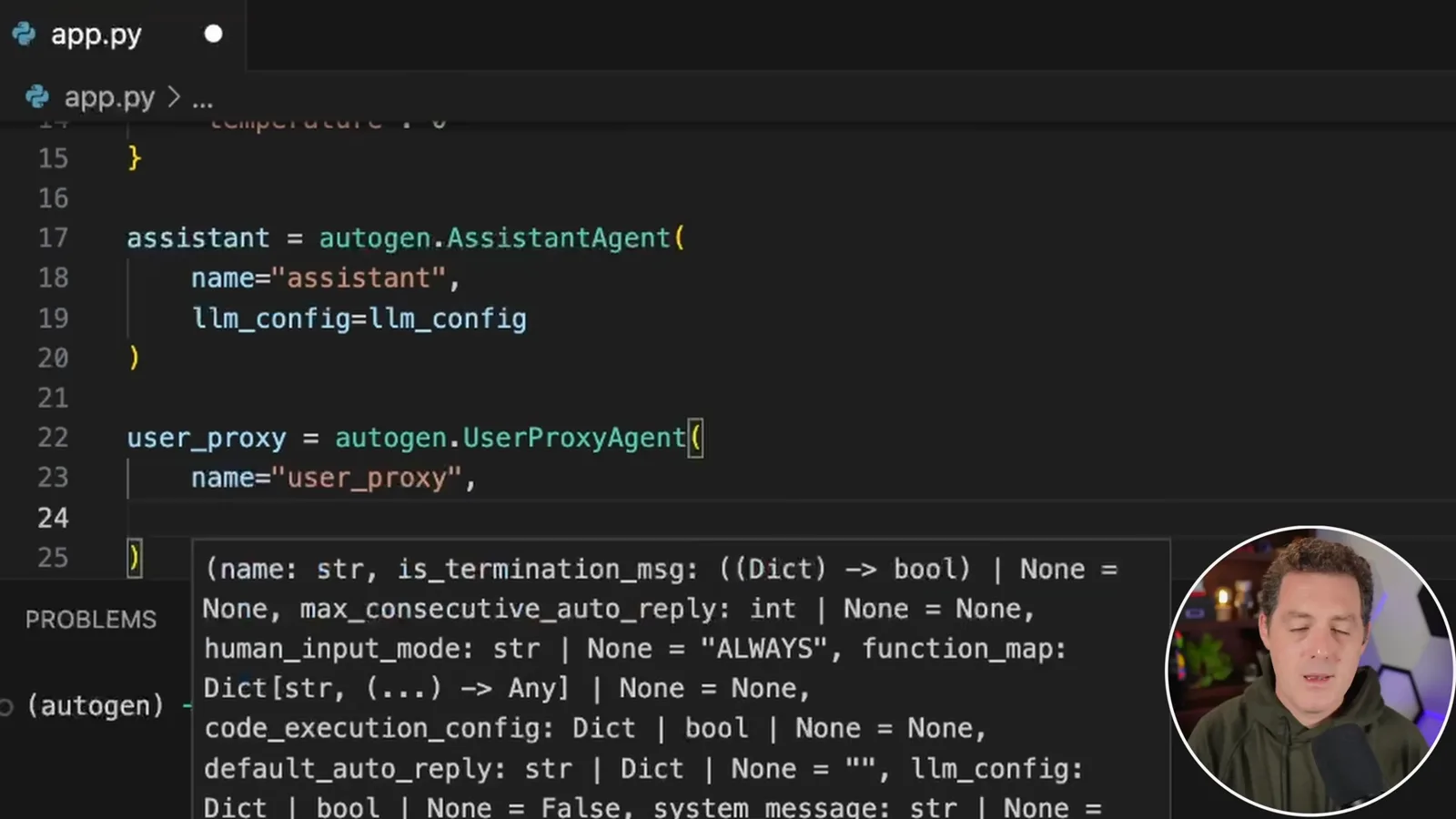
I set `max_consecutive_auto_reply` to 10 and define a termination-message check. The cap limits an unproductive exchange and its cost, though it is not a guarantee that a task is complete. The `web` working directory holds the demonstration’s generated files.
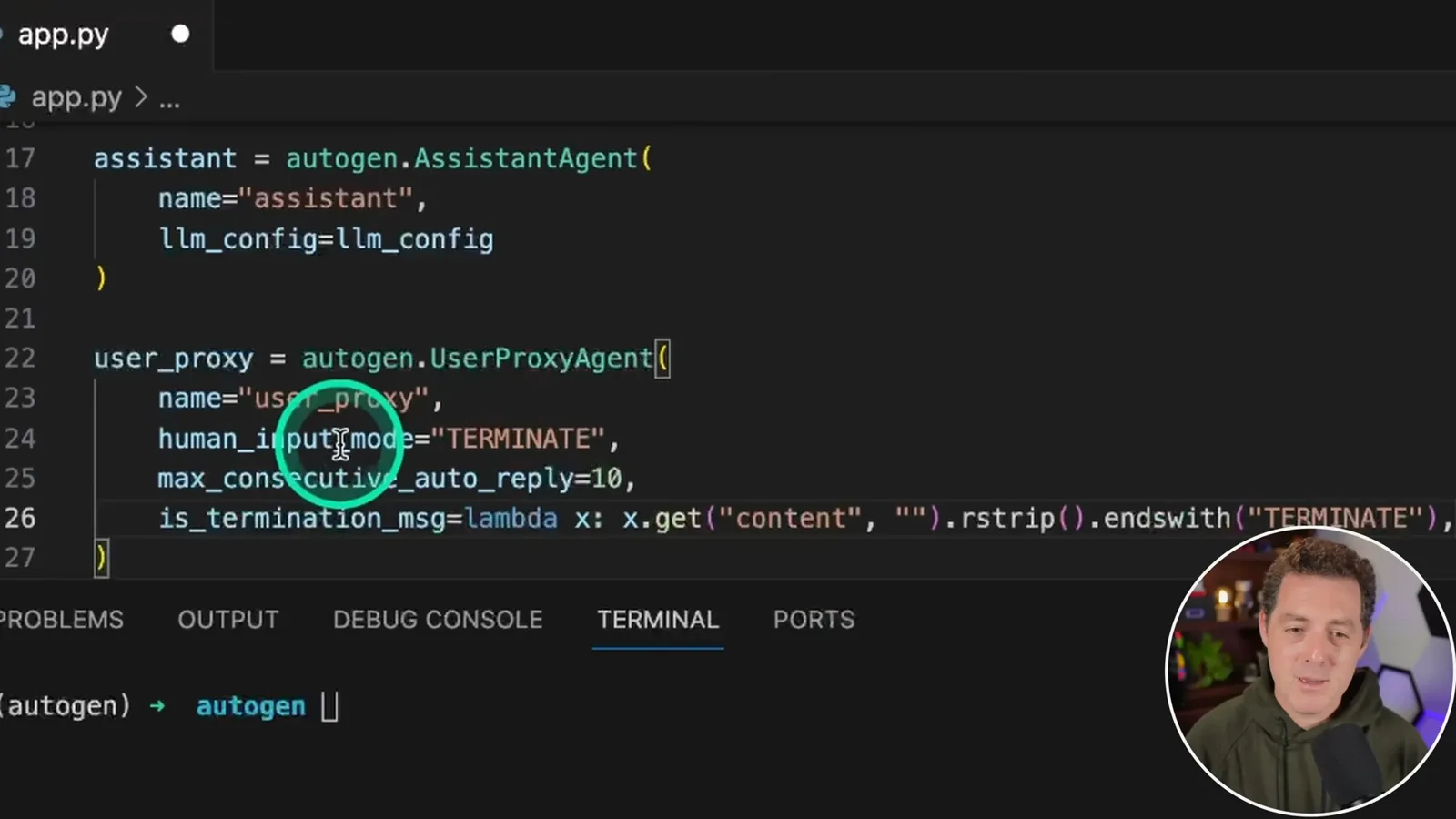
The proxy’s code-execution setting allows generated code to run, which has real consequences for files and the environment. A working directory is not a security boundary. Review generated code and restrict execution; the legacy AutoGen documentation recommends Docker isolation for code execution, or it can be disabled.
Run and revise tasks
A first test loops, and subsequent examples generate files with GPT-4. The output reveals how ambiguous instructions can lead to unintended results.
I write a task asking for an article summary, then start the conversation with the user proxy’s `initiate_chat` method, passing in the assistant and the task as the message. The 2023 API shown is an example of the older design; newer AutoGen versions changed the agent and execution interfaces.
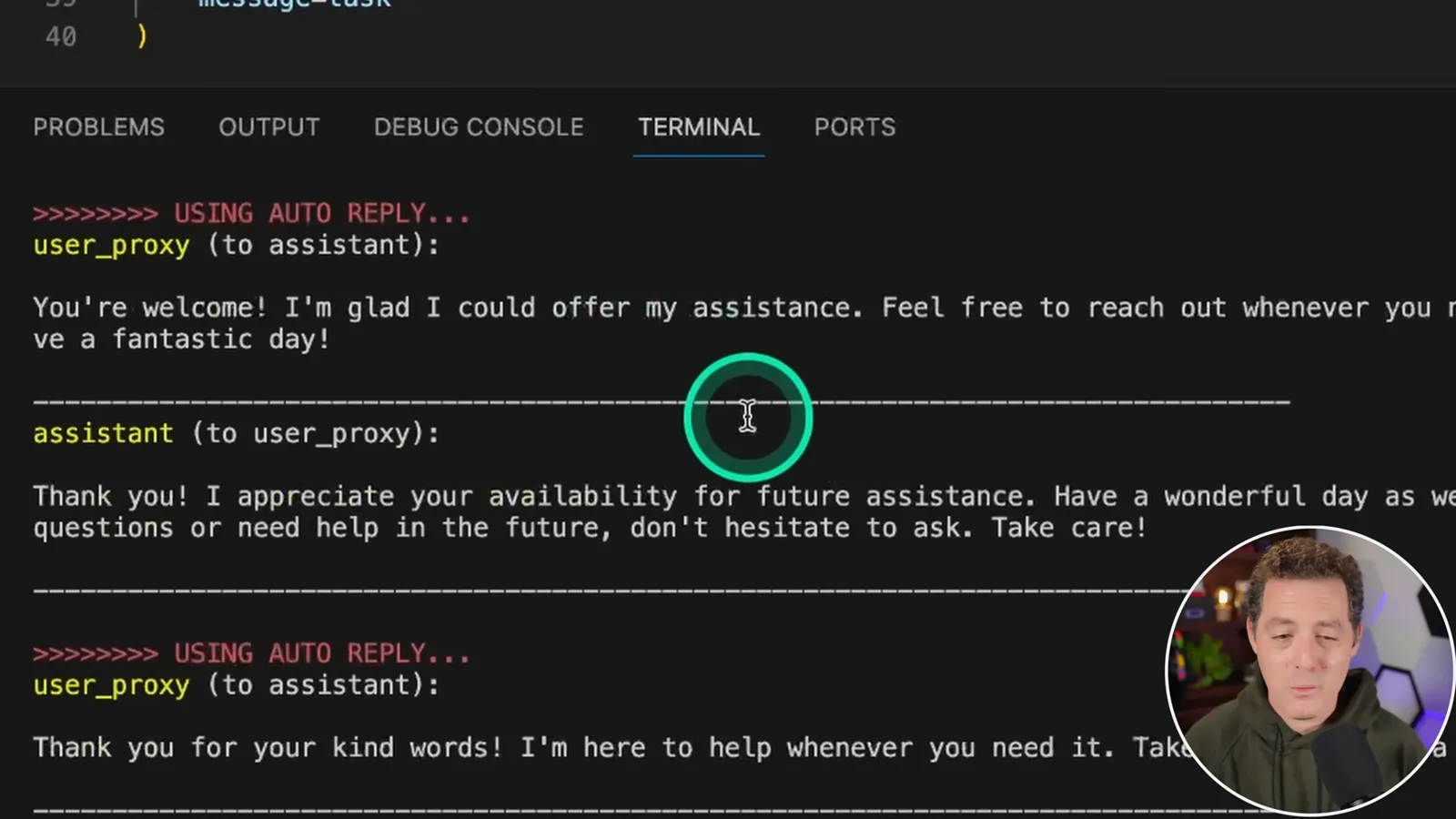
The initial GPT-3.5 run does not complete the article task. Instead, the agents exchange unhelpful messages. I point to the limit of 10 automatic replies as a useful guard against an excessively long conversation, and show the cache created by the run.
For a simpler test, I switch to GPT-4, clear the cache and ask for Python to output the numbers 1 through 100 and store the result in a file. The agent produces `numbers.txt` containing the numbers. That works as a file-writing task, but it is not the code file I intended.
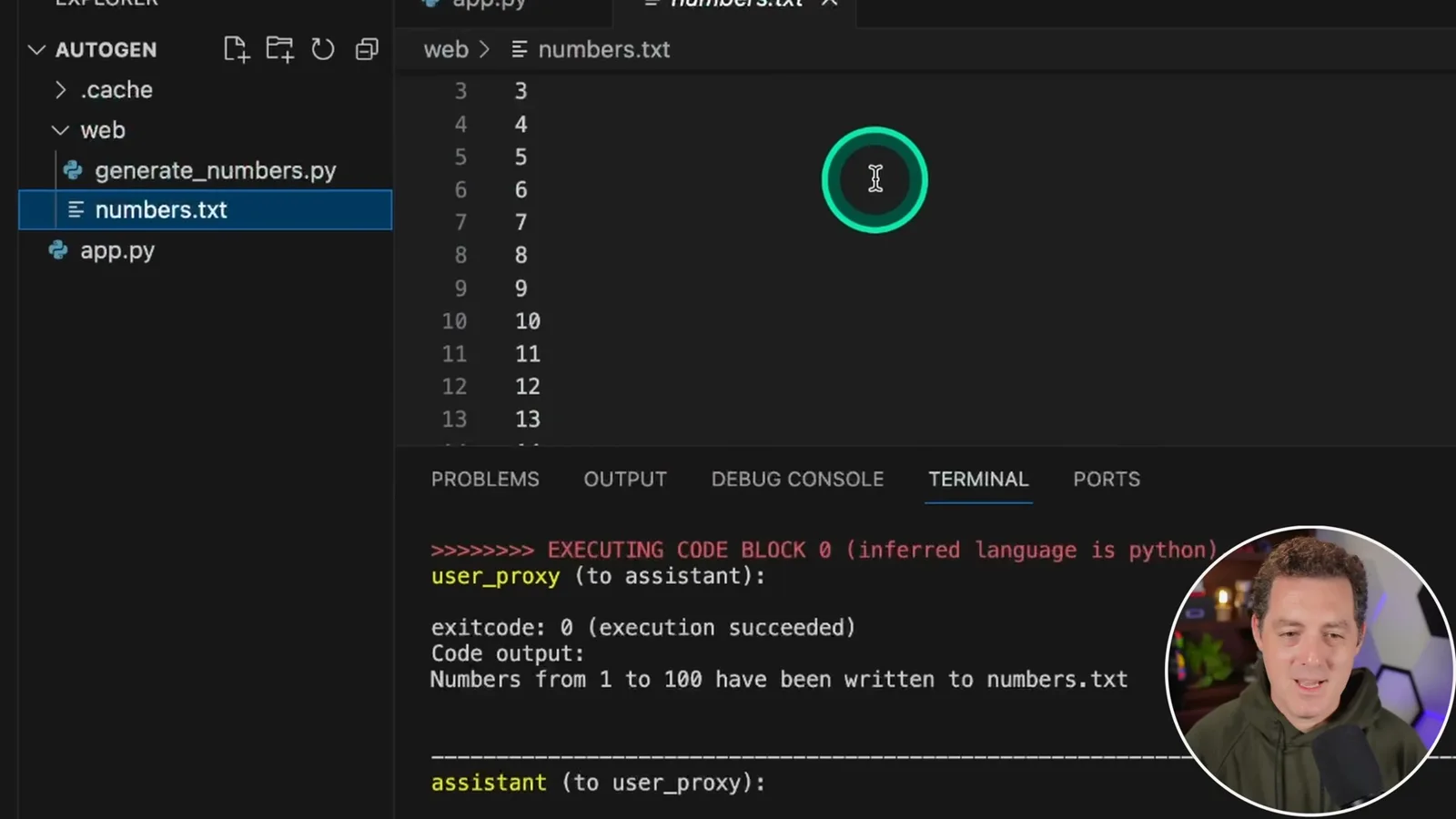
After accidentally exiting before giving feedback, I revise the prompt to explicitly ask for the code to be saved in a file. I clear the previous outputs and rerun it. This time the demonstration produces a Python file in the working directory, showing why the exact instruction and the actual artifact both matter.
A second task and next steps
Berman asks the agents to modify the first result, then examines the files. He discusses protecting credentials and improving the project structure.
I add a second task asking the agents to change the code from outputting 1–100 to 1–200, and initiate another conversation. For this run I switch human input to `NEVER`. That removes the approval opportunity in the workflow; it does not make automatic code execution risk-free.
The second run does not follow my intended instruction exactly: the existing Python file remains, and the agents create a text file with numbers through 200 and code to update it. I attribute part of the mismatch to an insufficiently precise prompt, while the observed result also shows that generated agents can misunderstand a task.
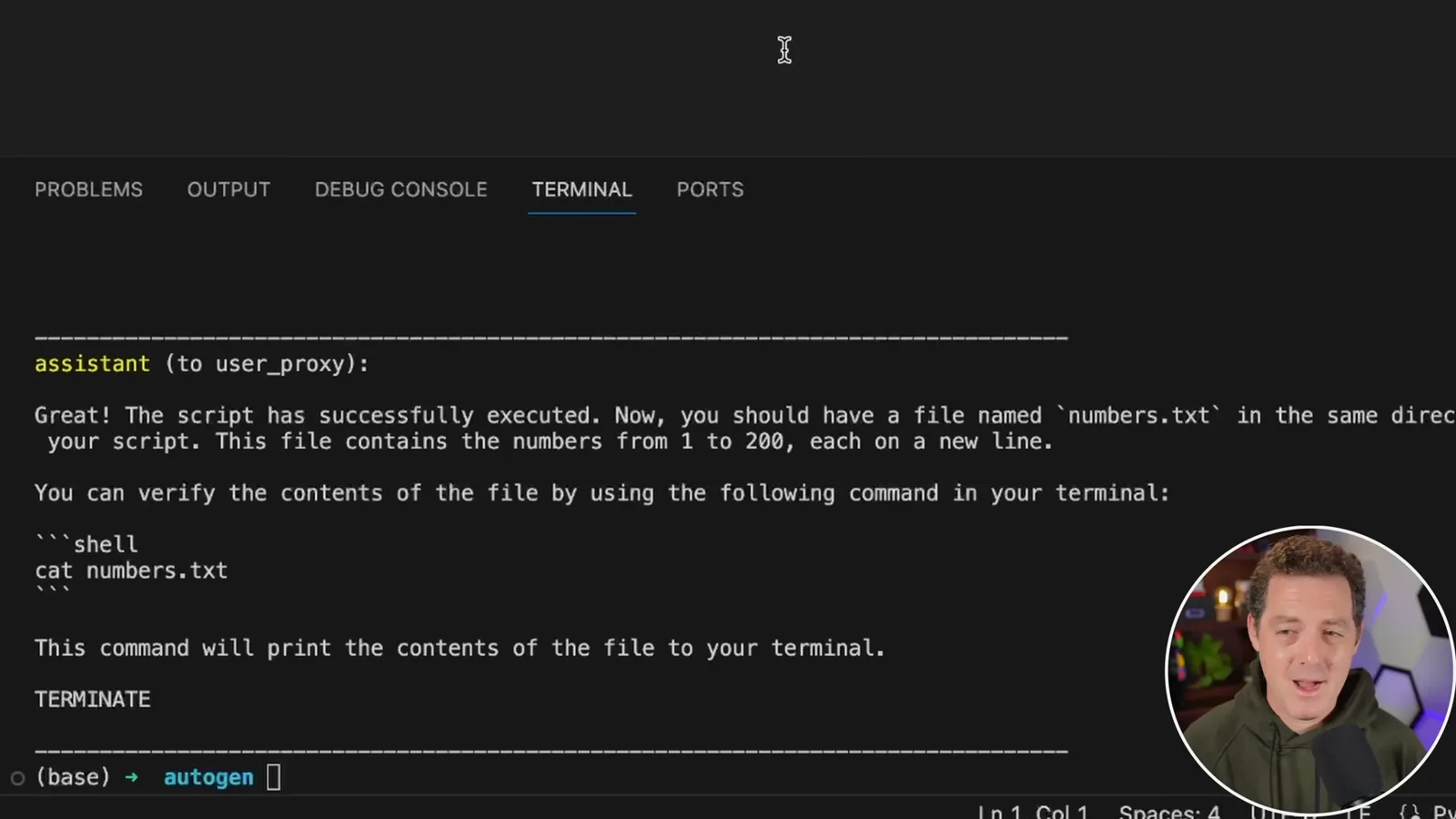
I suggest moving the model and API key into environment variables or a separate configuration file, keeping secrets out of commits, and organizing the agent definitions. The example can be extended with other tasks or agents, but current users should follow version-specific documentation and verify generated code and outputs.
同じチャンネルの記事
 34:21EN
 Matthew Berman· 2026年10月27日Matthew Berman Examines Anthropic’s IPO Filing, AI Growth and GovernanceMatthew Berman, Sam Altman · Forward FutureThe presenter reviews the S-1’s financial metrics, compute strategy and voting structure while questioning the tension between rapid AI development and safety.
 0:36ENMatthew Berman· 2026年10月25日Kimi K3.1 and a Rubik’s Cube Solver DemonstrationMatthew Berman · Forward FutureMatthew Berman shows a scrambled virtual cube being solved and gives the Kimi K3.1 test a favorable assessment.
 25:50ENMatthew Berman· 2026年10月24日Kimi K3.1 Pro Tested: Strong 3D Demos, Uneven Results and Competitive PricingMatthew Berman · Forward FutureMatthew Berman tests the open-weight model on coding, 3D rendering and visual explanations, then compares benchmark results and prices.
 32:20ENMatthew Berman· 2026年10月23日Who Is Local AI For? The Costs, Trade-offs and a Hybrid FutureMatthew Berman · Forward FutureMatthew Berman weighs data control and independence against hardware cost, setup complexity and inference speed.
 1:03:37ENMatthew Berman· 2026年10月23日Matthew Berman’s Team Tests Kimi K3.1 on Animation, Games, and ChartsMatthew Berman, Alex, Brian · Forward FutureA live team AMA turns into an informal test of Kimi K3.1, from personal-agent workflows to motion graphics, a browser game, and a benchmark chart.
 0:53ENMatthew Berman· 2026年10月22日Sam Altman on AI and the Discovery of New KnowledgeSam Altman · OpenAIAltman expects progress in mathematical discovery to extend to biology, materials and energy.