30 秒でわかる
A shared Sites app can show different information to each signed-in visitor using that person’s connectors, OpenAI’s Katia and John say. Their demonstration turns a launch spreadsheet into an app that refreshes from Drive, displays each user’s Linear tickets and lets editors change its interface. A second demo exposes app tools through WebMCP so a visitor’s agent can recommend gifts and update the live page.
- 1A scheduled task keeps a spreadsheet-based app currentThe launch radar pulls information from linked Drive documents and stores changing data in the site database.
- 2The same private app can show each visitor’s own dataThe Linear demo uses each signed-in user’s existing connector and supports ticket updates.
- 3Custom annotations make interface changes discoverableComponent-provided controls let editors preview a change and send it to Codex.
- 4A site can expose tools for an agent to update its interfaceThe gift app uses WebMCP tools while the agent looks up context and recommends catalog items.
ポイント
- Use scheduled tasks to refresh site data from connected sources.
- A private shared app can display information from each visitor’s own connectors.
- Custom annotations can expose editing controls and suggested changes to collaborators.
- WebMCP lets compatible agents interact with exposed site tools.
チャプターごとに整えた全文を読む
From internal prototype to Sites
John describes the deployment prototype and how it spread inside OpenAI.
Katia from OpenAI’s developer experience team and John, the lead engineer for Sites, introduce a service for creating and hosting full-stack web apps. John says it began as an internal deployment prototype built for researchers.
The prototype spread from engineers to non-engineers, leading to a dedicated team and a public release. John says Sites hosts eight million sites and more than 70% of OpenAI employees make their own.
Internal uses include interactive presentations, purpose-built interfaces for spreadsheet data, prototypes and team tools. The speakers demonstrate making a site, keeping it current and personalizing it for visitors.
Build a launch radar and keep it current
Katia turns a spreadsheet into a site and links a daily update using Drive.
Katia starts with a spreadsheet tracking DevDay launches, milestones and links. She asks Codex to turn it into a launch radar with list, board and calendar views, filters and links to project documents.
She then asks for a daily update using launch briefs in Google Drive. John says plugins bundle connectors and skills, while scheduled tasks can fetch current information and update the site without a person starting each run.
Sites includes a SQLite database, so a scheduled task can change displayed data without changing source code or redeploying. The speakers announce linked scheduled tasks to make a site and its updates easier to manage.
Personalize a shared app with visitor connectors
Private-site sign-in and plugins let different visitors see and update their own Linear tickets.
Sites can use Sign in with ChatGPT for authentication. John says new sites are private by default, while authors can also publish a public landing page and offer sign-in for additional features.
The speakers say visitors to private sites can bring their own ChatGPT plugins. A shared site can therefore use each signed-in person’s connectors to display their own information.
Katia adds a Linear connector with read and write access, asking the site to show each visitor’s assigned tickets and allow changes to status or descriptions. Codex builds the feature while the original launch radar is displayed.
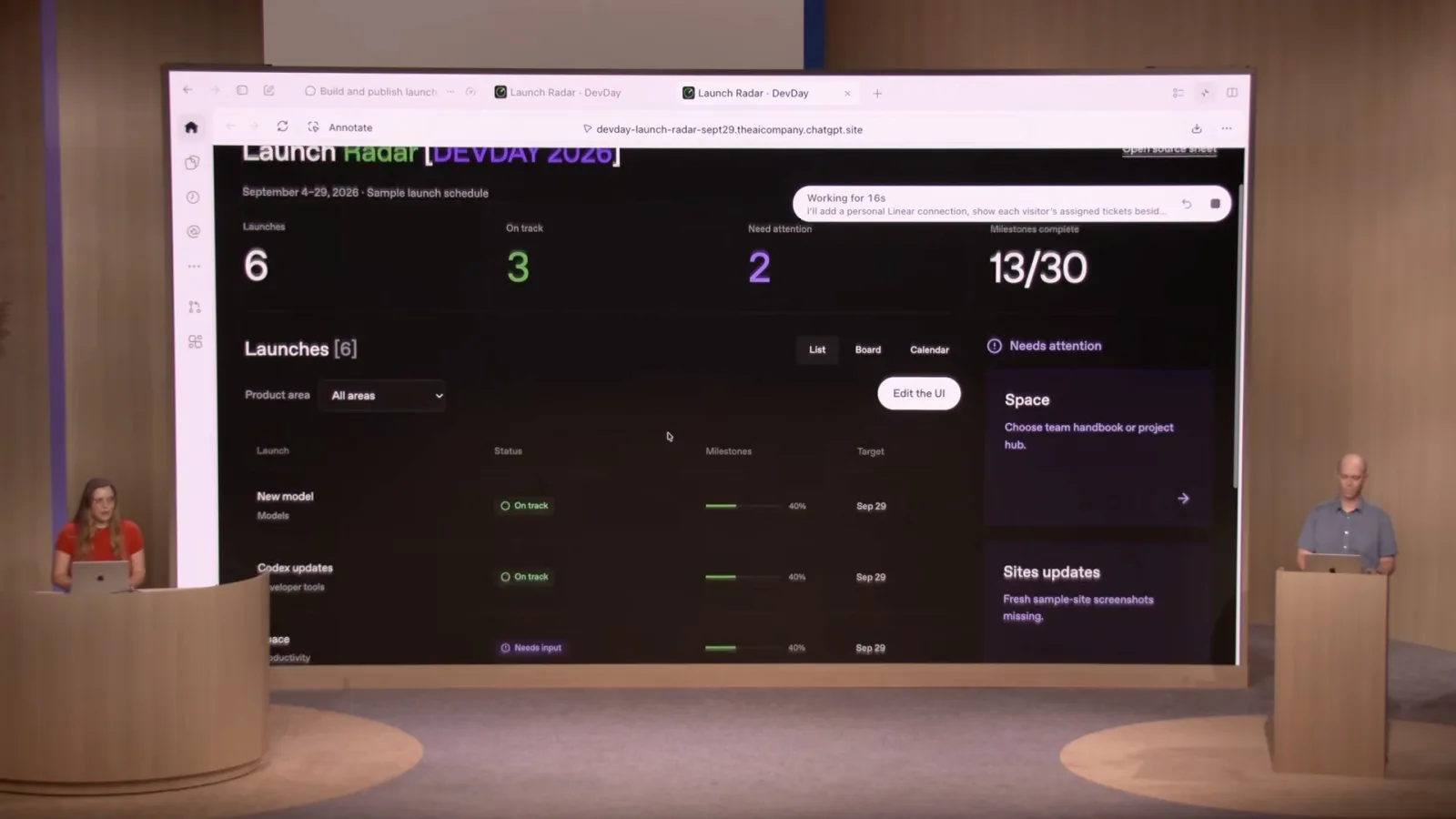
The demo shows the requested launch views and the shared design system. Katia shares the private site with John and gives him editor access, which allows him to push updates to the hosted app.
A linked scheduled task is set to refresh the site daily from the source documents. The speakers then open the same app as different users and show that each sees their own Linear tickets.
John changes a ticket status and saves it back through his connector. He says the integration uses each visitor’s existing connector rather than requiring the site author to implement the third-party connection separately.
Edit shared components with annotations
Custom controls allow editors to preview changes and send them to Codex.
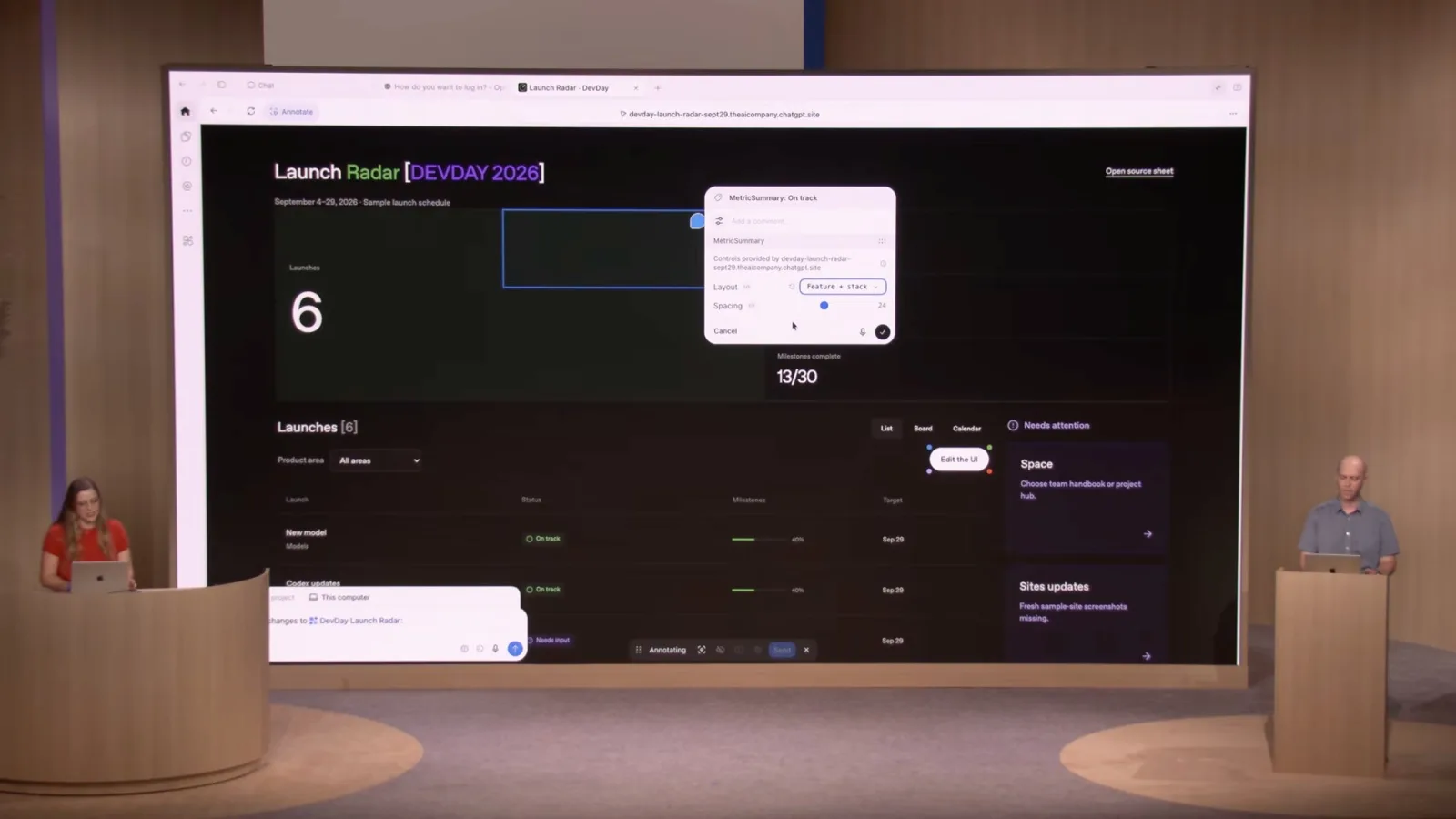
The in-app browser’s annotation feature lets an editor select interface elements and ask Codex to change them. The announced extension lets developers embed custom controls and suggested prompts in a web app.
John previews a larger status display using controls supplied by the component, then sends the selected change to Codex to commit it. The speakers say this can help people discover how to edit shared sites and design-system components.
Expose app tools to a visitor’s agent
A gift app demonstrates image generation and WebMCP tools that update the live interface.
For a public-facing example, Katia opens a gift-box app built with Sites. She takes a picture and generates a box design using an image API; the app stores an API key in environment variables.
She introduces WebMCP, which lets a site expose tools to an agent in a compatible browser. The agent can call those tools to interact with an app rather than carrying out every action by clicking through the interface.
Katia asks her agent to search Slack for John’s interests and use the gift catalog to suggest items. The agent updates the live interface, and she removes some recommendations before adding the rest to the basket.
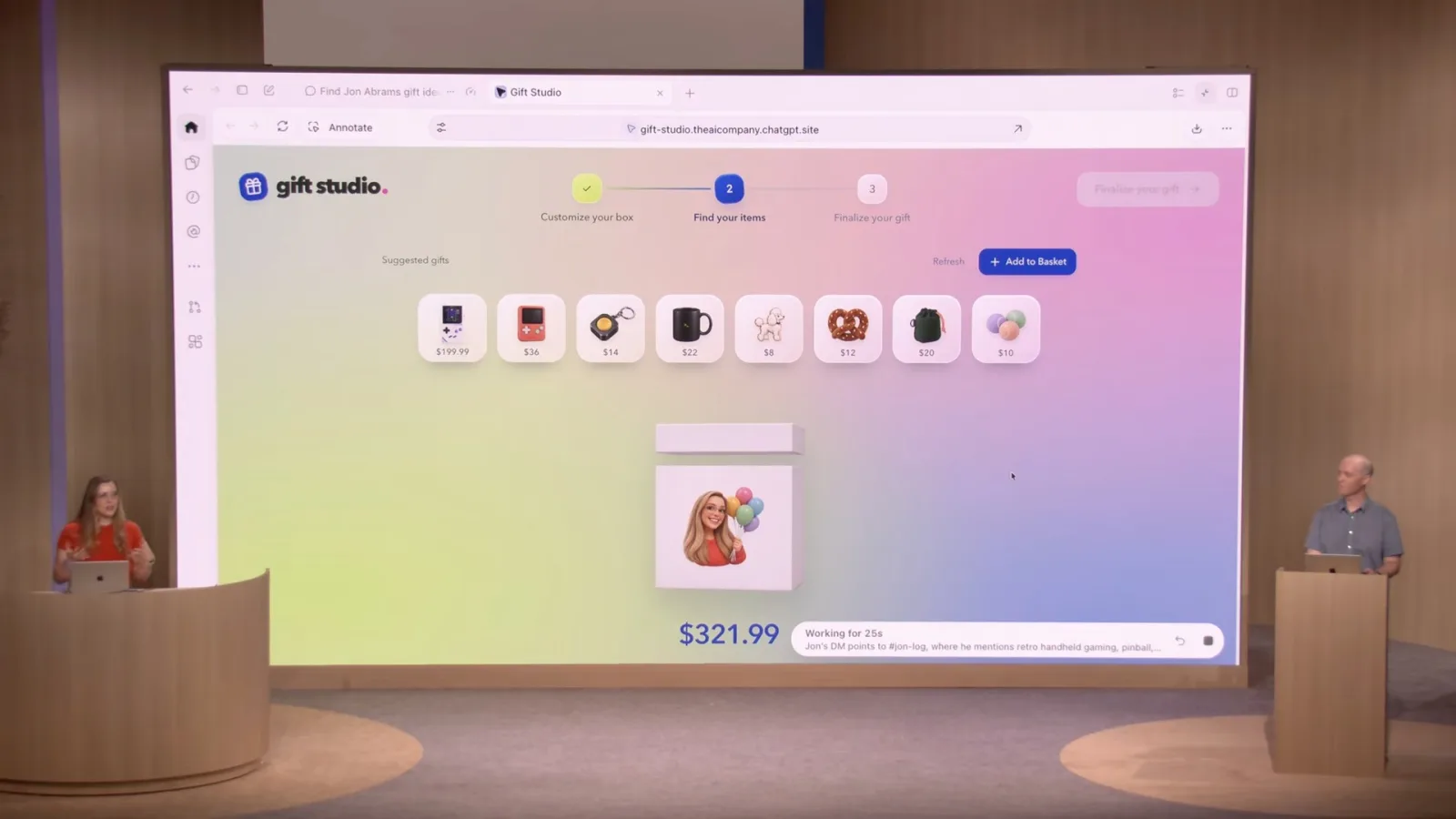
She also asks for a personalized message based on earlier conversations. The speakers present this as a way for a visitor’s agent to use the context available to it while interacting with a site.
John says the Sites plugin can add WebMCP where relevant. The speakers close by describing apps with authentication, databases, plugins and interfaces intended for both people and agents.
同じチャンネルの記事
 27:44EN
 OpenAI· 2026年11月11日Plugin extensions bring interactive tools into ChatGPTCorey, Max Neuber · OpenAIOpenAI describes discovery, sidebar and file entry points, event-driven automation and revised submissions.
 24:01ENOpenAI· 2026年11月11日When agent work needs loops, subagents and a shared logRaj, Eric · OpenAIOpenAI’s Raj and Eric explain persistence, when to delegate and how they coordinate longer work.
 22:37ENOpenAI· 2026年11月11日How GPT Live keeps speaking while an agent worksAlex, Erika · OpenAIOpenAI demonstrates simultaneous voice, background delegation and three ways to return updates.
 21:10ENOpenAI· 2026年11月11日How OpenAI turned security findings into verified fixesIan, Kyle · OpenAIOpenAI engineers describe the scan, deduplication and patch verification loop behind Codex Security.
 19:44ENOpenAI· 2026年11月11日What a managed agent harness has to do to keep workingCharlie, Steve · OpenAIOpenAI engineers explain remote sandboxes, long-running state and a human-approved flight rebooking demo.
 27:09ENOpenAI· 2026年11月11日A six-week coding agent run and what it took to superviseOpenAI engineers describe a CI maintenance agent, long-running context and the cost of keeping it working.