30 秒でわかる
Chris Vela, a forward deployed engineer at Runpod, argues that teams often deploy vLLM with default configurations without measuring their own context lengths, concurrency and latency requirements. He introduces BenchPod, a forthcoming dashboard and template for serving, configuring and benchmarking models on Runpod GPUs. In a demonstration using Kimi K3, he compares runs at several concurrency levels and describes a tradeoff between first-token latency and inter-token latency. He recommends testing configurations against the intended workload and considering smaller models when a frontier model is unnecessary.
- 1Start with the workloadVela says the right context window and hardware depend on whether the application is a coding agent or a simpler task, and how many users it must serve.
- 2A dashboard for experimentsBenchPod is a forthcoming vLLM-based template designed to centralize configuration, live metrics and benchmark comparisons.
- 3Compare concurrency levelsThe demo compares runs at 1, 8, 64 and 192 concurrent users, varying the maximum number of batched tokens.
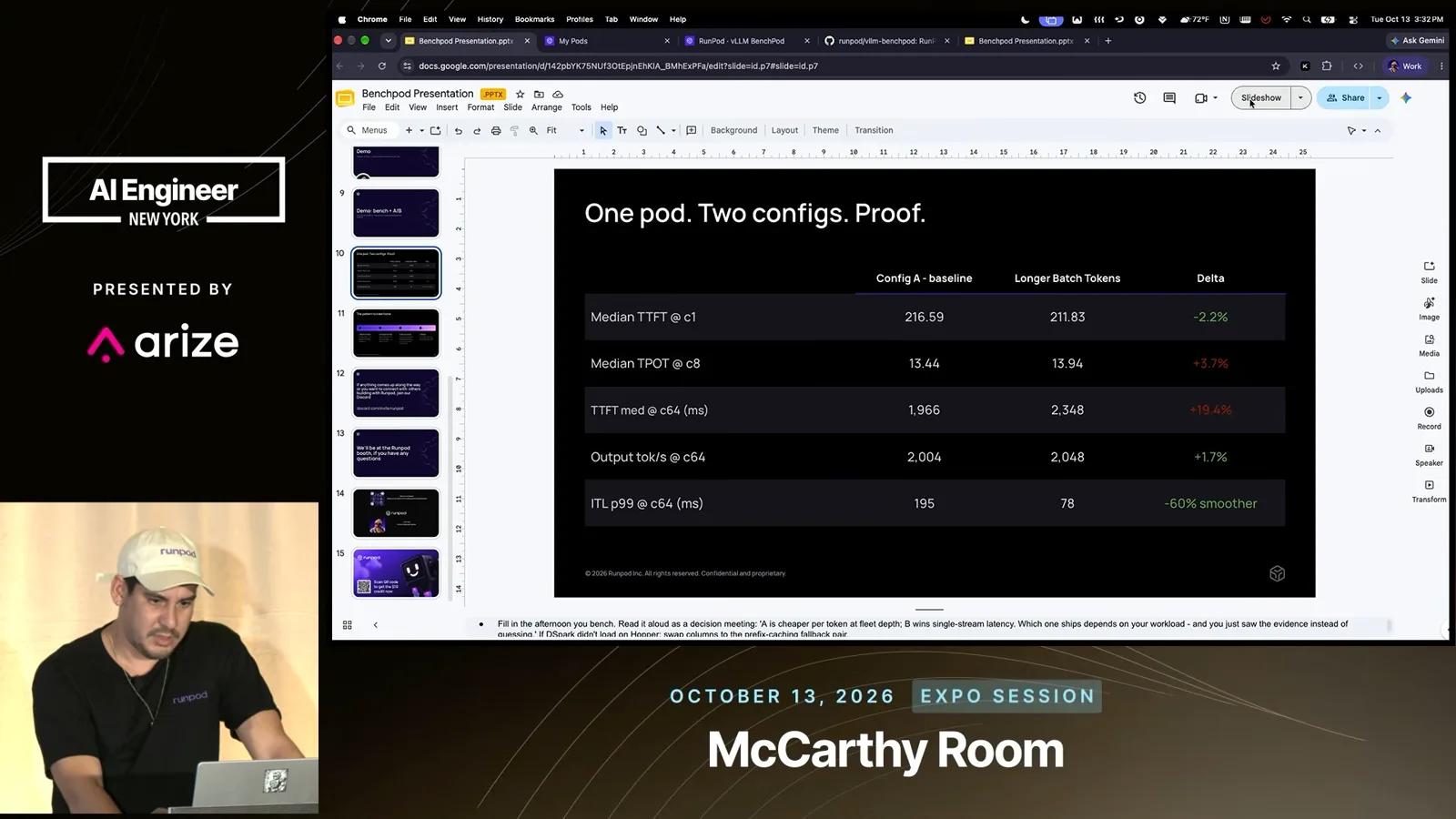
- 4Measure tradeoffs, not just a single speedThe displayed comparison shows p99 inter-token latency at concurrency 64 falling from 195 to 78 ms while median time to first token rises from 1,966 to 2,348 ms.
- 5Test, choose and scaleVela recommends selecting a GPU and model, comparing configurations, testing with an agent, then scaling the winning setup.
- 6A frontier model is not always necessaryHe says teams should weigh task needs against hardware costs and consider smaller models.
ポイント
- Choose model, context length and GPU capacity according to the actual task and expected concurrency.
- Check vLLM and CUDA compatibility before deploying a newly released model.
- Benchmark configuration changes against the latency and throughput metrics that matter to the workload.
- In Vela’s example, raising the batch-token limit improved p99 inter-token latency at concurrency 64 while increasing median time to first token.
- A smaller model and less expensive hardware can be a better fit than a frontier model for some tasks.
チャプターごとに整えた全文を読む
The danger of guessing serving settings
Vela introduces the difficulty of choosing a model, context window and concurrency settings. He argues that teams need measurements before production.
I’m Chris Vela, a forward deployed engineer at Runpod. I want to talk about benchmarking vLLM and the difficulties teams encounter when a new model appears. Runpod makes GPUs available from research and development through production serving, and I often see customers unsure how to launch a model or which settings to adjust.
Many teams start with a base configuration or a vLLM recipe. That is a useful starting point, but it does not answer whether the setup is right for production. Instead of guessing, I want data that can show an engineer or manager that a change actually works better.
Start by asking what the model is for: a coding agent, for example, has different needs from a simple summarization task. A very large context window is not always necessary. Expected user concurrency also matters; optimizing only for the smallest, cheapest GPU can miss how the KV cache will be used under load.
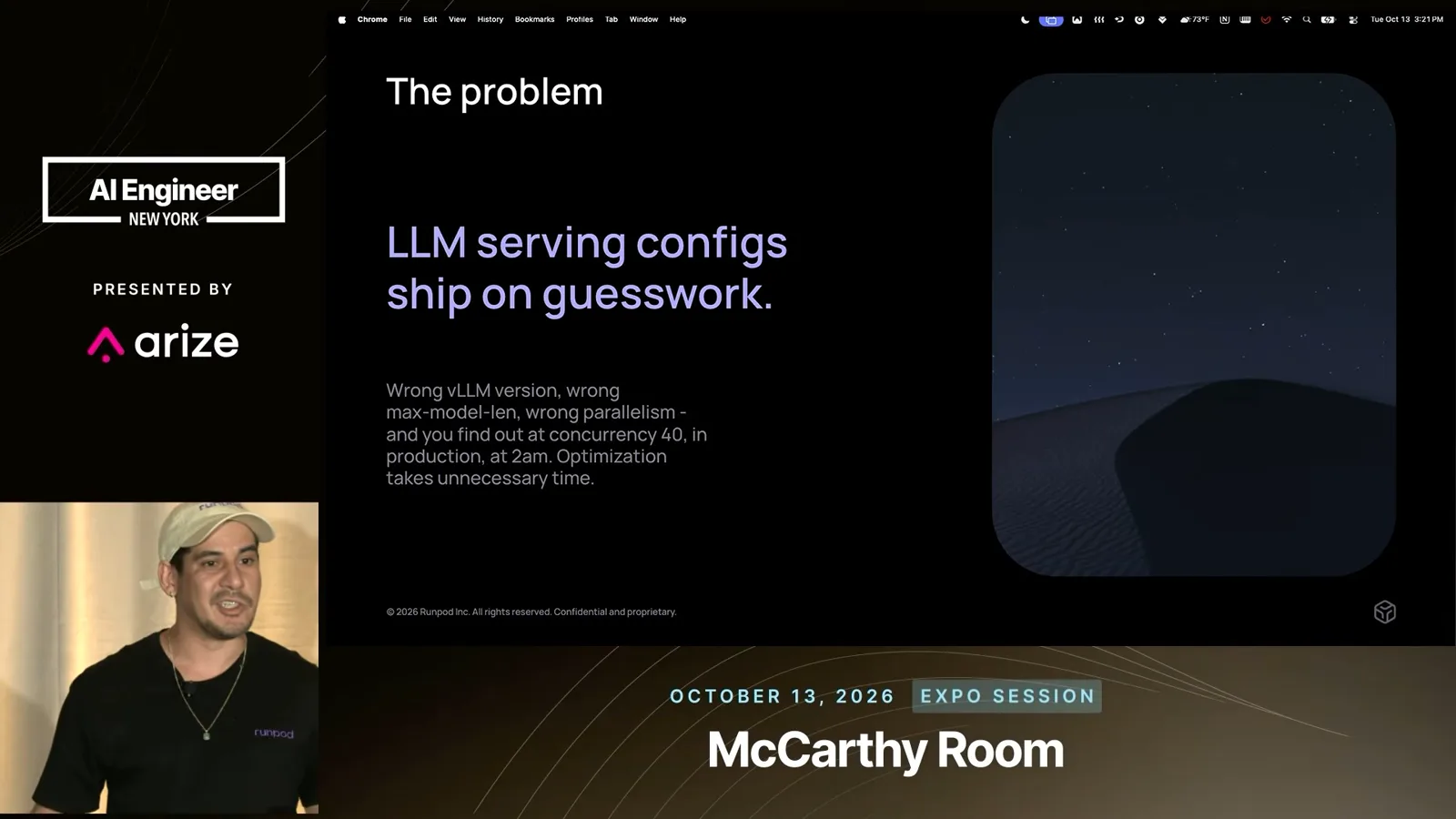
There are many configuration knobs to consider before production. Runpod pods are like virtual machines, use Docker and accept your own image. But even with convenient infrastructure, you still have to choose a compatible serving stack and configuration.
Version compatibility and BenchPod
He discusses vLLM compatibility and introduces a forthcoming template for quickly testing serving configurations.
A newly released model may require a newer vLLM version than the one in a familiar recipe. When the underlying implementation is moving quickly, teams can encounter confusing errors or immature support. I would not necessarily put a model into production the day after release; the implementation may still need work.
To make experiments easier, I created BenchPod, a template that had not yet been released at the time of the talk. It is built around vLLM and centralizes serving configuration, metrics and benchmarking, so teams can change a configuration and compare results quickly.
One pain point is the restart and cold-start wait after changing a configuration. Downloading model weights and loading them into GPUs can take around 30 minutes in my example. Being able to test on actual GPU machines, including B300s when available, lets you check claims against measurements rather than relying on descriptions.
Serving and observing a model
Vela describes the container, self-healing and dashboard, then discusses a Kimi K3 deployment and GPU metrics.
BenchPod uses a vLLM OpenAI-compatible Docker image and a FastAPI application. You can specify which models to serve, and a watchdog can restart the service when it fails. I describe an internal instance with four nodes where a model outage self-healed without disrupting our users.
Our team has been using Kimi K3 for coding agents. Although the model supports a one-million-token context, I say a single B300 cannot reach that full length in this setup and we use roughly half. In our experience that is still sufficient for long tasks and makes good use of the KV cache.
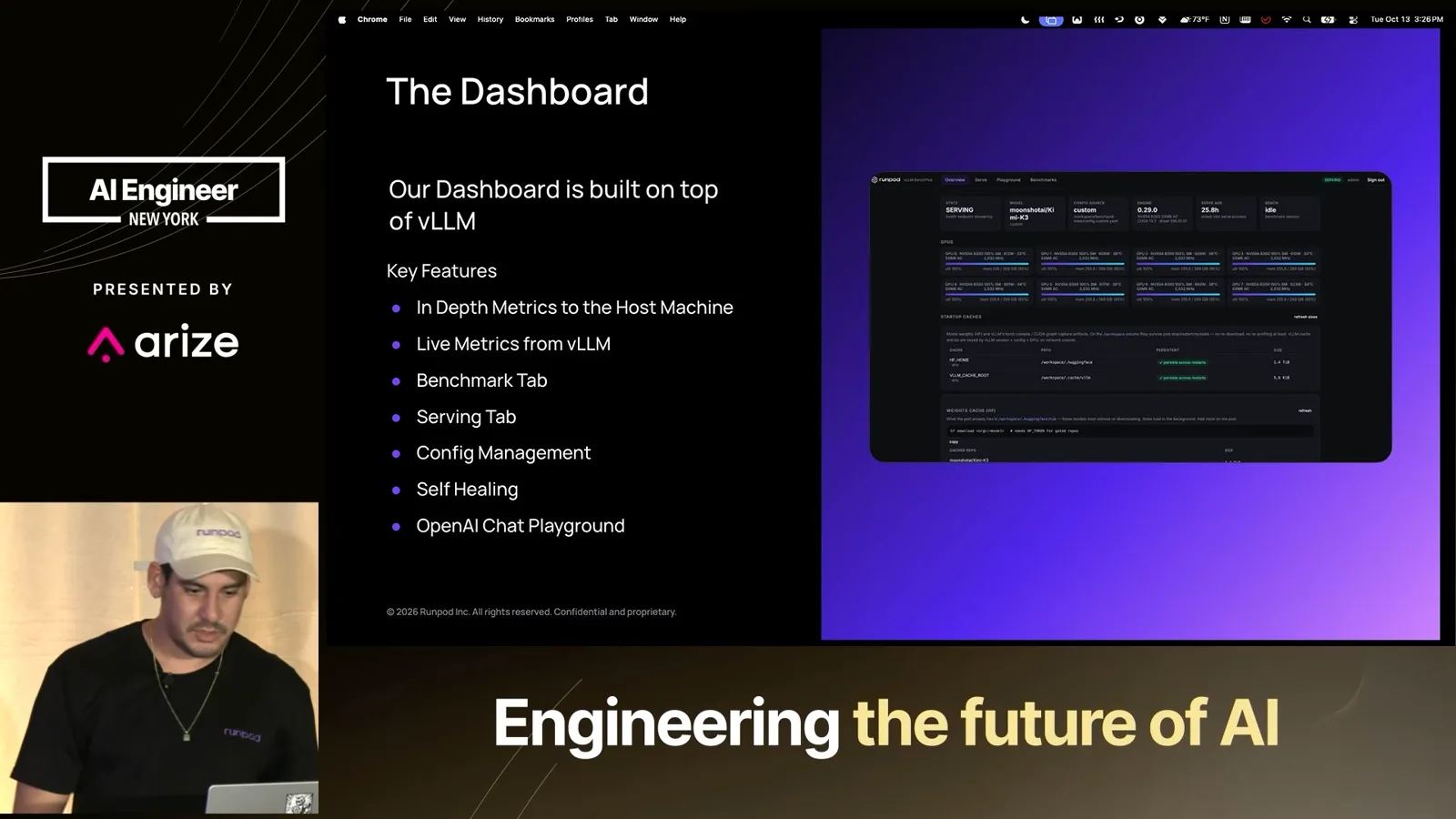
The dashboard includes GPU and host metrics, vLLM metrics, benchmarking, serving configuration, self-healing and a playground. CUDA compatibility matters too: I note that the demonstrated Kimi configuration works with CUDA 13.0 rather than 12.8. Teams can use the playground to test a model before connecting it to an agent.
The metrics also help teams observe cold starts and behavior under actual traffic. The template was not yet generally available during the talk. In the demonstration, I show the Runpod interface and note that available GPU supply can change; the screen happens to show no B300s available at that moment.
Demonstrating configuration and benchmarks
The demo shows a running instance, configuration changes and benchmark comparisons at different concurrency levels.
A pod can be deployed with a storage volume and the BenchPod image. The running instance exposes live metrics and error information, with data backed by storage and accessible through FastAPI calls. An agent can use the API without relying on the graphical interface, while the dashboard gives operators an overview.
I show a recent GPU failure and a roughly nine-minute cold start for the Kimi instance. The serving tab lets me stage an experiment using a vLLM YAML configuration and restart the service to apply it. For this demo, I varied the maximum number of batched tokens.
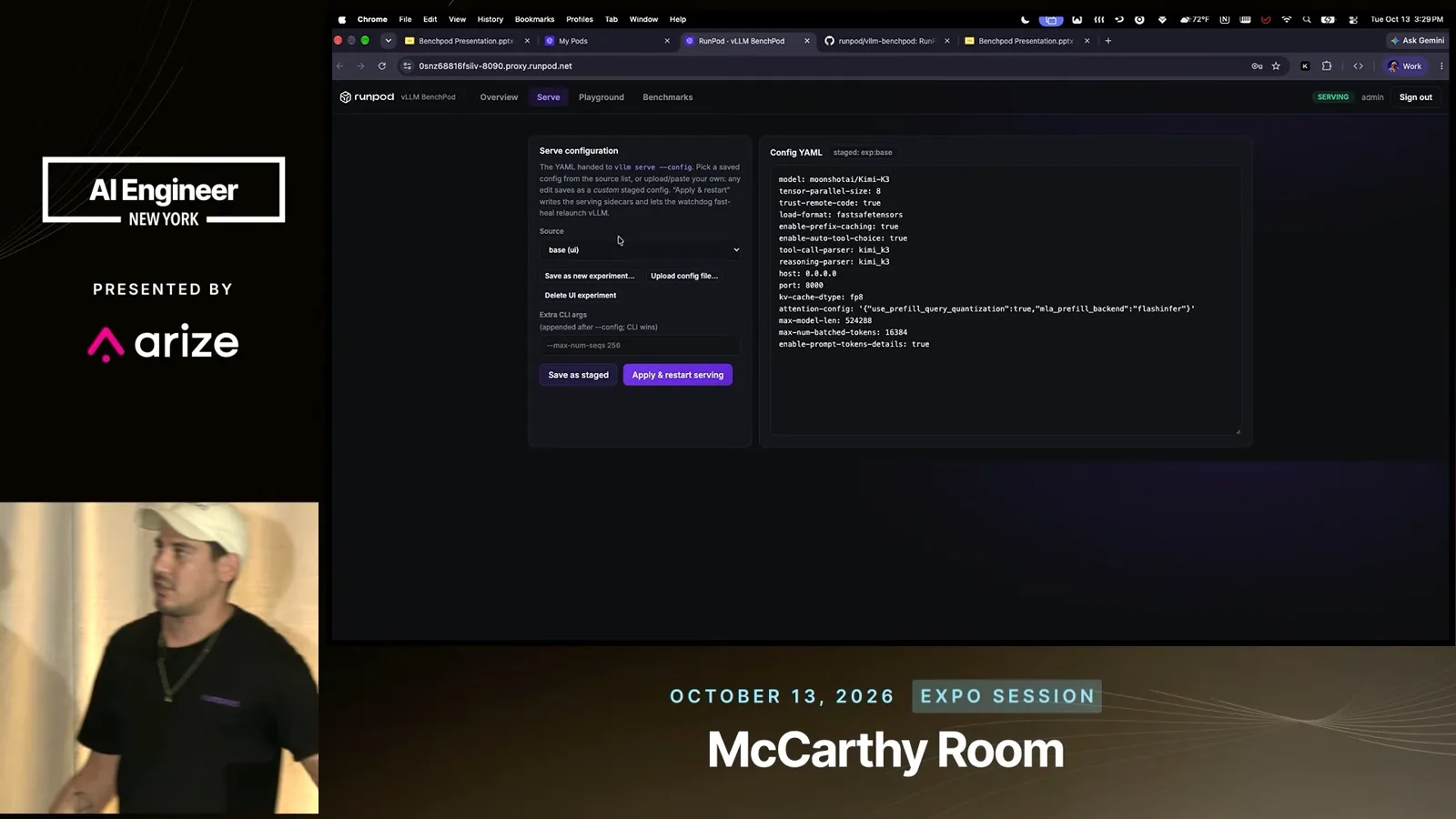
I ran the benchmarks in advance rather than waiting through them live. The runs use concurrency levels of 1, 8, 64 and 192 users, and the dashboard can compare multiple configurations. This makes it possible to see how a setting behaves as load increases rather than relying on a single test.
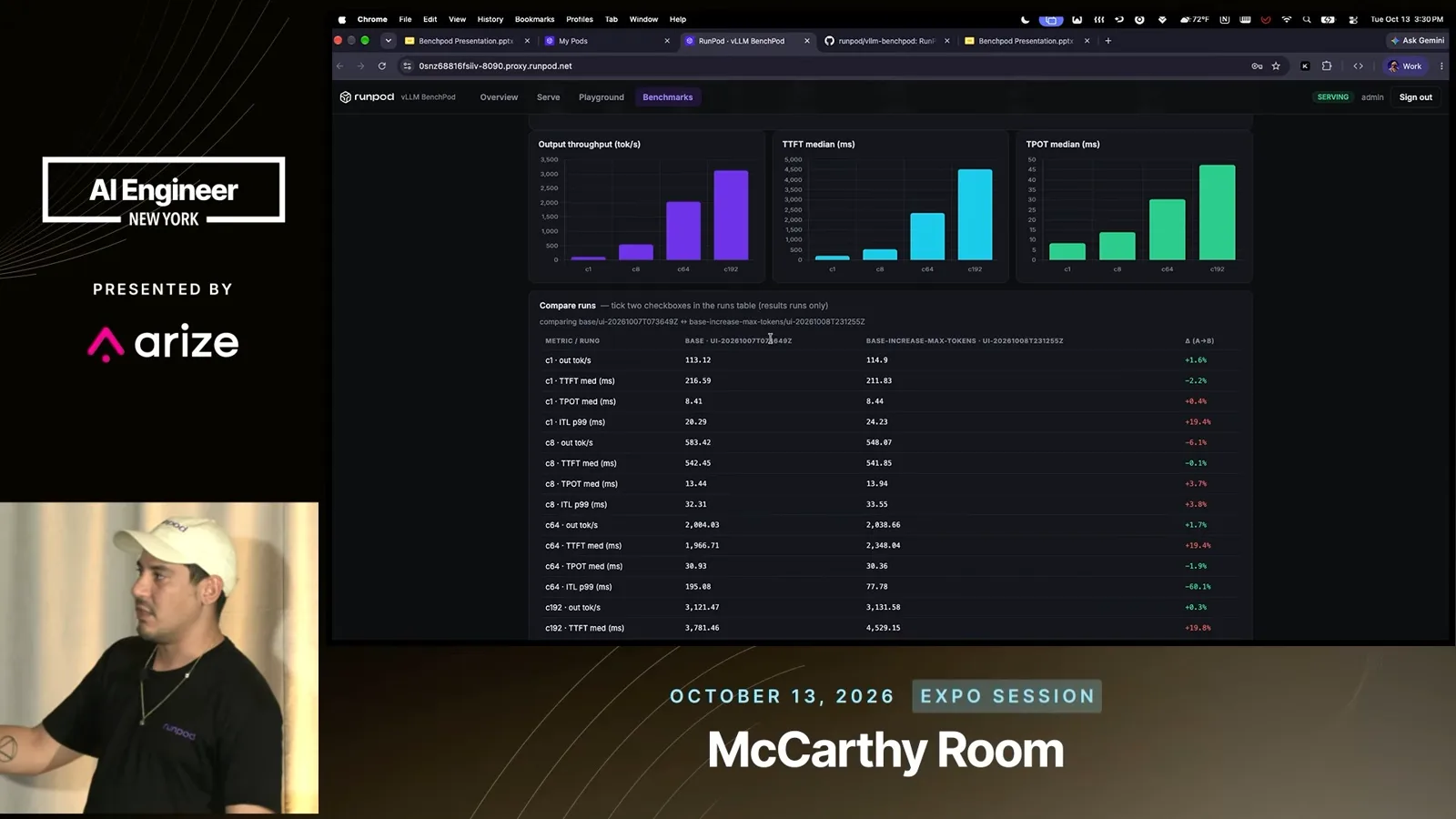
The displayed comparison illustrates a tradeoff. At concurrency 64, p99 inter-token latency falls from about 195 to 78 milliseconds with the larger batch-token setting, while median time to first token rises from about 1,966 to 2,348 milliseconds. The result depends on which latency matters to the application.
I observed that increasing the batch-token setting did not change first-token latency much in some cases, while inter-token latency dropped substantially in the example. For a long request, faster token generation can make the overall job finish sooner than with the base recipe; the comparison should be evaluated for the workload.
Once you have data from a pod, you can consider moving to a multi-node cluster or serverless infrastructure that scales up and down. Serverless users can also encounter delays while workers start, so measuring the actual behavior helps inform production decisions.
From a test to production
Vela discusses scaling and using actual measurements to select settings. He outlines the workflow from choosing hardware through deployment.
I demonstrate a command-line client using the running model. I say around 50 people are using our internal instance, and we also run other models. Looking ahead, I am interested in smarter routing so that teams can host and select among models rather than depend on one configuration.
You can design an experiment around the expected workload, such as hundreds of users. My recommended workflow is to pick a pod and GPU, select a model, compare configurations, and test with the agent. Optimize the metric that matters—such as inter-token latency, time to first token or time per output token—then ship the winner and scale it.
Match model size to the task
He discusses the cost of powerful GPU nodes, the value of smaller models and future work on routing and governance.
A frontier model is not automatically necessary for every team. I estimate that a B200 node on our platform costs around $40,000 a month, subject to price changes. It is powerful hardware, but the decision should reflect the actual task and cost.
For example, I run a DeepSeek model on four H200s for tasks it handles well, while I use Kimi for longer, more detailed work. Tooling and context management matter when self-hosting, and I see model routing and AI governance as next steps for Runpod.
I invite questions and note that I continue to learn new model-specific pitfalls as I test releases. The BenchPod template was planned for release at the end of the month so attendees could experiment with it themselves.
同じチャンネルの記事
 21:47EN
 AI Engineer· 2026年10月28日Patrick Smyth on Open-Source Supply Chain Security in the AI EraPatrick Smyth · ChainguardChainguard’s Patrick Smyth discusses faster exploitation, malware in dependencies, zero-days and the expanding attack surface around developer workflows.
 14:09ENAI Engineer· 2026年10月28日Taylor Luttrell-Williams on Finding Logic Vulnerabilities with SonarQube Hunter AgentTaylor Luttrell-Williams · SonarSonar’s Taylor Luttrell-Williams explains how a security agent maps a codebase, investigates logic flaws and presents validated findings alongside conventional scans.
 18:52ENAI Engineer· 2026年10月28日Manish Kapur and Addy Osmani on Verifying AI Software FactoriesManish Kapur, Addy Osmani · SonarSonar’s Manish Kapur and Anthropic’s Addy Osmani discuss code review, evidence and layered checks as coding agents increase the pace of software changes.
 18:35ENAI Engineer· 2026年10月28日Kamil Potrec on Agent Authentication, Delegation and Gateway ControlsKamil Potrec · KeycardKeycard’s Kamil Potrec explains why agents need distinct identities, scoped credentials and auditable authorization, and where gateways can help.
 18:56ENAI Engineer· 2026年10月27日John Feminella: Five Controls for AI Agents, and the $900 Million Bank ErrorJohn Feminella · Two SigmaA payment mistake shows why good intentions and approval prompts are not enough. Feminella describes practical controls for giving agents useful autonomy.
 18:12ENAI Engineer· 2026年10月27日Tim Tyler: An Accountability Framework for AI Agents as a Digital WorkforceTim Tyler · GraviteeThe Gravitee speaker applies identity, sponsorship, authority and oversight to agents, drawing on how organizations manage human work.