En 30 secondes
After three days with Apple Vision Pro in February 2024, Matthew Berman praises its intuitive interaction, rendered displays, audio and potential for work. He also describes discomfort, slow startup, passthrough quality, authentication and sharing friction, limited launch apps and a high price. He concludes that early adopters may enjoy it more than average buyers and imagines future AI uses, which are predictions rather than demonstrated features.
- 1Intuitive controlsLooking at a window and pinching works well for Berman, who describes it as a personal experience rather than a measured accuracy test.
- 2Comfort trade-offsThe Solo Knit Band puts pressure on his face, while the included over-head band feels more comfortable to him.
- 3Passthrough disappointsHe reports blur and noise in the camera view even though rendered windows and films look sharp.
- 4Work on a virtual displayMac Virtual Display creates a large floating screen, but physical peripherals can be hard to see in full immersion.
- 5Price and future potentialBerman would hesitate to recommend the launch device to an average buyer while seeing possibilities for future AI integration.
À retenir
- Berman finds eye-and-hand controls intuitive and the rendered content impressive, but his tracking estimate is subjective.
- A physical keyboard works best for him, and the headset’s weight, startup and lost window arrangement create friction.
- Passthrough appears blurry or noisy to him, especially in low light, while immersive movies and Mac Virtual Display stand out.
- Launch-era app gaps and the $3,499 US starting price are historical details, not current buying advice.
- His imagined AI assistants and immersive generated scenes are future possibilities rather than results of the review.
- Berman reports no nausea in his own use but also finds the device isolating around family.
Lire le texte remanié, chapitre par chapitre
Buying and learning the controls
Berman describes his launch-day fitting and first impressions. He finds eye and hand input intuitive but setup and window persistence frustrating.
After 72 hours with Apple Vision Pro in February 2024, I find it remarkable but also notice significant flaws. I will walk through the purchase, controls, comfort, apps, immersion, work and entertainment, then explain why I think the headset could eventually be an important AI device. This is an early personal review, not a current product guide.
I had not planned to buy one on launch day, but seeing other people get theirs changed my mind. I went to an Apple Store without a preorder and waited about half an hour. The staff scanned my face for a fit and let me try different sizes; my in-store measurements differed from the scan I had done at home.
The headset arrived for the demo on a wooden tray, and an employee guided me through putting it on, using gestures, looking at photos and watching immersive clips. The entire demonstration took about half an hour. The polish made a strong first impression before I began noticing the drawbacks.
The interface feels intuitive: windows float around me, can be moved closer or farther away, and stay in place as I move. Looking at an element and pinching to select works very well for me. My estimate that eye tracking is 99% accurate is a personal impression, not a measured performance statistic.
Getting started is slower than pulling out a phone. I take the device out of its case, remove its cover, connect the battery and put it on; in my experience, it then takes about 30 seconds before I can see through it. After disconnecting and restarting, I find that my previous window arrangement is gone, so I have to set it up again.
Typing, comfort and apps
He compares virtual and physical keyboards, headbands and launch apps. His comfort and tracking assessments are personal observations.
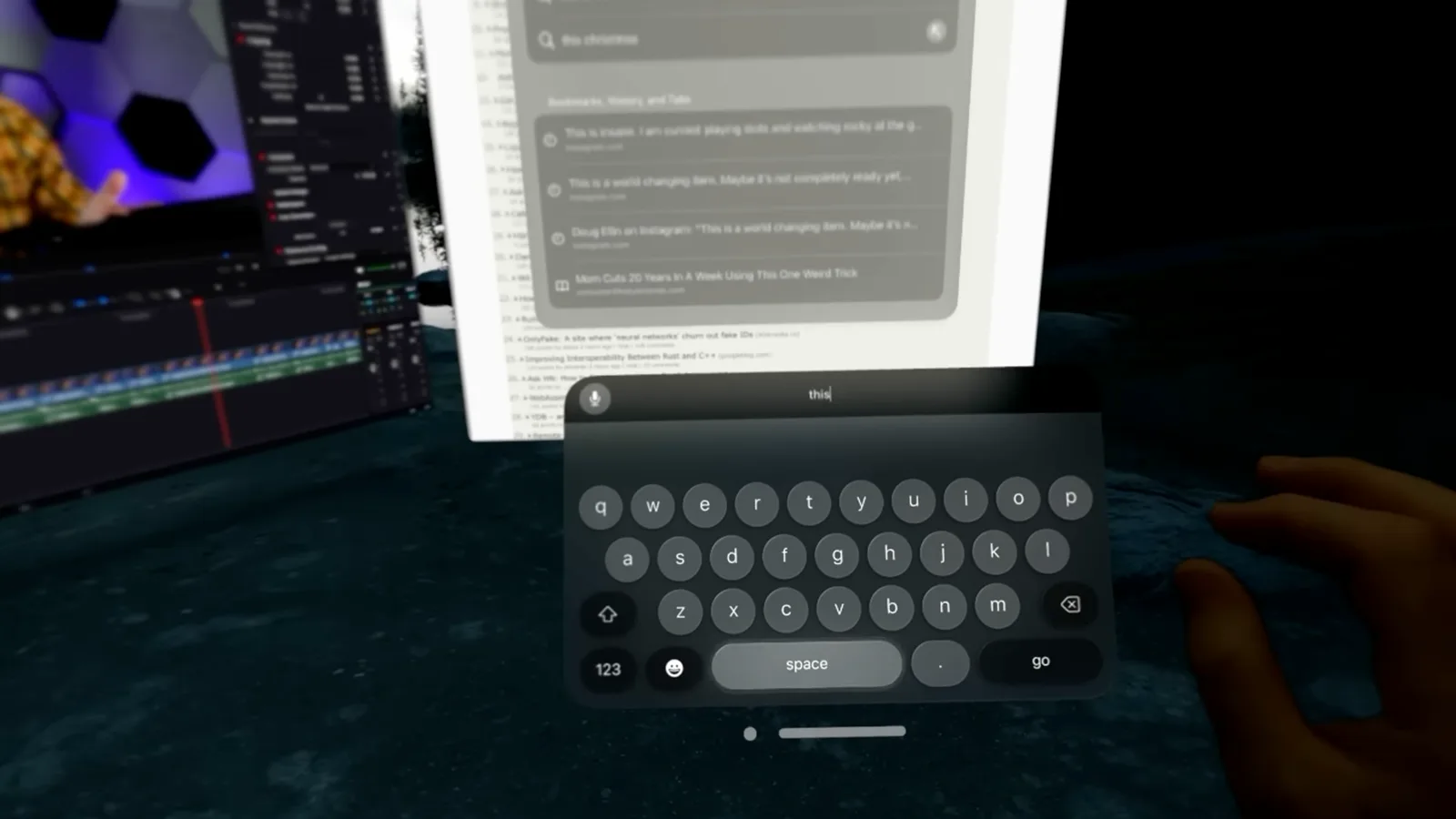
For typing, I can look at virtual keys and pinch, or reach out and tap the virtual keyboard, though there is no tactile feedback. A physical keyboard works best for longer text. In a fully immersive environment I can see my hands but not the keyboard, making it difficult to find the keys unless I can touch-type.
A phone is also awkward: inside an immersive environment I cannot see it, and in passthrough Face ID does not recognize my face while the headset is on. I have to enter the phone passcode. I would like an easier way for the devices to cooperate.
The Solo Knit Band looks and feels good, but its front-heavy fit creates pressure above and below my eyes, leading me to adjust it frequently. The included Dual Loop Band has an over-the-head strap and relieves some pressure for me. Individual fit will vary; Apple included both bands at launch.
I have not experienced eye strain or nausea in my own use, including a session lasting about 90 minutes. That is my experience, not a guarantee for other wearers. Comfort remains important because I may otherwise need to take the headset off before the battery runs down.
At launch, Apple said more than 600 apps and games were designed for Vision Pro, alongside many compatible iPhone and iPad apps. I find some important services missing as native apps, including Netflix, Spotify and YouTube, although websites such as Gmail and YouTube can be used through Safari. My suggestion that all the absences stem from Apple’s revenue share is speculation; developers may have different reasons.
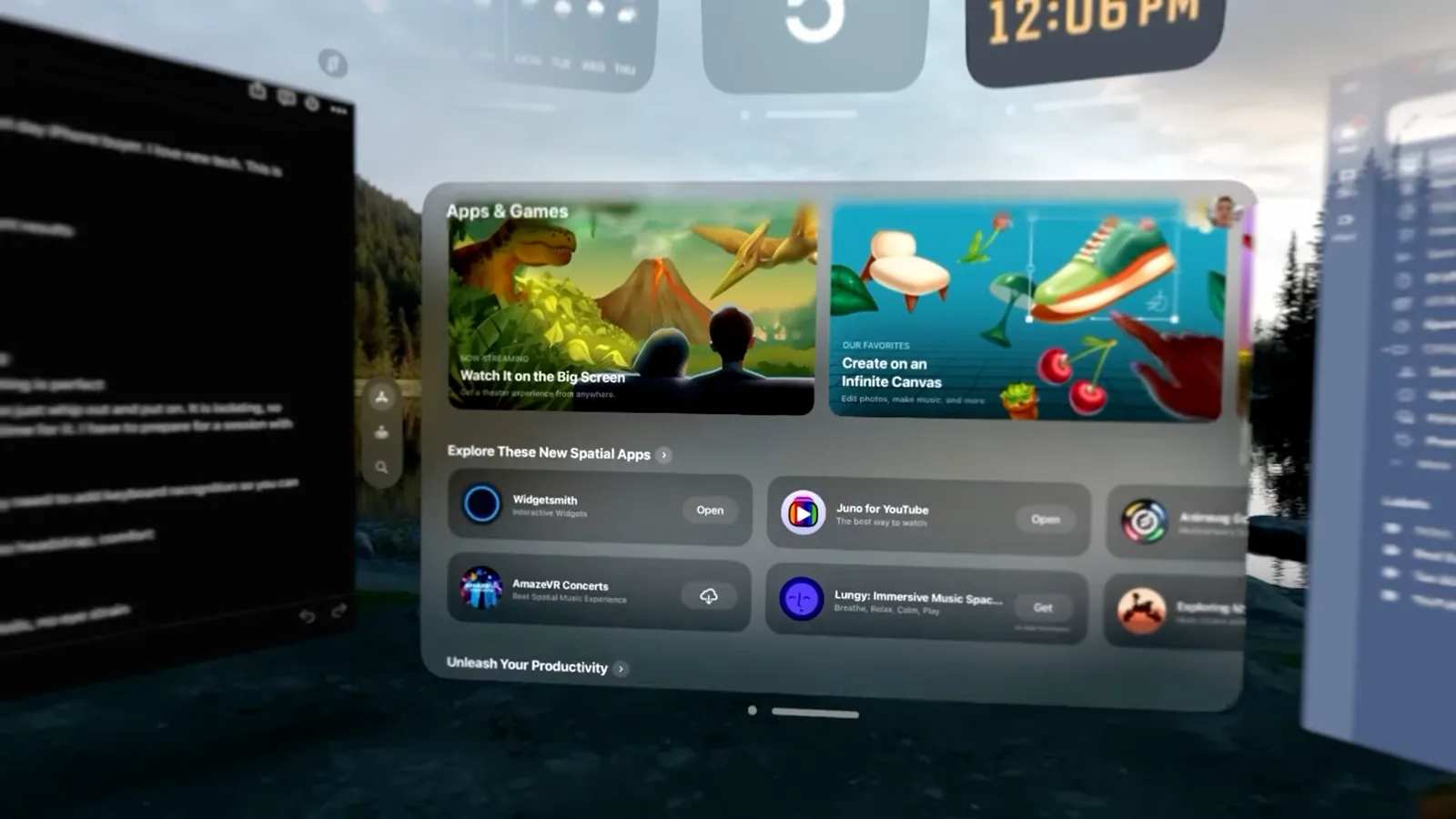
The game selection feels limited to me, with familiar casual titles but few of the games I most want to play. FaceTime is more impressive: people on phones appear large in front of me, and I can share my view. I have not tested a call with another Vision Pro wearer.
My Persona works, but it still falls into the uncanny valley. Apple described Persona as a beta feature at launch. More broadly, I think the platform’s potential depends on developers building experiences specifically for it; that is a prediction rather than a guarantee.
Immersion and passthrough
He praises virtual environments and entertainment while criticizing camera passthrough and the limited immersive-video field.
The immersive environments made a strong impression. Using the Digital Crown, I can dial up the degree of immersion and arrange windows while looking out over Joshua Tree or the moon. In my office I find it useful to tune out the room and focus, though my experience with other headsets has been limited.
Passthrough, the camera-mediated view of the room, is my biggest disappointment. When I move my head I notice blur, waves and color variation; low light adds noise. By contrast, I find the device-rendered windows and movies extremely sharp. My hope that software and later hardware will improve passthrough is a forecast.
Hand occlusion lets my hand appear in front of virtual interface elements, although I can see edge artifacts. I also enjoy how my hand seems to darken when I switch to a nighttime environment. These are visual effects I observed, not a precise measurement of tracking or compositing quality.
Apple’s immersive examples, including Alicia Keys in a studio, a tightrope walker and dinosaurs, feel strikingly close. They are 180-degree experiences, however, so looking outside the captured area breaks the illusion for me. I would like full 360-degree video, though I do not know the production constraints.
Watching films is an obvious use: I can place a theater-sized screen in a landscape and watch purchased Apple TV titles, including some available in 3D. I find it much more immersive than returning to my television. The experience and available catalog depend on the content and service.
Gaming seems like another natural use, but none of the launch games I tried held my attention for more than a short demo. I hope developers build more experiences suited to the device rather than simply reproducing familiar mobile games. That is my view of the launch selection, not a claim that no games existed.
Work and hardware
Berman tests Mac Virtual Display and discusses field of view, battery, audio and case. He considers the hardware useful but expensive.
Work may be the strongest use case for me. With Mac Virtual Display I can bring my MacBook screen into a large floating view, use its mouse and keyboard, and place other windows nearby. Full immersion can hide the physical peripherals, so I either keep them stationary and touch-type or leave some passthrough visible.
I can imagine using a headset and portable keyboard on a plane or in a café instead of looking down at a small laptop screen. Eye selection can reduce my need for a mouse, although I still want a physical keyboard. That portability scenario is my judgment about a possible workflow.
The hardware feels premium, but after about an hour I become aware of the limited field of view and a dark ring around it, like looking through binoculars. I read that it may be narrower than a Meta Quest but have not tested that comparison myself. A wider field of view could improve immersion in future devices.
The external battery is not a major drawback for me: I usually take a break or connect power before two hours. Apple’s original specifications described up to two hours on the battery and all-day use plugged in. The cable occasionally snags, and the connector takes practice to lock in place.
The spatial audio is one of my favorite features. Sound seems to stay positioned as I move my head, and I find it good enough for music or movies without headphones. At higher volume, however, other people nearby can hear it. I have not yet tried my Apple headphones with it.
The padded travel case feels well made and has space for the headset and battery. At around $200 in my purchase, I am not convinced it is worth the price when less expensive alternatives exist. That is a personal value judgment, and the price is from the time of the review.
Authentication, sharing and verdict
He describes login, guest-mode and mirroring friction, then weighs price and isolation. His AI scenarios are predictions about future uses.
Account authentication causes friction for me. I use hardware security keys and say I temporarily disabled Google Advanced Protection to sign in, then had to use my phone for two-factor prompts. That describes my setup in early 2024, not a recommendation to weaken account protection; supported authentication options can change.
I notice glare around bright content in dark environments, which adds to the binocular feeling. I suspect it may be intentional, but I do not know its cause. Sharing the headset is also cumbersome: I enable Guest User, hand it over within the allotted window, and the guest completes eye calibration and fit steps.
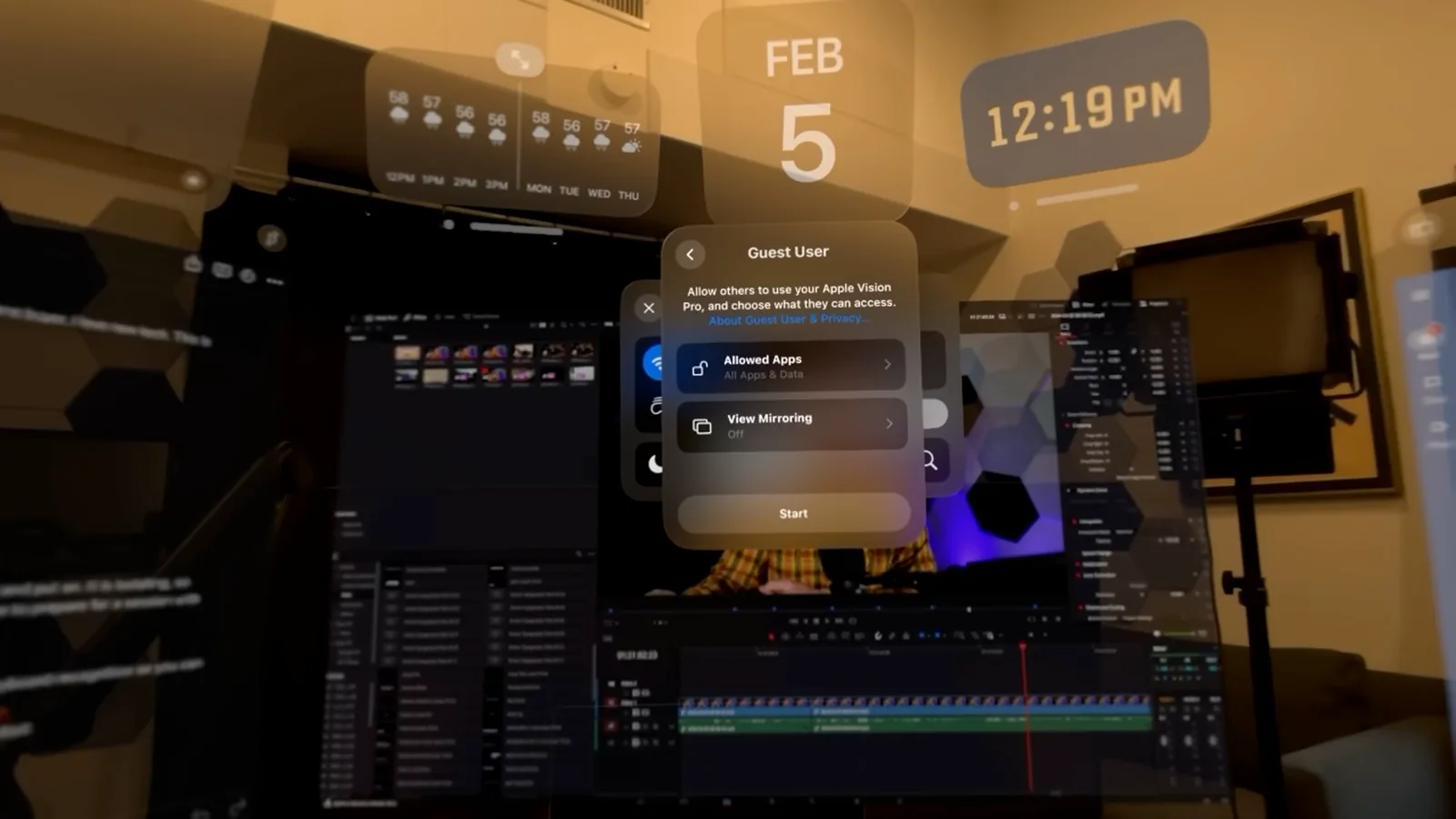
When mirroring, recording or sharing my view, some movie video does not appear. I suspect rights protection may be involved, but cannot establish the reason from this test. The recurring loss of my window arrangement after disconnecting and restarting remains one of my biggest frustrations.
My conclusion is that the device shows exciting potential but is difficult to recommend to an average buyer at this price. Apple’s [2024 US launch price](https://www.apple.com/newsroom/2024/01/apple-vision-pro-available-in-the-us-on-february-2/) started at $3,499; my nearly $4,000 figure reflects the high overall cost rather than the base price. Enthusiasts with discretionary money may value the early experience more.
I imagine friends watching sports from a courtside perspective, attending concerts and playing new kinds of games. These are future possibilities, not capabilities I demonstrated in this review. The headset also feels isolating at home: when I wear it, my family cannot interact with me in quite the same way, even in passthrough.
That isolation and the time needed to get started mean I have to deliberately make time to use it, unlike a quick phone check. I nevertheless see potential for AI because a headset combines cameras, sensors, microphones and computing with a spatial display. I show a clip of a locally running language model, but a demo alone does not establish that all large models run easily on the device.
In the future I imagine asking about an object I am looking at, previewing a chair in my room or exploring a generated historical scene. I also expect a more capable Siri could make such interactions smoother. These are concepts and predictions, not features established by this 2024 test; my enthusiasm is about what the platform might become.
Sur la même chaîne
 34:21EN
 Matthew Berman· 27 oct. 2026Matthew Berman Examines Anthropic’s IPO Filing, AI Growth and GovernanceMatthew Berman, Sam Altman · Forward FutureThe presenter reviews the S-1’s financial metrics, compute strategy and voting structure while questioning the tension between rapid AI development and safety.
 0:26ENMatthew Berman· 25 oct. 2026Sam Altman on Human Values and Problem-Solving in an AI WorldSam Altman · OpenAIIn a short interview excerpt, Altman considers the enjoyment of solving hard problems and the human role in interpreting results.
 0:36ENMatthew Berman· 25 oct. 2026Kimi K3.1 and a Rubik’s Cube Solver DemonstrationMatthew Berman · Forward FutureMatthew Berman shows a scrambled virtual cube being solved and gives the Kimi K3.1 test a favorable assessment.
 0:21ENMatthew Berman· 24 oct. 2026An AI-Generated Kimi Benchmark Chart Used Invented ScoresMatthew Berman · Forward FutureMatthew Berman asks for a graph of Kimi K3.1 Pro benchmarks, then discovers that the displayed figures are illustrative placeholders.
 25:50ENMatthew Berman· 24 oct. 2026Kimi K3.1 Pro Tested: Strong 3D Demos, Uneven Results and Competitive PricingMatthew Berman · Forward FutureMatthew Berman tests the open-weight model on coding, 3D rendering and visual explanations, then compares benchmark results and prices.
 32:20ENMatthew Berman· 23 oct. 2026Who Is Local AI For? The Costs, Trade-offs and a Hybrid FutureMatthew Berman · Forward FutureMatthew Berman weighs data control and independence against hardware cost, setup complexity and inference speed.