En 30 secondes
A small UI change can require repeated clicks and expensive AI calls just to reach the state being edited. Devin Chasanoff builds a development-only component inspector that renders the real component, exposes state, provides one-click presets and links visible cases to tests. He first refines one inspector, then asks Gemini to turn the pattern into reusable generation and update skills. A session-scoped editing mode keeps the inspector current when the component changes; he demonstrates it with error handling and workout-chat improvements.
- 1A development-only page isolates the actual componentThe Developer Hub opens a running preview alongside state controls, presets and plain-language test cases.
- 2The real component updates, but generated inspector details can go staleControls and test descriptions reflect the code when they were generated. Chasanoff adds an update skill and an optional editing mode to keep them aligned.
- 3The reusable system emerged from one successful exampleA complex first attempt failed; he restarted with a single card and turned its working inspector into a generation skill.
- 4Inspector editing mode belongs to one sessionRather than attaching a flag to every request, he enters the mode once and has the agent update both component and inspector until he exits.
- 5A failure preset makes retry behavior easy to inspectThe agent adds connection-error and timeout controls, so he can check the error UI without forcing the real endpoint to fail.
- 6Workout context and input changes can be checked in placeHe adds an expandable workout view and a target chip, then checks wrapping and scrolling in the isolated preview.
À retenir
- Build and refine one working component inspector before turning it into a reusable agent skill.
- Separate editable, inherited and computed state so a preview can expose what changes and what is read-only.
- Generated inspector controls can become stale; Chasanoff uses a session-scoped rule to update them alongside component changes.
- Use presets to reach error and proposal states without replaying the whole app flow or repeatedly calling the model.
Lire le texte remanié, chapitre par chapitre
Why a small UI change requires so many steps
Chasanoff demonstrates the cost of recreating an AI-generated proposal before editing a card.
I start small, refine a process until one case works, then turn it into a rule or automation that can scale. Here that process is a development-only inspector for my personal-trainer app.
Suppose I want to change one card in the app. To reach it, I must open the week, select a workout, request an AI modification and wait for Gemini to generate a proposal. Every edit and verification can require repeating those steps.
Even after accepting a proposed plan, the next screen has formatting I want to change. The need to drive the entire application into that state makes a small UI adjustment slow and dependent on repeated model calls.
A development hub for component states
The inspector combines a real component, presets, editable data and test descriptions.
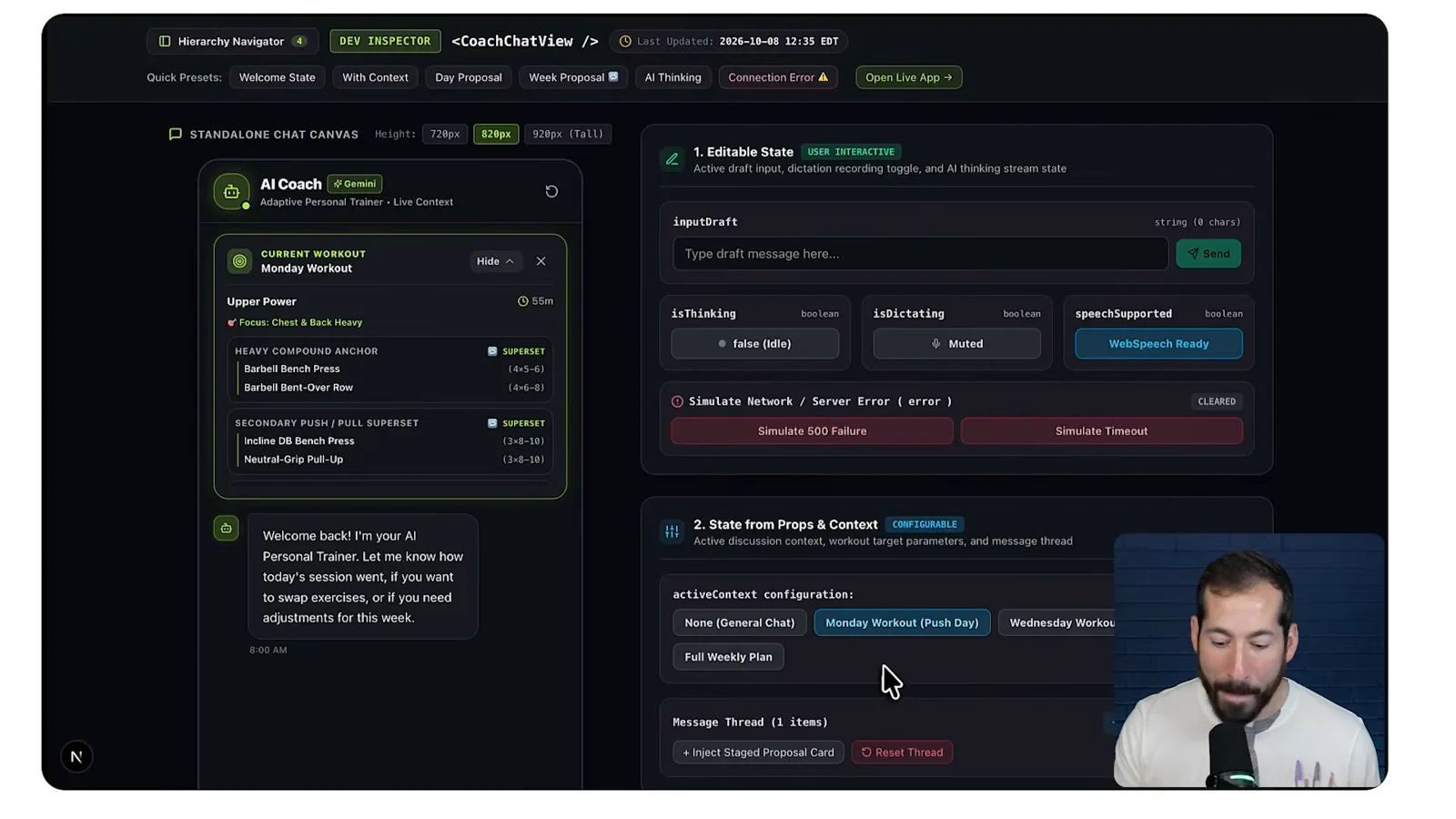
My solution is a Developer Hub button available only in development. It opens an inspector for a chosen component, showing the real component running on its own alongside controls and information about its state.
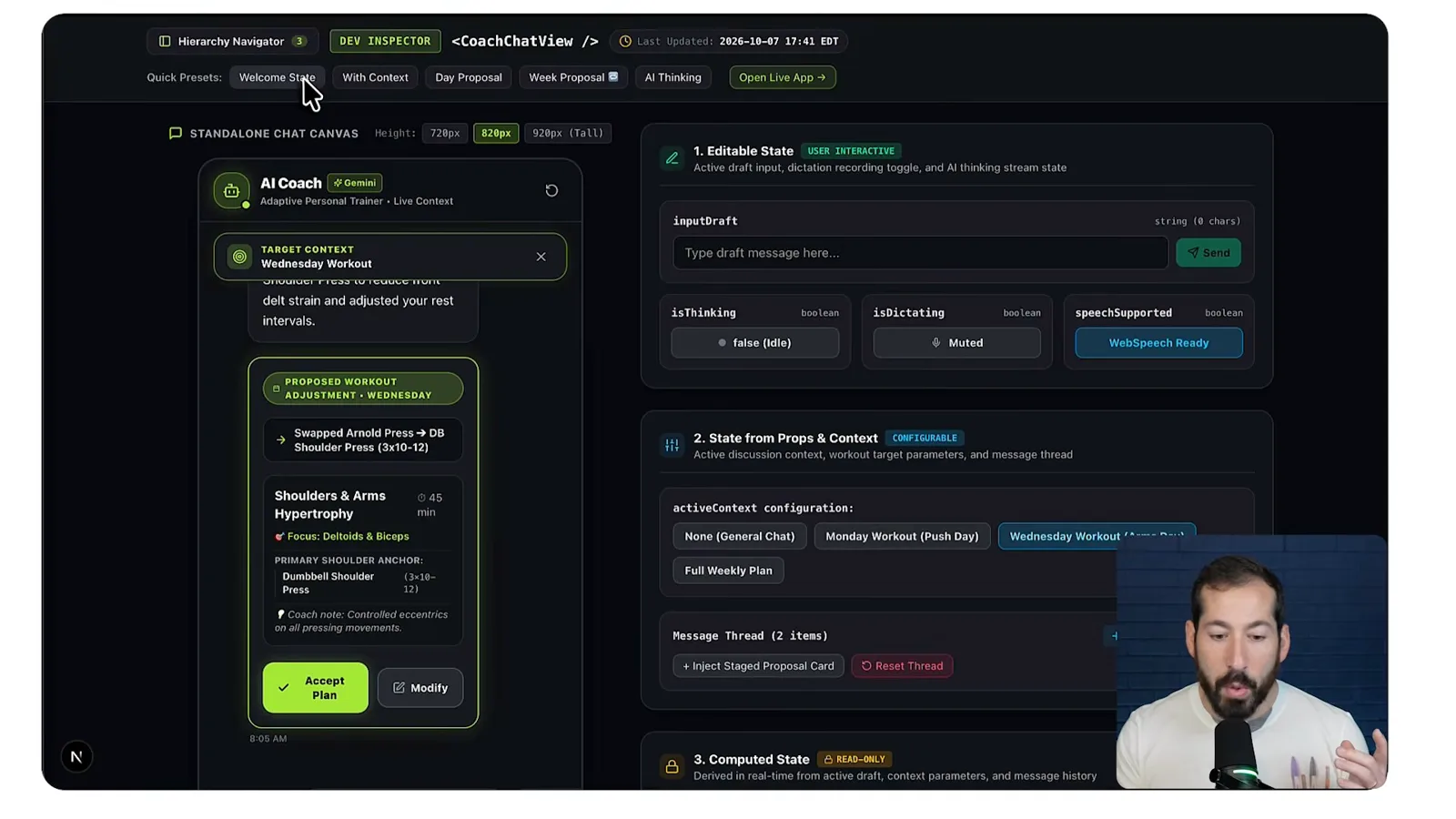
Quick presets let me switch between the welcome screen, a day proposal, a week proposal and the AI-thinking state. Instead of reconstructing the flow, I can reach each example with a click.
The controls expose editable values and data passed from the parent, while computed values are displayed for inspection. I can change settings and see how the component responds, or inspect underlying data when debugging.
The page also lists tests in plain English. Selecting a test can put the component into the corresponding state, making it easier to connect a test's intent with the actual view.
A navigator organizes inspectors by view. I can zoom in on a smaller card, such as an active workout component, and exercise its particular states instead of dealing with the whole page.
I built this system in an afternoon. The prompt and artifacts are linked in the video description, but I also want to show how I arrived at the system and how I use it to make changes.
Generate inspectors only where needed
A reusable skill creates a route for a selected component, reducing repeated setup and model calls.
A reusable skill generates an inspector route for a component I name. I choose which components need an inspector rather than generating pages for every component, because many small elements do not warrant one.
I ask Gemini in Antigravity to create an inspector for the daily workout proposal card. After about seven minutes it creates the page, with presets for cases such as a swap, a superset, a rest day and an applied proposal.
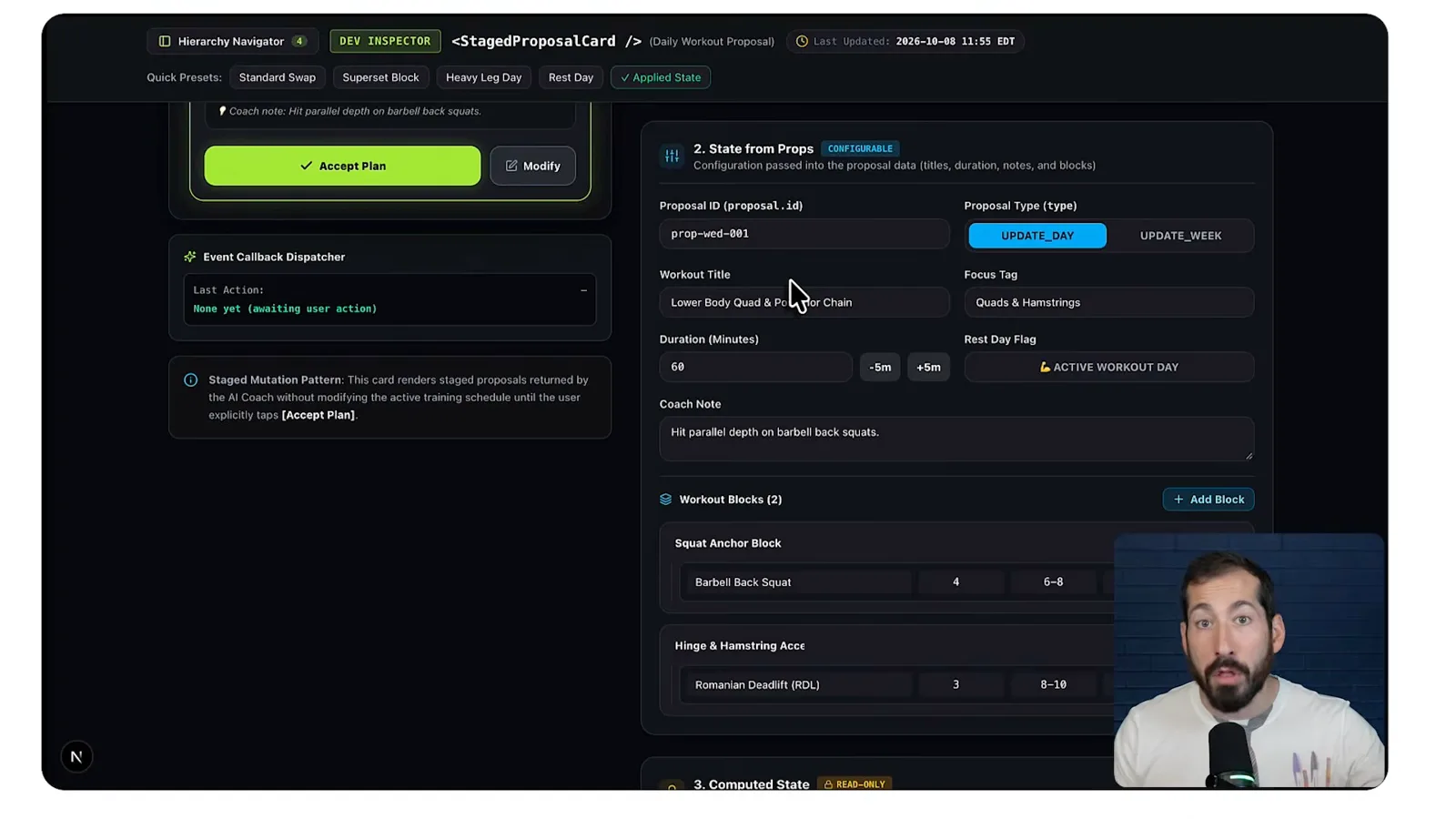
The page separates editable state, values passed as props and computed values, and it lists tests. I notice that one update-week option does not behave as I expected, which is the kind of detail the inspector makes easier to investigate.
The isolated preview is the same component used in the app, so changes to that component appear in the preview. I can check the result without re-entering the full flow and making additional Gemini calls each time.
Keep generated inspector details in sync
The preview reflects component changes, but its generated controls need an update. A session-scoped editing mode coordinates both.
There is a catch: the inspector's controls and explanations were generated by examining the code at a particular time. The component itself updates automatically, but those generated details and test descriptions can become stale as the code changes.
I experimented with analyzing the code continuously, but found that approach more involved than I needed. Instead, a last-updated indicator and a second skill let me ask the agent to refresh an inspector when its component or tests change.
Having to request an inspector refresh after every edit still felt cumbersome. I created an inspector editing mode: while it is active, the agent should update both the component and its inspector in the same request.
I did not begin by asking Gemini to create a rule. I described the friction, asked for options, and iterated on its recommendation. The result was a rule that lets me enter or exit inspector editing mode.
Turn one working example into a skill
After a broad attempt failed, Chasanoff refined one card, added tests and extracted reusable instructions.
The system took three attempts. I first made a proof of concept for one view in AI Studio; then I tried to generate a complex system from a prompt, but that version had many problems. I discarded it and started again.
On the third attempt I asked what components existed in the app. There were too many to inspect indiscriminately, and asking questions also put useful information about the project into the conversation context.
I chose one current-set card and asked for a dedicated development route that rendered it independently with dummy data. I wanted its state divided into editable values, computed values and props, with the computed values read-only.
Once that worked, I asked Gemini to list the component's tests and then put those tests on the page. It made a test click set up the related state, and also reflected which tests were active when I changed the component.
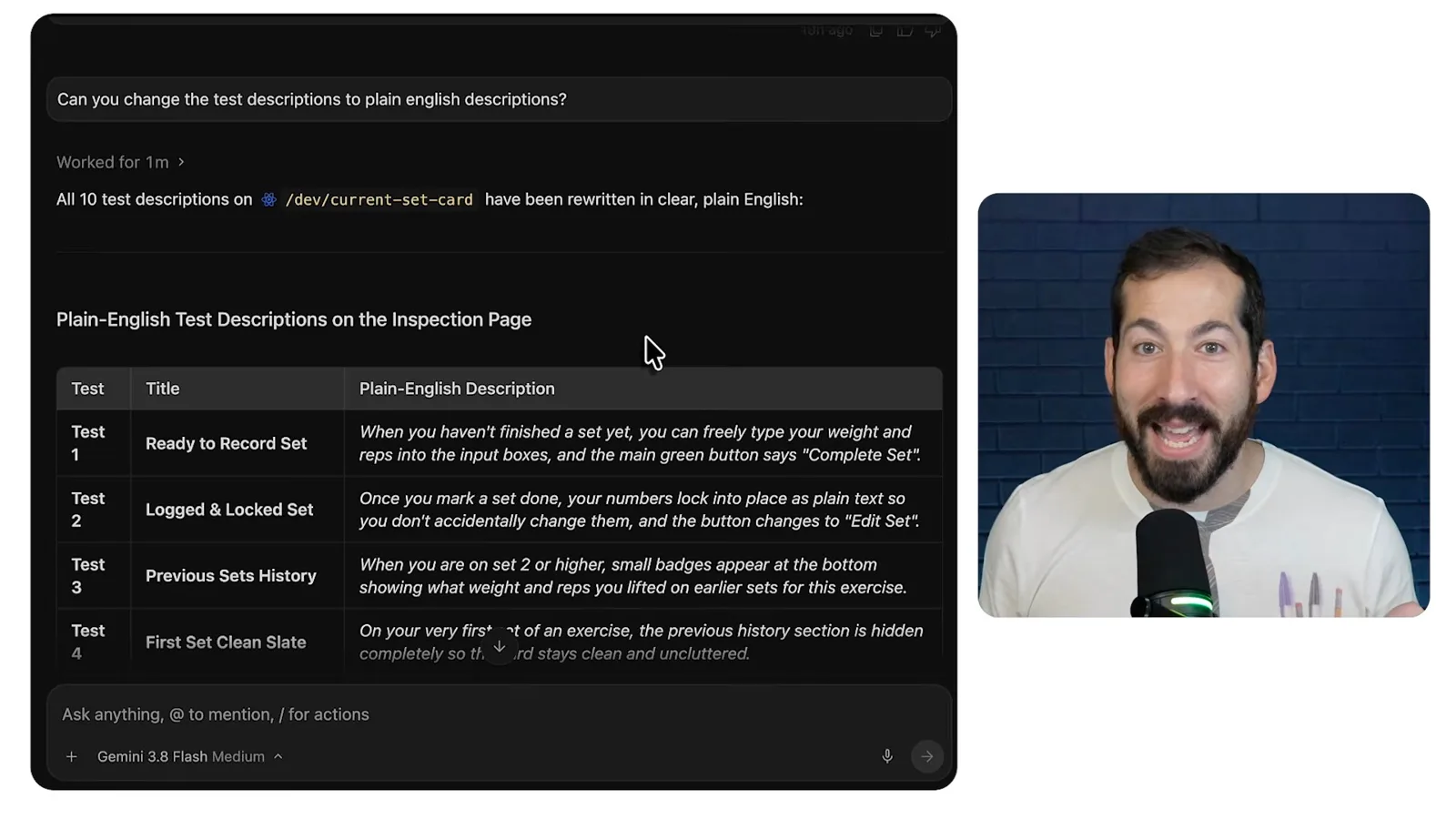
I asked how to structure the app so development-only tooling would not ship with the app. After discussing the options, I asked Gemini to turn the working example into a reusable skill for generating inspector routes for other components.
I made an update skill too, then tested and iterated. Component-specific changes stayed local; when a change affected the reusable pattern, I asked the agent to update the skill as well. Later I asked it to recognize those cases itself.
For the synchronization rule I first asked to discuss options without changing anything. My goal was to update the inspector when component state or tests changed, but only while I was actively doing that kind of work.
A flag on every request seemed burdensome. I preferred entering the mode once, having both component and inspector updated until I exited, and keeping the mode scoped to the individual session rather than globally across new sessions.
Test error handling and chat improvements
He uses the inspector to simulate failures and check an expanded workout context and improved input.
To test the mode live, I open the coach-chat inspector. Its presets cover welcome, context and proposals, but not a failure from the AI coach endpoint. I want the user to see the error and have a retry option.
I enter inspector editing mode and ask for an error state instead of a canned response. The agent adds the feature and updates the inspector with a connection-error preset, simulated 500 failure and timeout controls.
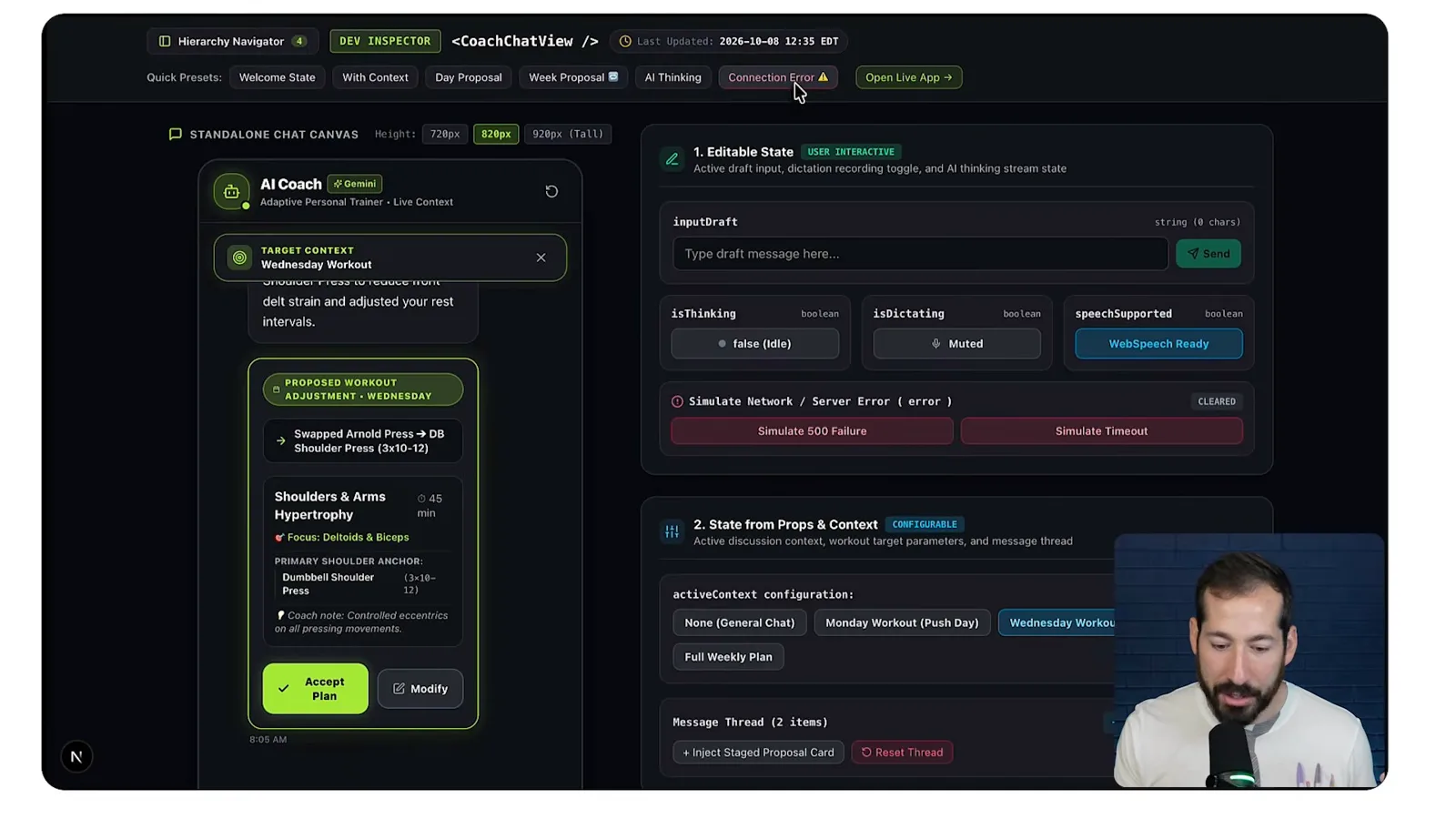
I can trigger those failure states directly in the inspector, see the retry button and check that a corresponding test is listed. I do not have to force the real endpoint to fail just to examine the UI.
Next I address the workout context. When a user selects Wednesday's workout and opens chat, the agent receives the workout data, but the user cannot see it and must switch back and forth to decide what to change.
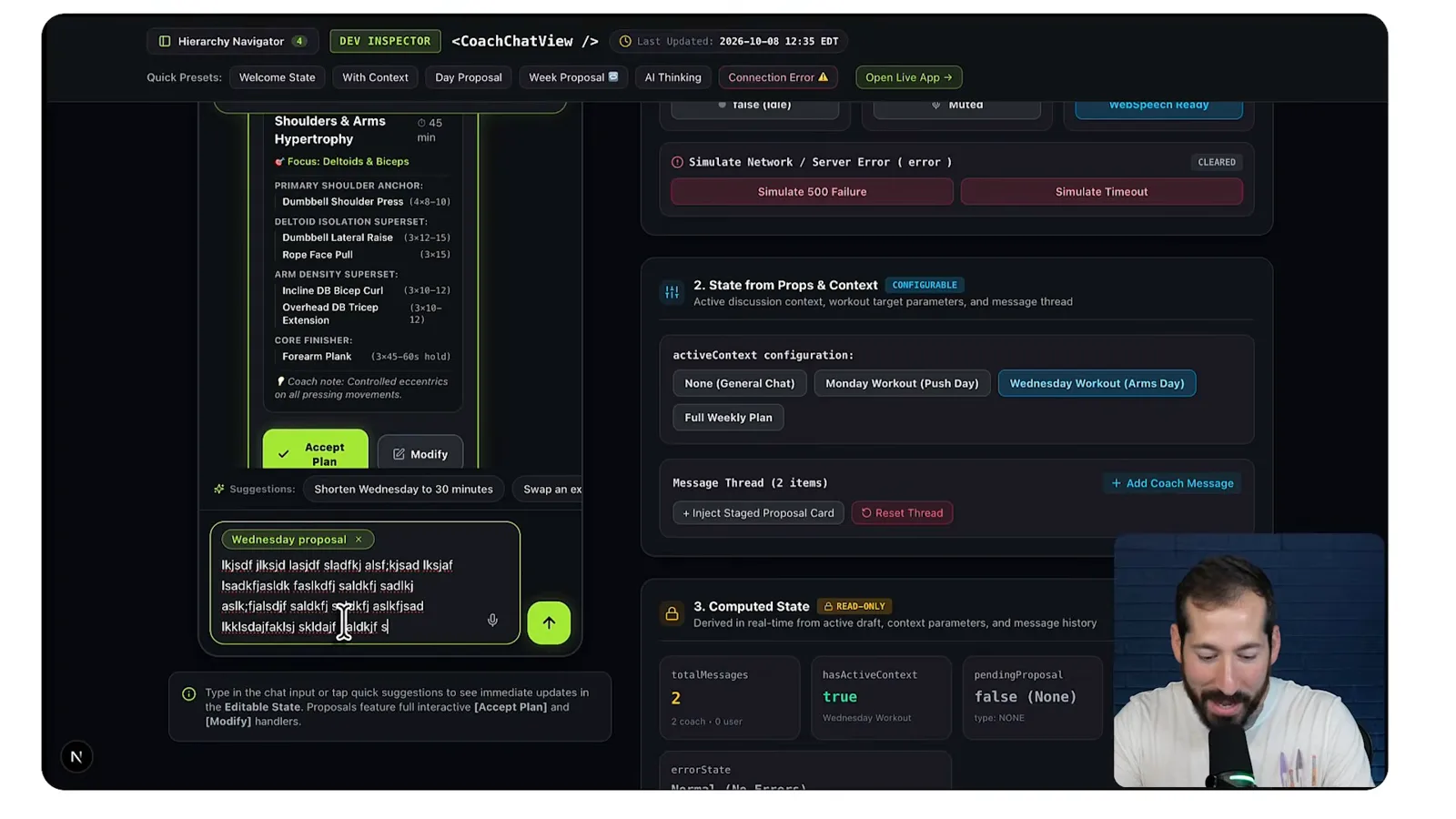
I ask for the current day or week's workout to appear in an expandable panel, open by default, along with tests. In the inspector I can switch between a day and the full week and see the context beside the chat.
Finally I revisit the modify action on a proposed workout. I dislike the target being inserted as ordinary input text, and I want the text field to wrap and expand vertically for a few lines before scrolling.
After the change, the target appears as a chip inside the input. I type a long test message and see it wrap, expand and then scroll. The inspector makes reaching and checking that state much easier.
The app still has more UI work to do, but the demonstration shows the workflow: build a useful view for one component, turn the pattern into reusable instructions, and keep the inspector in step as the component evolves.
Sur la même chaîne
 15:19EN
 Google Cloud Tech· 17 nov. 2026Give a Voice Agent Memory Without Sending Its Whole TranscriptLaxmi Harikumar, Miles Libbey · Google CloudA 40-word window and persistent facts cut classifier input in a Scribant demo while keeping user preferences across sessions.
 16:12ENGoogle Cloud Tech· 16 nov. 2026Looker CLI Lets Agents Discover and Run Admin TasksChrissie Goodrich, Mike DeAngelo · Google CloudMike DeAngelo explains how command discovery and JSON templates let agents use Looker’s API without loading every tool description at once.
 55:11ENGoogle Cloud Tech· 14 nov. 2026A no-code AI app build: diagnose the system before asking for a fixDevin Chasanoff · Google CloudDevin Chasanoff builds a workout coach in stages, using tests and context tracing to fix an API connection and unintended plan changes.
 13:01ENGoogle Cloud Tech· 12 nov. 2026Build an Agent Evaluation That Checks Every Guest’s NeedsAnnie Wang · Google CloudAnnie Wang builds a custom ADK metric that scores restaurant plans against group requirements and runs it in CI/CD.
 23:57ENGoogle Cloud Tech· 10 nov. 2026Six front-end ideas that make AI-built apps easier to debugDevin Chasanoff · Google CloudDevin Chasanoff uses an interactive game tracker to show where data lives, how values are derived and how components communicate.
 41:04ENGoogle Cloud Tech· 9 nov. 2026How Google tests Gemini 4 and uses agents to maintain codeTulsee Doshi, Smitha, Rody Davis, Luke, Mollie, Billy, Annie · Google DeepMindTulsee Doshi describes staged releases and long-running work; a demo audits web, Android and iOS code with subagents.