En 30 segundos
In this November 2023 video, Matthew Berman installs an early PrivateGPT release, asks questions about uploaded documents, and explores its API. Iván Martínez explains the motivation for local processing and outlines features the team hoped to add. The video includes a ServiceNow sponsorship. The commands and defaults describe that historical release. The project has since changed substantially; consult the [current documentation](https://docs.privategpt.dev/introduction) before installing. Local privacy depends on the actual model, embeddings, storage and network configuration.
- 1Local is a configuration choiceThe demonstrated local profile keeps processing on the machine after the needed assets are downloaded. Other integrations can use remote services.
- 2Historical setupBerman walks through cloning the repository, creating an environment and installing the local UI dependencies. The commands are specific to the version shown in 2023.
- 3Ingest and query a paperThe interface ingests an AutoGen paper and answers questions using document context. The retrieved chunks give the user material to inspect.
- 4Why build itIván Martínez discusses businesses’ reluctance to send sensitive information to external model providers and the appeal of private, local deployment.
- 5A 2023 roadmapMartínez discusses proposed connectors, evaluation tools and deployments using cloud model and vector infrastructure.
Conclusiones
- PrivateGPT combines document ingestion, embeddings, retrieval and language-model generation to answer questions using supplied material.
- A fully local configuration requires local inference, embeddings and storage; cloud alternatives can send data to external services.
- The 2023 tutorial used a Python 3.11 environment, Poetry, a local profile and a downloadable model, but current installation instructions differ.
- Compare generated answers with retrieved passages: a plausible answer alone does not establish that the document supplied it.
- Martínez described plans for connectors, evaluation and distributed deployments as a 2023 roadmap, not guarantees of present functionality.
Lee el texto editado por capítulos
The promise of PrivateGPT
Berman introduces the newer version of the project and its local and remote options. The video includes a ServiceNow sponsorship.
Matthew Berman introduces a new version of PrivateGPT, a project for asking questions about documents with a language model. The demonstration concerns the November 2023 release: the repository and installation workflow have since evolved, so readers should use the [current project documentation](https://docs.privategpt.dev/introduction) for a present-day setup.
The attraction is the possibility of keeping document processing on your own computer. Berman contrasts the original, simpler release with a more modular version that provides an API and allows components to be changed. Local operation is a configuration, however: choosing a remote model, embedding service or database can send information off the machine.
The video is sponsored by ServiceNow, whose Now Assist product Berman introduces for enterprise workflows. The sponsorship is separate from the PrivateGPT installation and demonstration that follow.
Install the 2023 release
He clones the repository, creates a Python environment and installs the UI and local dependencies. Setup downloads the model and embedding assets.
Berman opens the project repository and clones it to his machine. His [published 2023 installation notes](https://gist.github.com/mberman84/9b3c281ae5e3e92b7e946f6a09787cde) record the commands shown here; they are useful as a record of the video, not a substitute for the current documentation.
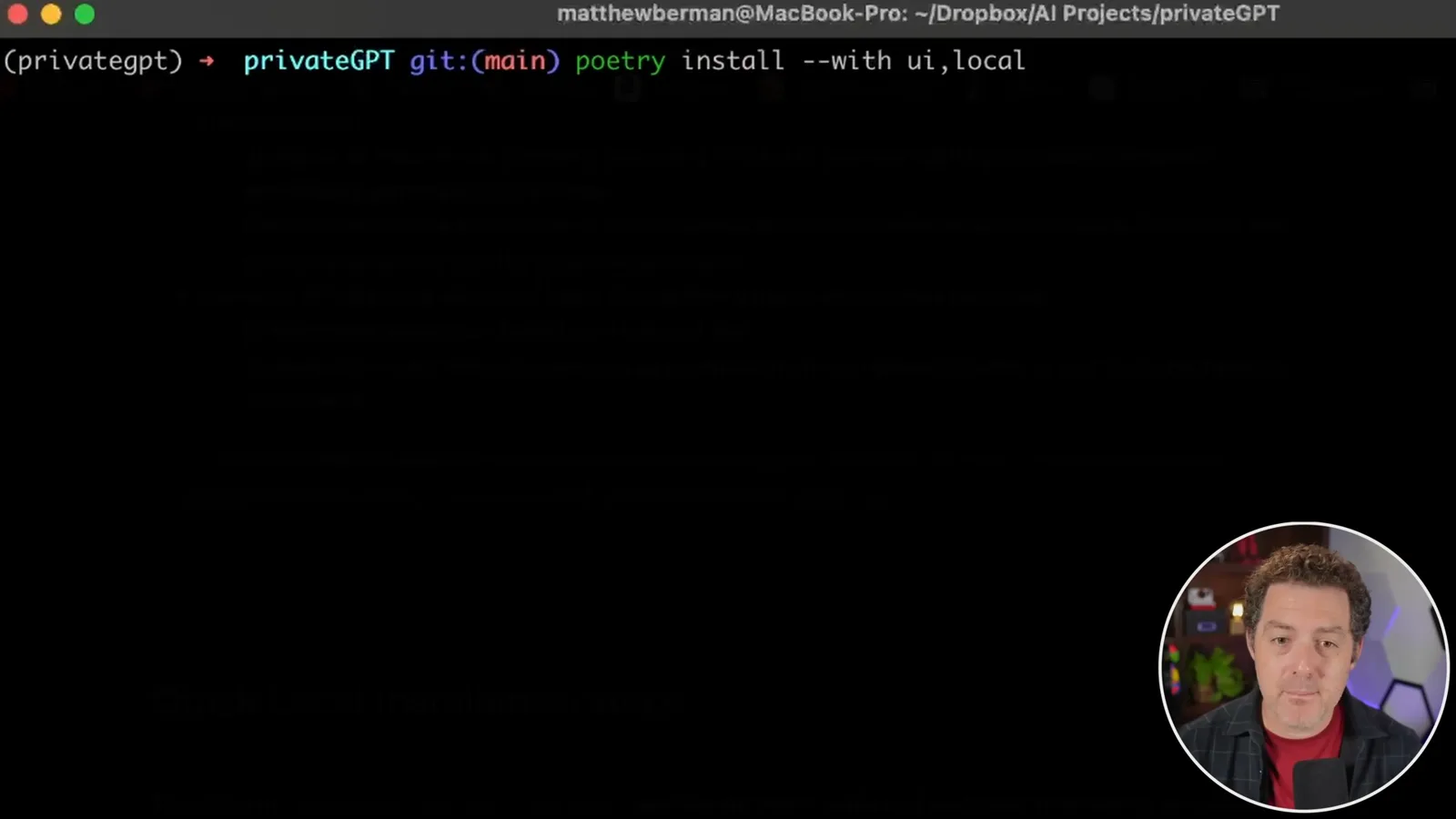
For the demonstration he enters the repository directory, creates a Conda environment with Python 3.11 and activates it. He then uses Poetry to install the UI and local dependency groups, with `poetry install --with ui,local`. Berman walks through the installation rather than assuming the viewer already has the components in place.
The project configuration separates choices such as the language model, embeddings and vector store. Berman examines the settings before running the setup script. The base settings and the selected profile both matter: a value visible in a base configuration file is not necessarily the effective value when a local profile overrides it.
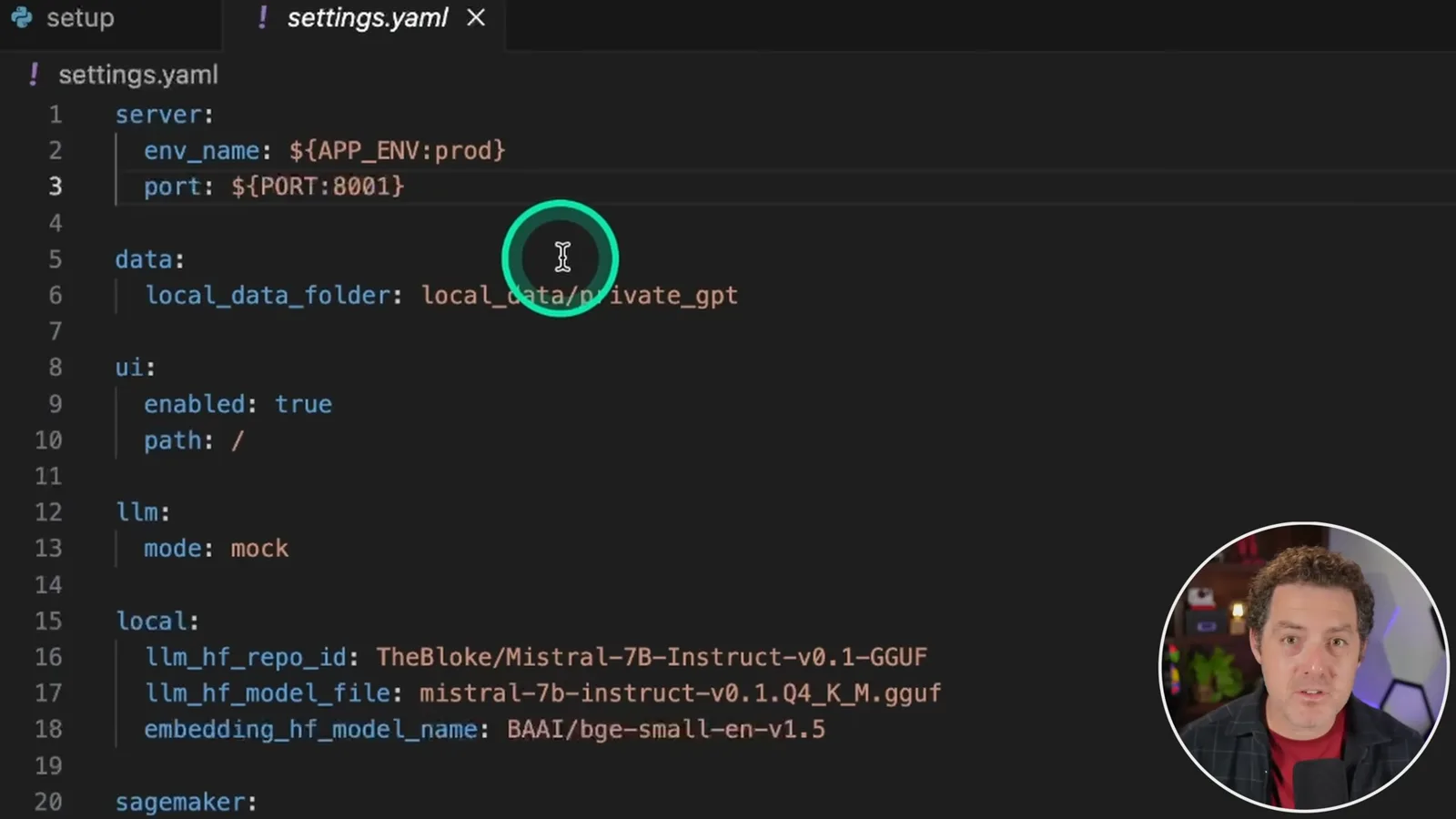
The historical setup command, `poetry run python scripts/setup`, downloads the model and embedding assets. The demonstration uses a GGUF version of Mistral 7B Instruct, a BGE small embedding model and Chroma for local vector storage. Downloading the assets requires an internet connection even when later inference and retrieval are run locally.
Launch and explore the interface
He discusses platform-specific acceleration and launches the local profile. The interface offers document queries, model chat and context inspection.
Berman discusses Windows and Mac installation and mentions a historical llama.cpp Metal build command for Apple hardware. Hardware acceleration and package compatibility depend on the version and platform; check the applicable installation instructions and investigate errors rather than assuming build warnings or failures are harmless.
He starts the 2023 local profile with `PGPT_PROFILES=local make run` and opens the local web interface on port 8001. The demonstration provides separate modes for chatting with documents, chatting with the model and examining relevant context. These historical commands and interface details may not apply to the current release.
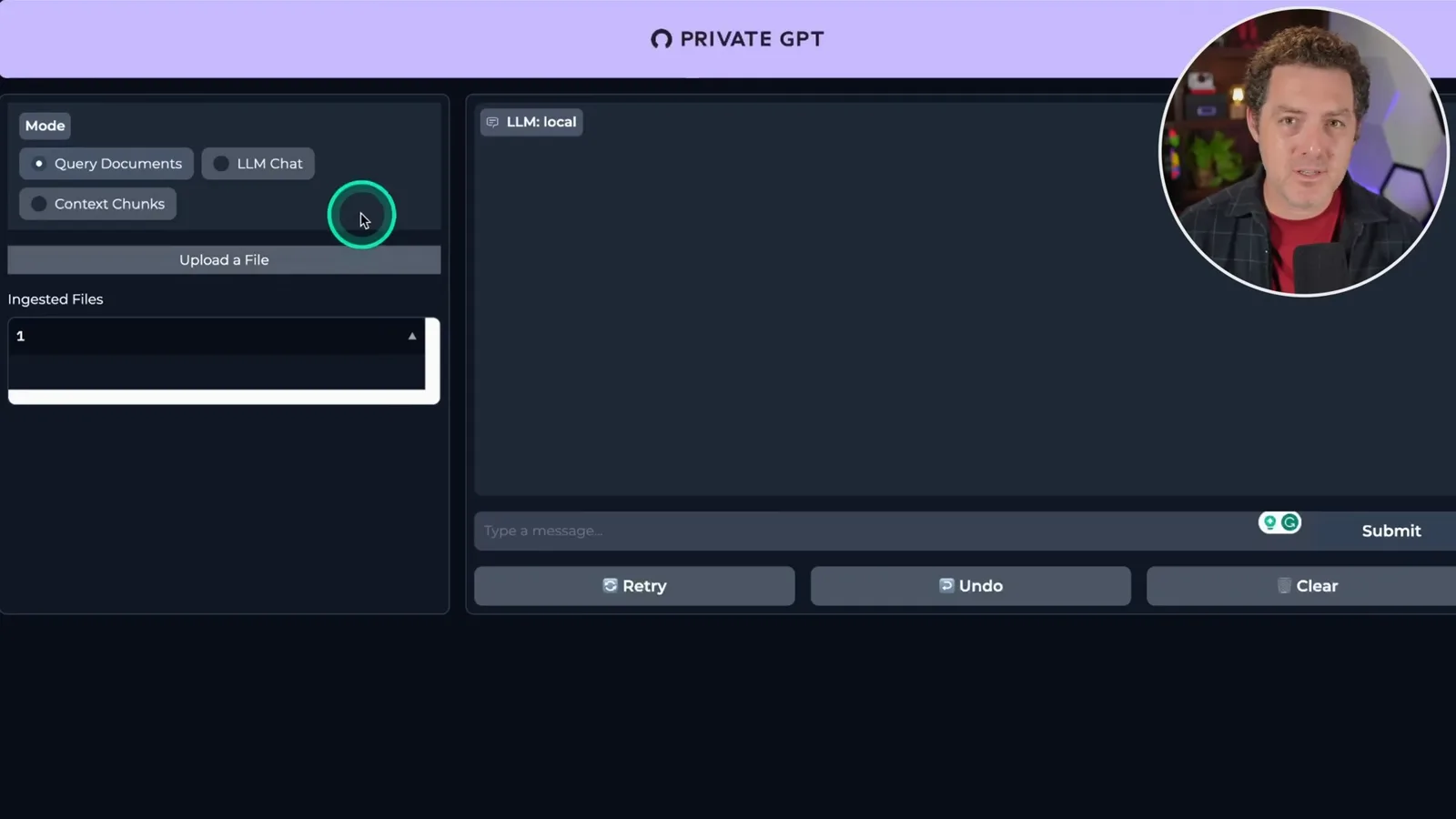
Test documents and inspect the API
Berman ingests an AutoGen paper and a book PDF, and then reviews the API endpoints. The examples illustrate both retrieval and the need to check sources.
To test document chat, Berman uploads a paper about AutoGen and waits for ingestion. The system processes the document into chunks, creates embeddings and stores them so that relevant passages can be retrieved when he asks a question. He asks for a summary and observes the response generated from the material.
The context mode makes the retrieval step visible: instead of seeing only the final answer, the user can inspect the passages selected from the document. This is useful for checking whether the system has retrieved material that actually supports a response; retrieval and generation can still make mistakes.
He also uploads a Harry Potter PDF and asks questions about it. A fluent or correct answer to a familiar book is not, on its own, proof that the answer came from the uploaded file, because the model might already have encountered the information. Inspect the returned context and compare it with the source.
Beyond the web interface, Berman opens the API documentation and points to endpoints for ingesting documents, listing them and requesting completions. The developer interface is intended to let applications use the document pipeline without depending on the demo UI.
Iván Martínez on privacy and the roadmap
The project creator describes the motivation for local models. He outlines proposed connectors, evaluation and deployment options as they stood in 2023.
Berman introduces Iván Martínez, the creator of PrivateGPT, for a short conversation about the project. Martínez describes seeing organizations hesitate to send their information to external AI services. Running open models and retrieval tools on hardware under their control was a way to make experimentation more approachable.
Martínez says the local configuration can run without an internet connection once the necessary dependencies and models are available. That is a useful privacy property, not an automatic guarantee: users still need to check the actual model and embedding providers, stored files and logs, access controls and network exposure.
Looking ahead from 2023, Martínez discusses adding connections to additional data sources and making workflows such as summarization and extraction easier. He also mentions observability and evaluation so developers can understand and assess how their applications perform. These are plans described in the interview, not a claim that each feature shipped as described.
He also envisions deployment on a cloud instance and more distributed arrangements, including managed model services such as SageMaker and external vector databases. Those options can help scale an application but change the privacy boundary: a remote component can receive data. Berman closes by thanking Martínez and directing viewers to the project.
Más de este canal
 34:21EN
 Matthew Berman· 27 oct 2026Matthew Berman Examines Anthropic’s IPO Filing, AI Growth and GovernanceMatthew Berman, Sam Altman · Forward FutureThe presenter reviews the S-1’s financial metrics, compute strategy and voting structure while questioning the tension between rapid AI development and safety.
 0:26ENMatthew Berman· 25 oct 2026Sam Altman on Human Values and Problem-Solving in an AI WorldSam Altman · OpenAIIn a short interview excerpt, Altman considers the enjoyment of solving hard problems and the human role in interpreting results.
 0:36ENMatthew Berman· 25 oct 2026Kimi K3.1 and a Rubik’s Cube Solver DemonstrationMatthew Berman · Forward FutureMatthew Berman shows a scrambled virtual cube being solved and gives the Kimi K3.1 test a favorable assessment.
 0:21ENMatthew Berman· 24 oct 2026An AI-Generated Kimi Benchmark Chart Used Invented ScoresMatthew Berman · Forward FutureMatthew Berman asks for a graph of Kimi K3.1 Pro benchmarks, then discovers that the displayed figures are illustrative placeholders.
 25:50ENMatthew Berman· 24 oct 2026Kimi K3.1 Pro Tested: Strong 3D Demos, Uneven Results and Competitive PricingMatthew Berman · Forward FutureMatthew Berman tests the open-weight model on coding, 3D rendering and visual explanations, then compares benchmark results and prices.
 32:20ENMatthew Berman· 23 oct 2026Who Is Local AI For? The Costs, Trade-offs and a Hybrid FutureMatthew Berman · Forward FutureMatthew Berman weighs data control and independence against hardware cost, setup complexity and inference speed.