En 30 segundos
Matthew Berman walks through his February 2026 OpenClaw setup on a dedicated MacBook Air. He explains how Telegram and Slack connect to a personal CRM, searchable knowledge base, video research, business analysis, meeting tasks and scheduled jobs. The workflows are his own configuration rather than default product guarantees. His video is sponsored by Greptile; he describes access controls, a review step before adding tasks and separate backups for code and databases.
- 1Interfaces and reusable skillsTelegram topics, limited Slack access and several model providers support focused workflows on a dedicated computer.
- 2Personal CRM and meetingsDaily email and calendar ingestion builds contact timelines used to prepare for meetings.
- 3Searchable knowledge baseSaved files and links are extracted, chunked, embedded and retrieved with sources.
- 4Video idea pipelineA request triggers research, duplicate checks, an outline and an Asana task.
- 5Business review councilSeveral agent roles review a draft built from business signals; the output remains analysis to assess.
- 6Human review before tasksMeeting-derived tasks are shown for approval before the system adds them to Todoist.
- 7Backups and recoveryCode is tracked in Git while databases are backed up separately, with a restoration procedure.
Conclusiones
- Separate messaging topics and reusable skills let one agent setup support several focused workflows.
- A personal CRM and knowledge base become more useful when their records can be reused in meeting preparation and video research.
- A multi-agent business briefing organizes perspectives but does not independently verify its conclusions.
- Meeting-derived tasks are shown for human approval before being added to Todoist in Berman’s setup.
- Usage logs, scheduled health checks and separate code and database backups help maintain the system.
- Connected services and meeting records involve private data and require attention to access and accuracy.
Lee el texto editado por capítulos
A dedicated machine and system overview
Berman introduces his hardware, messaging interfaces, models and reusable skills.
I run my OpenClaw setup on a dedicated MacBook Air that stays connected at home. I use TeamViewer for remote desktop access and Tailscale for SSH, allowing me to inspect or develop it from another machine. This is my personal setup in February 2026, not a requirement for every OpenClaw installation.
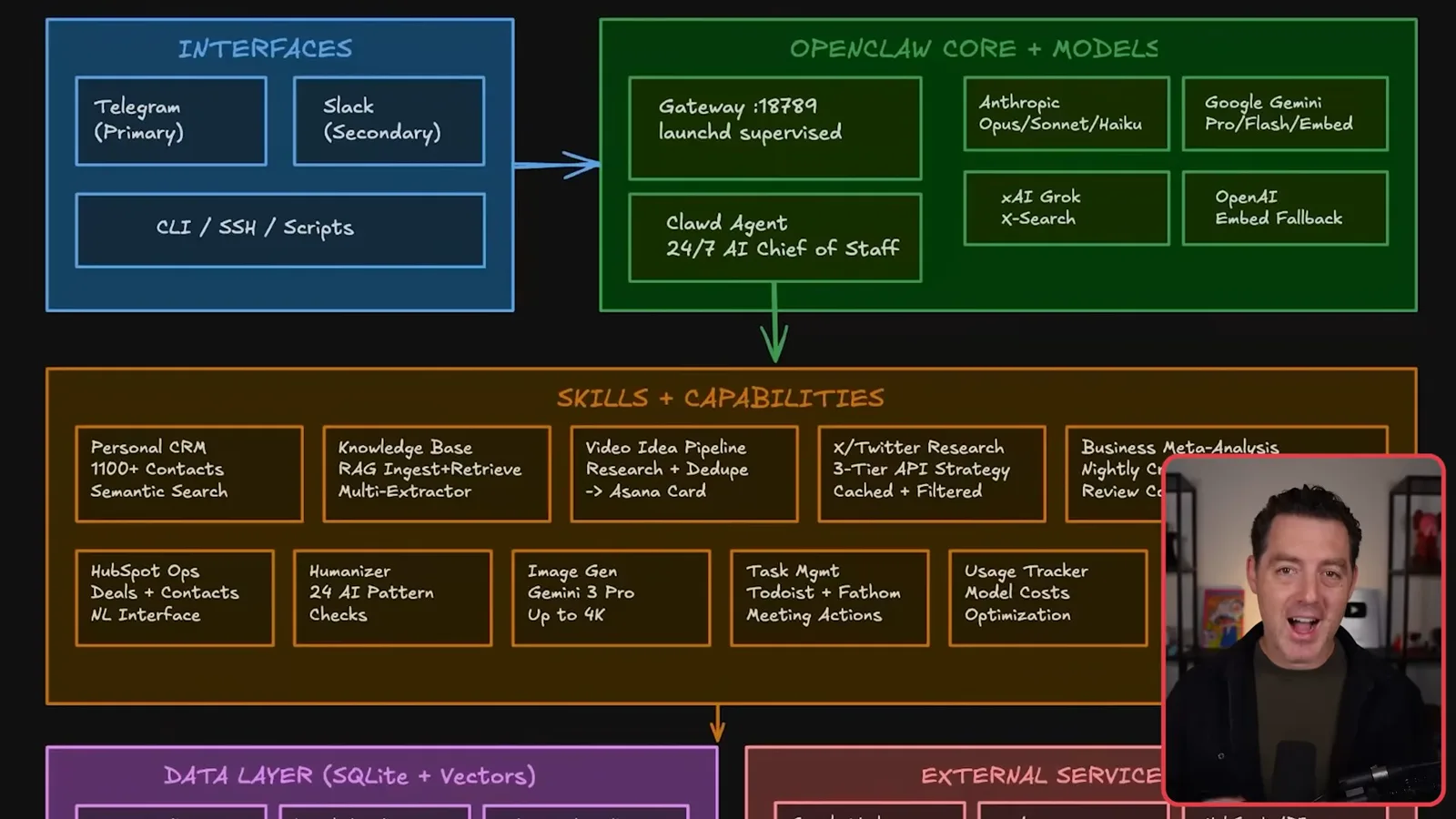
Telegram is my main interface, organized into narrowly focused topics such as knowledge, video research and meeting preparation. Instead of the daily session reset I previously used, I configured a one-year session expiration so these topic-specific conversations remain available longer. Session history and long-term memory are related but different mechanisms.
I also connect Slack, limiting invocation to me and to two channels, alongside command-line and script access. Different jobs can use models from Anthropic, Google, xAI and OpenAI. The point of these separate interfaces and models is to match the task to an appropriate workflow rather than force every request through one chat.
My reusable skills include a personal CRM, knowledge base, video ideas, social research, business analysis, task management and usage tracking. I store structured data locally and use vector search alongside SQL-style queries, so the same records can support both precise lookups and natural-language retrieval.
The setup connects to services including Google Workspace, Asana, HubSpot, Todoist, Fathom, GitHub, YouTube and web search. These connections give the workflows access to useful context, but they also determine what private information and actions the system can reach; the scope of access is part of the design.
Personal CRM and knowledge base
Email and calendar ingestion supports contact search and meeting preparation. A separate workflow stores and retrieves articles.
For the personal CRM, a scheduled workflow ingests email and calendar data, filters out contacts I do not want, merges duplicate people and uses a smaller model to classify their roles and context. It updates a contact timeline and creates a semantic index so I can ask who I last spoke with and what we discussed.
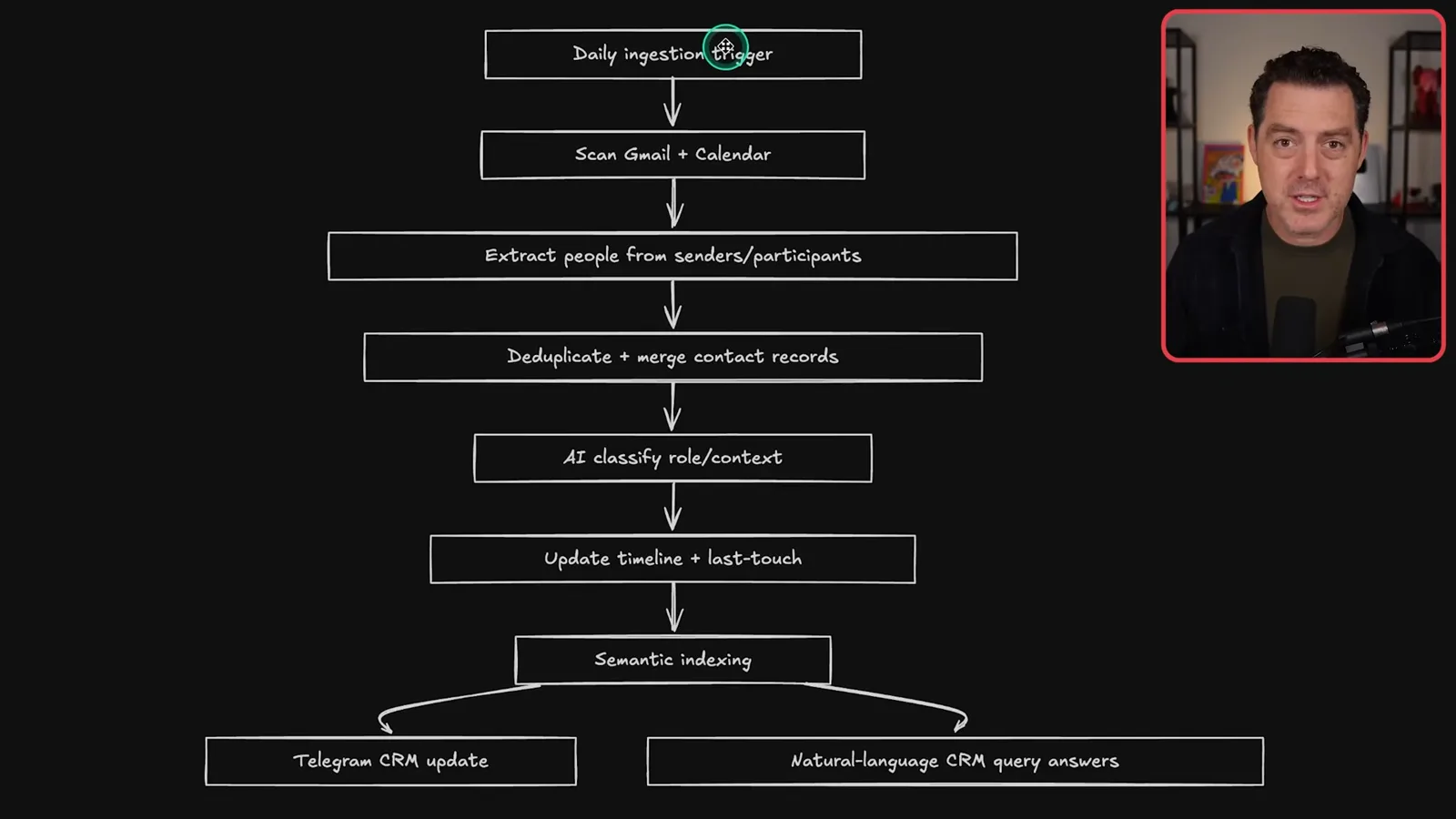
A meeting-preparation workflow builds on that CRM. Each morning it checks my calendar, filters out events without external participants and prepares a short briefing about the person, our previous discussion and the expected meeting topic. The usefulness comes from connecting records gathered by one workflow to another.
The knowledge base is a place to save articles and other material I find interesting. I send a file or URL through Telegram; the workflow detects the source, extracts and normalizes content, splits it into chunks, creates embeddings and stores them. Later I can search in natural language and receive an answer with sources.
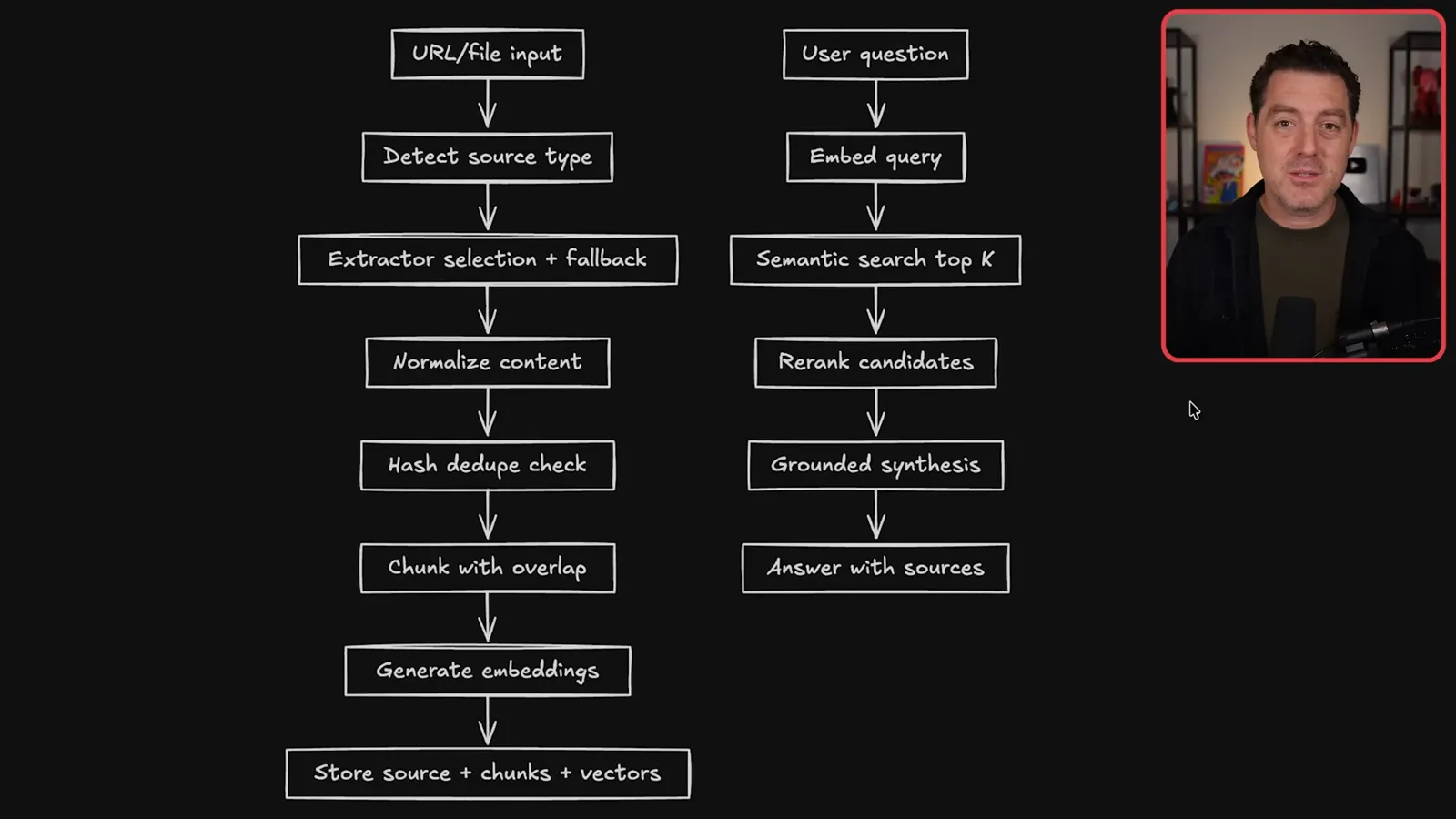
For example, I can ask it to find articles about a specific model and then reuse the sources while preparing a video. Retrieval makes my saved material easier to find, though the answer and citations still need to be checked against the original sources.
Video research and analytics
The idea pipeline combines social and web research with stored context, creates Asana tasks and tracks channel metrics.
Before this system, my team shared links in Slack, discussed potential videos and then manually created an Asana card with research. Now an article I send to the knowledge base is also summarized in our Slack channel; a team member can trigger a video idea from there, or I can do it through Telegram.
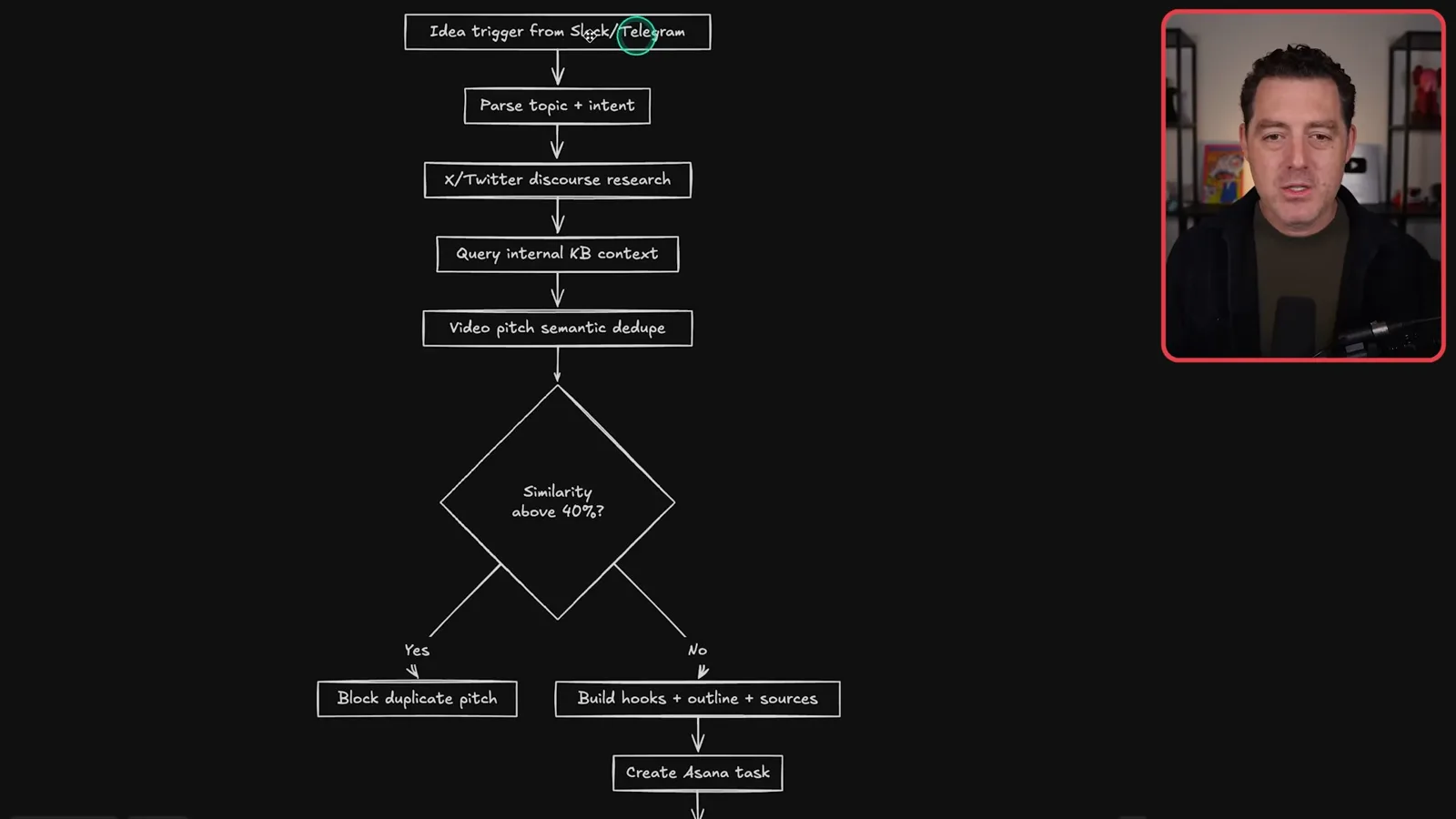
The idea workflow parses the topic, researches X and the web, retrieves relevant saved material and checks whether a similar pitch already exists. It then prepares a hook, outline and source links, creates an Asana task and confirms where the request came from. I say the workflow can complete in around 30 seconds in my setup.
For X research I use a fallback chain: an individual-post lookup service, a lower-cost search provider, the official X API and, where useful, xAI search. The services have different capabilities and prices. The video describes my configuration at the time; their current terms, access and costs can change.
A separate analytics job takes daily snapshots of my YouTube videos and channel growth, scans other channels’ upload patterns and stores metrics locally. It produces charts and feeds insights into the business review, helping me consider which topics, titles and thumbnails are working.
Business analysis and content tools
A multi-agent council reviews business signals; Berman also discusses HubSpot, writing and media generation.
The business review draws on multiple signals: channel metrics, CRM, automation health, social activity, messages, emails, Asana tasks, meeting transcripts and the deal pipeline. It selects leading signals, drafts an analysis and asks several agent roles to review it from different perspectives, including growth, revenue, skepticism and team dynamics.
A moderator reconciles the agent reviews and ranks proposed actions in a nightly report. I find the briefing useful for spotting opportunities I might otherwise miss. The agent council is a way to structure analysis, not independent proof that its inferences about the business or people are correct.
HubSpot supplies sponsorship-deal information to the system. I can ask a natural-language question, map it to a relevant endpoint and receive a summary. I say I do not use direct queries heavily yet, but having the deal pipeline available enriches the broader analysis.
For writing, I use a “humanizer” skill that flags patterns I associate with formulaic AI text and revises drafts. I apply it across messages and content. That is a stylistic editing workflow; it does not establish whether text was written by a human or make its factual claims reliable.
I connect image and video generation APIs and use separate Telegram topics to request images, revisions or video. In one example I ask for an icon, then request a larger version and a square format. The generated assets can be reused in other workflows, which is why I try to keep the skills modular.
Task approval and usage tracking
Meeting notes become proposed tasks for review, while a usage log tracks model and API costs.
The to-do workflow starts from meeting transcripts, direct requests or planning conversations. A model extracts actions, owners and deadlines, cross-references relevant CRM records and shows me the proposed task list. Only after my approval does it add the tasks to Todoist.
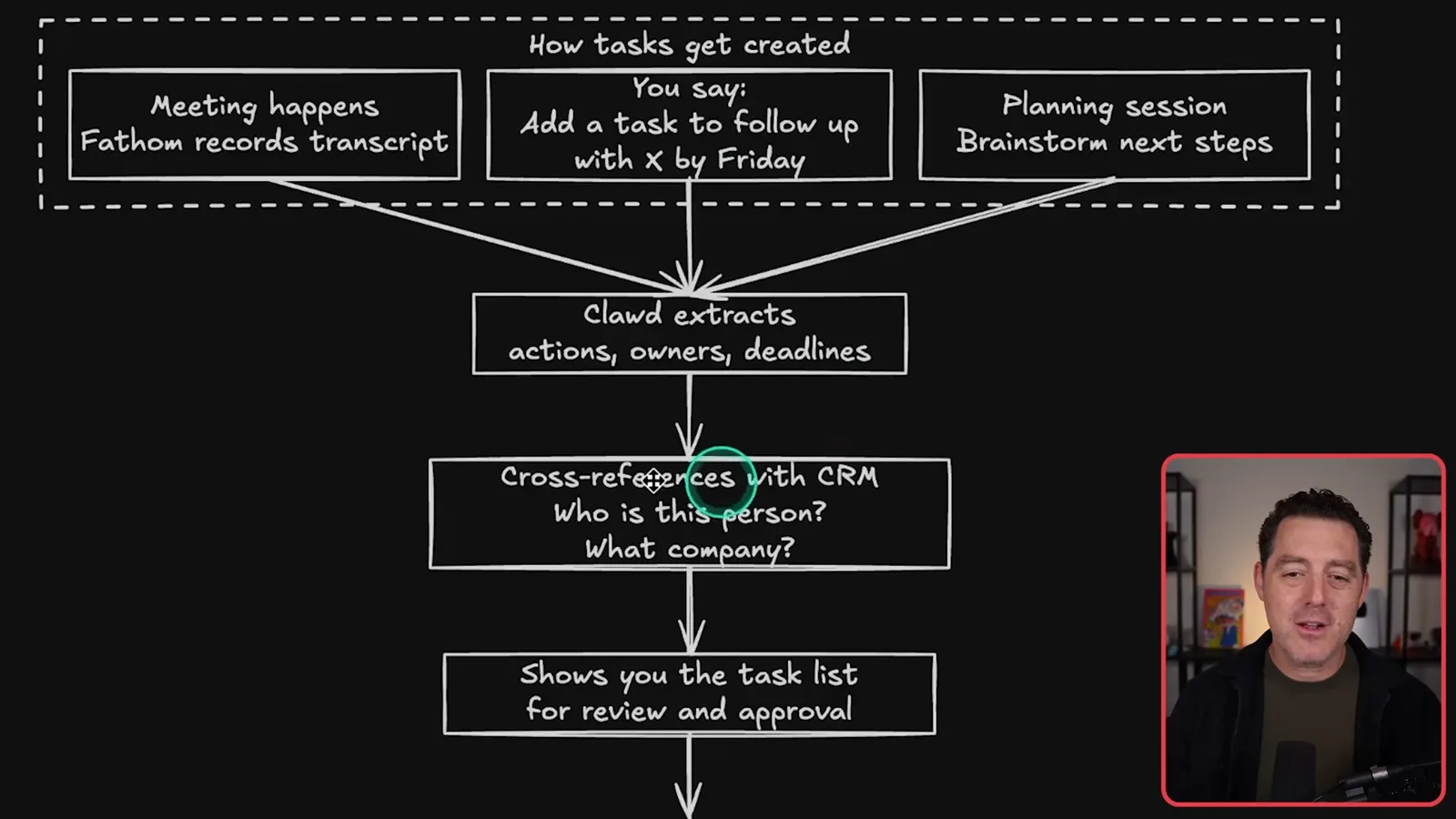
Because the system makes many model and API calls, I log usage and costs in one place. I can ask for a weekly breakdown, identify expensive workflows or inspect a 30-day trend. I estimate that my own mix of subscriptions and APIs costs around $150 a month at the time; that is an individual estimate, not a standard price.
I list the connected services again to show the range of inputs and outputs: messaging, calendar, email, project management, CRM, analytics, meeting notes, repositories and search. The exact choice of services matters less than designing interfaces that the workflows can reuse.
Schedules, backups and memory
Scheduled jobs run health checks and briefings. Code and databases are backed up separately, and daily notes feed longer-term memory.
Scheduled jobs keep the system running. I describe hourly code-repository synchronization, CRM checks and signal collection; daily email ingestion, analytics, health checks and a business briefing; and weekly memory synthesis and housekeeping. Job outcomes are logged and sent to a Telegram topic.
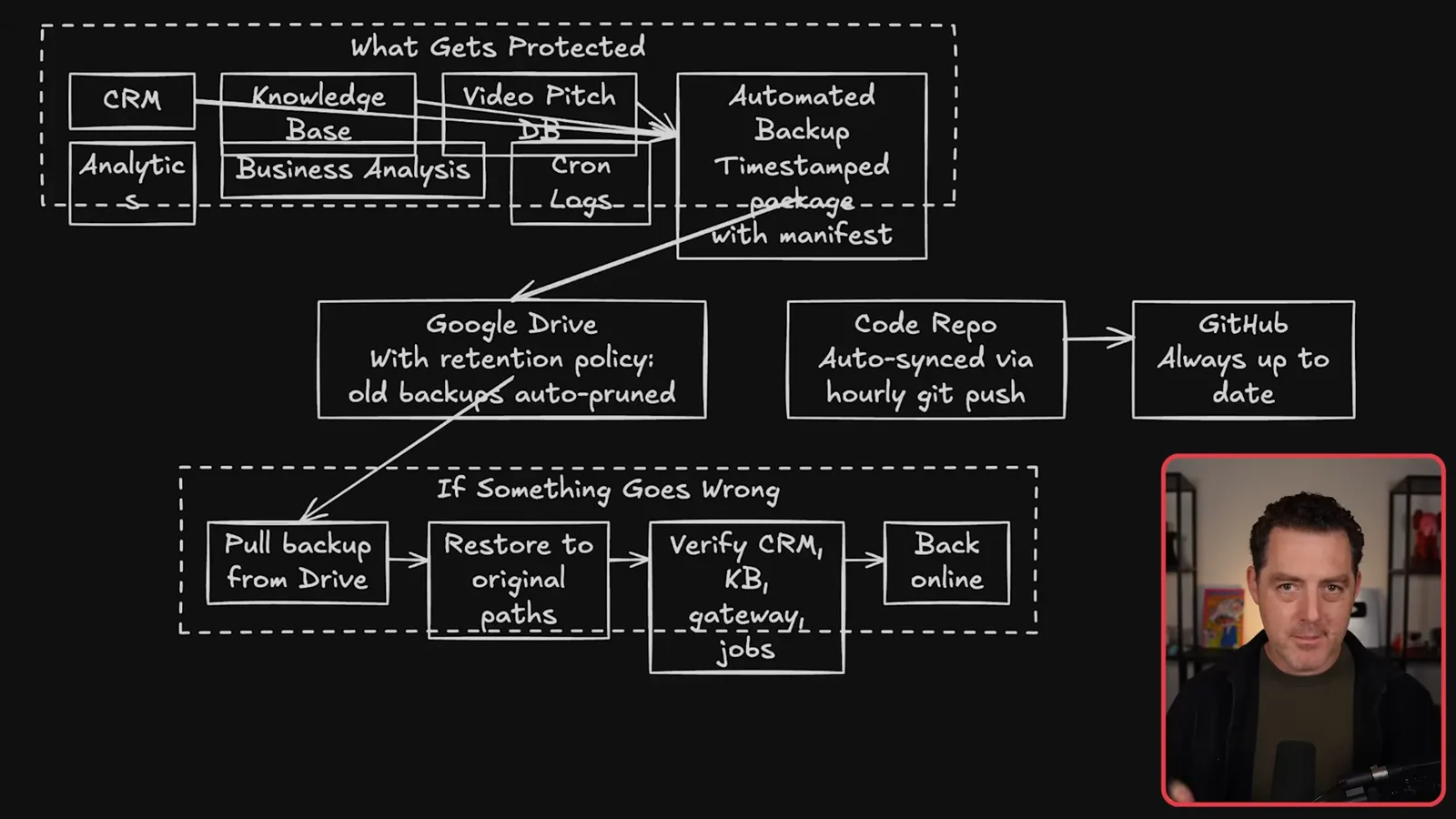
For recovery, I keep code and Markdown files in Git and back up databases separately to Google Drive with timestamps. I also maintain a restoration document describing how to retrieve the data and bring services back online. A backup plan is valuable only if its restore steps and access work when needed.
The default memory process records conversations, completed tasks and mistakes in daily notes, then synthesizes patterns and preferences into longer-term memory each week. I also keep corrective learnings. I describe this as an automated way to preserve context; it is not proof that all stored memories will be accurate or useful.
Development and instruction maintenance
Berman develops remotely in Cursor and describes daily reviews of configuration and Markdown guidance.
Although I can ask OpenClaw to build features through chat, I prefer developing in Cursor. From another computer I connect by SSH to the machine running OpenClaw, inspect files and make changes; TeamViewer is available when I need the full desktop. I say I test changes and commit code frequently.
The final maintenance problem is drift across Markdown instruction files. As skills and settings change, instructions can end up duplicated or inconsistent. I maintain a workspace reference describing architecture, databases, providers and other configuration, with separate files for agent behavior, identity, heartbeat and memory.
I ask the system to keep local copies of OpenClaw guidance and the relevant Anthropic prompting guide, then review my Markdown files daily for inconsistencies and recommended changes. I also observe that different model versions can respond differently to emphatic instructions. This is my maintenance practice, not a guarantee that an automated review will catch every issue.
The broader lesson from my setup is to make workflows reusable: the same contact records, knowledge base and analytics can serve several tasks. I close by encouraging viewers to explore their own use cases and adapt the system to how they work.
Más de este canal
 34:21EN
 Matthew Berman· 27 oct 2026Matthew Berman Examines Anthropic’s IPO Filing, AI Growth and GovernanceMatthew Berman, Sam Altman · Forward FutureThe presenter reviews the S-1’s financial metrics, compute strategy and voting structure while questioning the tension between rapid AI development and safety.
 0:36ENMatthew Berman· 25 oct 2026Kimi K3.1 and a Rubik’s Cube Solver DemonstrationMatthew Berman · Forward FutureMatthew Berman shows a scrambled virtual cube being solved and gives the Kimi K3.1 test a favorable assessment.
 25:50ENMatthew Berman· 24 oct 2026Kimi K3.1 Pro Tested: Strong 3D Demos, Uneven Results and Competitive PricingMatthew Berman · Forward FutureMatthew Berman tests the open-weight model on coding, 3D rendering and visual explanations, then compares benchmark results and prices.
 32:20ENMatthew Berman· 23 oct 2026Who Is Local AI For? The Costs, Trade-offs and a Hybrid FutureMatthew Berman · Forward FutureMatthew Berman weighs data control and independence against hardware cost, setup complexity and inference speed.
 1:03:37ENMatthew Berman· 23 oct 2026Matthew Berman’s Team Tests Kimi K3.1 on Animation, Games, and ChartsMatthew Berman, Alex, Brian · Forward FutureA live team AMA turns into an informal test of Kimi K3.1, from personal-agent workflows to motion graphics, a browser game, and a benchmark chart.
 0:53ENMatthew Berman· 22 oct 2026Sam Altman on AI and the Discovery of New KnowledgeSam Altman · OpenAIAltman expects progress in mathematical discovery to extend to biology, materials and energy.