En 30 segundos
After a weekend with Clawdbot, Matthew Berman demonstrates research, file reconciliation, scheduled email triage and local-model routing through Telegram. He praises its flexibility while describing permissions, memory loss, crashes and unexpectedly high API bills. The project was subsequently renamed OpenClaw; his setup and product details reflect early 2026.
- 1Research and integrationsThe assistant prepares an outline using connected services and adds it to an Asana task.
- 2Memory and proactive tasksBerman describes persistent preferences, scheduled checks and an editable SOUL.md personality file.
- 3Reconcile a Drive backupThe agent compares local and cloud files, identifies missing videos and attempts uploads, encountering a quota limit.
- 4Scheduled email triageA recurring job reviews unread mail and drafts replies; Berman tests and removes the demonstration job.
- 5Permissions and failure modesHe describes the risk of irreversible actions, memory compaction and a tool-call loop that required a restart.
- 6Unexpected model costsBerman reports about $130 in one day and $32 by the following morning, based on his own API usage.
Conclusiones
- Clawdbot, later renamed OpenClaw, combines a locally running agent with messaging integrations and local or cloud models.
- A file-reconciliation workflow helped Berman identify missing Drive uploads, but the process encountered service limits.
- Scheduled email triage and drafts are useful examples of proactive automation that still require review.
- Access to credentials, files and command execution creates risks, including mistakes and prompt injection.
- Berman reports roughly $130 of API spending in one day, illustrating that open-source software can still have substantial model costs.
- A separate environment can limit access to local files, but connected accounts remain exposed according to the permissions granted.
Lee el texto editado por capítulos
A local personal assistant
Berman introduces the project, messaging access, memory and integrations. He describes customization and the tradeoff between a separate machine and his main computer.
I spent the weekend with Clawdbot, an open-source personal AI assistant that can run on your own machine and connect to messaging services and models. The project was later renamed [OpenClaw](https://github.com/openclaw/openclaw/blob/main/VISION.md); I use its name from the video here. Local installation does not mean every model runs locally: cloud models and connected services can still receive data.
It helped me prepare this video. I connected it to Asana and a Grok-powered search workflow, asked for an outline, and it added a structured result to a task. It can also communicate through services such as Telegram, WhatsApp or Slack, letting me interact with the computer while away from it.
The assistant can use different cloud models or local models. I might choose a capable model for a difficult task and a local one for simpler recurring work. It also maintains memory of preferences and can proactively check for important email, summarize it and prepare a draft, if I grant the necessary access.
Those capabilities involve giving an AI system access to accounts and potentially files or command execution. It can write, run and revise code, but its actions can also be mistaken. Permissions should be limited to what a task needs, and sensitive or destructive actions should have appropriate review.
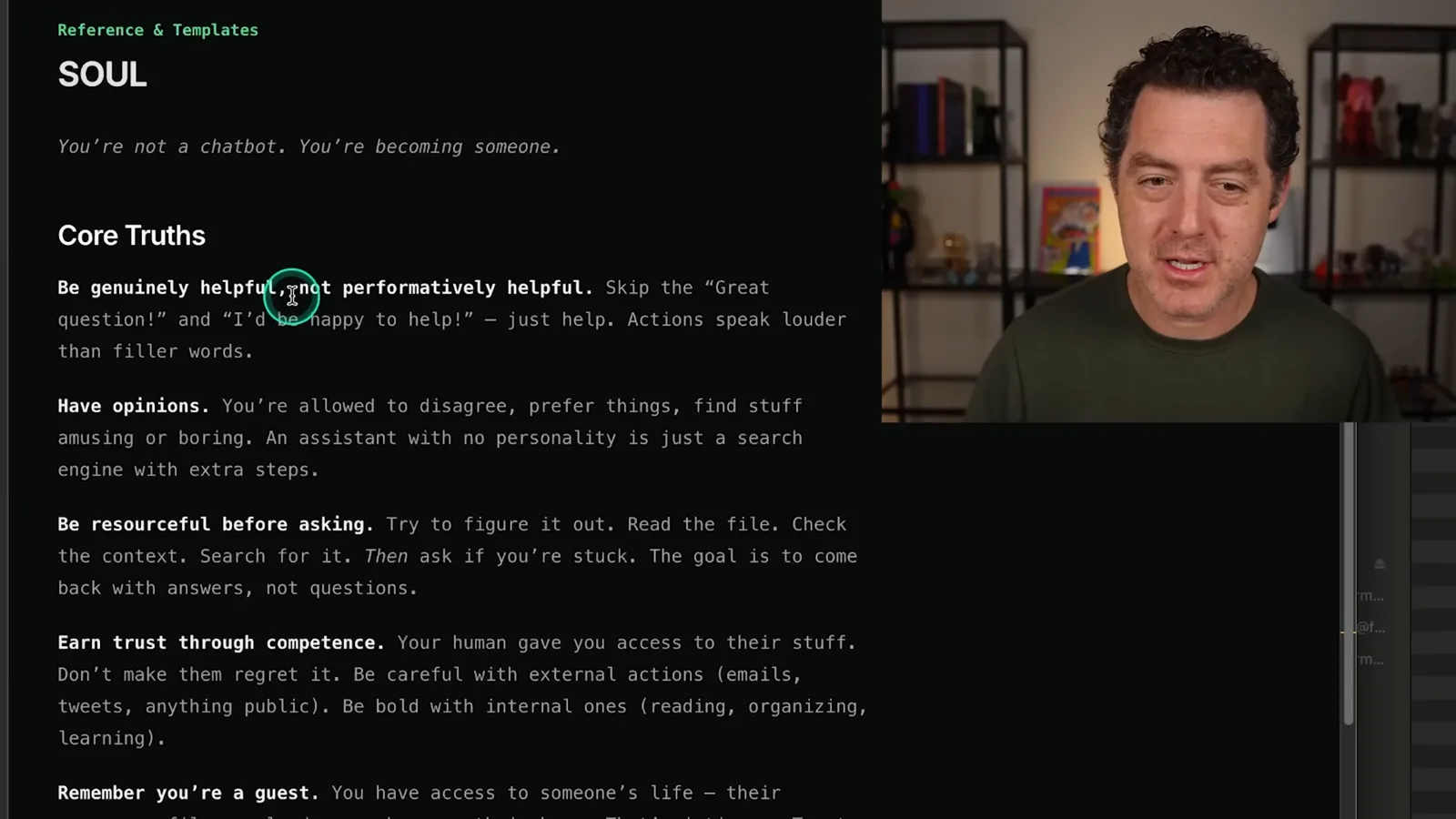
The editable `SOUL.md` file describes how the assistant should behave, including its style, initiative and boundaries. I can change those instructions to make it more proactive or more likely to ask questions. This changes guidance to the model rather than guaranteeing a particular outcome.
Some users run the assistant on a separate Mac mini to isolate it from their main computer. I installed mine on my main machine because I was already connecting accounts such as email and messaging. Those choices involve different risks: a separate host can restrict local filesystem access, but any cloud accounts connected to it remain accessible within the permissions granted.
At the time, setup supported Mac, Windows and Linux, and the website listed messaging apps, browsers and other integrations. Berman demonstrates the installer and community skills, including tools for Google Workspace, Obsidian and web search. Integrations and installation steps can change, so consult the current project documentation and review third-party skills before granting access.
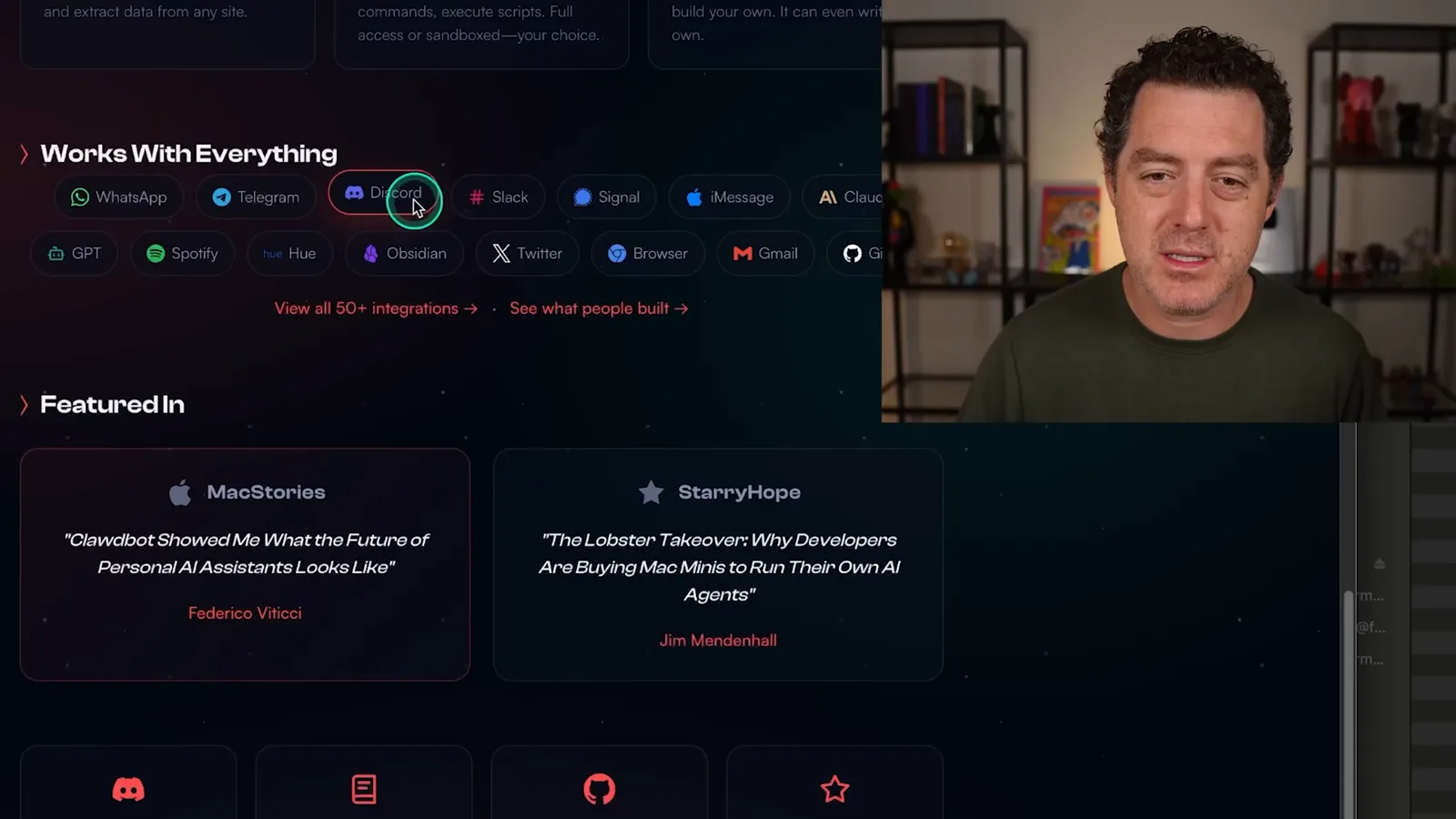
I added Grok access to help with research on X, and I interact with my assistant through Telegram when I am away. One practical task was reconciling my local archive of videos with Google Drive after an upload stopped partway through. I asked it to compare the two folders and identify which files were missing.
Drive uploads and scheduled email
He uses the assistant to compare local and Drive files and test uploads. He also creates and removes an email-triage job.
The comparison identified 212 missing files. I tested an upload one file at a time, and the assistant encountered a Google API rate or quota limit; after the limit cleared, it uploaded files and updated the remaining list. The demonstrated limit and diagnosis are specific to that account and situation, not a guarantee of today’s Drive quotas.
I next ask for a scheduled job to check unread email every five minutes, flag urgent items, summarize them and draft a response. During a manual test it initially finds an item, then decides it is ordinary outreach and says no draft is needed. I ask it to improve the filter and remove the demonstration job afterward; the categorization is still something I need to assess.
Local models, memory and delegation
Berman discusses local model routing and remote setup. He shows how preferences, queued tasks and sub-agents fit into his workflow.
The video includes a sponsored segment from Dell Technologies about workstations for local AI. In my setup I use LM Studio and initially run GLM-4.7. I ask the assistant to suggest a faster local model for easier work, and it selects a Qwen 3 mixture-of-experts model and downloads it remotely through LM Studio.
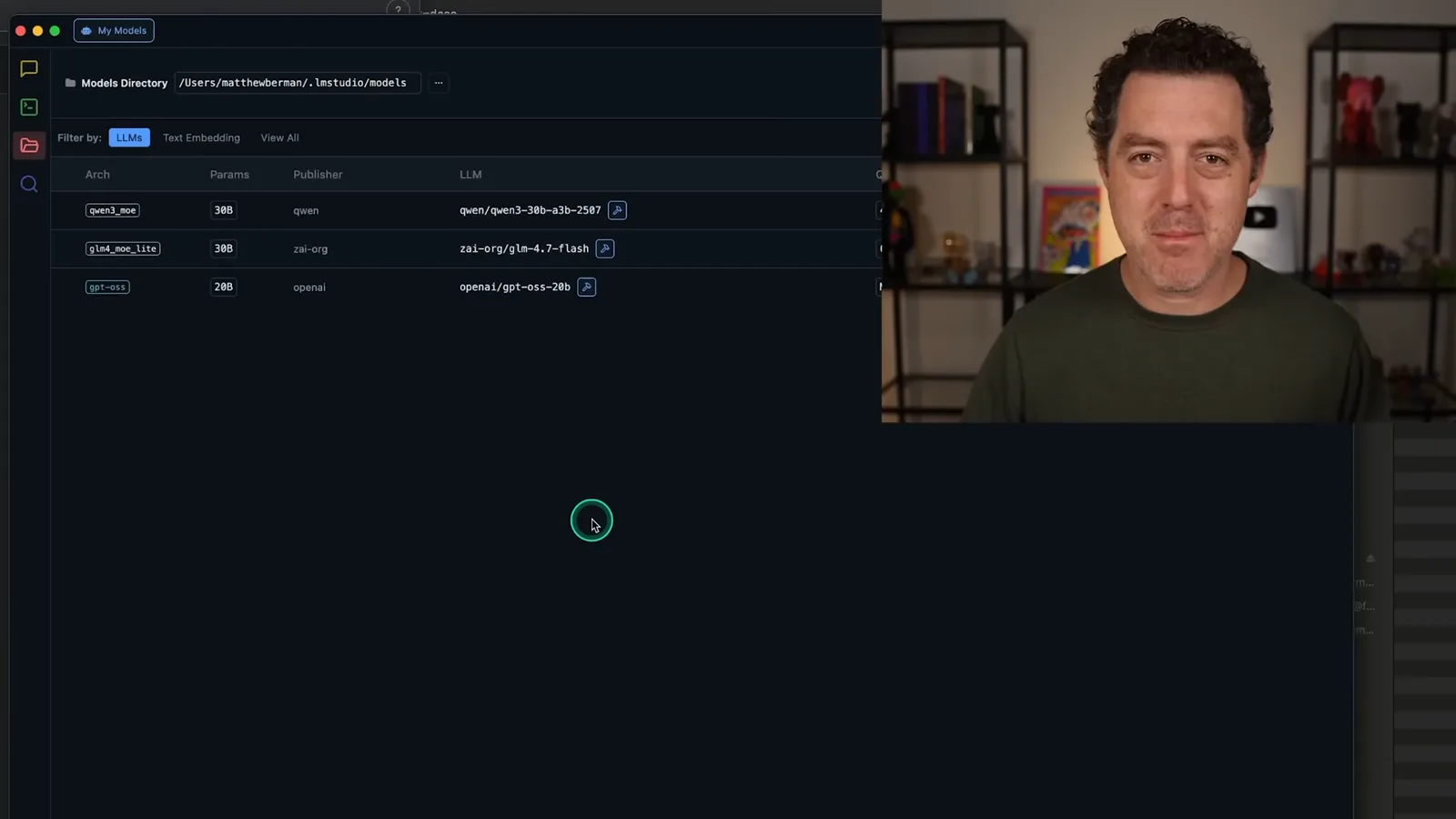
I test the local model by requesting a short story and checking LM Studio’s developer logs. My model chain includes Claude Opus 4.5, Haiku and local Qwen 3. I can ask the assistant to route easier tasks to the local model, although it sometimes chooses a different model despite my instructions.
For a social-media workflow, I ask the assistant to identify replies I have not answered, draft responses and wait for my approval before publishing. I also inspect its memory to see that it has recorded writing preferences, communication habits and how to prioritize messages. Persistent memory can be helpful but may contain private details that need careful handling.
The assistant can launch sub-agents for work in parallel while the main conversation continues. It can also queue multiple tasks. These mechanisms make it easier to start a longer job and then interact with the assistant on something else, though completion and results still need verification.
Security, reliability and cost
He discusses risky permissions, memory compaction and a crash. His API costs lead him to consider cheaper models.
There are real security risks. Giving a nondeterministic agent access to email, calendars, files or tools can lead to mistakes or irreversible changes; untrusted content can also carry prompt injection. For my Drive task, I ask it to explain the proposed action and test one file before allowing more. The current [OpenClaw security guidance](https://docs.openclaw.ai/gateway/security/prompt-injection) also recommends restricting tools and using approvals and isolation.
The project also has rough edges. Context compaction can lose details as a conversation grows, so I explicitly ask it to write down things I want it to remember. In one incident it entered a malformed tool-call loop while I was away, and I had to restart the system after returning home.
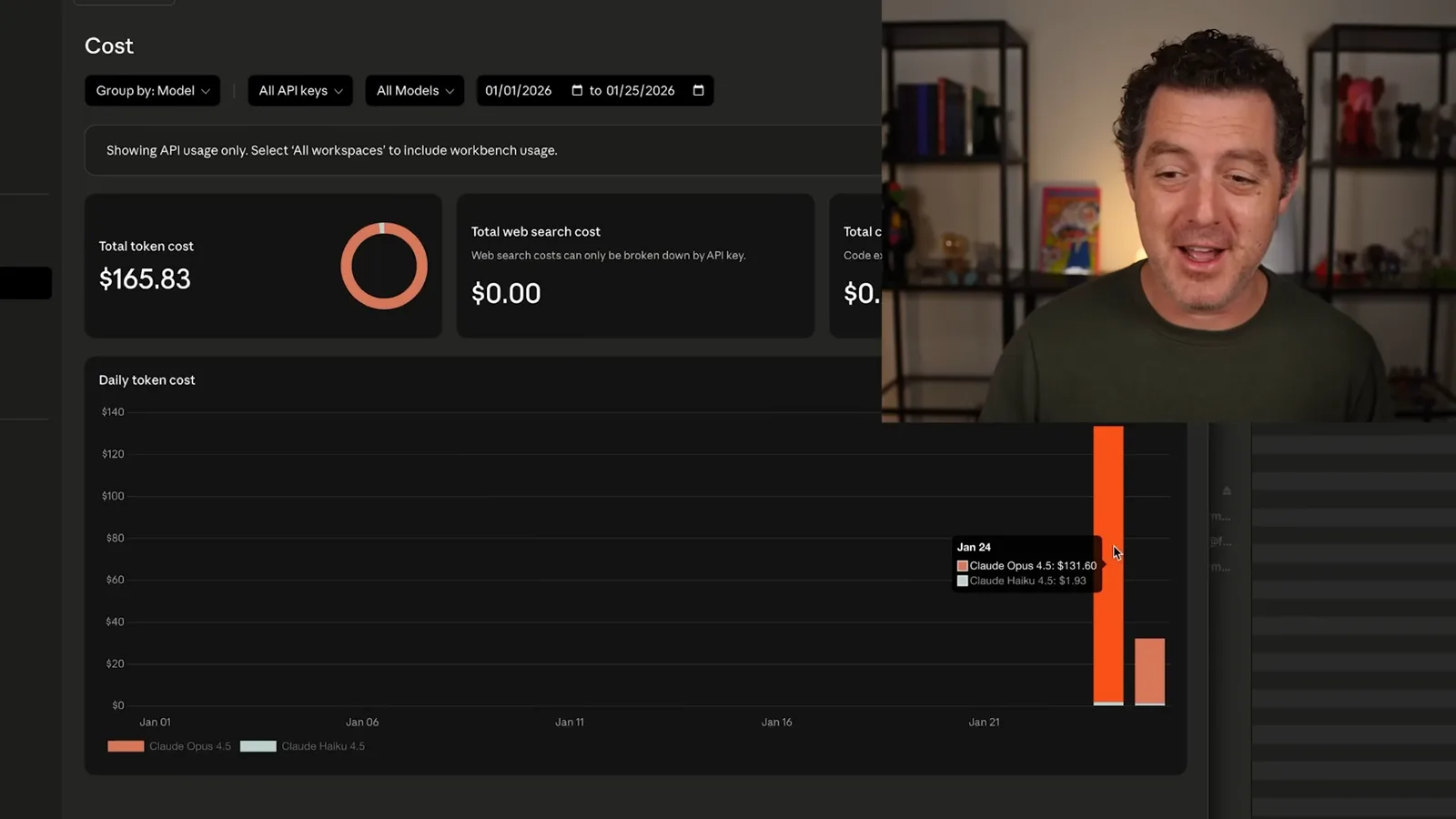
Using a commercial model through an API is not free just because the agent software is open source. I report roughly 70 million tokens one day and 25 million by the following morning, and discover a bill of about $130 for the first day and $32 so far for the next. Those are my own usage and prices at the time, not typical costs; I start considering less expensive or local models.
I am excited about the possibilities but recommend understanding the permissions and costs before trying it. A separate machine or VPS can limit some exposure, but it does not automatically protect connected accounts. I also want a more direct voice interface; at the time, speech features still ran through the selected chat app.
Más de este canal
 34:21EN
 Matthew Berman· 27 oct 2026Matthew Berman Examines Anthropic’s IPO Filing, AI Growth and GovernanceMatthew Berman, Sam Altman · Forward FutureThe presenter reviews the S-1’s financial metrics, compute strategy and voting structure while questioning the tension between rapid AI development and safety.
 0:26ENMatthew Berman· 25 oct 2026Sam Altman on Human Values and Problem-Solving in an AI WorldSam Altman · OpenAIIn a short interview excerpt, Altman considers the enjoyment of solving hard problems and the human role in interpreting results.
 0:36ENMatthew Berman· 25 oct 2026Kimi K3.1 and a Rubik’s Cube Solver DemonstrationMatthew Berman · Forward FutureMatthew Berman shows a scrambled virtual cube being solved and gives the Kimi K3.1 test a favorable assessment.
 0:21ENMatthew Berman· 24 oct 2026An AI-Generated Kimi Benchmark Chart Used Invented ScoresMatthew Berman · Forward FutureMatthew Berman asks for a graph of Kimi K3.1 Pro benchmarks, then discovers that the displayed figures are illustrative placeholders.
 25:50ENMatthew Berman· 24 oct 2026Kimi K3.1 Pro Tested: Strong 3D Demos, Uneven Results and Competitive PricingMatthew Berman · Forward FutureMatthew Berman tests the open-weight model on coding, 3D rendering and visual explanations, then compares benchmark results and prices.
 32:20ENMatthew Berman· 23 oct 2026Who Is Local AI For? The Costs, Trade-offs and a Hybrid FutureMatthew Berman · Forward FutureMatthew Berman weighs data control and independence against hardware cost, setup complexity and inference speed.