In 30 seconds
Philipp Schmid of Google DeepMind explains how to assemble an autonomous AI coworker using Gemini and Managed Agents. He describes the model, sandbox, playbooks, tools, credentials, rules and schedules, then demonstrates a portfolio audit.
- 1Seven requirementsA digital coworker needs a brain, computer, playbooks, tools, credentials, rules and a schedule.
- 2A sandbox for the agentManaged Agents gives the agent a remote environment for executing tools and working with files.
- 3Load knowledge when neededKeep always-on instructions concise and place detailed procedures in skills, references and scripts.
- 4Scope credential accessAn external proxy substitutes real credentials only for configured destinations.
- 5Control and schedule workProtected hooks can enforce checks, while scheduled triggers initiate recurring work.
- 6Audit a portfolioThe demonstration reads an audit skill, consults financial data and updates a spreadsheet.
Takeaways
- Treat an agent as a coworker that needs an environment, playbooks and boundaries as well as a model.
- Keep system instructions concise and load detailed skills only when needed.
- Isolate credentials from the sandbox and restrict where a proxy can use them.
- Use hooks for deterministic controls and scheduled triggers for recurring workflows.
- Combine skills and external tools to audit a portfolio and update a spreadsheet.
Read the edited text by chapter
The seven things an AI coworker needs
Schmid introduces the move from chatbots to autonomous coworkers. He outlines the seven components needed to onboard one.
Two years ago, we mostly asked chatbots simple questions. Then assistants gained tools and coding agents began writing software. Now we can give an agent its own computer and a task, and return hours later to see what it has produced. I want to show how to build an autonomous Wall Street coworker.
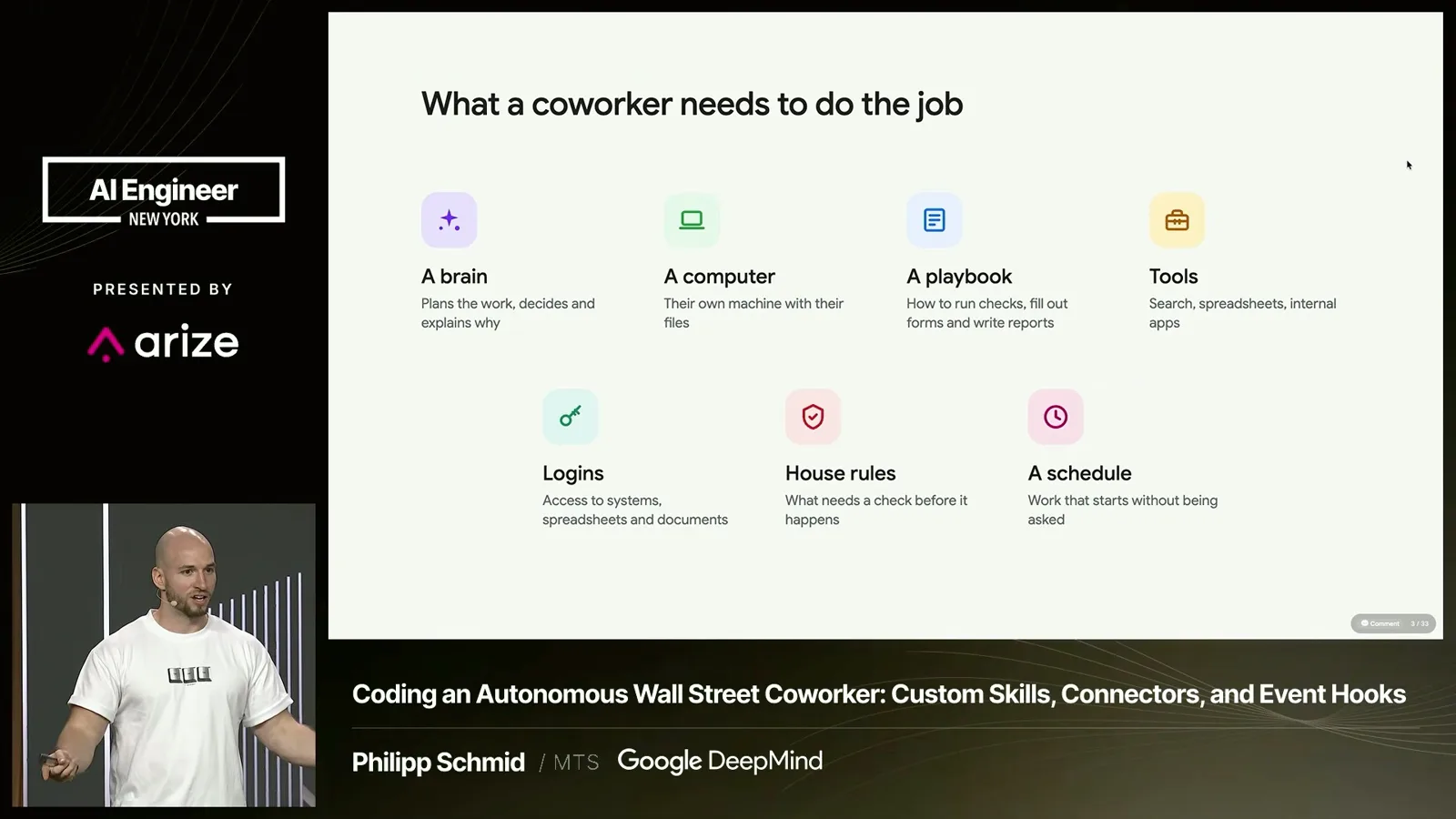
A coworker needs a brain, a computer for artifacts and iteration, playbooks for unfamiliar workflows, tools, credentials, house rules and a schedule. Those seven requirements apply to digital employees too. We will build one using Gemini and work through each part.
Gemini 4 and early uses
He describes the Gemini 4 release and examples from Google teams. He also shows a colleague’s generated ray-tracing project.
Before that, we recently announced Gemini 4. I highlighted its unified one-million-token context window and the extra room it gives the model to reason through difficult math. The Interactions API is a short way to get started: obtain an API key and send a request. The price I quoted at the talk was $2 for input and $10 for output.
Google teams had been testing the model internally. I described work involving Chromium, making the open Gemma model more efficient to run, improvements to the ADK framework, and internal code. One colleague also prompted Gemini to build a Python 3D ray tracer and used generated narration to explain it. The point is to be ambitious about the problems you try.
A managed computer for the agent
A managed sandbox lets an agent work with tools and files remotely. Schmid defines a custom agent called Buck.
In a conventional tool-calling loop, the model returns a function call, your application executes it, and the result goes back to the model. Managed Agents provides a remote sandbox where Gemini can run tools and work with files directly. Instead of supplying a model ID to the Interactions API, you specify an agent ID, prompt it and use the managed environment.
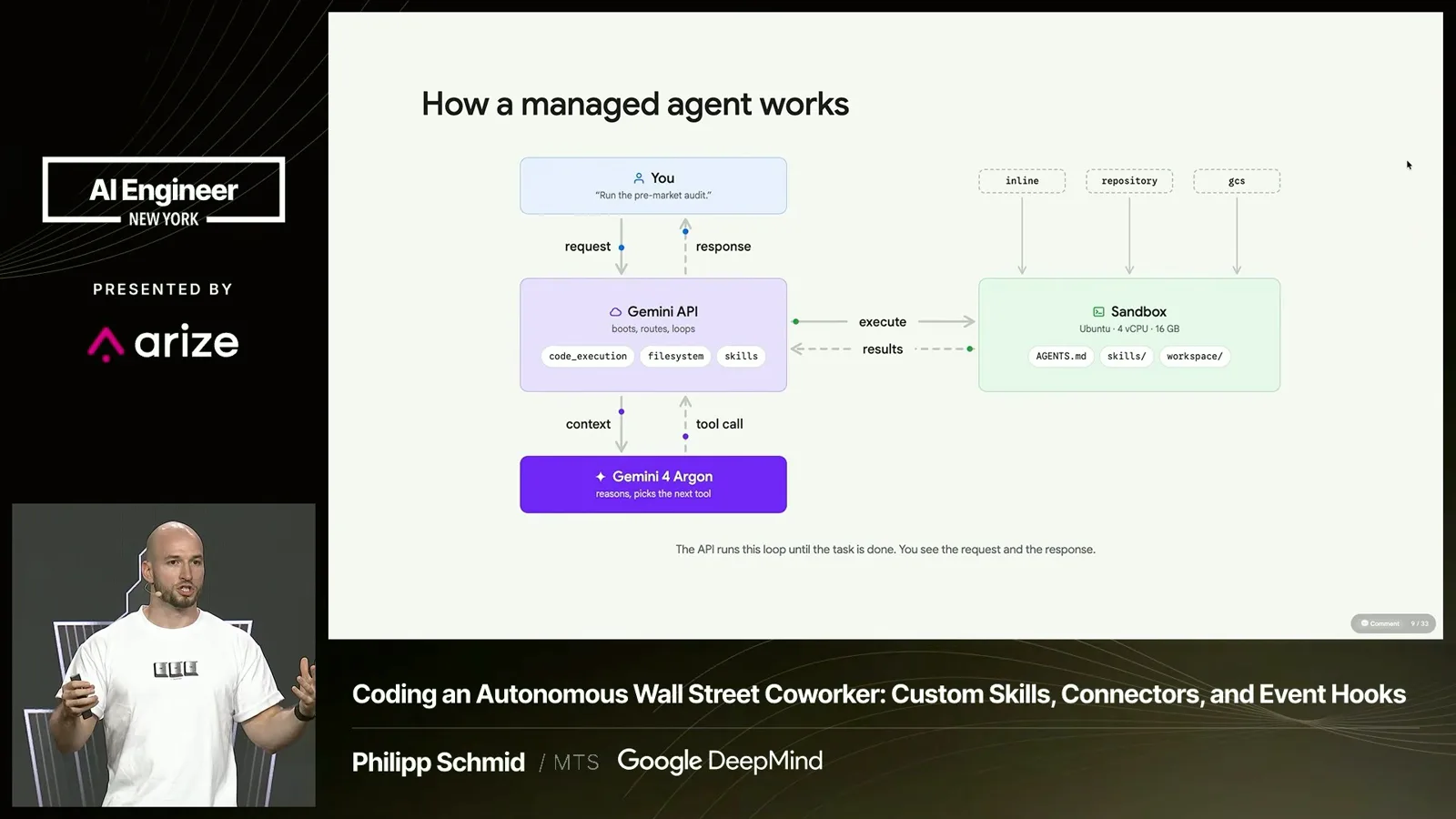
Our coworker is called Buck. To define Buck, we give the agent an ID, select a base agent and model, and provide system instructions. The remote agent uses the same harness as Antigravity. We then call our own agent by its ID through the Interactions API.
Files, playbooks and skills
The environment can be bootstrapped with files and repositories. Concise instructions and on-demand skills organize its knowledge.
A computer also needs its working environment. Managed Agents can receive inline files, a public or private GitHub repository containing skills, or a Google Cloud Storage bucket. Skills, hooks and system instructions live as files; the agent can also create skills or store learnings from previous sessions in its environment.
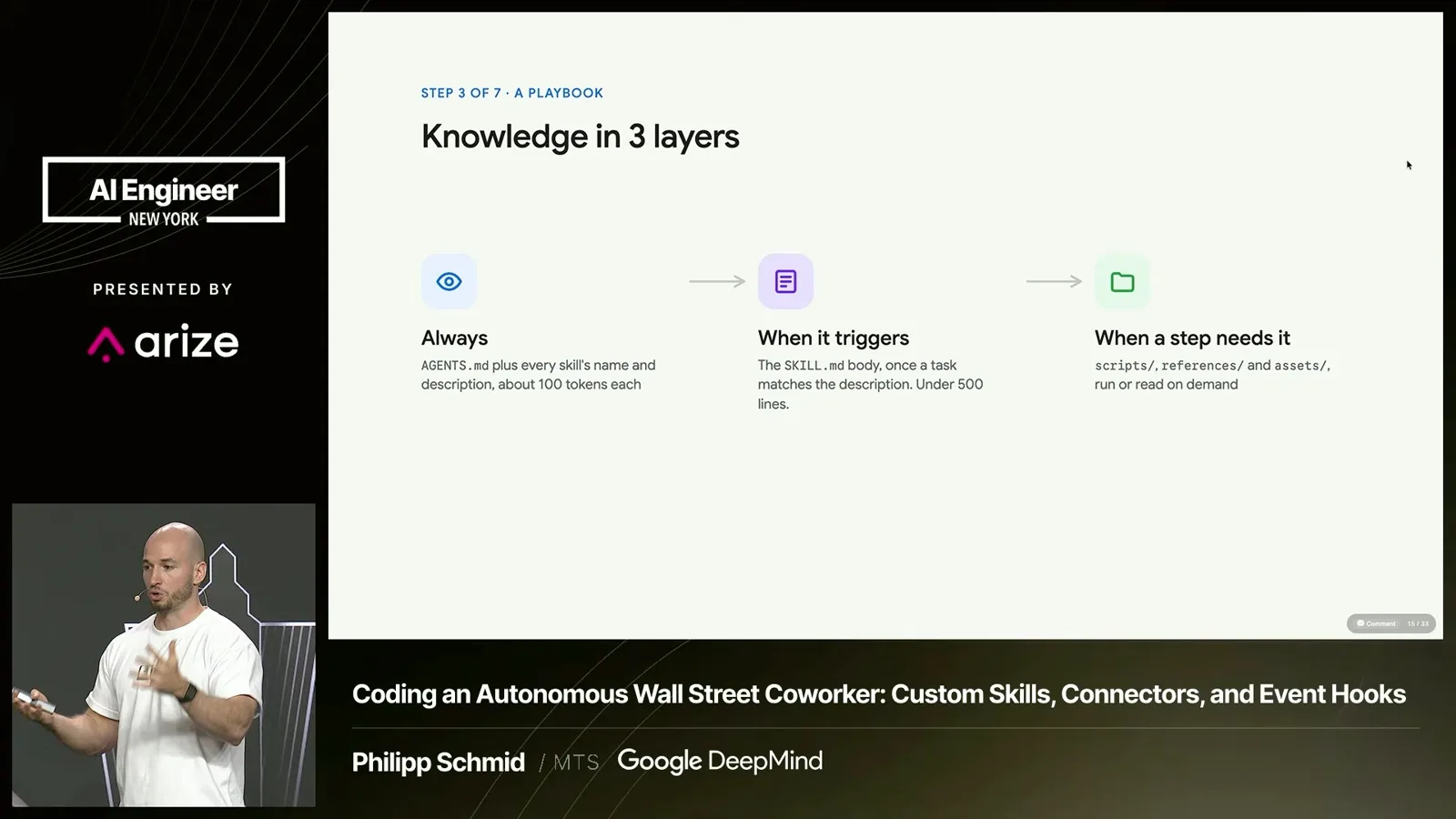
I separate knowledge by when it is needed. System instructions accompany every request, so keeping them concise matters for cost. Skills have short descriptions that tell the agent when to read them. Rather than making a skill into a dense document, split detailed context into references and scripts that can be loaded as needed.
For example, our portfolio-audit skill tells the agent when and how to run an included Python script, what to do with its results, and where to store them. It gives a new coworker a repeatable playbook without loading every detail for every task.
Tools and MCP
Built-in tools, MCP servers and custom functions connect an agent to services. Some functions can run outside the sandbox.
The next requirement is tools. Agents can use built-in capabilities such as Google Search and code execution, an MCP server, or custom functions. Managed Agents can connect to Workspace MCP tools for products such as Gmail and Sheets, and developers can provide their own servers or functions.
Custom functions still follow the familiar pattern: the agent makes a call and the application returns a result. This is useful when a capability needs to run outside the agent's sandbox rather than on its computer.
Credentials outside the sandbox
Credentials are stored outside the sandbox and substituted by a network proxy. Their use can be restricted to configured destinations.
Credentials are particularly easy to mishandle. I described three supported approaches: bearer tokens for APIs, OAuth for services and MCP tools, and environment variables for command-line utilities. The managed environment separates credentials from the sandbox using an external network proxy.
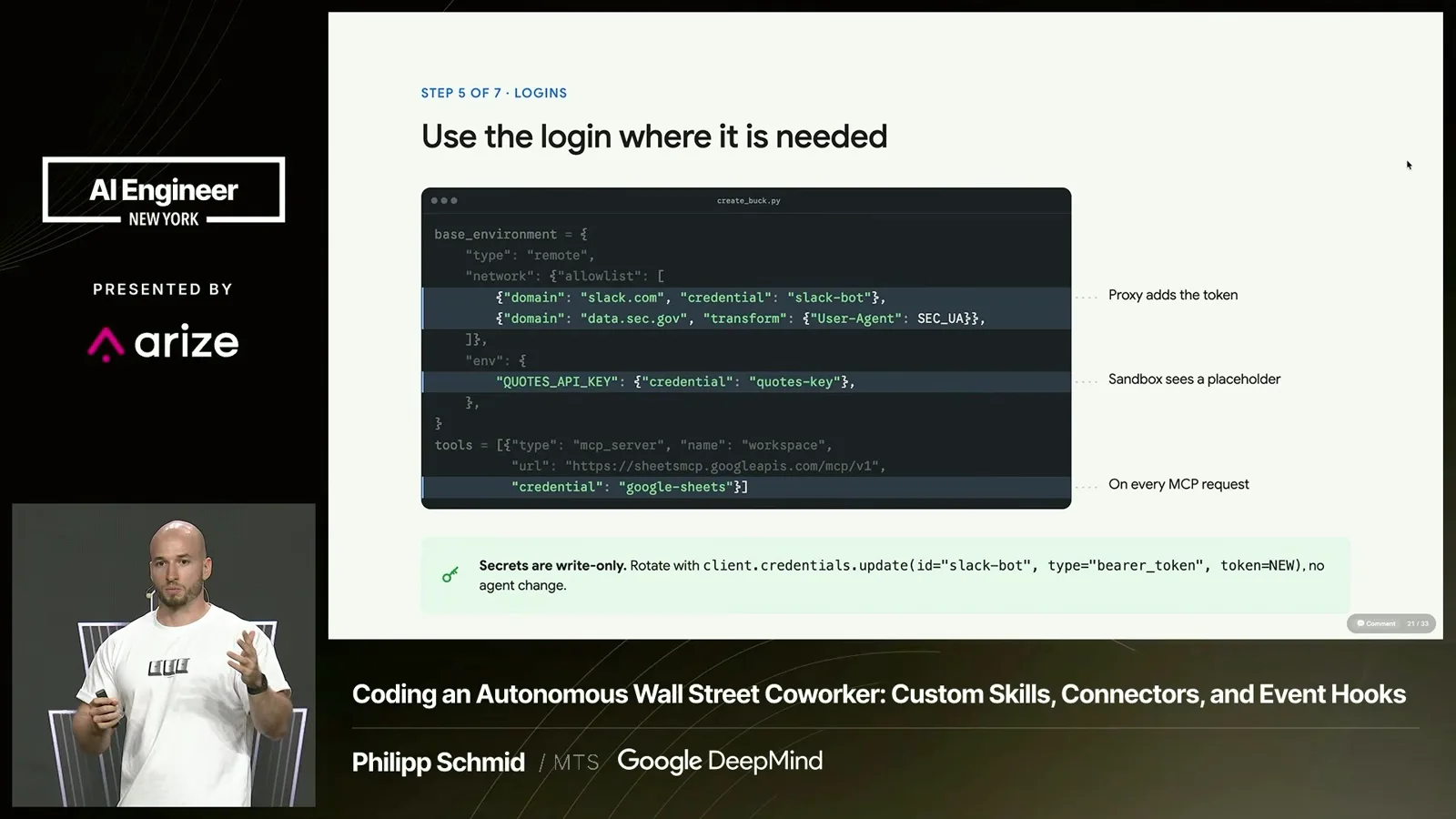
You create credentials outside the sandbox and define where they may be used, such as a particular domain. They are write-only: after setting one, you can replace it but cannot retrieve it. An environment variable visible to the agent contains a dummy value; on an allowed outbound request, the proxy replaces that value with the real credential.
I argued that domain-scoped substitution helps prevent a malicious prompt or MCP server from simply reading and sending the real token elsewhere. For example, an instruction to print an environment file would see the dummy value rather than the externally stored secret. The protection depends on the proxy and the configured credential restrictions.
Hooks and scheduled triggers
Protected hooks enforce rules around tool calls. Cron triggers run agents on a schedule, with webhooks in development.
Hooks provide another layer of house rules. A matcher can identify tool calls or commands that need monitoring or human approval, and the hook applies a deterministic check. Hook files are protected so that the agent cannot simply modify them to bypass the rule.
A coworker also needs a schedule. The available trigger I described is a cron schedule that runs the agent with a specified input in the same environment—for example, periodic due diligence or an audit. Webhooks were also being developed so that external services could trigger a workflow.
Portfolio audit demonstration
A scheduled API request starts a portfolio audit. The agent consults financial information and updates a sheet.
For the demo, I asked Gemini to help build a browser-based Google Sheets replica and simulated a scheduled trigger. A real Managed Agents API call told Buck to use the portfolio-audit skill. The agent read the skill, called financial services, checked changes in the market and stock prices, and updated the sheet.
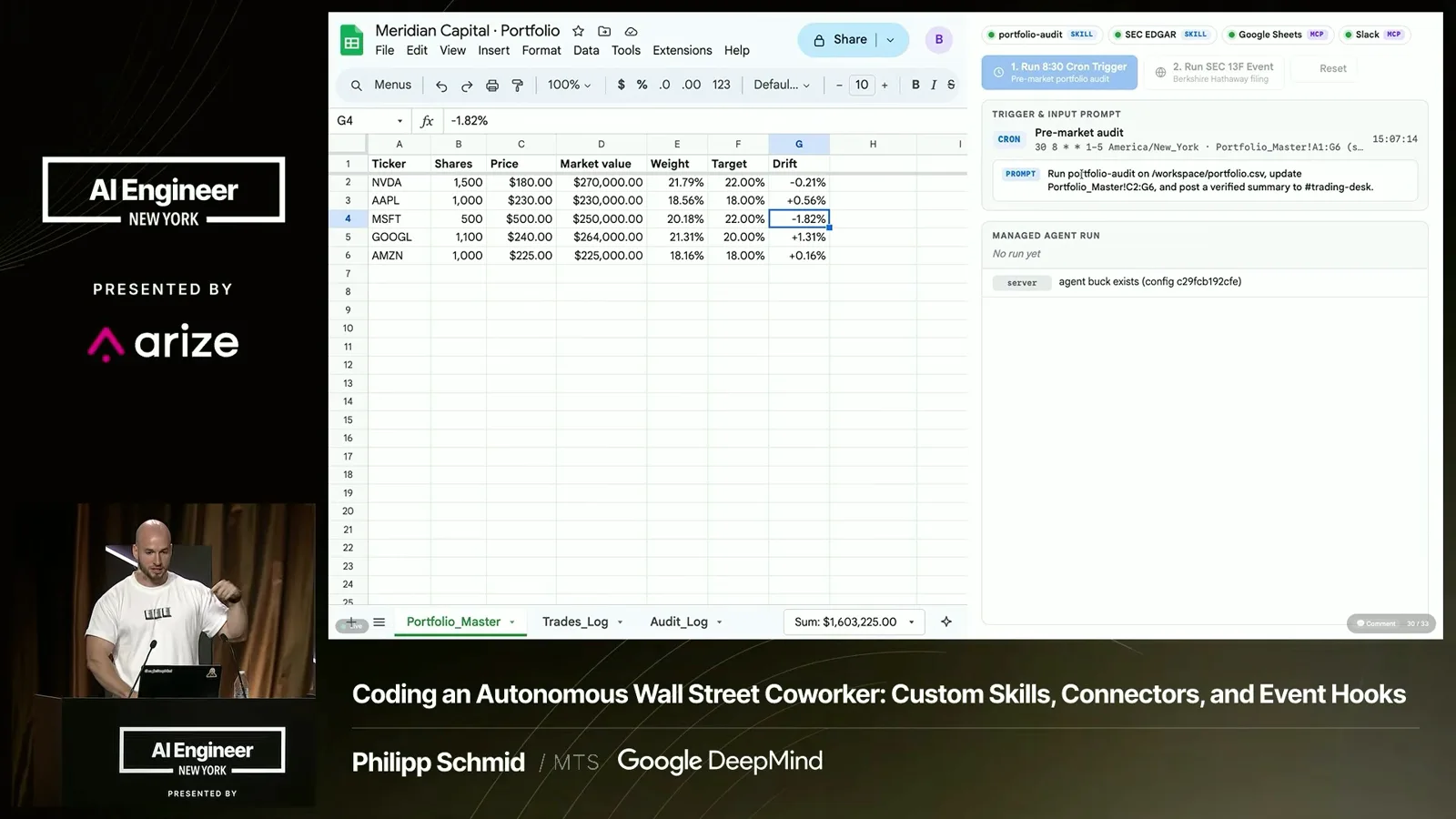
The same trigger could run at 8:30 each morning. With Slack access, the agent could post a summary of what changed to a trading channel. I also showed a recommendation request that used the conversation's earlier context and discussed three positions while respecting the system instructions about not taking actions.
Putting the coworker together
Schmid recaps the seven elements of the coworker. Managed infrastructure combines them into a running workflow.
The infrastructure for this coworker is in the managed environment: Gemini provides the brain, the sandbox provides the computer, and skills and tools provide the playbooks and capabilities. Credentials, hooks and triggers supply controlled access, rules and proactive execution. That is the complete coworker I wanted to build.
More from this channel
 23:05ZH → English
 AI Engineer· Nov 6, 2026Ryo Lu: When We Can Make Anything, Do We Know What We Want?Ryo LuFrom an AI-generated journal to a jazz ensemble, Ryo Lu explores judgment, life and collaboration alongside powerful tools.
 14:58ENAI Engineer· Nov 6, 2026Sparsh Jain on Building Experiential Memory for AI AgentsSparsh Jain · CentralAgent AIAn agent-memory lifecycle forms, updates and retrieves lessons while evaluation loops manage changing context.
 18:13ENAI Engineer· Nov 6, 2026Sid Pednekar: Judgment Is the Scarce Resource in AI AdoptionSid PednekarA framework for choosing valuable problems, building shared capabilities and turning experience into organizational learning.
 14:04ENAI Engineer· Nov 6, 2026Frank Long on Building AI Investment Workflows Around QualityFrank Long · CoatueCoatue’s Frank Long breaks investing into information, analysis and decision steps, and argues for choosing the right combination of code, models and people.
 17:52ENAI Engineer· Nov 5, 2026Cameron Wolfe on Evaluating AI When Answers Are SubjectiveCameron Wolfe · NetflixNetflix’s Cameron Wolfe outlines human review, calibrated model judges and production monitoring as a repeatable evaluation loop.
 20:45ENAI Engineer· Nov 5, 2026John Stecher and Scott Worland on Building AI Systems That Can ChangeScott Worland, John Stecher · Norm AIThe Blackstone and Norm AI CTOs discuss data strategy, evaluations, production controls and when to wait for a better model.