In 30 Sekunden
When an AI coding agent fixes one symptom at a time, an app can accumulate inconsistent behavior. Google Cloud’s Devin Chasanoff demonstrates a more precise way to describe the system: divide the screen into components, distinguish data passed from a parent from private state, and calculate values instead of storing duplicates. The same model makes it easier to specify conditional displays, guarded actions and preferences shared across the app.
- 1A screen is a tree of reusable componentsThe demo outlines the parent application and individual quest and inventory components.
- 2Parents pass details; each card can own its progressProps customize each card while its local state tracks its own counter.
- 3Derive remaining items instead of storing a second countKeeping two counts separately can leave them out of sync; a calculated value follows its source.
- 4State can guard an action as well as change the displayThe reward stays disabled until the quest is complete, and the increment stops at the target.
- 5Use shared state for preferences needed across the appCurrency and theme affect multiple components; a single card’s notes remain local.
Das Wichtigste
- Describe which component owns each changing value.
- Calculate values such as remaining items from their source instead of maintaining duplicates.
- Specify the conditions that show, style, enable or disable an element.
- Share app-wide preferences while keeping component-specific behavior local.
- Tell a coding agent how data and actions relate, not only which symptom to fix.
Den bearbeiteten Text nach Kapiteln lesen
Move from patching symptoms to describing the system
Chasanoff sets up an AI tutor and a game-themed learning app. The goal is to give a coding agent more precise instructions.
When an AI-built application develops bugs, fixing each symptom with a vague prompt can turn into a game of whack-a-mole. I find it more useful to describe the system: its building blocks, where information lives and how changes move through it.
For this lesson I use a custom front-end tutor in Google Antigravity. The tutor builds an interactive learning app as it teaches: I choose a role-playing game quest and inventory tracker, but you can use another theme and ask follow-up questions.
Identify components and where their data lives
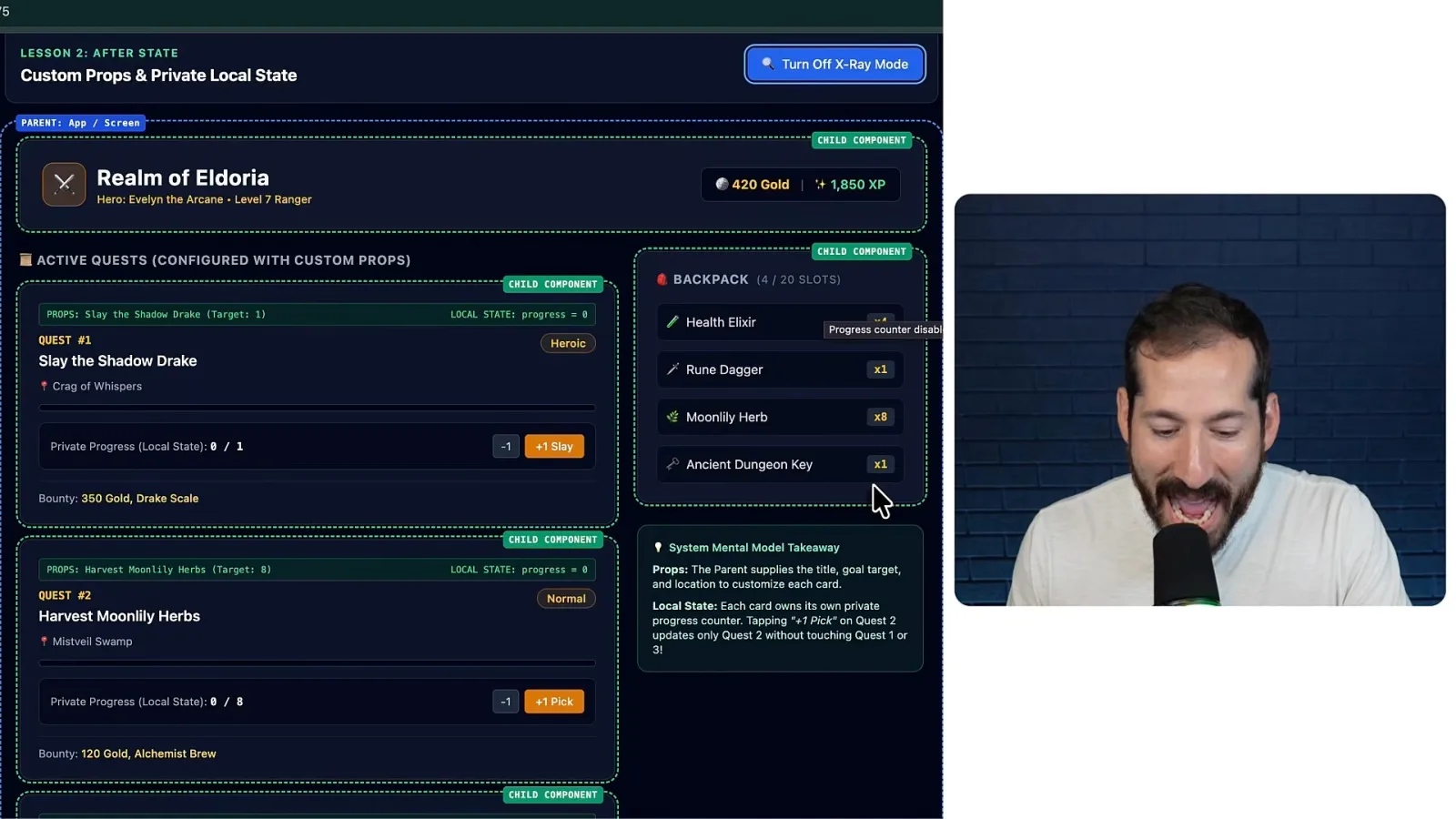
A parent passes quest details to reusable child cards. Each card can hold its own progress.
A screen can be thought of as a collection of reusable building blocks called components, arranged in a tree of parents and children. In the example, the overall app is the parent and each quest card or backpack is a child. The X-ray view outlines those boundaries.
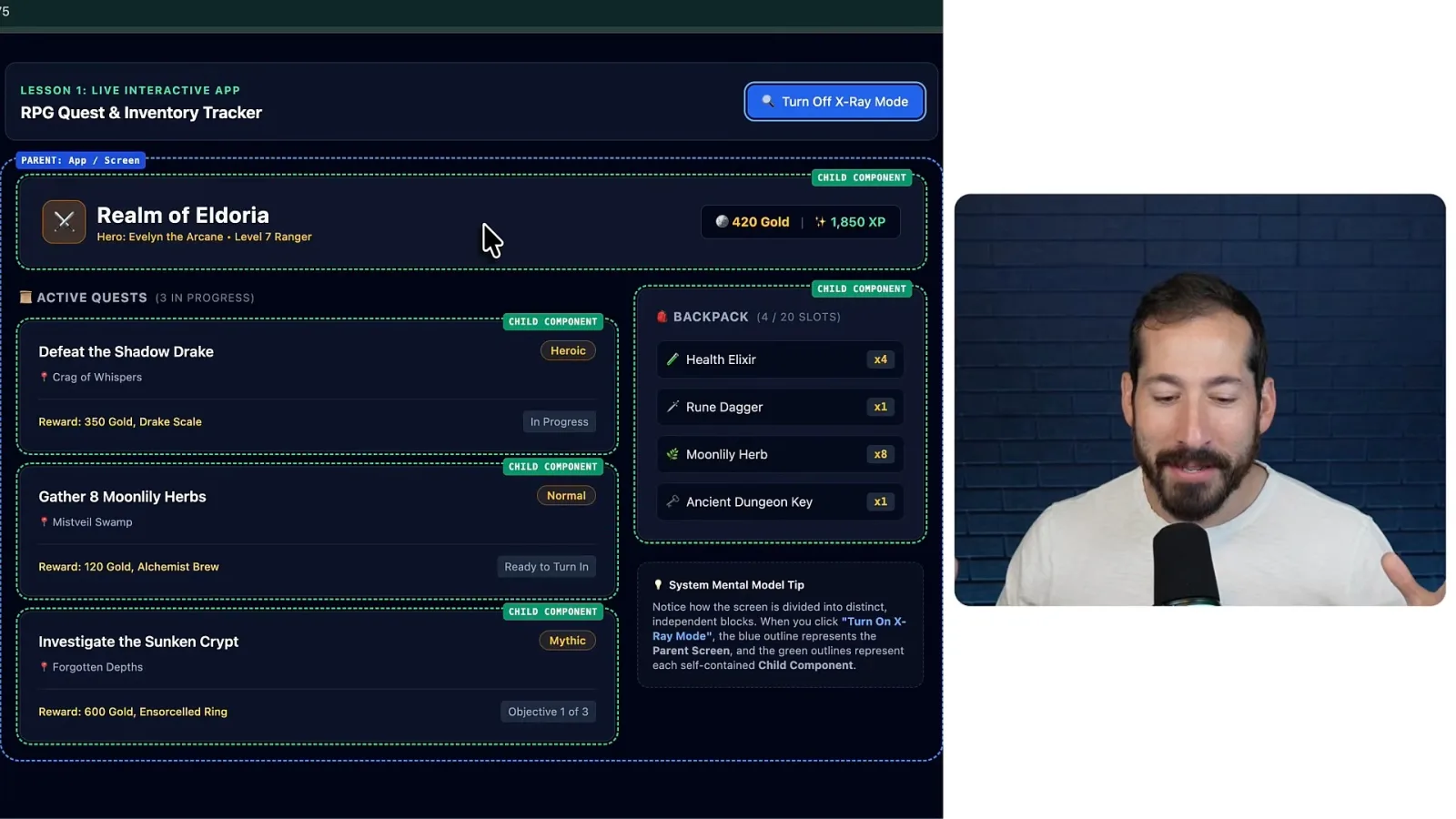
A component can receive information from its parent as props or keep its own changing information in local state. The distinction answers a practical question: who supplies this value and who is responsible for remembering it?
Our first quest cards all show the same fixed text, and their progress buttons do not yet track anything. Instead of asking only to make the cards different, specify the title, location and difficulty supplied by the parent, and a progress counter held by each card.
The parent has the list of quests and passes the appropriate details to each instance of the reusable card. Each instance can then maintain its own progress: adding one to the herb quest does not change the dragon quest.
Calculate values to avoid conflicting state
The demo contrasts an out-of-sync remaining count with one derived from the underlying count and target.
Calculated values, sometimes called computed state, can prevent duplicate information from drifting apart. In the broken example, the number of herbs collected changes while the separately stored number remaining stays at eight.
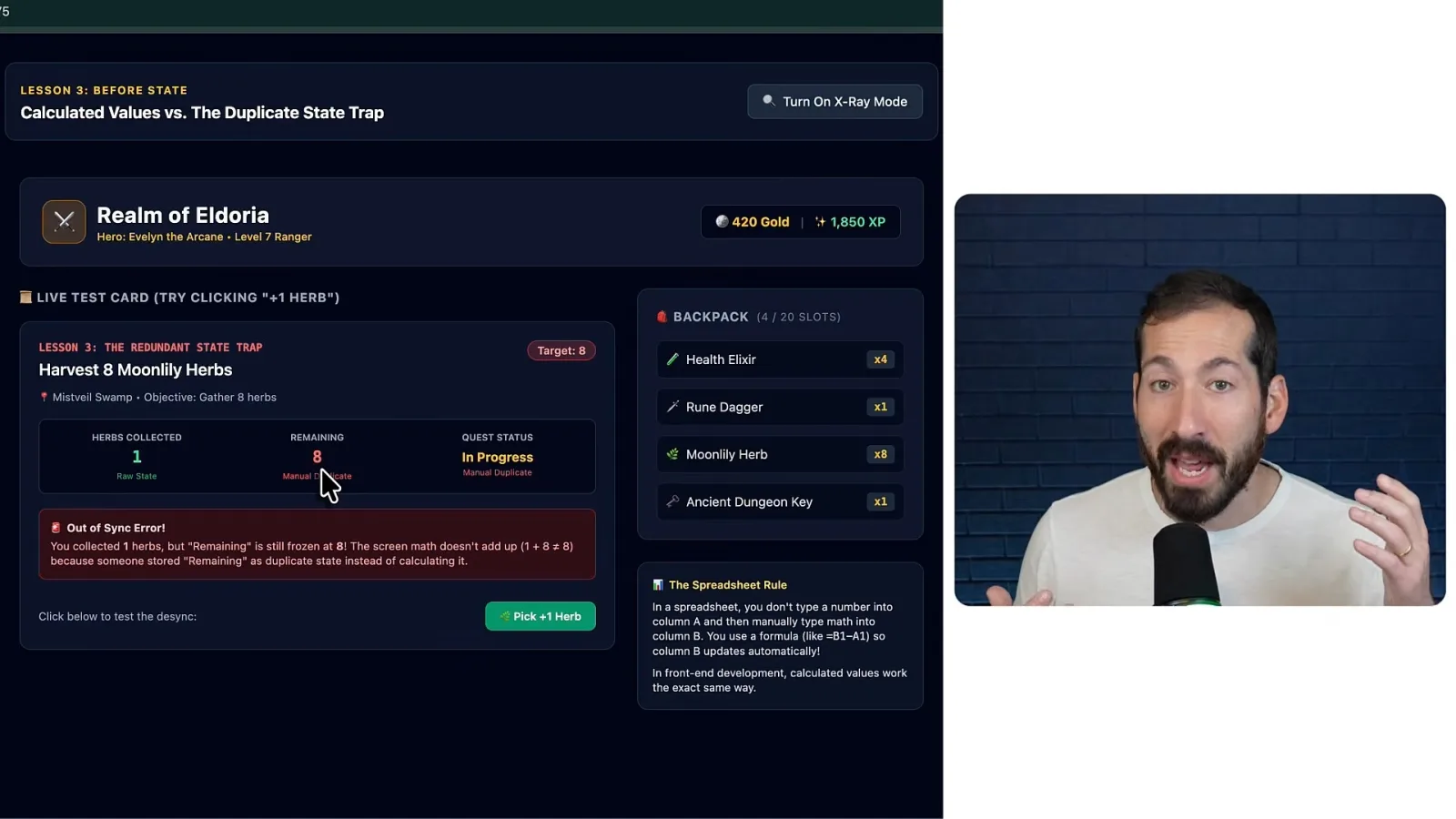
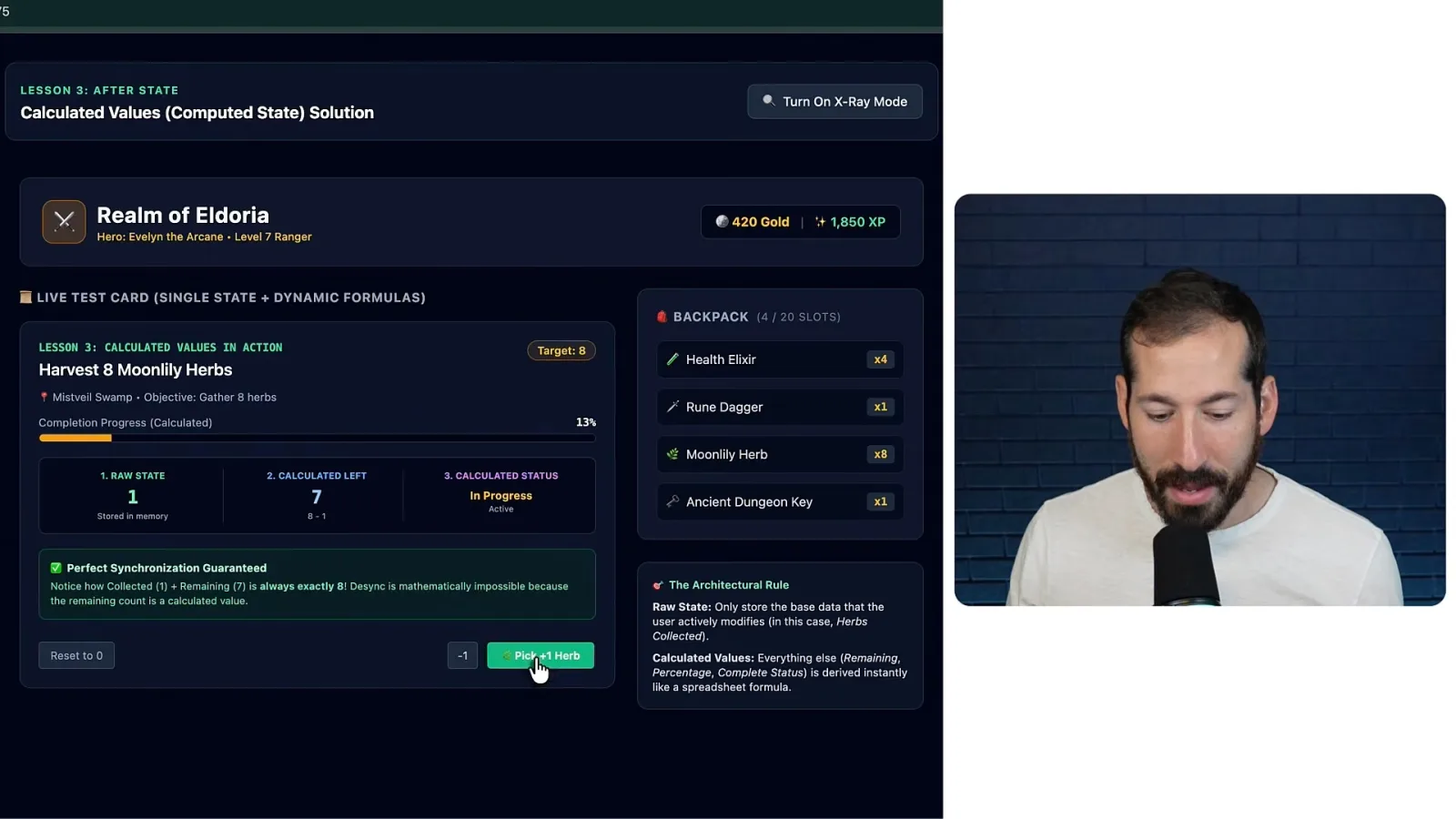
If the target is eight and one herb has been collected, the remaining count should be seven. Keeping both collected and remaining as independently updated state means every change has to keep them synchronized. That creates another opportunity for an inconsistency.
Ask the agent to store the underlying count and derive remaining items, completion status and percentage from it. Then changing the one source value updates the other displays by calculation, like a spreadsheet formula.
Change displays and actions when conditions change
Health controls styling and visibility, while quest progress controls which actions are enabled. A child event can notify the parent.
Dynamic rendering and styling use state to decide what appears or how it looks. In the game example, the dragon’s health changes its badge and colors; below 30%, the card shows an enraged style. A separate control reveals tactical information.
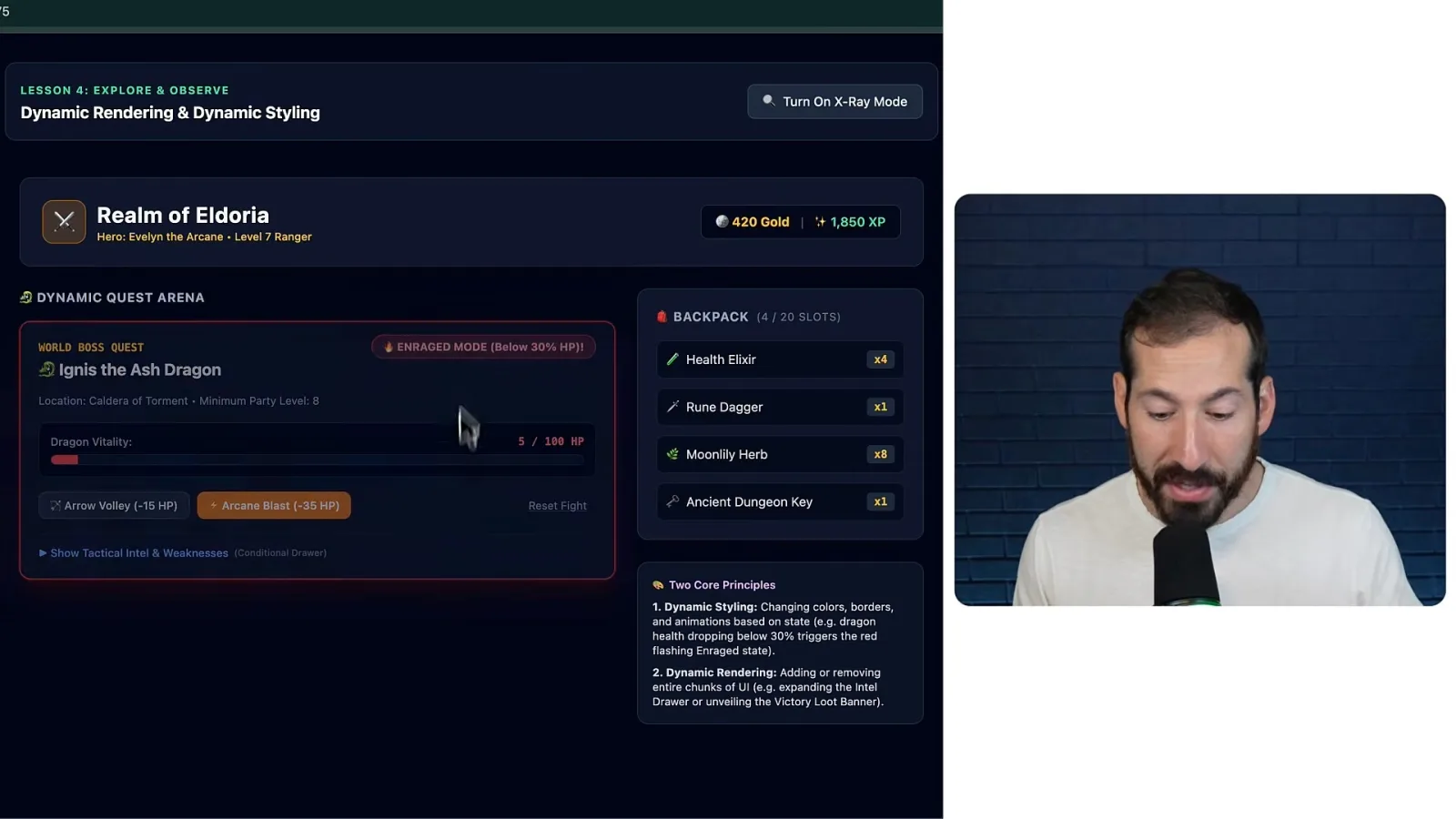
A victory banner can appear when health reaches zero. Instead of asking the model to make a boss card “cooler,” describe the condition and the result: below a specified health threshold, change the styling and badge; at zero, show the victory state.
State can also control actions. A bounty button should remain disabled until five wolves have been defeated, and the increment button should stop accepting more when the target is reached. These conditions keep the displayed actions consistent with the task.
A child can notify its parent when an action occurs so the parent can update shared information. The example uses that connection when a reward is claimed, allowing the wider application to respond to an event originating in a card.
Separate app-wide preferences from local behavior
Currency, units and theme are shared between components. A note toggle that belongs to one card stays local.
Local state belongs to a particular component, but some information is needed across many distant components. Passing the same preference through a long chain of parents and children can become difficult to maintain; shared app-level state is another option.
In the demo, currency, distance units and theme are shared: a change can update the header, quest cards and backpack together. By contrast, opening notes on one card is private to that card and can remain local.
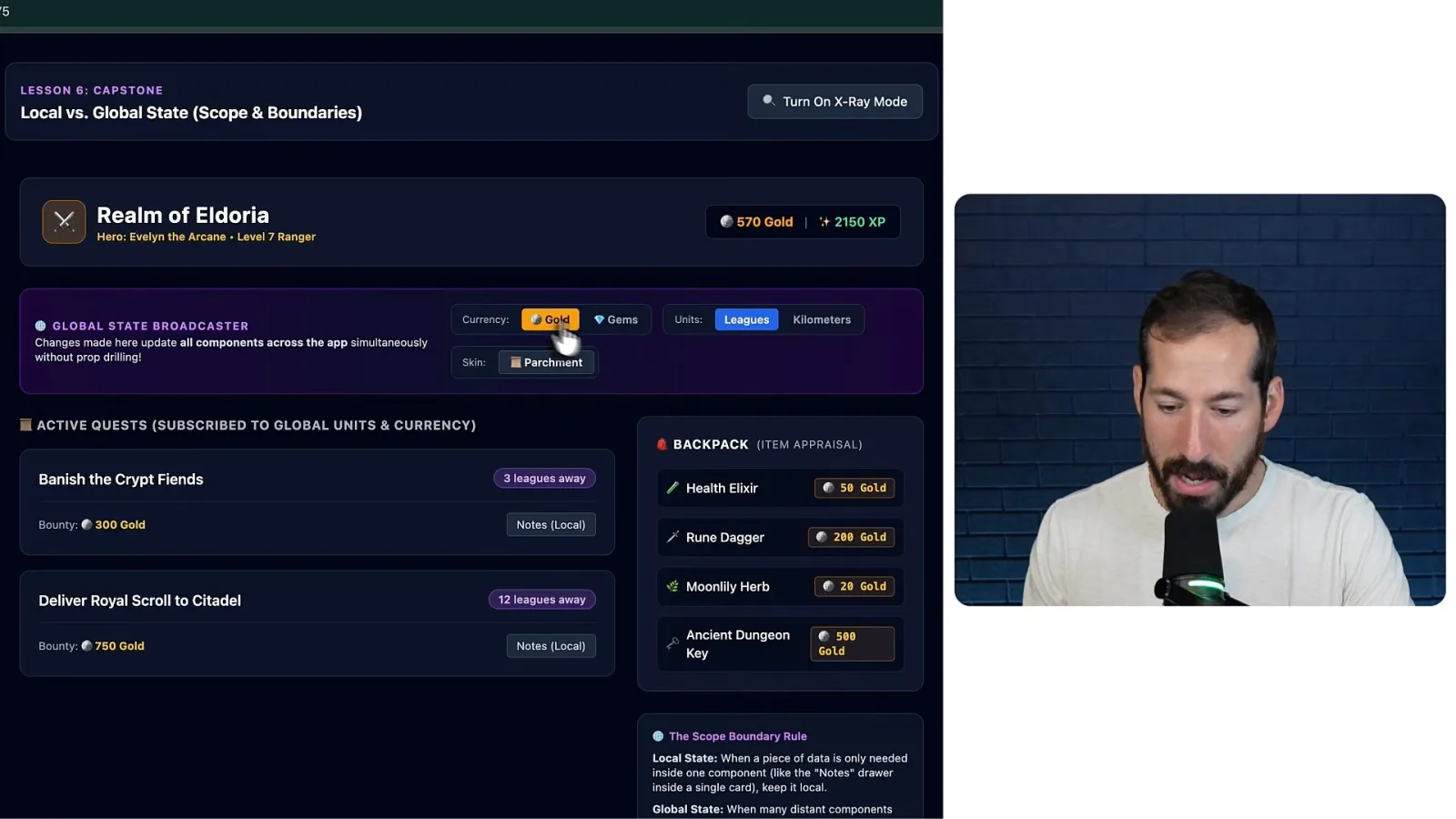
A more precise request identifies the shared preferences, the parts of the app that need them and the details that should remain private. You do not have to memorize all the jargon: explaining the relationship is enough to help an AI coding agent understand the desired design.
The six concepts are components and boundaries, props and local state, calculated values, conditional rendering and styling, actions and events, and local versus global state. Use them to describe how the application should behave as a system rather than fixing one feature at a time.
Mehr aus diesem Kanal
 41:04EN
 Google Cloud Tech· 9. Nov. 2026How Google tests Gemini 4 and uses agents to maintain codeTulsee Doshi, Smitha, Rody Davis, Luke, Mollie, Billy, Annie · Google DeepMindTulsee Doshi describes staged releases and long-running work; a demo audits web, Android and iOS code with subagents.
 17:27ENGoogle Cloud Tech· 9. Nov. 2026Fix a tangled app by specifying its states before promptingDevin Chasanoff · GoogleDevin Chasanoff maps a workout screen’s state, transitions and tests before asking an agent to change it.
 11:59ENGoogle Cloud Tech· 3. Nov. 2026Use two AI agents to turn a prototype into a front-end specificationDevin Chasanoff · GoogleDevin Chasanoff separates planning from documentation so Gemini can help a user design an app before building it.
 11:16ENGoogle Cloud Tech· 29. Okt. 2026Before an AI agent builds, reconcile the specs and plan checkpointsDevin Chase · GoogleDevin shows how to find conflicting requirements, compare assumptions with recommendations and plan a staged build.
 12:26ENGoogle Cloud Tech· 28. Okt. 2026Give an AI agent two kinds of long-term memoryAnnie Wang · Google CloudAnnie Wang separates exact facts from semantic preferences and keeps slow memory extraction off a live voice agent’s critical path.