In 30 Sekunden
Marvin Schwaibold joins Y Combinator’s Aaron Epstein to discuss how AI turns design sketches into testable prototypes while leaving judgment and curation to the designer. He demonstrates Shopify concepts, a grass shader and interaction controls, then applies the same principles to six submitted websites.
- 1The designer as editorSchwaibold uses AI for execution while retaining judgment, quality control and responsibility for the final experience.
- 2Sketching an interruptible interactionSimple Figma boxes helped him explain a motion sequence to Codex when text alone did not.
- 3Decomposing a grass shaderA topographical map revealed the terrain beneath the grass, while exposed controls made the simulation easier to tune.
- 4One goal per pageThe reviewers find that competing elements can obscure the first action a visitor should take.
- 5Keep scrolling responsiveThe guests argue that scroll manipulation and uninterruptible motion can obstruct rather than guide visitors.
Das Wichtigste
- AI speeds up execution, but designers still need to set the quality bar, decompose problems and curate results.
- Quick prototypes and adjustable controls make interaction ideas easier to test and discuss.
- A page should make its primary purpose and next action clear before revealing supporting detail.
- Motion and illustration should improve understanding or the experience rather than compete for attention.
- Interruptible interactions and native scrolling respect the pace at which people explore.
Den bearbeiteten Text nach Kapiteln lesen
Designing with AI and human judgment
Schwaibold describes an iterative workflow that moves from sketches to working demos. AI accelerates output while the designer keeps responsibility for quality.
Aaron Epstein welcomes Marvin Schwaibold, who leads the product design studio at Shopify. They discuss how AI is changing the way he designs and builds, then review websites submitted by viewers.
Schwaibold says his process is still iterative and sequential, with many variations, but his tools have changed. Figma remains a scratchpad for ideas; he now moves quickly into working demos using Codex, Claude Code and the terminal, testing results on his phone or computer.
AI does much of the execution, but the designer remains in the driving seat. Schwaibold selects outputs, makes quality decisions and breaks a complicated problem into smaller tasks for the agent. The loop is a continual exchange rather than a one-shot request.
Epstein suggests the designer has become an editor. Schwaibold agrees: the role always involved judgment, but producing the work to edit once required much more manual design. AI can write code and handle technical complexity, he says; deciding whether the result looks good and directing it remains his responsibility.
From Molly to Shopify
He explains the studio’s approach to progressive disclosure and its move to Shopify. A shared playground makes product ideas tangible.
At Shopify, his team works on major product surfaces, including the admin, the mobile app and Sidekick. One part of the design organization has redesigned the admin experience; another is exploring how conversations and AI infrastructure can help merchants manage and automate their stores.
Schwaibold describes the two efforts as almost paradoxical but complementary: one makes the interface more useful and polished, while the other uses AI to act through it. On mobile, this could mean more conversation about a business and less manual navigation through screens.
Before Shopify, Schwaibold ran Brooklyn design studio Molly with J Tal for about two years. Its projects ranged from web and product design to content strategy for large and small clients. A small roster of two or three clients let the studio work closely with them over focused periods.
Showing Molly’s work, he explains how a changing background glow was inspired by ambient lighting behind televisions. Before AI, the team duplicated and blurred a video to match the colors and rhythm on screen. Small details can encourage exploration before the visitor sees the rest of the work.
The studio called its approach to structuring website content “Primal.” Rather than demanding attention with everything at once, the site lets people explore through layers of progressively disclosed information. Each section can act as a chapter leading to more detail.
A Collins website illustrates the approach. Its case studies appear as a bookshelf; the team designed the layout and worked with an engineer on the organic bounce as the books stack and settle. Schwaibold argues that visitors may feel these details even if they do not consciously notice them.
Why devote a skilled person to a small interaction? For a branding studio, Schwaibold says, such details demonstrate the care prospective clients can expect in their own projects. A thoughtful interaction is both useful craft and evidence of the depth the agency can bring.
Schwaibold says Shopify founder Tobi Lütke wanted designers to help define the company’s future. Molly’s team saw an opportunity to apply its approach to interfaces used by millions, where the stakes and the impact differ from those of a small studio website.
The studio works closely with the broader Shopify organization and its roadmap rather than operating in isolation. AI helps the designers turn interface ideas into tangible prototypes rapidly. Those prototypes can circulate through the company, win attention and support a decision to build.
He contrasts this with work at Molly, where screens and animations needed handoffs among multiple contributors. Today a single designer or a small team can make a convincing prototype and build support around it before a larger team commits to implementation.
Schwaibold shows an admin redesign and a Sidekick prototype. Suggestions on the home feed identify opportunities for a merchant, such as improving a product description; interacting with a suggestion starts a conversation and presents proposed changes in context.
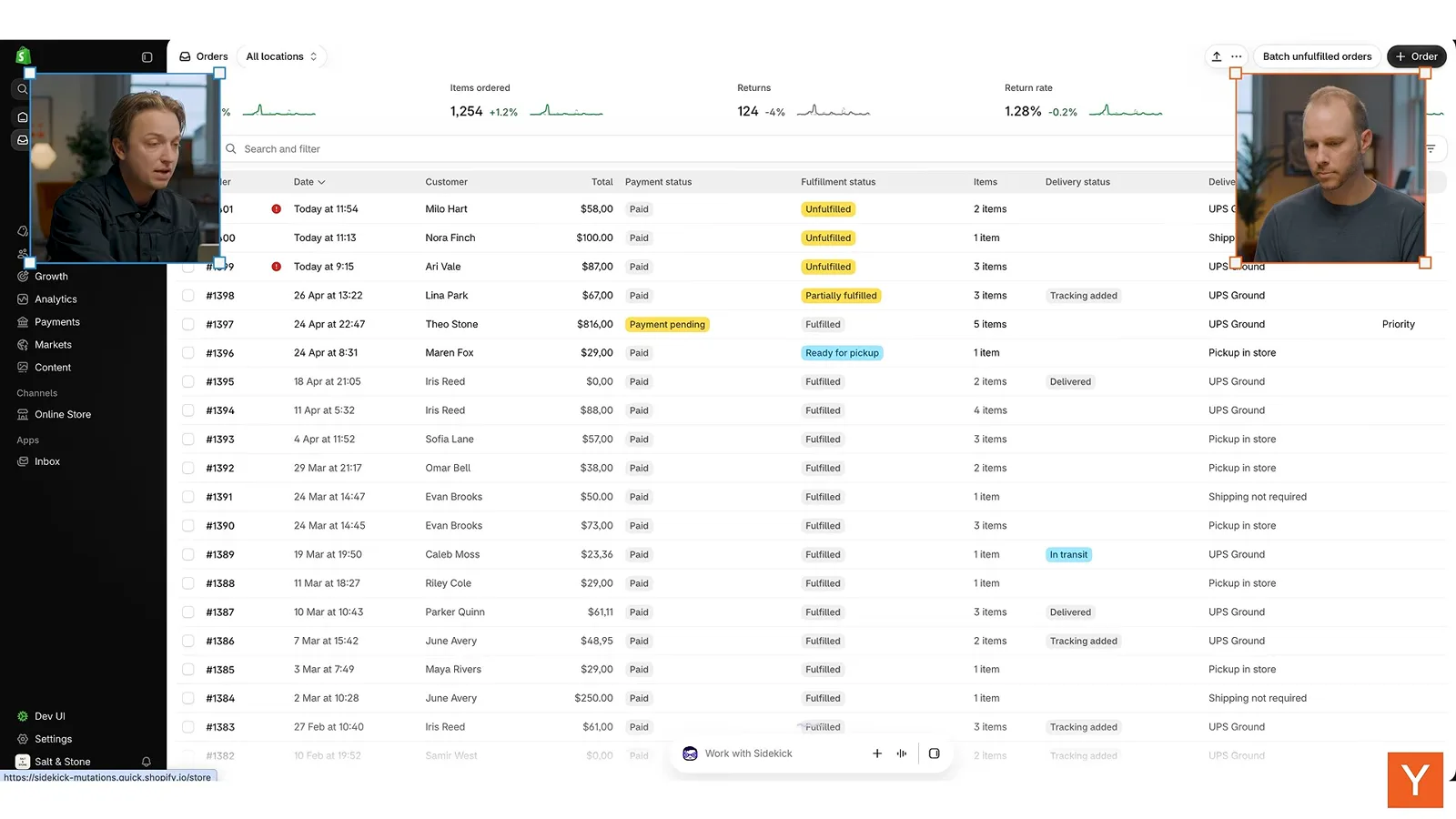
The idea is to bring an interface to the merchant when needed, instead of making them navigate through many screens. The demo is a playground rather than production code. Once the team agrees on a direction, designers branch off, explore ideas and bring them back into a shared prototype.
Building and tuning interactions
A Figma sketch clarifies interruptible motion, while a grass shader and DialKit demonstrate decomposition and exposed controls. Schwaibold encourages experimentation.
Epstein asks how designers moved from static layouts to building their own tests. Schwaibold says the Shopify playground is separate from the production repository, but AI makes it much easier for designers to visualize ideas. Earlier, complex ideas often had to be stress-tested in Figma before an engineer could build them.
For a grass-study side project, Schwaibold wanted a grid of videos that could open and close with a drag. Codex built an initial interaction, but it could not be interrupted: a user had to wait for one item to settle before opening another. That delay made the interface feel unresponsive.
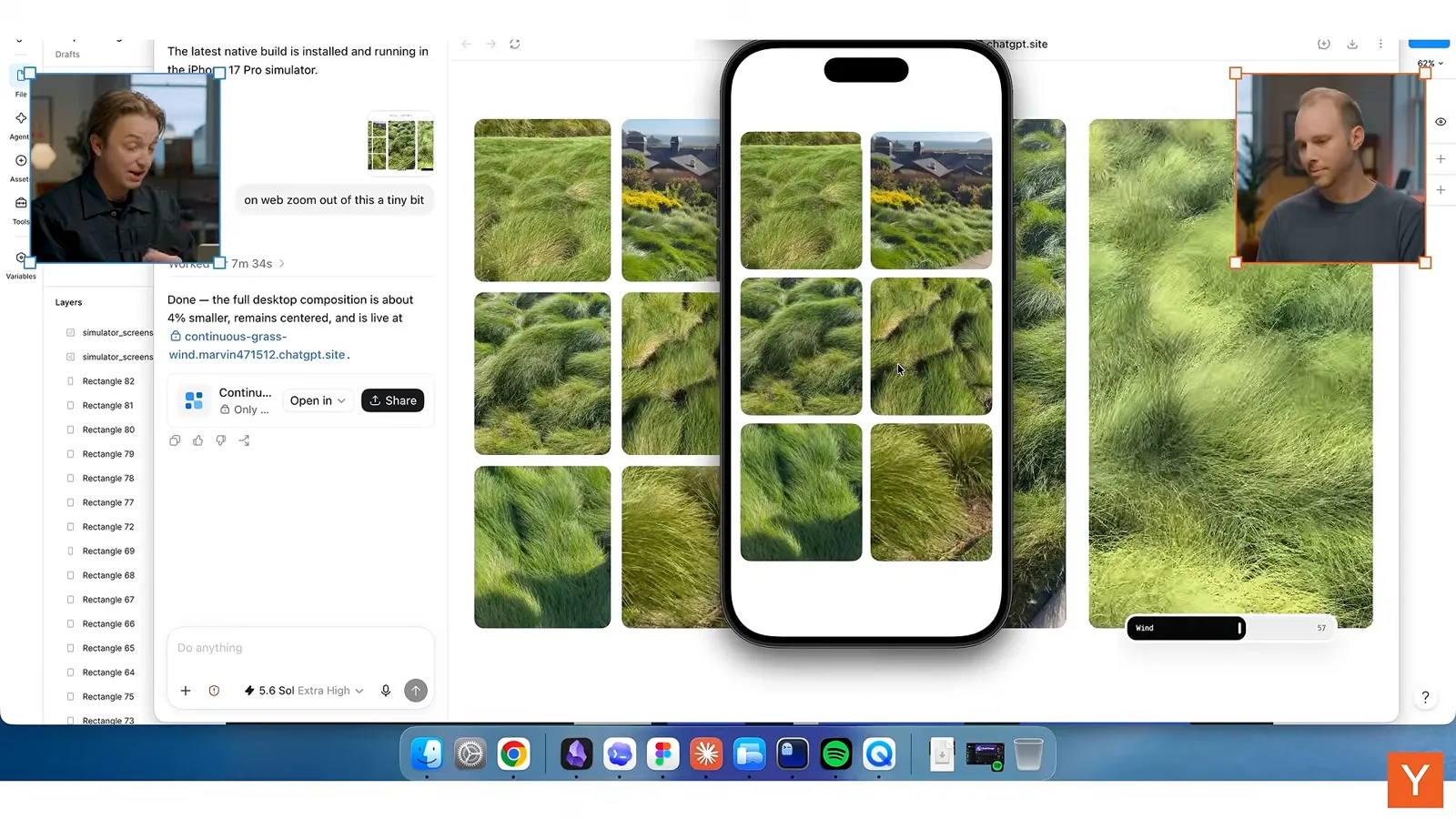
He used Figma to draw simple colored boxes showing the desired sequence: swipe one item away and tap another while the first is still moving. The sketch communicated the interaction to Codex better than his attempted text or voice description. Figma became a tool for decomposing and explaining the idea.
Schwaibold says the tools can create remarkable things, but the designer still needs to understand the problem well enough to break it into parts. That principle also guided his attempt to recreate real grass as a controllable shader.
He first gave Codex video of grass and asked it to reproduce colors and details in a web shader. The first result looked very different from his reference. He then gave another AI agent the original and the output, asking why the first agent had misunderstood his intention.
The second agent helped him articulate the lighting, shadows and separate components. A topographical representation exposed a crucial missing idea: the grass did not sit on a flat surface, but grew over small hills. Once that underlying structure was described, the scene became more convincing.
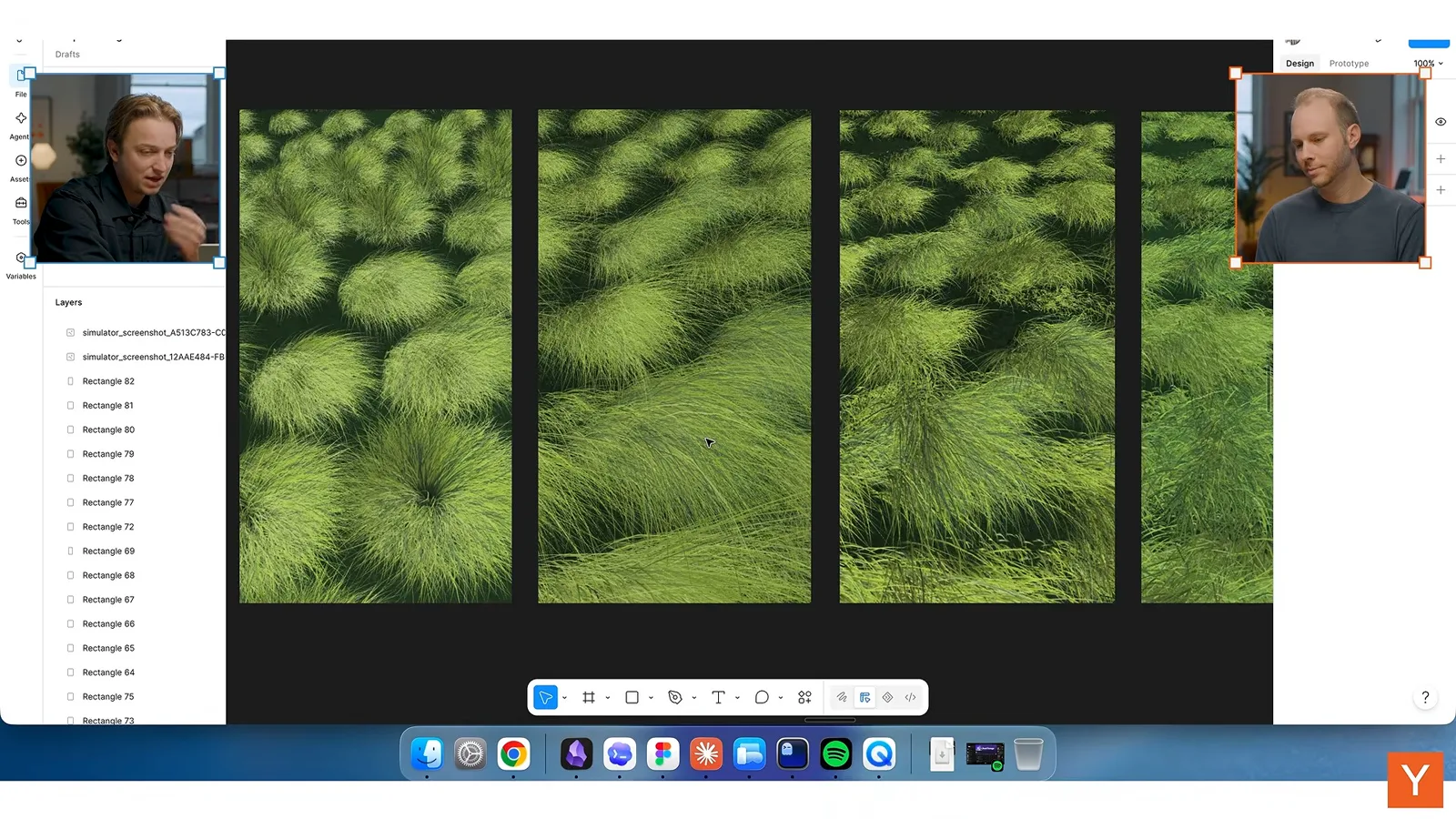
A colleague suggested looking closely at blade length and introduced DialKit to expose adjustable parameters. Schwaibold says the simulation had roughly 217,000 blades with limited variation. Controls let him inspect and tune the underlying values directly instead of repeatedly describing every change in chat.
Exposing those variables also revealed that he had misinterpreted an earlier terrain map. With controls for terrain, blade length and wind, he could see the effects immediately and experiment with the result. He describes this as a side project that would have been difficult for him to execute before AI tools.
Epstein observes that teams increasingly build small controls into prototypes so they can test parameters quickly. What once might have required changing code repeatedly can now become a temporary tool for exploring options and refining the interaction.
Schwaibold demonstrates another DialKit panel for a carousel inspired by Mike Matas. He says he reached the prototype through 91 prompts, then used controls to tune how a dragged item transfers movement to its neighbors. A value such as pull strength has to feel right, not merely work technically.
For founders and designers learning these tools, Schwaibold recommends persistent tinkering. He calls AI an infinitely patient collaborator: it will not get angry when asked to try the animation again. Share references, screenshots and color palettes, explain what is wrong, and continue iterating.
He also recommends learning by trying to reproduce interactions one admires. For him, rebuilding the carousel on a weekend was a way to look under the hood without drawing engineers away from their work. He says that understanding the construction makes him a better collaborator and manager.
Endstack and SkillSync
The first reviews examine unclear priorities, hidden features and decorative visuals. The guests argue for a clear main action and progressive disclosure.
The first website, Endstack, presents an AI workspace through a desktop-like interface. Both guests appreciate the way it puts visitors close to the product, but Epstein is unsure what specific task it is meant to help him accomplish.
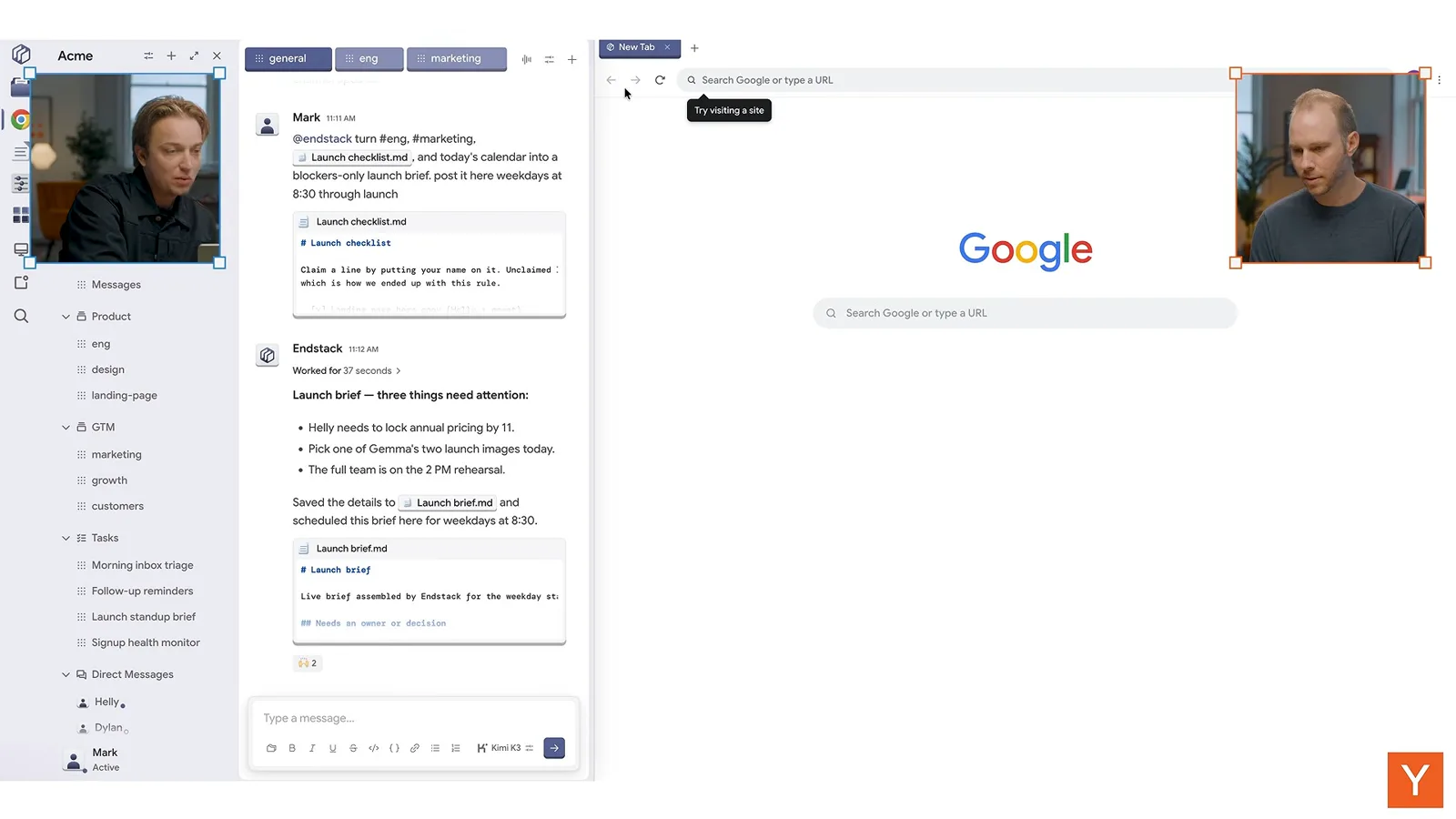
Schwaibold finds the page visually overloaded: a sidebar, chat history, interface and main message all compete for attention. He recalls a typography teacher who asked whether a poster directed the viewer’s eye. Here, he says, it is difficult to know what to look at or do first.
He suggests collapsing some clutter, making the introduction and headline clearer, and providing a simple route into a quick demo. Epstein agrees that a page should have one primary goal; several similarly styled buttons make it unclear which action matters most.
Schwaibold recommends choosing one idea around which to build the site’s narrative, as Collins did with its work. Both guests like the ambition of putting a visitor directly into the product, but argue that a little more context would help users reach its aha moment.
SkillSync describes a local-first Mac app for moving memory and skills across agents and teammates. The promise is clearer to the guests, but Schwaibold finds the typography small and the page dense. Detailed feature descriptions make it harder to grasp the core benefit quickly.
Epstein points out a common tab problem: visitors may never click through every tab, so important information hidden behind them may never be seen. Schwaibold proposes grouping the product’s capabilities into three clear pillars, each opening into more context.
A longer page can also be preferable to compressing everything behind tabs, Epstein says: people are comfortable scrolling. The founders should identify the most important thing their product does, show it clearly and make it easy to try.
The guests also question decorative AI-generated illustrations and animations that do not make the product easier to understand. Schwaibold suggests that an information designer can turn the features into a coherent visual language and potentially make that clarity part of the brand.
He recalls a Gemini animation that combined different capabilities into a braid and then a line. Many people worked on it, and engineers made it scrollable, but the result helped explain and distinguish the product. Abstract art direction can communicate well when it has a clear purpose.
Instaplay and Mintlify
They discuss helping visitors experience a game-creation product and explain why Mintlify’s restrained visual hierarchy earns trust.
Instaplay presents a gallery of game images, and the guests initially start playing rather than realizing that the primary feature is creating games. Epstein suggests that a concise explanation or a more prominent prompt could make the intended action clear.
Schwaibold asks whether the site wants users to explore existing games or make their own. When they try the creation flow, they encounter sign-in before seeing a result. He argues that giving someone enough access to experience the product is part of the cost of acquiring a user.
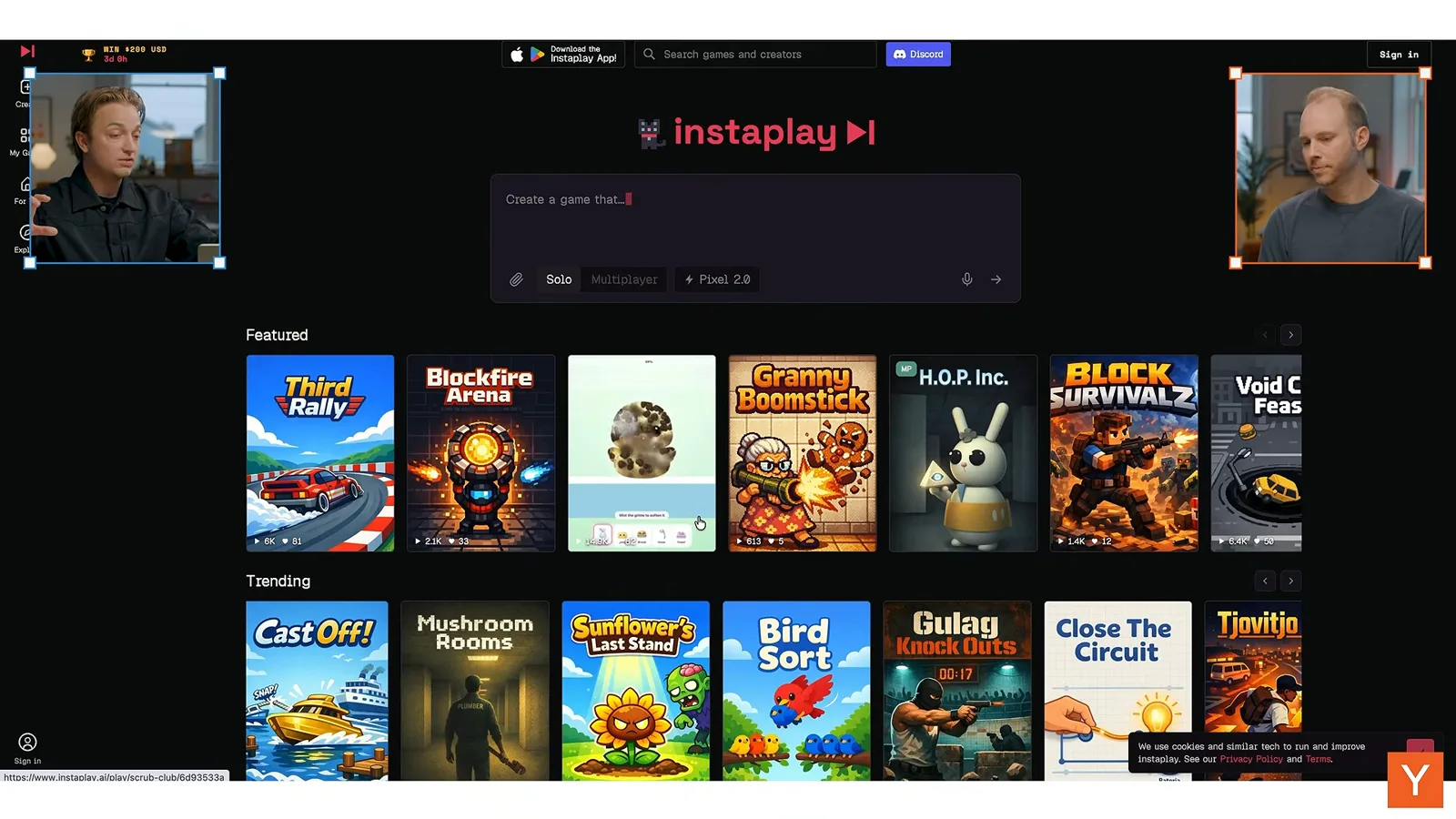
For the gallery, he suggests short previews rather than static covers, potentially generated from screen recordings. Epstein proposes allowing people to create and play first, then asking them to sign up when they want to save, return to or share the result.
They also find navigation labels and the route back home confusing. Schwaibold advises designers to put themselves in the position of a first-time visitor who does not already know what the product does. A confusing icon or redundant navigation can interrupt the path to value.
Mintlify, the next site, makes a more immediate impression. The guests describe its headline, paragraph, prominent action, typography and spacing as clean and professional. A subtle background graphic supports the impression of infrastructure rather than distracting from it.
Its customer logos provide social proof in a crowded tools market, Epstein says. Schwaibold likes the cohesive visual treatment of features, but suggests larger headlines and less repetition of the same background animation. Important points such as access control and compatibility are too easy to miss beneath visuals.
The guests like a swipeable customer-story carousel whose colors are matched to the photography and brands. They also appreciate the space between sections. Epstein observes that a restrained page still takes work: a team has to decide what to leave out instead of putting everything on screen.
Schwaibold returns to the idea of a homepage as a series of chapters. Each section should convey a distinct idea and offer a path into further information. The designer’s job is to reduce complexity and reveal one piece at a time while maintaining a narrative.
Knowlify and responsive scrolling
The reviewers recommend clearer product messaging and easier exploration of video examples. They criticize scrolling that overrides user control.
Knowlify turns documents and ideas into narrated animated videos. On its homepage, Schwaibold counts several competing type sizes, two actions, logos and other elements. He suggests a headline and a concise paragraph that carries the essential information.
Epstein finds the headline disorienting because two parts change at once. Neither guest immediately understands the video offering. They suggest stating the positive benefit clearly and, fittingly, using a video to demonstrate what the company makes.
The guests like the quality of the sample videos, but find the carousel difficult to explore: cards do not all behave as expected, and opening one makes it hard to move through the rest. They propose larger clickable targets and an interface that lets visitors swipe among examples.
Schwaibold suggests pairing each video with the customer and a short case study, so visitors can understand both the work and its result. The product description further down the page—uploading an idea or document and editing a narrated animation through chat—would be more useful near the top.
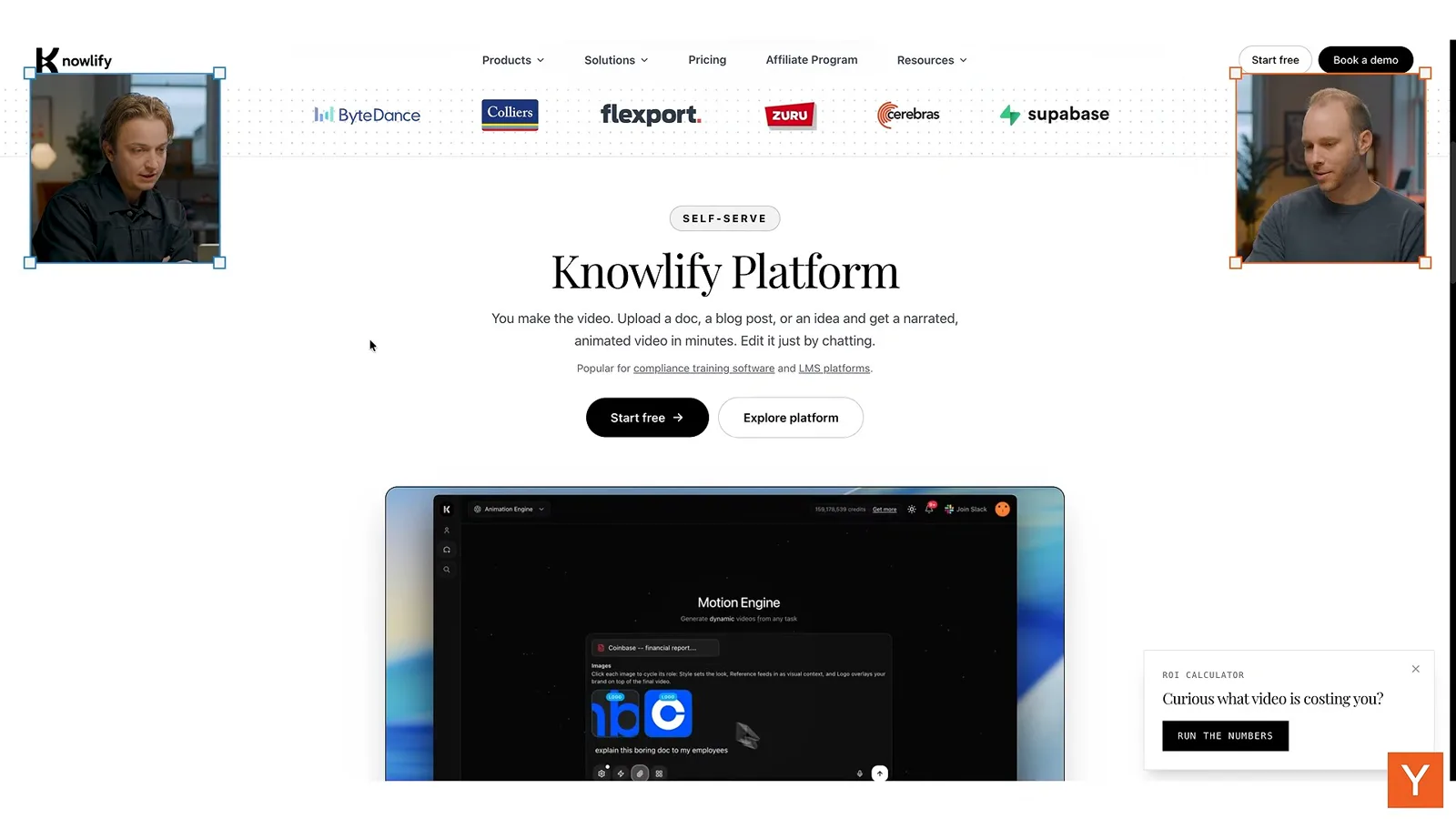
Both object to scroll manipulation that changes the speed or response of the page. Schwaibold calls for native scrolling and interruptible interfaces: users may change their minds at any moment, so the page should not force them to experience content at the designer’s chosen pace.
Epstein adds that visitors bring expectations from countless other pages and phones. Altering scroll sensitivity makes them reorient and can distract them from finding information. Small controls and full-screen videos that are hard to exit add further friction.
Instinct Space and a carousel toolkit
The final site review covers space imagery, typography and animations. Schwaibold shares a free carousel project.
The final review is Instinct Space, a lunar technology company. The guests immediately recognize its aerospace subject and appreciate its immersive imagery. Schwaibold suggests an interactive 3D treatment could make one or two elements into memorable focal points.
He likes the willingness to use a serif typeface, but finds several competing type styles and colorful logos that draw attention away from the core message. The opening could also include a little more context about what the company is building.
The site explains its work as launch, cruise and land. The reviewers like the concise structure but suggest that hover animations reveal their meaning faster. For landing, the most informative moment is the growing shadow near the surface rather than a long approach.
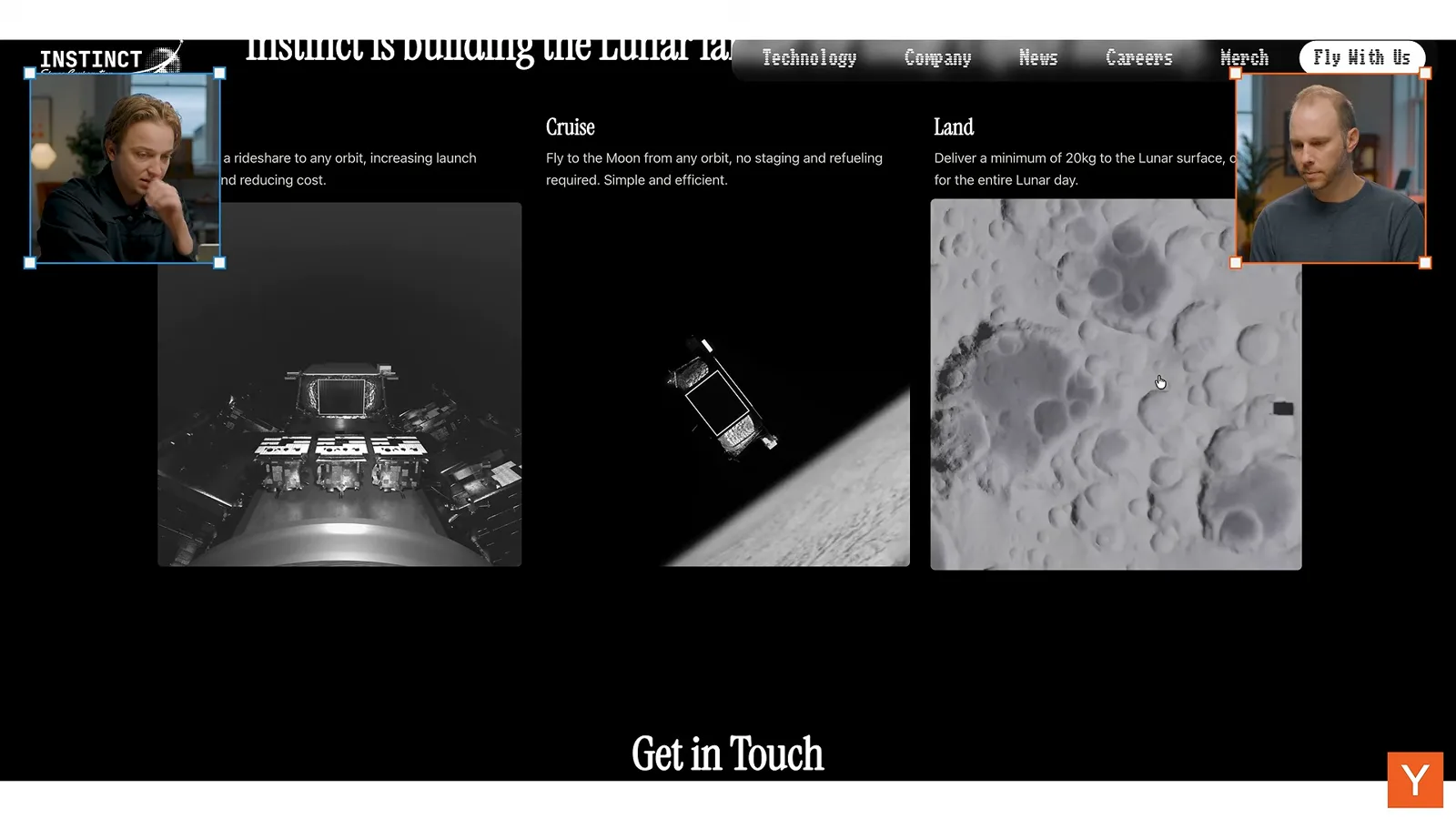
Schwaibold would make technology, company, news and careers into homepage chapters, each leading to deeper content. Real footage on the technology page helps Epstein understand that the hardware is being built, and they suggest bringing that evidence closer to the homepage.
They note inconsistent cover images and recommend using the serif face for headlines while keeping body copy in a readable sans serif. A carousel that responds only to buttons, rather than dragging or trackpad swipes, is another missed opportunity for natural interaction.
Schwaibold mentions Blossom Carousel, a free GitHub project with swipeable and scrollable variants, including mobile stacks. The episode closes with Epstein thanking him for showing how his design bar extends beyond appearance to the way people experience an interface.