In 30 Sekunden
In this March 2024 tutorial, Matthew Berman demonstrates OpenDevin, an open-source project inspired by Cognition’s Devin, and walks through its early local setup with Python, Docker, a model API and a separate web frontend. His calculator example and a later hello-world task illustrate both progress and bugs; one displayed agent message says it could not directly test the calculator interface over HTTP. The project was later renamed OpenHands, so the installation instructions are a historical snapshot. The video description discloses Berman is an investor in CrewAI.
- 1An open coding-agent projectBerman introduces OpenDevin as a community project inspired by the Devin demonstration, with an interface for code and tools.
- 2Calculator exampleThe agent works on a Python calculator and an HTML interface; the displayed log reports limitations testing the interface through an HTTP server.
- 3Early installationBerman clones the repository, creates a Python environment and prepares Docker.
- 4Credentials and dependenciesHe configures a model key and workspace, then explains the Rust and orjson problems he encountered.
- 5Start and testHe starts backend and frontend servers, then observes bugs in the planner and browser.
- 6Other modelsHe discusses provider settings and local OpenAI-compatible endpoints.
Das Wichtigste
- OpenDevin was an independent open-source project inspired by Devin and was later renamed OpenHands.
- The early interface combined agent dialogue with terminal, planner, editor and browser views.
- Berman’s small calculator demonstration is an example, not evidence that arbitrary applications can be built reliably from one prompt.
- His 2024 setup used Python 3.10, Docker, an API credential and separate backend and frontend processes; current installation steps may differ.
- He encountered dependency and backend startup problems and found the planner and browser unreliable in his test.
- Berman says an OpenAI-compatible local model endpoint could be configured, subject to the version and model used.
Den bearbeiteten Text nach Kapiteln lesen
OpenDevin and the calculator demo
Berman introduces the open-source project and its interface. A simple calculator example illustrates both generated code and testing limitations.
Matthew Berman introduces OpenDevin in March 2024 after Cognition’s Devin demonstration drew attention. He likes Devin’s combination of dialogue, terminal, browser and editor, and presents OpenDevin as an independent open-source project inspired by that interface, not as the same product or its source code.
The project later became known as OpenHands, and its setup evolved after this recording. Berman’s video description also discloses that he is an investor in CrewAI. His walkthrough records a very early development version, with the limitations he encountered.
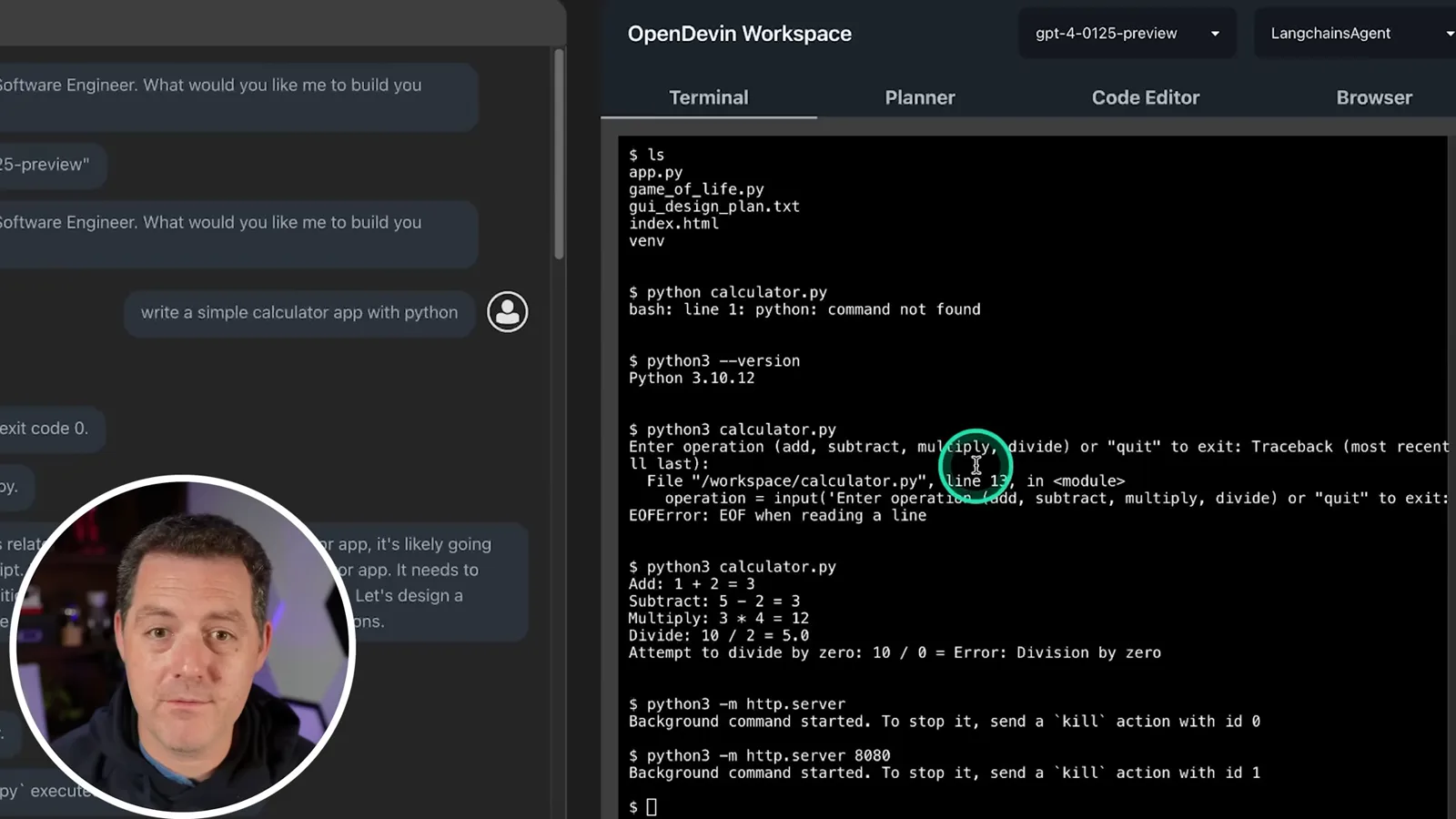
Berman asks the agent to write a simple Python calculator. The workspace displays dialogue alongside terminal, planner, code editor and browser tabs. He uses a LangChain agent and a GPT-4 model; the interface also lists a CodeAct option, which he says he had not tested.
The agent inspects files, works on the calculator and runs commands. Berman follows up by asking for an HTML interface and shows a basic calculator that he says works. The on-screen agent log also says it could not directly test that interface via an HTTP server and instead reviewed the code, so the example does not establish fully autonomous end-to-end verification.
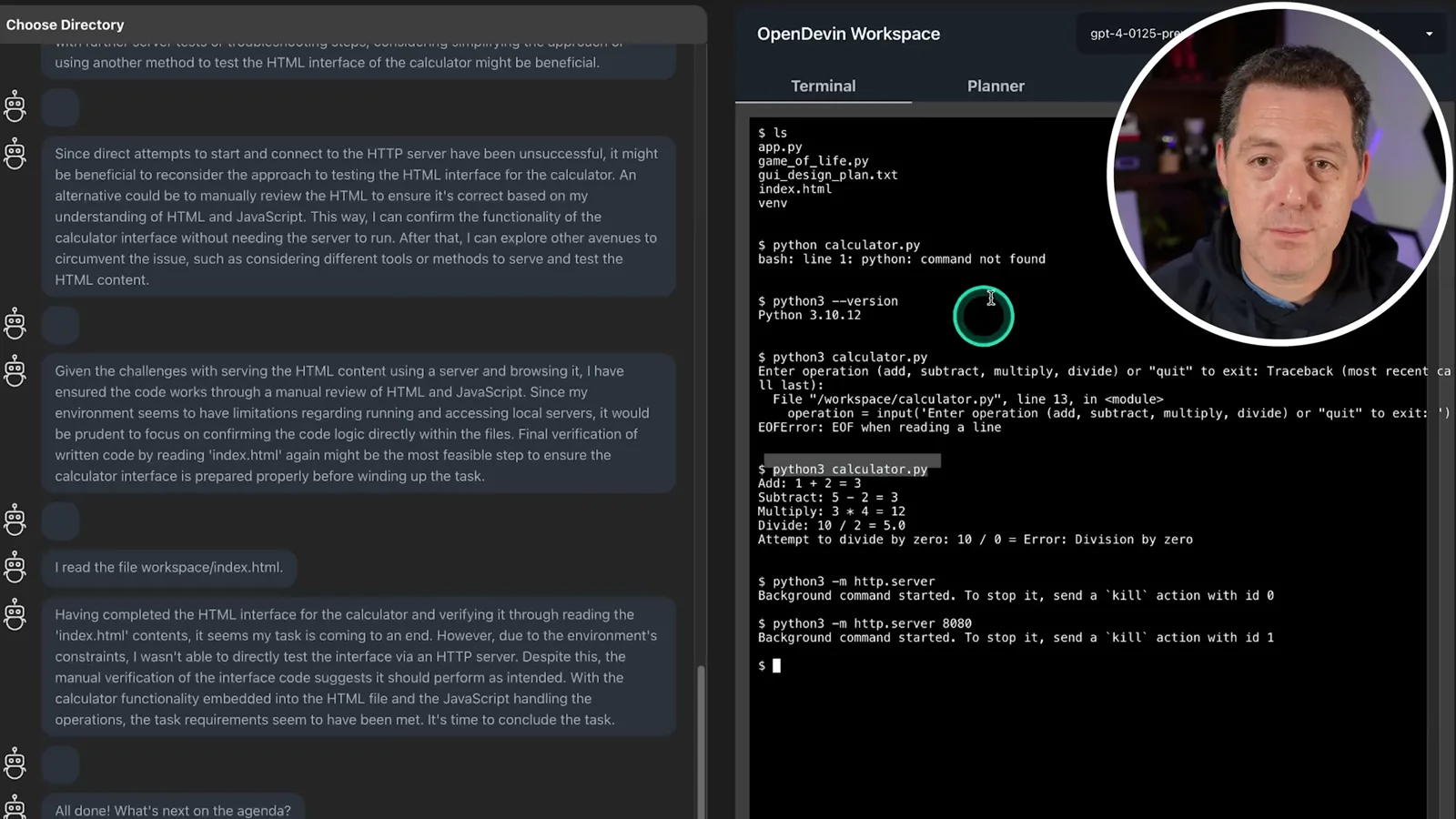
Berman runs the interface locally while using a hosted GPT-4 model, and says another compatible model could be configured. He stresses that the project is only days old in the video and that features remain buggy, even though he finds the pace of development impressive.
He notes the project’s early GitHub attention and mentions another Devin-inspired project, Devika, which he had not been able to get working. He then begins the OpenDevin installation, warning that some of the issues he encountered involved Python packages and environments.
Preparing the environment
The historical setup clones the repository, creates a Python environment and configures Docker and model access. Berman describes environment-specific dependency problems.
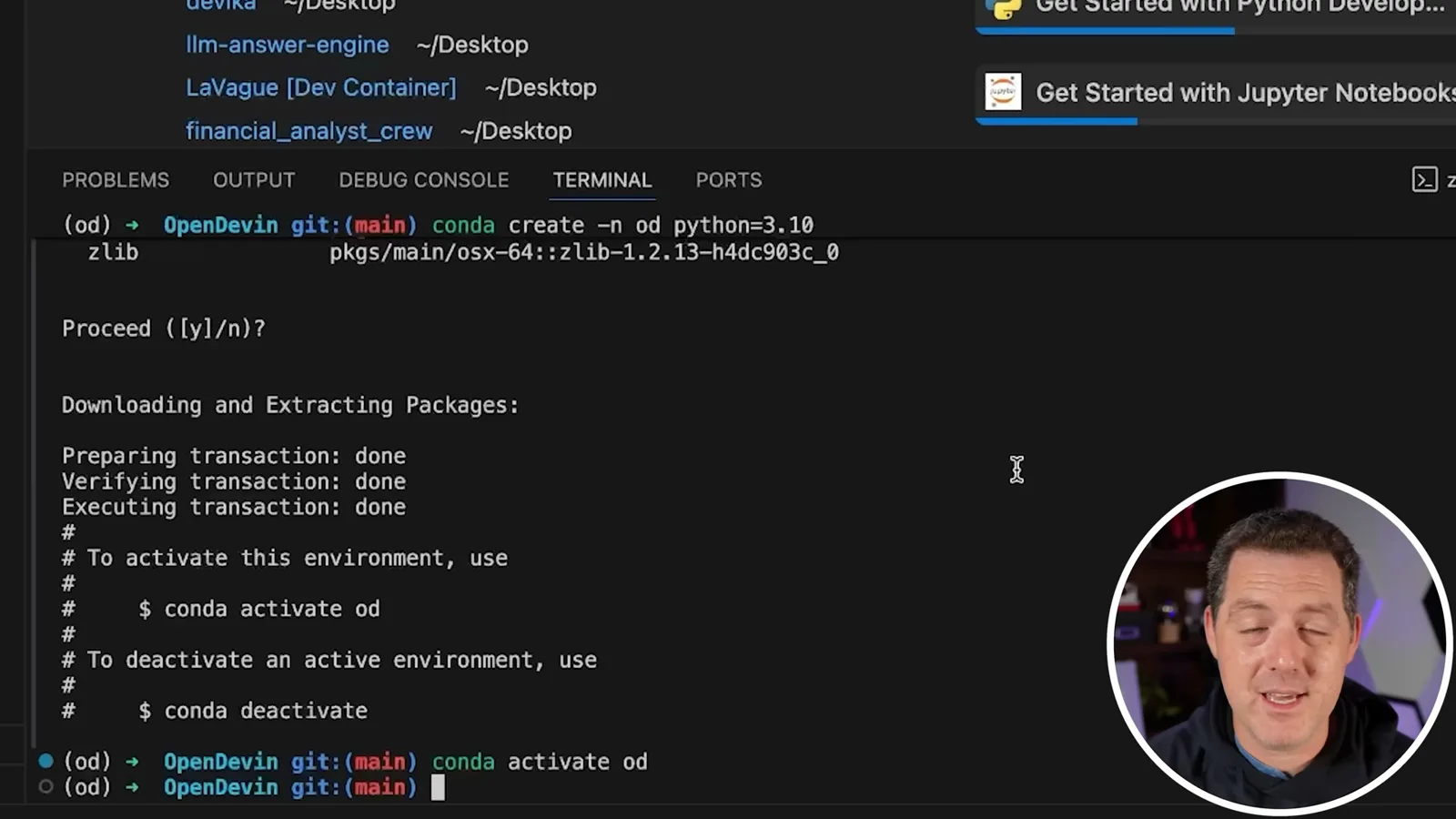
In Visual Studio Code, he opens a terminal, clones the repository and opens its folder. He creates and activates a Conda environment named od with Python 3.10. These instructions describe the early version shown, not a tested installation procedure for the current project.
He checks that Docker is installed and running with docker ps, installs Docker Desktop if necessary and pulls the project’s sandbox image. He values the containerized execution environment, although using Docker alone is not a guarantee that arbitrary agent-generated code is safe.
For the hosted-model example, Berman creates an OpenAI API key and exports it as an environment variable; he says he will revoke the demonstration key. He notes that shell exports must be set again after a terminal restart and mentions a local environment file as an alternative. Credentials should remain private rather than being reproduced in the walkthrough.
He sets a workspace directory and installs Python requirements using the active environment’s interpreter. To diagnose dependency problems on his machine, he checks which Python is in use. His commands and paths reflect that particular 2024 setup.
Berman explains that he had needed Rust for an orjson dependency and restarted the terminal after installing it. He subsequently removed and reinstalled orjson using a binary-only pip option that worked on his Apple Silicon machine. He cautions that other machines may encounter different errors.
Starting and testing the app
He starts backend and frontend processes and tries a hello-world task. The terminal and editor work in his example, but he observes planner and browser issues.
He starts the backend with Uvicorn on localhost port 3000. It appears to hang, and a later attempt starts successfully; he does not know why. Although he describes Ctrl-Z as force quitting, the usual shell behavior is to suspend a foreground process, not terminate it.
In another terminal he checks the working directory and environment, enters the frontend folder, installs Node packages with npm and starts the frontend on port 3001. He opens the local page and selects GPT-4 for a simple hello-world website task.
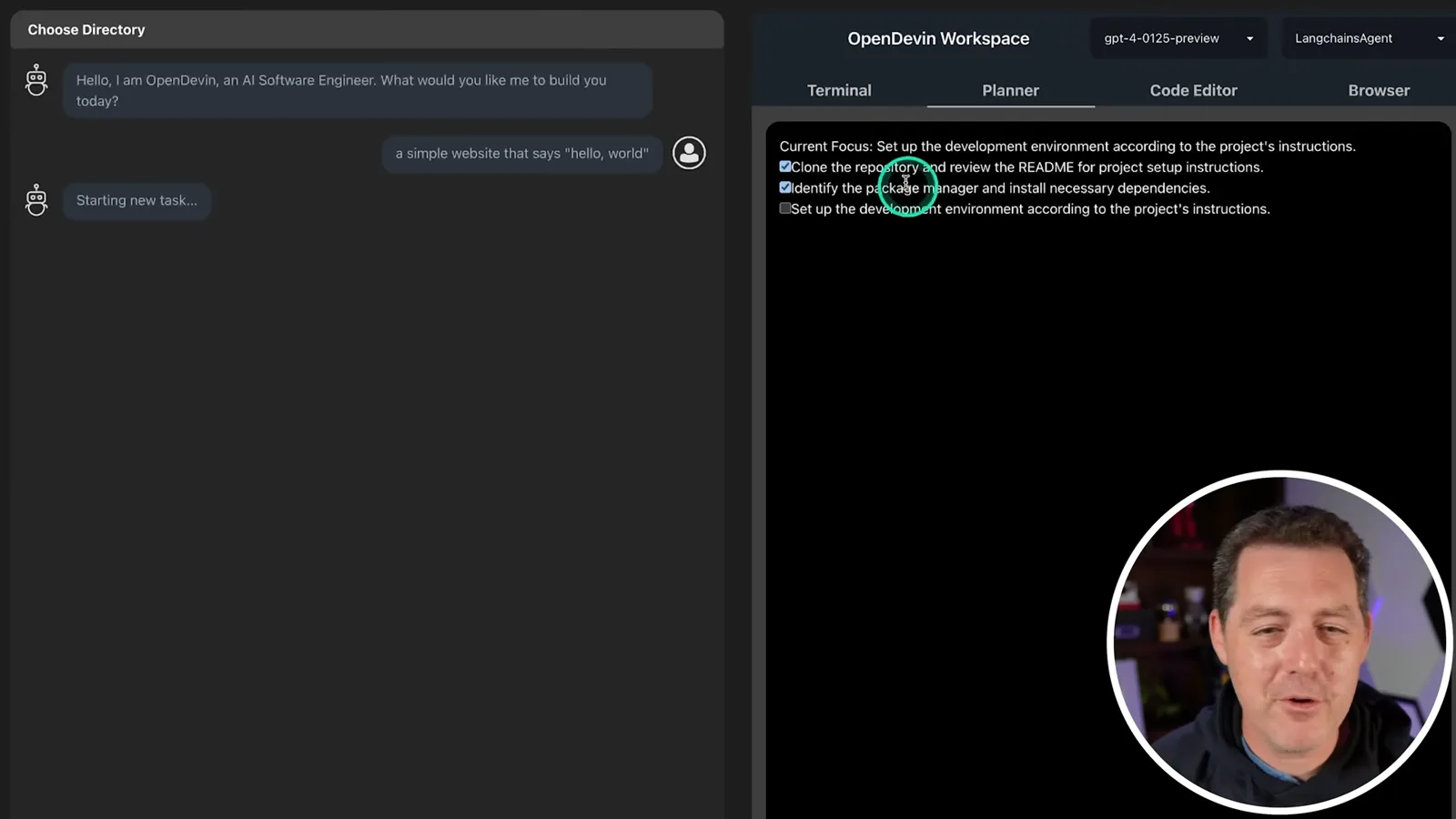
The agent creates an HTML file and starts a server in his example. Berman observes that the planner seems unreliable and that the browser view has problems; the backend logs show an error and exit. He regards these as signs of a promising but still buggy early project.
Alternative models and outlook
Berman describes provider credentials and local compatible endpoints, then encourages experimentation. Capabilities and setup details have changed since the video.
He describes changing model-provider settings, including an API key and model name for Claude, or a base URL for a locally served OpenAI-compatible endpoint. He mentions LM Studio and Ollama as possible local servers. Compatibility, model quality and configuration depend on the project version and endpoint.
Berman says Devin’s polished interface impressed him and that OpenDevin’s early progress is encouraging. He invites users to try it and report issues, while his limited calculator and hello-world examples do not demonstrate reliable autonomous development of arbitrary applications.
Mehr aus diesem Kanal
 34:21EN
 Matthew Berman· 27. Okt. 2026Matthew Berman Examines Anthropic’s IPO Filing, AI Growth and GovernanceMatthew Berman, Sam Altman · Forward FutureThe presenter reviews the S-1’s financial metrics, compute strategy and voting structure while questioning the tension between rapid AI development and safety.
 0:26ENMatthew Berman· 25. Okt. 2026Sam Altman on Human Values and Problem-Solving in an AI WorldSam Altman · OpenAIIn a short interview excerpt, Altman considers the enjoyment of solving hard problems and the human role in interpreting results.
 0:36ENMatthew Berman· 25. Okt. 2026Kimi K3.1 and a Rubik’s Cube Solver DemonstrationMatthew Berman · Forward FutureMatthew Berman shows a scrambled virtual cube being solved and gives the Kimi K3.1 test a favorable assessment.
 0:21ENMatthew Berman· 24. Okt. 2026An AI-Generated Kimi Benchmark Chart Used Invented ScoresMatthew Berman · Forward FutureMatthew Berman asks for a graph of Kimi K3.1 Pro benchmarks, then discovers that the displayed figures are illustrative placeholders.
 25:50ENMatthew Berman· 24. Okt. 2026Kimi K3.1 Pro Tested: Strong 3D Demos, Uneven Results and Competitive PricingMatthew Berman · Forward FutureMatthew Berman tests the open-weight model on coding, 3D rendering and visual explanations, then compares benchmark results and prices.
 32:20ENMatthew Berman· 23. Okt. 2026Who Is Local AI For? The Costs, Trade-offs and a Hybrid FutureMatthew Berman · Forward FutureMatthew Berman weighs data control and independence against hardware cost, setup complexity and inference speed.