In 30 Sekunden
Matthew Berman describes a customized OpenClaw setup that connects his team's email, CRM, meetings, knowledge base and content pipeline. He explains human review, separate prompt versions, layered security, scheduled jobs, usage logging and recovery, then discusses experimental health and voice-memory workflows. These are his February 2026 practices and claims, not a guarantee of safety, reliability or current subscription eligibility; HubSpot sponsors the video.
- 1Sponsorship inbox with reviewIncoming messages are scored against a rubric, researched and drafted; low-confidence and important cases go to people.
- 2A connected pipelineEmail, CRM stages, labels, embeddings and drafts form a workflow that Berman says he built gradually.
- 3Separate prompts for modelsHe maintains model-specific instruction files and a nightly drift review so shared operational facts stay aligned.
- 4CRM and meeting intelligenceEmail and calendar contacts, transcripts and action items connect to a CRM; proposed tasks go through an approval queue.
- 5Layered securityHe describes gateway controls, access rules, scanning, redaction and reviews. None can guarantee that untrusted content is safe.
- 6Observability and recoveryThe system tracks model usage and errors, batches notifications, and encrypts backups with a documented restore process.
- 7Experimental personal workflowsA teammate combines health data and recorded notes with an assistant; sensitive data and other people's recordings require appropriate safeguards and consent.
Das Wichtigste
- A sponsorship inbox classifies messages, researches senders, drafts replies and escalates uncertain or important cases for human review.
- The CRM, meeting pipeline and knowledge base share context, but combining sensitive sources increases the importance of access controls and consent.
- Berman maintains model-specific prompt files and checks for drift while organizing memory and notifications by topic and priority.
- Filtering, model scans, sandboxing and redaction are defense layers, not proof that prompt injection or data leaks are impossible.
- Usage tracking, scheduled work, logs, encrypted backups and tested restoration support operations, but automation and generated fixes still need oversight.
- His account of subscription authentication is a dated claim; current provider terms and supported authentication should be verified before implementation.
Den bearbeiteten Text nach Kapiteln lesen
Sponsorship email as an agent workflow
Berman demonstrates triage, research, scoring and human-reviewed replies. HubSpot sponsors the video.
After a month of heavy daily OpenClaw use, Matthew Berman describes a customized system he calls a full-time team member. He connects the agent to email, CRM, meetings and other services. The video is sponsored by HubSpot, which is also part of his workflow.
For sponsorship inquiries he created a separate workspace identity and routes a public group address to the agent. A fabricated sample message illustrates the system: it classifies the inquiry, researches the sender and scores it using a rubric. In the example, conflicting sender details lead to low confidence and a Telegram request for review.
Berman can approve or correct that classification. He says the rubric was refined over several days using feedback, with dimensions such as fit, budget, clarity, trust and likelihood of closing. High-value opportunities go to the team, while other categories receive different follow-up treatment.
The system creates a contextual draft rather than relying only on a template. In his example, Berman reviews the draft and presses send himself. He describes the broader goal of gradually granting more automation while keeping escalation for important or uncertain decisions.
Inbox pipeline and prompt versions
He outlines the email workflow and maintains separate instructions for different models with drift checks.
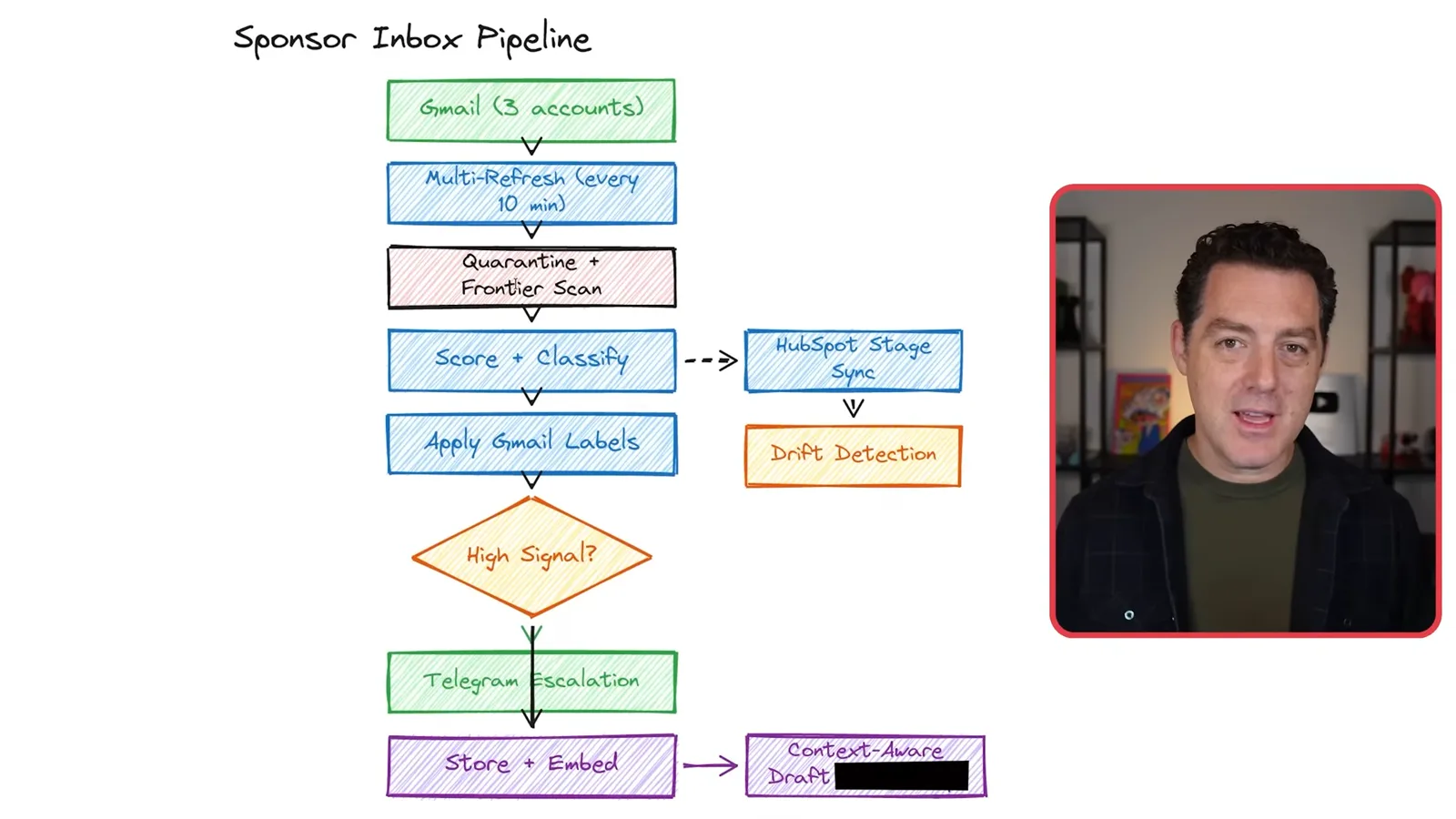
His inbox pipeline refreshes accounts every ten minutes, quarantines incoming material, applies a deterministic scan and then a model-based scan before classification. It checks prior correspondence, updates CRM stages and labels, stores and embeds the email, and prepares a draft. He acknowledges the first filter is imperfect; neither scanning layer can prove untrusted content harmless.
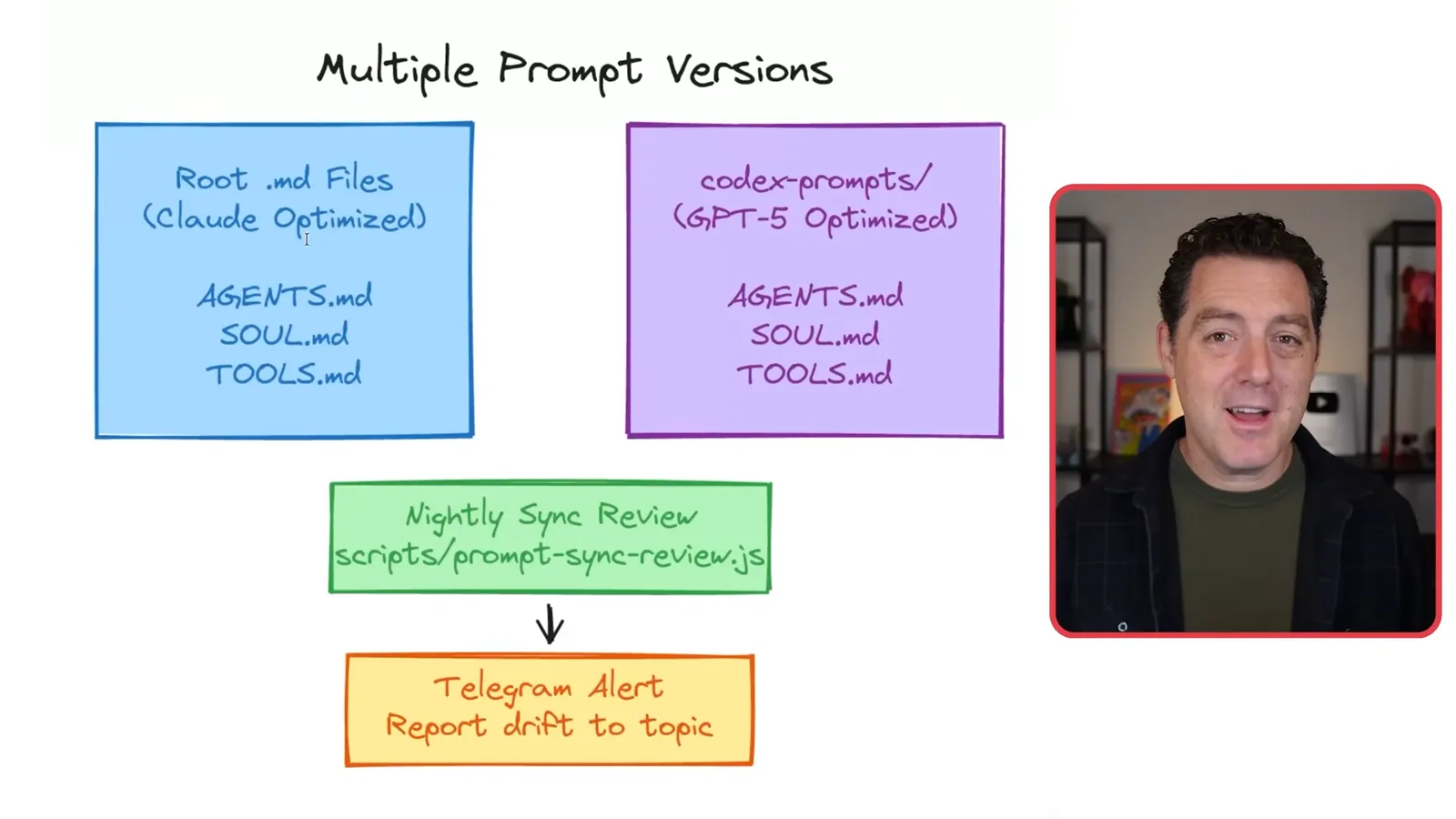
Berman maintains separate instruction-file versions for different models because he believes their prompting preferences differ. A nightly review compares operational facts and reports drift. His practical goal is to switch models without silently changing the rules or losing important context; the specific prompting advice is his experience at the time.
Files, topics, CRM and meetings
Operational files and separate conversation topics support a CRM and meeting-action pipeline.
He assigns distinct purposes to files for operational rules, identity, user context, tools, heartbeat and memory. Other references, such as product requirements, security practices and skills, are loaded as needed. He tries to avoid duplicating facts across files so that updates have a clear home.
Telegram group topics divide work into separate contexts such as CRM, knowledge, scheduled updates and research. Berman finds that this makes conversations easier to navigate and reduces the amount of unrelated context each thread must carry. This is a workflow choice, not a guarantee of durable memory.
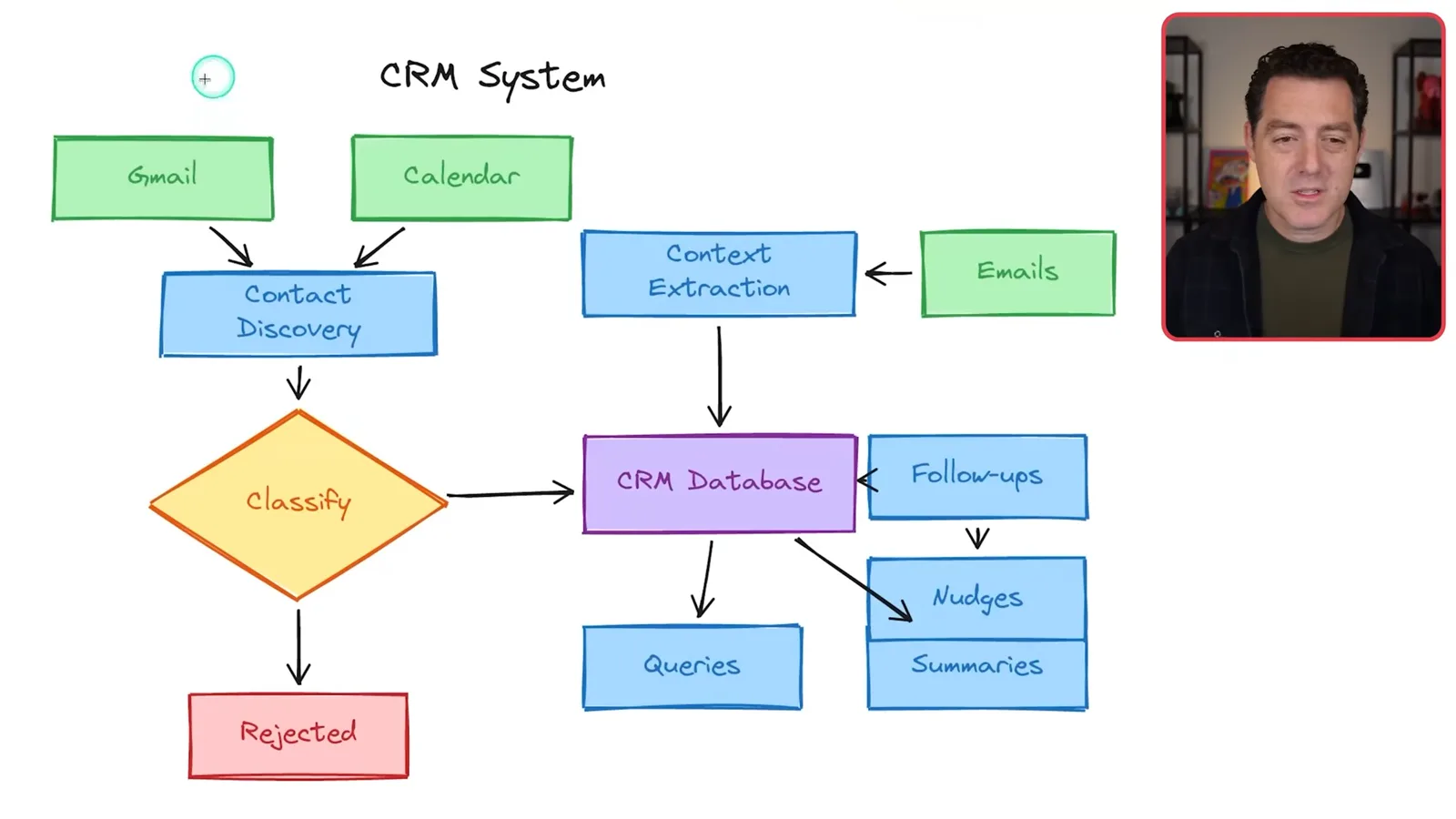
The CRM discovers contacts from email and calendar, filters unwanted entries and stores relationship context. It can research companies, retrieve past conversations and support questions such as who has not been contacted recently. Berman values the connections between the CRM, sponsorship pipeline and knowledge base.
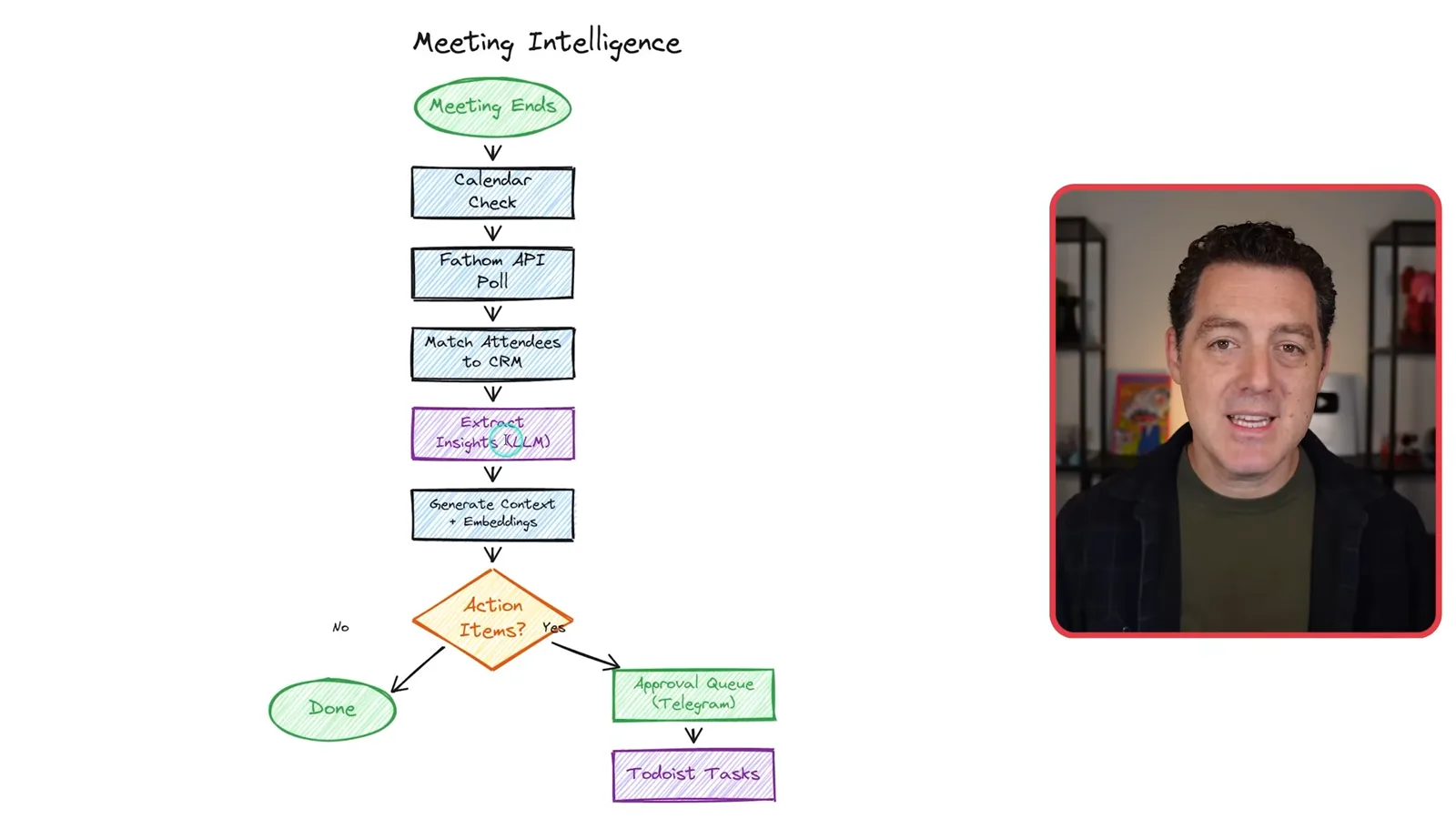
For meetings, a note-taking service supplies transcripts after calendar events. The workflow matches attendees to CRM records, extracts insights and proposed action items, and creates embeddings locally. Berman says proposed tasks are sent to Telegram for his approval before entering task management, with deal and assignee information also linked to CRM.
Knowledge, content and security
The knowledge base feeds research and content planning. Berman describes layered handling of untrusted material and sensitive data.
The knowledge base accepts articles, videos and posts shared through Telegram or Slack. Content is fetched, screened, chunked, embedded and stored for semantic search; relevant material can be linked to contacts or shared with the team. Ingested material remains untrusted even after automated scans, and sharing requires attention to access and confidentiality.
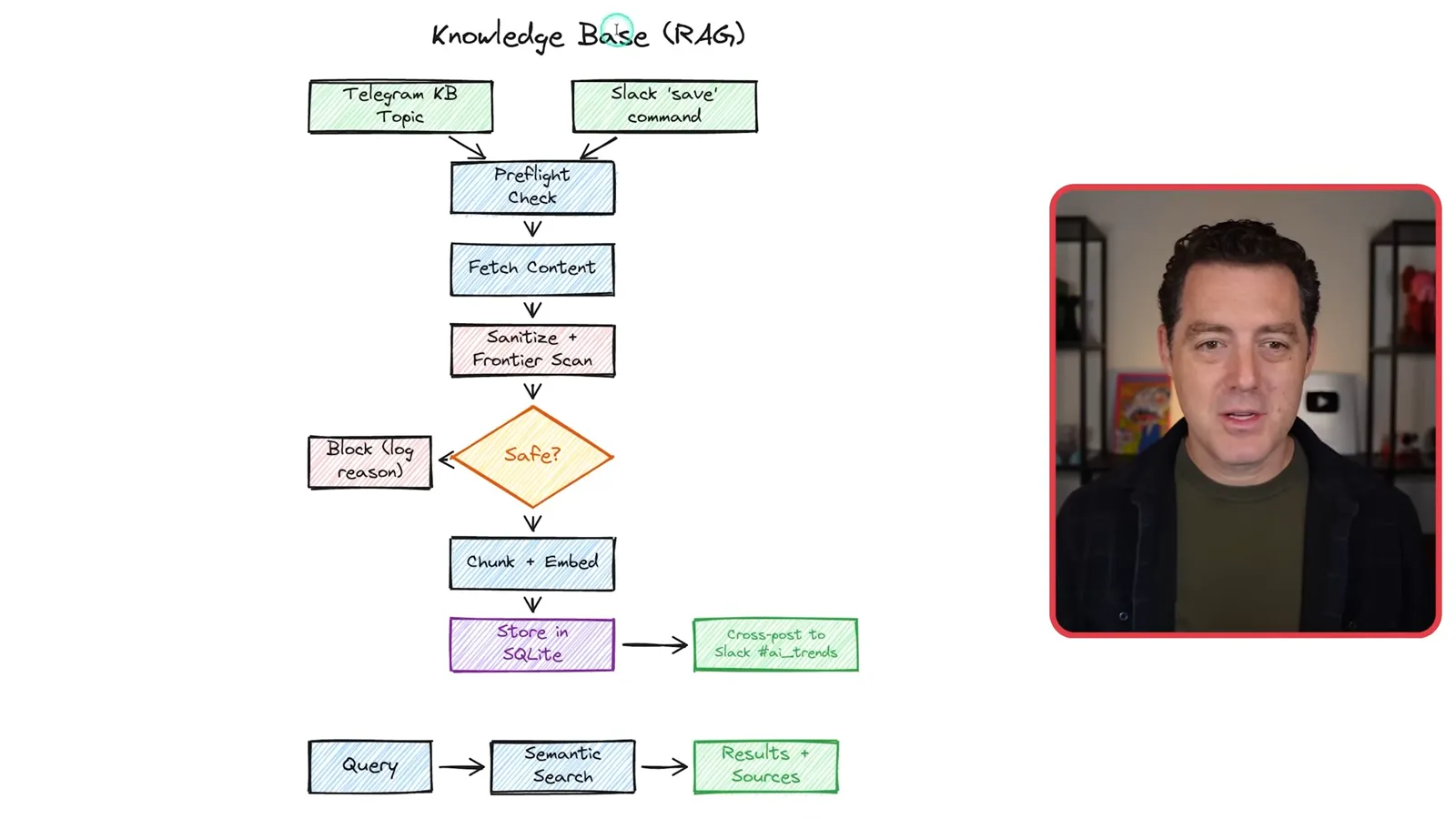
For content planning, Berman tags a discussion as a possible video idea. The agent reads the thread, searches the knowledge base and the web, creates a project card, and drafts an outline with references and packaging ideas. A completion message returns to the team; the usefulness of the outline still depends on source checking and editorial review.
Security is a central concern because the agent reads external messages and has access to internal tools. Berman describes authenticated gateway access, channel-specific policies and a layered prompt-injection process: deterministic filtering, a model-based scan in isolation and risk markers. Filters and AI reviewers can miss attacks or make mistakes; isolation and least privilege remain important.
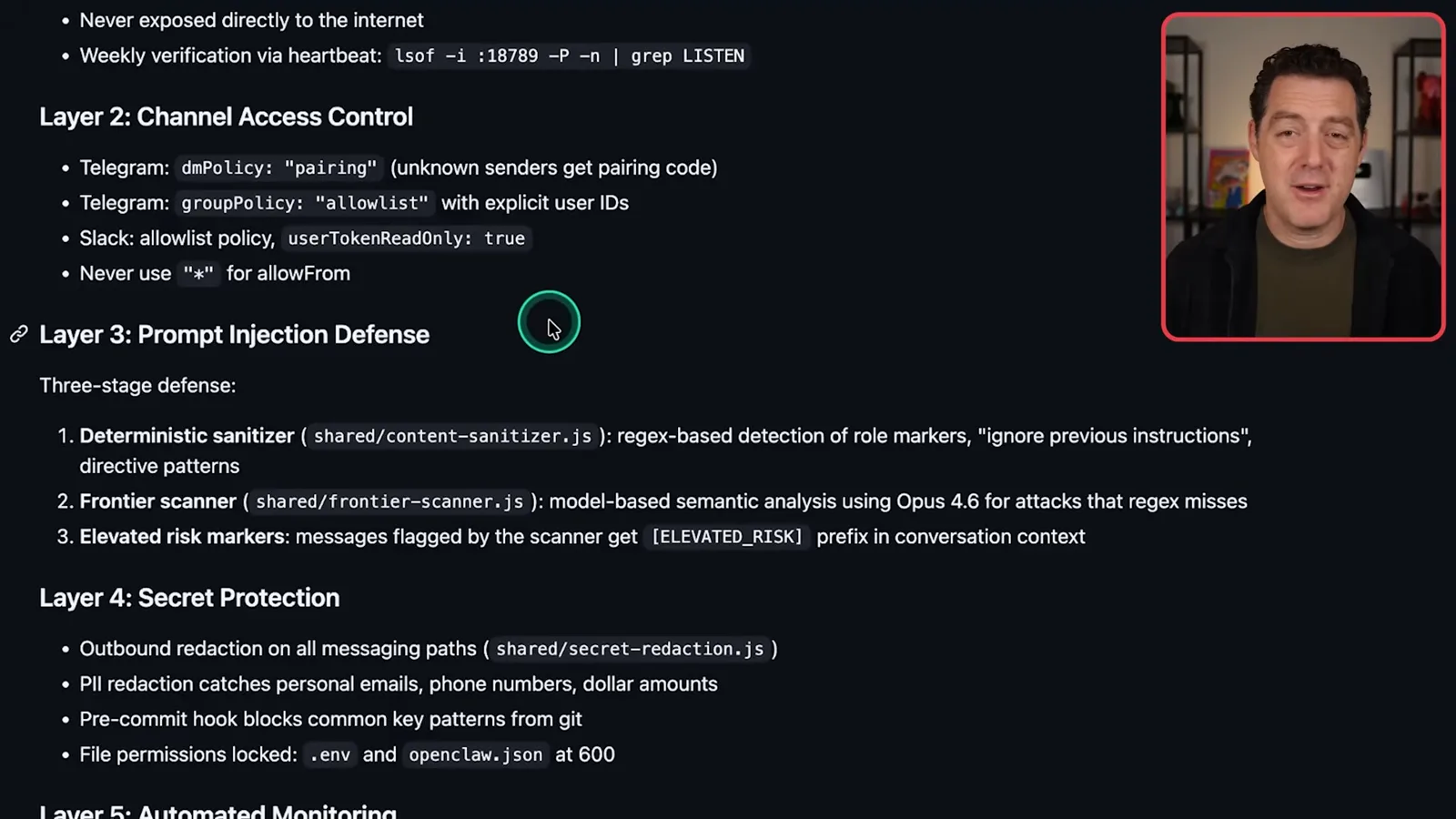
He adds outbound redaction for secrets and personal information, checks for key patterns before commits, restricts file permissions and runs automated security and health reviews. He also describes encrypted databases and backups, access tiers and protections against common web and database risks. These are his reported controls, not an independent security audit.
Scheduling, memory and notifications
He spreads scheduled jobs, watches context usage and batches alerts by urgency.
Scheduled jobs collect social analytics, update the CRM, review configuration and security, rotate logs and prepare briefings. Berman staggers heavier tasks overnight to fit usage limits and avoid competing with daytime work. He shares his schedule as an example rather than a universal cadence.
For memory, Berman says the default system works well for him. He separates Telegram topics, checks the context window with a status command and clears or expires context when it becomes crowded. A scheduled review trims duplication and drift in files loaded into each call.
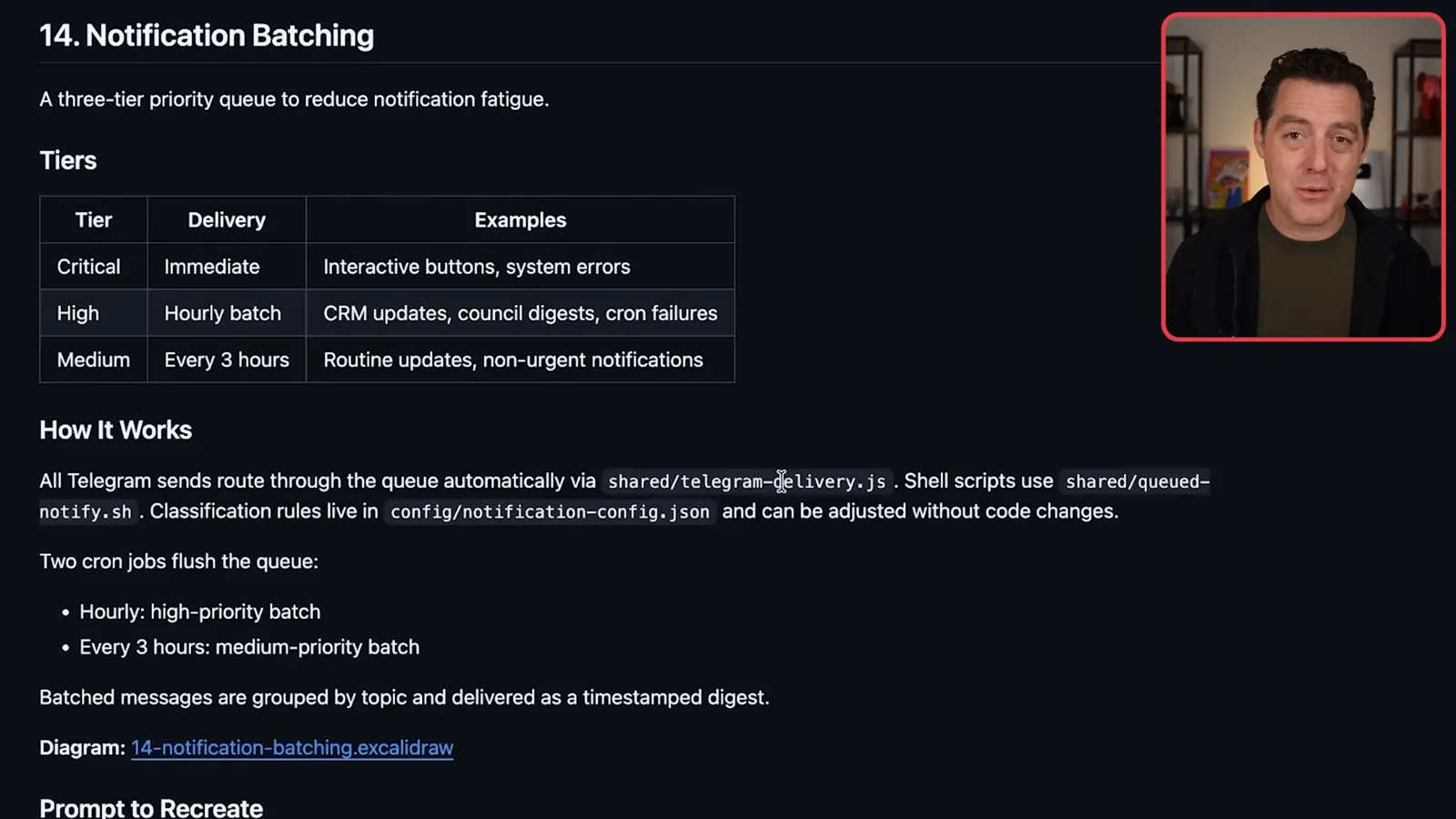
To reduce notification fatigue, he batches Telegram messages by priority: critical items immediately, high-priority updates hourly and routine items every three hours. A notification database records the messages. The useful schedule depends on what the user needs to see and how urgently.
A new financial workflow imports transaction exports from QuickBooks into a database for natural-language questions, with rules limiting where financial details can be shared. Another router logs model calls in JSONL and a database, feeding a usage dashboard, failure monitoring and estimated costs. Berman notes that subscription use makes the dollar estimates imperfect.
Costs, logging and separation
Usage logs and error reviews support operations; he describes an authentication setup and rules for separating work and personal data.
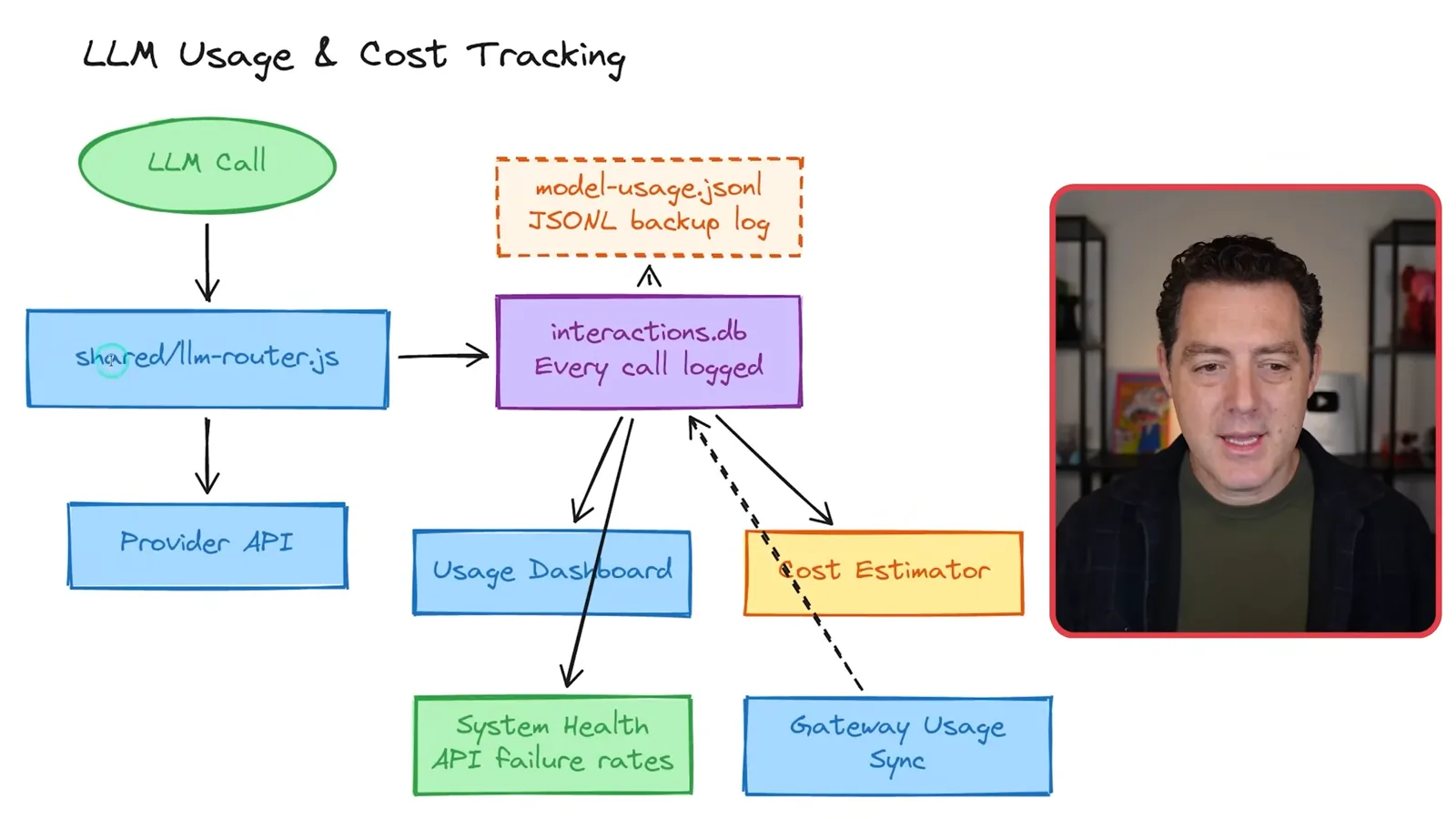
He advocates structured logging of errors and service calls so an agent can inspect problems the next morning. He asks it to propose or make fixes and rotates logs to manage size. Logs can themselves contain sensitive information, and automated repairs need appropriate review and testing.
Berman describes a February 2026 authentication change involving Anthropic's agent SDK and his subscription, saying it worked for his setup. This is a historical personal account, not confirmation that the approach is currently supported or allowed. Users need to check the provider's current terms and documented authentication methods.
One instance serves both work and personal contexts, so he defines data tiers and channel restrictions. Financial details and personal emails are meant for private messages; internal notes stay with the team, while external sharing requires approval. Berman acknowledges that rules and deterministic checks can still contain bugs or fail.
Improvement, backup and personal use cases
He reviews automated checks, cost controls, encrypted backups, health tracking and wearable note capture.
He records recurring errors, lessons and feature requests in files, and runs automated reviews of platform health, security, prompt consistency and data integrity. An innovation scout looks for other use cases. These processes help find candidate improvements but should not be mistaken for independent guarantees of correctness.
His cost measures include local embeddings, choosing different model tiers, spreading scheduled work, prompt caching, context-aware polling and notification batching. He emphasizes that even inexpensive calls add up at scale, so a usage view helps identify where work is concentrated.
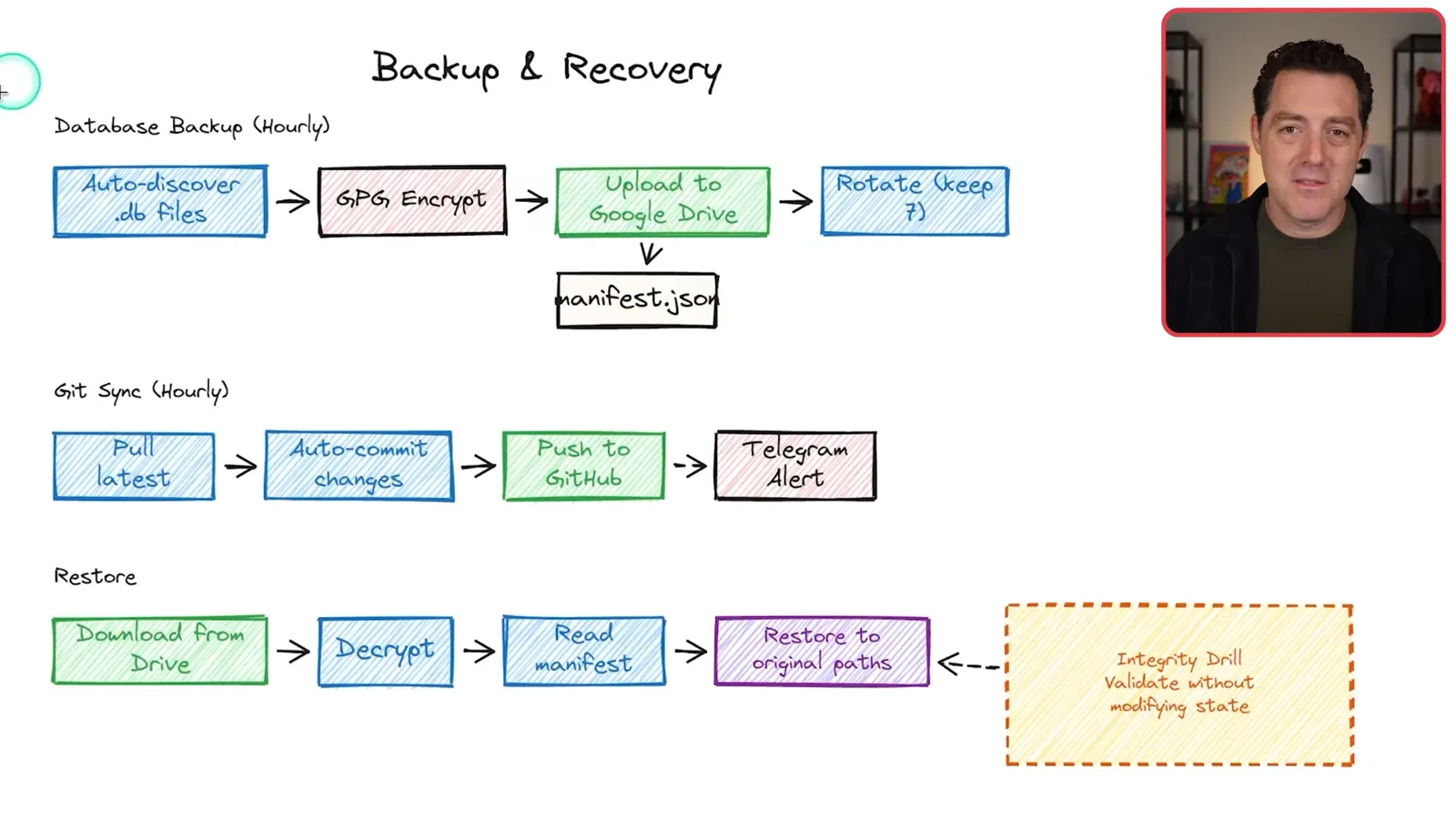
For recovery, he describes discovering database files, encrypting them, uploading them to Google Drive and rotating backups. A separate Git synchronization captures code changes, while a documented restore procedure uses the backup manifest and decryption. A backup is only useful if its integrity and restoration procedure are actually tested.
A teammate experiments with importing wearable and health data to generate summaries and trend flags. Berman also describes a wearable note system that stores voice-derived memories for private queries. Health outputs are not clinical diagnoses, and recording conversations or storing sensitive data requires consent and suitable privacy controls.
Berman wants a more natural two-way voice conversation with the assistant but has not settled on a solution. He closes by saying the system continues to evolve through experimentation, and that its greatest value for him is connecting workflows across his team.
Mehr aus diesem Kanal
 25:50EN
 32:20EN
 45:08EN
 0:32EN
 12:14EN
 10:36EN