30초 요약
Peter Yang demonstrates a free video-short skill that turns a raw recording into an edit with captions, B-roll and motion graphics. The agent first proposes a scene-by-scene plan, including any paid generated assets, and the creator reviews its sources and costs. Yang then comments on framing and layout in a review page before approving a final render. He emphasizes that the example required several rounds of feedback rather than working in one shot. The video is sponsored by Gemini.
- 1The workflow has four stages, and generated assets may cost moneyYang installs the skill, supplies a raw recording, gives feedback and approves the render. Optional image, video and music generation requires an API key with billing.
- 2The agent proposes a scene plan and identifies sources before editingYang checks suggested B-roll and the places where the plan calls for paid generation. He adds a reference and a requested graphic.
- 3A review page turns framing problems into specific notesYang comments where his head is cropped and asks for a simpler layout. The agent makes revisions before he approves a render.
- 4The result takes multiple feedback roundsYang explicitly says the example was not a one-shot edit. The review interface makes iteration easier, but the creator still checks it.
- 5The skill includes a checklist for the opening and visualsYang says the first seconds should capture attention and visuals should add something to the words. He also describes an evaluation file for checking the output.
핵심 정리
- Review the proposed scenes, B-roll sources and paid-generation plan before making the edit.
- Give scene-specific feedback, then check the revised video before final rendering.
- For longer recordings, specify how to handle pauses, retakes and filler without creating excessive jump cuts.
- Yang recommends opening a local environment file for an API key instead of pasting it into chat.
- Use a checklist to review whether the opening and visuals serve the story.
챕터별로 다듬은 전문 읽기
Installing the short-video workflow
Yang introduces his free skill and optional paid generation. He demonstrates setting up dependencies and keeping an API key out of chat.
I demonstrate a free video-short skill that takes raw footage and helps create a short with captions, B-roll, motion graphics and optional generated video. My workflow is to install the skill, provide the recording, review and iterate, then render the result. This video is sponsored by Gemini.
I install the skill from its repository in an agent environment. On first use it checks for tools including FFmpeg, yt-dlp and HyperFrames. An optional Gemini API key enables generated images, video and music; those API calls require billing and can cost money.
For the API key, I ask the assistant to open a local environment file and enter the key there rather than pasting it into the chat. The key is optional if I do not want the generated media features.
From raw footage to a scene plan
The agent proposes cuts and visual sources. Yang reviews the plan and explains his prompt for cleaning longer recordings.
I provide a 54-second raw recording and ask the skill to make a short. It proposes a scene-by-scene plan, including full-screen speaker footage, B-roll and split-screen graphics. I can review the suggested sources and where the plan intends to generate paid media.
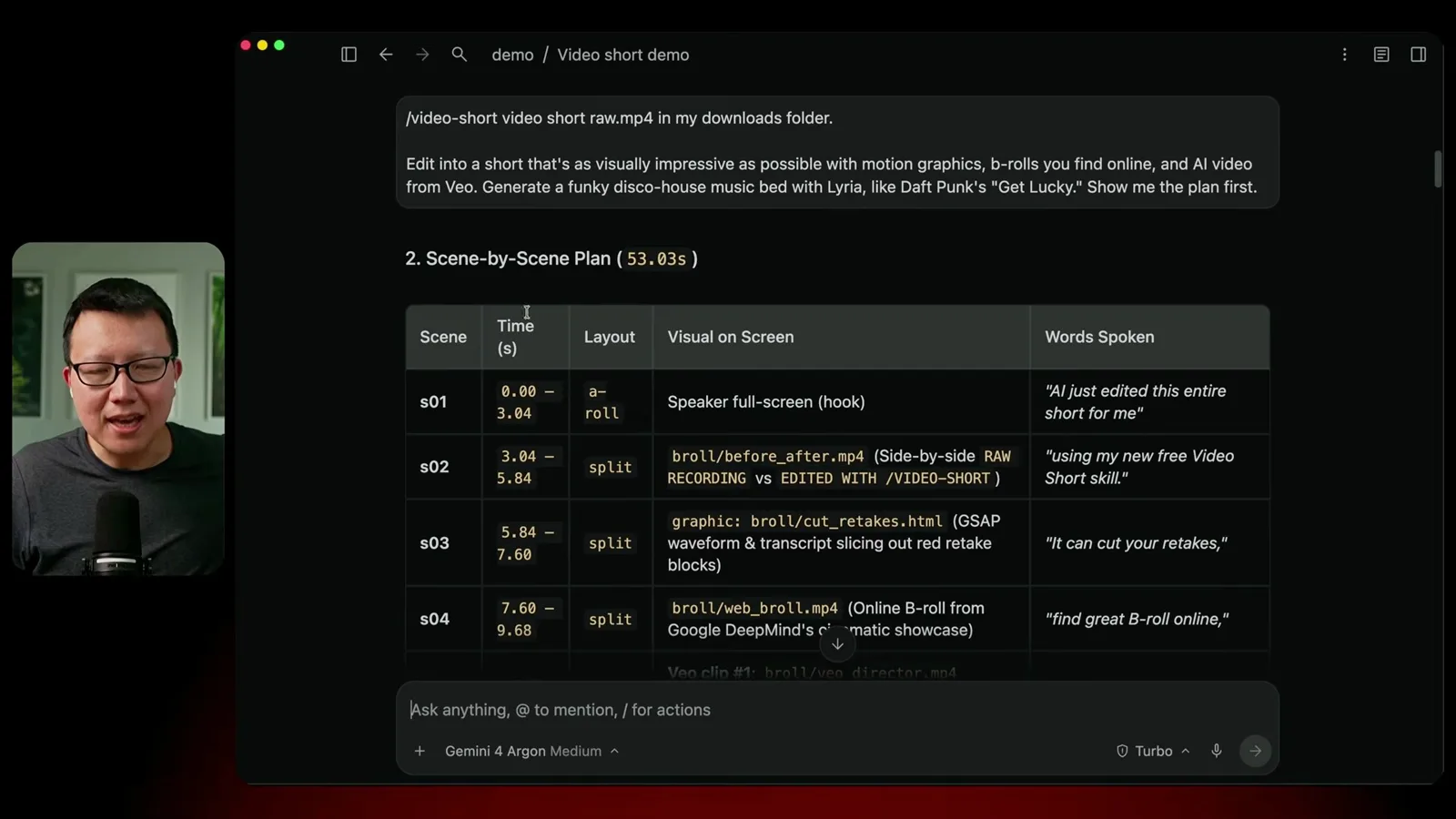
For longer recordings, I use a separate instruction to shorten pauses, remove repeats, false starts and filler, and avoid excessive choppy jump cuts. A basic version is included in the skill for cleaning short clips too.
I give the agent feedback on the plan, including a reference for a collage and a large number overlay. It produces a first cut. The important next step is not assuming the edit is finished but reviewing it scene by scene.
Reviewing and revising the draft
Yang gives scene-specific feedback on cropping and layout. He notes that the final result requires several rounds.
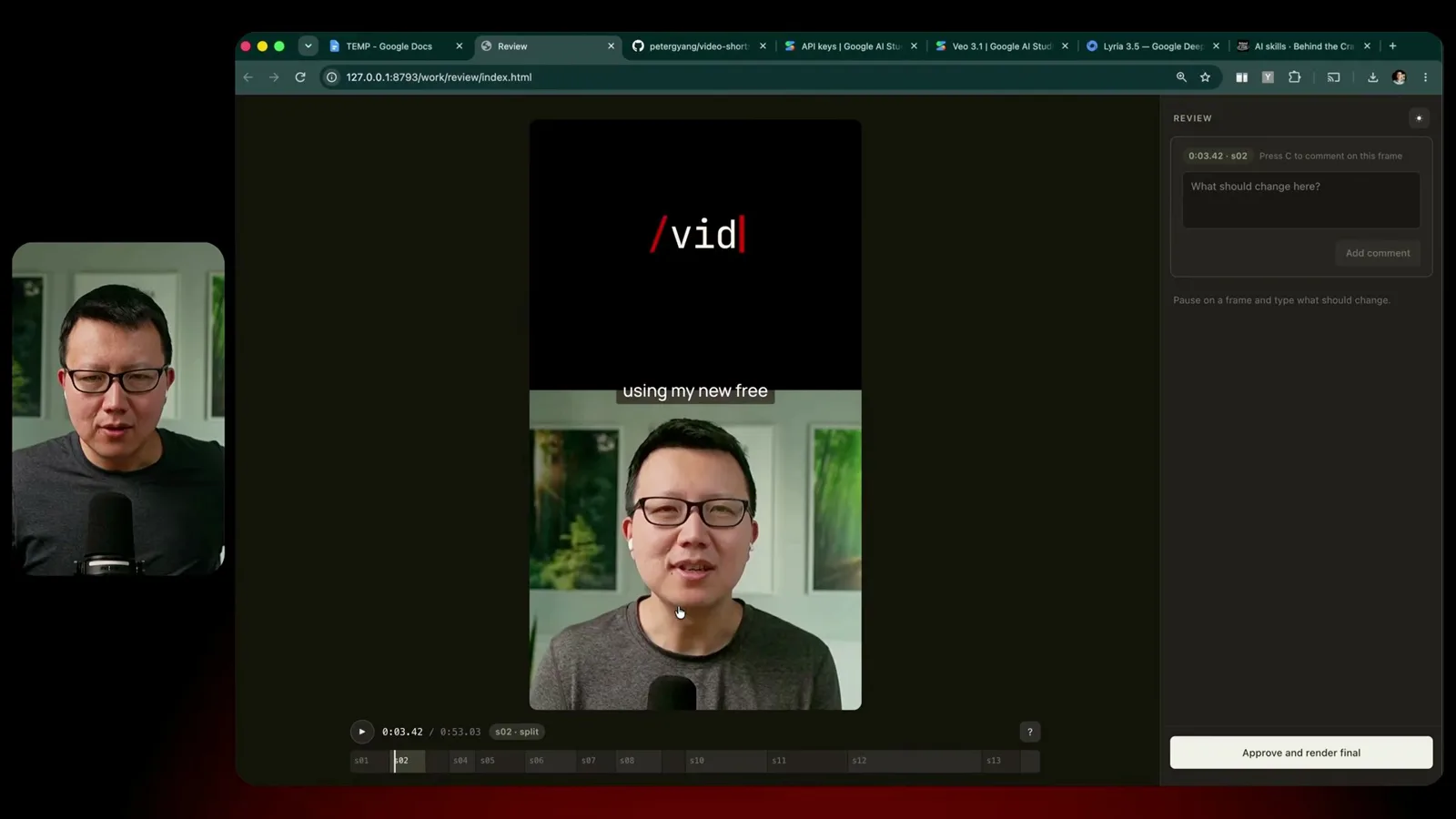
The skill opens a review page where I play the draft and leave comments at specific scenes. In two places my head is cropped, so I ask for a wider framing. I also ask to simplify part of the review-page layout.
After the agent revises the draft, I check that the framing and layout are fixed, then approve a final render. The version shown took several feedback rounds to reach; it was not produced in one shot.
What the skill adds and how it checks the result
The workflow can combine footage, captions, graphics and generated media. Yang describes a checklist for hooks and useful visuals.
The workflow can combine main speaker footage, tighter crops, split-screen B-roll, full-screen B-roll, captions and HTML motion graphics. Optional AI-generated video and music use the configured API service.
The skill file also includes editing practices: capture attention early, use visuals that add to the words and prefer footage that is legible on a phone. An evaluation file asks the agent to check the hook and other aspects before showing the result.
I am not a professional short-video editor, and others may make better shorts. My aim is to make editing more accessible so creators can spend more time on storytelling and producing content.
같은 채널의 다른 글
 46:40EN
 Peter Yang· 2026년 11월 8일팟캐스트 · 2명Ashley Alexander: How AI Helps Me Care for My Parents With Cancer게스트 Ashley Alexander · 진행자 Peter YangA caregiver uses AI to prepare for appointments, organize records and ask better questions—while keeping doctors at the center of treatment.
 17:50ENPeter Yang· 2026년 11월 4일팟캐스트Peter Yang’s Five Steps for Using AI to Help Care for His MotherYang uses a shared care brief and organized records to navigate appointments, while making time for family.
 15:03ENPeter Yang· 2026년 11월 3일팟캐스트How Peter Yang Used an AI Phone Agent to Negotiate His Internet BillAn AI call negotiated a lower price and faster service, but Yang still had to approve the change himself.
 33:09ENPeter Yang· 2026년 11월 1일팟캐스트 · 2명Jaclyn Konzelmann: When AI Can Build More, Choose What Deserves to Exist게스트 Jaclyn Konzelmann · 진행자 Peter YangGoogle Labs pairs short strategy documents with prototypes, user co-creation and lessons from experiments that end.
 13:05ENPeter Yang· 2026년 10월 28일팟캐스트Peter Yang Tests Genie 4: Convincing Worlds, Unfinished GameplayFive live demonstrations show scenes that respond to prompts and sound, alongside inconsistent actions and limited game mechanics.
 1:06ENPeter Yang· 2026년 10월 26일팟캐스트Peter Yang on Setting Up Payroll for a One-Person BusinessIn a paid partnership, Yang describes the paperwork he encountered and a payroll product integrated with a business account.