30 秒でわかる
Ezra Mechaber joins Claire Vo to explain how Figma’s PM OS grew from a personal terminal setup into a shared collection of product-management skills. He demonstrates organizational context gathering, browser-based bug bashing, the AutoXP experiment workflow and a real-time writing prototype.
- 1Raise the floorMechaber targeted missed launch coordination, meeting notes and finding owners before adding more ambitious workflows.
- 2A shared repositorySkills, instructions and hooks are distributed through a parent repo, while each PM keeps a separate workspace.
- 3Browser bug bashesAn agent follows explicit scenarios in the browser and records findings in a FigJam board.
- 4AutoXPData-science, writing and engineering agents propose experiments, with a human checkpoint before launch.
- 5Real-time writing checksA prototype uses Jev when the author pauses to find gaps and retrieve relevant source material.
ポイント
- Start with recurring work people miss, then share reusable skills and refine them through feedback.
- Organizational context can connect documents to owners, decisions and the people awaiting follow-up.
- A browser agent can systematically run test scenarios and report edge cases back to a shared board.
- AutoXP coordinates data analysis, UX writing and engineering while retaining a human review before launch.
- Fast, inexpensive checks can identify writing gaps and retrieve supporting material as an author works.
チャプターごとに整えた全文を読む
A PM operating system
Claire Vo introduces Ezra Mechaber and the workflows they will examine.
Ezra Mechaber, a growth product manager at Figma, wants to avoid wasting traffic that could be used for experiments. He describes AutoXP, an automated growth workflow that has already found a win, and the broader product management system from which his experiments grew.
Claire Vo introduces Mechaber and Figma’s PM OS, a shared collection of skills for everyday product work. Their conversation also covers browser-based bug bashing and a writing assistant using the fast, inexpensive model Jev.
Why Figma built PM OS
Mechaber explains the missed tasks and organizational needs that motivated the shared setup.
Vo asks how the system began. Mechaber says he expected everyone at Figma to be using AI when he joined, but found little use outside engineering. He started automating his own work and exploring what Claude Code made possible in a terminal.
After a challenge from Figma’s then chief product officer to get PMs comfortable with AI, he and colleagues Jinan and Lawrence began turning his personal setup into something others could reuse. The aim was to find the work PMs were doing poorly or not doing at all and raise the baseline.
For example, Mechaber often forgot to involve support operations at the right time before a launch. Meeting notes were another weak spot. He wanted assistance that was good enough to stop these omissions from blocking colleagues, as well as a way to find people and code owners in a roughly 2,000-person company.
One early skill helped write detailed specifications grounded in how the codebase worked. Vo describes the broader goal as both raising the floor on necessary tasks and removing the ceiling for ambitious work; teams need help with both.
Skills and shared context
The system helps PMs find colleagues and track decisions. A shared repository distributes skills and updates.
The system began as a simple repository used through Claude Code. At startup, it loads information about the PM, their colleagues, and a memory file, then makes a set of skills available. Mechaber jokes that the phrase “chief of staff” is useful shorthand even though he dislikes it.
One skill connects information from fragmented org-chart tools to answer who owns a team or project. When a PM writes a document, it can add the relevant engineering manager, designer, reviewers, and other stakeholders without requiring the author to remember each name.
Another frequently used skill, “What’s up,” gathers relevant Slack conversations and projects, including outstanding decisions and people awaiting responses. Mechaber runs it several times a day; a variant also brings together his live experiments.
The skill reads whole threads in selected channels and follows organization-specific instructions for finding useful context. Vo notes that this foundational work—finding stakeholders and related efforts—is easy to overlook but makes more strategic workflows possible.
Mechaber says he unsuccessfully tried to benchmark the system and would be interested in comparing it with an uncustomized current model. He found its guidance particularly helpful while models were less capable and Figma’s information architecture was difficult to navigate.
PM OS is fundamentally a repository: an agent instruction file, skills, hooks, and a folder structure. A startup hook checks for a new version so approximately 60 to 70 PMs can stay in sync. The shared parent repository and a private workspace sub-repository let people keep their own work separate.
Building and refining the skills
A small group experimented and the broader PM team gave feedback. Additional skills create artifacts, workshops and coaching.
A small group initially submitted many pull requests and experimented freely. At a PM offsite, the team installed, used, criticized, and modified the system together. Some skills were added and others removed; Mechaber keeps trying to take instructions out when improved models make them unnecessary.
The team chose not to instrument usage, partly because Mechaber wanted the project to feel fun rather than intrusive and it was built in spare time. Feedback came through Slack instead. Engineering managers became interested, and data scientists created a fork.
Among his favorite skills is an artifact builder that produces simple HTML and publishes it on an internal hosting tool. He also uses Figma’s MCP integration and a FigJam builder to create workshop templates, with design preferences encoded in the instructions.
A coaching skill combines a career ladder, feedback, and prior context with a current problem. Mechaber uses it for a first pass on his own development, including reminders about earlier misunderstandings and suggestions for communicating with colleagues.
Browser-based bug bashes
The interface evolved and Mechaber began using agents to follow test plans and report findings.
The interface evolved from a terminal to a local web front end with formatted Markdown and mobile support. Mechaber now mostly works in Codex, citing improvements in browser use; he has even scheduled an agent to book an office desk.
For bug bashes, his team prepares FigJam instructions with test accounts, paths, actions, and things to inspect. He gives one account to himself and another to the agent, asks it to follow the scenarios in the browser, and has it write its findings back to the board.
The team is still tuning how the agent writes comments, but its diligence has surfaced issues he missed. One text box broke when filled with a thousand emojis. Another issue involved the English article used before a team name in a seat-request flow, which appeared only for certain names.
The AutoXP experiment loop
Separate agents analyze, write and implement proposed tests, with human review before launch.
Vo asks about experiment automation. Mechaber explains that a growth PM sees unallocated traffic as a missed opportunity: there are product surfaces where the team would never normally spend enough time to run a test.
As models improved at bounded engineering, data analysis, and UX writing, he built AutoXP, drawing inspiration from others working on similar systems. An engineer was running five experiments at once, he says, and the first experiment produced a large win.
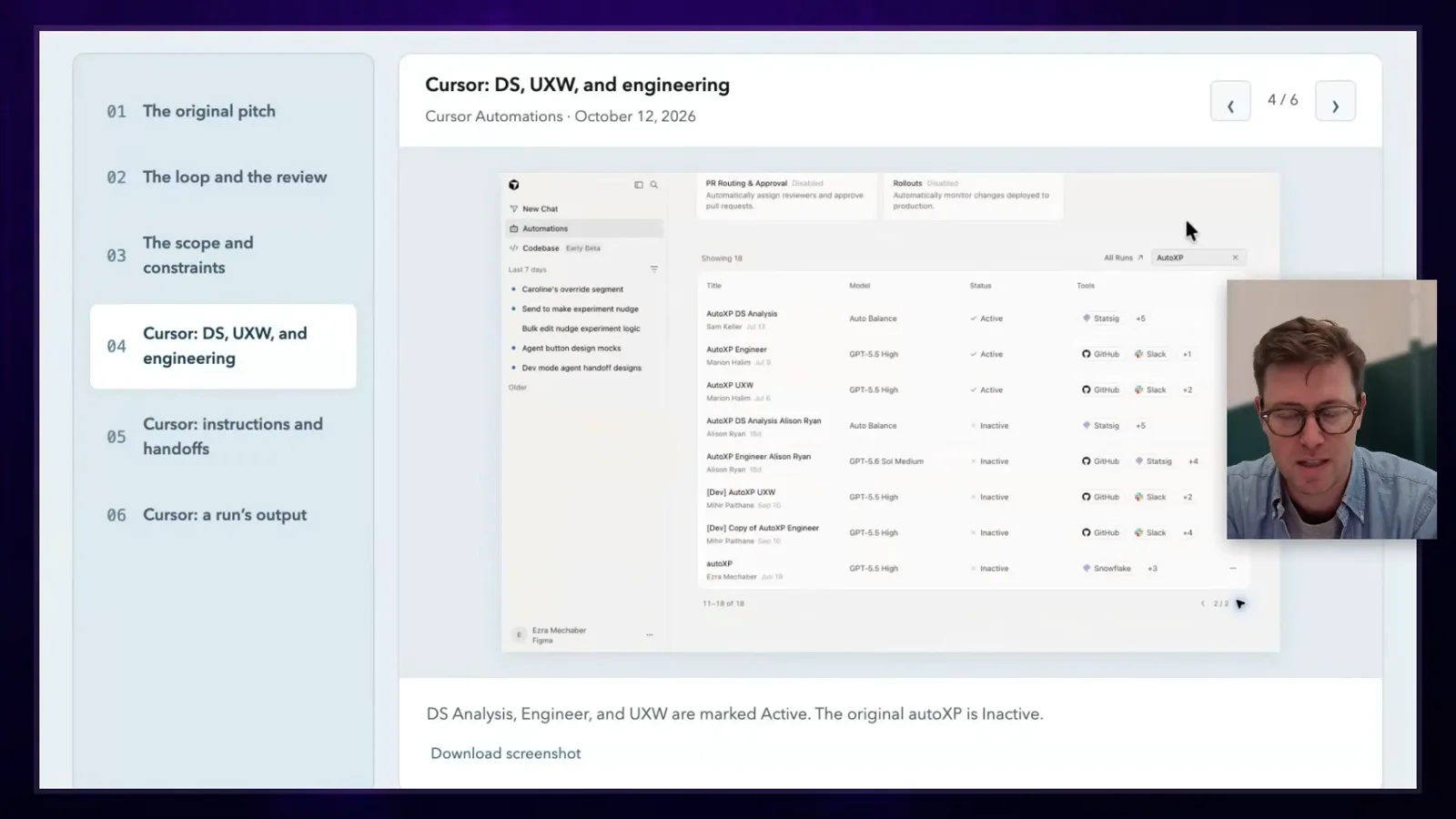
AutoXP uses Cursor automations and a dedicated Slack channel. A person can suggest a surface, or the system can run in a loop. A data-science agent looks for funnel drop-off and changes in user mix; a UX-writing agent proposes copy; an engineering agent picks up the code.
Each stage writes to the same Slack thread so people can follow the work. After an experiment ends, a webhook triggers analysis using instructions based on Mechaber’s growth experience: assess the result and decide whether to explore or exploit further.
The intended human checkpoint comes before launch, when someone can review the analysis, hypothesis, copy, and code together. The system can then watch results and begin another iteration. Mechaber stresses that the fully automated loop is the goal and the implementation is still approaching it.
Vo recalls founding Experiment Engine years earlier around a similar question: how to make better use of traffic and increase the number of experiments. She is excited that a team can now prototype much of the workflow with current tools.
A real-time writing assistant
A Jev-powered prototype checks unfinished text and finds supporting material.
The conversation turns to Jev, which Mechaber describes as a fast, cheap model that answers structured questions, such as a rating or a choice. He wondered where repeated low-latency checks could change the way people work, especially where slower models interrupt a collaborative flow.
His writing prototype checks text whenever the author pauses. It looks for placeholders, unfinished thoughts, and claims that may need support, then consults a library of source material. The idea was partly inspired by a writing application called Marker.
A live call initially encounters an internal firewall issue. Mechaber then demonstrates that a “TK” placeholder is recognized as an unfinished thought, while the system can say it lacks enough context to complete it. A different sentence prompts it to retrieve relevant interview excerpts from the library.
Mechaber is excited that a model can both identify a pattern and connect a passage to related material through retrieval in real time. He jokes that candidates might use a similar helper during product interviews, then suggests that building one could itself be a reason to hire them.
Personal agents and working with AI
The conversation closes with personal automation and ways to handle unhelpful AI output.
Vo recaps the 31 skills: tracking daily work, finding colleagues, writing specifications, and coaching, alongside the bug-bash and writing workflows. She asks about Instinct, a proactive agent that communicates through text messages.
Mechaber says Instinct’s memory and proactive behavior were useful. One practical example is reporting potholes encountered while biking with his children: he can send a message with the location and have the agent remember to submit a report. He says he has since mostly moved to Dots.
Asked how he reacts when an AI assistant fails, Mechaber says he prefers to remain kind. He does not claim the systems are conscious; his concern is that habitual meanness changes his own behavior. Vo distinguishes her frustrated all-caps questions from personal abuse and jokes about the cost of wasted tokens.
Mechaber adds that poor instructions or polluted context often contribute to a bad result. He describes a frustrating permission loop when moving a Codex session between environments and says that, when a conversation becomes unrecoverable, starting a fresh one can be more useful than repeating the same demand.
Vo offers a joking parenting-style prompt: express confidence in the agent’s abilities while taking responsibility for giving better direction. Mechaber likes setting high expectations and encouraging the assistant to build a prototype he can show engineers.
To close, Mechaber says he shares his work online and that Figma is hiring product managers, engineers, and designers. Vo thanks him for demonstrating a range of practical approaches to AI-assisted product work.
同じチャンネルの記事
 35:10EN
 How I AI· 2026年10月28日ポッドキャストFour Personal AI Agents on Nine Tasks: A User’s Testホスト Claire VoClaire Vo compares work and family workflows while acknowledging uneven access and subjective scoring.
 29:40ENHow I AI· 2026年10月26日ポッドキャスト · 2 人How Reddit Proto Connects Design, Live Data and Production Codeゲスト Blair Metcalf · ホスト Claire VoBlair Metcalf demonstrates Reddit’s internal prototyping harness and its design-system mapping for Figma and Cursor.
 16:22ENHow I AI· 2026年10月21日ポッドキャストClaire Vo: Claude Duet Is Beautiful, but It Is Not My Number One Agentホスト Claire VoAnthropic’s phone-based personal agent has the most polished launch Claire Vo has seen: thoughtful onboarding, task lists, first-class artifacts, and Slack-style channels. Polish is not enough when every other agent is competing for the same attention.
 36:33ENHow I AI· 2026年10月19日ポッドキャスト · 2 人How Brooke Lacey Uses Claude Code to Edit Short Videosゲスト Brooke Lacey · ホスト Claire VoA creator combines local media tools, timed cut lists and human feedback.
 24:05ENHow I AI· 2026年10月14日ポッドキャストA First Look at Meta Muse Wonder on Agent and Design Tasksホスト Claire VoClaire Vo reports strengths and weaknesses from her own small evaluation.
 37:47ENHow I AI· 2026年10月12日ポッドキャスト · 2 人Designing Meta Muse: Status, Personalization and Everyday Agentsゲスト Alex Cornell · ホスト Claire VoAlex Cornell discusses consumer agent design and his own experiments with Muse.