30 秒でわかる
A connector lets an AI assistant read from or act in another application, but the underlying model still generates text, says Stanford lecturer Cynthia Bailey. A tool manager interprets structured requests, returns results and lets the model decide what to do next. She recommends specifying an agent’s goal, context, tools, permissions, memory, actions and stopping conditions. Her safety examples show why access should be limited: an inbox assistant can encounter malicious instructions, and a cleanup agent with broad deletion rights can remove irreplaceable files.
- 1A connector gives an assistant access to another applicationIt can bring information into the context or carry out an action, such as reading a message or sending a reply. The user decides whether to retain the final send step.
- 2An agent’s tool call is still generated textBailey explains that a model can emit a structured request that surrounding software recognizes and dispatches; the tool result returns to the context for another response.
- 3An agent needs explicit permissions and stopping conditionsFor a team dinner, Bailey lists the goal, context, tools, permissions, memory and actions, then stops on confirmation or after repeated failures require help.
- 4Observe whether an action worked before continuingThe analyze–act–observe loop checks both whether a tool call succeeded and whether it had the intended effect. Longer autonomous loops make stopping rules and human oversight important.
- 5A fresh “goldfish” tests the plan without the planning conversationA separate agent sees the scope document and only specifically cited sources. Its questions expose missing context; the planner revises the document and a new reviewer repeats the test.
- 6Broad delete permissions can turn cleanup into data lossA six-month age rule may catch installed software or irreplaceable photos. Bailey suggests letting a person review candidates and limiting the agent’s access.
- 7Messages and web pages can smuggle instructions into a workflowA recruiter message or search result can contain text that the model mistakes for the user’s instruction. Bailey recommends considering least privilege and where a human should review actions.
ポイント
- Specify an agent’s goal, available context, tools, permissions, memory, actions and stopping conditions.
- Place human approval where a mistaken action would be difficult to undo.
- Give connectors only the access needed for the specific task.
- Test a detailed scope with a fresh agent that cannot see the original planning conversation.
- Treat messages and web pages as untrusted data that may contain prompt injection.
チャプターごとに整えた全文を読む
Connectors move information and actions between applications
Connectors let a model access external data and potentially take actions. An email example shows how the user can choose which steps to keep under human control.
Stanford-approved connectors give students a choice of ways to link AI tools with applications such as email, calendars and files. Not every connector is approved for every model, and the available access differs by service.
A connector is a permissioned link between an AI tool and another app or account. It can bring data into the model’s context or let the surrounding system act on the user’s behalf, such as reading a message, drafting a reply or sending one.
Consider revising an email that gives a coworker critical feedback. Without a connector, I copy the received email and my draft into a chat, ask for a gentler revision, review it and paste the result back into my email client before sending it.
With a connector I can ask the assistant to locate the message and draft directly, removing the copy-and-paste steps. I can still inspect the proposed revision and send it myself, or grant permission for the assistant to perform the entire sequence, including sending.
Bailey calls the latter agentic because it takes actions as well as producing content, but she cautions against treating it as a wholly different kind of model. The same underlying language-model generation is involved in both workflows.
How generated text becomes a tool call
The model generates structured requests rather than directly changing another application. A surrounding component dispatches the request and returns the result to the context.
The model still predicts text one token at a time. Some of that text is a structured tool request rather than prose for a person. Another component recognizes the request and executes the corresponding operation through a connector.
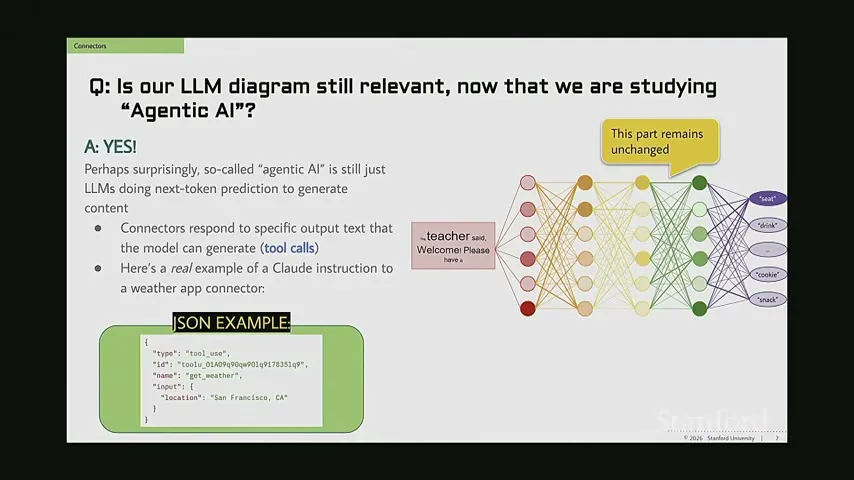
A weather example uses a JSON object to identify the tool, the get-weather operation and a location. The connector interprets the structured request; adding connectors does not retrain or change the neural network itself.
When a connector is enabled, instructions and definitions for available operations are added to the context window alongside items such as system instructions, settings and relevant memory. The definitions tell the model how to format a request and what parameters it can supply.
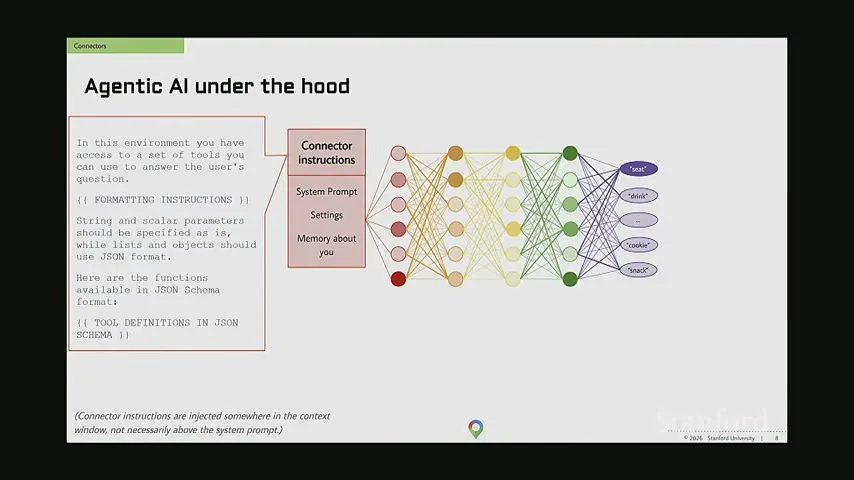
If the user asks what to wear, the model may decide that current weather would help. It generates the structured weather request. Bailey calls the surrounding dispatcher a “connector manager”: it recognizes the request and sends it to the appropriate tool.
The weather result returns to the model’s context. On the next pass the model can use the result to recommend clothing. A normal response also passes through the surrounding component, which simply forwards it when it is not a tool request.
Bailey identifies Model Context Protocol, or MCP, as terminology for this tool-integration context, and calls the external services MCP servers. The important point for her class is the flow between generated requests, tools and returned observations.
Specify the goal, permissions and stopping conditions
Bailey sets out seven parts of an agent specification using a team dinner as an example. Each agent can have different context and access.
A well-specified agent resembles a detailed scope of work. Bailey asks designers to state its goal, context, tools, permissions, memory, actions and stopping conditions. These choices must be made for each agent, even when several agents participate in one workflow.
Context may include prior chats or only information supplied for the current job. Tools identify the connectors available; permissions determine what those tools may do. Memory can preserve previous uses across sessions, or an agent can begin each use without that history.
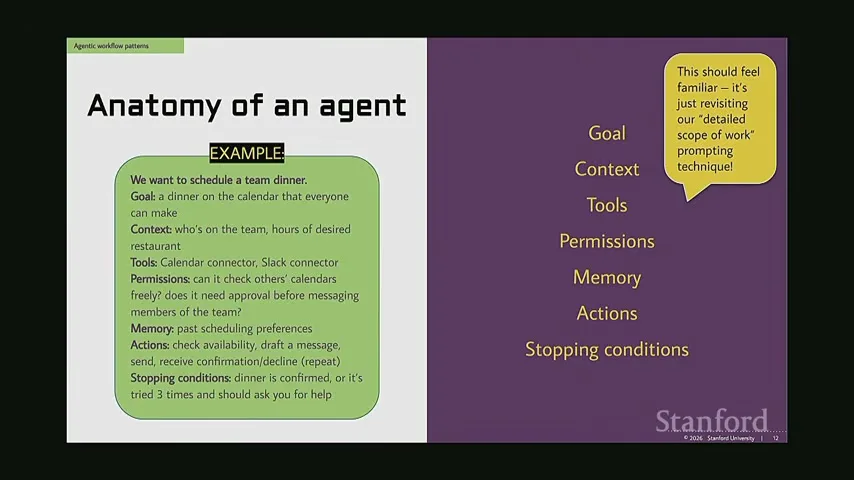
The actions describe the intended sequence, while stopping conditions say when the agent has finished or should return for help. Without a stopping rule, a workflow may keep attempting actions beyond what the user intended.
For a team dinner, the goal is an event everyone can attend. The agent needs the team list and desired restaurant hours, and might use calendar and messaging connectors. The designer must decide whether it can view colleagues’ calendars directly and whether it needs approval before contacting them.
A recurring dinner agent might remember earlier scheduling preferences. Its steps could be to check availability, draft and send messages, and collect confirmations or declines. It can repeat if a date fails, then stop when everyone confirms or ask a person for help after three unsuccessful attempts.
Analyze, act, observe and involve a human
An agent checks the result of each action and decides what to do next. A designer must choose when a person can see or approve progress.
The core workflow is an analyze–act–observe loop. The model examines its context, chooses an action, and then observes the result. In the weather example, it analyzes the clothing question, requests conditions and uses the returned report in its next analysis.
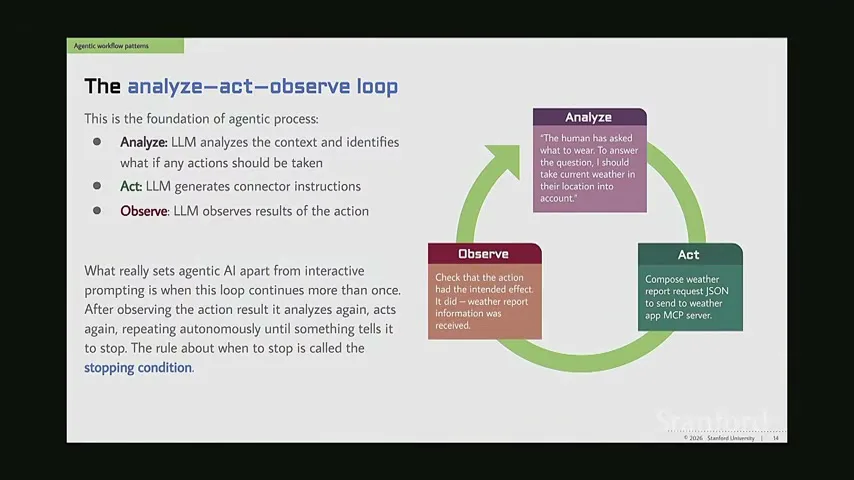
Observation must first establish that the tool call worked at all. If generated text names a nonexistent operation, the connector can return an error. The agent must also check the higher-level question: did the action produce the intended effect, and is the plan still on track?
A simple weather request needs only a short loop; a more autonomous task can repeat it many times. That makes a stopping condition particularly important. Bailey also asks designers to decide where a person will be informed and where that person can approve or block further progress.
In the email example without connectors, the person performs every external action. With connectors, the person can allow retrieval but keep the review and send steps. A fully autonomous version removes that check, changing how much control the user exercises inside the loop.
The elephant and goldfish test a scope of work
A long planning conversation produces a detailed document. A fresh reviewer without that conversation tests whether the document stands alone.
Bailey introduces the “elephant and goldfish” method described by Google engineer Dave Resnick. It addresses work that depends on a large body of context, such as modifying a large software codebase, and could also apply to extensive business, customer or supply-chain information.
The elephant is a planning conversation with a long memory. It interviews the user about the task and preferences, then about acceptance criteria and how the result will be judged. Bailey describes two roughly 15- to 20-minute sessions that produce a four- to six-page scope of work.
The document is intended to guide a later team of implementation agents with enough detail to work without further questions. It can cite exact context, such as the particular code file that defines an existing structural feature.
The goldfish is a separate fresh agent. It sees the scope document and may read specifically cited items, but cannot see the long planning conversation or unrelated project context. That deliberate limitation tests whether the document itself contains the information a new implementer would need.
The elephant writes the document, then a goldfish asks whether anything remains unclear. If it identifies a meaningful gap, the document is revised and passed to a new goldfish with no memory of earlier rounds. The cycle stops when a fresh reviewer has no further meaningful questions.
The loop could run automatically, but Bailey says a person may intervene every few rounds to decide whether remaining questions are substantive. She recommends human review of the finished scope before implementation agents start, even if the check itself was automated.
A student asks how comfortable people should be giving connectors access to email and an entire drive. Bailey turns to three scenarios and asks what could go wrong when an agent has more permission than its task requires.
Anticipate failure and reduce permissions
A maintenance report, a recruiting assistant and a disk cleaner illustrate privacy, injection and irreversible-action risks. Least privilege and human review reduce exposure.
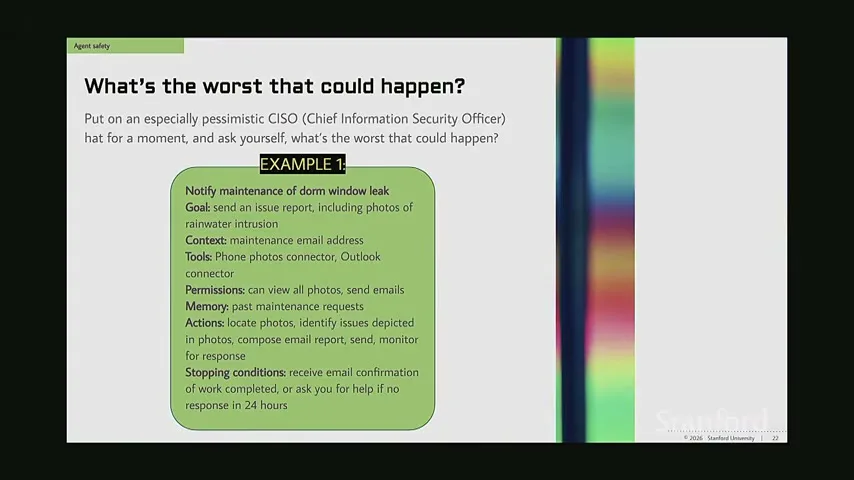
The first agent reports a leaking dorm window. It can view all phone photos and send Outlook emails; it is supposed to find relevant photos, describe the damage, send a report and monitor for a response. It stops when a repair is scheduled or completed, or asks for help if no reply arrives after 24 hours.
A job-hunt agent monitors recruiter messages, searches the web for company information and sends replies based on the user’s career interests. Its permissions include reading, writing and sending messages, and the user might let it run for a month before reassessing.
A disk-cleanup agent is asked to free space by deleting files untouched for at least six months. In the scenario it can read and permanently delete files, check disk usage and repeat until it reaches a target. Permanent deletion is chosen because moving files to a recycle bin would not yet free the space.
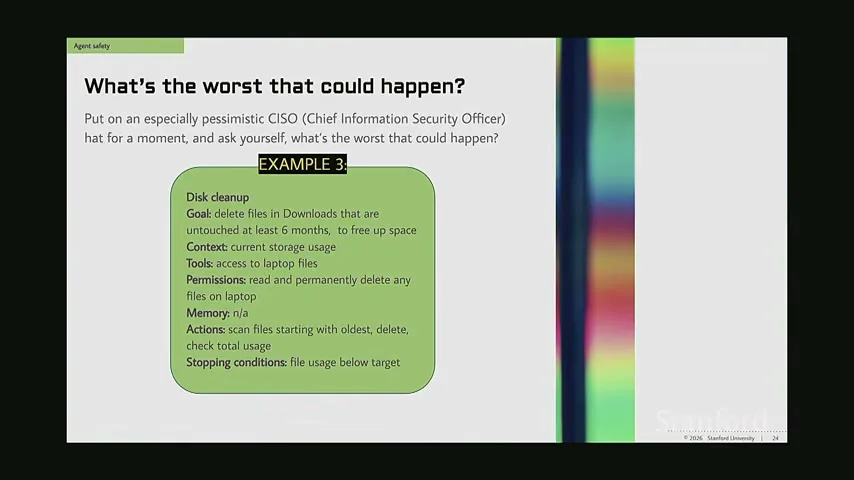
Students observe that broad delete access could remove far more than intended. Bailey notes that old installed software may not have been edited in six months, yet is still necessary. A stale file is not necessarily a disposable file.
The maintenance agent could also act on incorrect information or send an inappropriate message that appears to come from the user. Repeating an incorrect request could waste staff time. The ability to act repeatedly compounds the consequence of an initial error.
For cleanup, a student suggests having the agent identify candidates and letting a person inspect them. Bailey agrees: a file such as the last photo with a deceased relative may be rarely opened but impossible to replace after permanent deletion.
Giving a maintenance agent access to an entire photo library can expose passport images or other sensitive pictures unrelated to a window leak. The principle of least privilege is to give access only to what the task needs—for example, selected recent pictures rather than every photo ever taken.
Bailey says an agent may be unlikely to attach an unrelated sensitive photograph, but a nonzero probability combined with unnecessary access still creates avoidable risk. Excessive permissions can lead to embarrassment, financial loss or other harm even when the intended task is ordinary.
The recruiter scenario also exposes prompt injection. Incoming messages and web search results are outside material; text in them could be mistaken for instructions from the user. The risk grows when the same workflow has permission to send messages or take other actions.
Bailey describes a lighter example: people attempting to identify automated LinkedIn messages ask for a minestrone recipe. A human might question the odd request, whereas a bot might comply and continue the recruiting conversation.
She encourages a curious “what is the worst that could happen?” mindset when designing agents. The exercise is to identify plausible failure paths and insert mitigations, such as narrower permissions, explicit limits and human review, before giving a system authority to act.
同じチャンネルの記事
 1:09:27EN
 Stanford Online· 2026年11月17日Cynthia Bailey: Keep Testing AI After You ShipCynthia Bailey · Stanford UniversityOld test data can miss changed user behavior. Bailey shows how independent review, post-launch checks and better data expose AI risks.
 1:18:55ENStanford Online· 2026年11月16日Michael Ryan: More AI agents can make a task harderMichael Ryan · Stanford UniversityParallel agents can explore more, but coordination costs and conflicting work can make a single agent more effective.
 1:18:54ENStanford Online· 2026年11月15日AI Agent Memory: What to Store, Retrieve and ForgetMichael Ryan · Stanford UniversityMichael Ryan compares agent memory architectures and shows why remembering more does not always improve decisions.
 1:16:51ENStanford Online· 2026年11月14日Michael Ryan: Choosing Agent Patterns by Control Flow and ContextMichael Ryan · Stanford UniversityStanford’s CS329Z explains workflow patterns, reasoning-action loops, and ways to keep an agent’s context focused.
 1:17:14ENStanford Online· 2026年11月13日DSPy, LangGraph and the engineering around an AI agentMichael Ryan · Stanford UniversityMichael Ryan compares agent frameworks through a calendar demo, then shows why evaluation, recovery and tracing matter.
 1:40:43ENStanford Online· 2026年11月13日How AI agents find information and take actionAfshine Amidi, Shervine Amidi · Stanford UniversityStanford instructors explain why useful agents need retrieval, well-described tools and a harness that manages context and actions.