En 30 secondes
Scott Farrar uses Claude Code and a shared collection of Markdown files as a household memory that he can inspect and carry between conversations. The files bring appliance details and insurance documents together with project checklists; a wall display surfaces tasks and recent wins. Farrar and his wife share much of the material through Dropbox, accepting that simultaneous edits can conflict. A math educator, he also wants AI tutors to draw out students’ reasoning instead of giving them answers.
- 1Files make household memory visible across chatsFarrar stores Markdown records on his computer so new Claude Code sessions can read and update the same information.
- 2The insurance project turns documents into next actionsThe assistant identifies missing quotes and questions for an agent, helping Farrar move a complicated task forward.
- 3A shared folder is a compromise for two peopleFarrar and his wife use Dropbox for much of their shared context, accepting possible conflicts if both edit at once.
- 4A wall display brings projects and wins out of the laptopA script extracts tasks, trips and completed work for a custom DAKboard page.
- 5An AI tutor can ask the student to teach itFarrar suggests reversing the relationship so a student explains a solution and the chatbot asks why.
À retenir
- Keep reusable household context in inspectable files that new AI sessions can read.
- Turn complex paperwork into a project with open questions and concrete next steps.
- Choose a sharing method that the people in the household will actually use, and account for edit conflicts.
- Show both current tasks and completed work where the household can see them.
- Ask an AI tutor to elicit a student’s reasoning rather than solve the problem for them.
Lire le texte remanié, chapitre par chapitre
A household memory that survives a new chat
Farrar uses local Markdown files as inspectable memory for a coding agent. Insurance documents become a project with questions and next steps.
Scott Farrar wanted an AI assistant grounded in facts he could inspect. He built a household system in Claude Code that reads and writes Markdown files, so a new conversation can find appliance details, warranty information and earlier decisions rather than relying on an opaque chat memory.
Farrar has children, a career and the ordinary work of keeping a household running. A question such as whether to change car insurance can turn into a complex project. In a chat, he found it difficult to know how much context to supply or what the conversation was retaining.
He switched to a coding agent and stored the shared context in files on his computer. Each Claude Code session can read the same records and update them as work progresses. He can also inspect the files directly rather than guessing what the system knows.
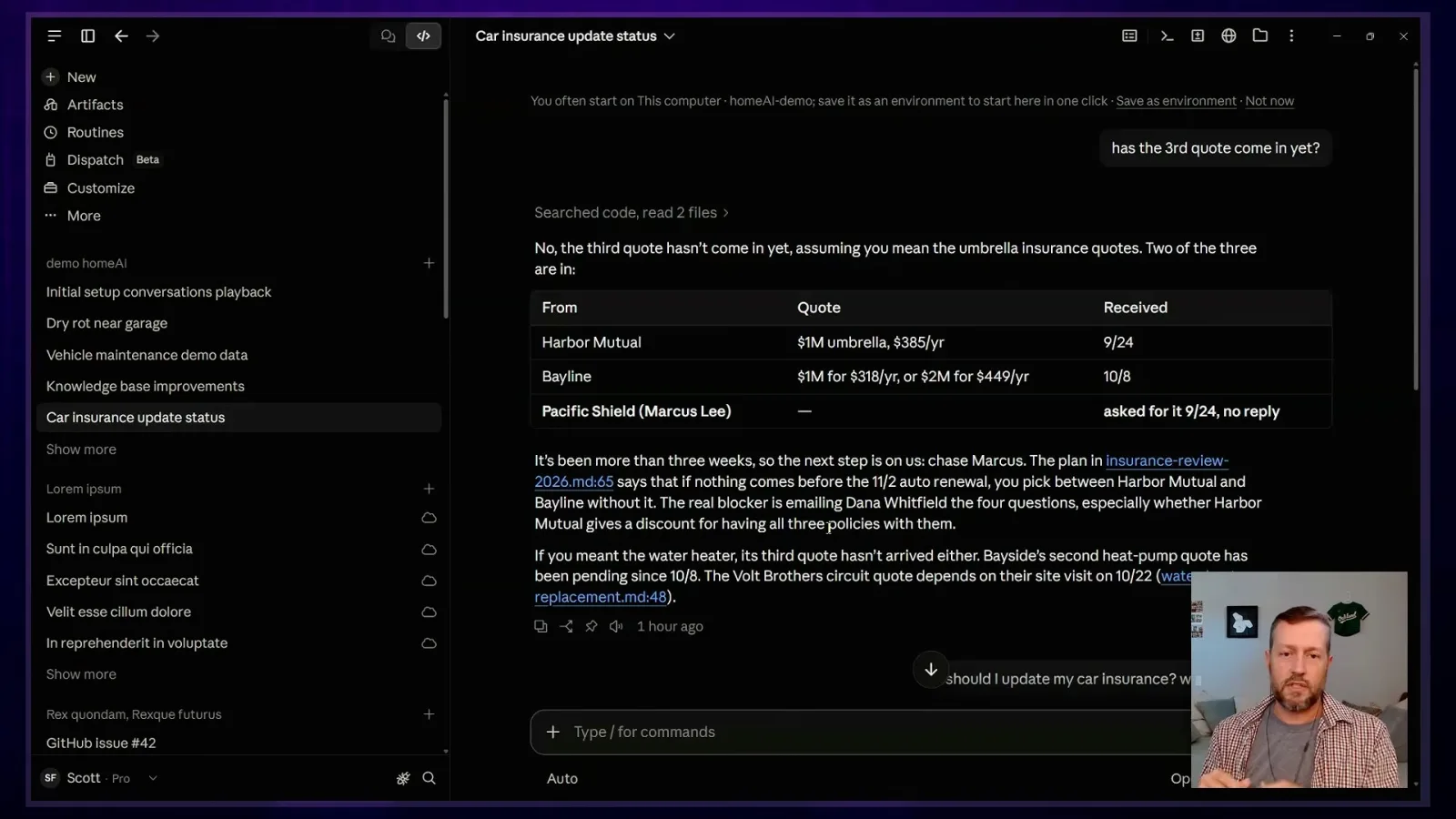
For car insurance, the files collect the documents, quotes and project status. When Farrar asks what to do next, the assistant can identify the outstanding quote or a question for an insurance agent and build a checklist. He says those concrete next steps keep a job from disappearing into his mental backlog.
In one insurance project, an earlier quote raised a question about updating the cars on a policy. Instead of putting off the paperwork, he asked for the next step and got a suggested email and the questions he needed answered before deciding.
Previously Farrar says he would have depended more on his insurance agent, without reading every document in detail. With the assistant helping him work through the documents and combine them with household context, he could ask more specific questions and understand the replies.
From appliance photos to a shared to-do list
The files cover appliances, warranties and tasks. Farrar and his wife use a shared folder, with safeguards against simultaneous edits left partly to their routine.
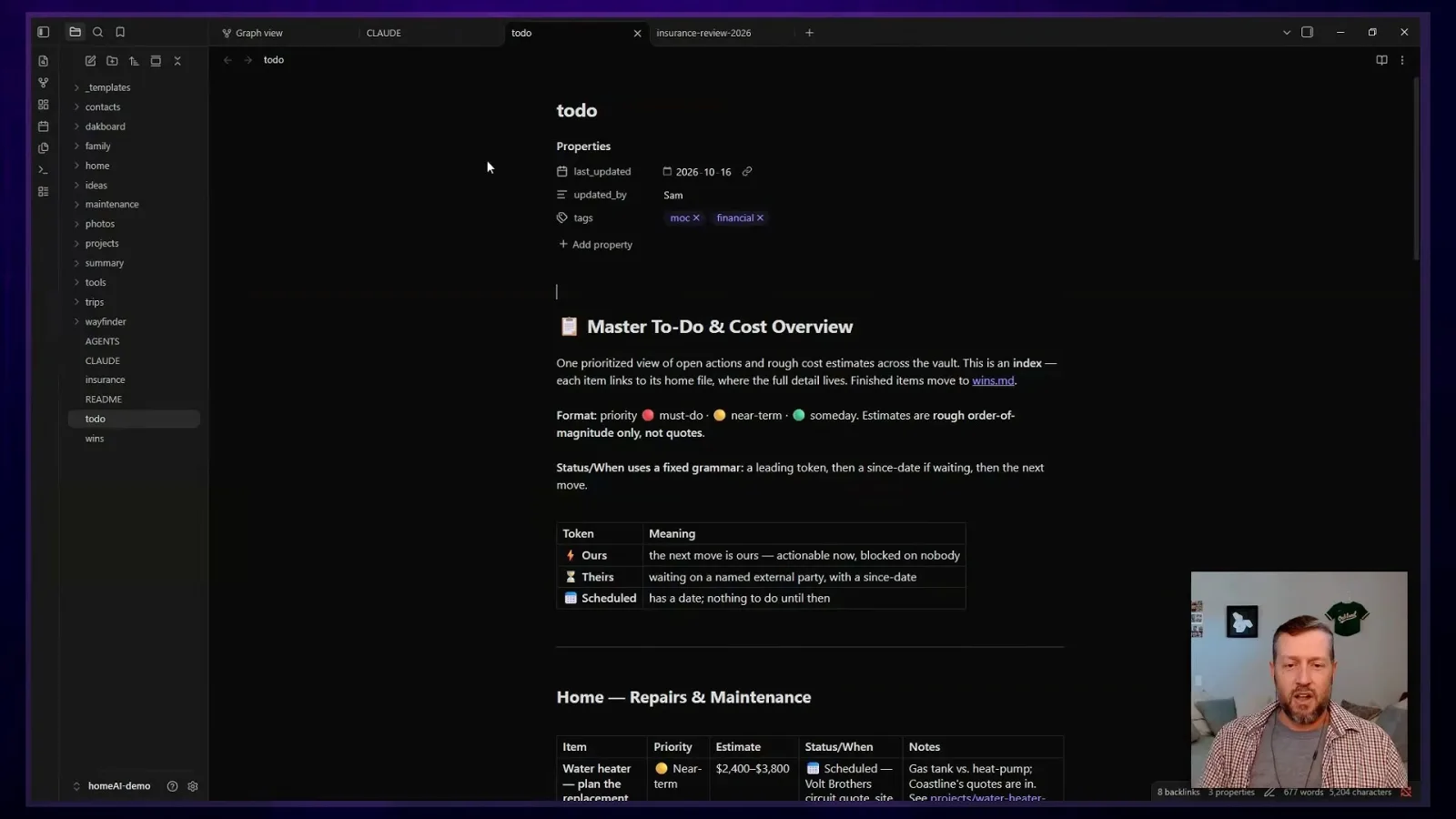
The insurance project is one file in a larger collection that Farrar views in Obsidian. Other records describe appliances and their serial numbers, or when a child's iPad may stop receiving software updates. The graph shows how the stored notes relate to one another.
To start the collection, he asked Claude what information to gather. It suggested photographing appliances; those pictures are summarized in an appliance list. Although he can open the Markdown memory, he often starts a conversation and asks a loose question such as what is happening with the refrigerator.
The assistant can look up a refrigerator's warranty because Farrar put the information into the files earlier. He compares the system to his father’s old filing cabinet: receipts and warranty documents were already useful long before AI, provided someone could find them when needed.
Claire Vo contrasts people who naturally organize and tag everything with those who collect loose information. Farrar says the useful middle ground is that he can give the agent unstructured material and let it help organize and maintain it. A linting script also checks that chatty agents have not made the to-do list too verbose.
Coding agents can work through files that have sat on a computer for years. Farrar says he had often known information was somewhere on his machine but lacked the time to sort it. Giving an agent a directory made it possible to pull out and organize the material.
One of the files he returns to most is a household to-do list. He and his wife brainstormed everything in their heads, from a faulty tub spout to a possible dry-rot problem, then asked the system to compile items with priorities, estimated costs and references.
Farrar set boundaries when building the system: he wanted household information and collaboration with his wife, while excluding medical information and finances from that shared setup. Each of them should be able to talk to an assistant using the same household context.
They first tried a shared Dropbox folder on both laptops. The system warned that simultaneous edits could cause sync conflicts; GitHub was another option, but his wife did not want the extra workflow. They use Dropbox for much of the information and GitHub for some scripts, while generally avoiding editing the same files at once.
Putting projects and wins on the wall
A custom display extracts tasks and trips from the household files. Farrar says reminders and checklists have helped move projects forward.
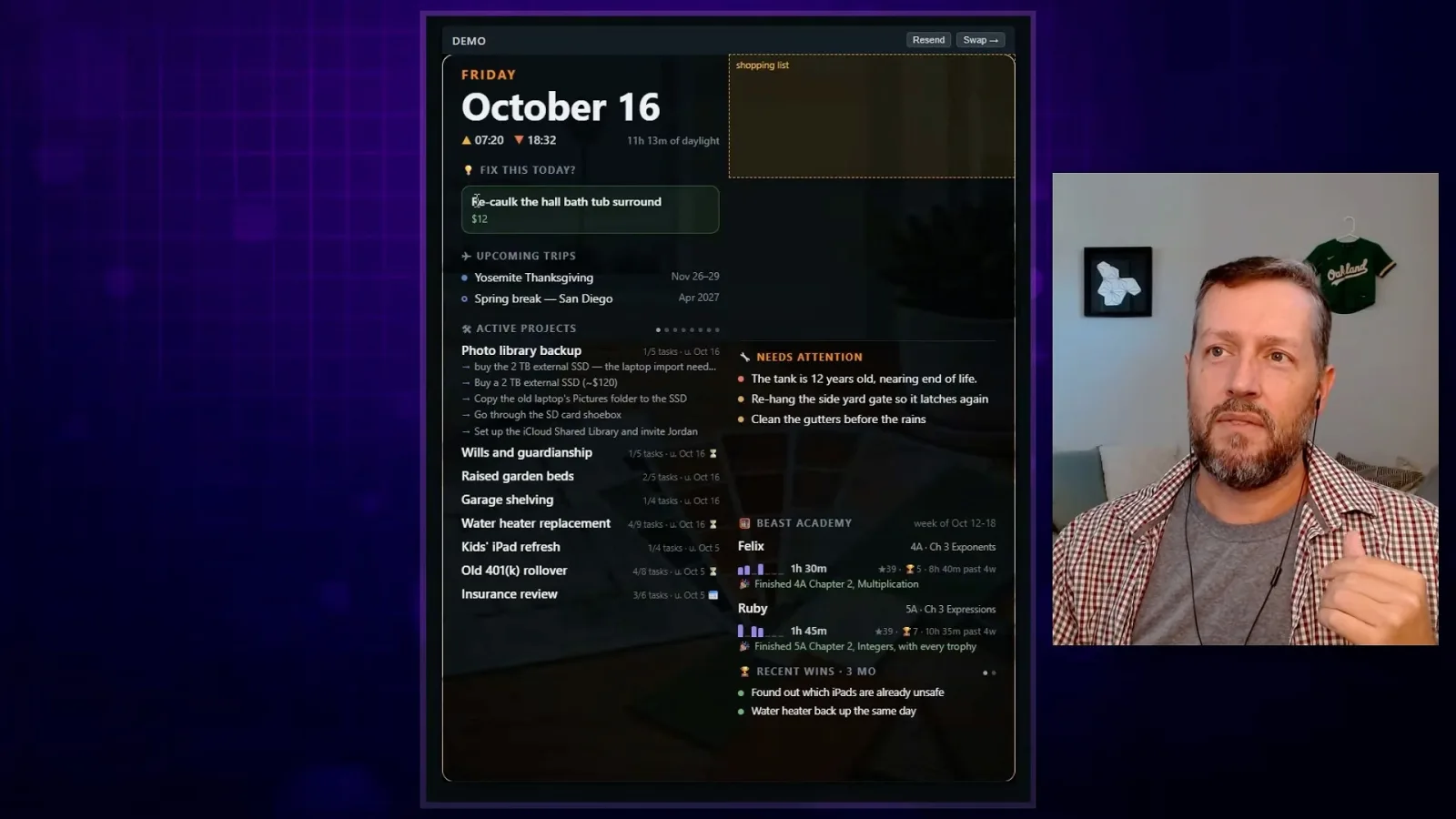
The Obsidian graph is useful to Farrar, but not necessarily to everyone in the house. He uses a DAKboard wall display that can show a custom web page, with the aim of bringing useful information out of his laptop and into a place the family will pass.
A script extracts to-do items, upcoming trips and other details for the display. It shows current projects, a possible task for today, longer-term items and information for the children. Farrar also added recent wins so the board acknowledges completed work, such as fixing a water heater.
Farrar says the checklists have changed his behavior. Open items no longer depend on him remembering that he should do something; the system can bring an overdue request back to his attention. He says he has moved enough projects forward that he is often waiting for other people to reply.
Asked what households might delegate to AI for thinking and planning, he names repairs, insurance, future planning, device management and trips. A broad question about earthquake preparation can become a project by drawing on information already collected about the house.
His workflow distinguishes a backlog idea from a full project. Once a project is active, a file collects information and a checklist; when it is finished, he can close it and put the result among the wins. A photograph of a handwritten circuit-breaker label is another item he hopes to make easier to query.
Vo considers recording a walkthrough of her own home and asking an AI system what needs attention. She sees Farrar's demonstration as a way to turn a collection of household observations into a more useful starting point for work.
Let the student do the thinking
Farrar applies the idea of human agency to math education. He proposes tutors that ask students to explain their reasoning.
The conversation turns to children and learning mathematics. Farrar says his household assistant suggests and organizes work, but he keeps a role for himself in acting on it. In education he similarly wants students to retain agency and do the cognitive work needed to learn.
A tutor that immediately provides the answer can short-circuit a productive struggle. Farrar prefers tools that interpret what students have said and encourage them to develop their ideas. Vo describes the difference as keeping the student responsible for learning how to solve the problem.
One approach Farrar has explored reverses the tutoring relationship: the chatbot asks the student to explain something to it. For a linear equation, it might ask why the same operation must be performed on both sides, drawing out the student's reasoning rather than presenting the solution.
Vo values the patience and privacy of an AI tutor, which can give a learner room to ask questions and work through frustration. Farrar adds that patience can coexist with a gentle demand: the tutor can encourage a student who knows more than they think instead of doing the whole task for them.
Reset a chat and inspect its memory
When the assistant goes out of sync, Farrar starts a new session or checks where an incorrect idea came from.
When an assistant goes out of sync, Farrar often closes the chat and starts a new session. He may also ask where an idea came from, particularly to check whether an error has been written into a memory file that future sessions will read.
In an earlier version, an agent kept putting lengthy updates into the to-do table even though his instructions requested brevity. Asking why exposed the mismatch between the written instruction and its behavior, a reminder to inspect the shared record as well as the current conversation.
Vo summarizes the workflow as giving the AI loose context, using it to help track household responsibilities and recording wins. For learning, the aim is different: an assistant should draw out what students already know and challenge them, rather than simply supplying an answer. Farrar shares his work at sfxmath.com.
Sur la même chaîne
 38:34EN
 How I AI· 9 nov. 2026Podcast · 2 voixA founder used Codex to build the Norwegian tutor he wantedInvité : William Imoh · Anime : Claire VoWilliam Imoh describes a voice app built around conversation, then shows how role-based agents support his company.
 24:47ENHow I AI· 9 nov. 2026PodcastClaire Vo: Fable 5.2 excels at creative builds, but not every designA marketing animation, furniture guide and 3D typewriter impressed Vo; independently generated website designs did not.
 42:30ENHow I AI· 2 nov. 2026Podcast · 2 voixInside Figma’s PM OS: Ezra Mechaber on Skills, Bug Bashes and Automated ExperimentsInvité : Ezra Mechaber · Anime : Claire VoFigma growth PM Ezra Mechaber shows Claire Vo how a shared repository supports product work, browser testing and a human-reviewed experiment loop.
 35:10ENHow I AI· 28 oct. 2026PodcastFour Personal AI Agents on Nine Tasks: A User’s TestAnime : Claire VoClaire Vo compares work and family workflows while acknowledging uneven access and subjective scoring.
 29:40ENHow I AI· 26 oct. 2026Podcast · 2 voixHow Reddit Proto Connects Design, Live Data and Production CodeInvité : Blair Metcalf · Anime : Claire VoBlair Metcalf demonstrates Reddit’s internal prototyping harness and its design-system mapping for Figma and Cursor.
 16:22ENHow I AI· 21 oct. 2026PodcastClaire Vo: Claude Duet Is Beautiful, but It Is Not My Number One AgentAnime : Claire VoAnthropic’s phone-based personal agent has the most polished launch Claire Vo has seen: thoughtful onboarding, task lists, first-class artifacts, and Slack-style channels. Polish is not enough when every other agent is competing for the same attention.