En 30 secondes
In this 2023 tutorial, Matthew Berman sets up Dolphin 2.0 Mistral 7B on a RunPod GPU and connects MemGPT to text-generation-webui’s API. He runs a brief test in which the agent stores and recalls his name. The project has since evolved into Letta, so the commands and interfaces shown are historical rather than current installation instructions.
- 1A remote GPU for the demoBerman uses RunPod because his computer struggles to run inference while recording, though he describes the same basic setup for a local machine.
- 2Load an open-weight modelHe downloads Dolphin 2.0 Mistral 7B into text-generation-webui and loads it with the Transformers loader.
- 3Point MemGPT at the APIThe historical setup uses OPENAI_API_BASE for the port 5000 endpoint and BACKEND_TYPE=webui for the backend.
- 4Test memory with a nameThe agent saves the name Matt and answers correctly when asked. This is a small demonstration, not a comprehensive memory evaluation.
À retenir
- The model in this demonstration runs on a remote RunPod GPU, although the presenter says a similar setup can run on a suitably equipped local machine.
- Text-generation-webui serves the model behind an API that the historical MemGPT client can call.
- The video’s memory test shows a name being saved and recalled in one short interaction; it does not establish general memory reliability.
- The original MemGPT project has evolved into Letta, and its historical commands and menus may no longer apply.
Lire le texte remanié, chapitre par chapitre
Local-model support and the RunPod setup
Berman introduces newly added model support and explains why the demonstration runs on a cloud GPU. He deploys a RunPod instance and identifies its interface and API ports.
The MemGPT team has added support for local language models and an AutoGPT integration since my earlier introduction. I want to show how to connect an open-weight model to MemGPT; an AutoGen integration will be the subject of a separate video.
I am using RunPod because running inference and recording at the same time puts too much strain on my computer. The same basic approach can be used on your own machine if it has the resources: text-generation-webui hosts the model and exposes an API for MemGPT to call. In this demonstration, however, the model is running on the remote RunPod GPU.
On RunPod, I choose Secure Cloud and an RTX A6000, then deploy the instance. The template exposes port 7860 for the web interface and port 5000 for the API. Once the instance is ready, I connect to the HTTP service on port 7860 to download and configure the model.
Download and load the model
He downloads Dolphin 2.0 Mistral 7B through text-generation-webui and loads it using Transformers. He also explains which API the tutorial uses.
The model I choose is Dolphin 2.0 Mistral 7B. The MemGPT authors told me that the Airoboros prompt template tends to work well, but I am using this smaller model to demonstrate the process. In the model tab of text-generation-webui, I paste the model identifier and start the download. The software was new at the time, and I thank MemGPT authors Charles and Vivian for helping with bugs.
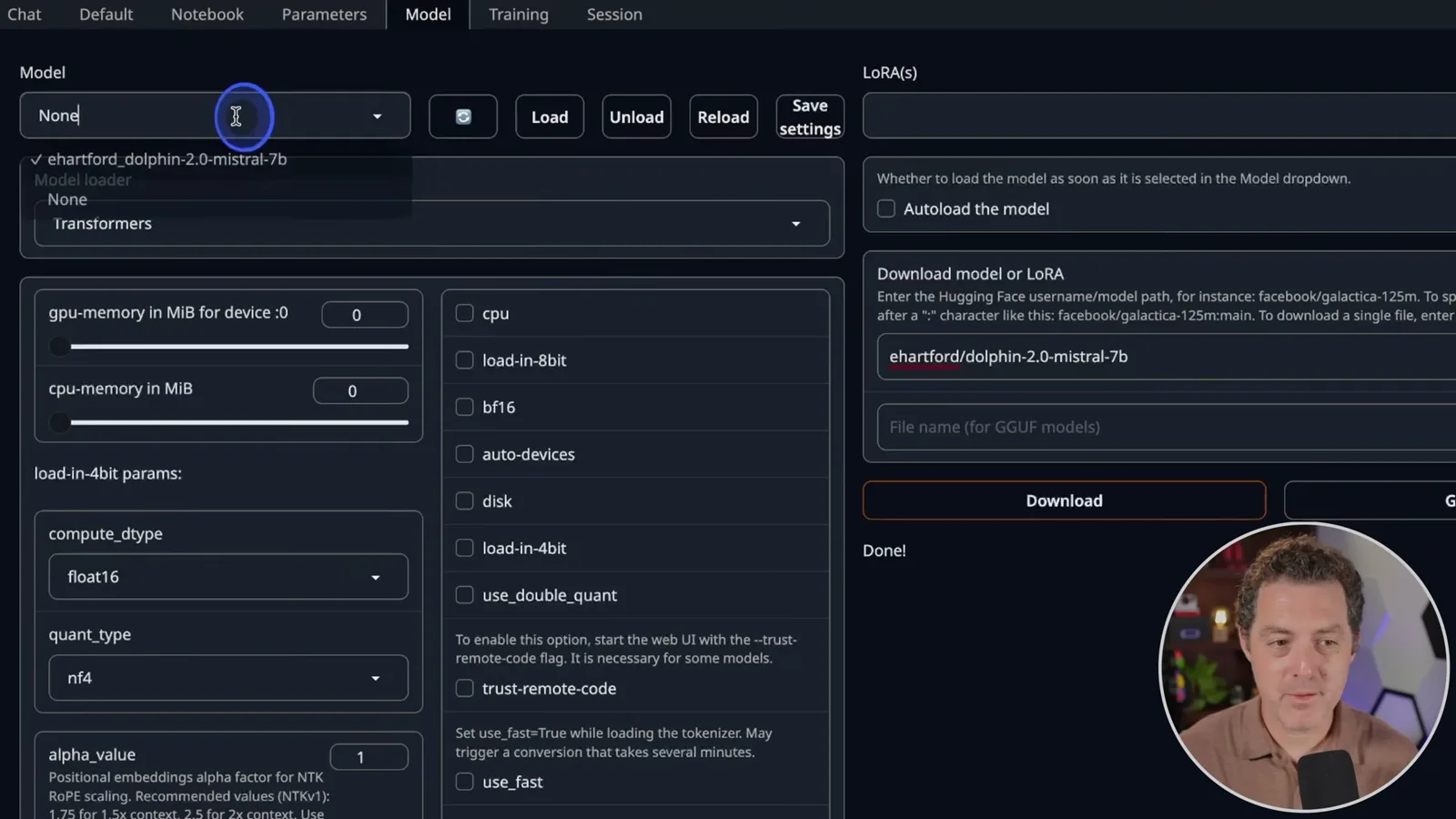
Once the download finishes, I select the Transformers loader because this model is unquantized. I refresh the model list; if the interface still shows None after the selection, I select None and then choose the model again before clicking Load. In the Session tab, I leave the OpenAI extension disabled: this setup uses text-generation-webui’s default API instead.
Connect and start MemGPT
Berman clones the historical repository, configures its endpoint and backend, and installs dependencies in a Python environment. He launches the application and selects a persona.
Next I clone the MemGPT repository and change into its directory. The authors had also made a module available, so cloning was not the only installation option; for a production project I would generally use the module instead. This is the original 2023 workflow: MemGPT has since evolved into Letta, and the current project may have different installation and configuration steps.
I set OPENAI_API_BASE to the RunPod endpoint for port 5000, removing the trailing slash, so the client sends requests to the model API. I also set BACKEND_TYPE to webui. Use the endpoint belonging to your own instance, rather than copying a URL displayed in a demonstration.
For this historical setup, I create and activate a Conda environment with Python 3.11.3, then install the repository requirements with pip. I start the program using `python3 main.py --no_verify`; I explain that this option allows the local-model setup to run in the version I am demonstrating. These commands and flags should not be assumed to work with current releases.
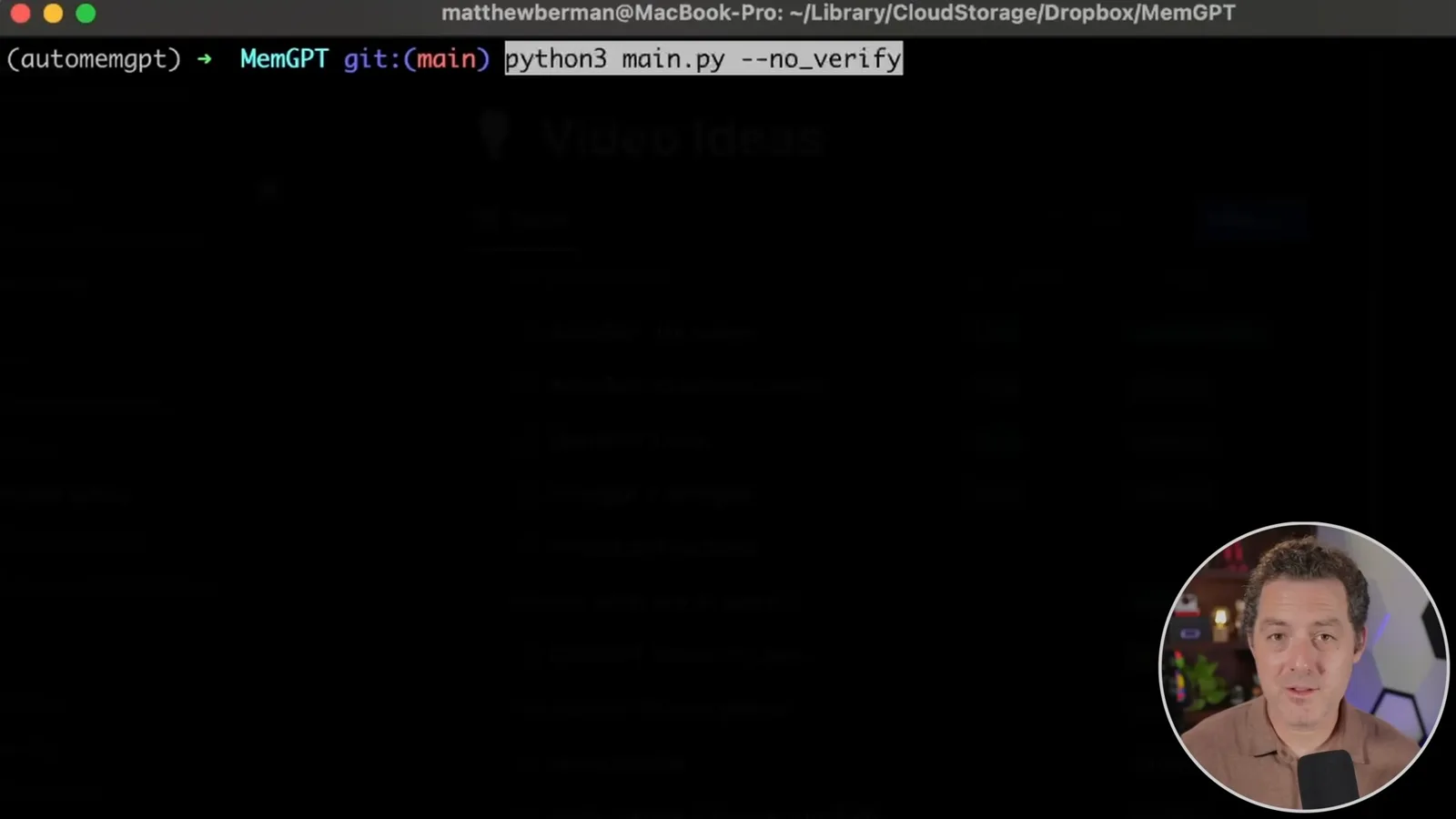
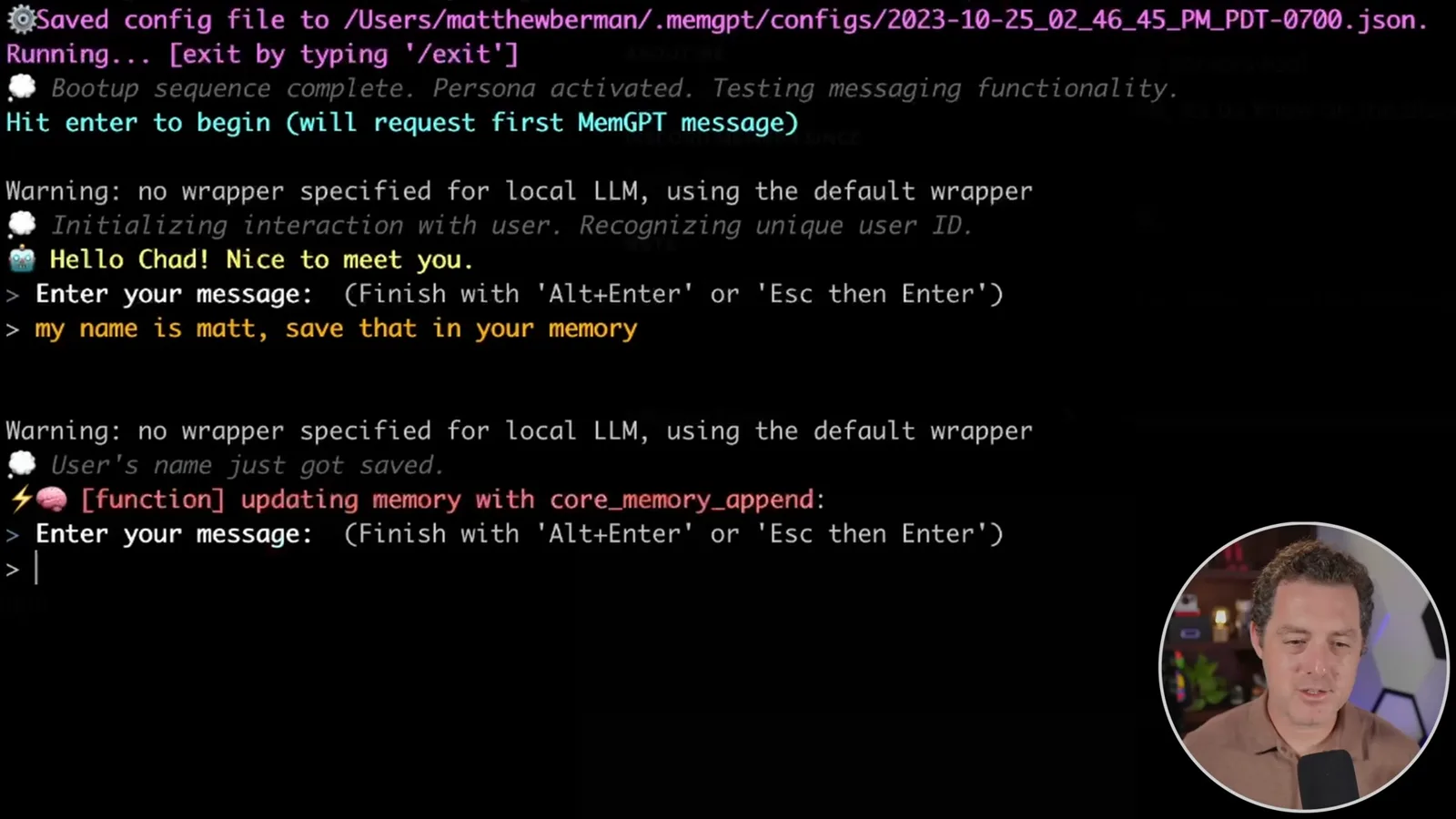
The menu does not offer my local model as a selection, so I choose GPT-4 as a workaround, then choose the Sam persona and the basic user without preloading anything. Despite that menu selection, the configured API endpoint is the RunPod-hosted model. My aim here is to show the connection working, not to build a complete application.
Save and recall a name
The presenter sends a name to the agent and asks it to remember. The model responds correctly to a follow-up question.
I ask the agent to save my name, Matt, in memory. The interface supports multiline input, so pressing Enter alone does not send the message: I press Escape and then Enter. The agent records the name, and when I ask “What’s my name?” it answers Matt. That is a useful basic check of this interaction, though one example cannot establish how reliably the system will remember information in other situations.
Sur la même chaîne
 34:21EN
 Matthew Berman· 27 oct. 2026Matthew Berman Examines Anthropic’s IPO Filing, AI Growth and GovernanceMatthew Berman, Sam Altman · Forward FutureThe presenter reviews the S-1’s financial metrics, compute strategy and voting structure while questioning the tension between rapid AI development and safety.
 0:26ENMatthew Berman· 25 oct. 2026Sam Altman on Human Values and Problem-Solving in an AI WorldSam Altman · OpenAIIn a short interview excerpt, Altman considers the enjoyment of solving hard problems and the human role in interpreting results.
 0:36ENMatthew Berman· 25 oct. 2026Kimi K3.1 and a Rubik’s Cube Solver DemonstrationMatthew Berman · Forward FutureMatthew Berman shows a scrambled virtual cube being solved and gives the Kimi K3.1 test a favorable assessment.
 0:21ENMatthew Berman· 24 oct. 2026An AI-Generated Kimi Benchmark Chart Used Invented ScoresMatthew Berman · Forward FutureMatthew Berman asks for a graph of Kimi K3.1 Pro benchmarks, then discovers that the displayed figures are illustrative placeholders.
 25:50ENMatthew Berman· 24 oct. 2026Kimi K3.1 Pro Tested: Strong 3D Demos, Uneven Results and Competitive PricingMatthew Berman · Forward FutureMatthew Berman tests the open-weight model on coding, 3D rendering and visual explanations, then compares benchmark results and prices.
 32:20ENMatthew Berman· 23 oct. 2026Who Is Local AI For? The Costs, Trade-offs and a Hybrid FutureMatthew Berman · Forward FutureMatthew Berman weighs data control and independence against hardware cost, setup complexity and inference speed.