En 30 secondes
Matthew Berman demonstrates how to expose the Max reasoning-effort option in the settings interface shown in his August 2026 video, then select it for Luna. He also expresses a negative personal view of Ultra and cites an 80% Luna discount. The clip does not provide a benchmark or details establishing the discount’s scope, and settings, model support and promotions can change.
- 1A reason to use LunaBerman cites an 80% discount, but the short clip does not specify its terms or duration.
- 2Expose Max in settingsHe opens configuration and enables Max under available reasoning efforts; the menu notes that availability varies by model.
- 3An opinion about UltraHe advises turning Ultra off based on his own assessment, without presenting a controlled test.
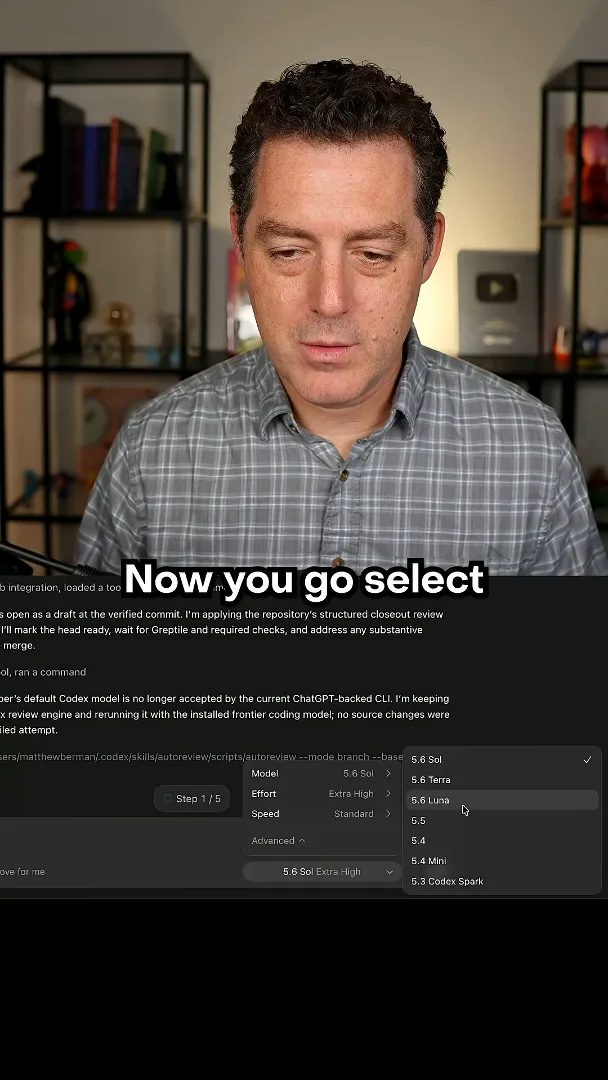
- 4Select LunaHe returns to the model picker and selects Luna with Max available.
À retenir
- The demonstrated configuration menu lets users choose which reasoning-effort levels appear in model controls.
- Berman enables Max and then selects Luna in the model picker.
- Available reasoning efforts depend on the model and the product version.
- His criticism of Ultra and mention of an 80% discount are time-specific claims, not independently verified results.
Lire le texte remanié, chapitre par chapitre
Reasoning effort configuration
Berman cites a Luna discount and shows the available reasoning-effort settings. He enables Max and offers his opinion of Ultra.
I want to use Luna more and say it is 80% off in this August 2026 video. The clip does not explain the promotion’s scope or duration, so the discount should be treated as a time-specific claim rather than a current price. My focus is the Max reasoning-effort option, which I say is not enabled by default in the setup shown.
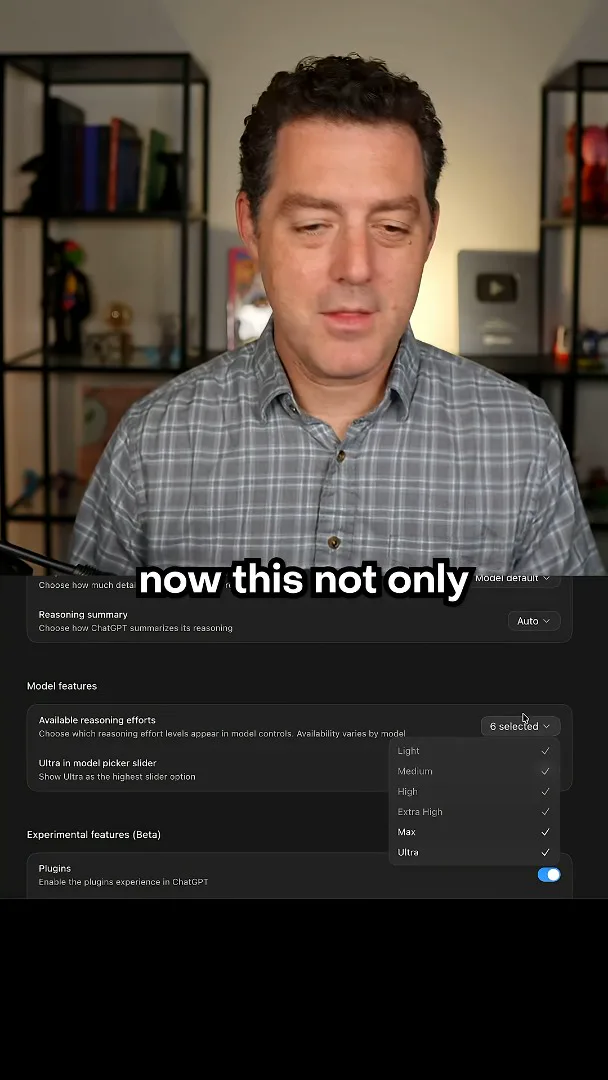
In the demonstrated settings interface, I open Configuration and find “Available reasoning efforts.” I enable Max so it can appear in model controls. The menu says availability varies by model; I also mention Terra and Sol, but supported choices can change by version and model.
I recommend turning Ultra off because I believe it uses too many tokens without enough benefit in my experience. That is my assessment, and this short clip provides no controlled comparison or evidence that Ultra is generally broken. After changing the settings, I select Luna and show that Max is available.
Selecting Luna
He selects Luna after exposing Max. The clip does not independently validate the discount or compare reasoning settings.
Sur la même chaîne
 34:21EN
 Matthew Berman· 27 oct. 2026Matthew Berman Examines Anthropic’s IPO Filing, AI Growth and GovernanceMatthew Berman, Sam Altman · Forward FutureThe presenter reviews the S-1’s financial metrics, compute strategy and voting structure while questioning the tension between rapid AI development and safety.
 0:36ENMatthew Berman· 25 oct. 2026Kimi K3.1 and a Rubik’s Cube Solver DemonstrationMatthew Berman · Forward FutureMatthew Berman shows a scrambled virtual cube being solved and gives the Kimi K3.1 test a favorable assessment.
 0:21ENMatthew Berman· 24 oct. 2026An AI-Generated Kimi Benchmark Chart Used Invented ScoresMatthew Berman · Forward FutureMatthew Berman asks for a graph of Kimi K3.1 Pro benchmarks, then discovers that the displayed figures are illustrative placeholders.
 25:50ENMatthew Berman· 24 oct. 2026Kimi K3.1 Pro Tested: Strong 3D Demos, Uneven Results and Competitive PricingMatthew Berman · Forward FutureMatthew Berman tests the open-weight model on coding, 3D rendering and visual explanations, then compares benchmark results and prices.
 32:20ENMatthew Berman· 23 oct. 2026Who Is Local AI For? The Costs, Trade-offs and a Hybrid FutureMatthew Berman · Forward FutureMatthew Berman weighs data control and independence against hardware cost, setup complexity and inference speed.
 1:03:37ENMatthew Berman· 23 oct. 2026Matthew Berman’s Team Tests Kimi K3.1 on Animation, Games, and ChartsMatthew Berman, Alex, Brian · Forward FutureA live team AMA turns into an informal test of Kimi K3.1, from personal-agent workflows to motion graphics, a browser game, and a benchmark chart.