En 30 secondes
Matthew Berman demonstrates a 2023 setup that hosts Dolphin 2.1 Mistral 7B on RunPod, exposes a Text Generation WebUI API and points an AutoGen configuration at it. A coder agent produces Python that the user proxy executes to print numbers from 1 to 100. The example uses historical interfaces and one model; it does not establish compatibility with every model. He notes the conversation continues because its termination configuration is incomplete.
- 1Deploy a GPU instanceThe 2023 demonstration selects a RunPod template and GPU and exposes port 50001 for the model API.
- 2Download the modelBerman downloads Dolphin 2.1 Mistral 7B and uses the Transformers loader for its unquantized weights.
- 3Enable the APIHe enables the WebUI OpenAI extension and restarts the session.
- 4Point AutoGen at the serviceThe example changes the API base to the RunPod endpoint on port 50001 with a /v1 suffix.
- 5Test and terminationThe user proxy runs generated code that prints numbers; Berman says the conversation continues because termination is not correctly configured.
À retenir
- The demonstrated setup serves a model through a Text Generation WebUI OpenAI-compatible endpoint on RunPod.
- Berman downloads the unquantized Dolphin 2.1 Mistral 7B model and loads it with Transformers.
- An AutoGen coder and user proxy generate and execute a simple Python example.
- The demo continues after execution because its termination behavior was not fully configured.
- Current interfaces, model compatibility, hosting costs and security settings should be checked separately.
Lire le texte remanié, chapitre par chapitre
RunPod setup
Berman introduces the hosted-model approach and deploys a GPU instance with an exposed API port.
I want to use AutoGen with an open-weight model rather than an OpenAI-hosted model. In this 2023 walkthrough I host the model on RunPod and use Text Generation WebUI to provide an OpenAI-compatible API. A local installation is another option if your own machine has enough resources.
In the RunPod interface I select the Secure Cloud tab, a Text Generation WebUI template and an RTX A6000. In the deployment overrides I expose port 50001 for the API, then deploy the instance. The interface, available templates, hardware and pricing shown are historical and may have changed.
The model I choose is Eric Hartford’s Dolphin 2.1 Mistral 7B. Once the pod is running, I connect to the WebUI on port 7860, open the Model tab and download `ehartford/dolphin-2.1-mistral-7b`. I use the unquantized version; model size and available memory matter when choosing alternatives.
Model and API configuration
He downloads and loads Dolphin 2.1 Mistral 7B, then enables an OpenAI-compatible WebUI extension.
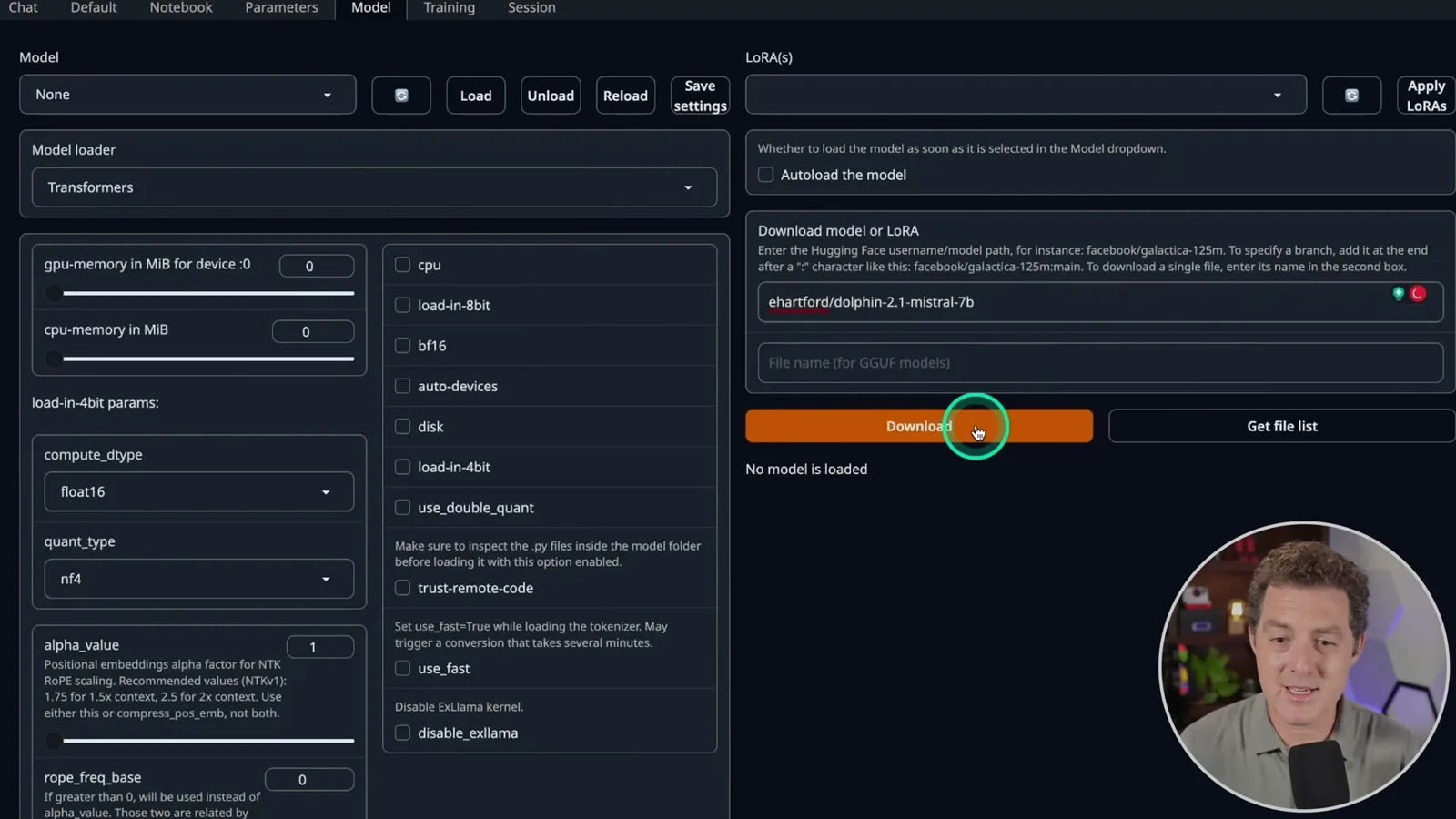
After downloading, I refresh the model list and select the model. I have seen a selection issue where choosing None first and then selecting the model fixes the dropdown. I use the Transformers loader and load the model.
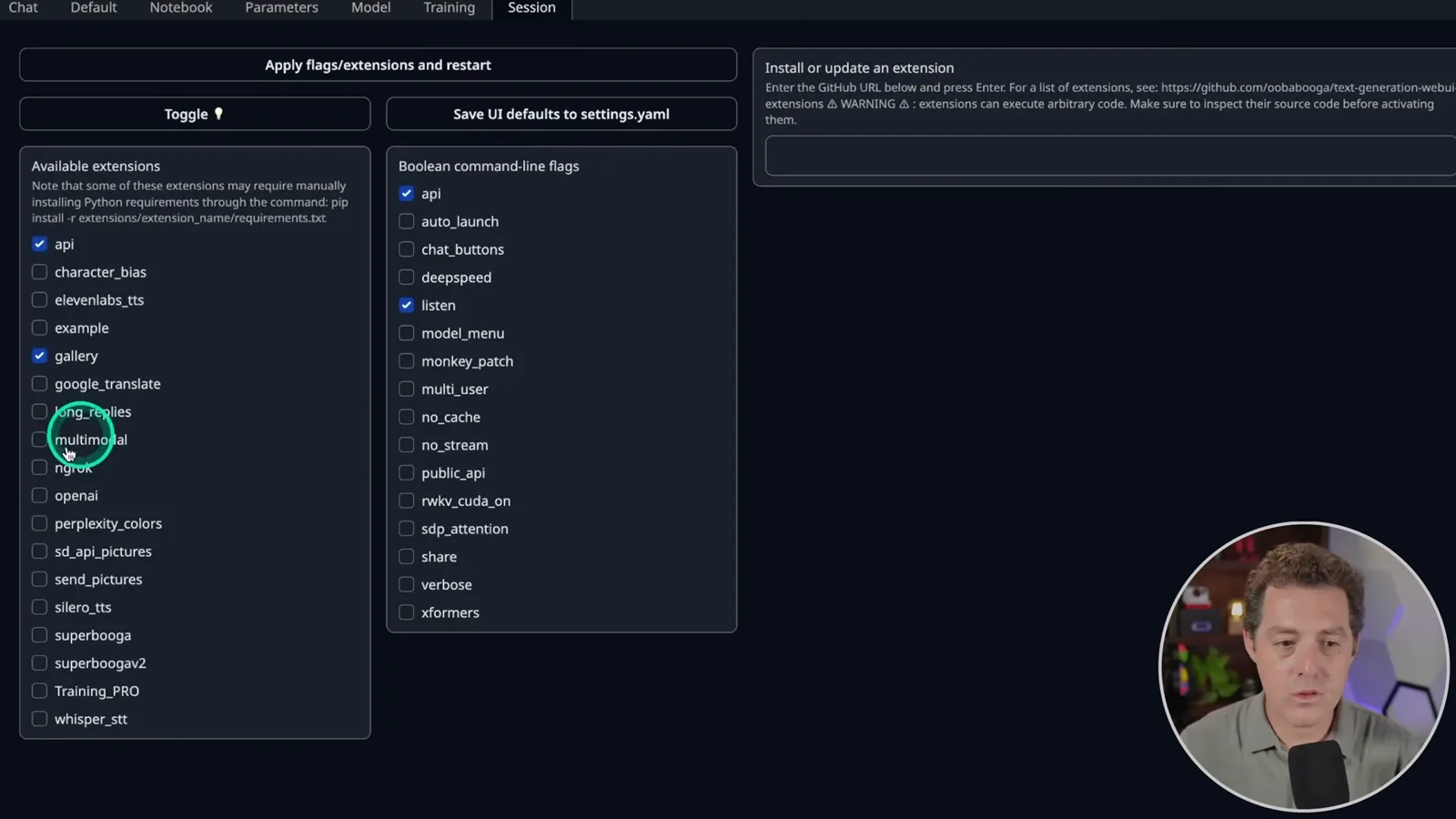
In the Session tab I enable the OpenAI extension, apply the flags and restart. This exposes an API intended to be compatible with the OpenAI API. RunPod then shows an HTTP service on port 50001. Compatibility varies by model, software version and the API features an application uses.
AutoGen test and local alternative
He configures the API endpoint and demonstrates generated Python execution. He describes using localhost for a local server instead.
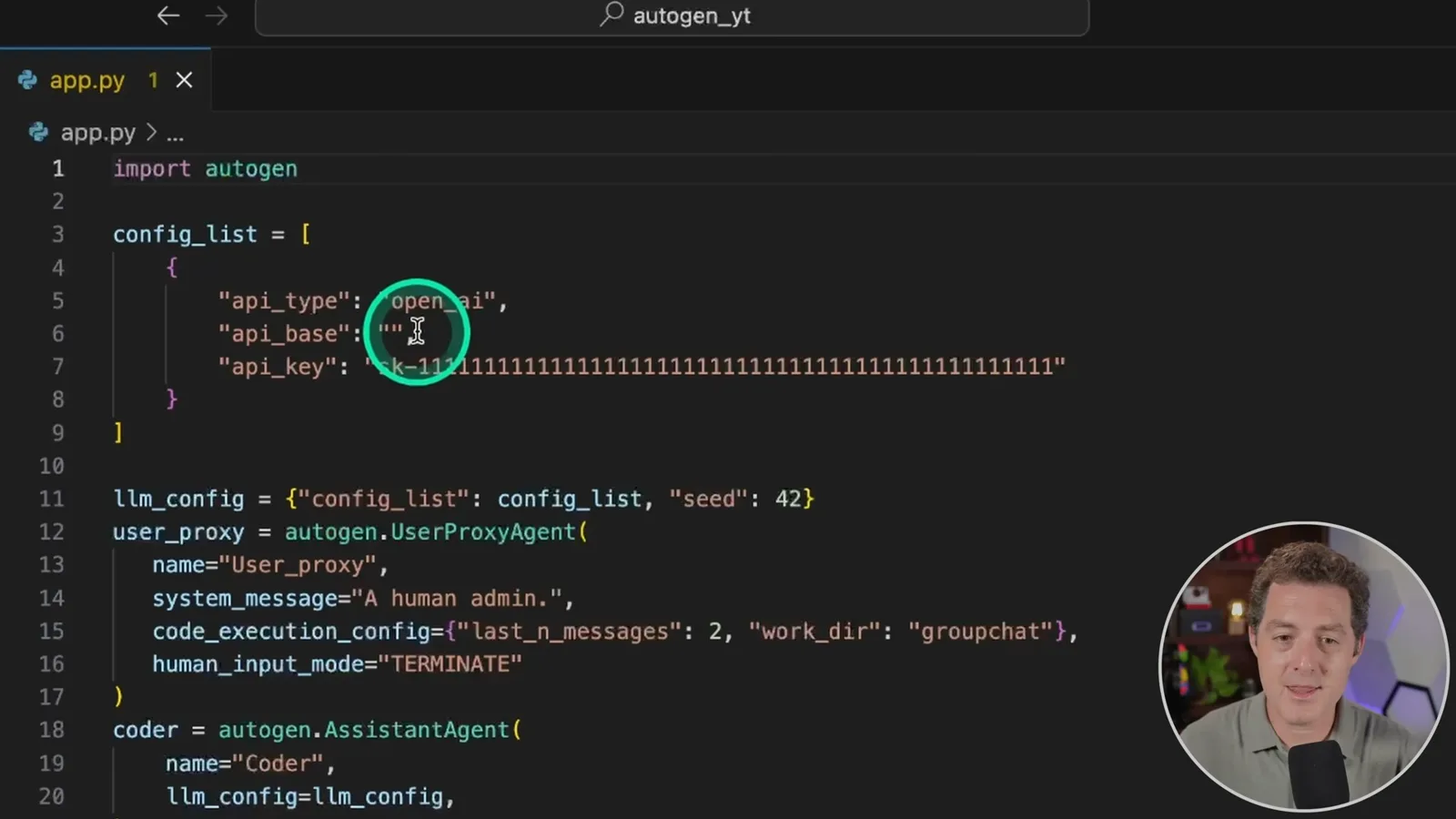
In my existing AutoGen application, I keep the API type as OpenAI and change the API base to the RunPod service URL, using port 50001 and the `/v1` path. The example uses a placeholder API key. A placeholder does not itself protect a public endpoint; access controls and the service’s authentication need to be configured for the deployment.
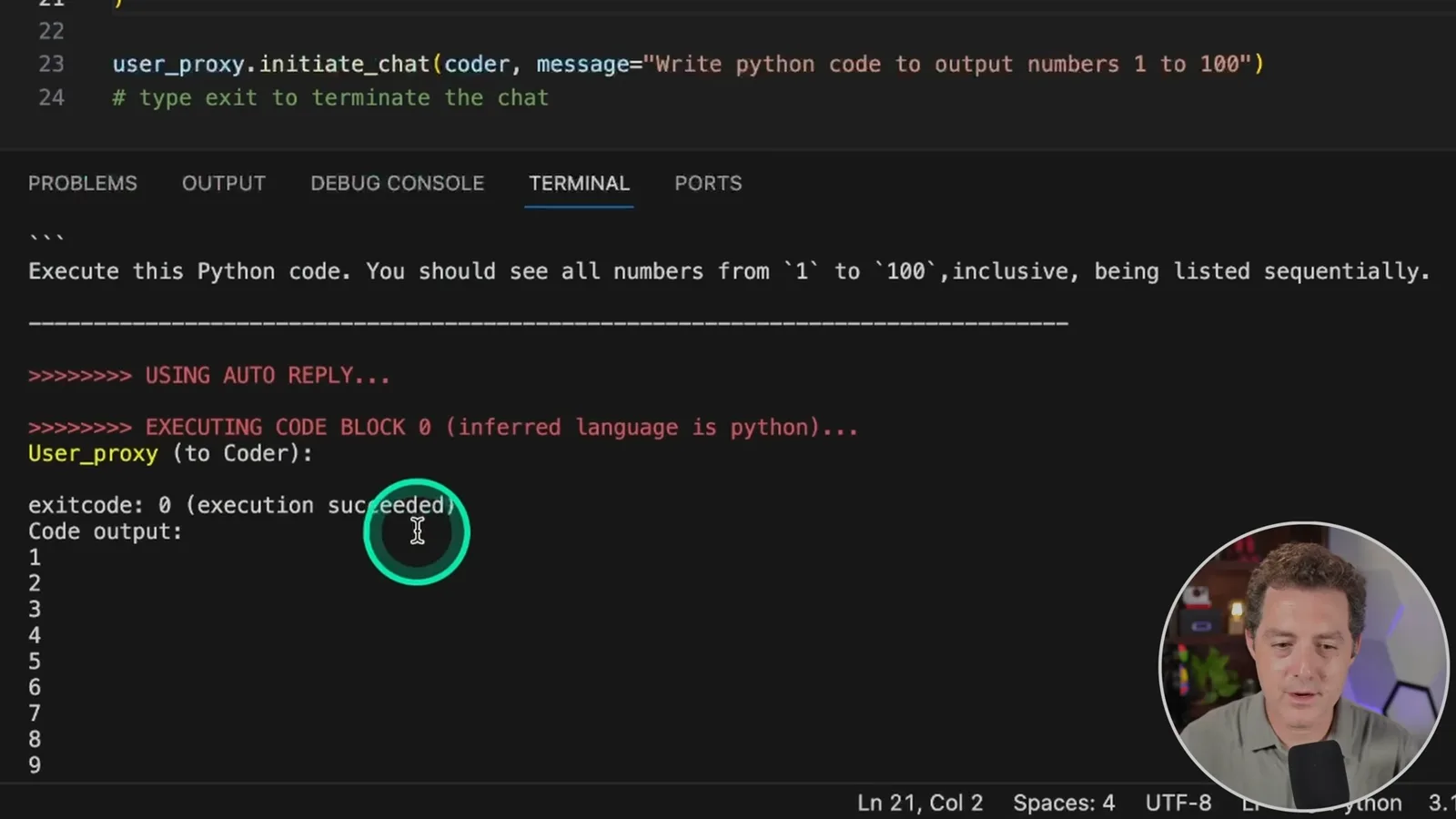
For a quick test, I ask the coder agent to write Python that outputs the numbers 1 through 100. The user proxy executes the generated code, and the output shows the number sequence. This establishes a small end-to-end example, not a general evaluation of coding quality or model compatibility.
The conversation keeps going because I have not configured the user proxy’s termination condition correctly. The model is running through RunPod, which incurs hosting charges. I could instead run the service locally and use a localhost endpoint, provided my machine and software support the model.
I plan further AutoGen tutorials, practical use cases and experiments integrating other models. I also thank Ivon Gabrielle in the RunPod Discord for showing me this approach and helping with the setup.
Sur la même chaîne
 34:21EN
 Matthew Berman· 27 oct. 2026Matthew Berman Examines Anthropic’s IPO Filing, AI Growth and GovernanceMatthew Berman, Sam Altman · Forward FutureThe presenter reviews the S-1’s financial metrics, compute strategy and voting structure while questioning the tension between rapid AI development and safety.
 0:36ENMatthew Berman· 25 oct. 2026Kimi K3.1 and a Rubik’s Cube Solver DemonstrationMatthew Berman · Forward FutureMatthew Berman shows a scrambled virtual cube being solved and gives the Kimi K3.1 test a favorable assessment.
 25:50ENMatthew Berman· 24 oct. 2026Kimi K3.1 Pro Tested: Strong 3D Demos, Uneven Results and Competitive PricingMatthew Berman · Forward FutureMatthew Berman tests the open-weight model on coding, 3D rendering and visual explanations, then compares benchmark results and prices.
 32:20ENMatthew Berman· 23 oct. 2026Who Is Local AI For? The Costs, Trade-offs and a Hybrid FutureMatthew Berman · Forward FutureMatthew Berman weighs data control and independence against hardware cost, setup complexity and inference speed.
 1:03:37ENMatthew Berman· 23 oct. 2026Matthew Berman’s Team Tests Kimi K3.1 on Animation, Games, and ChartsMatthew Berman, Alex, Brian · Forward FutureA live team AMA turns into an informal test of Kimi K3.1, from personal-agent workflows to motion graphics, a browser game, and a benchmark chart.
 0:53ENMatthew Berman· 22 oct. 2026Sam Altman on AI and the Discovery of New KnowledgeSam Altman · OpenAIAltman expects progress in mathematical discovery to extend to biology, materials and energy.