En 30 secondes
Berman describes Grok Bot routines for email, calendars, meeting summaries, school messages and computer cleanup, and relays coding and food-ordering ideas. The video is sponsored by here.now, in which Forward Future discloses a small investment.
- 1Email triageThe host batches archival candidates and summarizes messages needing attention.
- 2A reported coding workflowCursor engineers describe delegating tasks to Cursor agents; Berman has not yet tested it.
- 3Meeting summariesA routine checks transcripts and extracts action items.
- 4Cleanup with reviewThe bot classifies possible deletions without deleting automatically.
À retenir
- Email and meeting summaries are the host’s favorite established workflows.
- Specialized bots can be coordinated through a central chief-of-staff bot.
- The Cursor workflow and DoorDash CLI were not personally tested by the host at recording time.
- His cleanup workflow explicitly asks the bot not to delete files automatically.
- The video discloses both a here.now sponsorship and an investment.
Lire le texte remanié, chapitre par chapitre
Email and classification
Berman describes scheduled triage and sponsor-lead scoring.
I have been using Grok Bot daily and like its persistent bot characters. I will show workflows I use and ideas others have shared; my positive assessment is a personal experience, not a controlled comparison.
My email agent reviews overnight and leftover mail each morning. It groups obvious candidates for archiving and asks me to approve the batch, then summarizes lower-priority messages that still merit a look.
I connect Gmail to allow the bot to read, label, draft and archive messages. Over time I can give it rules for recurring categories, including cases where I allow automatic archiving.
For messages needing action, I ask for the current thread and prior interactions to be summarized along with a suggested next step. I also connect other context sources, including HubSpot and Google Drive, so the agent can use relevant notes.
A separate classification routine scores sponsorship leads and applies labels to different categories of mail. I adapted a scoring heuristic I had built earlier and scheduled the routine during working hours.
Publishing and calendar
He discusses a sponsor and a bot for calendar coordination.
The video includes a sponsorship from here.now, a publishing service that can give an agent a link to share an artifact. Forward Future also discloses a small investment in the company; availability and pricing described in the video are from that time.
My calendar bot works with multiple connected calendars. I use it to help coordinate times, detect conflicts and create events from dates in messages, often delegating through a chief-of-staff bot.
Browser and coding tasks
He demonstrates product search and relays a coding workflow from Cursor engineers.
I use cloud browser control for tasks such as product searches and returns. In the demonstration, the bot finds a tungsten cube and reports its price; I describe other possible actions, but do not demonstrate completing a purchase here.
For returns, I say the bot can navigate a retailer’s flow and provide a QR code. I also mention booking and administrative tasks as possible uses; their success depends on the sites and the access granted.
Cursor engineers described a coding workflow in which a project-specific Grok Bot gathers context, plans work and delegates to Cursor agents. I explicitly say I have not tried this workflow myself yet.
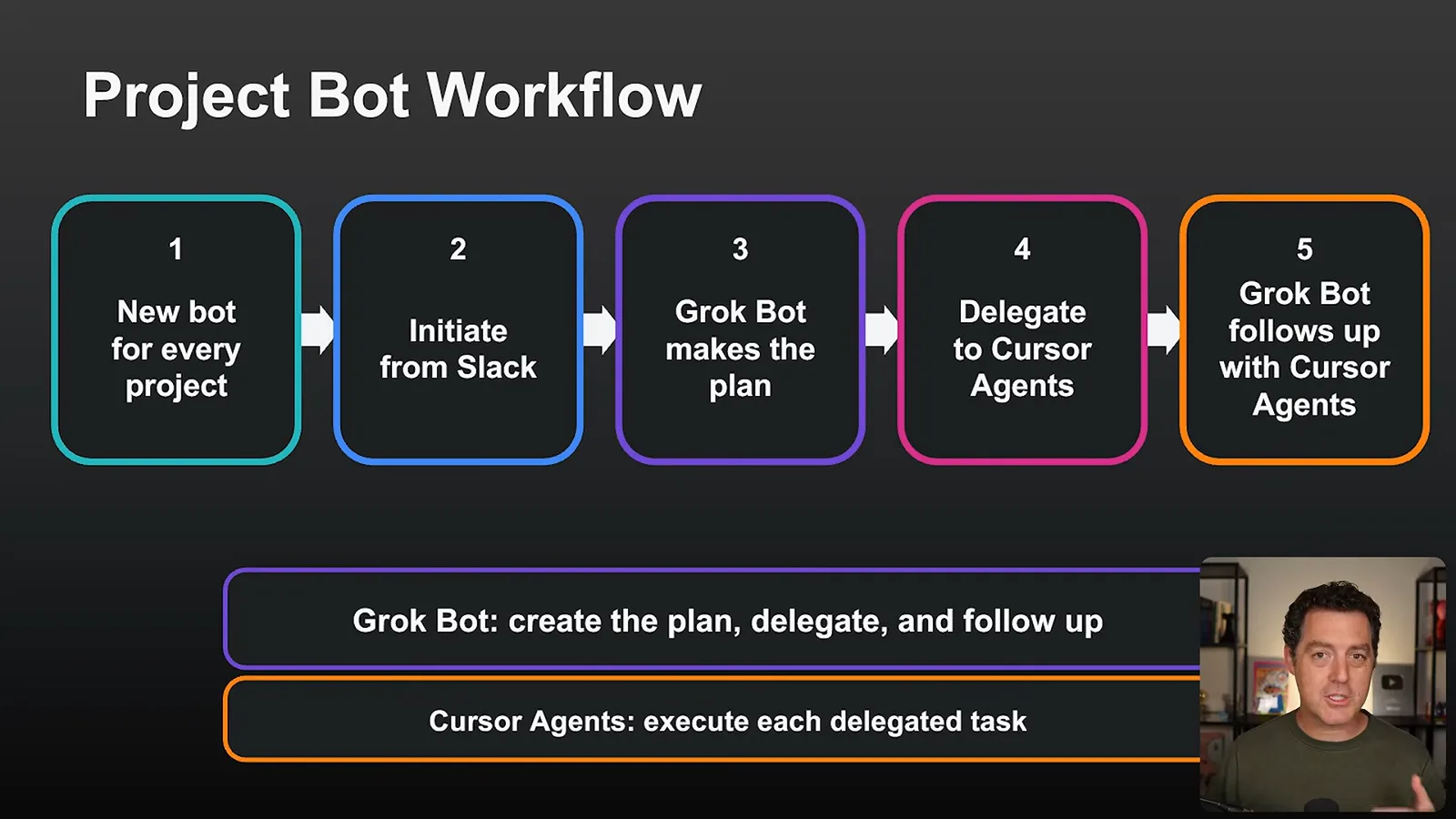
In their described setup, a task starts in Slack, the bot can use connected sources and follows up on delegated cloud work. One example is continuing to investigate a pull request until its CI passes; this is a reported workflow, not my own demonstration.
Food and meeting notes
The video distinguishes a proposed food-ordering setup from an established meeting-summary routine.
I discuss food ordering through DoorDash. I am still on the CLI waitlist and have not used it myself; in the video I show the bot falling back to browser navigation, with sign-in and address still needed before an order could be completed.
My meeting-summary bot checks for new Fathom transcripts, summarizes meetings and identifies commitments made by either participant. It can deliver the notes through the bot, Slack or Telegram.
I would like the bot eventually to review those action items and determine which it can complete independently, but I have not implemented that step yet. For now, meeting summaries and email triage are my two favorite workflows.
Specialized bots and cleanup
A central bot delegates, while school and cleanup bots handle narrower tasks.
My chief-of-staff bot is a central point of contact that delegates work to specialized bots. I keep a separate personal bot to distinguish personal tasks from work-related requests.
A school bot checks for messages from my children’s schools, summarizes important information and identifies dates. I say it can create calendar events and invite my wife, reducing the time I spend reviewing long messages.
For computer cleanup, I ask the bot to classify potential deletions by risk and explicitly tell it not to delete anything automatically. It reports examples such as caches and worktrees for me to review before deciding what to remove.
Telegram and conclusions
Berman describes manual Telegram setup and his overall impression.
I describe setting up a Telegram bot manually so I can reach my chief-of-staff agent while away from the desktop. The setup uses a bot token, and I say I had to work through some issues before it worked.
I see Grok Bot as an approachable bridge between simple question-answering and more involved coding agents. That is my assessment based on the workflows I have tried, with some features and integrations still requiring setup.
Sur la même chaîne
 25:50EN
 32:20EN
 0:22EN
 45:08EN
 0:32EN
 1:02EN