En 30 secondes
Microsoft PowerShell engineering manager Steve Lee discusses the transition from Windows PowerShell 5.1 to open-source, cross-platform PowerShell Core and the then-forthcoming PowerShell 7. He demonstrates changes to error handling, language syntax, parallel processing, command completion and Windows module compatibility. In a wide-ranging Q&A, Lee discusses module management, startup performance, SSH remoting, governance and Azure Functions. Release dates, support timelines and future plans are presented as they stood at the time of the talk.
- 1Windows PowerShell 5.1 remains supportedLee describes 5.1 as feature-complete, with critical servicing continuing and side-by-side use available for new workloads.
- 2PowerShell 7 and compatibilityThe release was positioned as the next step after PowerShell Core 6, with .NET Core 3.1 and renewed work on Windows modules.
- 3Error handlingA concise error view reduces noise, while Get-Error exposes richer diagnostics, including stack traces.
- 4Parallel processing has a costForEach-Object -Parallel can help with waiting or underused cores, but threads and runspaces introduce overhead.
- 5Windows PowerShell compatibilityUnsupported Windows modules can run through a child Windows PowerShell process; returned objects cross a remoting boundary and are deserialized.
- 6SSH remotingPowerShell remoting over SSH is cross-platform and carries objects, but at the time lacked some WinRM capabilities such as Just Enough Administration.
À retenir
- Windows PowerShell 5.1 was treated as a stable, supported product while new feature development moved to cross-platform PowerShell.
- PowerShell 7 aimed to improve Windows compatibility using .NET Core 3.1 and a Windows PowerShell compatibility process.
- Concise errors and Get-Error provide different levels of detail for interactive users and developers.
- Parallel execution has overhead, so measure whether it benefits the workload rather than applying it everywhere.
- Compatibility remoting returns deserialized objects, which do not retain arbitrary methods from the remote object.
- Experimental features can be tested but their designs may change before stabilization.
Lire le texte remanié, chapitre par chapitre
From Windows PowerShell to open source
Lee describes Windows PowerShell 5.1 servicing and the move to .NET Core, open source and multiple platforms. He recounts compatibility and release automation work in PowerShell Core 6.
I manage the PowerShell engineering team at Microsoft. At the time of this talk it has 11 engineers, working with several program managers; our responsibilities include the shell, the gallery, editor services, Pester, PowerShellGet and OpenSSH. Windows PowerShell servicing has moved to another Windows team.
Windows PowerShell 5.1 is the last version of the Windows PowerShell line. There is no plan for a 5.2, 6 or 7 under that name. It remains part of Windows, and support includes critical fixes, but the new work in PowerShell Core and PowerShell 7 is not planned to be ported back.
Think of 5.1 as complete and stable. If an existing business workload runs there, I do not see a reason to move it solely for the sake of moving. New automation that needs newer features can use a separate installation side by side.
In 2016 we announced that PowerShell would become open source and cross-platform. The move from the Windows .NET Framework to .NET Core made it possible to offer the shell beyond Windows, while opening the project to community contributions and fixes.
Opening the code also meant reconsidering tests. Many existing Windows tests used a proprietary framework and overlapped heavily, so the team wrote new open-source tests with Pester rather than simply publishing the old suite.
PowerShell Core 6.1 focused on compatibility with Windows PowerShell. Engineers worked with Windows teams to validate and update in-box modules; Lee estimates that many of those modules reached roughly 60–70 percent compatibility during that effort.
For 6.2, the team invested in automation and consolidated CI on Azure DevOps. Testing across Windows and many Linux distributions was costly. The work reduced a typical preview release from about five calendar days with three engineers to roughly two days with one and a half engineers when issues arose.
PowerShell 7 plans and support
He presents the planned release and support cadence, and explains why Windows would not ship PowerShell 7 in-box at that time. Windows PowerShell compatibility uses a separate process when necessary.
PowerShell 7 drops the word Core from the name. Lee describes it conceptually as the next step after Core 6 rather than a wholesale breaking redesign: the team wanted users to see it as PowerShell, not assume that Core meant a diminished subset.
The aim was to make it a viable daily replacement for Windows PowerShell. .NET Core 3.1 restored many APIs missing from earlier .NET Core releases, making compatibility with .NET Framework modules more feasible. The team also restored commands and worked with Windows teams on in-box modules.
At the time of the talk, the final preview had shipped, a release candidate was imminent and general availability was targeted for January. Changes were being cherry-picked into the release rather than automatically taking everything from the development branch. These were plans at the time, not a current release schedule.
Lee says PowerShell 7 is intended as a long-term servicing release aligned with .NET Core 3.1, with roughly three years of security and critical-fix support. PowerShell Core 6.2 followed the earlier lifecycle and was expected to leave support after the new release.
The plan was to release annually and align alternate long-term releases with .NET, including a prospective 7.1 on .NET 5 and 7.2 on .NET 6. Those plans were explicitly subject to change, and the team did not intend to increment the PowerShell major version merely to match .NET.
There was no plan at the time to include PowerShell 7 in Windows itself. The obstacle was support duration: .NET Core’s three-year long-term servicing period was shorter than the Windows lifecycle. Lee notes that installing even Microsoft-signed software can be difficult in some enterprises.
For Windows modules that are not marked compatible with PowerShell Core, the preview adds a compatibility path. PowerShell 7 can invoke commands in a Windows PowerShell process using the jobs infrastructure, rather than requiring WinRM to be enabled.
Errors, web requests and language features
A demo compares concise errors with detailed diagnostics and shows web request handling. Lee then demonstrates null-related operators and the ternary operator.
The first visible change in the demonstration is a concise error view. Older errors can fill the screen with information that many users find confusing. The new default emphasizes the immediate message, while users can choose the older view if they prefer it.
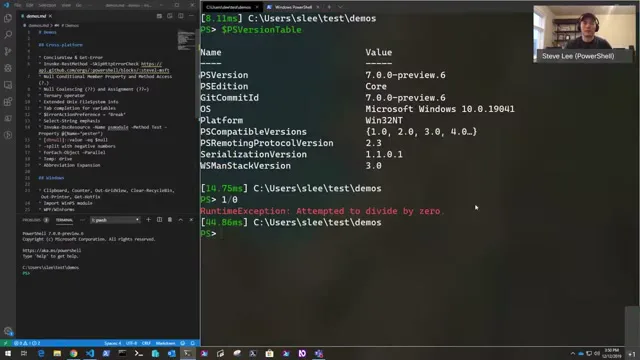
For deeper investigation, Get-Error exposes richer information, including .NET and PowerShell script stack traces. In a script with several errors, the concise display also shows the relevant line and uses color to make the output easier to scan.
Cloud workloads often involve REST APIs and JSON. Lee shows an HTTP failure and explains that scripts may need the response body, status or headers to decide what to do. Treating every failed HTTP status as a terminating PowerShell error can make that handling awkward.
A community-contributed option allows Invoke-WebRequest and Invoke-RestMethod to skip converting an unsuccessful HTTP status into a PowerShell error. The script can capture the status code and response headers and handle the response itself.
The team chose several language additions from highly voted community requests. One demonstration is null-conditional member and index access: an expression can attempt the operation only when the value is not null, avoiding a separate check for that case.
Braces around the variable are required in that syntax because PowerShell already permits question marks in variable names. This avoids breaking existing names. Lee cautions that avoiding one null check does not prevent unrelated mistakes elsewhere in the script.
Null coalescing offers a default when a value is null. In Lee’s example, an unset user value can fall back to another value; when it is set, the expression returns the existing value instead. A related assignment form updates a variable only when it is null.
The ternary operator chooses one of two expressions based on a condition. It is familiar from other languages and was a popular request, but Lee stresses that it is an option rather than a requirement for every script.
Interactive improvements and experimental features
Unix file metadata, completion, debugging and highlighted search results receive attention. Lee distinguishes an experimental design from an untested implementation.
On Unix-like systems, file listings gain information familiar from a native long-format listing, including user and group information. This comes from native APIs and is presented in PowerShell’s Get-ChildItem output on those platforms.
Interactive completion is also improved. Instead of entering an invalid preference value to discover acceptable enum values from an error, a user can tab-complete them. Lee attempts an additional live example but does not get its syntax working during the demonstration.
A new action preference can break into the command-line debugger on an error, without adding an explicit debugger wait at every point. That makes it easier to investigate a script with multiple errors as it runs.
Select-String gains visual emphasis for matching text. The result remains an object usable in automation, and the highlighting can be turned off. PowerShell is adding more configurable color to distinguish items and their contents in interactive output.
Lee distinguishes experimental features from buggy ones. In previews, experimental features had been enabled by default to gather feedback; the release candidate would turn them off by default. Experimental means the design may still change, so users should not depend on it as a stable production interface.
At the time, concise errors, the ternary operator and null coalescing were planned to stabilize, while null-conditional member and method access would remain experimental. Experimental features could still be enabled for testing, but design changes would not be treated as breaking changes.
DSC, null values and parallel execution
Lee discusses invoking DSC resources, database nulls and string splitting. He demonstrates parallel iteration and explains the overhead and throttle limit.
The team also worked on Invoke-DscResource, although Desired State Configuration itself belonged to another team. The idea was to call a DSC resource’s test, set or get operations directly, without requiring a local configuration manager on the system, including on Linux and macOS.
For database users, the demonstration addresses how scripts compare an absent value with a database null. The aim of the community-requested behavior is to reduce the need to handle DBNull separately in common comparisons. A similar convenience applies to null strings.
A negative count for splitting strings changes the direction of the split. A positive count can split from the left, while a negative count starts from the right, making it easier to retain the desired portion of a string without extra manipulation.
ForEach-Object -Parallel addresses a common request from users of PowerShell Workflow: a convenient way to run work concurrently. A demo with sleeps shows multiple iterations progressing in parallel instead of waiting for each one to finish serially.
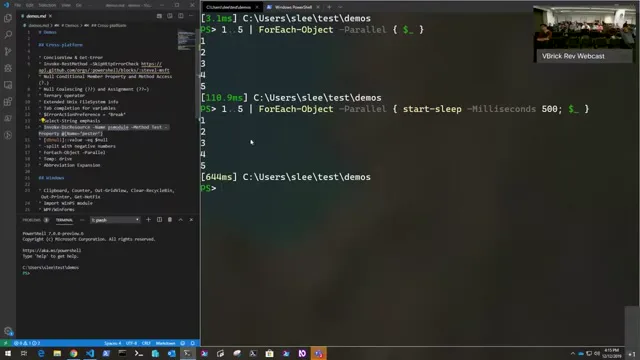
Parallel is not a universal speed switch. Starting threads and runspaces has a cost, so small tasks may become slower. It is more promising when work waits on network requests or leaves CPU cores underused; Measure-Command can help determine whether it actually improves a particular workload.
ForEach-Object itself creates local runspaces. A script inside the loop can still invoke a command on a remote session, but the parallel parameter is not itself a remote-computer selector. The default throttle limit shown in the talk is five, and users can tune it for their workload.
Commands and Windows compatibility
Temporary drives and command abbreviation aid interactive use. Restored commands and a compatibility process help Windows users move existing scripts.
The new Temp drive maps to the operating system’s temporary directory, providing a convenient path on Windows and Unix-like systems. Unlike Pester’s TestDrive, it does not automatically clean up files: it is a shortcut, so cleanup remains the user’s responsibility.
Interactive abbreviation expansion helps with long command names. Typing the capital letters of a command and using tab completion can expand the name. This is for interactive completion; the abbreviation is not expanded at script runtime, where full names remain more readable.
Several commands absent from PowerShell Core 6 return in version 7. Clipboard commands are one example: dependencies missing in earlier .NET Core versions had prevented them from shipping. The cross-platform implementation discussed here handles text, not the file clipboard behavior available in Windows PowerShell.
Other restored Windows commands include performance counters, recycle-bin handling, printing and hotfix inspection. Some remain unavailable, including examples that depend on nonpublic APIs. Lee notes that newer event commands supersede some older event-log commands.
Out-GridView provides an interactive table that can filter objects and pass selected items onward in a pipeline. For example, a script could let a user choose services before another command acts on the selection. Lee cautions against casually using a destructive follow-up in the example.
The return of .NET desktop components also permits Windows scripts that use WPF and WinForms. WPF in this .NET Core release is Windows-only; Lee mentions Avalonia as a possible cross-platform alternative rather than claiming WPF itself works everywhere.
The ServerManager module illustrates the compatibility problem. It cannot load directly in the earlier PowerShell Core example because it depends on an unsupported assembly. PowerShell 7 can instead start Windows PowerShell as a child process and load the module there.
The commands exposed in PowerShell 7 are proxy functions that communicate with the child process through the job infrastructure. Basic operations such as inspecting or changing Windows features can work, although formatting may differ when output crosses the remoting boundary.
The returned objects are deserialized rather than live objects in the original process. Their data is available locally, but methods belonging to the remote type are not necessarily callable on the copy. That is an important limit when deciding whether an existing script will work through compatibility mode.
Q&A: modules and performance
Questions cover operating-system checks, plans for PowerShellGet v3 and performance. Lee separates script runtime from startup latency.
Asked about scripts that should run across operating systems, Lee suggests checking the environment or testing for a command with Get-Command. At the time, some Windows-only commands were candidates for later cross-platform work, while others depended on platform-specific APIs and would take more effort.
Module authors also need to check their dependencies. Different Linux distributions do not necessarily have the same native commands, so a runtime check and a meaningful error can help. Gallery tags can advertise supported operating systems, although Lee says the package tooling did not yet enforce all of those constraints.
For PowerShellGet v3, Lee wanted to simplify installation. Existing workflows can require switches to handle command-name conflicts, publisher differences or already-installed versions. His goal was to make the ordinary request to install a module easier to carry out.
Another proposed change is NuGet-style version ranges. A dependency can specify version 3 inclusive and version 4 exclusive, rather than using an artificial maximum such as a long sequence of nines. Lee also discusses direct NuGet packages as a desired scenario.
The proposed rewrite would move away from the PackageManagement dependency and toward a C# implementation, with a more convenient user experience and local caching. A cache could accelerate searches and potentially help identify which module supplies a missing command. The preview schedule was still tentative.
On performance, Lee expects many scripts to benefit from .NET Core and PowerShell optimizations, but does not give a universal speedup number. Startup is a different issue: he expects PowerShell 7 to start more slowly than Windows PowerShell 5.1 on the same Windows system.
He attributes part of the startup difference to how the runtimes prepare native code. Windows PowerShell can use native images generated from its managed assemblies, while the .NET Core approach used here does not precompile everything. Further startup work was planned, but he did not expect parity immediately.
Lee gives rough, system-dependent estimates without profiles: perhaps 300–400 milliseconds for Windows PowerShell and 600–800 milliseconds for PowerShell 7. These are informal estimates from the talk, not a benchmark or a claim about current releases.
The team had taken over PSReadLine maintenance and planned to incorporate newer versions in the editor extension. At the time, the goal was a PSReadLine 2.0 release around the PowerShell 7 launch and an update for Windows PowerShell as well.
Q&A: remoting, governance and Azure
Lee compares SSH and WinRM remoting and discusses compatibility on older Windows versions. He also addresses community RFCs and PowerShell support in Azure Functions.
For cross-platform remoting, Lee recommends PowerShell remoting over SSH. This is more than starting an interactive shell through SSH: the PowerShell remoting protocol transports objects back to the client. SSH works across platforms, whereas the WinRM-based path had limitations on Linux and macOS.
At the time, gaps in the open-source infrastructure underlying non-Windows WSMan support made some authentication and Exchange Online scenarios difficult. Lee says the team intended to invest in SSH and mentions the possibility of remote debugging through a reverse tunnel.
One limitation was Just Enough Administration, which constrains what a remote user can do at an endpoint. It worked through the Windows/WinRM path, but not through SSH remoting in the scenario Lee describes. Adding comparable support was a difficult future project.
Windows OpenSSH was production-ready on supported recent Windows versions, but a small team had to merge upstream changes and integrate them into Windows. Lee mentions an Azure extension as another installation route, while acknowledging the effort required to support older systems.
For the Active Directory module, compatibility depends on the Windows version. On newer Windows versions, updates allowed the module to work directly with PowerShell Core; on older systems, Lee describes using the Windows PowerShell compatibility path, with the associated deserialized-object limitation.
Asked about contentious changes, Lee points to debate over language features. Some contributors worried that additional syntax increased complexity when existing if statements could already express the behavior; others valued the requested options. The committee had to balance those views.
The team was also discussing how to make governance more open, potentially involving more community members and separating technical and strategic responsibilities. Lee emphasizes that no final structure had been settled at the time of the talk.
Community RFC review had fallen behind, in part because a small committee had limited meeting time and had prioritized its own proposals. The team wanted a lighter and more inclusive process, including discussing ideas in issues before contributors invest in a full RFC.
Finally, Lee discusses Azure Functions. PowerShell team members helped build the language worker with an experience oriented toward PowerShell scripters, then handed ownership to the Azure Functions team after the public preview. He hoped that team would adopt PowerShell 7 around its general availability, but did not promise a date.
Sur la même chaîne
 1:34:29EN
 1:34:36EN
 15:48EN
 1:20:57EN
 1:12:58EN
 58:47EN