In 30 seconds
DSPy and LangGraph can solve the same agent workflow in different ways: DSPy emphasizes input/output signatures, Python modules and optimization, while LangGraph models shared state, nodes and routing. Stanford’s Michael Ryan demonstrates both with a calendar assistant, then shows how evaluation changes a design decision: in one small test, optimizing an instruction improved a model from 11 of 20 examples to 20 of 20. He cautions that this is a task-specific test, and argues for representative evaluations, observable failures and recovery instead of adding agent complexity by default.
- 1An engineered AI system needs data and evaluation as well as a modelRyan distinguishes a runnable agent from an engineered system whose behavior can be measured and improved.
- 2DSPy separates the input–output contract from how the model fulfills itSignatures describe fields, modules compose behavior, and optimizers use data and a metric to improve the program.
- 3On a 20-email test, prompt optimization improved the small model from 11 correct to 20The example uses 30 training emails and 20 held-out test emails. Ryan cautions that data splits, evaluation quality and optimization cost still matter.
- 4LangGraph makes shared state and routing explicitNodes read and update state, while edges define control flow. Ryan says DSPy calls can also be used inside graph nodes.
- 5The agent harness changes how a model uses tools and contextRyan contrasts a minimal shell-based harness with alternatives that manage events, persistent terminals or branching history differently.
- 6A durable workflow can retry a failed activityIn the Temporal calendar example, an emoji-selection activity retries before the workflow continues. Its history exposes what happened.
- 7Evaluate the task you actually need, including failure casesRyan recommends representative and difficult cases, measuring cost and latency as well as accuracy, instead of treating an unrelated benchmark as the goal.
Takeaways
- Start with a workflow when the steps are known; add agent autonomy when the task requires the model to decide what to do next.
- Define task-specific data and evaluation before deciding whether a framework or prompt change is better.
- DSPy prompt optimization improved a calendar extraction example from 11/20 to 20/20 on its small held-out test; the result does not establish general performance.
- Use traces, timeouts, retry limits and execution budgets to make agent failures visible and recoverable.
- A harness’s tools, context, execution and memory choices can change results even with the same underlying model.
Read the edited text by chapter
Frameworks hide details; engineering still needs evaluation
Ryan compares AI frameworks to PyTorch abstractions. He distinguishes models, programmed workflows and agents by where control flow sits.
Frameworks can make agent systems easier to build by hiding repetitive implementation details. Michael Ryan compares them to PyTorch: a developer specifies the forward pass and calls backward rather than manually writing every derivative, even though the underlying mathematics still matters.
Ryan describes three pillars of AI engineering: the system itself, data such as demonstrations and feedback, and an evaluation or metric. A runnable agent can be built without the latter two, but he argues that improving it reliably requires all three.
He places systems on a spectrum. In a workflow, application code controls the sequence of model calls and branches. In an agent, the model has more control over actions such as choosing tools; real systems can mix these approaches.
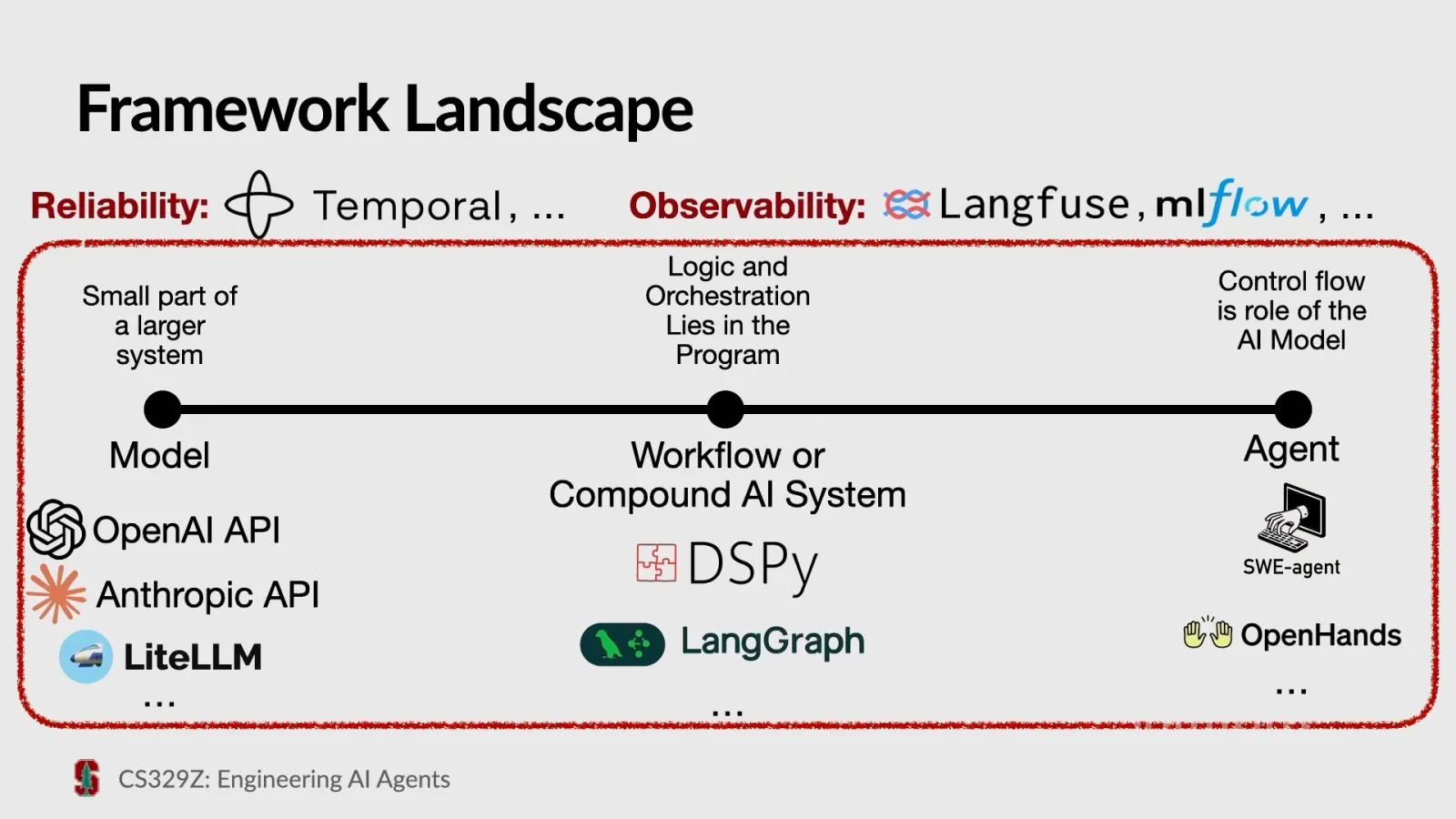
DSPy and LangGraph can be used for workflows and agents, while Temporal addresses reliability and tools such as Langfuse and MLflow help inspect execution. Ryan distinguishes observability—making problems visible—from reliability mechanisms that can also recover automatically.
DSPy signatures define what goes in and out
A live calendar example introduces signatures, field types, descriptions and adapters that format and validate outputs.
Ryan discloses that he previously worked on DSPy. Its three concepts in this lecture are signatures, which define inputs and outputs; modules, which specify and compose behavior; and optimizers, which use data and a metric to improve prompts or weights.
The live example uses a calendar application with tools for adding, deleting and moving events. Ryan begins with a simple signature mapping a message to a response and uses DSPy’s Predict module to call the model.
For sentiment extraction, a loose signature can return inconsistent labels or capitalization. Adding types can restrict the intended output to positive, negative or neutral and add a numeric confidence field.
Asked how formatting is enforced, Ryan explains that adapters turn the signature into model instructions and validate the returned structure. He says built-in adapters can try fallback formats, but eventually raise an error if they cannot produce a valid result.
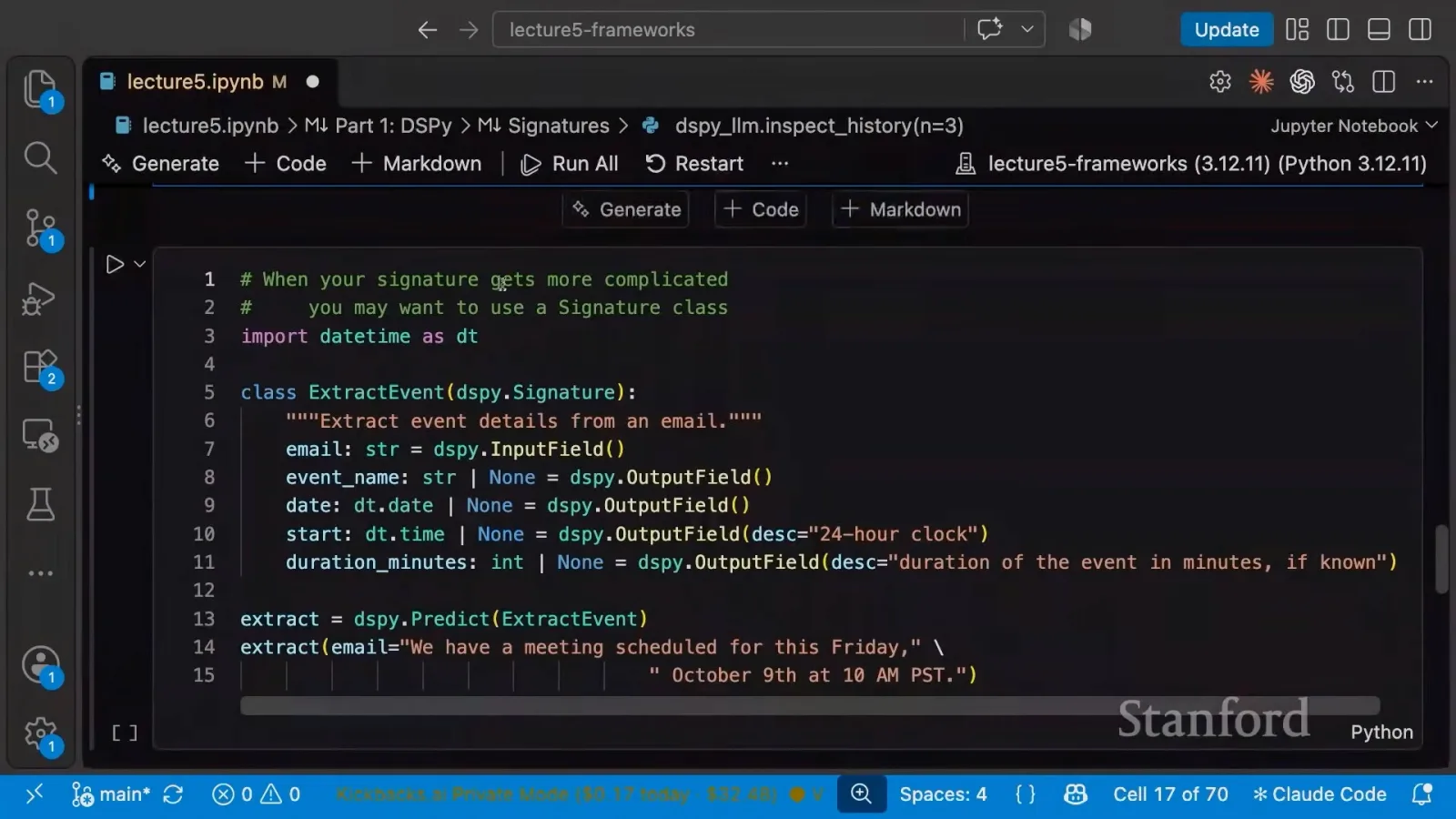
A class-based signature can describe a more complex task: extract an event’s name, date, time and duration from an email. Optional fields can represent missing information, and field descriptions can specify conventions such as a 24-hour clock.
A student asks whether a field name alone tells the model what to extract. Ryan says its name and type provide information, but a description can clarify ambiguous cases. The signature also limits which outputs the program asks for.
The class docstring supplies task instructions in DSPy’s prompt construction. Ryan suggests stating essential requirements there, while an optimizer may help with details. He says conversion of the signature to a prompt is deterministic; the model’s response is a separate step.
Compose model calls with ordinary Python
Modules combine extraction, emoji selection and a calendar API. The code decides which steps to execute.
A module can change how a signature is fulfilled. Ryan demonstrates ChainOfThought, which adds a reasoning field before the other outputs, and a second signature that selects an emoji for an event.
The class discusses why a docstring is used as a system instruction. Ryan says it is easy to find and read in code; a participant notes that the structure also constrains certain mistakes. They acknowledge the oddity of documentation becoming executable behavior.
Ryan composes extraction and emoji selection in a larger Python module. The forward method extracts the email’s event, checks that name, date and time are present, then selects an emoji and calls the calendar API. If required fields are missing, his example returns no event.
The calendar demo uses a one-hour default when the message does not specify duration. A meeting email adds an event; a message without a usable event returns a no-event result. Ryan emphasizes that this branching is his application code, not a special requirement of the library.
Optimize against labeled examples and a metric
Ryan uses 30 training and 20 test emails to demonstrate prompt optimization and discusses cost, held-out evaluation and overfitting.
To discuss optimization, Ryan asks whether a smaller open-weights model can perform the extraction task. He prepares 50 synthetic labeled emails and splits them into 30 training examples and 20 test examples.
The example’s metric requires exact matches for date, start time and duration. Event name is not scored. A metric returns a score and can optionally provide textual feedback to help an optimizer understand errors.
On this small held-out set, the demonstrated larger model gets all 20 examples right. The small Gemma model initially gets 11 of 20; after the GEPA prompt optimizer rewrites the instruction using training data, the displayed test result is 20 of 20.
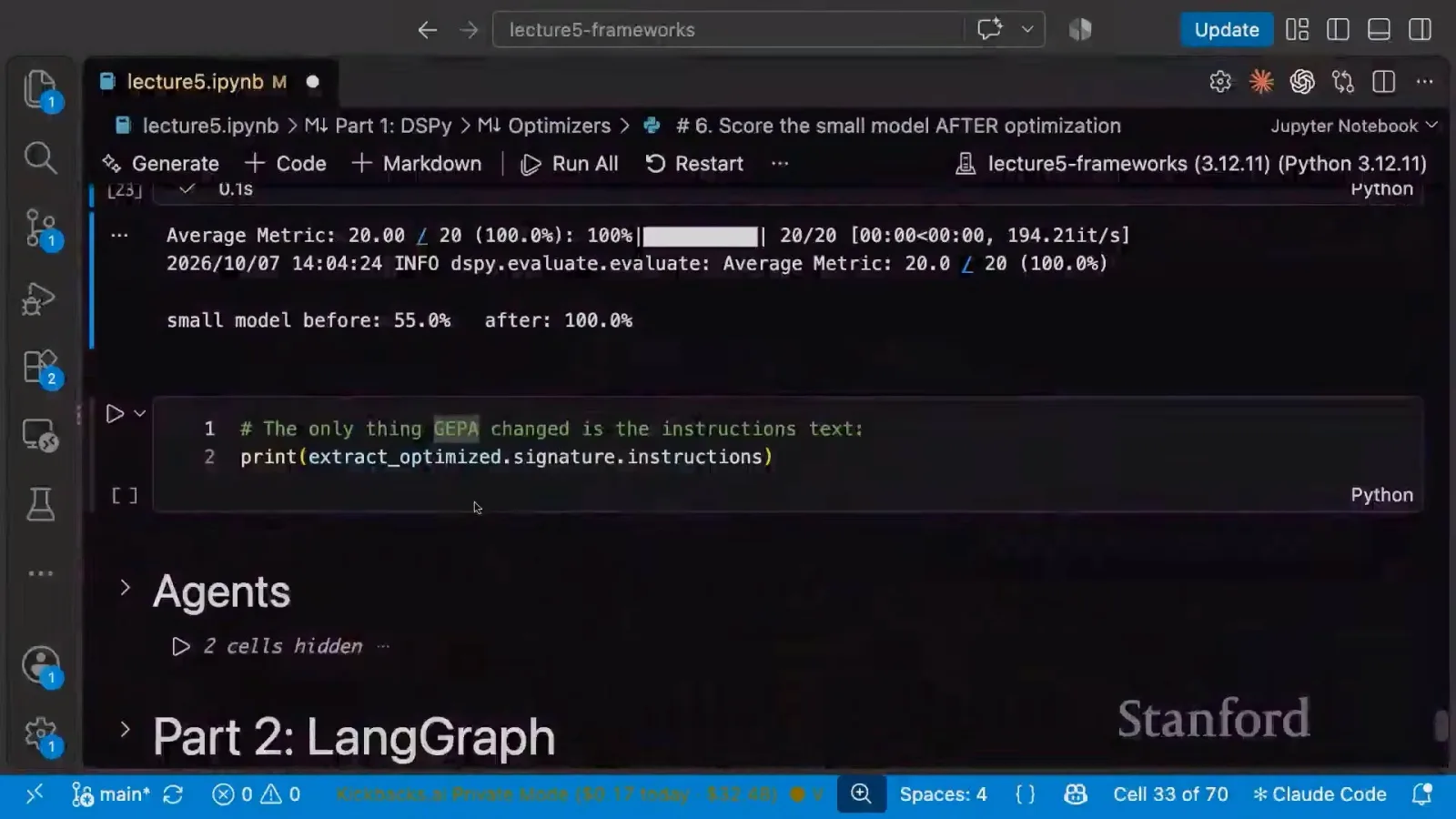
The optimized instruction is longer and spells out the extraction task and output fields. Ryan says a person might have written something similar manually. He also notes that optimization requires many model calls and can consume substantial tokens, depending on the budget.
A student asks about overfitting. Ryan says the same train, development and test separation used in other machine-learning work still applies. His example optimizes on the training set and reports the result on the test set, but the metric and examples must reflect the real goal.
DSPy caches model calls with matching inputs and parameters, so a cached run can reproduce the stored output. Without that cache, generating another optimized prompt is not necessarily deterministic.
An optimized instruction can sometimes look strange. Ryan recalls an older example that used a Star Trek scenario for a math task. His advice is to judge prompts against meaningful held-out evaluations and be alert to metrics that can be gamed.
Let the model choose calendar tools
A ReAct module selects tool calls to update a calendar. Ryan also discusses using code to inspect a long inbox in a recursive language model.
The calendar workflow can also be made more agentic. Ryan uses DSPy’s ReAct module with calendar functions as tools, giving it a request and asking for a summary. In the demonstration it adds a coffee meeting and changes lecture emojis.
He briefly shows a recursive language-model approach to an inbox. Instead of placing every email directly in a model call, the example gives the system a variable and a code execution environment in which it can inspect or search the text.
Students ask whether they can provide their own prompts. Ryan says instructions can be written in the signature’s docstring; using an optimizer is optional, and optimization can start from an existing instruction.
Summing up, he says signatures specify contracts, modules determine how to fulfill them, and optimizers improve a program using data and a metric. Agent modules supply patterns such as tool-use loops.
LangGraph represents state, nodes and edges
Ryan rebuilds the calendar workflow as a graph with conditional routing and compares the abstraction to DSPy.
LangGraph uses a different abstraction: a shared state, nodes that read and update it, and edges that control the path between nodes. An edge can be conditional, and a model-and-tool loop is one possible graph.
Ryan rebuilds the event extractor with structured output. The graph starts with an email in state, runs a node that writes extracted details and then ends. Visualizing the graph makes the simple fixed path explicit.
A student asks why use a graph. Ryan says explicit orchestration can help reason about retries, inspection and distributed work. The developer defines the graph; the end user of the resulting application need not edit it.
He then adds a conditional route: if the extracted state has a name, date and start time, the workflow selects an emoji and adds the calendar event; otherwise it ends. An email without an event therefore does not create a calendar entry.
Asked to compare the frameworks, Ryan says DSPy users often write control flow in Python and optimize prompts, whereas LangGraph emphasizes graph orchestration. The choices overlap and can be combined: a LangGraph node can call DSPy.
LangChain’s agent helper can create a model-and-tools loop. In the example, the agent receives a request to move a coffee meeting and updates the calendar. Ryan qualifies some implementation details as his understanding rather than a full account.
For a large data-processing task, he says structured output alone is not a decisive distinction because both frameworks support it. Large graph orchestration could favor LangGraph, while DSPy calls and optimized prompts could still be used inside the graph.
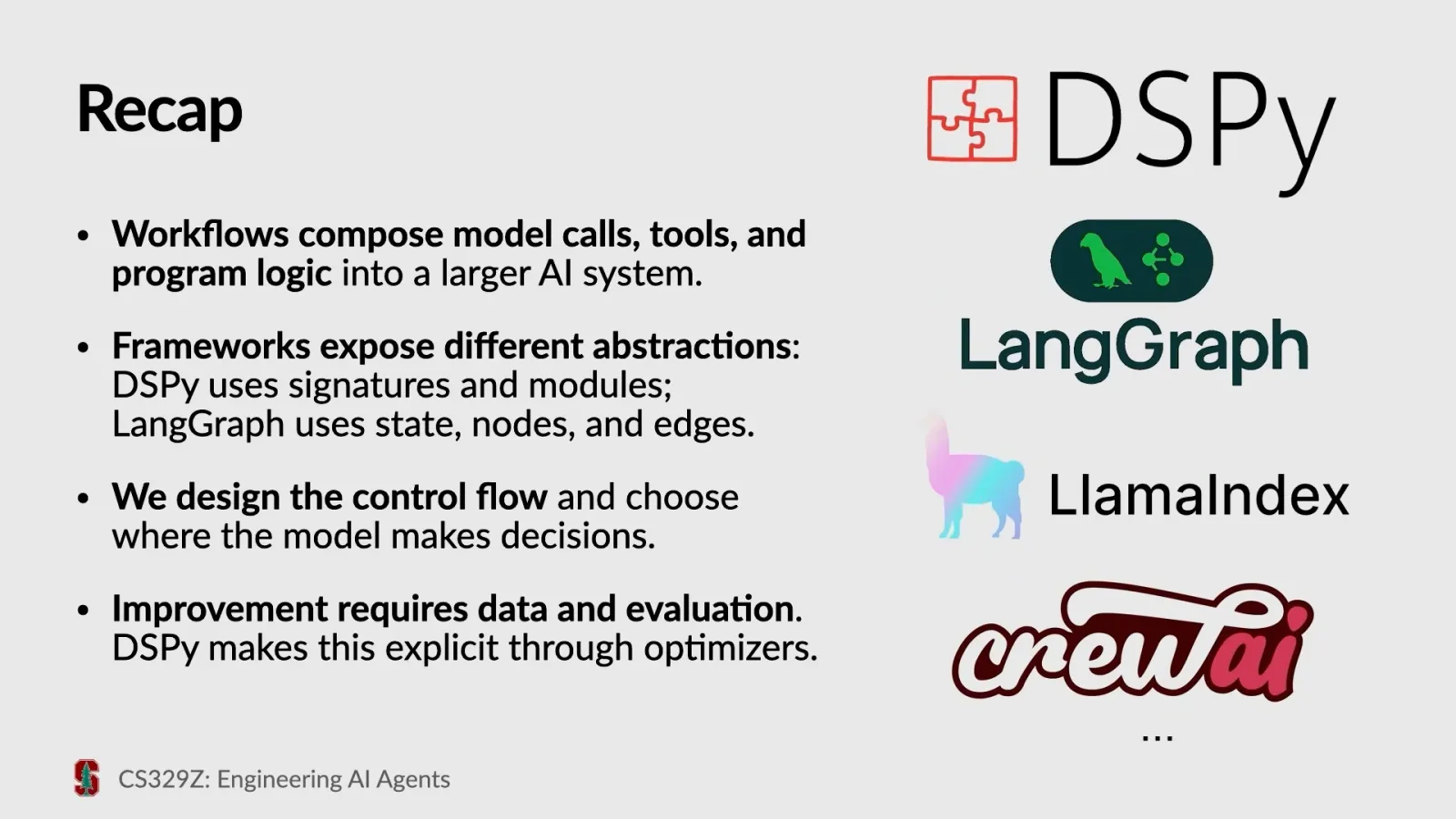
The larger lesson is that frameworks expose different abstractions for similar jobs. Regardless of the library, developers decide where control sits and need data and evaluation to improve the resulting system.
Agent harnesses make different tool and memory choices
Minimal and richer harnesses handle command execution, context and history differently. Benchmark results depend on both model and harness.
An agent harness is the machinery around the model: tools, planning and memory mechanisms, context construction and execution. Different choices trade off success, cost, latency and user control.
Ryan describes mini-SWE-agent as a minimalist example with Bash as its tool and a growing linear history. Each command uses a new process rather than a stateful terminal, simplifying some execution concerns.
OpenHands uses an event-oriented history and a persistent terminal, with mechanisms to stop repeated failure. Ryan contrasts that with Pi’s small set of tools and tree-shaped history, illustrating that agents can organize similar work differently.
He also describes OpenClaw as an example of a longer-running agent with scheduled activity and file-based identity and memory. These are design choices, not requirements for every harness.
A benchmark chart compares models across harnesses and shows that the surrounding implementation can affect results. Ryan also describes research on generating a task-specific harness, while cautioning that optimizing for a benchmark is not the same as building a general-purpose coding assistant.
Temporal records execution and retries failures
A calendar workflow shows durable activities, workers and server-side history; a failed activity can be retried and inspected.
Longer-running tasks need infrastructure that survives failures. Ryan distinguishes the human-time duration plotted in a model benchmark from the actual time the model runs; his operational concern is that a machine or worker can fail while a workflow is underway.
In Temporal, workflows link activities; workers execute code, while a server maintains execution history and state and dispatches work. Ryan reruns the calendar task and opens the server interface rather than walking through all the code.
The example includes an intentionally flaky emoji-selection activity. The history shows it being retried three times before the calendar operation continues, making both the recovery and its timing visible for inspection.
Trace calls, cost and latency
Observability tools show inputs, outputs, errors and performance, helping teams debug longer-running systems.
Ryan shows observability tools including MLflow, LangSmith and Langfuse. Depending on the tool, a team can inspect inputs, outputs, traces, token usage, latency, costs and evaluation scores to understand what a system actually did.
Start simple and evaluate the real task
Ryan recommends the least complex architecture that fits, representative evaluations and safeguards for failure. He closes with the cost of abstraction and external dependencies.
His first practice is to keep the architecture simple. A fixed workflow may be a good fit for extracting calendar events from emails; a more open-ended assistant asked to manage a calendar may need the model to choose actions.
Even a single task-specific model might be sufficient for a well-defined extraction problem with enough training data. When using an agent, Ryan recommends choosing its available tools deliberately rather than adding autonomy without a reason.
Make failures observable and recoverable: trace model and tool calls, record state changes and errors, set timeouts, limit retries and execution budgets, and monitor what happened. Feeding a tool error back to an agent can allow it to try another approach.
Ryan mentions a research system, Shepherd, that uses a supervising agent to observe another agent’s actions and intervene after failures. He presents it as an example of an approach to observability, alongside ordinary engineering tools.
Evaluations should guide design and optimization. Build cases representative of the intended task, including diverse inputs, edge cases and failures, and consider cost and latency as well as accuracy.
He cautions against optimizing an unrelated headline benchmark. A calendar assistant should be tested on calendar tasks; coding benchmarks are more appropriate when the goal is a general coding agent.
Abstractions make development faster but can hide behavior that matters when something breaks. Ryan recommends understanding the prompts, system mechanics and dependencies underneath a framework, including whether an external library is likely to remain maintained.
His closing cycle is to build, run, evaluate and improve. Start with a simple design, justify additional complexity, plan for failure and recovery, and use evidence from the relevant evaluation to weigh quality, cost and latency.
More from this channel
 1:40:43EN
 Stanford Online· Nov 13, 2026How AI agents find information and take actionAfshine Amidi, Shervine Amidi · Stanford UniversityStanford instructors explain why useful agents need retrieval, well-described tools and a harness that manages context and actions.
 1:19:15ENStanford Online· Nov 12, 2026How AI agents learn to use tools—and how to test themDiyi Yang · Stanford UniversityDiyi Yang traces tool use from retrieval failures and Toolformer to runtime discovery, MCP and reliability benchmarks.
 1:11:21ENStanford Online· Nov 12, 2026Stanford researchers use AI to challenge thinking, not replace itCynthia Bailey, Mark Algee-Hewitt, Megan Ma, Markus Covert · Stanford UniversityA humanities scholar, legal researcher and bioengineer show how they use models while protecting judgment and human interpretation.
 1:16:31ENStanford Online· Nov 11, 2026Building RAG: from document chunks to agents that searchDiyi Yang · Stanford UniversityDiyi Yang explains how indexing, hybrid retrieval and reranking work—and why agents need to check what search returns.
 1:03:19ENStanford Online· Nov 11, 2026Manage AI sources: retrieve selectively and withhold context when usefulCynthia Bailey · Stanford UniversityStanford lecturer Cynthia Bailey explains when to retrieve documents, leave context out and guard against instructions hidden in sources.
 1:17:53ENStanford Online· Nov 10, 2026How language-model design shapes context engineering for agentsMichael Ryan · Stanford UniversityStanford’s Michael Ryan connects decoding, attention and inference to the practical choices agent builders make.