In 30 seconds
Berman demonstrates Meta’s SAM Audio using a short restaurant video. He uses a text prompt to isolate a voice and switches between the isolated and remaining audio; the video is a sponsored demonstration, not a systematic evaluation.
- 1Audio separationBerman introduces SAM Audio and discloses his partnership with Meta.
- 2Select a voiceHe enters a prompt to isolate the speaker from restaurant noise.
- 3Listen to the remainderHe switches off the isolated voice and plays the other sounds.
Takeaways
- The demonstration uses a text prompt to select a sound.
- The interface provides isolated audio and the remaining sound as separate tracks.
- One example does not establish performance on every recording.
Read the edited text by chapter
SAM Audio demonstration
Berman introduces the sponsored example and its source video.
I demonstrate Meta’s SAM Audio, which can isolate a selected sound from an audio or video recording using a prompt. I am partnering with Meta on this video; the short demonstration is an example rather than an independent benchmark.
The source clip shows a woman speaking on the phone in a noisy restaurant. After playing the original, I enter “voice” and ask the tool to isolate it. The interface produces separate tracks, and I play the isolated speech.
Separate and play the tracks
He isolates the voice and then listens to the remaining audio.
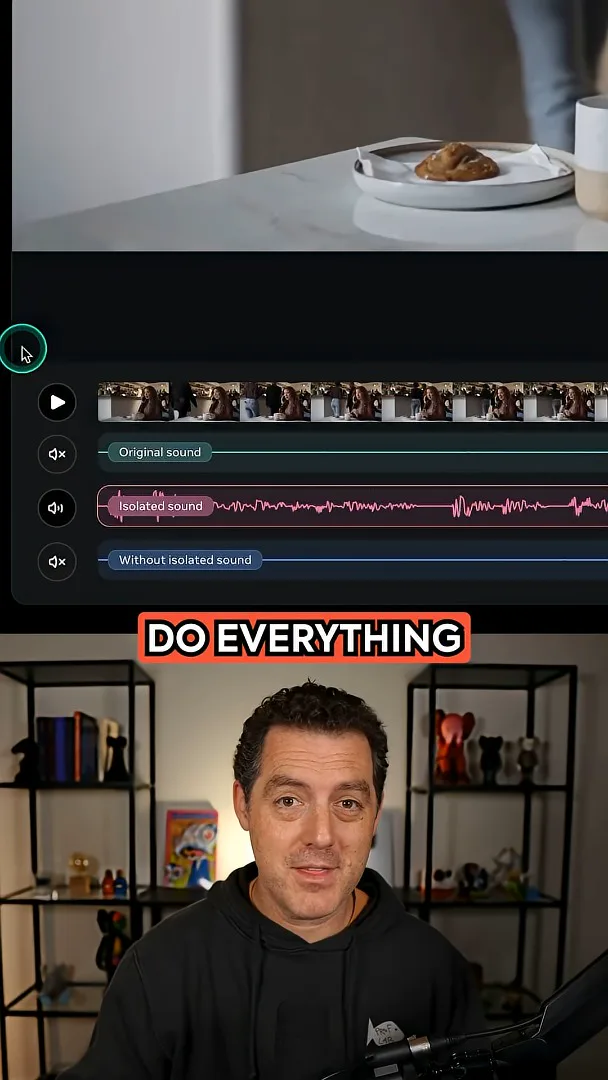
I then mute the isolated voice and play the remaining audio. The example illustrates how a creator can listen to the target and the background separately; it does not establish how well every recording or sound source will separate.
More from this channel
 25:50EN
 32:20EN
 0:22EN
 45:08EN
 0:32EN
 1:02EN