In 30 seconds
In this January 23, 2025 video, Matthew Berman reacts to OpenAI’s launch of Operator, a research preview that uses a cloud browser. The demonstration includes reservations, grocery shopping, user takeover and parallel tasks, along with a live failure and benchmark results. Availability and product descriptions reflect the launch period; the video includes a Together AI sponsorship.
- 1Booking with clarificationWhen the requested restaurant time is unavailable, Operator proposes another time and asks the user to confirm.
- 2Observe, act and inspectThe grocery demo illustrates a loop of screenshots, interface actions and subsequent observations.
- 3User takeoverA presenter manually changes the grocery order and then returns control to the agent.
- 4Safety layersOpenAI discusses refusals, confirmations and a prompt-injection monitor as mitigations, while acknowledging remaining risks.
- 5Benchmark limitsThe reported scores are 38.1% on OSWorld and 58.1% on WebArena under the stated evaluation conditions.
Takeaways
- Operator’s launch demo used screenshots and mouse and keyboard actions to work in a remote browser.
- The agent paused for clarification or confirmation, and a person could take over the browser.
- Saved cookies could preserve logins, but authentication, changing websites and payments remained sources of friction.
- OpenAI described layered mitigations for harmful requests, model mistakes and malicious website instructions.
- The reported OSWorld and WebArena scores reflect specific benchmarks and do not guarantee success on real websites.
Read the edited text by chapter
An early browser agent
Altman and OpenAI presenters introduce Operator and its launch scope. Berman discusses how visual browser control works.
In January 2025, OpenAI announced Operator, an early research preview of an agent that uses a cloud browser to carry out tasks. I watch the launch demonstration and comment on its capabilities and limitations.
Sam Altman describes agents simply as AI systems that can work independently on a task. I like that concise definition even though more elaborate agent systems may also use memory, tools or collaboration.
OpenAI says Operator observes a browser through screenshots and controls it with mouse and keyboard actions. At launch it is offered to US Pro users, with wider access described as a future plan; those details are historical, not current availability guidance.
OpenAI’s presenters emphasize that this is an early preview that can make mistakes. The home screen offers example prompts and mentions work with several services, including OpenTable, Instacart and others.
I explain the general challenge of translating visual information into clicks on the correct interface elements. I speculate that work with partner sites helped the demonstration, but the video does not establish exactly how the model was trained for those sites.
A restaurant reservation
The agent searches for a table and asks about an alternative time. Berman considers login and payment friction; the video includes a sponsor segment.
In the first demonstration, the team asks Operator to reserve a table for two at a San Francisco restaurant at 7 p.m. It opens a remote browser, navigates to OpenTable and searches for the restaurant.
I initially worry that a cloud browser may require repeated logins and manual payment details. The later demo clarifies that cookies can preserve a logged-in session, although authentication and payment can still require user intervention.
I view the preview as impressive but unfinished, especially for real transactions. The video then includes a sponsored segment for Together AI.
Back in the demo, Operator searches and displays a summary of its actions. A location mismatch is corrected using a custom instruction specifying San Francisco.
I imagine future agents managing more authentication, but that is speculation and would require careful privacy and security design. The demo itself later uses a user-controlled takeover for sensitive login steps.
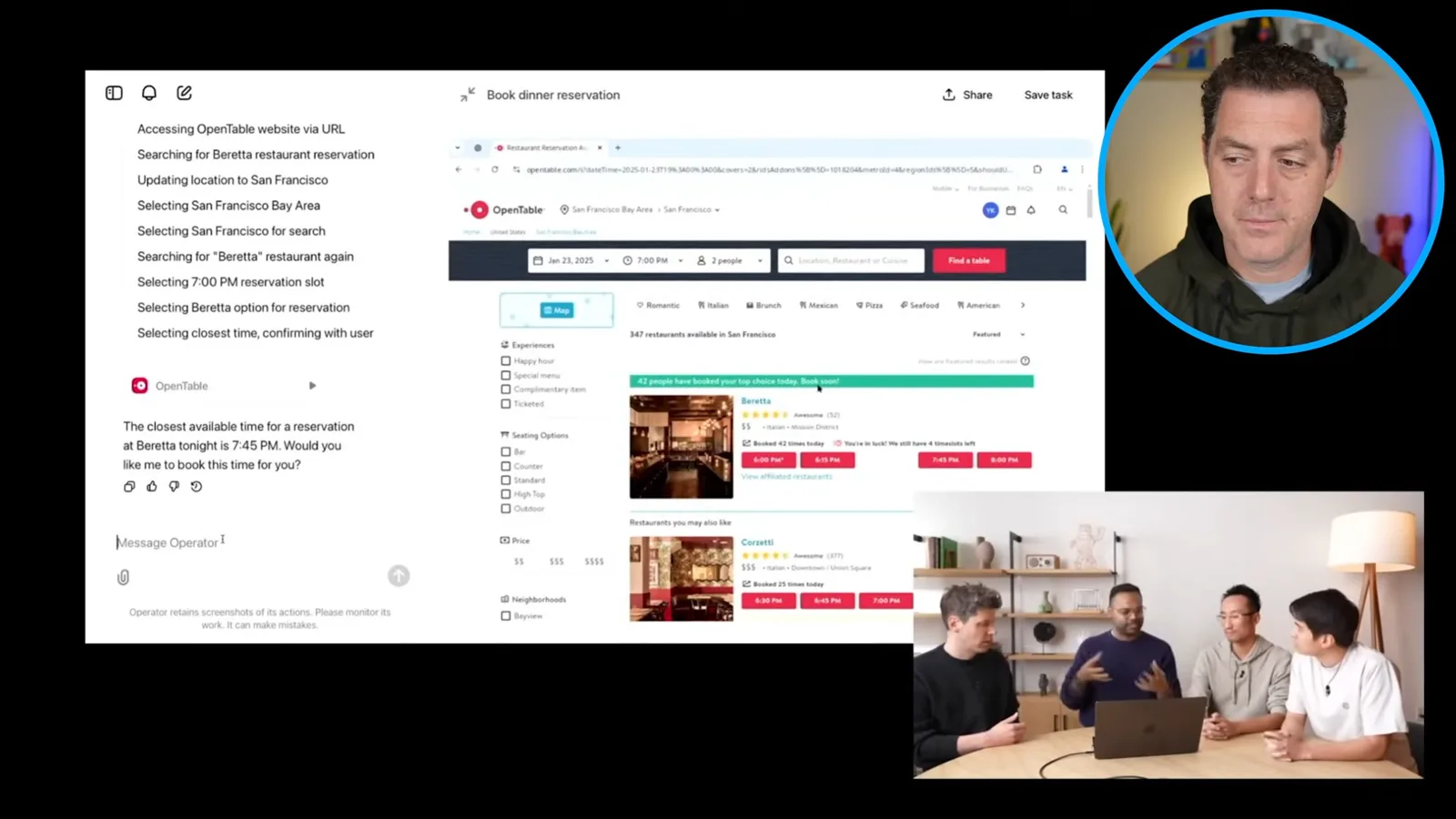
The requested 7 p.m. reservation is unavailable, so Operator asks whether 7:45 is acceptable. The team describes this as a way for an agent to pause for clarification while the user does something else.
Before making the reservation, Operator also seeks confirmation. The time slot then becomes unavailable during the live demo, illustrating that real websites and availability can change while a task is running.
I highlight the possibility of running several browser tasks in parallel rather than personally working through them one at a time. The amount of practical time saved depends on how often tasks need supervision or correction.
Groceries and computer use
A shopping-list image initiates an Instacart task. The presenters explain CUA’s screenshot and action loop.
For the grocery example, the team uploads an image of a shopping list and asks Operator to use Instacart. The list includes eggs, spinach, mushrooms, chicken thighs and chili crunch.
The presenters say the model recognizes the items in the image and can search for a suitable store if no site is specified. I notice that the demonstration account is already logged in and want to know how that session was established.
OpenAI introduces its computer-using agent, or CUA, as a model built on GPT-4o and trained for computer interaction. Berman comments on the action summaries but the video does not establish the model’s private reasoning implementation.
The presenters contrast controlling a visual interface with relying on a separate API for every service. I note that browser interactions can be fragile, but they can reach interfaces that do not expose the needed API.
I compare browser agents to robots designed for environments built around human interfaces: adapting to an existing interface can extend reach without redesigning every service. That analogy does not imply that visual control is always more reliable than an API.
The team replays a grocery step: CUA observes a screenshot, identifies a product, clicks Add, sees the next screen and continues. The UI shows an action history and summaries; it should not be treated as a full transcript of hidden reasoning.
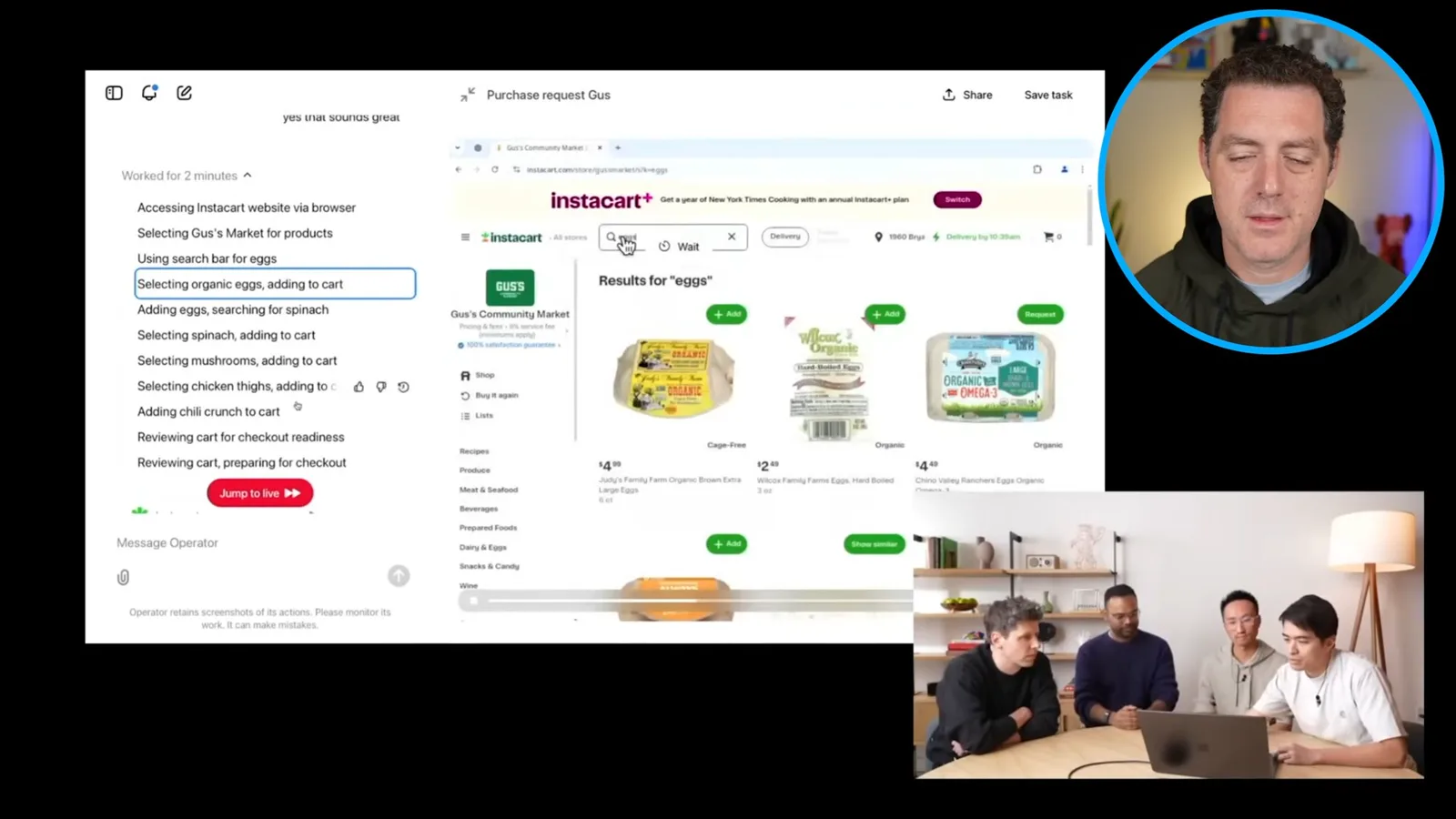
The repeated loop is to observe the current screen, decide on an action and inspect the resulting screen. In the example the agent adds eggs and then searches for spinach.
Takeover and parallel tasks
A user takes control, and the team explains session privacy and saved cookies. A ticket task encounters a blocked redirect before further tasks are launched.
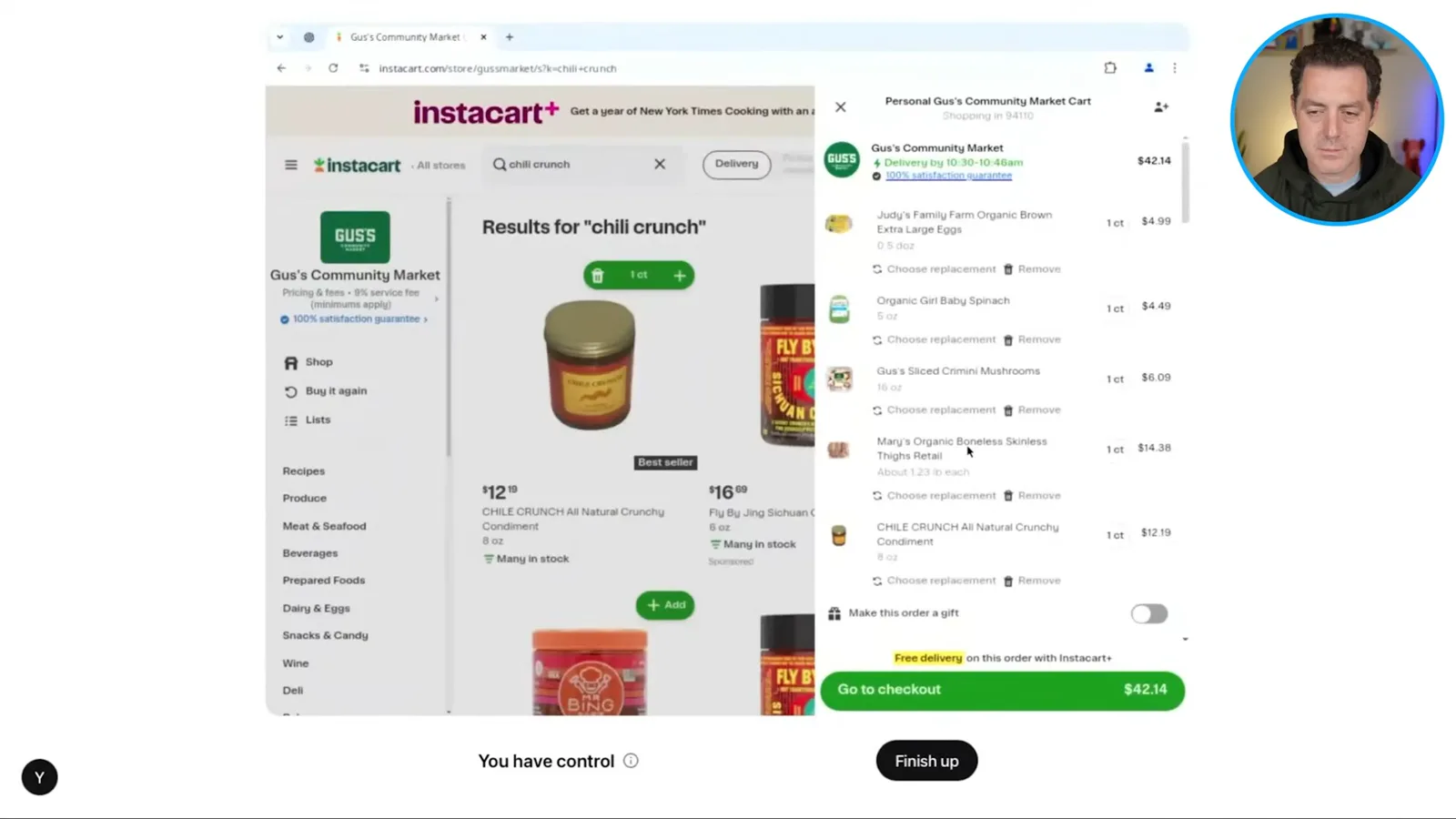
A presenter takes control of the browser and changes the egg quantity. OpenAI says the user can take over, guide the process and then return control to Operator.
The team says Operator cannot see the user’s actions while the user has taken control. On returning control, the user may optionally summarize what changed; the agent can also inspect the resulting page.
The presenter explains that the Instacart login was completed before the demo and that cookies keep the session signed in until cleared. This corrects my earlier assumption that every task necessarily starts without a saved login, though some friction remains.
A ticket-search task hits a blocked page during the live demo. The presenter takes control and corrects the address; the team attributes the issue to a redirect and a rule requiring HTTPS.
The team launches additional tasks, including finding a tennis court, a cleaner and pizzas. I find parallel delegation compelling, while these examples still involve prompts, selections and confirmations from the user.
Operator asks follow-up questions and the team selects from the returned options. OpenAI says notifications can draw the user back when an agent needs help or is about to make an impactful change.
Safety and evaluation
The team describes safety layers and a live login. They close with benchmark results and the limitations of the early research preview.
The safety discussion separates harmful user requests, model mistakes and malicious website instructions. OpenAI describes refusals and moderation, confirmations, and a separate prompt-injection monitor as layers intended to reduce those risks.
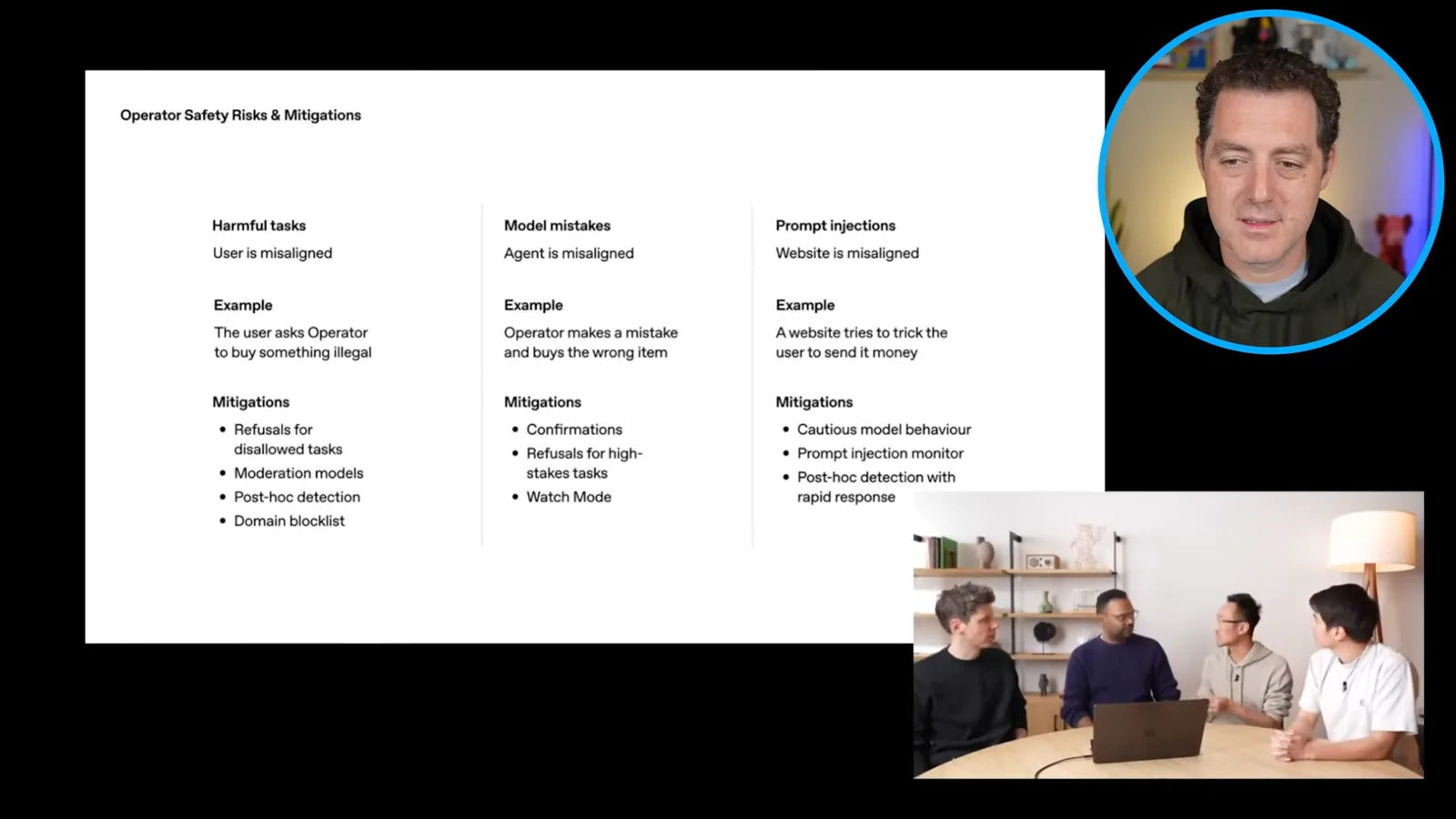
For a state-changing action, confirmation gives the user a chance to check the details. The presenters acknowledge that no set of mitigations can predict every failure, and describe a gradual rollout to learn from use.
The ticket purchase requires the presenter to take over and log in. Berman notes that email codes, password managers and payment details can add friction in a remote browser; the actual flow depends on the website and saved session.
OpenAI reports CUA scores of 38.1% on OSWorld and 58.1% on WebArena, compared with stated human scores of 72.4% and 78.2% respectively. These are benchmark results under specified conditions, not success rates for every real-world task.
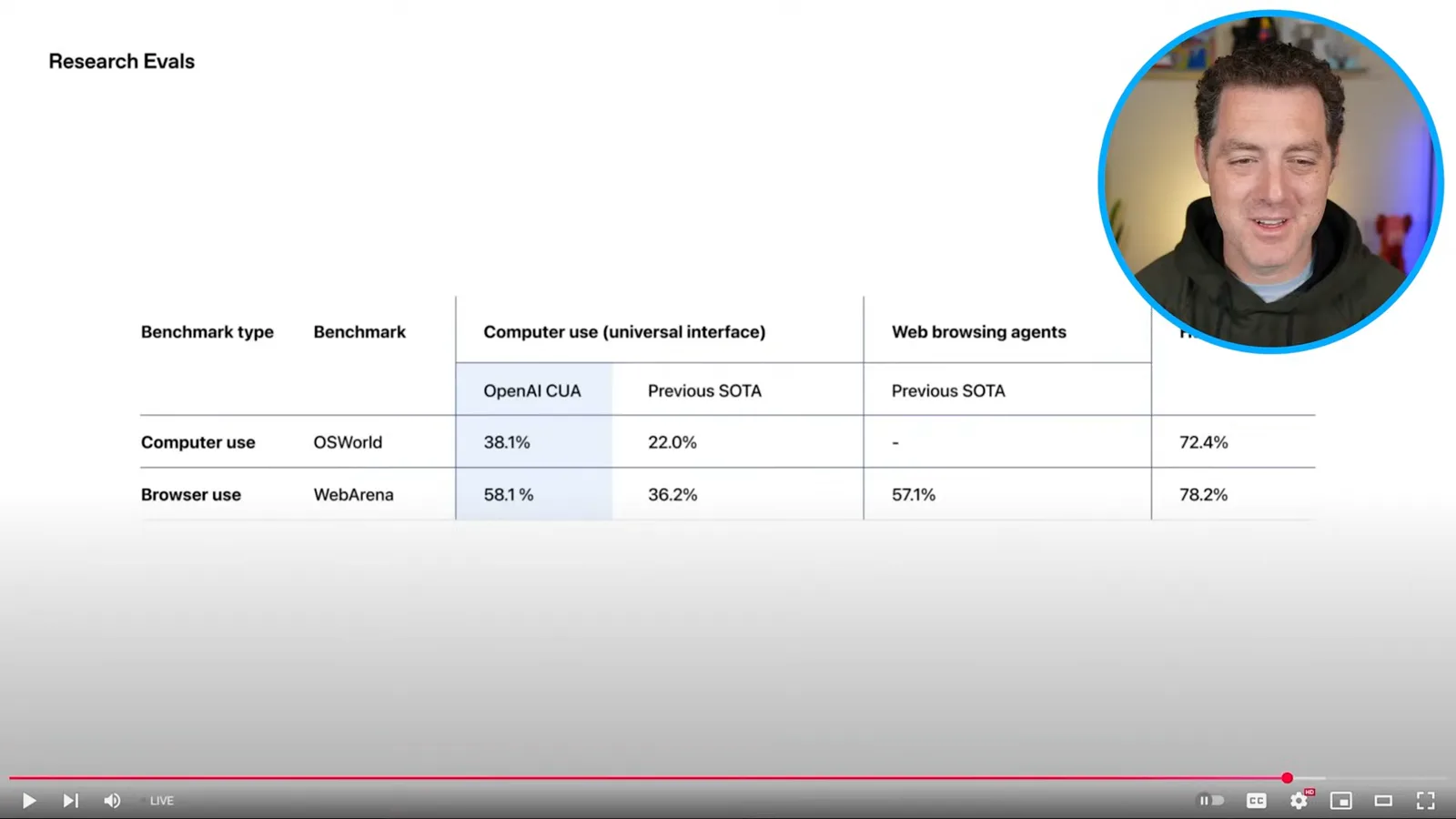
The presenters emphasize that the WebArena setup gives the system screenshots, mouse and keyboard rather than page text or element metadata. They say the underlying model could also be used on a computer interface beyond the demonstrated browser.
OpenAI closes by calling Operator an early research preview and describing planned API access. I am eager to test it, while the demo itself has shown both useful delegation and the need for human checks.
More from this channel
 25:50EN
 32:20EN
 0:22EN
 45:08EN
 0:32EN
 12:14EN