In 30 Sekunden
Jemima Abu argues that coding agents can repeat accessibility gaps present in their training and surrounding code. Her practical response is to define accessibility requirements, audit existing code, build reusable components and make agents follow those rules. In one informal Figma implementation, her accessibility skill coincided with a drop from 15 to five minutes and 58% lower cost, but she cautions that a single uncontrolled run cannot establish a general speed or cost benefit.
- 1A single skill-assisted run was faster, but is not proofAbu reports 15 versus five minutes and 58% lower cost in one informal Figma experiment; she explicitly says it was not controlled.
- 2Native elements can replace some custom codeThe HTML details element can provide an accordion-like disclosure without recreating its behavior from scratch.
- 3Inaccessible products lose customers before teams see themAbu recounts a banking customer switching providers because the first app could not be used.
- 4Make accessibility part of the agent workflowDefine requirements, audit the codebase, use shared components and require agents to follow the rules.
- 5Semantic HTML and keyboard operation are useful starting pointsAbu shares a lightweight skill and warns that instructions alone cannot guarantee full accessibility.
Das Wichtigste
- Define accessibility requirements before prompting an agent to implement a product.
- Audit the existing codebase so agents do not simply reproduce its accessibility problems.
- Prefer suitable semantic HTML and reusable components over unnecessary custom implementations.
- Put keyboard access and other accessibility requirements into agent guidance that runs consistently.
- An accessibility skill can help, but testing with appropriate tools and people remains necessary.
Den bearbeiteten Text nach Kapiteln lesen
An accessibility exercise and a small experiment
Abu asks the audience to use a phone without looking. She compares one Figma implementation with and without accessibility guidance, while explaining the experiment’s limits.
Jemima Abu asks the audience to close their eyes and unlock a phone, then to imagine doing so for the first time without knowing where the keys are. The exercise introduces the difficulty of relying on interfaces that assume everyone can see them.
Abu defines accessibility as building products that people can use regardless of disability. Visual, motor, cognitive and hearing disabilities can all expose barriers that a developer using the product in one familiar way might miss.
She cites a finding that 96% of leading websites have accessibility issues and recounts common objections from developers: accessibility takes too long, clients do not request it, or managers have other priorities.
To test her own hypothesis, Abu asked an agent to implement a Figma design twice: once without accessibility guidance and once with a skill she wrote. In her example, the guided run took five minutes rather than 15 and cost 58% less.
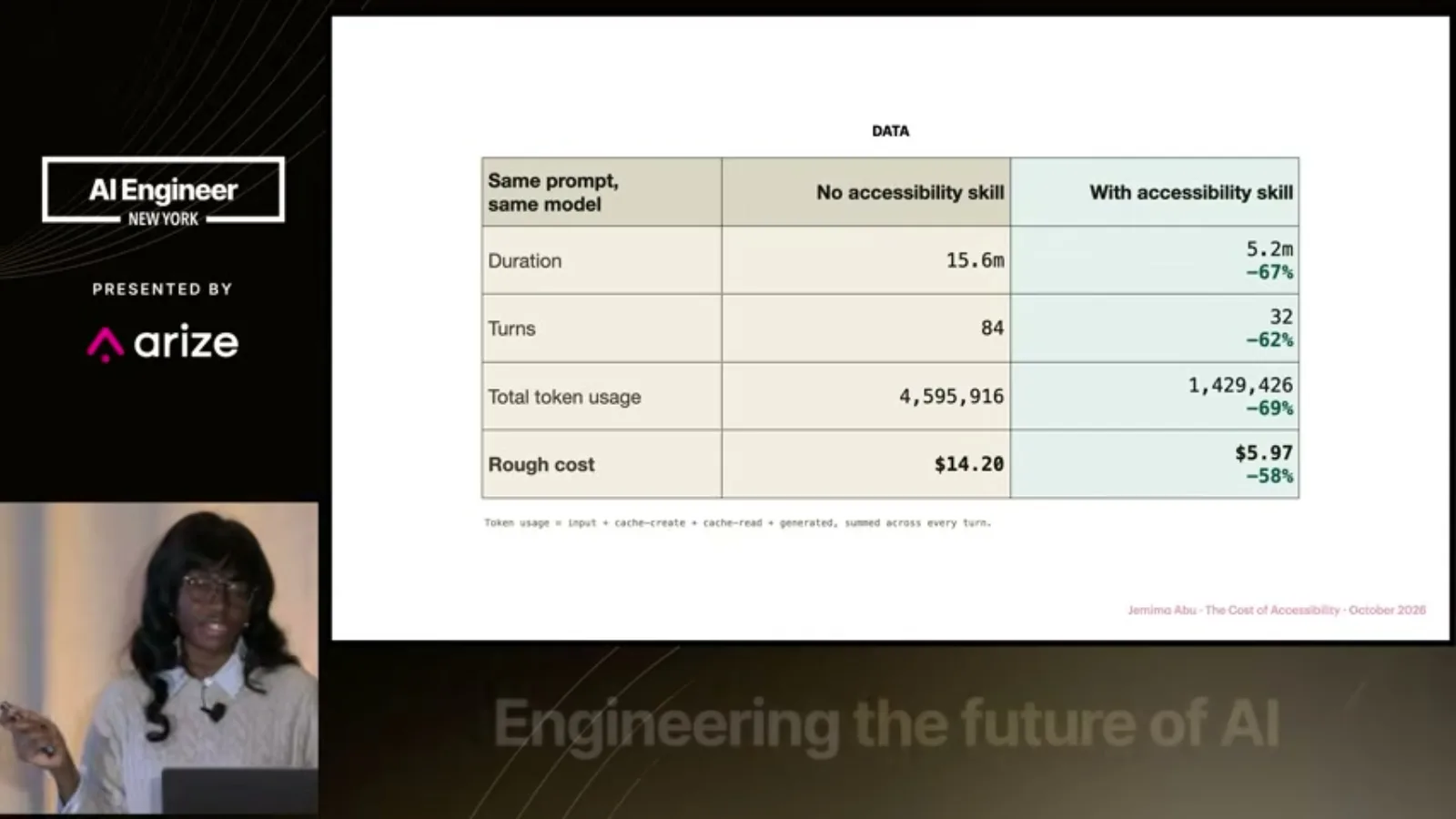
Abu immediately qualifies the comparison: it was a one-off experiment in an uncontrolled environment, not evidence that accessible code is always cheaper or faster. Her point is that specific instructions can help an agent follow the desired approach.
Abu introduces herself as a product engineer and certified accessibility professional. She compares an AI agent to a young child sent on an errand: a map, shopping list and clear boundaries help the child reach the intended destination.
How coding agents repeat inaccessible patterns
Agents need explicit guidance, Abu argues. She compares custom components with native HTML and explains why accessibility is harder to add at the end.
For a coding agent, the equivalent is clear guidance about the code and behavior expected. Without it, the agent may generate a large collection of generic elements instead of the semantic structure the developer wanted.
Abu argues that human bias can become AI bias. Developers who test only on their own devices may overlook screen-reader users or people who navigate with a keyboard, and generated code can repeat patterns found in existing code.
She says agents may also produce more custom code than necessary. An accordion-style disclosure can often use the native HTML details element instead of a custom JavaScript implementation, taking advantage of browser-provided behavior.
Her blueberry muffin analogy illustrates why accessibility should be built in from the start. Adding ARIA labels after a site is complete, she argues, is like pushing blueberries onto an already baked plain muffin.
Users, business costs and legal exposure
Inaccessible interfaces can push customers away. Abu also discusses legal risks, which depend on the applicable jurisdiction and circumstances.
Abu recounts a person switching from one bank to another because the first bank’s app was inaccessible. The customer did not necessarily prefer the second bank’s features; they needed a product they could actually use.
That creates a selection problem for teams: saying no current users rely on assistive technology may overlook people who tried the product, found a barrier and left. Abu compares it to a shop wondering why nobody enters when it has no door.
She also raises legal exposure associated with inaccessible websites and refers to the Americans with Disabilities Act. The precise obligations depend on the organization, service and applicable law; the talk’s broad formulation should not be treated as a legal determination.
A four-step agent workflow
Define requirements, audit the codebase, use reusable components and make accessibility guidance mandatory for agents.
Her first recommendation is to define accessibility requirements for the product. A web application and a mobile application may have different needs, so the developer or product manager should identify the relevant standards before prompting an agent.
Second, audit the existing codebase. Abu compares an agent entering a messy project to a new roommate who sees dirty dishes and assumes that is the household norm; existing patterns can become the examples the agent follows.
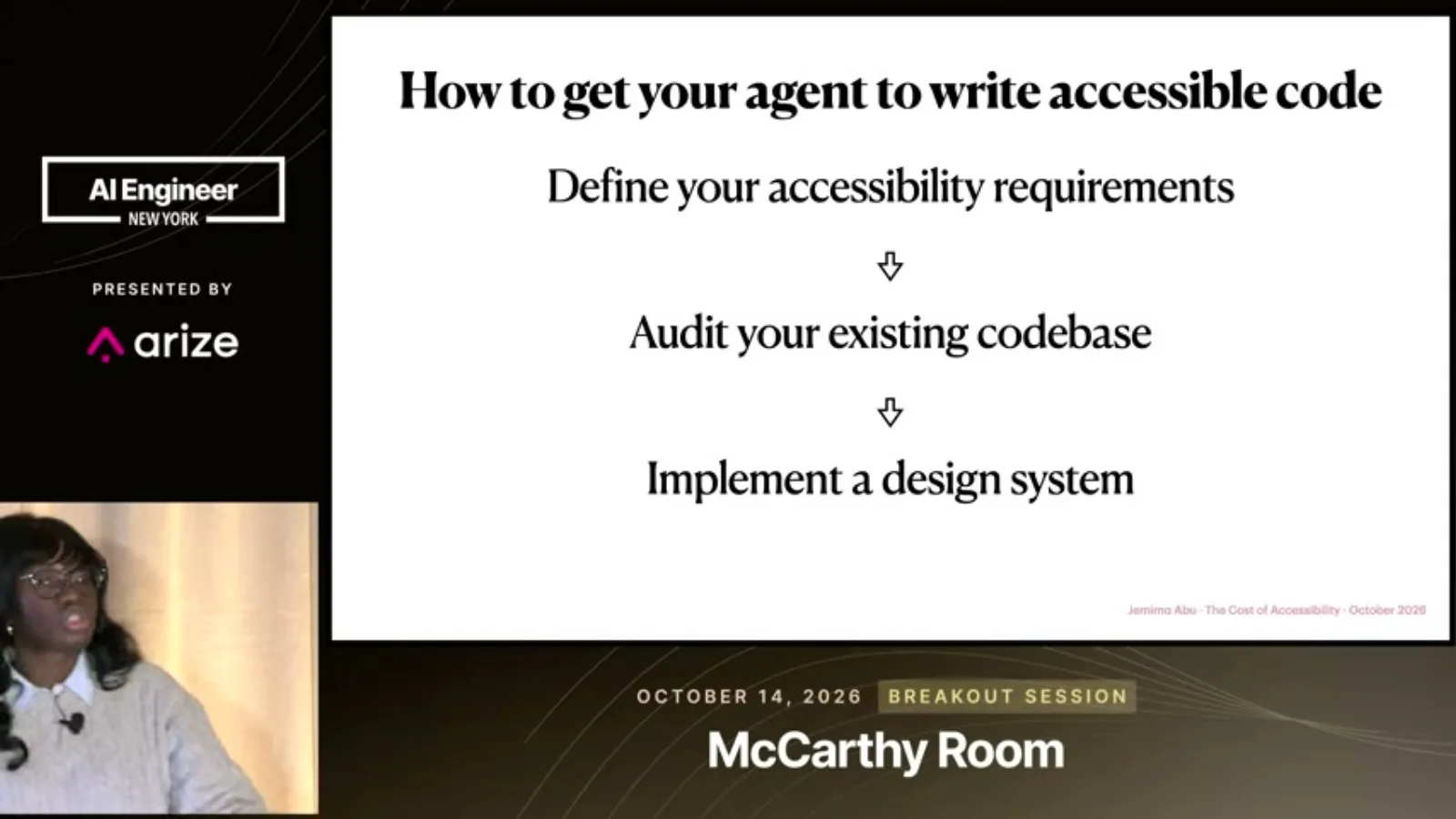
Third, use a design system or reusable component library. When an accessibility issue is fixed in a shared component, the improvement can reach many pages rather than requiring each instance to be repaired independently.
Fourth, make the requirements mandatory in the agent’s normal workflow. Deadlines make accessibility easy to forget, so the agent should repeatedly receive guidance to build for people with different ways of using the product.
A lightweight skill and questions
Abu recommends semantic HTML and keyboard operation while emphasizing that prompts alone cannot guarantee accessibility. In questions she criticizes superficial accessibility overlays.
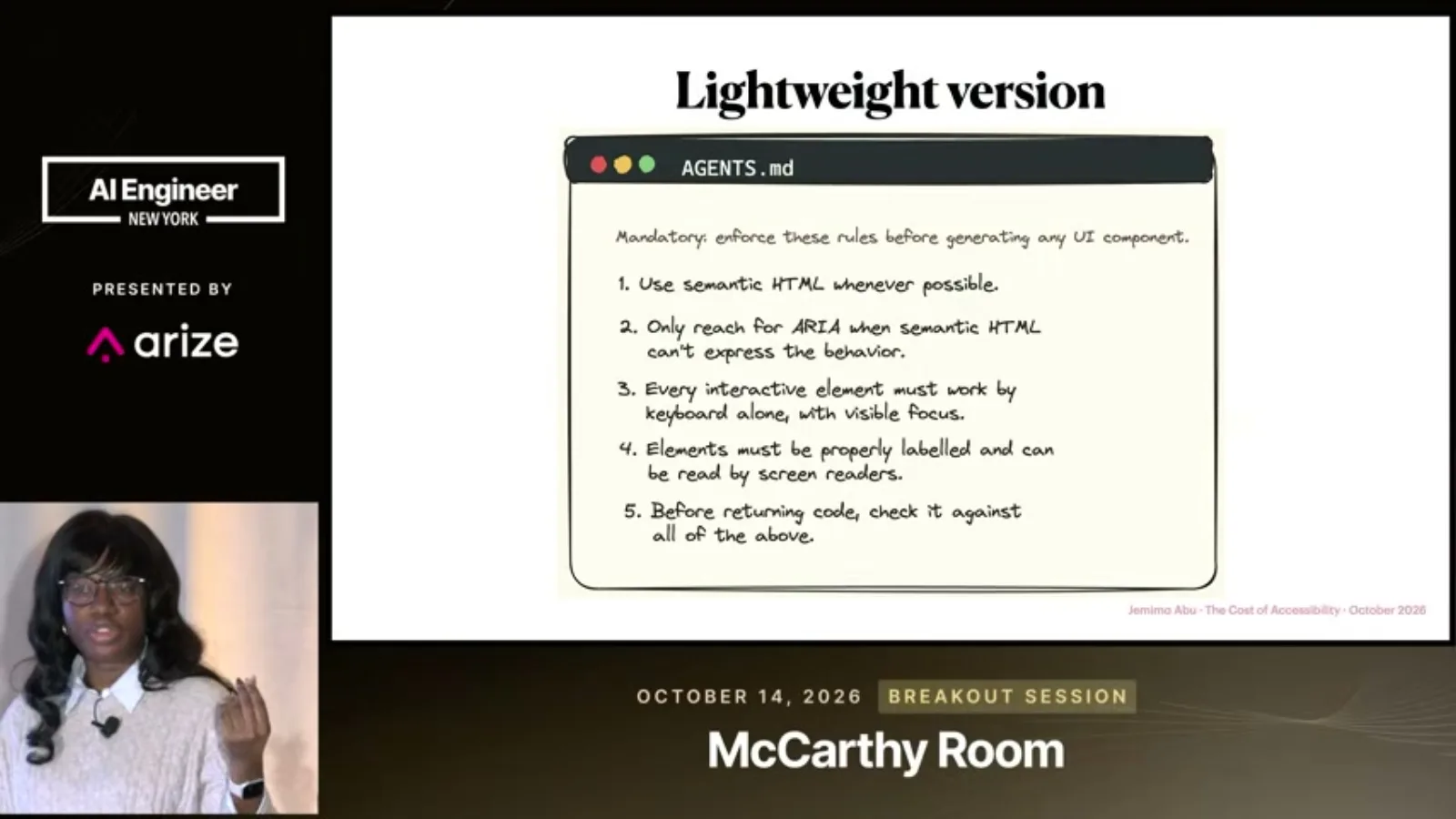
Abu shows a lightweight accessibility skill: use semantic HTML, reach for ARIA when appropriate, and ensure interactive elements work with a keyboard. She says her examples focus on the web and should be adapted to the product.
She also mentions modern web guidance that helps agents choose current browser features, such as details for disclosures. These instructions can improve the starting point, but she cautions that prompts alone do not make a product fully accessible.
During questions, Abu names two frustrations: teams ignoring basic needs, such as keyboard handlers, and teams treating an accessibility overlay as a complete solution. An overlay, she says, resembles adding blueberries after the muffin has already been baked.
Mehr aus diesem Kanal
 19:41EN
 AI Engineer· 9. Nov. 2026A high-reliability automation starts by routing the hard cases awayMatthew Jewkes · Standard CyberneticsMatthew Jewkes describes separating critical errors, ambiguous decisions and unusual exceptions in a biopharma indexing workflow.
 22:01ENAI Engineer· 9. Nov. 2026Zach Lloyd: make the software factory measurable and editableZach Lloyd · WarpWarp’s CEO proposes recording agent runs, scoring failures and testing changes to the workflow on real tasks.
 27:35ENAI Engineer· 9. Nov. 2026Uber traded an always-green trunk for faster AI-scale mergesPreetam Dwivedi, Manjari Akella · UberIts merge queue now relaxes some conflicts and validates the combined state after landing, with a verified-good fallback.
 15:25ENAI Engineer· 9. Nov. 2026Hassan and Omar El Mghari: When an AI financial forecast is right for the wrong reasonsHassan El Mghari, Omar El Mghari · Together AIA Costco membership-fee model passed basic checks and landed close to reported results, but an audit uncovered offsetting assumptions.
 21:12ENAI Engineer· 9. Nov. 2026Tom Moor: Give coding agents the product context that code cannot showTom Moor · LinearLinear’s workflow carries customer requests, past decisions, review history and human feedback from intake through implementation and review.
 15:35ENAI Engineer· 9. Nov. 2026Mislav Ivanda: Choose an execution boundary before an agent frameworkMislav Ivanda · DaytonaThe Daytona engineer compares local approvals, embedded runtimes and sandboxed machines for running agent-generated code.