In 30 Sekunden
In September 2023, Matthew Berman demonstrates Open Interpreter, an open-source terminal tool that generates and executes code on the user’s computer. Using a hosted GPT-4 API, he lists desktop files, explores and charts a spreadsheet, renames it and summarizes the first page of a PDF after several retries. His attempt to install a local Code Llama backend fails. The demonstration uses historical software commands and behavior; local code execution with a hosted model is not the same as fully local inference. The video includes a paid CapCut Online sponsorship.
- 1Local executionOpen Interpreter offers a terminal interface for language models to run code on a user’s computer; a hosted model can still process requests remotely.
- 2InstallationBerman creates a Conda environment with Python 3.11.4 and installs the package, then launches the historical GPT-4 configuration.
- 3Review before executionThe tool proposes shell commands and asks for approval. The historical -y flag skips approvals and removes an important review point.
- 4Spreadsheet and PDFThe demo reads a fashion-brand spreadsheet, graphs growth and renames the file; a first-page PDF summary succeeds after repeated errors.
- 5Local model attemptThe Code Llama installation fails on his machine, so he cannot demonstrate local inference.
Das Wichtigste
- Open Interpreter runs generated code on the user’s machine and can work with local files and system commands.
- The successful demonstration used GPT-4 through the OpenAI API, so the model itself was remote even though code ran locally.
- Approval prompts let the user review proposed code; bypassing them removes that check and local execution can change files or system settings.
- The spreadsheet and PDF examples required package installs and retries, and the PDF summary covered only the first page.
- The presenter’s 2023 Code Llama setup failed, so the video does not demonstrate a working fully local model.
Den bearbeiteten Text nach Kapiteln lesen
What Open Interpreter does
Berman compares the tool with ChatGPT Code Interpreter and describes local file and system access. He includes a paid CapCut Online sponsorship.
ChatGPT’s Code Interpreter can work with uploaded PDFs, images and data through natural language. I introduce Open Interpreter as a way to run model-generated code on your own computer and work with local files. This is a September 2023 demonstration, and the installation steps and model options may have changed.
The project describes a terminal interface that can execute Python, JavaScript, shell commands and more. Potential uses include editing files, analyzing data, controlling a browser and changing computer settings. These capabilities depend on the environment, permissions and generated code; having local execution does not make every task reliable or remove all limitations.
The video includes a paid sponsorship for CapCut Online, whose script-to-video and editing tools Berman promotes. He then returns to the Open Interpreter installation.
Installation and desktop files
He installs the package in a Conda environment and connects the 2023 GPT-4 API. He reviews and approves commands to list files.
I open a terminal with Anaconda installed and create a Conda environment named oi using Python 3.11.4. After activating it with `conda activate oi`, I install the package with `pip install open-interpreter`. In this setup the environment must be activated when launching the tool; these are the commands shown in 2023, not a guarantee of current compatibility.
I launch `interpreter` with the then-default GPT-4 option and supply an OpenAI API key. Although commands execute on my computer, GPT-4 inference uses a hosted API rather than running the model locally; prompts and relevant content may be sent to the provider. I say I will revoke the key shown during recording.
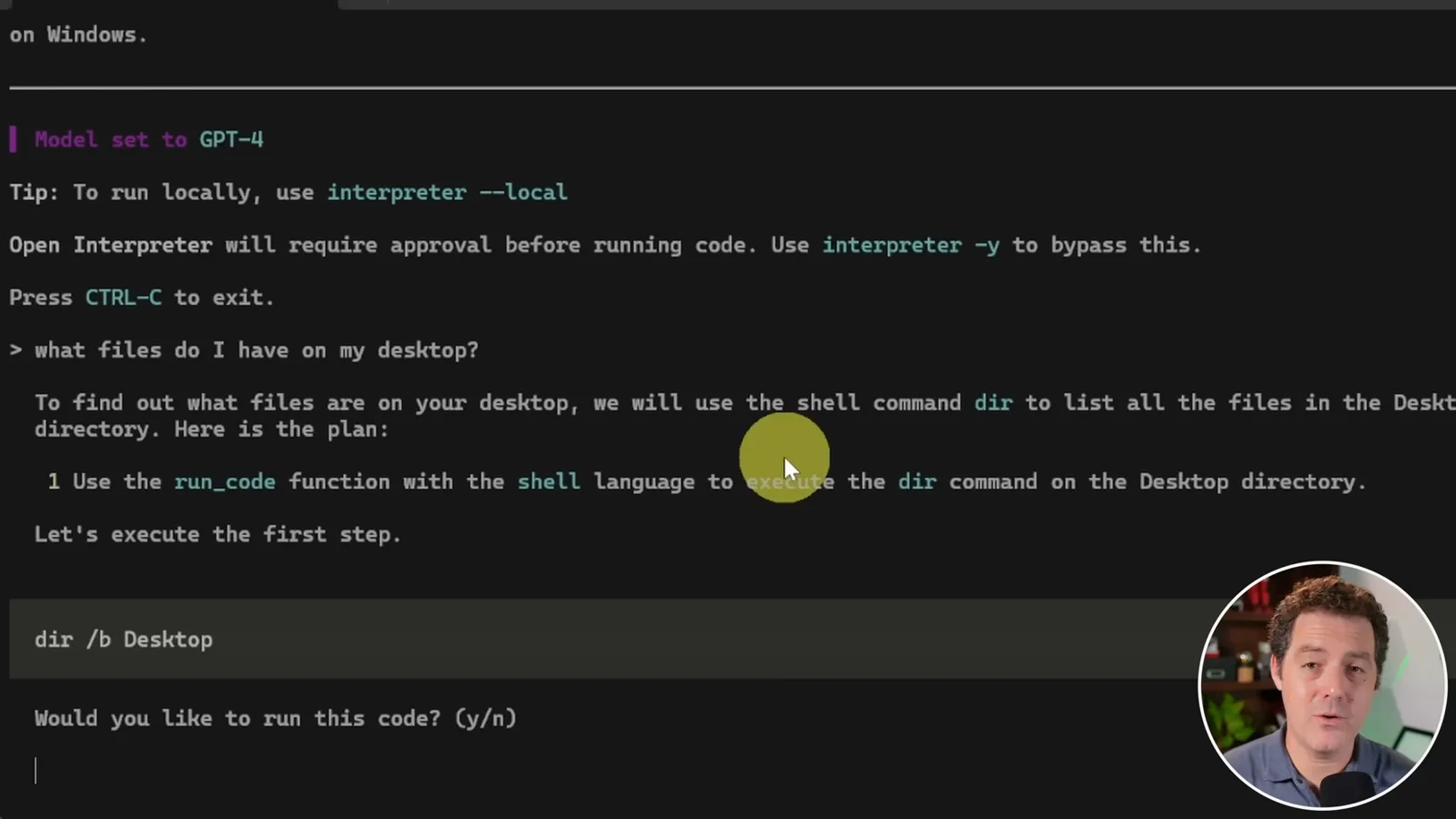
I ask what files are on my desktop. The tool proposes a Windows shell command, asks whether it should run, encounters an error and tries again successfully. The historical `interpreter -y` option skips approval prompts, but doing so removes the opportunity to inspect commands before they can modify or access local resources.
Spreadsheet and PDF examples
The tool inspects and charts spreadsheet data, renames a file and retries a PDF summary after several errors. Berman highlights the iterative code-writing process.
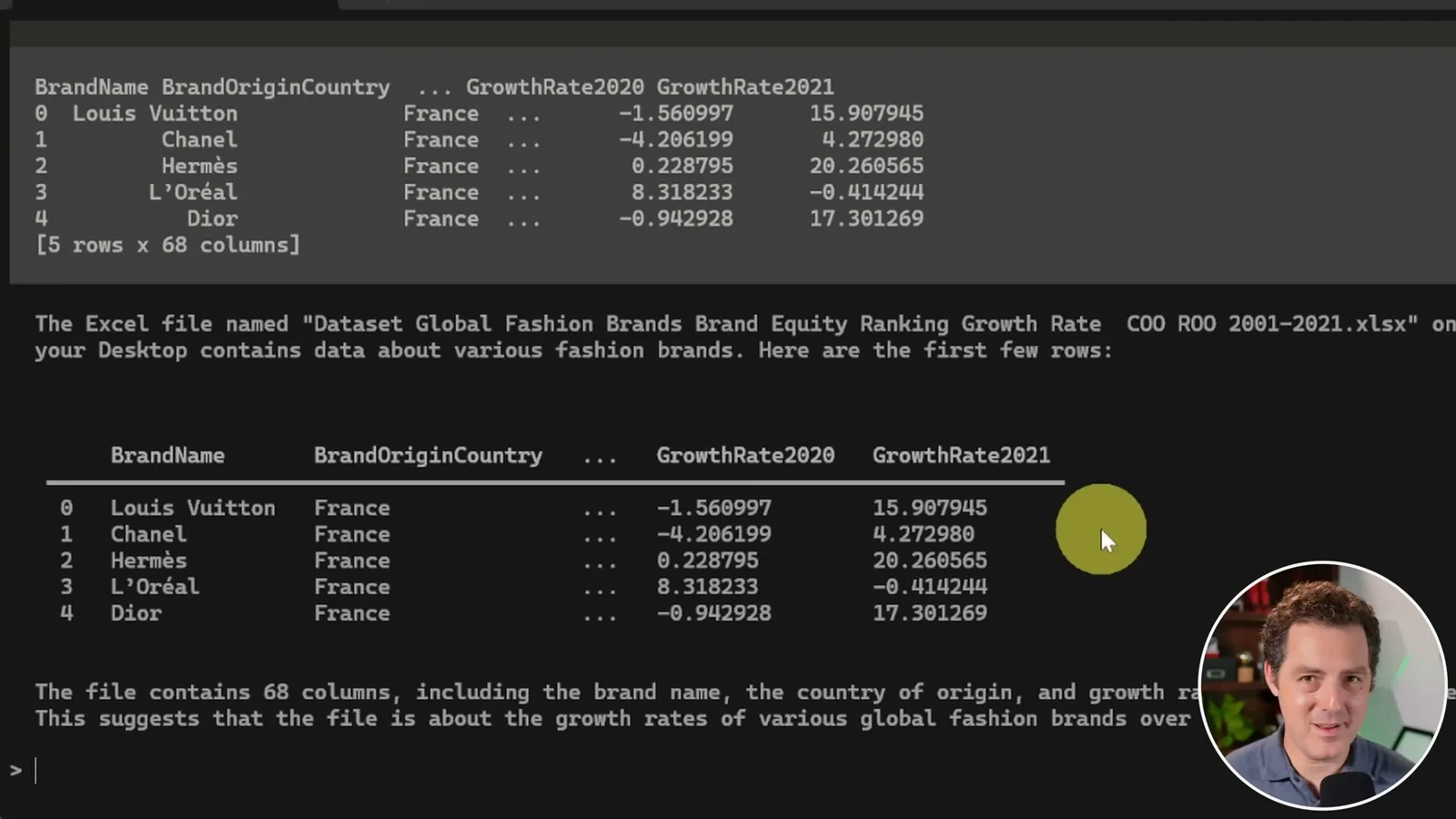
Next I ask what an Excel file on the desktop contains. The tool installs libraries, retries after an error and displays sample rows from a fashion-brand dataset. I then ask which company had the highest growth rate in the latest year in that dataset; it returns Nike, which I say matches the data.
I ask for a chart of the companies’ growth rates. The tool installs matplotlib and produces a graph, then I ask it to rename the spreadsheet to a simpler name. It encounters an error, tries a different command and succeeds; I verify the renamed file on the desktop.
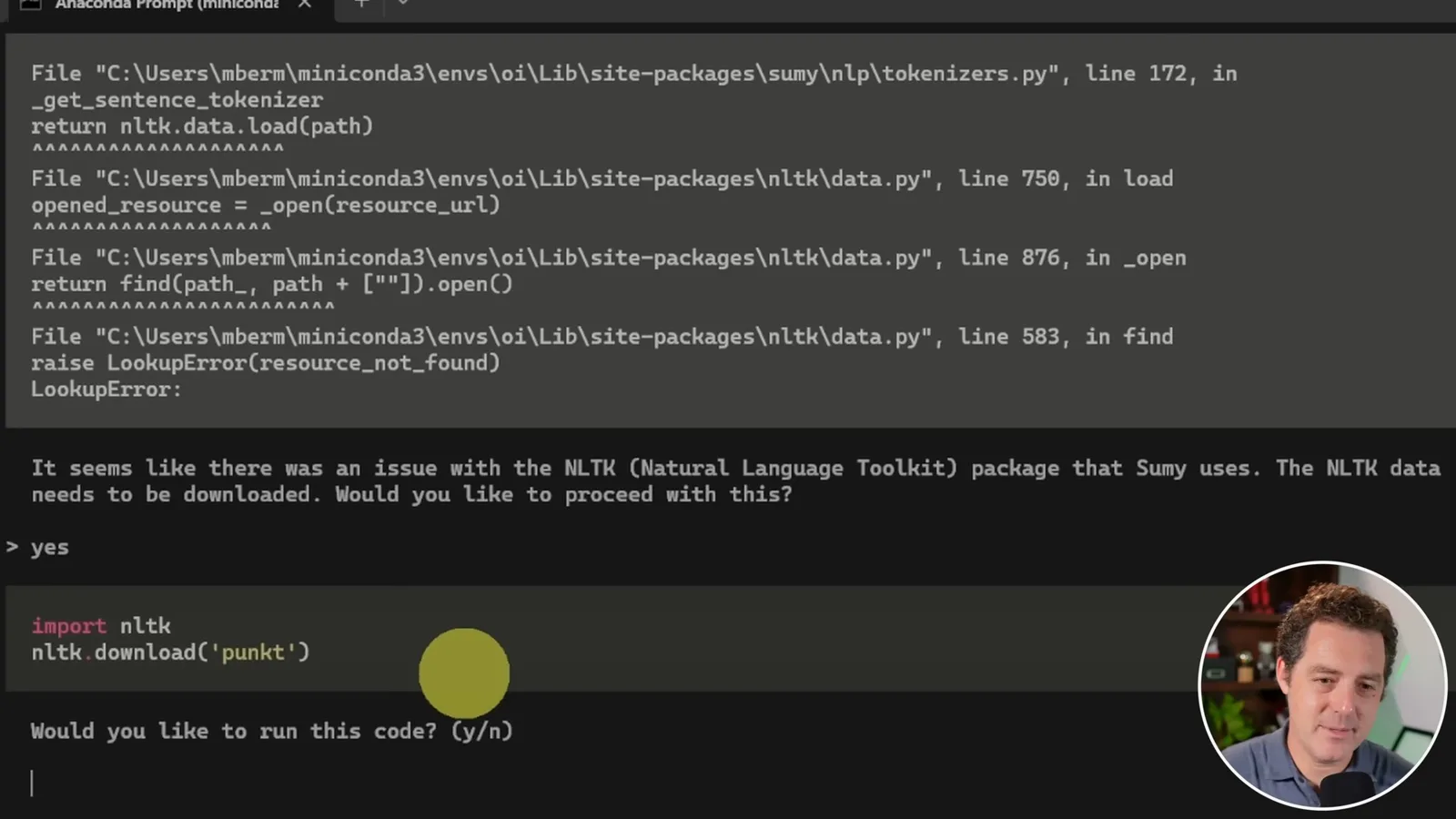
For a PDF, I request a summary of only the first page of Attention Is All You Need. The process encounters multiple problems, including a deprecated PDF reader, package issues and missing NLTK data. After trying alternatives, installing dependencies and retrying, it produces a summary. The example demonstrates an iterative recovery, not a seamless or full-document summary.
An unsuccessful local model setup
He tries the historical Code Llama option but encounters an installation failure. He closes with interest in future local model support.
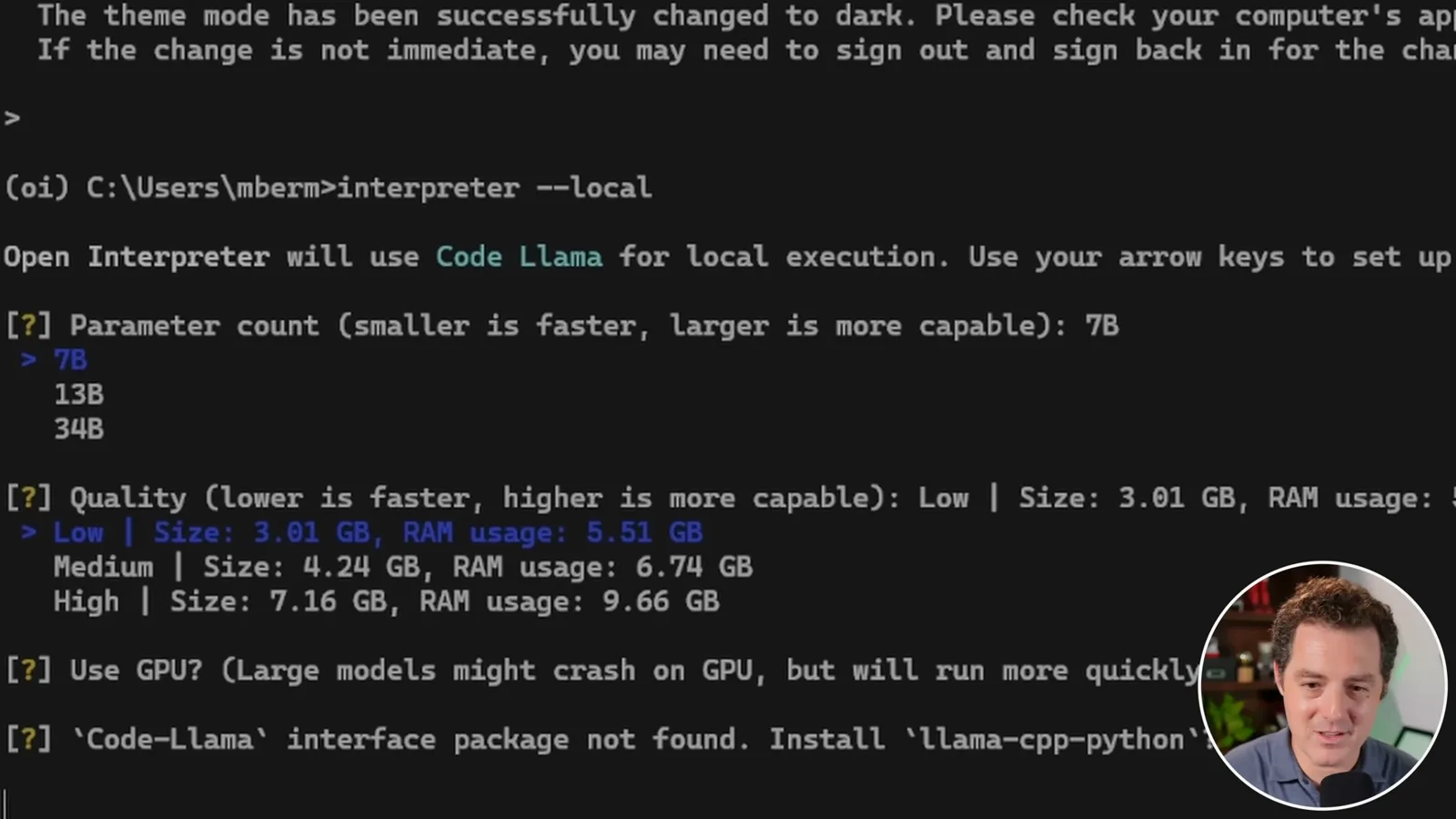
Finally, I try the then-available `interpreter --local` path for Code Llama, selecting a small model and GPU use. Installation of its interface fails on my system, so I cannot demonstrate local inference. I remain excited about the possibility of an open-source, fully local setup and invite viewers to suggest other use cases.
Mehr aus diesem Kanal
 34:21EN
 Matthew Berman· 27. Okt. 2026Matthew Berman Examines Anthropic’s IPO Filing, AI Growth and GovernanceMatthew Berman, Sam Altman · Forward FutureThe presenter reviews the S-1’s financial metrics, compute strategy and voting structure while questioning the tension between rapid AI development and safety.
 0:26ENMatthew Berman· 25. Okt. 2026Sam Altman on Human Values and Problem-Solving in an AI WorldSam Altman · OpenAIIn a short interview excerpt, Altman considers the enjoyment of solving hard problems and the human role in interpreting results.
 0:36ENMatthew Berman· 25. Okt. 2026Kimi K3.1 and a Rubik’s Cube Solver DemonstrationMatthew Berman · Forward FutureMatthew Berman shows a scrambled virtual cube being solved and gives the Kimi K3.1 test a favorable assessment.
 0:21ENMatthew Berman· 24. Okt. 2026An AI-Generated Kimi Benchmark Chart Used Invented ScoresMatthew Berman · Forward FutureMatthew Berman asks for a graph of Kimi K3.1 Pro benchmarks, then discovers that the displayed figures are illustrative placeholders.
 25:50ENMatthew Berman· 24. Okt. 2026Kimi K3.1 Pro Tested: Strong 3D Demos, Uneven Results and Competitive PricingMatthew Berman · Forward FutureMatthew Berman tests the open-weight model on coding, 3D rendering and visual explanations, then compares benchmark results and prices.
 32:20ENMatthew Berman· 23. Okt. 2026Who Is Local AI For? The Costs, Trade-offs and a Hybrid FutureMatthew Berman · Forward FutureMatthew Berman weighs data control and independence against hardware cost, setup complexity and inference speed.