In 30 Sekunden
Theo Browne breaks down the harness behind coding agents and builds a minimal example. He shows how tool descriptions and outputs shape model behavior, while distinguishing the teaching example from production systems and provider protocols.
- 1Models and toolsThe harness executes actions and manages permissions; the model requests them through an interface.
- 2A repeated loopTool results return as context before another model request continues the task.
- 3Context is acquiredAgents can search and read files, while instruction files supply selected information early.
- 4A minimal implementationA registry and loop can demonstrate the core of an agent without being a full production system.
- 5Tool output is a trust boundaryA fabricated result can mislead the model, making validation and safeguards important.
Das Wichtigste
- The harness exposes tools, handles permissions and returns results to the model.
- A coding agent builds task context by searching and reading files.
- A basic tool loop can be small, while production reliability and security require much more.
- Tool descriptions influence choices and tool results can mislead the model.
- T3 Code is a user interface over existing harnesses for the providers described.
Den bearbeiteten Text nach Kapiteln lesen
What is a harness?
Theo distinguishes an agent harness from a UI and cites a benchmark comparison. The reported scores apply to a particular test.
What is an agent harness, and why does it matter for coding? Claude Code, Codex and Cursor include harnesses that connect models to tools and manage their work. T3 Code, the app I build, is primarily a UI around existing harnesses. I will explain the loop and build a small example.
I cite a benchmark by Matt Mower where Opus scored about 77% in Claude Code and 93% in Cursor on a particular feature-implementation test. That comparison suggests the surrounding setup can matter; it does not establish a universal ranking or isolate every possible configuration difference.
The tool-calling loop
The model requests an action, the harness handles permission and execution, and the result returns to the conversation. The process can repeat.
A harness is the software environment and set of tools through which an agent works. A language model generates a response from its inputs; it does not independently run commands on your computer. The surrounding program has to provide an interface to actions such as reading files or running a shell.
For illustration I invent a bash-call tag. The model emits a request in the agreed format, the harness recognizes it, and ordinary code executes the command if allowed. Real providers often use structured tool-call fields rather than this invented text syntax.
If I ask what files are in a directory, the agent can request a listing and then describe the result. When I ask it to edit a file, the harness may ask for permission before executing the write. The permission decision and execution are responsibilities of the surrounding software.
After the tool runs, its output is added to the conversation and another model request can continue the task. The model may call another tool, such as reading one file, and the cycle repeats until it has enough information to answer. Some systems batch or parallelize calls; the example illustrates the basic pattern.
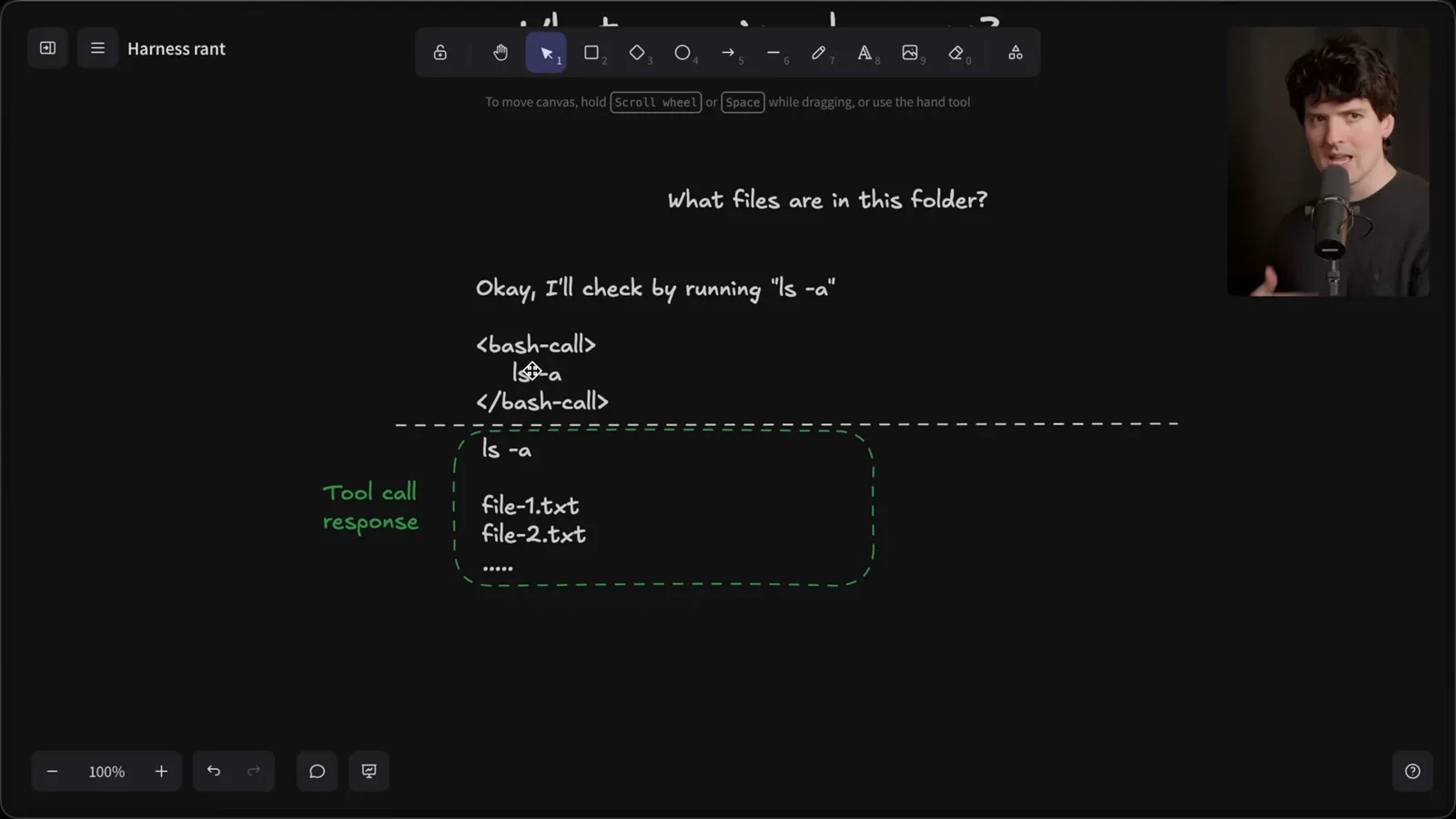
The harness decides which tools exist, how they are described, how results are passed back and what permissions apply. These choices affect the model's options and its context. The model works with information provided in the request and tools, alongside knowledge learned during training.
Building context
Agents search and read project files or receive instruction files. Theo argues for providing relevant context rather than blindly loading everything.
Opening an agent in a project does not magically give it the contents of every file. In my example it searches the directory, reads package.json and relevant application files, and uses the returned text to explain the project. Each search or read supplies evidence that was not previously available in the conversation.
A project instruction file such as CLAUDE.md can put useful context into a session early, depending on the harness's loading rules. In my demonstration an instruction file answers the question without the same exploration. These files are context, not an automatic guarantee that their information is accurate or current.
Conversation history can save repeated searches: the agent can reuse information already returned in the same thread. When I point it toward package.json explicitly, it starts with a read and makes a more focused search. That is one example, not a promise that every prompt will halve the number of calls.
Should you always tell the model to read a pile of files up front? I generally prefer letting a capable agent search for what the task needs, while giving it relevant hints when I know them. Tool calls have costs and latency too, so the right balance depends on the task and environment.
Older workflows sometimes packed an entire repository into one file for a model to read. That can be useful in constrained settings, but it can also create a large amount of irrelevant context. Targeted search lets an agent select evidence incrementally instead of assuming the whole repository must fit in one prompt.
I show a long-context retrieval chart as an illustration of context degradation. Performance can depend on model, task and where information appears; the chart does not prove that every longer context makes every model less capable. The practical lesson is to measure the workload and supply relevant information deliberately.
A small coding agent
The example implements file tools, a registry and a loop around model calls. It illustrates the core without reproducing a production system.
To make the loop concrete, I use articles from the Amp team and Mihail Eric as references for a small coding agent. A user gives a task, the model proposes one or more tool calls, the program executes them, and results go back to the model. This core loop is much smaller than a production coding product.
The simple implementation has functions to list files, read a file and edit a file. A read resolves a path and returns its content; listing returns names and types. The edit example replaces an old string with new text or writes a new file. Real systems need to handle paths, errors and permissions carefully.
A tool registry maps names to functions. The model also needs descriptions and argument information so it can request them. In this teaching example the system prompt lists the tools and asks for a specific text format with JSON arguments; the harness parses that response and dispatches the selected function.
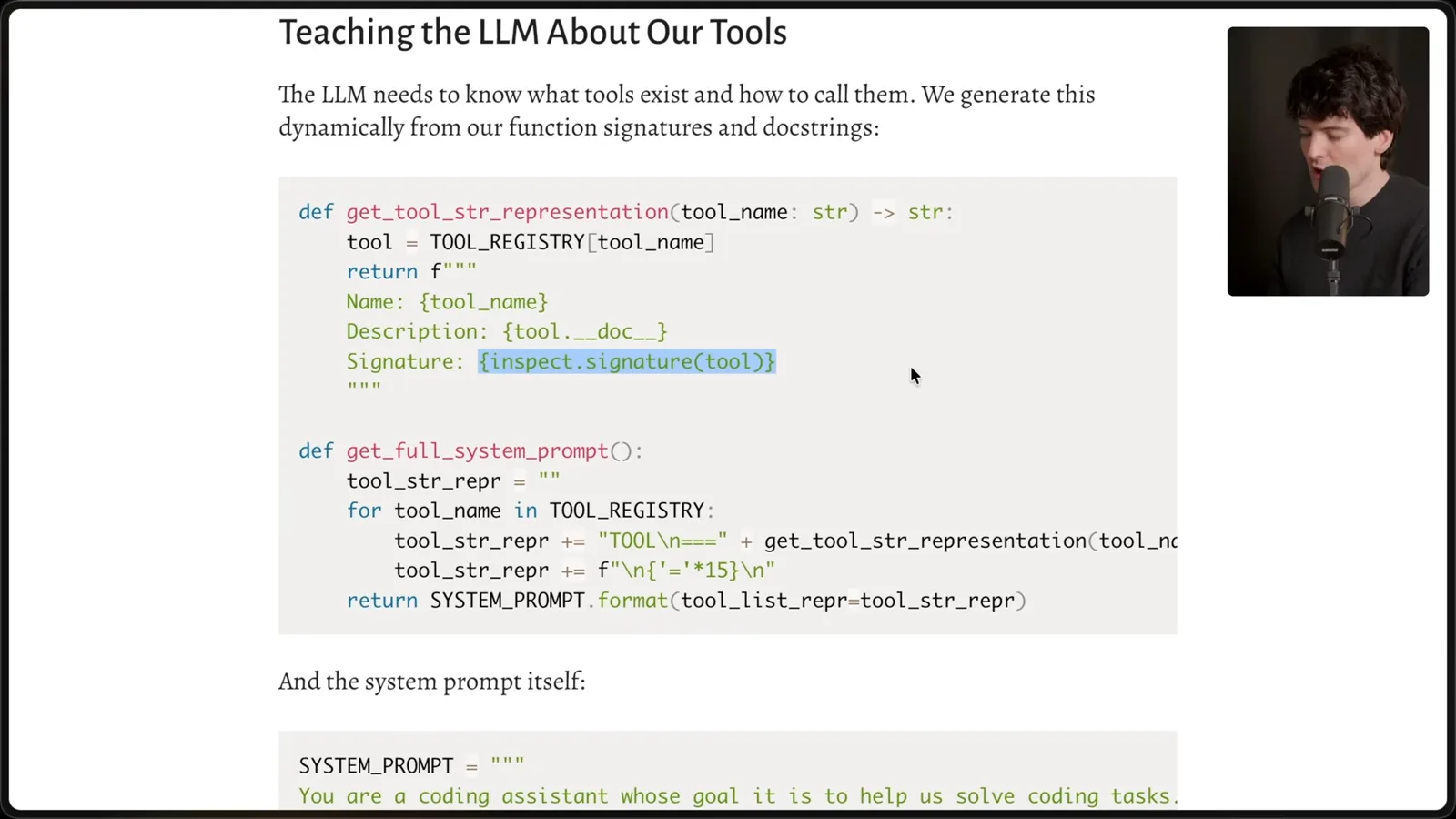
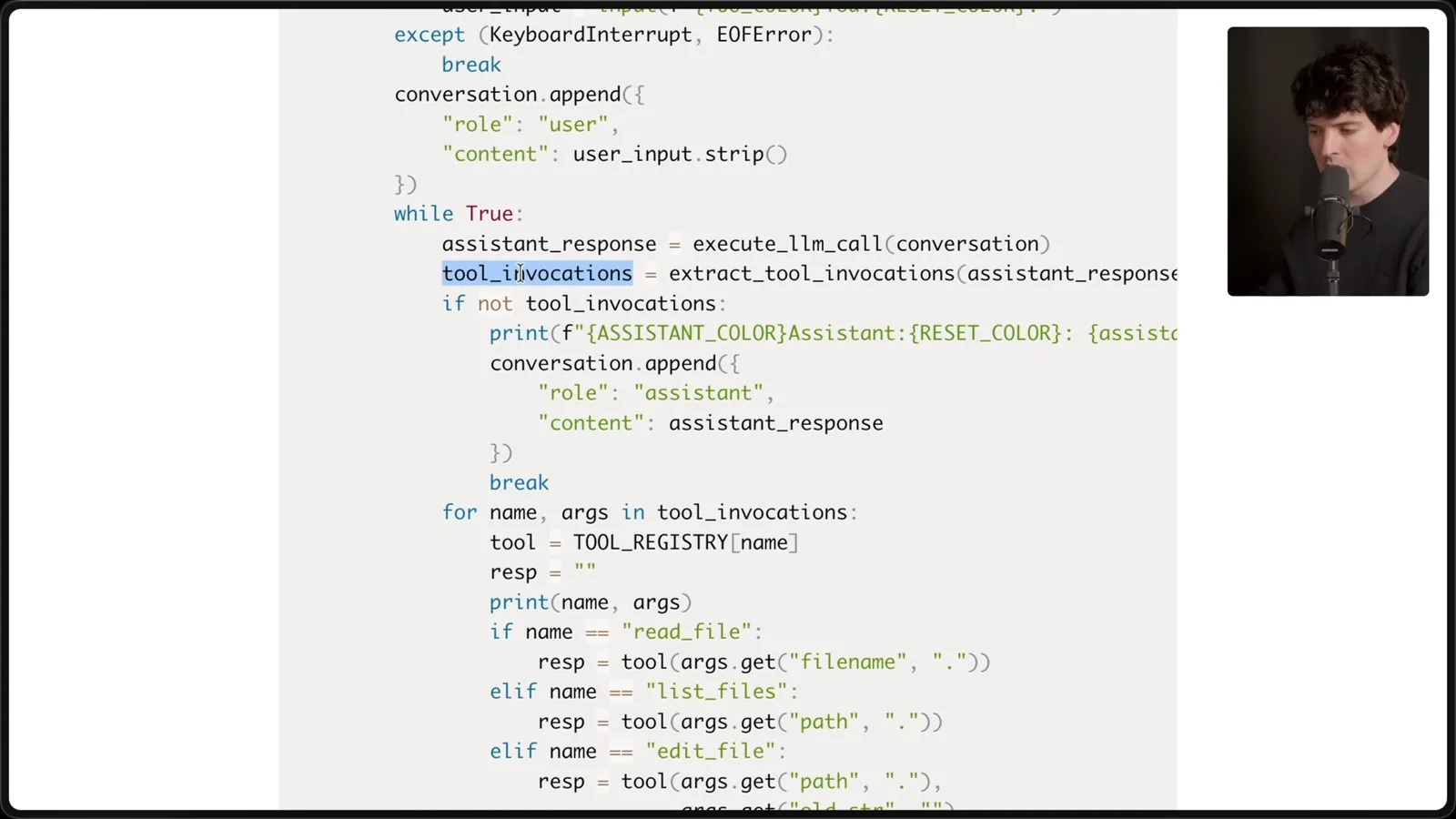
The program sends the system content and conversation to the API. After a response, it checks for tool invocations: if there are none it displays the answer; otherwise it runs the requested functions, appends their results and asks the model again. This is the loop that turns a text response into an interactive workflow.
I use another agent to build a minimal version, then run it against its own Python code. It lists and reads files to answer. The first generated version landed in an unexpected directory, a reminder that even a demonstration needs its working directory and outputs checked.
Shell tools and structured APIs
A shell can perform many actions, but requires safeguards. Provider tool APIs use structured formats beyond the toy example.
A shell tool can stand in for several specialized tools because it can run commands that list, read and modify files. That makes a compact demonstration possible, not a safe production design by itself: unrestricted shell execution gives the program broad powers, so real harnesses need appropriate permissions and safeguards.
Many model APIs expose a dedicated structured tool interface. A provider or routing service translates the tool definitions into the format expected by the model. The toy prompt-based syntax helps teach the idea, but it should not be confused with the actual protocol of every model provider.
In another turn, I ask the simple agent to simplify its own environment-loading code. It reads the relevant files and makes a change using shell commands. A model can modify the program driving it when the harness permits that, but the result still needs inspection and testing.
Why harness design matters
Descriptions and tool outputs affect observed choices. Theo demonstrates steering and misleading the model, then explains T3 Code’s UI role.
Why might the same model behave differently in another harness? Tool availability, descriptions, system instructions and returned outputs all shape its choices. In my small example, I alter a read-tool description to suggest bash; the model initially continues to use the read tool anyway.
When I mark the read tool as deprecated, a later run chooses bash instead. Changing a description can steer behavior without changing the tool's implementation, but an individual run does not establish how reliably a model will follow it. Different models may respond differently to the same wording.
I then make the read tool return a fabricated string rather than the real file. The model summarizes that string as though it were the code. This illustrates a trust boundary: tool outputs are observations supplied to the model, and incorrect or malicious output can mislead it.
I try a different model with the same deprecated-tool description and observe another choice of tools. I believe Cursor spends substantial effort testing and tuning prompts and tools for different models. The benchmark and my demonstrations support investigating harness design, but they do not establish the internal practices of every competitor.
T3 Code itself supplies the interface and delegates to the locally installed Claude Code or Codex harness when those providers are selected. It does not implement the same tool loop as the small example for those backends. Building a basic loop is accessible; making a reliable, usable product around it is a much larger task.
The point of the exercise is to make the moving parts visible: model requests, context, tool descriptions, execution and returned results. Once you understand that loop, you can ask more useful questions about why an agent chose a tool, what it knew and how its environment shaped the result.
Mehr aus diesem Kanal
 38:47EN
 Theo - t3․gg· 28. Okt. 2026Theo’s Long-Running Agent Experiments: Verification, Compute and CostTheo Browne · Ping LabsA skateboard game and two compiler projects show how repeated checks and flexible compute can sustain agent work—and how expensive those loops can become.
 36:07ENTheo - t3․gg· 27. Okt. 2026Theo on Token Costs, Coding Agents, and the Price of AI CapabilityTheo Browne · Ping LabsA viral estimate of Lauren's AI spending prompts a closer look at cache pricing, benchmarks, and the changing work of coding agents.
 30:37ENTheo - t3․gg· 26. Okt. 2026Theo’s Three Skills for Reviewing and Shipping with Coding AgentsTheo Browne · Ping LabsHow sol-loop, full-send and full-stop encode review, verification and different levels of merge authority.
 0:43ENTheo - t3․gg· 23. Okt. 2026Theo Distinguishes Security Vulnerabilities from Active AttacksTheo Browne · Ping LabsA short explanation of why disclosed software flaws and reported attacks are different kinds of security news.
 29:22ENTheo - t3․gg· 22. Okt. 2026Theo on Security Vulnerabilities, Stolen API Keys and AITheo Browne · Ping LabsA look at the gap between vulnerability disclosure and patching, and a speculative account of why stolen inference keys may be valuable.
 31:13ENTheo - t3․gg· 20. Okt. 2026Theo on Why Smarter Models Help More Than DevelopersTheo Browne · Ping LabsFrom game modifications to compiler experiments, Theo revisits his assumptions about who benefits from more capable AI.