In 30 Sekunden
Bryan Cantrill examines the difficulty of debugging production systems that continue running but perform pathologically. He recounts incidents involving a misconfigured database server, memory reclamation, disk firmware and kernel page-table isolation to show how a small cause can have effects far away in the stack. He argues for understanding a system before changing it, iterating through questions and observations, and combining static and dynamic instrumentation with visualization. A Cassandra benchmark illustrates how his state-map visualization exposed oscillating periods of work and idle time.
- 1A system can fail without crashingA service may remain operational but become unacceptably slow. The absence of a crash or explicit error makes the cause harder to locate.
- 2Small causes, large effectsA high-level mistake can multiply work down the stack, while low-level delays can expand latency at higher layers.
- 3An expensive accidental routerA database benchmark stalled when a lab router rebooted and a misconfigured database machine tried to route packets. The small configuration mistake took two weeks to diagnose.
- 4Debug, do not just tuneChanging settings based on folklore may appear to help without establishing why. Cantrill urges engineers to understand the system and collect evidence.
- 5Aggregation hides timeAggregates make large volumes manageable, but remove the time dimension and can conceal transient patterns. Some questions require disaggregated data.
- 6State maps reveal idle periodsA Cassandra benchmark averaged around 60% I/O utilization, but a timeline showed alternating saturated and idle periods. Memory pressure and routing-entry reclamation were implicated.
Das Wichtigste
- Treat pathological performance as a debugging problem rather than blindly tuning settings.
- A small defect at one layer can amplify work or latency across the system.
- Ask successive questions that narrow the possibilities before settling on a cause.
- Combine static and dynamic instrumentation so the system can answer unexpected questions.
- Aggregation reduces data volume but can hide the timing patterns needed to explain an issue.
- Visualization helps reveal patterns and generate follow-up questions; tools do not do the reasoning for you.
- Persistence and careful evidence matter more than an appearance of effortless intuition.
Den bearbeiteten Text nach Kapiteln lesen
Why pathological performance is hard
Cantrill distinguishes crashes, explicit errors and implicit failures. A system that continues to operate but suddenly becomes slow can be especially difficult to investigate.
I am almost superstitious about giving this talk. After speaking about debugging during an outage, I encountered a series of outages; after criticizing firmware, firmware bugs seemed to find me. Still, pathologically performing systems have been a recurring part of my career, and I want to discuss how we investigate them.
The easiest failures to investigate are often the ones that stop decisively. A fatal assertion tells us where the program detected a condition it could not tolerate. An uncaught exception or invalid pointer may leave a core or crash dump containing the state needed to reconstruct what happened.
It is immensely satisfying to take a rare production crash, understand it from the dump, reproduce it and fix it. Unfortunately, many failures are not fatal. A system may continue operating while failing in an important way.
An explicit error or log message gives us a place to start. The harder case is an implicit failure: the software keeps running but returns a wrong answer, leaks resources or otherwise behaves incorrectly without explaining itself. Numeric bugs can be particularly difficult to isolate.
One of the hardest cases is a system that is not obviously broken but performs terribly. It may have worked well for months or years and then suddenly become slow in production. Everyone wants an explanation, but the system gives no immediate reason for its behavior.
Early in my career we ran a benchmark on a huge Sun E10K system, with other machines feeding it. It was an impressive database benchmark until the machine periodically stopped making useful progress for several minutes, then recovered as if a cloud had lifted.
Abstraction stacks and butterflies
Software’s layered abstractions make systems powerful but can amplify small problems into large performance effects. A database benchmark illustrates a distant configuration cause.
We investigated again and again, with experts working around the clock. The case taught me how difficult it is to navigate a stack of abstractions. Since 1997 those stacks have become even deeper: software is built on software, layer after layer.
Software is unusual because it has properties of both information and machinery. When a layer works, it becomes part of the foundation for the next. The result is a remarkable edifice, but it is so deep that we can lose sight of what lies below us.
I once interviewed Arthur Whitney, who offered poetry as a metaphor for software. The conversation left me asking where software begins: is an algorithm software before it runs on a machine, and is processor microcode software? These questions remind us that the boundaries of the stack are not as simple as they seem.
When the stack performs badly, abstraction can work against us in two ways. A small mistake high in the stack can multiply into vast amounts of work below it. Conversely, a delay deep in the stack can propagate upward as an explosion of latency.
Imagine a monitoring script accidentally running every 10 milliseconds instead of every 10 seconds on every machine. A one-line error can create enormous downstream work. These are the butterflies that can produce a performance hurricane: small inputs with disproportionate effects.
Back to the benchmark: we looked deep into the database machine’s network stack and fixed several inefficient algorithms, but the stalls continued. Eventually we found a lab router with faulty firmware that periodically rebooted.
The database machine had also been misconfigured to route packets. Whenever the router disappeared, this enormously expensive database server tried to become a router, did so badly, and stopped making useful database progress. When the router returned, the benchmark resumed.
It took two weeks of work by experts across the world to find that small misconfiguration. The mismatch between a simple cause and an excruciating investigation was a sobering lesson in how far apart symptoms and causes can be.
Incidents across the stack
Memory reclamation, disk firmware and a page-table isolation change illustrate different sources of pathological behavior. The visible symptoms can be far from the initiating condition.
Another case involved the adaptive replacement cache, or ARC. The machine remained pingable, but processes stopped making progress. That suggested the operating system was still active while something inside the kernel prevented useful work.
Free memory dipped below a threshold, triggering a request to reclaim memory and a cache-reaping task. A separate ARC operation attempting to shrink became blocked behind that work. Meanwhile the ARC grew, and the gap between its target and actual size became large enough to stop other activity while the system waited for memory.
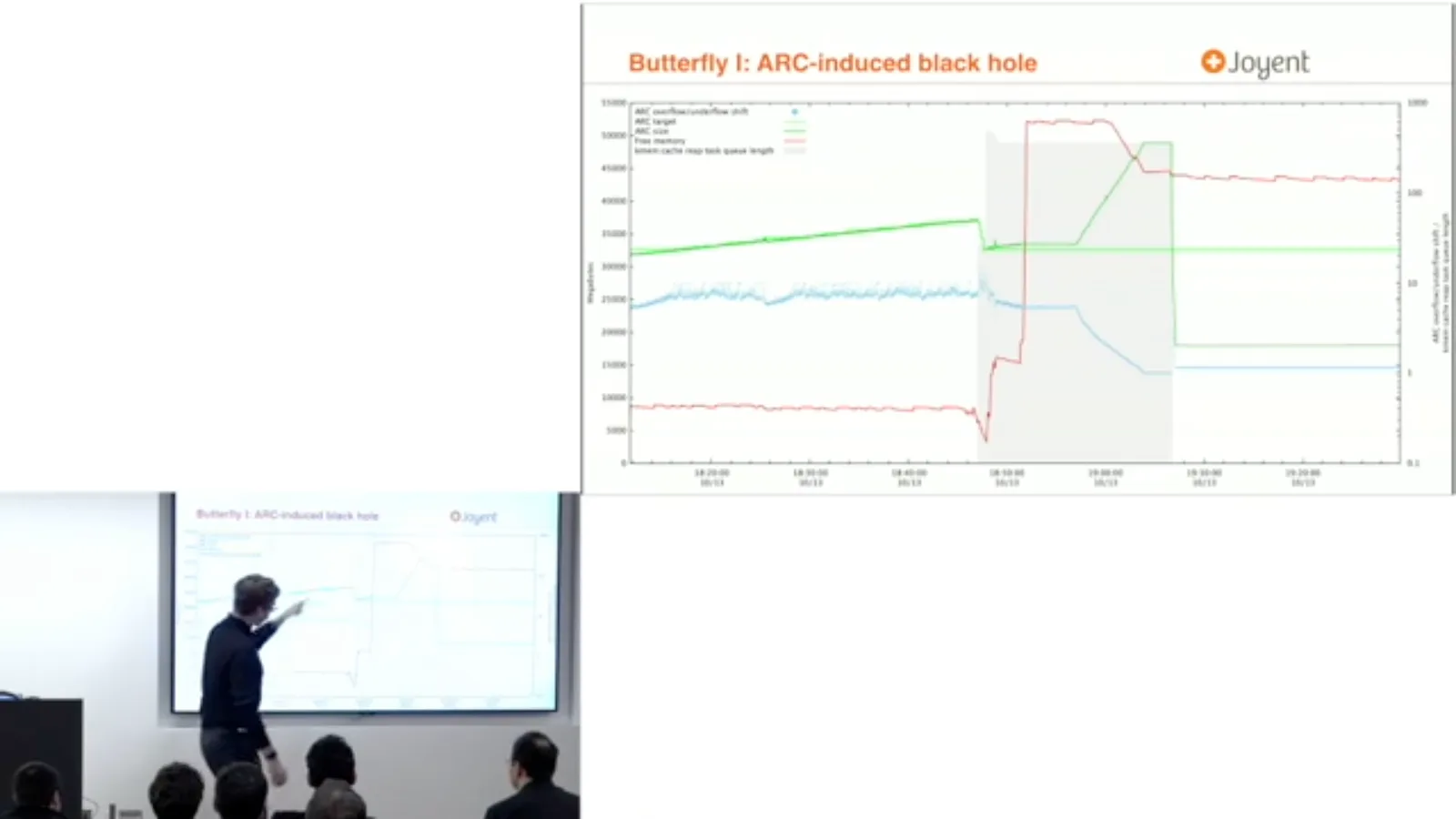
The ultimate cause was small, but finding it was painful. Another incident involved PostgreSQL on spinning disks. Autovacuum generated reads, and the whole system appeared to stall, so our initial suspicion stayed on PostgreSQL and how much work it was doing.
When we finally examined individual read latencies, they were extraordinarily slow even for spinning media. The trace showed reads remaining outstanding while writes completed. Only after a long delay—around 1,700 milliseconds—did the reads receive attention.
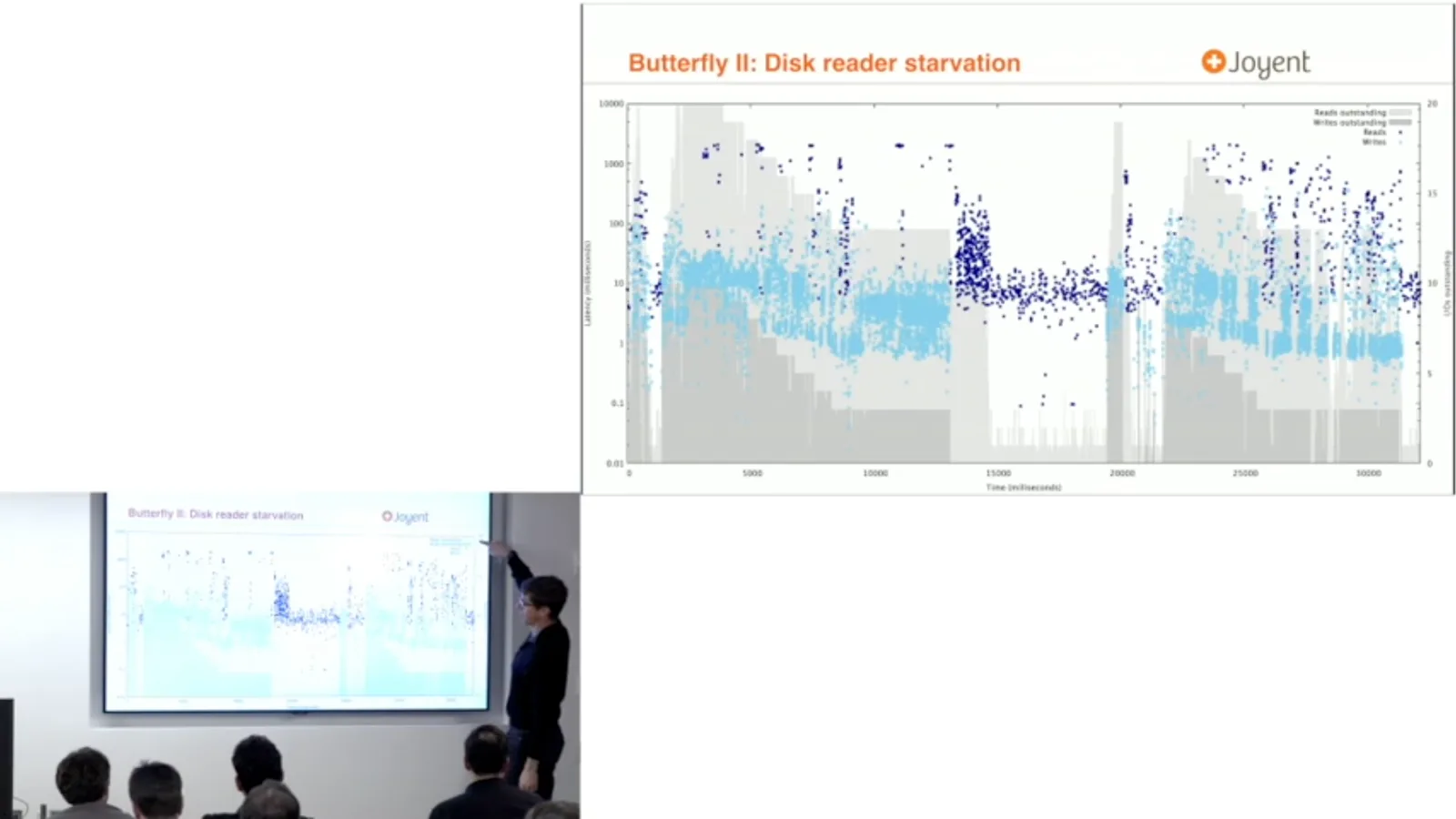
The firmware developers acknowledged the drive should not behave that way. The drive performed well under read-only or write-only benchmarks, but mixed reads and writes exposed a starvation problem. The eventual remedy was to replace the drives with another vendor’s hardware.
A different opportunity arose during the response to Meltdown and Spectre: a known change was being introduced into a system, allowing us to observe its effect. One PHP workload showed a surprisingly large increase in system time after kernel page-table isolation was enabled.
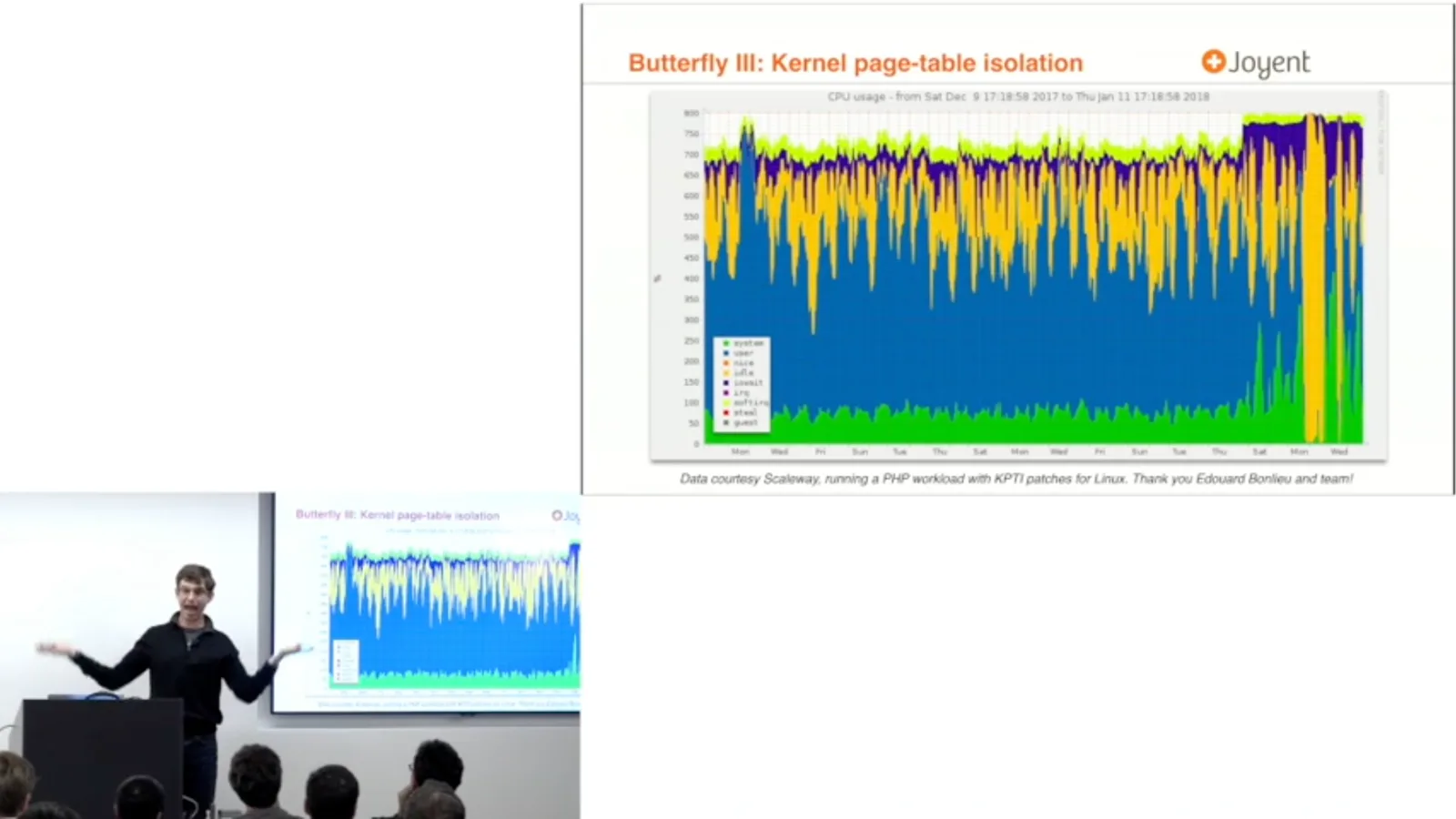
The mitigation physically separates mappings to address a speculative-execution problem, but the resulting performance effect was much larger than I expected for that workload. Without knowing the change, tracing the visible slowdown back to that cause would be extraordinarily difficult.
The debugging mindset
Multiple bottlenecks, changing load and uncertain models make performance debugging difficult. Cantrill argues against blind tuning and folklore.
The general challenge is that we see the hurricane and must find the butterflies. Symptoms can be far from causes, and there may be more than one cause. A problem can be real and worth fixing without being the only reason the system remains slow.
This is particularly familiar in scalability work. Removing one bottleneck may expose another immediately, so throughput may not improve as expected, and can even appear worse. Only after several constraints are removed might the system finally deliver its full capacity.
Production systems are dynamic. During an investigation, load can change or an operation such as autovacuum can finish, and the problem disappears. That does not mean you fixed it. Review the evidence and ask what you learned; hope that the problem will stay gone is not a debugging strategy.
Even when you identify a genuine issue, predicting how the whole system will behave after a change is difficult. It is worth trying to model the result, but changing one subsystem can alter which constraint dominates next.
This is debugging, not tuning. Tuning a guitar suggests mechanically adjusting controls until things sound better; blindly changing garbage collectors or other settings is not a substitute for understanding why a system behaves as it does.
I have seen vendors blame a garbage-collection setting they themselves recommended shortly before. Guessing at a familiar setting can fail to solve the problem and can obscure what actually changed. The goal is to understand the system first, then make a reasoned change.
Nor should a story about an old incident become a recipe for the next one. A previous explanation may itself have been wrong, and even a correct past cause does not establish the cause today. Resist folklore and use the present system’s evidence.
Questions and observability
Successive questions narrow the space of possible explanations. Static and dynamic instrumentation make it possible to observe the system and test those questions.
Debugging is not simply the act of inventing a hypothesis. Iterate between questions and answers, narrowing the space of possible explanations. A hypothesis is important, but it becomes useful after observations have eliminated enough alternatives to make it specific.
My children play twenty questions by immediately asking whether the answer is a badger. Even when a guess happens to be right, jumping to it skips the useful work. Ask broader questions, observe the system, and use the answers to decide what question comes next.
Brendan Gregg’s USE method offers a valuable starting point: for each resource, ask about utilization, saturation and errors. It is not a universal recipe that automatically identifies a faulty router or solves the whole problem. It helps frame initial questions.
Observability is essential because without it we are reduced to guessing, changing things and inferring from side effects. Some low-level systems, such as firmware, are difficult to observe directly. For software we develop ourselves, we should make observation a design requirement.
A change that appears to fix a problem does not prove the explanation. Perhaps restarting a process happened to remove the symptom. Correlation is not causation, and success can teach us nothing if we did not investigate what the system was doing before the change.
Static instrumentation places meaningful information in source code through logs, counters and similar mechanisms. It gives us a starting point when software behaves badly. Silent software makes even the first diagnostic question much harder to answer.
Static instrumentation is not enough. Dynamic instrumentation such as DTrace, and other approaches at different layers, let us gather data for questions we did not anticipate. We need both forms to ask and answer questions as an investigation develops.
Monitoring is necessary when operating systems we cannot change, such as firmware. When we also develop the software we operate, we can go further: observability expands the questions we can ask of our own systems. That technical connection is part of joining development and operations.
Aggregation and visualization
Aggregation is essential but loses temporal detail. Plots, heat maps and flame graphs can expose patterns and inspire further questions.
Instrumentation can produce enormous volumes of data, so aggregation is essential. DTrace makes aggregation a first-class operation and can aggregate per CPU before combining results. This allows invasive questions to be asked without necessarily perturbing performance through excessive data movement.
Aggregation has a cost: it discards time. Some patterns are visible only in disaggregated data. In the disk-firmware investigation, I spent too long relying on aggregate counters and therefore missed a more vivid pattern in the individual operations.
Visualization uses our ability to spot patterns, including patterns we did not know to look for. A graph often does not give the final answer; it surprises us and prompts a new series of questions. That makes plotting an essential investigative skill.
I have relied on gnuplot for years, often alongside Unix tools. Other people may prefer R or a spreadsheet; the important thing is being fluent enough to visualize the data. A tool is not a magician: DTrace can help answer questions, but it cannot do the thinking for you.
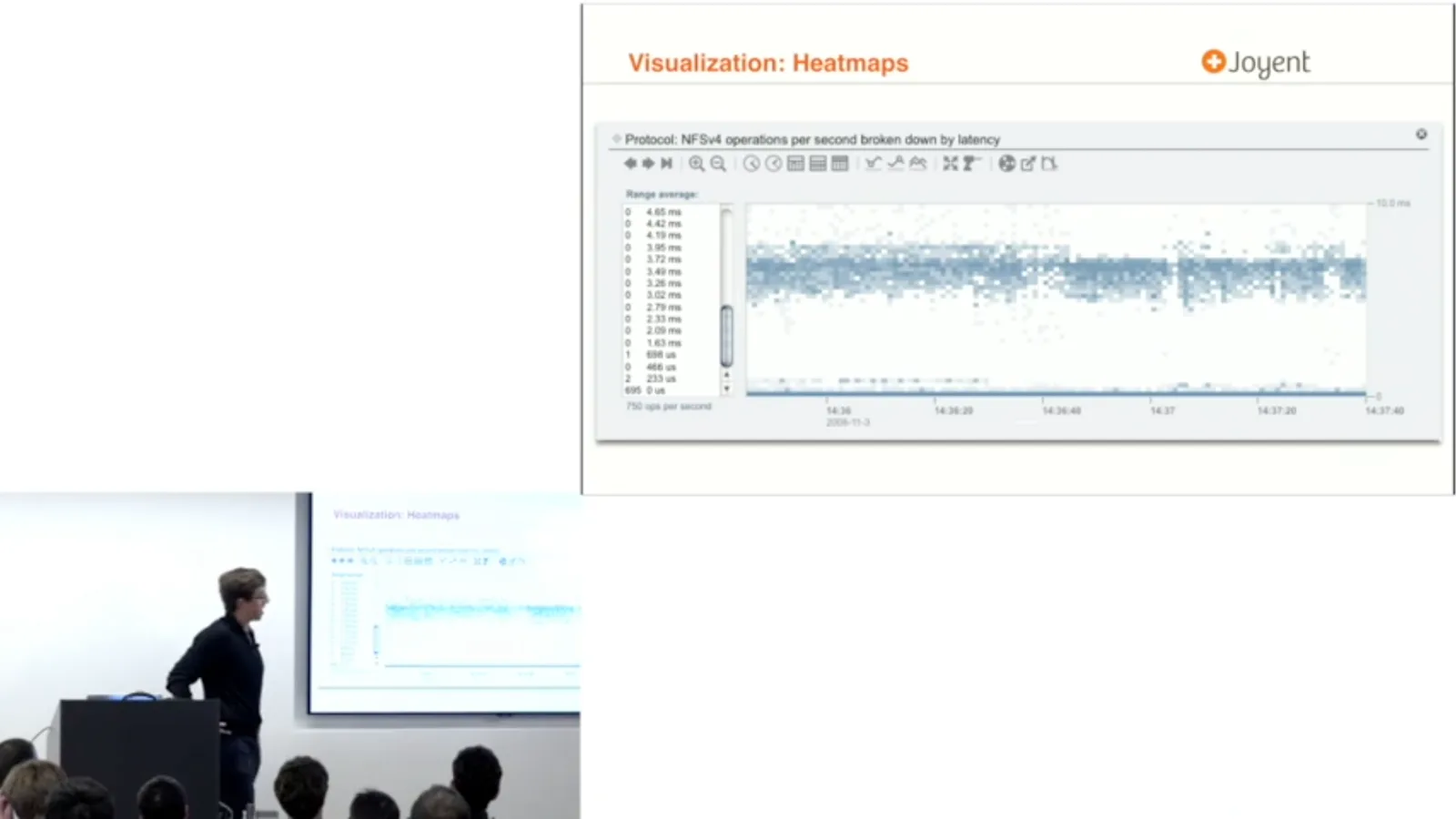
Latency heat maps are one useful technique. They plot latency over time and use color intensity to show the frequency of observations at each value. Outliers and recurring shapes become visible and suggest further questions about what the system was doing.
Flame graphs, developed by Brendan Gregg, organize aggregated stack samples to show where CPU time is spent. They are especially useful when a system is actively consuming CPU. The visualization is separate from a particular data source, allowing collected profiles to be rendered as interactive SVG.
State maps and a Cassandra benchmark
A timeline of thread and device states exposes alternating work and idle periods hidden by averages. Cantrill describes the memory-pressure behavior implicated in the benchmark.
For a Cassandra benchmark I needed another view. The workload should have driven the I/O subsystem hard, but the average showed only around 60 percent utilization. I wanted to understand what that average contained at subsecond resolution.
I built state maps: timelines that put time on the horizontal axis, give each thread a row and color its states. The approach resembles older thread-debugging views, but this workload had hundreds of threads. An SVG can make the result interactive and permit zooming.
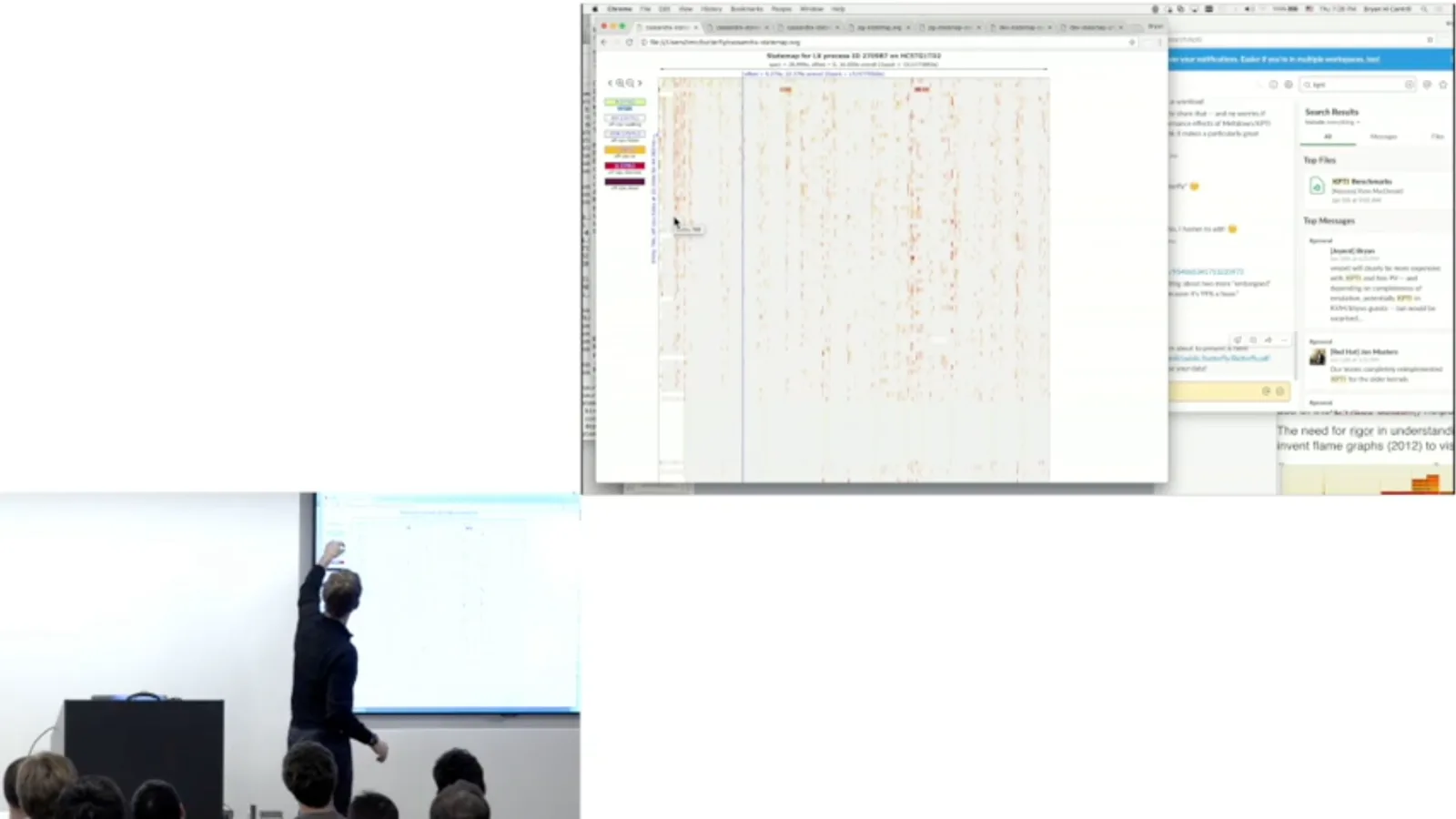
The first striking feature was how much time the threads were not doing useful work. Some were off CPU waiting on futexes or other conditions. A futex wait alone does not prove lock contention: it can also represent a thread waiting for a condition, so interpretation requires more context.
The timeline showed bands of activity followed by idle periods. Garbage collection appeared as a brief phase, but it was not the issue being investigated. The frustrating question was why the benchmark repeatedly stopped supplying work to the storage devices.
Adding more load did not eliminate the idle stretches; it made the active stretches more contended. State maps were generated from DTrace data in this example, but the renderer consumes a data payload that can be gathered by other means on other systems.
Zooming into about 200 milliseconds revealed individual state transitions. What looked like a single garbage-collection stop at a broader scale staggered across threads over time. Again, the point was not to blame garbage collection, but to use the detail to ask better questions.
The device timeline revealed that the apparent 60 percent average was not steady 60 percent utilization. It alternated between fully busy and idle. Some idle intervals lasted only around half a second, making them difficult to catch by inspecting the machine at the wrong moment.
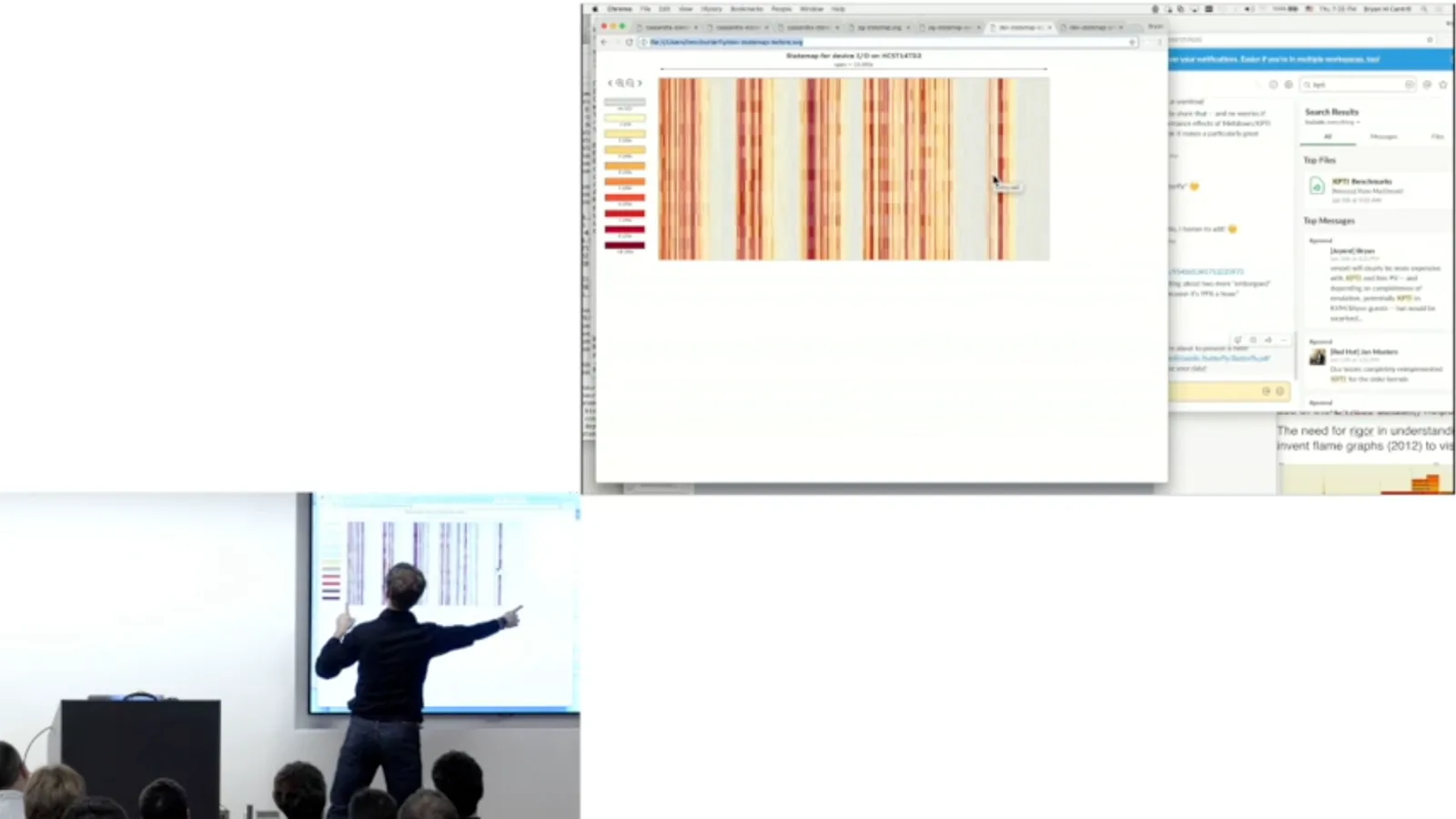
The team found that the system was slightly oversubscribed on memory. Applications could still allocate, but the kernel repeatedly asked subsystems to reclaim memory. The networking subsystem gave up routing entries, even though their memory footprint was tiny relative to the machine’s capacity.
After those entries were reclaimed, the system temporarily had to re-establish where traffic should go. Roughly half a second later it could run again, until memory reclamation repeated the cycle. The team had a way to unlock throughput, although Cantrill says they were still investigating some details.
The state map did not magically solve the case, but it substantiated the oscillation and generated valuable follow-up questions. Even after the improvement, there were more questions about why activity was not uniformly saturated.
Another state map showed PostgreSQL processes waiting on random reads from spinning disks. Zooming in made the relative times visible: a small amount of CPU work was followed by a much longer I/O wait. Cantrill shared the early tool so others could experiment with it.
Persistence over intuition
Cantrill returns to the discipline of debugging and asks engineers to convert guesses into testable questions. Finding the cause takes persistence and resilience.
When performance is pathological, approach the problem as debugging. Turn a colleague’s confident guess into a question: what can we ask the system, and what data would distinguish that explanation from the alternatives? Make observability part of the system itself.
A retrospective story can make an investigation look effortless. In reality these cases take time, involve wrong turns and demand persistence. Intuition can even mislead; grit and resilience are available to everyone willing to keep asking and measuring.
These are human-made systems. Every instruction executes because someone arranged for it to execute, so in principle we can understand what is happening. That belief can be hard to maintain during a long investigation, but it helps us persist until we find the butterfly behind the hurricane.
Mehr aus diesem Kanal
 1:34:29EN
 1:34:36EN
 15:48EN
 1:20:57EN
 1:12:58EN
 58:47EN